
BMP file format
View on Wikipedia| Windows Bitmap | |
|---|---|
| Filename extension | .bmp, .dib |
| Internet media type | image/bmp[1]image/x-bmp |
| Type code | 'BMP ''BMPf''BMPp' |
| Uniform Type Identifier (UTI) | com.microsoft.bmp |
| Developed by | Microsoft Corporation |
| Type of format | Raster graphics |
| Open format? | OSP for WMF |
The BMP file format, or bitmap, is a raster graphics image file format used to store bitmap digital images, independently of the display device (such as a graphics adapter), especially on Microsoft Windows[2] and OS/2[3] operating systems.
The BMP file format is capable of storing two-dimensional digital images in various color depths, and optionally with data compression, alpha channels, and color profiles. The Windows Metafile (WMF) specification covers the BMP file format.[4]
Device-independent bitmaps and the BMP file format
[edit]
Microsoft has defined a particular representation of color bitmaps of different color depths, as an aid to exchanging bitmaps between devices and applications with a variety of internal representations. They called these device-independent bitmaps or DIBs, and the file format for them is called DIB file format or BMP image file format.
According to Microsoft support:[5]
A device-independent bitmap (DIB) is a format used to define device-independent bitmaps in various color resolutions. The main purpose of DIBs is to allow bitmaps to be moved from one device to another (hence, the device-independent part of the name). A DIB is an external format, in contrast to a device-dependent bitmap, which appears in the system as a bitmap object (created by an application...). A DIB is normally transported in metafiles (usually using the StretchDIBits() function), BMP files, and the Clipboard (CF_DIB data format).
The following sections discuss the data stored in the BMP file or DIB in detail. This is the standard BMP file format.[5] Some applications create bitmap image files which are not compliant with the Microsoft documentation. Also, not all fields are used; a value of 0 will be found in these unused fields.
File structure
[edit]The bitmap image file consists of fixed-size structures (headers) as well as variable-sized structures appearing in a predetermined sequence. Many different versions of some of these structures can appear in the file, due to the long evolution of this file format.
Referring to the diagram 1, the bitmap file is composed of structures in the following order:
| Structure name | Optional | Size (bytes) | Purpose | Comment |
|---|---|---|---|---|
| Bitmap file header | No | 14 | General information | Not needed after the file is loaded in memory |
| DIB header | No | Fixed-size (7 different versions exist) |
Detailed information and pixel format | Immediately follows the Bitmap file header |
| Extra bit masks | Yes | 12 or 16 | Pixel format | Present only in case the DIB header is the BITMAPINFOHEADER and the Compression Method member is set to either BI_BITFIELDS or BI_ALPHABITFIELDS |
| Color table | Depends | Varies | Colors (Pixel array) | Mandatory for color depths ≤ 8 bits |
| Gap1 | Yes | Varies | Structure alignment | An artifact of the File offset to Pixel array in the Bitmap file header |
| Pixel array | No | Varies | Pixel values | The pixel format is defined by the DIB header or Extra bit masks. Each row in the Pixel array is padded to a multiple of 4 bytes in size |
| Gap2 | Yes | Varies | Structure alignment | An artifact of the ICC profile data offset field in the DIB header |
| ICC color profile | Yes | Varies | Color profile (for color management) | Can also contain a path to an external file containing the color profile. When loaded in memory as "non-packed DIB", it is located between the color table and Gap1.[6] |
DIBs in memory
[edit]A bitmap image file loaded into memory becomes a DIB data structure – an important component of the Windows GDI API. The in-memory DIB data structure is almost the same as the BMP file format, but it does not contain the 14-byte bitmap file header and begins with the DIB header. For DIBs loaded in memory, the color table can also consist of 16-bit entries that constitute indexes to the currently realized palette[7] (an additional level of indirection), instead of explicit RGB color definitions. In all cases, the pixel array must begin at a memory address that is a multiple of 4 bytes. In non-packed DIBs loaded in memory, the optional color profile data should be located immediately after the color table and before the gap1 and pixel array[6] (unlike in diag. 1).
When the size of gap1 and gap2 is zero, the in-memory DIB data structure is customarily referred to as "packed DIB" and can be referred to by a single pointer pointing to the beginning of the DIB header. In all cases, the pixel array must begin at a memory address that is a multiple of 4 bytes. In some cases it may be necessary to adjust the number of entries in the color table in order to force the memory address of the pixel array to a multiple of 4 bytes.[7] For "packed DIBs" loaded in memory, the optional color profile data should immediately follow the pixel array, as depicted in diag. 1 (with gap1=0 and gap2=0).[6]
"Packed DIBs" are required by Windows clipboard API functions as well as by some Windows patterned brush and resource functions.[8]
Bitmap file header
[edit]This block of bytes is at the start of the file and is used to identify the file. A typical application reads this block first to ensure that the file is actually a BMP file and that it is not damaged. The first 2 bytes of the BMP file format are the character "B" then the character "M" in ASCII encoding. All of the integer values are stored in little-endian format (i.e. least-significant byte first).
| Offset (bytes) | Size (bytes) | Description |
|---|---|---|
| 0 | 2 | The header field used to identify the BMP and DIB file is 0x42 0x4D in hexadecimal, same as BM in ASCII. The following entries are possible:
|
| 2 | 4 | The size of the BMP file in bytes |
| 6 | 2 | Reserved; actual value depends on the application that creates the image, if created manually can be 0 |
| 8 | 2 | Reserved; actual value depends on the application that creates the image, if created manually can be 0 |
| 10 | 4 | The offset, i.e. starting address, of the byte where the bitmap image data (pixel array) can be found. |
DIB header (bitmap information header)
[edit]This block of bytes tells the application detailed information about the image, which will be used to display the image on the screen. The block also matches the header used internally by Windows and OS/2 and has several different variants. All of them contain a dword (32-bit) field, specifying their size, so that an application can easily determine which header is used in the image. The reason that there are different headers is that Microsoft extended the DIB format several times. The new extended headers can be used with some GDI functions instead of the older ones, providing more functionality. Since the GDI supports a function for loading bitmap files, typical Windows applications use that functionality. One consequence of this is that for such applications, the BMP formats that they support match the formats supported by the Windows version being run. See the table below for more information.
| Size (bytes) | Header name | OS support | Features | Written by |
|---|---|---|---|---|
| 12 | BITMAPCOREHEADER OS21XBITMAPHEADER |
Windows 2.0 or later OS/2 1.x[3] |
||
| 64 | OS22XBITMAPHEADER | OS/2 BITMAPCOREHEADER2 | Adds halftoning. Adds RLE and Huffman 1D compression. | |
| 16 | OS22XBITMAPHEADER | This variant of the previous header contains only the first 16 bytes and the remaining bytes are assumed to be zero values.[3]
An example of such a case is the graphic pal8os2v2-16.bmp[9] of the BMP Suite.[10] |
||
| 40 | BITMAPINFOHEADER | Windows NT, 3.1x or later[2] | Extends bitmap width and height to 4 bytes. Adds 16 bpp and 32 bpp formats. Adds RLE compression. | |
| 52 | BITMAPV2INFOHEADER | Undocumented | Adds RGB bit masks. | Adobe Photoshop |
| 56 | BITMAPV3INFOHEADER | Not officially documented, but this documentation was posted on Adobe's forums, by an employee of Adobe with a statement that the standard was at one point in the past included in official MS documentation[11] | Adds alpha channel bit mask. | Adobe Photoshop |
| 108 | BITMAPV4HEADER | Windows NT 4.0, 95 or later | Adds color space type and gamma correction | |
| 124 | BITMAPV5HEADER | Windows NT 5.0, 98 or later | Adds ICC color profiles | The GIMP |
| Offset (bytes) | Size (bytes) | OS/2 1.x BITMAPCOREHEADER[3] |
|---|---|---|
| 14 | 4 | The size of this header (12 bytes) |
| 18 | 2 | The bitmap width in pixels (unsigned 16-bit) |
| 20 | 2 | The bitmap height in pixels (unsigned 16-bit) |
| 22 | 2 | The number of color planes, must be 1 |
| 24 | 2 | The number of bits per pixel |
The Windows 2.x BITMAPCOREHEADER differs from the OS/2 1.x BITMAPCOREHEADER (shown in the table above) in the one detail that the image width and height fields are signed integers, not unsigned.[12]
Versions after BITMAPINFOHEADER only add fields to the end of the header of the previous version. For example: BITMAPV2INFOHEADER adds fields to BITMAPINFOHEADER, and BITMAPV3INFOHEADER adds fields to BITMAPV2INFOHEADER.
An integrated alpha channel has been introduced with the undocumented BITMAPV3INFOHEADER and with the documented BITMAPV4HEADER (since Windows 95) and is used within Windows XP logon and theme system as well as Microsoft Office (since v2000); it is supported by some image editing software, such as Adobe Photoshop since version 7 and Adobe Flash since version MX 2004 (then known as Macromedia Flash). It is also supported by GIMP, Google Chrome, Microsoft PowerPoint and Microsoft Word.
For compatibility reasons, most applications use the older DIB headers for saving files. With OS/2 no longer supported after Windows 2000, for now the common Windows format is the BITMAPINFOHEADER header. See next table for its description. All values are stored as unsigned integers, unless explicitly noted.
| Offset (bytes) | Size (bytes) | Windows BITMAPINFOHEADER[2] |
|---|---|---|
| 14 | 4 | the size of this header, in bytes (40) |
| 18 | 4 | the bitmap width in pixels (signed integer) |
| 22 | 4 | the bitmap height in pixels (signed integer) |
| 26 | 2 | the number of color planes (must be 1) |
| 28 | 2 | the number of bits per pixel, which is the color depth of the image. Typical values are 1, 4, 8, 16, 24 and 32. |
| 30 | 4 | the compression method being used. See the next table for a list of possible values |
| 34 | 4 | the image size. This is the size of the raw bitmap data; a dummy 0 can be given for BI_RGB bitmaps. |
| 38 | 4 | the horizontal resolution of the image. (pixel per metre, signed integer) |
| 42 | 4 | the vertical resolution of the image. (pixel per metre, signed integer) |
| 46 | 4 | the number of colors in the color palette, or 0 to default to 2n |
| 50 | 4 | the number of important colors used, or 0 when every color is important; generally ignored |
The compression method (offset 30) can be:
| Value | Identified by | Compression method | Comment |
|---|---|---|---|
| 0 | BI_RGB | none | Most common |
| 1 | BI_RLE8 | RLE 8-bit/pixel | Can be used only with 8-bit/pixel bitmaps |
| 2 | BI_RLE4 | RLE 4-bit/pixel | Can be used only with 4-bit/pixel bitmaps |
| 3 | BI_BITFIELDS | OS22XBITMAPHEADER: Huffman 1D | BITMAPV2INFOHEADER: RGB bit field masks, BITMAPV3INFOHEADER+: RGBA |
| 4 | BI_JPEG | OS22XBITMAPHEADER: RLE-24 | BITMAPV4INFOHEADER+: JPEG image for printing[13] |
| 5 | BI_PNG | BITMAPV4INFOHEADER+: PNG image for printing[13] | |
| 6 | BI_ALPHABITFIELDS | RGBA bit field masks | only Windows CE 5.0 with .NET 4.0 or later |
| 11 | BI_CMYK | none | only Windows Metafile CMYK[4] |
| 12 | BI_CMYKRLE8 | RLE-8 | only Windows Metafile CMYK |
| 13 | BI_CMYKRLE4 | RLE-4 | only Windows Metafile CMYK |
An OS/2 2.x OS22XBITMAPHEADER (BITMAPINFOHEADER2 in IBM's documentation) contains 24 additional bytes:[3]
| Offset (bytes) | Size (bytes) | OS/2 OS22XBITMAPHEADER (BITMAPINFOHEADER2)[3] |
|---|---|---|
| 54 | 2 | An enumerated value specifying the units for the horizontal and vertical resolutions (offsets 38 and 42). The only defined value is 0, meaning pixels per metre |
| 56 | 2 | Padding. Ignored and should be zero |
| 58 | 2 | An enumerated value indicating the direction in which the bits fill the bitmap. The only defined value is 0, meaning the origin is the lower-left corner. Bits fill from left-to-right, then bottom-to-top.
Note that Windows bitmaps (which don't include this field) can also specify an upper-left origin (bits fill from left-to-right, then top-to-bottom) by using a negative value for the image height |
| 60 | 2 | An enumerated value indicating a halftoning algorithm that should be used when rendering the image. |
| 62 | 4 | Halftoning parameter 1 (see below) |
| 66 | 4 | Halftoning parameter 2 (see below) |
| 70 | 4 | An enumerated value indicating the color encoding for each entry in the color table. The only defined value is 0, indicating RGB. |
| 74 | 4 | An application-defined identifier. Not used for image rendering |
The halftoning algorithm (offset 60) can be:
| Value | Halftoning algorithm | Comment |
|---|---|---|
| 0 | none | Most common |
| 1 | Error diffusion | Halftoning parameter 1 (offset 64) is the percentage of error damping. 100 indicates no damping. 0 indicates that errors are not diffused |
| 2 | PANDA: Processing Algorithm for Noncoded Document Acquisition | Halftoning parameters 1 and 2 (offsets 64 and 68, respectively) represent the X and Y dimensions, in pixels, respectively, of the halftoning pattern used |
| 3 | Super-circle | Halftoning parameters 1 and 2 (offsets 64 and 68, respectively) represent the X and Y dimensions, in pixels, respectively, of the halftoning pattern used |
Color table
[edit]The color table (palette) occurs in the BMP image file directly after the BMP file header, the DIB header, and after the optional three or four bitmasks if the BITMAPINFOHEADER header with BI_BITFIELDS (12 bytes) or BI_ALPHABITFIELDS (16 bytes) option is used. Therefore, its offset is the size of the BITMAPFILEHEADER plus the size of the DIB header (plus optional 12-16 bytes for the three or four bit masks).
Note: On Windows CE the BITMAPINFOHEADER header can be used with the BI_ALPHABITFIELDS[14] option in the biCompression member.
The number of entries in the palette is either 2n (where n is the number of bits per pixel) or a smaller number specified in the header (in the OS/2 BITMAPCOREHEADER header format, only the full-size palette is supported).[3][5] In most cases, each entry in the color table occupies 4 bytes, in the order blue, green, red, 0x00 (see below for exceptions). This is indexed in the BITMAPINFOHEADER in the structure member biBitCount.
The color table is a block of bytes (a table) listing the colors used by the image. Each pixel in an indexed color image is described by a number of bits (1, 4, or 8) which is an index of a single color described by this table. The purpose of the color palette in indexed color bitmaps is to inform the application about the actual color that each of these index values corresponds to. The purpose of the color table in non-indexed (non-palettized) bitmaps is to list the colors used by the bitmap for the purposes of optimization on devices with limited color display capability and to facilitate future conversion to different pixel formats and palettization.
The colors in the color table are usually specified in the 4-byte per entry ARGB32 format. The color table used with the OS/2 BITMAPCOREHEADER uses the 3-byte per entry RGB24 format.[3][5] For DIBs loaded in memory, the color table can optionally consist of 2-byte entries – these entries constitute indexes to the currently realized palette[7] instead of explicit RGB color definitions.
Microsoft does not disallow the presence of a valid alpha channel bit mask[15] in BITMAPV4HEADER and BITMAPV5HEADER for 1bpp, 4bpp and 8bpp indexed color images, which indicates that the color table entries can also specify an alpha component using the 8.8.8.[0-8].[0-8] format via the RGBQUAD.rgbReserved[16] member. However, some versions of Microsoft's documentation disallow this feature by stating that the RGBQUAD.rgbReserved member "must be zero".
As mentioned above, the color table is normally not used when the pixels are in the 16-bit per pixel (16bpp) format (and higher); there are normally no color table entries in those bitmap image files. However, the Microsoft documentation (on the MSDN web site as of Nov. 16, 2010[17]) specifies that for 16bpp (and higher), the color table can be present to store a list of colors intended for optimization on devices with limited color display capability, while it also specifies, that in such cases, no indexed palette entries are present in this Color Table. This may seem like a contradiction if no distinction is made between the mandatory palette entries and the optional color list.
Pixel storage
[edit]The bits representing the bitmap pixels are packed in rows (also known as strides or scan lines). The size of each row is rounded up to a multiple of 4 bytes (a 32-bit DWORD) by padding.[18]
For images with height above 1, multiple padded rows are stored consecutively, forming a Pixel Array.
The total number of bytes necessary to store one row of pixels can be calculated as:

The total number of bytes necessary to store an array of pixels in an n bits per pixel (bpp) image, with 2n colors, can be calculated by accounting for the effect of rounding up the size of each row to a multiple of 4 bytes, as follows:

Pixel array (bitmap data)
[edit]The pixel array is a block of 32-bit DWORDs, that describes the image pixel by pixel. Usually pixels are stored "bottom-up", starting in the lower left corner, going from left to right, and then row by row from the bottom to the top of the image.[5] Unless BITMAPCOREHEADER is used, uncompressed Windows bitmaps also can be stored from the top to bottom, when the Image Height value is negative.
In the original OS/2 DIB, the only four legal values of color depth were 1, 4, 8, and 24 bits per pixel (bpp).[5] Contemporary DIB Headers allow pixel formats with 1, 2, 4, 8, 16, 24 and 32 bits per pixel (bpp).[19] GDI+ also permits 64 bits per pixel.[20]
Padding bytes (not necessarily 0) must be appended to the end of the rows in order to bring up the length of the rows to a multiple of four bytes. When the pixel array is loaded into memory, each row must begin at a memory address that is a multiple of 4. This address/offset restriction is mandatory only for Pixel Arrays loaded in memory. For file storage purposes, only the size of each row must be a multiple of 4 bytes while the file offset can be arbitrary.[5] A 24-bit bitmap with Width=1, would have 3 bytes of data per row (blue, green, red) and 1 byte of padding, while Width=2 would have 6 bytes of data and 2 bytes of padding, Width=3 would have 9 bytes of data and 3 bytes of padding, and Width=4 would have 12 bytes of data and no padding.
Compression
[edit]- Indexed color images may be compressed with 4-bit or 8-bit RLE or Huffman 1D algorithm.
- OS/2 BITMAPCOREHEADER2 24bpp images may be compressed with the 24-bit RLE algorithm.
- The 16bpp and 32bpp images are always stored uncompressed.
- Note that images in all color depths can be stored without compression if so desired.
Pixel format
[edit]- The 1-bit per pixel (1bpp) format supports 2 distinct colors, (for example: black and white). The pixel values are stored in each bit, with the first (left-most) pixel in the most-significant bit of the first byte.[5] Each bit is an index into a table of 2 colors. An unset bit will refer to the first color table entry, and a set bit will refer to the last (second) color table entry.
- The 2-bit per pixel (2bpp) format supports 4 distinct colors and stores 4 pixels per 1 byte, the left-most pixel being in the two most significant bits (Windows CE only:[21]). Each pixel value is a 2-bit index into a table of up to 4 colors.
- The 4-bit per pixel (4bpp) format supports 16 distinct colors and stores 2 pixels per 1 byte, the left-most pixel being in the more significant nibble.[5] Each pixel value is a 4-bit index into a table of up to 16 colors.
- The 8-bit per pixel (8bpp) format supports 256 distinct colors and stores 1 pixel per 1 byte. Each byte is an index into a table of up to 256 colors.
- The 16-bit per pixel (16bpp) format supports 65536 distinct colors and stores 1 pixel per 2-byte WORD. Each WORD can define the alpha, red, green and blue samples of the pixel.
- The 24-bit per pixel (24bpp) format supports 16,777,216 distinct colors and stores 1 pixel value per 3 bytes. Each pixel value defines the red, green and blue samples of the pixel (8.8.8.0.0 in RGBAX notation). Specifically, in the order: blue, green and red (8 bits per each sample).[5]
- The 32-bit per pixel (32bpp) format supports 4,294,967,296 distinct colors and stores 1 pixel per 4-byte DWORD. Each DWORD can define the alpha, red, green and blue samples of the pixel.
In order to resolve the ambiguity of which bits define which samples, the DIB headers provide certain defaults as well as specific BITFIELDS, which are bit masks that define the membership of particular group of bits in a pixel to a particular channel. The following diagram defines this mechanism:

The sample fields defined by the BITFIELDS bit masks have to be contiguous and non-overlapping, but the order of the sample fields is arbitrary. The most ubiquitous field order is: Alpha, Blue, Green, Red (MSB to LSB). The red, green and blue bit masks are valid only when the Compression member of the DIB header is set to BI_BITFIELDS. The alpha bit mask is valid whenever it is present in the DIB header or when the Compression member of the DIB header is set to BI_ALPHABITFIELDS[14] (Windows CE only).
![Diag. 3 – The pixel format with an alpha channel for a 16-bit pixel (in RGBAX sample Length notation) actually generated by Adobe Photoshop[22]](https://en.wikipedia.org/wiki/File:SLNotation44440.svg)

RGB video subtypes
[edit]The BITFIELD mechanism described above allows for the definition of tens of thousands of different pixel formats, however only several of them are used in practice,[22] all palettized formats RGB8, RGB4, and RGB1 (marked in yellow in the table above, defined in dshow.h.MEDIASUBTYPE names):
| R.G.B.A.X | RGB subtype | R.G.B.A.X | ARGB subtype |
|---|---|---|---|
| 8.8.8.0.8 | RGB32 | 8.8.8.8.0 | ARGB32 |
| 10.10.10.2.0 | A2R10G10B10 | ||
| 8.8.8.0.0 | RGB24 | 10.10.10.2.0 | A2B10G10R10 |
| 5.6.5.0.0 | RGB565 | 4.4.4.4.0 | ARGB4444 |
| 5.5.5.0.1 | RGB555 | 5.5.5.1.0 | ARGB1555 |
| Bit field | Offset
(hex) |
Bits A2R10G10B10 | Bits A2B10G10R10 | ||||
|---|---|---|---|---|---|---|---|
| Red | 36 | 00 00 F0 3F
|
LE: 3FF00000
|
20...29
|
FF 03 00 00
|
LE: 000003FF
|
0... 9
|
| Green | 3A | 00 FC 0F 00
|
LE: 000FFC00
|
10...19
|
00 FC 0F 00
|
LE: 000FFC00
|
10...19
|
| Blue | 3E | FF 03 00 00
|
LE: 000003FF
|
0... 9
|
00 00 F0 3F
|
LE: 3FF00000
|
20...29
|
| Alpha | 42 | 00 00 00 C0
|
LE: C0000000
|
30...31
|
00 00 00 C0
|
LE: C0000000
|
30...31
|
In version 2.1.4 FFmpeg supported (in its own terminology) the BMP pixel formats bgra, bgr24, rgb565le, rgb555le, rgb444le, rgb8, bgr8, rgb4_byte, bgr4_byte, gray, pal8, and monob; i.e., bgra was the only supported pixel format with transparency.[24]

Example 1
[edit]Following is an example of a 2×2 pixel, 24-bit bitmap (Windows DIB header BITMAPINFOHEADER) with pixel format RGB24.
| Offset
(hex) |
Size
(bytes) |
Hex value | Value | Description |
|---|---|---|---|---|
| BMP Header | ||||
| 00 | 2 | 42 4D | "BM" | ID field (42h, 4Dh) |
| 02 | 4 | 46 00 00 00 | 70 bytes (54+16) | Size of the BMP file (54 bytes header + 16 bytes data) |
| 06 | 2 | 00 00 | Unused | Application specific |
| 08 | 2 | 00 00 | Unused | Application specific |
| 0A | 4 | 36 00 00 00 | 54 bytes (14+40) | Offset where the pixel array (bitmap data) can be found |
| DIB Header | ||||
| 0E | 4 | 28 00 00 00 | 40 bytes | Number of bytes in the DIB header (from this point) |
| 12 | 4 | 02 00 00 00 | 2 pixels (left to right order) | Width of the bitmap in pixels |
| 16 | 4 | 02 00 00 00 | 2 pixels (bottom to top order) | Height of the bitmap in pixels. Positive for bottom to top pixel order. |
| 1A | 2 | 01 00 | 1 plane | Number of color planes being used |
| 1C | 2 | 18 00 | 24 bits | Number of bits per pixel |
| 1E | 4 | 00 00 00 00 | 0 | BI_RGB, no pixel array compression used |
| 22 | 4 | 10 00 00 00 | 16 bytes | Size of the raw bitmap data (including padding) |
| 26 | 4 | 13 0B 00 00 | 2835 pixels/metre horizontal | Print resolution of the image, 72 DPI × 39.3701 inches per metre yields 2834.6472 |
| 2A | 4 | 13 0B 00 00 | 2835 pixels/metre vertical | |
| 2E | 4 | 00 00 00 00 | 0 colors | Number of colors in the palette |
| 32 | 4 | 00 00 00 00 | 0 important colors | 0 means all colors are important |
| Start of pixel array (bitmap data) | ||||
| 36 | 3 | 00 00 FF | 0 0 255 | Red, Pixel (x=0, y=1) |
| 39 | 3 | FF FF FF | 255 255 255 | White, Pixel (x=1, y=1) |
| 3C | 2 | 00 00 | 0 0 | Padding for 4 byte alignment (could be a value other than zero) |
| 3E | 3 | FF 00 00 | 255 0 0 | Blue, Pixel (x=0, y=0) |
| 41 | 3 | 00 FF 00 | 0 255 0 | Green, Pixel (x=1, y=0) |
| 44 | 2 | 00 00 | 0 0 | Padding for 4 byte alignment (could be a value other than zero) |
Example 2
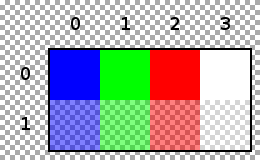
[edit]Following is an example of a 4×2 pixel, 32-bit bitmap with opacity values in the alpha channel (Windows DIB Header BITMAPV4HEADER) with pixel format ARGB32.
| Offset
(hex) |
Size
(bytes) |
Hex value | Value | Description |
|---|---|---|---|---|
| BMP Header | ||||
| 00 | 2 | 42 4D | "BM" | ID field (42h, 4Dh) |
| 02 | 4 | 9A 00 00 00 | 154 bytes (122+32) | Size of the BMP file |
| 06 | 2 | 00 00 | Unused | Application specific |
| 08 | 2 | 00 00 | Unused | Application specific |
| 0A | 4 | 7A 00 00 00 | 122 bytes (14+108) | Offset where the pixel array (bitmap data) can be found |
| DIB Header | ||||
| 0E | 4 | 6C 00 00 00 | 108 bytes | Number of bytes in the DIB header (from this point) |
| 12 | 4 | 04 00 00 00 | 4 pixels (left to right order) | Width of the bitmap in pixels |
| 16 | 4 | 02 00 00 00 | 2 pixels (bottom to top order) | Height of the bitmap in pixels |
| 1A | 2 | 01 00 | 1 plane | Number of color planes being used |
| 1C | 2 | 20 00 | 32 bits | Number of bits per pixel |
| 1E | 4 | 03 00 00 00 | 3 | BI_BITFIELDS, no pixel array compression used |
| 22 | 4 | 20 00 00 00 | 32 bytes | Size of the raw bitmap data (including padding) |
| 26 | 4 | 13 0B 00 00 | 2835 pixels/metre horizontal | Print resolution of the image, 72 DPI × 39.3701 inches per metre yields 2834.6472 |
| 2A | 4 | 13 0B 00 00 | 2835 pixels/metre vertical | |
| 2E | 4 | 00 00 00 00 | 0 colors | Number of colors in the palette |
| 32 | 4 | 00 00 00 00 | 0 important colors | 0 means all colors are important |
| 36 | 4 | 00 00 FF 00 | 00FF0000 in big-endian | Red channel bit mask (valid because BI_BITFIELDS is specified) |
| 3A | 4 | 00 FF 00 00 | 0000FF00 in big-endian | Green channel bit mask (valid because BI_BITFIELDS is specified) |
| 3E | 4 | FF 00 00 00 | 000000FF in big-endian | Blue channel bit mask (valid because BI_BITFIELDS is specified) |
| 42 | 4 | 00 00 00 FF | FF000000 in big-endian | Alpha channel bit mask |
| 46 | 4 | 20 6E 69 57 | little-endian "Win "
|
LCS_WINDOWS_COLOR_SPACE |
| 4A | 36 | 00...00 | CIEXYZTRIPLE Color Space endpoints | Unused for LCS "Win " or "sRGB"
|
| 6E | 4 | 00 00 00 00 | 0 Red Gamma | Unused for LCS "Win " or "sRGB"
|
| 72 | 4 | 00 00 00 00 | 0 Green Gamma | Unused for LCS "Win " or "sRGB"
|
| 76 | 4 | 00 00 00 00 | 0 Blue Gamma | Unused for LCS "Win " or "sRGB"
|
| Start of the Pixel Array (the bitmap Data) | ||||
| 7A | 4 | FF 00 00 7F | 255 0 0 127 | Blue (Alpha: 127), Pixel (x=0, y=1) |
| 7E | 4 | 00 FF 00 7F | 0 255 0 127 | Green (Alpha: 127), Pixel (x=1, y=1) |
| 82 | 4 | 00 00 FF 7F | 0 0 255 127 | Red (Alpha: 127), Pixel (x=2, y=1) |
| 86 | 4 | FF FF FF 7F | 255 255 255 127 | White (Alpha: 127), Pixel (x=3, y=1) |
| 8A | 4 | FF 00 00 FF | 255 0 0 255 | Blue (Alpha: 255), Pixel (x=0, y=0) |
| 8E | 4 | 00 FF 00 FF | 0 255 0 255 | Green (Alpha: 255), Pixel (x=1, y=0) |
| 92 | 4 | 00 00 FF FF | 0 0 255 255 | Red (Alpha: 255), Pixel (x=2, y=0) |
| 96 | 4 | FF FF FF FF | 255 255 255 255 | White (Alpha: 255), Pixel (x=3, y=0) |
Note that the bitmap data starts with the lower left hand corner of the image.
Usage of BMP format
[edit]The simplicity of the BMP file format, and its widespread familiarity in Windows and elsewhere, as well as the fact that this format is relatively well documented and has an open format, makes BMP a very common format that image processing programs from many operating systems can read and write. ICO and CUR files contain bitmaps starting with a BITMAPINFOHEADER.
Many older graphical user interfaces used bitmaps in their built-in graphics subsystems;[25] for example, the Microsoft Windows and OS/2 platforms' GDI subsystem, where the specific format used is the Windows and OS/2 bitmap file format, usually named with the file extension of .BMP.[26]
While most BMP files have a relatively large file size due to lack of any compression (or generally low-ratio run-length encoding on palletized images), many BMP files can be considerably compressed with lossless data compression algorithms such as ZIP because they contain redundant data. Some formats, such as RAR, even include routines specifically targeted at efficient compression of such data.
Related formats
[edit]The X Window System uses a similar XBM format for black-and-white images, and XPM (pixelmap) for color images. There are also a variety of "raw" formats, which save raw data with no other information. The Portable Pixmap (PPM) and Truevision TGA formats also exist, but are less often used – or only for special purposes; for example, TGA can contain transparency information.
References
[edit]- ^ "IANA Considerations". Windows Image Media Types. sec. 5. doi:10.17487/RFC7903. RFC 7903.
- ^ a b c James D. Murray; William vanRyper (April 1996). Encyclopedia of Graphics File Formats (Second ed.). O'Reilly. bmp. ISBN 1-56592-161-5. Retrieved 2014-03-07.
- ^ a b c d e f g h James D. Murray; William vanRyper (April 1996). Encyclopedia of Graphics File Formats (Second ed.). O'Reilly. os2bmp. ISBN 1-56592-161-5. Retrieved 2014-03-07.
- ^ a b "[MS-WMF]: Windows Metafile Format". MSDN. 2014-02-13. Retrieved 2014-03-12.
- ^ a b c d e f g h i j "DIBs and Their Uses". Microsoft Help and Support. Retrieved 2015-05-14.
- ^ a b c MSDN Bitmap Header Types
- ^ a b c MSDN BITMAPINFO Structure
- ^ Feng Yuan - Windows graphics programming: Win32 GDI and DirectDraw: Packed Device-Independent Bitmap (CreateDIBPatternBrush, CreateDIBPatternBrushPt, FindResource, LoadResource, LockResource)
- ^ Summers, Jason (2015-10-30). "pal8os2v2-16.bmp". Retrieved 2016-07-06.
- ^ Summers, Jason (2015-10-30). "BMP Suite". Retrieved 2016-07-06.
- ^ Cox, Chris (2010-11-15). "Invalid BMP Format with Alpha channel". Photoshop Windows forum. Adobe. Archived from the original on 2015-01-27. Retrieved 2016-05-22.
- ^ "Microsoft Windows Bitmap: Summary from the Encyclopedia of Graphics File Formats".
- ^ a b "JPEG and PNG Extensions for Specific Bitmap Functions and Structures".
- ^ a b MSDN - BITMAPINFOHEADER (Windows CE 5.0): BI_ALPHABITFIELDS in biCompression member
- ^ MSDN – BITMAPV4HEADER: The member bV4AlphaMask
- ^ MSDN – RGBQUAD: rgbReserved member
- ^ see note under biClrUsed MSDN BITMAPINFOHEADER
- ^ "Image Stride - Win32 apps". learn.microsoft.com.
- ^ MSDN - BITMAPINFOHEADER: The member biBitCount
- ^ "Types of Bitmaps". MSDN. 2012-06-03. Retrieved 2014-03-16.
- ^ MSDN: Windows CE - BITMAPINFOHEADER Structure
- ^ a b Adobe Photoshop: BMP Format Archived 2011-09-22 at the Wayback Machine
- ^ a b "Uncompressed RGB Video Subtypes". dshow.h. MSDN. Retrieved 2014-03-11.
- ^ "Image Formats". FFmpeg General Documentation. 2014. Retrieved 2014-02-23.
- ^ Julian Smart; Stefan Csomor & Kevin Hock (2006). Cross-Platform GUI Programming with Wxwidgets. Prentice Hall. ISBN 0-13-147381-6.
- ^ "Bitmap Image File (BMP), Version 5". Digital Preservation. Library of Congress. 2014-01-08. Retrieved 2014-03-11.
External links
[edit]- Bitmap File Structure, at digicamsoft.com
- An introduction to DIBs (Device Independent Bitmaps), at herdsoft.com
- A simple bitmap loader C++ class, at kalytta.com (A2R10G10B10 not yet[update] supported)
- The BMP File Format, Part 1 By David Charlap at Dr. Dobb's journal of software tools (drdobbs.com), March 1995
| Raster |
|
|---|---|
| Raw | |
| Vector | |
| Compound | |
| Metadata |
|


![[9]](/BMP_file_format#cite_note-pal8os2v2-16.bmp-9)
BMP file format
View on GrokipediaIntroduction and History
Development and Evolution
The BMP file format was originally developed by Microsoft for Windows 2.0 in 1987. In collaboration with IBM, early versions were adapted for the OS/2 Presentation Manager, with the format formally introduced in OS/2 1.1 in late 1988 to enable device-independent raster graphics in the graphical user interface.[6] The early version, known as the Windows 2.0 bitmap format (equivalent to OS/2 BMP 1.0), featured a simple 12-byte header supporting basic color depths of 1, 4, 8, and 24 bits per pixel.[7] IBM's adoption and joint development with Microsoft established BMP as a foundational element for OS/2's multimedia capabilities, though it drew heavily from Microsoft's Windows bitmap handling.[6] Microsoft later adapted and enhanced the format for its own ecosystem, incorporating it into Windows 3.0, released on May 22, 1990, where it became the standard for bitmap storage in the Windows graphical environment.[8] A significant evolution occurred with Windows 3.1 in 1992, which introduced the BITMAPINFOHEADER structure—a 40-byte header that improved support for resolution, compression, and color palettes compared to prior variants.[9] Further advancements came in 1995 with Windows 95, adding the BITMAPV4HEADER to include color space information and gamma correction for better cross-device consistency; Windows NT 4.0 in 1996 also supported this header.[10] By 1998–2000, Windows 98 and Windows 2000 introduced the BITMAPV5HEADER, extending the format with support for ICC color profiles and alpha channels to address advanced imaging needs like transparency and precise color management.[1] OS/2 continued to influence BMP's trajectory with its own iterations; OS/2 2.0 in 1992 adopted a 64-byte header variant (OS/2 BMP 2.0), adding fields for compression and resolution while maintaining compatibility with earlier Windows formats.[6] Key milestones include Microsoft's public documentation of the format in the 1992 Windows 3.1 SDK, which solidified its structure for developers.[11] Although BMP has no formal ISO standardization, it achieved de facto status as the native bitmap format for Windows through extensive inclusion in Microsoft SDKs and operating system APIs, ensuring widespread adoption despite the rise of more efficient alternatives.[1]Purpose and Key Characteristics
The BMP file format is a raster graphics image format designed to store bitmap digital images independently of the display device or hardware, enabling consistent rendering across different systems through its use of a Device-Independent Bitmap (DIB) structure.[12][13] This device independence is achieved via a color table that maps pixel values to specific RGB color values, ensuring portability in applications like icons, screen captures, and image exchange within Microsoft Windows and OS/2 environments.[13][12] Key characteristics of BMP include support for bit depths from 1 bit per pixel (monochrome) to 32 bits per pixel (full color with alpha in extended variants), accommodating a range of image complexities from simple black-and-white to high-fidelity color representations.[13][12] The format primarily uses uncompressed storage but also supports Run-Length Encoding (RLE) compression for 4-bit and 8-bit images to reduce file size while maintaining lossless quality; higher bit depths like 16-bit and 32-bit remain uncompressed.[13][12] Pixel data is stored in row-major order—scanning from left to right and typically bottom to top—with each row padded with zero bytes to align to 4-byte boundaries for efficient memory access.[3] The BMP format's advantages lie in its inherent simplicity, which facilitates easy implementation and parsing, along with no associated licensing fees and native support within the Windows operating system.[12] It integrates seamlessly with the Windows Graphics Device Interface (GDI), serving as a core mechanism for bitmap rendering, manipulation, and output to both screens and printers via functions such asGetDIBits and SetDIBitsToDevice.[13]
Despite these strengths, BMP files often suffer from large sizes due to their predominantly uncompressed nature, making them inefficient for storage or transmission compared to more advanced formats.[12] Additionally, the standard format lacks built-in support for transparency (alpha channels are limited to certain extensions) or animation, restricting its utility in modern web or multimedia applications.[12]
Core File Structure
BMP File Header
The BMP file header, also known as the BITMAPFILEHEADER structure, is a fixed 14-byte prefix that begins every BMP file, serving to identify the file format, specify its total size, and indicate the location of the pixel data array.[14] This header ensures compatibility with Windows graphics device interface (GDI) functions for loading and displaying bitmaps.[3] The header's fields are defined in little-endian byte order, consistent with the overall BMP format, where multi-byte values have their least significant byte stored first.[3] The structure consists of the following components, with offsets relative to the start of the file:| Offset (bytes) | Size (bytes) | Field Name | Type | Description |
|---|---|---|---|---|
| 0-1 | 2 | bfType | WORD | A magic number identifying the file as a BMP; must be 0x4D42 (ASCII "BM", hexadecimal 42 4D). This field distinguishes BMP files from other formats and is required for proper recognition by applications.[14] |
| 2-5 | 4 | bfSize | DWORD | The total size of the BMP file in bytes, including the header, any subsequent information headers, color table, and pixel data. This value is calculated as the sum of the BMP file header size (14 bytes), the device-independent bitmap (DIB) header size, the color table size (if present), and the pixel data size. For example, in a standard uncompressed 24-bit BMP with no color table, the file size would be 14 + 40 (for the typical DIB header) + pixel array size.[14][3] |
| 6-7 | 2 | bfReserved1 | WORD | A reserved field that must be set to 0; it has no defined purpose in the current specification and is ignored by readers.[14] |
| 8-9 | 2 | bfReserved2 | WORD | Another reserved field that must be set to 0, similarly unused and reserved for potential future extensions.[14] |
| 10-13 | 4 | bfOffBits | DWORD | The offset in bytes from the beginning of the file to the start of the pixel data array. In standard BMP files using the 40-byte BITMAPINFOHEADER, this value is typically 54 (14 + 40), assuming no color table; however, it varies if a color table is present or in cases of embedded DIBs within other formats, where the offset adjusts based on preceding structures.[14][3] |
DIB Header Variants
The Device-Independent Bitmap (DIB) header in a BMP file immediately follows the BMP file header and contains essential metadata about the image, such as its dimensions and format. The first field, biSize (or equivalent), specifies the header's size in bytes, allowing applications to identify the variant and parse subsequent fields accordingly. All variants include core fields like width, height, planes (always 1 for planar bitmaps), and bit count, but later versions add support for compression, resolution, and advanced color management.[10] The earliest variant, introduced with OS/2 1.0, is the BITMAPCOREHEADER, which is 12 bytes long. It uses bcSize to denote its size, followed by bcWidth and bcHeight (both WORD values representing pixels), bcPlanes (set to 1), and bcBitCount (indicating bits per pixel, limited to 1, 4, 8, or 24). Since width and height are unsigned WORD integers, they are always positive, implying a bottom-up orientation where the pixel array origin is at the lower-left corner. This variant lacks fields for compression or resolution.[15] The BITMAPINFOHEADER, introduced in Windows 3.0 and 40 bytes in size, extends the core structure for greater flexibility. It retains biSize, biWidth, and biHeight (now LONG integers for signed values), biPlanes (1), and biBitCount, but adds biCompression (specifying formats like BI_RGB for uncompressed), biSizeImage (optional size of the pixel array), biXPelsPerMeter and biYPelsPerMeter (horizontal and vertical resolution in pixels per meter, used to approximate DPI), biClrUsed (number of color table entries), and biClrImportant (count of significant colors). The signed biHeight enables top-down bitmaps (negative value, origin at upper-left, rows stored from top to bottom without inversion) alongside the standard bottom-up (positive value); RLE-compressed formats (BI_RLE4 and BI_RLE8) require positive heights, while top-down bitmaps support only BI_RGB or BI_BITFIELDS. This header determines the offset to pixel data via the BMP file header's bfOffBits field.[16] Subsequent variants build on BITMAPINFOHEADER. The BITMAPV4HEADER, 108 bytes and introduced with Windows 95, includes all prior fields plus bit masks for RGB components (bV4RedMask, bV4GreenMask, bV4BlueMask, bV4AlphaMask) to support bitfield compression, color space type (bV4CSType, e.g., for calibrated RGB), CIE XYZ endpoints (bV4Endpoints), and gamma values (bV4GammaRed, bV4GammaGreen, bV4GammaBlue in 16.16 fixed-point format). It maintains the signed height interpretation and resolution fields.[17] The most advanced variant, BITMAPV5HEADER (124 bytes, introduced in Windows 98), further extends BITMAPV4HEADER with profile-related fields like bV5Intent (rendering intent, e.g., for images or graphics), bV5ProfileData (offset to embedded ICC profile), and bV5ProfileSize (profile size in bytes), alongside a reserved field. It supports the same height signing and resolution metrics as previous versions, enabling precise color management in modern applications. Earlier headers like BITMAPCOREHEADER and BITMAPV4HEADER are retained for backward compatibility but are largely superseded.[4]| Variant | Size (bytes) | Key Introduction | Core Fields Shared | Unique Additions |
|---|---|---|---|---|
| BITMAPCOREHEADER | 12 | OS/2 1.0 | bcSize, bcWidth, bcHeight (unsigned WORD), bcPlanes (1), bcBitCount | None |
| BITMAPINFOHEADER | 40 | Windows 3.0 | biSize, biWidth, biHeight (signed LONG), biPlanes (1), biBitCount | biCompression, biXPelsPerMeter, biYPelsPerMeter |
| BITMAPV4HEADER | 108 | Windows 95 | As BITMAPINFOHEADER | RGB/alpha masks, color space, gamma |
| BITMAPV5HEADER | 124 | Windows 98 | As BITMAPV4HEADER | ICC profile offset/size, rendering intent |
Color Table Organization
In the BMP file format, the color table, also known as the palette, is an array of RGBQUAD structures that defines the mapping of pixel indices to specific RGB color values, essential for indexed color modes.[3] It is required for paletted images with bit depths of 1, 4, or 8 bits per pixel (bpp), where pixel values serve as indices into the table to determine the actual color.[16] For true-color modes such as 16-bit, 24-bit, or 32-bpp, the color table is optional and typically absent unless used for performance optimization or to specify bitfield masks in certain compressed formats.[10] Each entry in the color table is a 4-byte RGBQUAD structure consisting of one byte each for blue, green, red, and a reserved byte, which is usually set to 0 in standard implementations.[18] In BMP variants using the BITMAPV4HEADER or BITMAPV5HEADER (V4 and later), the reserved byte may support alpha channel information in specific contexts, though alpha is more commonly handled via separate bitmasks in bitfield modes rather than per-entry in paletted tables.[17] The table's size is determined by the biClrUsed field in the DIB header: if biClrUsed is 0, it defaults to 2 raised to the power of biBitCount entries (e.g., 2 for 1-bpp, 16 for 4-bpp, 256 for 8-bpp); otherwise, it contains exactly biClrUsed entries.[16] For 16-bpp and 32-bpp modes with BI_BITFIELDS compression, the color table position instead holds an optional 3-entry structure of DWORD bitmasks defining the red, green, and blue component positions within each pixel, with size set to 3 via biClrUsed if present.[19] The color table immediately follows the DIB header in the file structure, with its total size calculated as biClrUsed multiplied by 4 bytes per entry (or the default maximum if biClrUsed is 0), ensuring proper alignment before the pixel data array.[3] This organization allows efficient storage for limited color depths while providing flexibility for higher depths through optional masks. Palette types include exact palettes, which store precise RGB values for direct mapping, and halftone palettes, which are system-optimized sets of colors (such as the 216-color Windows halftone palette) designed to improve rendering quality during scaling or dithering operations by approximating a wider range of colors.[20] In indexed modes, pixel indices directly reference these table entries to resolve the final RGB values during display.[16]Pixel Data Handling
Pixel Array Layout
The pixel array in a BMP file stores the raw image data and begins at the byte offset indicated by thebfOffBits field in the BITMAPFILEHEADER structure, immediately following the file header, DIB header, and color table (if present).[3] This offset ensures that the pixel data starts on a properly aligned boundary after any preceding structures.[3]
By default, BMP files use a bottom-up layout, where the pixel rows (scanlines) are stored sequentially starting from the bottom of the image and proceeding to the top.[3] Each scanline represents one row of pixels from left to right, and the rows follow one another without inter-row padding.[3] To maintain efficient memory alignment and processing, every scanline is padded at the end with zero bytes so that its total length is a multiple of 4 bytes (DWORD alignment).[3] The size of each padded scanline, in bytes, is calculated using the formula:
biWidth is the bitmap width in pixels and biBitCount is the bits per pixel, as defined in the DIB header.[3] This padding applies regardless of the bit depth and ensures compatibility with graphics hardware and software routines.[3]
The orientation of the pixel array is determined by the biHeight field in the DIB header. A positive value specifies a bottom-up bitmap, with the origin at the lower-left corner and rows stored from bottom to top using the absolute height.[16] A negative value indicates a top-down bitmap, where the origin is at the upper-left corner and rows are stored from top to bottom, with the height taken as the absolute value of biHeight.[21] The biHeight field must be non-zero, as a value of zero renders the bitmap invalid by defining no image height.[16] Top-down bitmaps are typically uncompressed and support only RGB or bitfields compression types.) For compressed bitmaps, the pixel array layout may differ, as detailed in the compression techniques section.
Compression Techniques
The BMP file format supports a limited set of compression techniques primarily designed to reduce storage requirements for pixel data in low-color-depth images, while maintaining compatibility with device-independent bitmaps (DIBs).[22] These methods are specified in the biCompression field of the bitmap information header and are applied directly to the pixel array following the header and color table.[3] The most basic compression type is BI_RGB (value 0), which represents uncompressed raw pixel data stored sequentially without any encoding.[22] This method preserves the exact pixel values as defined by the bit depth, making it suitable for high-fidelity representations but resulting in larger file sizes compared to encoded alternatives.[5] For 8-bit paletted images, BI_RLE8 (value 1) employs run-length encoding (RLE) to compress sequences of identical pixels.[22] In encoded mode, it uses two-byte pairs where the first byte indicates the run length (1-255 pixels) and the second byte specifies the color index from the palette; absolute mode allows encoding of varying pixels with a leading zero byte followed by the count and subsequent color indexes, padded to even byte boundaries for alignment.[22] Escape sequences handle structural elements: 00 00 signals the end of a line, 00 01 denotes the end of the bitmap, and 00 02 introduces a delta offset with two following bytes for horizontal (dx) and vertical (dy) movement, enabling efficient skips over uniform areas.[22] BI_RLE4 (value 2) applies a similar RLE scheme to 4-bit paletted images, packing two pixels per byte in the color data.[22] Encoded mode consists of a first byte for the run length and a second byte containing two 4-bit color indexes (high nibble first, low nibble second); absolute mode uses a zero byte followed by the count and packed color indexes, aligned to word boundaries.[22] It shares the same escape codes as BI_RLE8 for line ends, bitmap ends, and deltas.[22] BI_BITFIELDS (value 3) is used for 16-bit and 32-bit images to explicitly define RGB component positions via three preceding DWORD bit masks (for red, green, and blue), rather than assuming default shifts.[22] This is not a true compression algorithm but a format specifier that allows the pixel data to remain uncompressed while supporting custom bit layouts, such as 5-6-5 RGB for 16 bits.[22] Extensions in the BITMAPV5HEADER include non-standard types like BI_JPEG (value 4) and BI_PNG (value 5), which embed raw JPEG or PNG image streams in the pixel data section instead of native BMP pixels.[4] These are intended for specific bitmap operations, such as passing compressed data through Windows APIs, and require external decoders for rendering, without altering the BMP container structure.[19] Decoding these compression types involves expanding RLE runs into sequential pixels for BI_RLE8 and BI_RLE4, processing escape codes to adjust position or terminate without modifying the underlying bottom-up row layout, and directly interpreting raw data for BI_RGB and BI_BITFIELDS.[22] For embedded formats like BI_JPEG or BI_PNG, decoding extracts and processes the stream using respective image decoders.[4]Supported Pixel Formats
The BMP file format supports several pixel formats defined by the bit count (biBitCount) in the DIB header, ranging from monochrome to full-color representations with optional alpha channels. These formats determine how pixel data is encoded and interpreted, either through indexing into a color palette or direct storage of color component values. For paletted formats (1-bit, 4-bit, and 8-bit), pixel values serve as indices into a color table, as detailed in the Color Table Organization section.[16][13] The 1-bit format represents monochrome images, where each pixel uses 1 bit to index one of two palette entries, typically black (RGB 0,0,0) and white (RGB 255,255,255). This results in two distinct colors and is commonly used for simple black-and-white graphics.[16][13] In the 4-bit format, each pixel uses 4 bits to index one of 16 possible colors from the palette, with two pixels packed into each byte for efficient storage. This allows for basic color images with a limited palette, such as VGA-era graphics. The 8-bit format extends this to 8 bits per pixel, supporting up to 256 colors with one pixel per byte, enabling more vibrant paletted images while still relying on the color table for interpretation.[16][13] For true-color formats without palettes, the 16-bit format stores RGB values directly in 16 bits per pixel, typically using either a 5-5-5 (5 bits red, 5 bits green, 5 bits blue) or 5-6-5 arrangement under the BI_BITFIELDS compression mode. In the 5-5-5 layout, bit masks define the channels as red (0x7C00), green (0x03E0), and blue (0x001F), with pixel values shifted and scaled accordingly to extract component intensities. The 5-6-5 variant adjusts the masks to red (0xF800), green (0x07E0), and blue (0x001F) for improved green fidelity, but neither includes alpha transparency.[16][13] The 24-bit format provides 16.7 million colors using 24 bits per pixel in uncompressed BI_RGB mode, with each pixel consisting of 8-bit BGR triplets (blue, green, red order). No alpha channel is present, making it suitable for high-color images without transparency. Extending to 32-bit, the format adds an 8-bit alpha channel in BGRA order under BI_BITFIELDS, supported in BITMAPV4HEADER or later variants, where masks specify blue (0x000000FF), green (0x0000FF00), red (0x00FF0000), and alpha (0xFF000000). This enables semi-transparent pixels, with alpha values interpreted as opacity masks in advanced rendering. Legacy 32-bit files may ignore the alpha channel.[16][17][13]Variations and Extensions
OS/2 and Early Windows Versions
The BMP file format originated in the context of OS/2 and early Windows implementations, serving as a simple raster graphics container for device-independent bitmaps in graphical user interfaces. In OS/2 1.0, introduced in 1987, the format utilized a 12-byte bitmap information header known as OS21XBITMAPHEADER, which followed a 14-byte file header starting with the "BM" magic number (0x4D42). This header included fields for the structure size (fixed at 12 bytes), image width and height in pixels (as unsigned shorts), number of color planes (always 1), and bits per pixel of 1, 4, 8, or 24, with a strong emphasis on 1-bit monochrome for icons and cursors using AND/XOR masks. Compression was not supported, ensuring straightforward uncompressed pixel data storage in a bottom-up row-major order, padded to 4-byte boundaries per row.[6][23] OS/2 2.0, released in 1992, extended the format with the OS22XBITMAPHEADER, a variable-length header (fixed part 16 bytes) that maintained backward compatibility while adding fields for compression type (uncompressed or RLE for 4-bit/8-bit), image data size, horizontal and vertical resolutions in pixels per meter, number of used and important colors, units specification (metric), and recording order (bottom-up). The bits per pixel remained 1, 4, 8, or 24, with the color table using 3-byte RGB entries for paletted modes and no palette for 24-bit. These additions, particularly the unit and recording flags, allowed for more flexible rendering in the OS/2 Presentation Manager, though the format prioritized simplicity over advanced features.[6][23] Early Windows versions prior to 3.1, specifically Windows 2.0 in 1987, employed a structure identical to OS/2 1.0, featuring the 14-byte file header with "BM" identifier and 12-byte bitmap header, supporting 1, 4, 8, or 24 bits per pixel without compression. Windows 1.0 in 1985 used a different 10-byte device-dependent bitmap format without a file header. These implementations were tailored for Windows-specific tools like Paint, focusing on device-independent bitmaps for screen display on limited hardware such as CGA/EGA adapters, and shared the OS/2 heritage due to Microsoft's co-development of OS/2. The format's BMP magic number ensured basic interoperability, though Windows tools used signed shorts for dimensions, differing from OS/2's unsigned values.[2][6] Modern image viewers and libraries maintain compatibility with these legacy OS/2 and early Windows BMP variants by parsing the 12-byte and 16-byte headers, rendering the pixel data correctly while typically ignoring or defaulting extended fields like units and recording order from OS/2 2.0. This support stems from the format's foundational role, though applications may convert such files to later Windows subtypes for enhanced functionality.[6][23]Modern Windows and RGB Subtypes
The modern enhancements to the BMP file format build on the core Device Independent Bitmap (DIB) structure to support advanced color management and pixel formats. These improvements are primarily embodied in the 108-byte BITMAPV4HEADER and 124-byte BITMAPV5HEADER structures, which extend the earlier 40-byte BITMAPINFOHEADER by adding fields for precise color channel specification and profile integration.[10] The BITMAPV4HEADER adds support for bitfield masks that define the positions of red, green, blue, and alpha channels in pixel data, particularly useful for 16-bit, 24-bit, and 32-bit per pixel (bpp) formats when the compression type (biCompression) is set to BI_BITFIELDS (value 3). These masks—bV4RedMask, bV4GreenMask, bV4BlueMask, and bV4AlphaMask—are DWORD values indicating the bit shifts and lengths for each component, allowing flexible RGB layouts beyond the standard byte-aligned order. For instance, in a typical 32-bpp ARGB configuration using BI_BITFIELDS, the masks might be set to 0x00FF0000 for red, 0x0000FF00 for green, 0x000000FF for blue, and 0xFF000000 for alpha. This enables per-pixel alpha transparency in 32-bpp bitmaps, though in practice, many applications and the Windows GDI prior to XP often ignored the alpha channel due to legacy file incompatibilities.[17][5] Further advancing color fidelity, the BITMAPV5HEADER extends the V4 structure with fields for color space specification and ICC profile handling, making it suitable for professional imaging workflows in Windows 2000 and later. The biCSType field (DWORD) defines the color space, with values such as LCS_CALIBRATED_RGB (calibrated RGB with explicit endpoints and gamma), LCS_sRGB (standard sRGB space), LCS_WINDOWS_COLOR_SPACE (system default, typically sRGB), PROFILE_LINKED (links to an external ICC profile file), or PROFILE_EMBEDDED (embeds the ICC profile directly). Accompanying this are the bV5RedMask, bV5GreenMask, and bV5BlueMask fields, which function similarly to their V4 counterparts but integrate with the specified color space. The bV5Intent field (DWORD) further refines rendering behavior, using values like LCS_GM_BUSINESS (for saturated colors in business graphics), LCS_GM_GRAPHICS (colorimetric match for designs), LCS_GM_IMAGES (contrast preservation for photographs), or LCS_GM_ABS_COLORIMETRIC (absolute colorimetric for proofs). For profile integration, biProfileData provides the byte offset from the header start to the profile data (a filename for linked profiles or raw bytes for embedded ones), while biProfileSize specifies the profile's length in bytes; this data follows the color table or pixel array in the file.[4] In addition to RGB enhancements, modern BMP variants support YUV video subtypes through the biCompression field in the DIB header, which can accept FOURCC codes for such formats, though such usage remains rare outside video processing contexts. For example, AYUV (32-bit AYUV 4:4:4, FOURCC 'AYUV' or 0x56555941 in little-endian) packs an alpha channel with YUV components for video workflows, using biCompression set to the corresponding DWORD value. These formats leverage the same mask fields in V4/V5 headers to define channel positions, but compatibility is limited, as standard BMP decoders prioritize RGB over YUV.[16][24]Top-Down and Bottom-Up Bitmaps
In the BMP file format, the standard pixel array layout is bottom-up, where the value of thebiHeight field in the BITMAPINFOHEADER structure is positive, indicating that the image origin is at the lower-left corner and scanlines are stored starting from the bottom row (row 0) to the top, with the bottom row appearing first in the file after the headers and color table.[16] This orientation aligns with early Windows GDI conventions, where all device-independent bitmaps (DIBs) were bottom-up, ensuring the first byte of pixel data represents the bottom-left pixel, progressing left-to-right and bottom-to-top.[21]
The top-down variant reverses this ordering, with biHeight set to a negative value whose absolute magnitude specifies the image height in pixels; here, the origin is at the upper-left corner, and scanlines begin with the top row (row 0) first in the file, followed by subsequent rows downward to the bottom.[16] This configuration is supported for uncompressed RGB bitmaps (BI_RGB or BI_BITFIELDS compression) but prohibits traditional DIB compressions like RLE, as top-down DIBs cannot be compressed in that manner.[16] Row padding to multiples of four bytes still applies in both variants to maintain DWORD alignment, similar to the general pixel array structure.[21]
Detection of the bitmap orientation relies solely on the sign of biHeight: positive for bottom-up and negative for top-down, allowing decoders to interpret the pixel data accordingly without additional flags.[21] For YUV bitmaps, the format is always treated as top-down regardless of the sign, with decoders expected to use the absolute value for height calculations while accepting negative values for compatibility.[16]
Top-down bitmaps are employed in scenarios requiring natural top-to-bottom progressive rendering, such as graphics APIs like DirectDraw or video processing in DirectShow, where avoiding image flipping reduces processing overhead on displays that load line-by-line from top to bottom.[21] They also appear in BMP files embedding JPEG data (BI_JPEG compression), where biHeight describes the decompressed image dimensions, often aligning with JPEG's inherent top-down scanline order to prevent orientation mismatches post-decompression.[25] In animation contexts like AVI streams, top-down ordering facilitates efficient frame handling without reversal.[21] However, compatibility challenges arise in older software or GDI-based applications that assume bottom-up storage, potentially requiring explicit flipping of top-down images to avoid inverted rendering.[21]
Practical Usage and Examples
Common Applications and Limitations
The BMP file format, developed by Microsoft, finds primary use in Windows-based environments for storing device-independent bitmap images. It is commonly employed for icons, where the ICO format embeds BMP data to support multiple resolutions and color depths in a single file. Additionally, BMP serves as a standard for clipboard operations in Windows applications, enabling seamless image transfer between programs without loss of quality. Printer bitmaps often utilize BMP for high-fidelity output, as its uncompressed nature preserves pixel data suitable for rendering on various devices. In early game development with DirectX, BMP was a prevalent choice for textures due to straightforward loading via GDI and D3DX APIs.[26] Despite these applications, BMP has notable limitations that restrict its broader adoption. It lacks support for embedded metadata, such as EXIF tags common in formats like JPEG, making it unsuitable for images requiring descriptive information like camera settings or timestamps. Compression is minimal or optional (e.g., RLE for certain bit depths), resulting in large file sizes; a 24-bit image allocates approximately 3 bytes per pixel, leading to substantial storage needs—for instance, an uncompressed 800×600 24-bit BMP image requires about 1.44 MB (800 × 600 × 3 bytes), excluding file headers. Furthermore, BMP does not support progressive loading, where images display incrementally during download, nor does it inherently handle transparency via alpha channels in legacy variants, though modern 32-bit extensions offer limited alpha support. In contemporary contexts, BMP maintains legacy support in web browsers for basic image display, though efficient variants are rarely used due to size inefficiencies. It persists in specialized fields like medical imaging on legacy systems and embedded devices where simplicity and Windows compatibility are prioritized over optimization. Overall, BMP's usage has declined in favor of more versatile formats like PNG, which provides lossless compression and transparency, and JPEG for photographic compression.Encoding Example: 1-bit Monochrome
To illustrate the encoding process for a 1-bit monochrome BMP file, consider a 2x2 pixel image depicting a black and white checkerboard pattern, with the bottom-left and top-right pixels black, and the bottom-right and top-left pixels white. This format uses 1 bit per pixel to index into a 2-color palette, where bit 0 represents black and bit 1 represents white, enabling efficient storage for binary images.[5] The encoding starts with the 14-byte BMP file header, which identifies the file type as "BM" (hex 42 4D), specifies the total file size as 70 bytes (little-endian hex 46 00 00 00), sets reserved fields to zero, and defines the offset to the pixel data at byte 62 (little-endian hex 3E 00 00 00). This is followed by the 40-byte BITMAPINFOHEADER, which sets the header size to 40 (28 00 00 00), image width and height to 2 pixels each (02 00 00 00 for both), planes to 1 (01 00), bits per pixel to 1 (01 00), compression to none (BI_RGB, 00 00 00 00), image size to 0 (optional for uncompressed), horizontal and vertical resolution to 0, colors used to 2 (02 00 00 00), and important colors to 0.[5] Next, the 8-byte color palette consists of two RGBQUAD entries: black as 00 00 00 00 (B=0, G=0, R=0, reserved=0) and white as FF FF FF 00 (B=255, G=255, R=255, reserved=0), stored in BGR order with the reserved byte last. The pixel array, starting at offset 62, stores data bottom-up (first row in file is image bottom row) with rows padded to 4-byte boundaries for DWORD alignment. For a 2-pixel width at 1 bpp, each row uses 1 byte for 2 packed bits (leftmost pixel in MSB, rightmost in next bit, lower bits zeroed) plus 3 padding bytes, totaling 4 bytes per row or 8 bytes for the image.[5] In this checkerboard example, the bottom row (black left, white right) packs as bit7=0 (black), bit6=1 (white): hex 40, padded with 00 00 00. The top row (white left, black right) packs as bit7=1 (white), bit6=0 (black): hex 80, padded with 00 00 00. Bit packing can be computed manually or via pseudocode, such as:for each row from bottom to top:
initialize byte = 0
for col = 0 to width-1:
bit_position = 7 - col // MSB for leftmost pixel
if pixel[row][col] == white: // index 1
byte |= (1 << bit_position)
// else black (0), no set
write byte followed by (4 - 1) zero bytes // for width=2
42 4D 46 00 00 00 00 00 00 00 3E 00 00 00
28 00 00 00 02 00 00 00 02 00 00 00 01 00
01 00 00 00 00 00 00 00 00 00 00 00 00 00
00 00 02 00 00 00 00 00 00 00 00 00 00 00
00 00 00 00 00 00 00 00 FF FF FF 00 40 00
00 00 80 00 00 00
Decoding Example: 24-bit RGB
To illustrate the decoding process for a 24-bit RGB BMP file, consider a scenario involving a 100x100 pixel image stored in the standard bottom-up orientation without compression. The file begins with a 14-byte BITMAPFILEHEADER, followed by a 40-byte BITMAPINFOHEADER, resulting in a pixel data offset of 54 bytes; there is no color palette since 24-bit format directly encodes RGB values without indexing.[3] The decoding steps involve first reading the headers to extract key parameters: the file size, width (100 pixels), height (100 pixels), and bits per pixel (24). The row stride is then calculated as the smallest multiple of 4 bytes that accommodates the uncompressed row data, given by the formula ; for this 100-pixel width, each row requires exactly 300 bytes (100 pixels × 3 bytes per pixel), which already aligns to a 4-byte boundary, so no additional padding is needed. Starting from the offset, the pixel data is read row by row from bottom to top, with each row consisting of tightly packed BGR triplets (blue, green, red channels, 8 bits each). For display purposes, the rows may need vertical flipping to match top-down conventions in many rendering systems.[3] The following pseudocode demonstrates the core extraction logic, assuming a binary stream reader and a 2D pixel array for output (with RGB order normalized):# Assume: file_stream positioned at start, headers already parsed
# Variables: offset (e.g., 54), width=100, height=100, row_stride=300
# Output: pixels[height][width] as RGB tuples (0-255)
file_stream.seek(offset)
for y in range(height - 1, -1, -1): # Bottom-up reading
row_data = file_stream.read(row_stride) # Read full padded row
for x in range(width):
idx = x * 3
b = row_data[idx] # Blue channel
g = row_data[idx + 1] # Green channel
r = row_data[idx + 2] # Red channel
pixels[y][x] = (r, g, b) # Normalize to RGB for display
# Discard any padding bytes if row_stride > width * 3 (not needed here)