Hubbry Logo
Java appletJava appletMain
Open search
Java applet
Community hub
Java applet
logo
8 pages, 0 posts
0 subscribers
Be the first to start a discussion here.
Contribute something
Java applet
Java applet
from Wikipedia

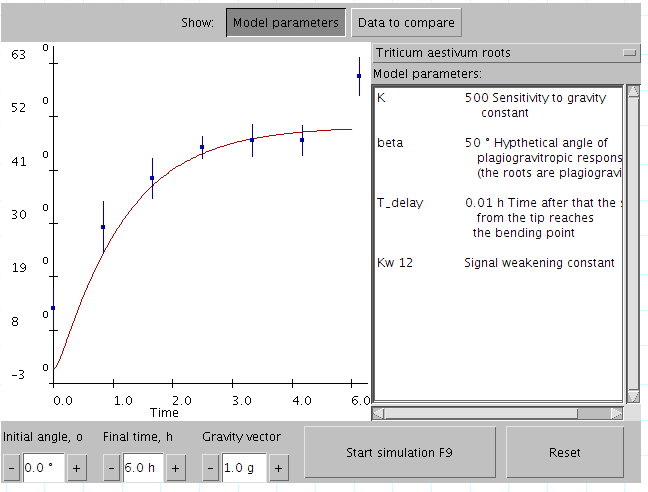
A Java applet that was created as supplementary demonstration material for a scientific publication
A Java applet that uses 3D hardware acceleration to visualize 3D files in .pdb format downloaded from a server[1]
Using applet for nontrivial animation illustrating biophysical topic (randomly moving ions pass through voltage gates)[2]
Using a Java applet for computation – intensive visualization of the Mandelbrot set[3]
Applets' running speed is sufficient for making e.g. nontrivial computer games that play chess.[4]
NASA World Wind (open source) is a second generation applet[5] that makes heavy use of OpenGL and on-demand data downloading to provide a detailed 3D map of the world.
Web access to the server console at the hardware level with the help of a Java applet
Demonstration of image processing using two dimensional Fourier transform

Java applets are small applications written in the Java programming language, or another programming language that compiles to Java bytecode, and delivered to users in the form of Java bytecode.

At the time of their introduction, the intended use was for the user to launch the applet from a web page, and for the applet to then execute within a Java virtual machine (JVM) in a process separate from the web browser itself. A Java applet could appear in a frame of the web page, a new application window, a program from Sun called appletviewer,[6] or a stand-alone tool for testing applets.[clarification needed]

Java applets were introduced in the first version of the Java language, which was released in 1995. Beginning in 2013, major web browsers began to phase out support for NPAPI, the underlying technology applets used to run. with applets becoming completely unable to be run by 2015–2017. Java applets were deprecated by Java 9 in 2017.[7][8][9][10][11] Java applets were deprecated for removal by Java 17 in 2021.[12] Java applets are targeted to be removed by Java 26 in 2026.[13]

Java applets were usually written in Java, but other languages such as Jython, JRuby, Pascal,[14] Scala, NetRexx, or Eiffel (via SmartEiffel) could be used as well.

Unlike early versions of JavaScript, Java applets had access to 3D hardware acceleration, making them well-suited for non-trivial, computation-intensive visualizations. Since applets' introduction, JavaScript has gained support for hardware-accelerated graphics via canvas technology (or specifically WebGL, then later WebGPU in the case of 3D graphics),[15][16] as well as just-in-time compilation.[17]

Since Java bytecode is cross-platform (or platform independent), Java applets could be executed by clients for many platforms, including Microsoft Windows, FreeBSD, Unix, macOS and Linux. They could not be run on mobile devices, which do not support running standard Oracle JVM bytecode. Android devices can run code written in Java compiled for the Android Runtime.

Overview

[edit]

The applets are used to provide interactive features to web applications that cannot be provided by HTML alone. They can capture mouse input and also have controls like buttons or check boxes. In response to user actions, an applet can change the provided graphic content. This makes applets well-suited for demonstration, visualization, and teaching. There are online applet collections for studying various subjects, from physics to heart physiology.

An applet can also be a text area only; providing, for instance, a cross-platform command-line interface to some remote system. If needed, an applet can leave the dedicated area and run as a separate window. However, applets have very little control over web page content outside the applet's dedicated area, so they are less useful for improving the site appearance in general, unlike other types of browser extensions (while applets like news tickers or WYSIWYG editors are also known). Applets can also play media in formats that are not natively supported by the browser.

Pages coded in HTML may embed parameters within them that are passed to the applet. Because of this, the same applet may have a different appearance depending on the parameters that were passed.

As applets were available before HTML5, modern CSS and JavaScript interface DOM were standard, they were also widely used for trivial effects such as mouseover and navigation buttons. This approach, which posed major problems for accessibility and misused system resources, is no longer in use and was strongly discouraged even at the time.

Technical information

[edit]

Most browsers executed Java applets in a sandbox, preventing applets from accessing local data like the file system.[18] The code of the applet was downloaded from a web server, after which the browser either embedded the applet into a web page or opened a new window showing the applet's user interface.

The first implementations involved downloading an applet class by class. While classes are small files, there are often many of them, so applets got a reputation as slow-loading components. However, since .jar files were introduced, an applet is usually delivered as a single file that has a size similar to an image file (hundreds of kilobytes to several megabytes).

Java system libraries and runtimes are backwards-compatible, allowing one to write code that runs both on current and on future versions of the Java virtual machine.

Similar technologies

[edit]

Many Java developers, blogs and magazines recommended that the Java Web Start technology be used in place of applets.[19] Java Web Start allowed the launching of unmodified applet code, which then ran in a separate window (not inside the invoking browser).

A Java Servlet is sometimes informally compared to be "like" a server-side applet, but it is different in its language, functions, and in each of the characteristics described here about applets.

Embedding into a web page

[edit]

The applet would be displayed on the web page by making use of the deprecated applet HTML element,[20] or the recommended object element.[21] The embed element can be used[22] with Mozilla family browsers (embed was deprecated in HTML 4 but is included in HTML 5). This specifies the applet's source and location. Both object and embed tags can also download and install Java virtual machine (if required) or at least lead to the plugin page. applet and object tags also support loading of the serialized applets that start in some particular (rather than initial) state. Tags also specify the message that shows up in place of the applet if the browser cannot run it due to any reason.

However, despite object being officially a recommended tag in 2010, the support of the object tag was not yet consistent among browsers and Sun kept recommending the older applet tag for deploying in multibrowser environments,[23] as it remained the only tag consistently supported by the most popular browsers. To support multiple browsers, using the object tag to embed an applet would require JavaScript (that recognizes the browser and adjusts the tag), usage of additional browser-specific tags or delivering adapted output from the server side.

The Java browser plug-in relied on NPAPI, which nearly all web browser vendors have removed support for, or do not implement, due to its age and security issues. In January 2016, Oracle announced that Java runtime environments based on JDK 9 will discontinue the browser plug-in.[24]

Advantages

[edit]

A Java applet could have any or all of the following advantages:[25]

  • It was simple to make it work on FreeBSD, Linux, Microsoft Windows and macOS – that is, to make it cross-platform. Applets were supported by most web browsers through the first decade of the 21st century; since then, however, most browsers have dropped applet support for security reasons.
  • The same applet would work on "all" installed versions of Java at the same time, rather than just the latest plug-in version only. However, if an applet requires a later version of the Java Runtime Environment (JRE) the client would be forced to wait during the large download.
  • Most web browsers cached applets so they were quick to load when returning to a web page. Applets also improved with use: after a first applet is run, the JVM was already running and subsequent applets started quickly (the JVM will need to restart each time the browser starts afresh). JRE versions 1.5 and greater restarted the JVM when the browser navigates between pages, as a security measure which removed that performance gain.
  • It moved work from the server to the client, making a web solution more scalable with the number of users/clients.
  • If a standalone program (like Google Earth) talks to a web server, that server normally needs to support all prior versions for users who have not kept their client software updated. In contrast, a browser loaded (and cached) the latest applet version, so there is no need to support legacy versions.
  • Applet naturally supported changing user state, such as figure positions on the chessboard.
  • Developers could develop and debug an applet directly simply by creating a main routine (either in the applet's class or in a separate class) and calling init() and start() on the applet, thus allowing for development in their favorite Java SE development environment. All one had to do was to re-test the applet in the AppletViewer program or a web browser to ensure it conforms to security restrictions.
  • An untrusted applet had no access to the local machine and can only access the server it came from. This makes applets much safer to run than the native executables that they would replace. However, a signed applet could have full access to the machine it is running on, if the user agreed.
  • Java applets were fast, with similar performance to natively installed software.

Disadvantages

[edit]

Java applets had the following disadvantages compared to other client-side web technologies:

  • Java applets would depend on a Java Runtime Environment (JRE), a complex and heavy-weight software package. They also normally required a plug-in for the web browser. Some organizations only allow software installed by an administrator. As a result, users were unable to view applets unless one was important enough to justify contacting the administrator to request installation of the JRE and plug-in.
  • If an applet requires a newer JRE than available on the system, the user running it the first time will need to wait for the large JRE download to complete.
  • Mobile browsers on iOS or Android, never run Java applets at all.[26] Even before the deprecation of applets on all platforms, desktop browsers phased out Java applet support concurrently with the rise of mobile operating systems.
  • There was no standard to make the content of applets available to screen readers. Therefore, applets harmed the accessibility of a web site to users with special needs.
  • As with any client-side scripting, security restrictions made it difficult or even impossible for some untrusted applets to achieve their desired goals. Only by editing the java.policy file in the JAVA JRE installation could one grant access to the local filesystem or system clipboard, or to network sources other than the one that served the applet to the browser.
  • Most users did not care about the difference between untrusted and trusted applets, so this distinction did not help much with security. The ability to run untrusted applets was eventually removed entirely to fix this, before all applets were removed.
[edit]

Sun made considerable efforts to ensure compatibility is maintained between Java versions as they evolve, enforcing Java portability by law if required. Oracle seems to be continuing the same strategy.

1997: Sun vs Microsoft

[edit]

The 1997 lawsuit,[27] was filed after Microsoft created a modified Java Virtual Machine of their own, which shipped with Internet Explorer. Microsoft added about 50 methods and 50 fields[27] into the classes within the java.awt, java.lang, and java.io packages. Other modifications included removal of RMI capability and replacement of Java Native Interface from JNI to RNI, a different standard. RMI was removed because it only easily supports Java to Java communications and competes with Microsoft DCOM technology. Applets that relied on these changes or just inadvertently used them worked only within Microsoft's Java system. Sun sued for breach of trademark, as the point of Java was that there should be no proprietary extensions and that code should work everywhere. Microsoft agreed to pay Sun $20 million, and Sun agreed to grant Microsoft limited license to use Java without modifications only and for a limited time.[28]

2002: Sun vs Microsoft

[edit]

Microsoft continued to ship its own unmodified Java virtual machine. Over the years it became extremely outdated yet still default for Internet Explorer. A later study revealed that applets of this time often contain their own classes that mirror Swing and other newer features in a limited way.[29] In 2002, Sun filed an antitrust lawsuit, claiming that Microsoft's attempts at illegal monopolization had harmed the Java platform. Sun demanded Microsoft distribute Sun's current, binary implementation of Java technology as part of Windows, distribute it as a recommended update for older Microsoft desktop operating systems and stop the distribution of Microsoft's Virtual Machine (as its licensing time, agreed in the prior lawsuit, had expired).[28] Microsoft paid $700 million for pending antitrust issues, another $900 million for patent issues and a $350 million royalty fee to use Sun's software in the future.[30][non-primary source needed]

Security

[edit]

There were two applet types with very different security models: signed applets and unsigned applets.[31] Starting with Java SE 7 Update 21 (April 2013) applets and Web-Start Apps are encouraged to be signed with a trusted certificate, and warning messages appear when running unsigned applets.[32] Further, starting with Java 7 Update 51 unsigned applets were blocked by default; they could be run by creating an exception in the Java Control Panel.[33]

Unsigned

[edit]

Limits on unsigned applets were understood as "draconian": they have no access to the local filesystem and web access limited to the applet download site; there are also many other important restrictions. For instance, they cannot access all system properties, use their own class loader, call native code, execute external commands on a local system or redefine classes belonging to core packages included as part of a Java release. While they can run in a standalone frame, such frame contains a header, indicating that this is an untrusted applet. Successful initial call of the forbidden method does not automatically create a security hole as an access controller checks the entire stack of the calling code to be sure the call is not coming from an improper location.

As with any complex system, many security problems have been discovered and fixed since Java was first released. Some of these (like the Calendar serialization security bug) persisted for many years with nobody being aware. Others have been discovered in use by malware in the wild.[citation needed]

Some studies mention applets crashing the browser or overusing CPU resources but these are classified as nuisances and not as true security flaws. However, unsigned applets may be involved in combined attacks that exploit a combination of multiple severe configuration errors in other parts of the system. An unsigned applet can also be more dangerous to run directly on the server where it is hosted because while code base allows it to talk with the server, running inside it can bypass the firewall. An applet may also try DoS attacks on the server where it is hosted, but usually people who manage the web site also manage the applet, making this unreasonable. Communities may solve this problem via source code review or running applets on a dedicated domain.

The unsigned applet can also try to download malware hosted on originating server. However it could only store such file into a temporary folder (as it is transient data) and has no means to complete the attack by executing it. There were attempts to use applets for spreading Phoenix and Siberia exploits this way,[citation needed] but these exploits do not use Java internally and were also distributed in several other ways.

Signed

[edit]

A signed applet[34] contains a signature that the browser should verify through a remotely running, independent certificate authority server. Producing this signature involves specialized tools and interaction with the authority server maintainers. Once the signature is verified, and the user of the current machine also approves, a signed applet can get more rights, becoming equivalent to an ordinary standalone program. The rationale is that the author of the applet is now known and will be responsible for any deliberate damage.[vague] This approach allows applets to be used for many tasks that are otherwise not possible by client-side scripting. However, this approach requires more responsibility from the user, deciding whom he or she trusts. The related concerns include a non-responsive authority server, wrong evaluation of the signer identity when issuing certificates, and known applet publishers still doing something that the user would not approve of. Hence signed applets that appeared from Java 1.1 may actually have more security concerns.

Self-signed

[edit]

Self-signed applets, which are applets signed by the developer themselves, may potentially pose a security risk; java plugins provide a warning when requesting authorization for a self-signed applet, as the function and safety of the applet is guaranteed only by the developer itself, and has not been independently confirmed. Such self-signed certificates are usually only used during development prior to release where third-party confirmation of security is unimportant, but most applet developers will seek third-party signing to ensure that users trust the applet's safety.

Java security problems are not fundamentally different from similar problems of any client-side scripting platform[35][citation needed]. In particular, all issues related to signed applets also apply to Microsoft ActiveX components.

As of 2014, self-signed and unsigned applets are no longer accepted by the commonly available Java plugins or Java Web Start. Consequently, developers who wish to deploy Java applets have no alternative but to acquire trusted certificates from commercial sources.

Alternatives

[edit]

Alternative technologies exist (for example, WebAssembly[36] and JavaScript) that satisfy all or more of the scope of what was possible with an applet. JavaScript could coexist with applets in the same page, assist in launching applets (for instance, in a separate frame or providing platform workarounds) and later be called from the applet code. As JavaScript gained in features and performance, the support for and use of applets declined, until their eventual removal.

See also

[edit]

References

[edit]
[edit]
Revisions and contributorsEdit on WikipediaRead on Wikipedia
from Grokipedia
A Java applet is a small program written in the Java programming language that is embedded within an HTML page using the <applet> or <object> tag, allowing it to be downloaded and executed directly within a web browser via the browser's Java Virtual Machine (JVM). Designed for interactivity, applets enable dynamic content such as animations, games, and data visualizations without requiring a full standalone application, leveraging the full Java API while running in a sandboxed environment for security. Introduced in 1995 alongside the initial public release of by , applets represented an early innovation in , aiming to bring platform-independent, executable code to browsers at a time when the web was primarily static . They gained popularity in the late and early for enhancing user experiences on websites, particularly in , , and enterprise applications, by allowing seamless integration of rich media and computations without server-side processing. However, security vulnerabilities, performance issues, and the rise of alternative technologies like , , and led to their decline; major browsers such as Chrome, , and Edge discontinued support for the Java Plug-in by 2016-2017. Oracle deprecated the Applet API in JDK 9 (2017) and fully removed it in JDK 11 (2018), recommending migration to modern web standards. Today, Java applets are obsolete and unsupported in production environments, though they remain of historical interest in understanding the evolution of client-side web computing.

Introduction

Definition and Purpose

A Java applet is a small, platform-independent Java program designed to run within a web browser's Java Virtual Machine (JVM) under a security sandbox, restricting its access to system resources to prevent potential harm. Unlike standalone Java applications, applets are compiled to platform-neutral bytecode and executed client-side, allowing them to interact dynamically with the hosting web page without server-side processing. The primary purpose of Java applets was to enhance static web pages with interactive, dynamic content, such as animations, simple games, and data visualizations, enabling richer user experiences without the need for users to download and install full applications. This approach leveraged 's portability to deliver consistent behavior across diverse client environments, including different operating systems and browsers supporting the JVM. Applets are limited to specific APIs, primarily extending the Applet class from the java.applet package for basic functionality or the JApplet class from javax.swing for graphical user interfaces using Swing components. Java applets were initially released by in 1995, serving as a key demonstration of the language's "" principle by embedding executable code directly in documents for cross-platform execution.

Historical Context

Java applets originated at in the early 1990s as part of a broader effort to develop platform-independent software for and networked devices. The project, initially codenamed and later , was led by engineers including , Patrick Naughton, and Mike Sheridan, who aimed to create a simple, reliable language for embedded systems. By 1995, the language was renamed , and applets emerged as small, executable programs designed to run within web browsers, enabling dynamic content on the emerging . The first public demonstration occurred on May 23, 1995, at the SunWorld Expo in , where Sun showcased the browser running an animated mascot—a cartoon character waving and performing actions—to highlight Java's potential for interactive web experiences. A key milestone came with the release of the (JDK) 1.0 on January 23, 1996, which formally included applet support as a core feature, allowing developers to embed in pages via the tag. Applets grew alongside the Web 1.0 era, benefiting from partnerships with browser vendors; 2.0 integrated applet support in late 1995 following the Sun-Netscape announcement, while Microsoft added compatibility in Internet Explorer 3.0 in August 1996 through its implementation. This facilitated widespread experimentation during the internet boom. By the late , Java applets reached peak adoption, powering a variety of web enhancements that transformed static pages into interactive applications. Common uses included real-time stock tickers for financial sites, multiplayer chat applications for early communities, and educational tools such as interactive simulations and visualizations in academic resources. Their cross-platform portability and ability to handle complex graphics and networking made them popular for prototypes and games, with millions of applets deployed as browsers like and became standard. Adoption peaked around 2000-2005, aligning with the dot-com expansion, before the rise of alternatives like AJAX began to erode their dominance. Early challenges tempered this growth, including the need for browser plugins or virtual machines, which required users to download and install the Java Runtime Environment (JRE)—a barrier on dial-up connections and early hardware. Performance issues were prominent, with slow startup times due to and limited optimization on processors from the mid-1990s, often resulting in choppy animations or high memory usage. Initial security vulnerabilities, such as buffer overflows and sandbox bypasses in the applet security model, emerged shortly after launch, prompting Sun to issue patches like those in JDK 1.0.2 (July 1996) to address exploits that could allow malicious code execution. These hurdles highlighted the trade-offs of applet portability amid evolving web standards.

Technical Architecture

Core Components

Java applets are built upon the java.applet.Applet class, which serves as the foundational superclass for any applet embedded in a web page or viewed via the Java Applet Viewer. This class extends java.awt.Panel, providing a common interface between the applet and its hosting environment, such as a web browser. Developers must subclass Applet to create custom applets, overriding key lifecycle methods including init() for initialization, start() to begin execution, stop() to pause activity, and destroy() for cleanup. For graphical user interfaces leveraging the Swing framework, the javax.swing.JApplet class extends Applet to incorporate Swing's component architecture, enabling richer, lightweight UI elements while maintaining compatibility with the applet model. JApplet includes a JRootPane as its primary child, facilitating the organization of Swing components within the applet's content pane. The runtime environment for Java applets relies on the Java Runtime Environment (JRE), which executes applet bytecode within a Java Virtual Machine (JVM) either embedded in the browser or provided via the Java Plug-in. This setup allows applets to run securely within the browser context, with the JRE handling class verification, memory management, and garbage collection specific to the applet's sandboxed execution. Applets access the java.applet package to interact with their hosting environment, particularly for retrieving HTML parameters passed via the <applet> tag using methods like getParameter(String name). This package includes interfaces such as AppletContext for managing document display and audio playback via AudioClip, and AppletStub for stub implementation by the host. For user interfaces, applets integrate with the Abstract Window Toolkit (AWT) through Applet's inheritance from Panel, supporting basic components like buttons and labels, or with Swing via JApplet for advanced widgets. However, applets have restricted access to the full Java SE API, excluding features like direct file I/O operations to maintain isolation from the host system. Resource management in applets involves through specialized class loaders, where the browser employs an AppletClassLoader to isolate and load classes from distinct origins, preventing namespace conflicts between applets from different sources. Applets are typically packaged in (Java Archive) files to bundle multiple classes, images, sounds, and other resources into a single compressed archive, reducing download times via fewer HTTP requests. The <applet> tag's archive attribute specifies these files, with the class loader preloading resources as needed; additional files not in the are fetched from the directory.

Applet Lifecycle

The lifecycle of a Java applet consists of four primary stages managed by the browser or applet viewer, enabling the applet to respond to changes in visibility and resource availability. These stages are handled via overridden methods in the Applet class or its subclasses, such as JApplet for Swing-based applets. The initialization stage begins when the applet is first loaded into the browser, triggering the init() method. This method is invoked only once to perform setup tasks, such as creating components, initializing variables, or allocating resources like threads, without starting execution. For example, an applet might use init() to instantiate buttons or load data structures. Following initialization, the start() method is called to activate the applet, typically starting animations, timers, or other ongoing processes when the applet becomes visible to the user. When the applet loses visibility, such as when the user navigates away from the page or switches tabs, the stop() method is invoked to pause execution. This stage suspends activities like animations or network connections to conserve resources, but the applet remains in and can resume later without reinitialization. Finally, the destroy() method is called when the applet is being unloaded or the browser closes the page, providing an opportunity for cleanup, such as releasing threads, closing files, or disposing of graphical resources to prevent leaks. State transitions between these stages are triggered by browser events, including page loading (initiating init() and start()), page unloading or minimization (invoking stop()), and tab switching in multi-tab browsers (potentially calling stop() and later start() upon return). The painting process, handled by the paint() and update() methods inherited from the Component class, occurs in response to exposure events; these methods are executed on the event dispatch thread to ensure thread safety, with update() typically clearing the background before calling paint() for redrawing the applet's display. Error handling during the lifecycle is critical, particularly for exceptions that may arise during class loading or method execution. For instance, a ClassNotFoundException can occur in the initialization phase if the browser fails to locate required classes from the applet's or JAR file, often due to incorrect paths or network issues, halting the lifecycle before start() is reached. Developers must ensure robust exception catching within lifecycle methods to log errors or gracefully degrade functionality. Performance considerations arise from repeated start() and stop() cycles in multi-tab browsing environments, where each tab may spawn a separate JVM instance, leading to such as heap exhaustion or excessive CPU usage from frequent pausing and resuming. To mitigate this, applets should minimize state in start() and stop() to avoid redundant computations, and users can adjust JVM heap sizes via the Java Control Panel for better handling of multiple instances.

Development and Integration

Creating Applets

Note: Java applet development uses deprecated features; the Applet API was deprecated in JDK 9 (2017) and is targeted for removal in JDK 26 (expected 2026). It requires JDK 8 or earlier for complete tool support and is suitable only for legacy applications. Java applets are developed using the Java Development Kit (JDK), which provides essential tools for compilation and packaging. The JDK's javac compiler is used to convert applet source code into bytecode .class files. Integrated Development Environments (IDEs) such as Eclipse and NetBeans enhance the development process by offering code editing, syntax highlighting, and built-in support for applet testing. In Eclipse with a compatible JDK (e.g., JDK 8), developers can launch applets directly by selecting the applet class and choosing Run > Run As > Java Applet, which simulates browser execution. Similarly, NetBeans supports applet creation through its project wizards and allows running applets via the IDE's execution tools, often integrating with the JDK's AppletViewer for previews. The basic structure of a Java applet involves creating a class that extends either the java.applet.Applet class for AWT-based applets or javax.swing.JApplet for Swing-based ones, enabling access to applet-specific functionality. Developers override key lifecycle methods—such as [init](/page/Init)() for initialization and start() for activation—to define the applet's behavior, though detailed lifecycle management is covered elsewhere. To handle runtime parameters passed from the hosting environment, the getParameter(String name) method is used to retrieve values by name, allowing customization without recompiling the code. For example, a simple applet might look like this:

java

import java.applet.Applet; import java.awt.Graphics; public class SimpleApplet extends [Applet](/page/Applet) { private [String](/page/String) message; public void [init](/page/Init)() { message = getParameter("message"); if (message == null) { message = "Hello, World!"; } } public void paint([Graphics](/page/Graphics) g) { g.drawString(message, 50, 25); } }

import java.applet.Applet; import java.awt.Graphics; public class SimpleApplet extends [Applet](/page/Applet) { private [String](/page/String) message; public void [init](/page/Init)() { message = getParameter("message"); if (message == null) { message = "Hello, World!"; } } public void paint([Graphics](/page/Graphics) g) { g.drawString(message, 50, 25); } }

This structure ensures the applet initializes parameters and renders content appropriately. Packaging an applet begins with compiling the source files using the JDK's javac command, producing one or more .class files that form the applet's bytecode. These files are then bundled into a JAR (Java Archive) file using the jar tool, which compresses resources and facilitates efficient distribution; for instance, jar cvf MyApplet.jar *.class creates the archive. A manifest file (MANIFEST.MF) within the JAR provides metadata, including versioning attributes like Implementation-Version: 1.0 to track updates and ensure compatibility. This packaging approach supports modular deployment while maintaining the applet's integrity. Testing applets typically employed the JDK's AppletViewer tool (available in JDK versions up to 10), a standalone simulator that mimics browser behavior without requiring a full web setup; it is invoked via appletviewer MyApplet.html, where the HTML references the applet for validation. AppletViewer was removed in JDK 11 (2018). In IDEs like or with compatible JDKs, integrated viewers allow direct execution from the editor, providing immediate feedback on rendering and interactions. For debugging, developers rely on techniques such as inserting System.out.println() statements, which output to the Java console or IDE's output window, revealing variable states and execution flow during runtime. This method is particularly useful for tracing issues in the applet's lifecycle without advanced debuggers.

Embedding in Web Pages

Java applets are embedded into HTML documents primarily using the <applet> tag, which specifies the applet's class file and display dimensions, although this tag has been deprecated since HTML 4.01 and is obsolete in HTML5. The <applet> tag requires attributes such as code for the applet's main class file (e.g., MyApplet.class), codebase for the base URL from which the applet code is loaded (optional, defaults to the document's location), width and height for the applet's pixel dimensions (required), and alt for alternative text displayed in non-Java-enabled environments. For modern browser compatibility at the time, the <object> tag is recommended for Internet Explorer and similar, using a classid attribute to invoke the Java Plug-in (e.g., classid="clsid:CAFEEFAC-0018-0000-0000-ABCDEFFEDCBA" for Java 8), along with code, width, height, and other parameters. The <embed> tag serves Netscape and Mozilla-based browsers, specifying the type attribute for the Java MIME type (e.g., type="application/x-java-applet;version=1.8") and including code, width, and height. Applet configuration is achieved through <param> tags nested within the embedding tag, allowing developers to pass string values or key-value pairs that the applet retrieves via the getParameter() method in its init() lifecycle phase. For example, <param name="foreground" value="blue"> can customize the applet's appearance by setting a parameter accessible in the Java code. These parameters enable dynamic setup without recompiling the applet, supporting a range of options from visual properties to operational modes. To optimize loading, the archive attribute in the <applet>, <object>, or <embed> tag lists comma-separated file names (e.g., archive="myapplet.jar,resources.jar"), which the browser preloads from the directory or subdirectories, thereby reducing initial times by bundling classes and resources into fewer files. files specified this way must originate from the same host as the for security reasons in HTTP contexts. For environments lacking Java support, fallback content ensures graceful degradation; the alt attribute in <applet> provides simple text, while enclosing the tag in <noembed>...</noembed> or using <noscript> allows embedding alternative HTML, such as an image or message like "Java is not available on this browser."

html

<applet code="MyApplet.class" width="200" height="200" alt="Loading applet..."> <param name="background" value="white"> <noembed> <p>Your browser does not support Java applets.</p> </noembed> </applet>

<applet code="MyApplet.class" width="200" height="200" alt="Loading applet..."> <param name="background" value="white"> <noembed> <p>Your browser does not support Java applets.</p> </noembed> </applet>

This example illustrates a basic embedding with parameters and fallback. For cross-browser deployment, conditional comments or JavaScript can select between <object> and <embed> tags dynamically.

Security Mechanisms

Unsigned Applets

Unsigned applets, also known as sandbox applets, operate within a restricted environment designed to protect the host system from potential harm. These applets execute in the Java sandbox, a mechanism that limits their capabilities to a predefined set of safe operations, preventing unauthorized access to sensitive resources. This model was introduced in early Java versions to enable web-based execution of untrusted code while minimizing risks to users. In terms of functionality, unsigned applets are confined to the applet window for graphical output and cannot interact with the local , execute system commands, or load native libraries. They may establish network connections only to the originating host and port from which they were downloaded, using the same protocol and domain, and can display content via the showDocument method. Additionally, they permit invocation of public methods in other applets on the same page and reading of secure system properties, such as those related to the Java runtime environment. These restrictions ensure that the applet's lifecycle—initialization, starting, stopping, and destruction—occurs entirely within the sandbox boundaries. Permissions for unsigned applets are strictly enforced by the Java SecurityManager, a core component of the Java runtime that intercepts and validates all potentially sensitive operations. Basic via streams is allowed, as is thread creation for concurrent execution, but attempts to access prohibited resources trigger exceptions. For instance, unsigned applets cannot create custom ClassLoaders, modify the SecurityManager itself, or access non-secure system properties like user home directories. With Java Network Launch Protocol (JNLP) extensions, limited additional capabilities such as file operations or access may be granted, but only within user-approved bounds. Despite these safeguards, unsigned applets pose risks, particularly from malicious code that exploits allowed operations to cause denial-of-service (DoS) attacks. For example, an applet could enter an infinite loop or perform intensive computations, consuming excessive CPU resources and potentially leading to browser hangs or crashes without affecting the broader system. The sandbox does not inherently mitigate such resource exhaustion attacks, making it vulnerable to antagonism or disruption from unverified sources. Unsigned applets were the default deployment mode for simple, trusted interactive content in early Java implementations, such as JDK 1.0 and 1.1, before emerged as a standard for expanding permissions. They suited non-intrusive applications like animations or basic calculators, where full system access was unnecessary, and were widely used in web pages during the as gained popularity for client-side scripting.

Signed and Self-Signed Applets

Signed applets extend the capabilities of Java applets by incorporating digital signatures, allowing them to request permissions for operations restricted in the default sandbox, such as file system access or network connections to arbitrary hosts. The signing process begins with packaging the applet's class files and resources into a JAR file, followed by applying a digital signature using a private key associated with an X.509 certificate. For trusted signed applets, the certificate is issued by a reputable Certificate Authority (CA), ensuring chain-of-trust validation; self-signed applets, in contrast, use locally generated certificates without CA endorsement, suitable primarily for development and testing. The jarsigner tool signs the JAR file, requiring a keystore containing the private key and certificate. Developers generate a using keytool with the command keytool -genkeypair -alias myalias -keyalg RSA -keystore mykeystore.jks, creating a key pair and valid for a specified duration. For CA-signed certificates, the obtained file is imported into the keystore via keytool -importcert. Signing then proceeds with jarsigner -verbose -keystore mykeystore.jks -storepass password myapplet.jar myalias, embedding the signature in the JAR's META-INF directory while preserving file integrity. Upon execution, signed applets trigger a user prompt in the Java Plug-in to grant permissions for sensitive operations like file I/O (java.io.FilePermission), networking (java.net.SocketPermission), or printing (java.awt.AWTPermission). Trusted signatures from recognized CAs typically result in a simpler approval dialog, whereas self-signed ones are flagged as untrusted, often requiring manual trust establishment through the Java Control Panel or blocking the applet entirely unless explicitly allowed. Permissions can encompass granular controls or full access via AllPermission, depending on user consent and configuration. Implementation relies on policy files to define and enforce permissions for signed code. The system-wide java.policy file, located in the JRE's lib/security directory, uses entries like grant signedBy "myalias" { permission java.security.AllPermission; }; to authorize actions based on the signer's alias in the client's keystore. The Java Plug-in verifies signatures by checking the certificate chain against trusted CAs or imported self-signed entries before applying policies; without verification, the applet reverts to sandbox restrictions. Self-signed applets demand explicit edits or keystore imports on the client side, complicating deployment. Digital signing for applets was introduced in JDK 1.1 in 1997, enabling the first secure mechanism to elevate privileges while maintaining user control. By Java SE 5.0 (JDK 1.5) in 2004, signing had evolved into a prerequisite for advanced features like enhanced JAR handling and integrated prompting, solidifying its role in the platform's .

Benefits and Limitations

Advantages

Java applets offered significant cross-platform compatibility, embodying the Java principle of "" through compilation to platform-independent bytecode executed by the (JVM). This allowed a single applet to operate seamlessly across operating systems such as Windows, macOS, and without requiring recompilation or platform-specific modifications. They provided rich interactivity, leveraging libraries like the (AWT) and Swing to deliver , capabilities, and elements. Security isolation was a key strength, with applets confined to a restrictive sandbox environment that prevented access to sensitive system resources like local files or networks unless explicitly authorized. This model supported executing untrusted code downloaded from the web. In terms of performance, applets benefited from the JVM's and optimized execution, which was suitable for compute-intensive tasks like scientific simulations or complex visualizations in their era.

Disadvantages

Java applets were plagued by numerous vulnerabilities, particularly in the , including buffer overflows in the Java Runtime Environment (JRE) that affected image processing and GIF handling, allowing potential remote code execution. These exploits, such as those enabling untrusted applets to access unauthorized system resources like COM objects, contributed to widespread user distrust, exacerbated by intrusive permission prompts that required explicit user approval for applet actions. Performance overhead was a significant drawback, with JVM startup times often imposing delays of several seconds to over a minute, especially for initial loads after system reboots or when the heap size was insufficient, forcing frequent garbage collection. Additionally, long-running sessions were susceptible to leaks, leading to gradual degradation in responsiveness and increased resource consumption over time. User experience suffered from the mandatory installation and frequent updates of the Java Runtime Environment, which many users lacked or found cumbersome to maintain, often resulting in applet failures or prompts to download software mid-session. Poorly coded applets frequently caused browser crashes or freezes, as documented in troubleshooting guides, disrupting web browsing and eroding confidence in Java-based content. Maintenance challenges arose from heavy reliance on outdated browser plugins like , which became unsupported in major browsers, complicating deployment and requiring users to enable legacy modes that posed further risks. Applets also lacked native support for mobile platforms, as the plugin architecture was incompatible with mobile browsers and devices, limiting in an increasingly mobile-centric web ecosystem.

Sun vs. Microsoft Disputes

In October 1997, Sun Microsystems filed a lawsuit against Microsoft in the U.S. District Court in San Jose, California, accusing the company of breaching its Java license agreement by modifying the Java Virtual Machine (JVM) in Internet Explorer to include Windows-specific extensions that undermined Java's cross-platform compatibility, particularly for applets. Sun claimed these alterations violated the license terms requiring faithful implementation of Java specifications and constituted trademark infringement and false advertising by labeling the modified version as "Java compatible." The suit sought an injunction to prevent further distribution of the incompatible software and damages exceeding $35 million. The case progressed with Sun securing a preliminary in November 1998, barring Microsoft from using the "Java Compatible" logo on non-compliant products. After years of litigation, the parties reached a settlement on January 23, 2001, under which Microsoft agreed to pay Sun $20 million and commit to a clean-room reimplementation of over 100 Java APIs to ensure compatibility without reverse-engineering Sun's code. Microsoft was also prohibited from using Java compatibility trademarks unless its products passed Sun's compatibility tests, and it granted Sun a broad while receiving a limited one in return. This agreement aimed to restore Java's portability for applets across platforms. Despite the settlement, tensions persisted, leading Sun to file another in March 2002, alleging had breached the 2001 agreement by developing incompatible Java elements within the .NET Framework and by excluding any Java runtime from , which Sun viewed as an attempt to marginalize Java applets in web applications. Sun sought over $1 billion in damages and an to force to distribute a compliant JVM. proceedings included a December 2002 ruling by U.S. District Judge Frederick Motz requiring to include Sun's JVM in Windows distributions, though this was overturned on appeal in June 2003, while the prohibition on infringing Java products was upheld. The disputes culminated in a comprehensive settlement on April 2, 2004, where paid Sun $1.6 billion ($700 million for antitrust claims and $900 million for cross-licensing), and agreed to cease all development and distribution of its Java technologies, including the MSJVM, effectively ending Microsoft's involvement in Java applet support. These disputes significantly delayed uniform cross-browser support for Java applets, as developers faced inconsistent behavior on compared to other browsers, complicating web integration. They underscored Sun's strict enforcement of Java's "write once, run anywhere" philosophy, which demanded unmodified implementations to preserve applet portability. The conflicts occurred amid broader U.S. Department of Justice antitrust actions against during the of the late 1990s, where Java was seen as a threat to Windows dominance, amplifying scrutiny on Microsoft's platform-specific tactics.

Browser and Platform Issues

Java applets encountered notable compatibility challenges across web browsers, stemming from variations in how the <applet> tag was interpreted and rendered. , an early adopter of Java technology, integrated ' JVM starting with version 2.0 in 1996, supporting Java 1.0 and later 1.1 features natively, but its rendering was tied to a fixed JVM version (e.g., 1.1.5 in Netscape 4.x), limiting support for advanced components like Swing. In contrast, initially used a proprietary JVM, which diverged from Sun's implementation in areas such as just-in-time () compilation and widget layout, causing inconsistent applet behavior and screen refresh problems, particularly with Java 1.4.1. These differences often resulted in applets failing to display correctly or throwing exceptions in one browser while functioning in the other. By the early 2000s, developers shifted to the Portable Application Programming Interface () plugin model, where the Java Plug-in standardized applet execution by embedding a consistent JVM across browsers like , , and emerging ones such as . JVM inconsistencies further compounded browser issues, as applets compiled against a specific Java version could encounter runtime errors on clients with mismatched JVMs. A common problem was the NoSuchMethodError, occurring when an applet invoked a method available in the developer's compile-time JVM but absent in the client's runtime environment due to version differences. This was exacerbated in browser contexts, where built-in or outdated JVMs (e.g., Microsoft's in early ) lacked methods introduced in later Sun/ releases. To address this, 's Java Plug-in served as a key , allowing web pages to invoke a dedicated, updatable JRE instance that overrode the browser's native JVM, ensuring more reliable execution of applet . Platform-specific bugs added another layer of complexity. On macOS, JVM implementations frequently experienced startup delays and graphics corruption; for instance, Java 7 updates 10, 11, and 13 introduced rendering artifacts in applets due to changes in the AWT/Swing graphics pipeline interacting with macOS's Quartz rendering engine. Similarly, Java 8 update 31 caused prolonged loading times for signed applets on macOS, with traces revealing delays in certificate validation and plugin initialization lasting up to 20 seconds in some cases. On Linux distributions, font rendering in applets often appeared distorted or lacking anti-aliasing, as the JVM's font subsystem (using FreeType) clashed with the host system's font configuration, resulting in jagged text in Swing-based UIs. Mitigation strategies focused on detection and adaptation tools. Oracle's deployJava.js library enabled web developers to script JRE version checks before applet launch, automatically prompting users to install or update to a compatible version if mismatches were detected, thereby reducing runtime errors across browsers and platforms. However, these efforts could not fully overcome inherent failures, as evolving browser architectures and priorities led to inconsistent plugin support, ultimately rendering unreliable without custom interventions.

Decline and Modern Context

Deprecation Timeline

In January 2016, announced plans to the browser plug-in in JDK 9, marking the beginning of the official end to support within the Java ecosystem. This decision aligned with broader industry trends toward plugin-free web technologies, driven by security concerns and the evolution of web standards. The deprecation effectively signaled that future Java releases would phase out the infrastructure necessary for applets to run in browsers. Major web browsers began disabling support for the (), which Java applets relied upon, accelerating the technology's obsolescence. removed NPAPI support starting with version 42 in April 2015, preventing applets from running without extensions that were later also discontinued. followed suit, dropping NPAPI in version 52 in March 2017, with extended support in the ESR variant ending in June 2018. ceased NPAPI support in version 12 in September 2018, while , launched in 2015 and rebuilt on in 2020, never natively supported Java applets. By 2020, all major browsers had fully eliminated compatibility, rendering applets inoperable in standard web environments. JDK 9, released on September 21, 2017, formally deprecated the Applet API and related classes in the java.applet package, while retaining the code for but issuing warnings during compilation and runtime. In JDK 11, released in September 2018, removed the deployment technologies entirely, including the Java plug-in, Java Applet Viewer tool, and support for in favor of modular alternatives. This excision eliminated the runtime infrastructure for applets, though the deprecated lingered in subsequent releases until further proposals for complete removal, such as in 2021 targeting by JDK 17 and final excision planned for JDK 26 in 2026. To facilitate the transition, Oracle published detailed migration guides recommending the conversion of applets to standalone Java applications deployed via (JNLP) or server-side technologies, emphasizing the rewrite of applet code to remove browser dependencies. These resources highlighted automated tools for partial conversions but stressed manual refactoring for full compatibility. The shift impacted legacy systems, particularly in enterprise environments where applets powered internal tools for banking, simulations, and data visualization; many organizations faced compliance risks and maintenance challenges, prompting migrations to / frameworks or dedicated JVM runtimes. As of November 2025, Java applets receive no support from modern web browsers, with execution limited to specialized emulators like the archived AppletViewer (via older JDKs) or standalone JVM environments outside browser contexts. Oracle's ongoing support for Java SE focuses on non-browser deployments, underscoring applets' irrelevance in contemporary web development.

Current Alternatives

Modern web technologies have largely supplanted Java applets for delivering interactive content in browsers, leveraging native standards without requiring external plugins. Primary replacements include the Canvas API for 2D graphics and for 3D rendering, which enable developers to create dynamic visualizations, animations, and games directly within HTML documents using . The Canvas API, introduced as part of , provides a bitmap-based drawing surface for imperative rendering, supporting applications like data visualization and image manipulation across all major browsers without additional installations. extends this capability to hardware-accelerated 3D graphics, allowing complex scenes and effects that were once exclusive to plugin-based systems. For enhanced interactivity, JavaScript frameworks such as React and have become standard tools, facilitating the construction of responsive user interfaces and single-page applications (SPAs) through component-based architectures and manipulation. React, maintained by Meta, emphasizes declarative UI rendering and , enabling efficient updates for interactive elements like forms and dashboards. , known for its progressive framework approach, offers similar reactivity and templating for building scalable frontends, with adoption in projects requiring seamless user experiences. These frameworks integrate natively with elements, replacing the need for applet-driven logic with lightweight, client-side execution. WebAssembly (Wasm) serves as a high-performance alternative for compute-intensive tasks, compiling code from languages like C++, , or even to a binary format that runs near-native speeds in browsers. Unlike applets, which relied on the (JVM) plugin, WebAssembly achieves cross-platform execution with direct browser integration, avoiding installation hurdles and supporting modular loading for larger applications. It provides similar portability to applets but with improved security through a strict sandbox and , preventing the vulnerabilities that plagued older plugin models. Other viable options include Progressive Web Apps (PWAs), which deliver app-like experiences with offline capabilities, push notifications, and device integration using service workers and files, all without plugins. PWAs enhance mobile compatibility by adapting to various screen sizes and operating systems via a single codebase, offering installable interfaces that rival native apps. Server-side rendering (SSR) with further supports interactivity by pre-rendering pages on the server, improving initial load times and for dynamic content, while reducing client-side overhead. Migrating from applets to these alternatives yields significant benefits, including elimination of plugin dependencies, which resolves compatibility issues across devices and browsers. Enhanced mobile support ensures responsive performance on smartphones and tablets, where applets often failed due to JVM absences. improves by avoiding external sandboxes prone to exploits, relying instead on browser-enforced isolation models that are regularly updated by vendors. Overall, these technologies promote broader and maintainability, with and related standards pushing back plugin-based approaches like applets in favor of native web capabilities.

References

Add your contribution
Related Hubs
Contribute something
User Avatar
No comments yet.