Hubbry Logo
Keyboard technologyKeyboard technologyMain
Open search
Keyboard technology
Community hub
Keyboard technology
logo
8 pages, 0 posts
0 subscribers
Be the first to start a discussion here.
Contribute something
Keyboard technology
Keyboard technology
from Wikipedia

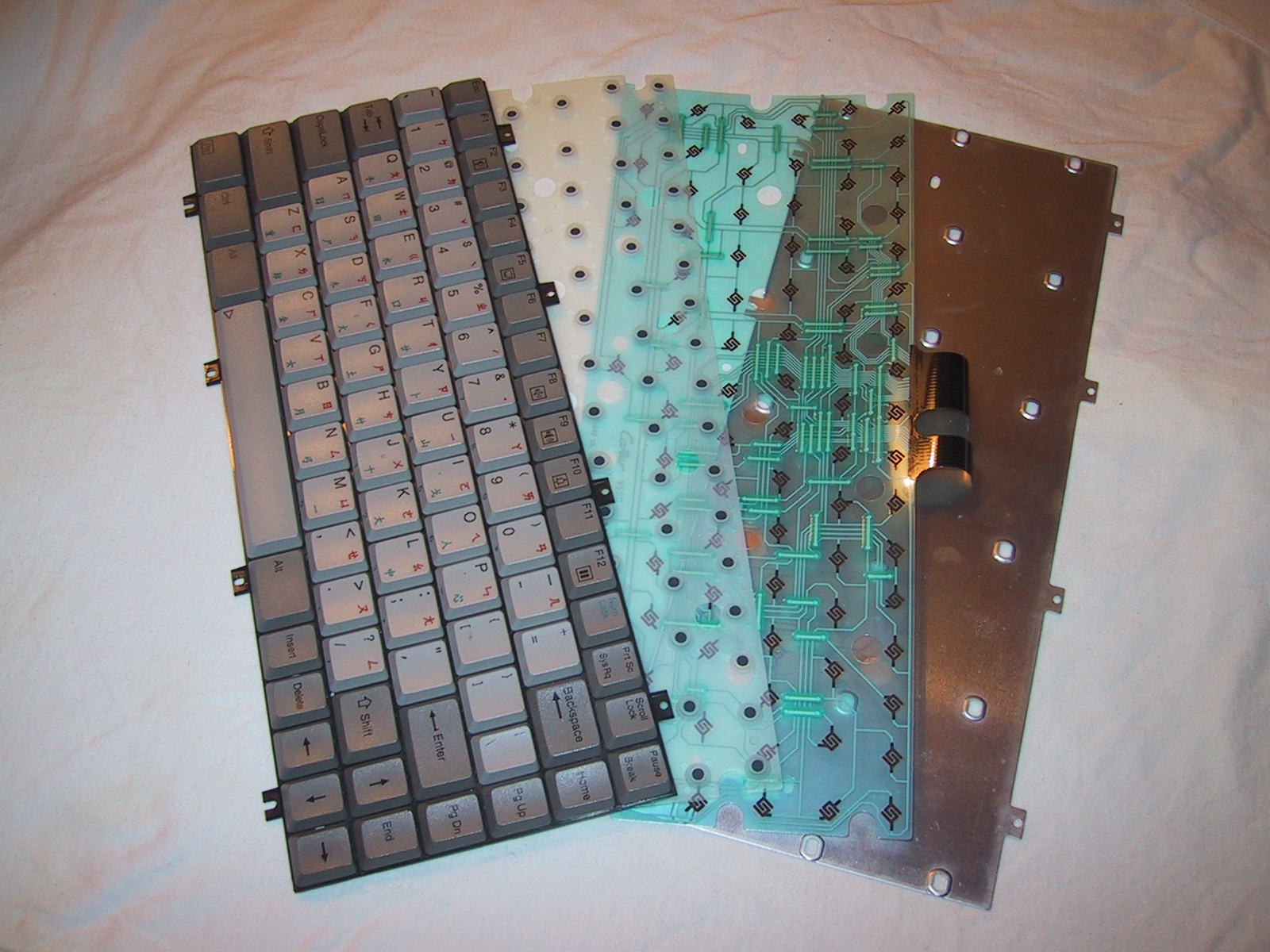
Keyboard construction of a typical notebook computer keyboard, in four layers

The technology of computer keyboards includes many elements. Many different keyboard technologies have been developed to meet consumer demands and optimized for industrial applications. The standard full-size (100%) computer alphanumeric keyboard typically uses 101 to 105 keys; keyboards integrated in laptop computers are typically less comprehensive.

Virtual keyboards, which are mostly accessed via a touchscreen interface, have no physical switches and provide artificial audio and haptic feedback instead. This variety of keyboard can prove useful, as it is not limited by the rigid nature of physical computer keyboards.

The majority of modern keyboards include a control processor and indicator lights to provide feedback to the user (and to the central processor) about what state the keyboard is in. Plug-and-play technology means that its "out of the box" layout can be notified to the system, making the keyboard immediately ready to use without the need for further configuration, unless the user so desires. This also enables manufacture of generic keyboards for a variety of language markets, that differ only in the symbols engraved on the keytops.

Keystroke sensing

[edit]

Membrane

[edit]
A typical membrane assembly

A common membrane design consists of three layers. The top and bottom layer have exposed electrical matrix traces, and the middle layer is a spacer to prevent current from passing through the top and bottom conductive traces passively. When pressure is applied to the top membrane, it bridges the top and bottom conductive contact pads, allowing current to transfer.

Two of the most common types of membrane keyboards include full-travel rubber dome over membrane and flat-panel membrane keyboards. Flat-panel membrane keyboards are most often found on appliances like microwave ovens or photocopiers.

Rubber dome over membrane

[edit]
Exploded view of a typical rubber dome over membrane design

Full-travel rubber dome over membrane keyboards are the most common keyboard design manufactured today. In these keyboards, a rubber dome sheet is placed above the membranes, ensuring that the domes align with the contact pads. The rubber dome serves a dual purpose: it acts as a tactile return spring and provides a soft surface to transfer force onto the top membrane. To bridge the connection between the two contact pads, the rubber dome must be fully depressed.

Rubber dome over membrane keyboards became very popular with computer manufacturers as they sought to reduce costs while PC prices declined.

Scissor-switch
[edit]
Scissor switch mechanism

A common, compact variant of rubber dome over membrane is the scissor-switch, based on the scissors mechanism. Due to the requirement of many notebooks to be slim, they require the keyboards to be low-profile. Therefore, this technology is most commonly featured on notebooks. The keys are attached to the keyboard via two plastic pieces that interlock in a "scissor"-like fashion and snap to the keyboard and the keycap. These keyboards are generally quiet and the keys require little force to press.

Scissor-switch keyboards are typically slightly more expensive. They are harder to clean (due to the limited movement of the keys and their multiple attachment points) but also less likely to get debris in them as the gaps between the keys are often smaller (as there is no need for extra room to allow for the 'wiggle' in the key, as typically found on a membrane keyboard).[1]

Flat-panel membrane

[edit]
Atari 400 keyboard

Flat-panel membrane keyboards are often used in harsh environments where water or leak-proofing is desirable. They can have non-tactile, polydome tactile and metal dome tactile keys. Polydome tactile membrane switches use polyester, or PET, and is formed to create a stiff plastic dome. When the stiff polydome is pressed, the conductive ink on the back of the polydome connects with the bottom layer of the circuit. Metal dome membrane switches are made of stainless steel and offer enhanced durability and reliability and can feature custom dome designs.[2] Non-tactile flat-panel membrane keyboards have little to no keypress feel and often issue a beep or flash of light on actuation.

Although this keyboard design was commonly used in the early days of the personal computer (on the Sinclair ZX80, ZX81, and Atari 400), they have been supplanted by more responsive and modern designs.

Roll-up keyboard

[edit]
Most keyboards are rigid, but this keyboard is flexible.

Computer keyboards made of flexible silicone or polyurethane materials can roll up in a bundle. This type of keyboard can take advantage of the thin flexible plastic membranes, but still pose the risk of damage. When they are completely sealed in rubber, they are water resistant. Roll-up keyboards provide relatively little tactile feedback. Because these keyboards are typically made of silicone, they unfavorably tend to attract dirt, dust, and hair.[3]

Metal contact

[edit]
Cherry MX Blue (left) and disassembled Cherry MX Brown (right)

Keyboards which have metal contact switches typically use discrete modules for each key. This type of switch are usually composed of a housing, a spring, and a slider, and sometimes other parts such as a separate tactile leaf or clickbar.

Cherry MX switch contacts

At rest, the metal contacts inside of the switch are held apart. As the switch is pressed down, the contacts are held together to conduct current for actuation. Many switch designs use gold for contact material to prolong the lifetime of the switch by preventing switch failure from oxidization. Most designs use a metal leaf, where the movable contact is a leaf spring.

A major producer of discrete metal contact switches is Cherry, who has manufactured the Cherry MX family of switches since the 1980s. Cherry's color-coding system of categorizing switches has been imitated by other switch manufacturers, such as Gateron and Kailh among many others.[4][5]

Keyboards which utilize this technology are commonly referred to as "mechanical keyboards", but there is not a universally agreed-upon clear-cut definition for this term.[6]

Hot-swappable keyboard

[edit]

Hot-swappable keyboards are keyboards in which switches can be pulled out and replaced without requiring the typical solder connection.[7][8] Instead of the switch pins being directly soldered to the keyboard's PCB, hot-swap sockets are instead soldered on. Hot-swap sockets can allow users to change different switches out of the keyboard without having the tools or knowledge required to solder.

Reed

[edit]
Reed switch with reed module removed

The reed module in a reed switch consists of two metal contacts inside of a glass bubble usually sealed with some inert gas like nitrogen to help prevent particle build-up. The slider in the housing pushes a magnet down in front of the reed capsule and the magnetic field causes the reed contacts to become attracted to each other and make contact. The reed switch mechanism was originally invented in 1936 by W B Ellwood at Bell Telephone Laboratories.

Although reed switches use metal leaf contacts, they are considered separate from all other forms of metal contact switch because the contacts are operated magnetically instead of using physical force from a slider to be pressed together.

Capacitive

[edit]
Topre electrostatic capacitive switch

In a capacitive mechanism, pressing a key changes the capacitance of a pattern of capacitor pads. The pattern consists of two D-shaped capacitor pads for each switch, printed on a printed circuit board (PCB) and covered by a thin, insulating film of soldermask which acts as a dielectric.

For the most common, foam and foil implementation of this technology, the movable part ends with a flat foam element about the size of an aspirin tablet, finished with aluminum foil. Opposite the switch is a PCB with the capacitor pads. When the key is pressed, the foil tightly clings to the surface of the PCB, forming a daisy chain of two capacitors between contact pads and itself separated with a thin soldermask, and thus "shorting" the contact pads with an easily detectable drop of capacitive reactance between them. Usually, this permits a pulse or pulse train to be sensed.

An advantage of the capacitive technology is that the switch is not dependent on the flow of current through metal contacts to actuate. There is no debouncing necessary.

The sensor tells enough about the distance of the keypress to allow the user to adjust the actuation point (key sensitivity). This adjustment can be done with the help of the bundled software and individually for each key, if so implemented.[9] A keyboard which utilizes these abilities include the Real Force RGB.

IBM's Model F keyboard is a design consisting of a buckling spring over a capacitive PCB, similar to the later Model M keyboard, but instead used membrane sensing in place of a PCB.

The Topre Corporation design for switches uses a conical spring below a rubber dome. The dome provides resistance, while the spring does the capacitive action.[10]

Hall effect

[edit]
RAFI RS 76 C 010 hall effect switch fully disassembled

Hall effect keyboards use Hall effect sensors to detect the movement of a magnet by the potential difference in voltage. When a key is depressed, it moves a magnet that is detected by a solid-state sensor. Because they require no physical contact for actuation, Hall-effect keyboards are extremely reliable and can accept millions of keystrokes before failing. They are used for ultra-high reliability applications such as nuclear power plants, aircraft cockpits, and critical industrial environments. They can easily be made totally waterproof, and can resist large amounts of dust and contaminants. Because a magnet and sensor are required for each key, as well as custom control electronics, they are expensive to manufacture.

A hall switch works through magnetic fields. Every switch has a small magnet fixed inside it. When the electricity passes through the main circuit, it creates a magnetic flux. Every time a key is pressed, the magnetic intensity changes. This change is noticed by the circuit and the sensors send the information to the motherboard.[11]

Optical

[edit]

Optical switch technology was introduced in 1962 by Harley E. Kelchner for use in a typewriter machine with the purpose of reducing the noise generated by typewriter keys.

An optical keyboard technology utilizes light-emitting devices and photo sensors to optically detect actuated keys, offering faster response times and eliminating the need for physical contact between moving parts. Most commonly the emitters and sensors are located at the perimeter, mounted on a small PCB. The light is directed from side to side of the keyboard interior, and it can only be blocked by the actuated keys. Most optical keyboards require at least two beams (most commonly a vertical beam and a horizontal beam) to determine the actuated key. Some optical keyboards use a special key structure that blocks the light in a certain pattern, allowing only one beam per row of keys (most commonly a horizontal beam).

The mechanism of the optical keyboard is very simple – a light beam is sent from the emitter to the receiving sensor, and the actuated key blocks, reflects, refracts or otherwise interacts with the beam, resulting in an identified key.

A major advantage of optical switch technology is that it is very resistant to moisture, dust, and debris because there are no metal contacts that can corrode.

The specialist DataHand keyboard uses optical technology to sense keypresses with a single light beam and sensor per key. The keys are held in their rest position by magnets; when the magnetic force is overcome to press a key, the optical path is unblocked and the keypress is registered.

Laser projection

[edit]

A laser projection device approximately the size of a computer mouse projects the outline of keyboard keys onto a flat surface, such as a table or desk. This type of keyboard is portable enough to be easily used with PDAs and cellphones, and many models have retractable cords and wireless capabilities. However, this design is prone to error, as accidental disruption of the laser will generate unwanted keystrokes. This type of keyboard's inherent lack of tactile feedback makes it often undesirable.

Notable switch mechanisms

[edit]

Buckling spring

[edit]
Illustration from the original buckling spring U.S. patent 4,118,611, issued to IBM in 1978

The buckling spring mechanism (now expired U.S. patent 4,118,611) atop the switch is responsible for the characteristic clicky response of the keyboard. This mechanism controls a small hammer that strikes a capacitive or membrane switch.[12]

IBM's Model F keyboard series was the first to employ buckling spring key-switches, which used capacitive sensing to actuate. The original patent was never employed in an actual production keyboard but it establishes the basic premise of a buckling spring.

The IBM Model M is a large family of computer keyboards created by IBM that began in late 1983 when IBM patented a membrane buckling spring key-switch design. The main intent of this design was to halve the production cost of the Model F.[13] The most well known full-size Model M is known officially as the IBM Enhanced Keyboard.

A classic full-size Model M keyboard with Spanish ISO key layout

In 1993, two years after spawning Lexmark, IBM transferred its keyboard operations to the daughter company. New Model M keyboards continued to be manufactured for IBM by Lexmark until 1996, when Unicomp was established and purchased the keyboard patents and tooling equipment to continue their production.

IBM continued to make Model M's in their Scotland factory until 1999.[14]

Debouncing

[edit]
Snapshot of switch bounce on an oscilloscope. The switch bounces between on and off several times before settling.

When a key is pressed, it oscillates (bounces) against its contacts several times before settling. When released, it oscillates again until it comes to rest. Although it happens on a scale too small to be visible to the naked eye, it can be enough to register multiple keystrokes.

To resolve this, the processor in a keyboard debounces the keystrokes, by averaging the signal over time to produce one "confirmed" keystroke that (usually) corresponds to a single press or release. Early membrane keyboards had limited typing speed because they had to do significant debouncing. This was a noticeable problem on the ZX81.[15]

Keycaps

[edit]

Keycaps are used on full-travel keyboards. While modern keycaps are typically surface-printed, they can also be double-shot molded, laser marked, dye sublimation printed, engraved, or made of transparent material with printed paper inserts. There are also keycaps which utilize thin shells that are placed over key bases, which were used on several IBM PC keyboards. A more modern but rare innovation is the OLED key which, on some specialty devices like stream controller keypads, feature a tiny OLED display under each keycap, which can be customized in software to display any icon or glyph the user wishes. Due to high cost most of these devices are not full keyboards for typing but are meant for shortcuts for launching applications or macro commands for other programs.

Switches allow for the removal and replacement of keycaps with a common stem type.

Stabilizers

[edit]

Almost all keyboards which utilize keys two or more units in length (such as the typical space bar or enter key) use stabilizers to ensure consistent movement and prevent key wobble during typing. Various lubricants and padding techniques can be used to reduce the rattle of components.

Other parts

[edit]

A modern PC keyboard typically includes a control processor and indicator lights to provide feedback to the user about what state the keyboard is in. Depending on the sophistication of the controller's programming, the keyboard may also offer other special features. The processor is usually a single chip 8048 microcontroller variant. The keyboard switch matrix is wired to its inputs and it processes the incoming keystrokes and sends the results down a serial cable (the keyboard cord) to a receiver in the main computer box. It also controls the illumination of the "caps lock", "num lock" and "scroll lock" lights.

A common test for whether the computer has crashed is pressing the "caps lock" key. The keyboard sends the key code to the keyboard driver running in the main computer; if the main computer is operating, it commands the light to turn on. All the other indicator lights work in a similar way. The keyboard driver also tracks the shift, alt and control state of the keyboard.[16]

Keyboard switch matrix

[edit]
A close-up of a keyboard matrix circuit printed onto a flexible transparent PET sheet

The keyboard switch matrix is often drawn with horizontal wires and vertical wires in a grid which is called a matrix circuit. It has a switch at some or all intersections, much like a multiplexed display.

Ghost keys

[edit]

Almost all keyboards have only the switch (but no diode) at each intersection, which causes "ghost keys" and "key jamming" when multiple keys are pressed (rollover). Certain, often more expensive, keyboards have a diode between each intersection, allowing the keyboard microcontroller to accurately sense any number of simultaneous keys being pressed, without generating erroneous ghost keys.[17]

Alternative text-entering methods

[edit]
On-screen keyboard controlled with the mouse can be used by users with limited mobility.

Optical character recognition (OCR) is preferable to rekeying for converting existing text that is already written down but not in machine-readable format (for example, a Linotype-composed book from the 1940s). In other words, to convert the text from an image to editable text (that is, a string of character codes), a person could re-type it, or a computer could look at the image and deduce what each character is. OCR technology has already reached an impressive state (for example, Google Book Search) and promises more for the future.

Speech recognition converts speech into machine-readable text (that is, a string of character codes). This technology has also reached an advanced state and is implemented in various software products. For certain uses (e.g., transcription of medical or legal dictation; journalism; writing essays or novels) speech recognition is starting to replace the keyboard. However, the lack of privacy when issuing voice commands and dictation makes this kind of input unsuitable for many environments.

Pointing devices can be used to enter text or characters in contexts where using a physical keyboard would be inappropriate or impossible. These accessories typically present characters on a display, in a layout that provides fast access to the more frequently used characters or character combinations. Popular examples of this kind of input are Graffiti, Dasher and on-screen virtual keyboards.

Other issues

[edit]

Keystroke logging

[edit]

Unencrypted Bluetooth keyboards are known to be vulnerable to signal theft for keylogging by other Bluetooth devices in range. Microsoft wireless keyboards 2011 and earlier are documented to have this vulnerability.[18]

Keystroke logging (often called keylogging) is a method of capturing and recording user keystrokes. While it can be used legally to measure employee activity, or by law enforcement agencies to investigate suspicious activities, it is also used by hackers for illegal or malicious acts. Hackers use keyloggers to obtain passwords or encryption keys.

Keystroke logging can be achieved by both hardware and software means. Hardware key loggers are attached to the keyboard cable or installed inside standard keyboards. Software keyloggers work on the target computer's operating system and gain unauthorized access to the hardware, hook into the keyboard with functions provided by the OS, or use remote access software to transmit recorded data out of the target computer to a remote location. Some hackers also use wireless keylogger sniffers to collect packets of data being transferred from a wireless keyboard and its receiver, and then they crack the encryption key being used to secure wireless communications between the two devices.

Anti-spyware applications are able to detect many keyloggers and remove them. Responsible vendors of monitoring software support detection by anti-spyware programs, thus preventing abuse of the software. Enabling a firewall does not stop keyloggers per se, but can possibly prevent transmission of the logged material over the net if properly configured. Network monitors (also known as reverse-firewalls) can be used to alert the user whenever an application attempts to make a network connection. This gives the user the chance to prevent the keylogger from "phoning home" with his or her typed information. Automatic form-filling programs can prevent keylogging entirely by not using the keyboard at all. Most keyloggers can be fooled by alternating between typing the login credentials and typing characters somewhere else in the focus window.[19][needs update]

Keyboards are also known to emit electromagnetic signatures that can be detected using special spying equipment to reconstruct the keys pressed on the keyboard. Neal O'Farrell, executive director of the Identity Theft Council, revealed to InformationWeek that "More than 25 years ago, a couple of former spooks showed me how they could capture a user's ATM PIN, from a van parked across the street, simply by capturing and decoding the electromagnetic signals generated by every keystroke," O'Farrell said. "They could even capture keystrokes from computers in nearby offices, but the technology wasn't sophisticated enough to focus in on any specific computer."[20]

Physical injury

[edit]

The use of a keyboard may cause serious injury (such as carpal tunnel syndrome or other repetitive strain injuries) to the hands, wrists, arms, neck or back.[21] The risks of injuries can be reduced by taking frequent short breaks to get up and walk around a couple of times every hour. Users should also vary tasks throughout the day, to avoid overuse of the hands and wrists. When typing on a keyboard, a person should keep the shoulders relaxed with the elbows at the side, with the keyboard and mouse positioned so that reaching is not necessary. The chair height and keyboard tray should be adjusted so that the wrists are straight, and the wrists should not be rested on sharp table edges.[22] Wrist or palm rests should not be used while typing.[23]

Some adaptive technology ranging from special keyboards, mouse replacements and pen tablet interfaces to speech recognition software can reduce the risk of injury. Pause software reminds the user to pause frequently. Switching to a much more ergonomic mouse, such as a vertical mouse or joystick mouse may provide relief.

By using a touchpad or a stylus pen with a graphic tablet, in place of a mouse, one can lessen the repetitive strain on the arms and hands.[24]

See also

[edit]

References

[edit]
Revisions and contributorsEdit on WikipediaRead on Wikipedia
from Grokipedia
Keyboard technology refers to the design, mechanisms, and engineering principles that enable keyboards to function as primary input devices for computers, typewriters, and other electronic systems, converting physical key presses into electrical signals for data entry. Originating from mechanical typewriters in the 19th century, it has evolved to include diverse switch types, layouts, and connectivity options that prioritize tactile feedback, durability, and user efficiency. The foundational developments in keyboard technology began with , patented by in 1868, which featured a mechanical key arrangement to imprint characters on paper. In 1878, Sholes and James Densmore introduced the layout—named after the first six letters on the top row—to minimize jamming of mechanical typebars by separating frequently used letter pairs, a design that remains the most popular keyboard layout despite ergonomic critiques. By the early , teletype machines, refined by inventors like Charles L. Krum between 1907 and 1910, adapted principles for electrical , laying groundwork for computer integration. Integration with computing accelerated post-World War II; the computer in 1946 relied on punch-card readers, but by 1948, the used electro-mechanical typewriters for input, marking the shift to direct key-based entry. The 1960s brought video display terminals (VDTs) through projects like in 1964, developed by MIT, , and , enabling real-time text input and display. By the late , personal computers popularized electronic keyboards with built-in microprocessors that scan a key matrix—a grid of circuits connecting rows and columns of keys—to detect presses and generate scan codes transmitted via protocols like PS/2 or USB. At the core of modern keyboard technology are the switch mechanisms that register key activations. Mechanical keyboards employ individual spring-loaded switches with metal contacts that close a circuit upon depression, offering precise tactile and auditory feedback with lifespans exceeding 50 million actuations per key. In contrast, membrane keyboards use cost-effective layered plastic sheets with conductive traces, where a rubber dome collapses to bridge circuits, though they provide less durability (typically 5-10 million cycles). Capacitive switches, non-mechanical in nature, detect changes in electrical capacitance between two plates when a conductive keycap alters the field, enabling dust-resistant, silent operation and up to 100 million cycles, as seen in high-end models. Other variants include scissor-switch designs for slim laptop profiles and Hall effect sensors using magnetic fields for contactless detection in specialized applications. Contemporary advancements emphasize , portability, and versatility, with wireless keyboards using or RF for cable-free operation since the 1990s, and virtual keyboards on touchscreens simulating physical keys via . Alternative layouts like the Dvorak, patented in , rearrange keys to minimize finger motion and improve typing efficiency, though adoption remains limited due to QWERTY's entrenchment. Gaming and mechanical enthusiast keyboards often feature customizable RGB backlighting, programmable macros, and hot-swappable switches, reflecting ongoing innovations in user customization and performance.

Core Components

Keycaps

Keycaps are the removable tops of keys on a keyboard, serving as the primary for input while providing tactile feedback and visual cues through their design and legends. They are engineered to fit over switch stems, allowing for easy customization and replacement to suit ergonomic preferences, , or specific layouts. In mechanical keyboards, keycaps play a crucial role in enhancing typing experience by influencing finger placement and key feel, with variations in height, shape, and material directly impacting comfort and sound profile. Common materials for keycaps include (ABS) plastic, valued for its durability, cost-effectiveness, ease of molding, and recyclability, making it a staple in mass-produced keyboards. Alternatively, (PBT) offers superior texture, resistance to shine from oils, and overall longevity due to its thicker, heavier composition, though it commands a slightly higher price. PBT keycaps are thicker (typically 1.5mm walls) compared to ABS (around 1mm), contributing to a more substantial feel and reduced wear over time. Keycap profiles define their height and sculpting for ergonomic typing, with popular options including the OEM profile (medium height, angled shape following a spherical curve for home row comfort), Cherry profile (similar medium height with a sloped, cylindrical top for smooth transitions), and SA profile (high profile with tall, concave tops for pronounced finger guidance). These profiles often adhere to row-based heights like R1 to R4, though OEM and Cherry may deviate slightly for uniformity. Legends, or the printed characters on keycaps, are applied via methods such as laser-etching (which melts the surface for a raised, durable mark), dye-sublimation (fusing ink deep into the material for fade-resistant results), or pad-printing (stamping ink for affordable, basic application). Customization extends keycap functionality through techniques like dye-sublimation for vibrant, personalized legends or pad-printing for quick prototypes, enabling users to create themed sets. keycaps represent a collectible niche, handcrafted in small batches from materials like , metal, or clay by individual artists, featuring unique themes such as fantasy motifs or to express personal style and add exclusivity to keyboards. These limited-run pieces often command premium prices due to their nature and thematic storytelling. Mounting mechanisms ensure compatibility with underlying switches, primarily via the Cherry stem (a cross-shaped plastic clip designed for MX-style switches, allowing secure, universal attachment on most modern mechanical keyboards) or the Alps stem (a forked design specific to older Alps switches, less common but supported in retro or hybrid builds). Keycaps with Cherry stems fit the vast majority of contemporary mechanical keyboards, while Alps-compatible ones require matching hardware to avoid instability. Historically, keycaps evolved from typewriter-era designs using , , , , or metal for round, flat-topped keys with simple lettering, transitioning in the mid-20th century to plastic (like ABS) for rectangular shapes with embossed or printed characters on early computer keyboards. Modern iterations, from the 1980s onward, employ advanced plastics like PBT alongside techniques such as double-shot molding, supporting standards for international layouts that accommodate diverse scripts and symbols beyond basic ASCII. This progression reflects broader shifts in manufacturing and global computing needs.

Switches

Switches are the core actuation mechanisms in keyboards responsible for detecting and registering key presses through physical or mechanical interaction. They convert the user's finger pressure into an electrical signal, providing varying degrees of tactile feedback, auditory cues, and travel distance based on design. Common types include mechanical, buckling spring, and switches, each optimized for different balances of durability, cost, and . Mechanical switches, such as those from Cherry MX, feature individual plunger systems with a stem, spring, and contact mechanism housed in a self-contained unit. Linear variants like the Cherry MX Red offer smooth, uninterrupted travel without tactile bumps or clicks, with an actuation force of 45 cN (approximately 45 g) and a total travel distance of 4 mm, making them suitable for rapid, low-resistance typing or gaming. Tactile switches, exemplified by the Cherry MX Brown, introduce a noticeable bump at the actuation point for feedback confirmation, requiring 55 cN force and the same 4 mm travel, balancing speed and precision. Clicky switches, such as the Cherry MX Blue, combine tactile feedback with an audible snap, actuated at 60 cN and 4 mm travel, appealing to users who prefer pronounced sensory cues. These switches typically exhibit force curves that peak at actuation before stabilizing, ensuring consistent performance across millions of uses. The buckling spring mechanism, pioneered in IBM's Model M keyboards, employs a coiled spring mounted over a that buckles under pressure to create a sharp tactile snap and close the circuit. When compressed, the spring deforms catastrophically against a curved , generating a peak force of 60-70 g at around 2.5 mm of travel, which produces both haptic and acoustic feedback without relying on separate contacts. This , detailed in IBM's foundational , provides a unique "over-center" action where the spring's buckling amplifies the sensation, enhancing typing accuracy and satisfaction. Membrane switches, in contrast, use a rubber dome that compresses to bridge conductive circuits on underlying layers, offering a cost-effective alternative for mass-produced keyboards. The dome collapses under finger pressure, typically requiring 50-60 g of force and providing 3-4 mm of , though with less precise feedback due to the shared structure. This configuration minimizes parts count and assembly complexity, making it prevalent in entry-level and designs. Switch lifespan is a key differentiator, measured in actuation cycles per key. Mechanical switches like Cherry MX are rated for over 50 million cycles, enabling decades of heavy use without degradation. Membrane rubber dome switches, however, endure only 5-10 million cycles due to material fatigue in the dome and circuits, limiting their suitability for intensive applications. Buckling spring mechanisms fall in between, rated for at least 25 million cycles, benefiting from robust spring construction. Post-2020 developments have focused on low-profile switches to accommodate thinner chassis, reducing total travel to 1.5-2.5 mm while retaining mechanical principles. Cherry's MX Ultra Low Profile (ULP) series, for instance, achieves 1.8 mm total travel with 65 cN actuation force, integrating seamlessly into slim devices without sacrificing durability ratings of over 50 million cycles. Similarly, Kailh's Choc series offers compact designs with 3.0 mm travel variants, but ultra-low iterations align closer to 2.5 mm, prioritizing portability and reduced finger in .

Stabilizers

Stabilizers are mechanical components in keyboards designed to ensure uniform actuation and minimize wobble on larger keys, such as Shift, Enter, and spacebar, by linking the to multiple switch stems. Two primary types of stabilizers exist: wire-in-housing designs, often referred to as Costar-style, and plate-mounted designs, exemplified by Durock-style stabilizers. Costar-style stabilizers feature a wire that rotates within dedicated housings mounted directly to the PCB, providing a more integrated but less modular approach commonly found in older or mass-produced keyboards. In contrast, plate-mounted stabilizers, like those from Durock, clip or screw into slots in the keyboard's mounting plate, offering greater ease of installation and removal for custom builds. Key components of stabilizers include housings that hold the assembly, metal wires or bars that connect to the keycap stems for synchronized movement, and optional lubricants such as grease applied to points for smoother operation. The housings typically snap onto switch housings or plate cutouts, while the wire's ends insert into sliders on the to prevent uneven pressing. Common issues with stabilizers include audible rattle caused by unlubricated or loose metal parts rubbing against the housing or plate, which can be mitigated through application of grease but often requires disassembly for tuning. Installation challenges arise with screw-in designs, which demand precise alignment and tools, versus clip-in variants that risk improper seating leading to further instability. Stabilizers are compatible with both PCB-mounted and plate-mounted keyboard architectures, typically supporting keys larger than 1.25 units in size to accommodate extended keycaps without compromising feel. For instance, they ensure balanced actuation on 2u or 6.25u keys in standard layouts. The evolution of stabilizers traces back to typewriter bar linkages, which used rigid mechanisms to coordinate wide keys like the spacebar, evolving into modern modular designs popularized in the through enthusiast communities and custom mechanical keyboards. These contemporary stabilizers emphasize lubricated, tunable components for reduced noise and improved over earlier rigid systems.

Sensing Technologies

Mechanical Contact Sensing

Mechanical contact sensing in keyboards relies on the physical closure of electrical circuits to detect key presses, typically involving direct contact between conductive elements triggered by mechanical force. In basic metal contact designs, a spring-loaded key plunger carries a metal strip or pad that bridges two circuit pads on the keyboard's base when depressed, completing the circuit and registering the input. These contacts are often gold-plated to minimize oxidation and electrical arcing, which can cause wear over time by eroding the contact surfaces during repeated make-and-break cycles. High-quality implementations use thin gold layers over base metals like silver or copper to enhance durability while keeping costs manageable. Metal dome switches represent a refined variant, where a thin, bent metal leaf or dome—typically —serves as the contact element. Upon key press, the dome flexes to touch opposing contact pads on a , closing the circuit with a characteristic tactile snap. These are commonly integrated into compact keyboards for their space efficiency and reliable momentary action, with under 100 milliohms ensuring low signal loss. Rubber dome mechanisms adapt this principle for cost-sensitive applications, such as and entry-level desktop keyboards; here, a dome collapses under pressure to press a conductive carbon pill or pad against underlying contacts, bridging the circuit without metal-to-metal wear on the dome itself. Quality rubber dome keyboards achieve lifespans of 5 to 10 million actuations per key, though heavy use can lead to dome and reduced responsiveness over time. Reed switches offer a durable alternative for early high-reliability keyboards, employing two ferromagnetic reeds sealed in a that close via magnetic attraction from a small attached to the key stem. When the key is pressed, the magnet pulls the reeds into contact, completing the circuit without direct mechanical impact on the switch itself. Patented in 1936 but applied to keyboards in the early , reed switches provided exceptional —often exceeding 100 million cycles—and were favored in industrial or terminal keyboards for their resistance to dust and environmental factors. However, their bulkier design and higher cost limited widespread adoption compared to simpler contact methods. The primary advantages of mechanical contact sensing include its , requiring minimal for operation, and low , making it suitable for mass-produced devices. Disadvantages center on mechanical wear and potential arcing at low voltages, though effectively mitigates and extends contact life to tens of millions of cycles in well-designed systems. These methods dominated desktop keyboard designs from the through the , appearing in early computer terminals and office machines before cost pressures shifted production toward more economical alternatives. Debouncing circuits are often necessary to filter transient bounces in contact closure, ensuring clean signal registration.

Capacitive Sensing

Capacitive sensing in keyboards detects key presses by measuring changes in electrical caused by the proximity or movement of a key stem, enabling non-contact operation without physical electrical connections. This technology relies on the principle that a conductor, such as the key stem or a user's finger, alters the between plates or within a sensing grid, which is then interpreted as input by the controller. Unlike conductive mechanisms, uses insulated components to form capacitors, where pressing a key modifies the value—typically by bringing conductive elements closer or introducing changes—allowing for precise detection without wear-prone contacts. In non-conductive designs, the key stem functions as a moving that alters between two fixed plates or within self- grids, where each key site has its own sensing . Mutual setups involve intersecting row and column forming capacitors at each , with the key press disturbing the field at the specific grid point. Self- configurations, conversely, measure the total from a single to ground, changed by the key's conductive parts entering the field. These approaches ensure durability as no metal contacts are required, supporting sealed enclosures for environmental resistance. A prominent implementation is the Topre switch, an electrostatic capacitive design that integrates a rubber dome for actuation feedback with a conical spring and underlying capacitive sensor. When pressed, the rubber dome compresses, moving the stem to change the capacitance detected by the PCB, typically requiring an actuation force of around 45 grams for standard models. The rubber component provides sound dampening and a tactile return, contributing to a smooth, quiet typing experience without mechanical contacts. Capacitive keyboards employ a row-column matrix where a controller scans the grid by applying voltage pulses to rows and measuring variations on columns to identify pressed positions. This scanning process, often using charge-transfer or methods, detects multiple simultaneous presses while minimizing through sequential polling. The matrix centralizes sensing, reducing per-key circuitry and enabling efficient integration in compact layouts. Key advantages of include elimination of mechanical wear for extended lifespan exceeding 50 million actuations and inherent due to the absence of perforations or contacts, making it suitable for harsh environments. These features have been leveraged in high-end keyboards like the Realforce series, introduced in the by , which use proprietary Topre capacitive switches for professional typing applications emphasizing precision and reliability. In the , advances in capacitive technology include hybrid systems with adjustable actuation points, such as those in the Realforce GX1 series, where sensitivity can be tuned from 0.1 mm to 3.0 mm in 0.1 mm increments for analog-like control in gaming and productivity. While pure magnetic sensing dominates some analog innovations, capacitive designs continue to evolve with integrated microcontrollers for dynamic sensitivity, enhancing responsiveness without physical modifications.

Non-Contact Sensing

Non-contact sensing technologies in keyboards detect key presses without physical electrical contacts, relying instead on , interruption, or projected patterns to register inputs. These methods emerged to address in traditional mechanical switches, offering enhanced durability and responsiveness in applications like gaming and portable devices. By eliminating metal-to-metal contact, non-contact systems reduce debounce requirements and enable features such as adjustable actuation, though they often involve more complex components. Hall effect sensors utilize to detect key movement, typically embedding a small magnet in the key stem that alters the through a stationary as the key is pressed. This change in generates a voltage proportional to the key's position, allowing for analog input and precise control without physical contact. In gaming keyboards like the Wooting Two HE, introduced in , users can adjust actuation points from 0.1 mm to 4.0 mm via software, enabling customizable sensitivity for rapid trigger mechanics in competitive play. Optical switches employ infrared (IR) light detection, where an IR LED emits a beam across the switch housing that is interrupted by a shutter mechanism attached to the key stem during actuation. This light-blocking event triggers the input signal almost instantaneously, bypassing traditional contact-based delays. Razer's optical switches, debuted in products like the Huntsman series around 2019, achieve a response time of 0.2 milliseconds through this infrared actuation, making them suitable for high-speed gaming where minimal latency is critical. Laser projection systems create virtual keyboards by projecting an IR laser grid or pattern onto a flat surface, with a camera or detecting finger movements that disrupt the grid to register keystrokes. Developed in the early , Canesta's projection keyboard used a red to outline a layout and image sensors to capture disruptions in the projected IR field, allowing on any surface without physical keys. These devices, demonstrated in prototypes around 2002, offered portability for but required line-of-sight and calibration for accuracy. Non-contact sensing provides advantages such as faster response times due to the absence of debounce delays and improved longevity from reduced mechanical wear, with and optical switches often rated for over 100 million actuations. However, these technologies face disadvantages including higher manufacturing costs due to specialized sensors and potential sensitivity to environmental factors like dust, which can obstruct optical beams or interfere with magnetic fields. As of 2025, ultrasonic sensing is emerging for non-contact applications on flexible surfaces, using high-frequency sound waves to detect pressure or proximity changes in solid-state . This approach enables bendable or conformable interfaces, with market projections indicating growth driven by demand for wearable and adaptive input devices.

Electrical

Switch Matrix

The switch matrix is an electrical that interconnects key switches in a grid of rows and columns to minimize the number of pins needed for a keyboard. This design multiplexes the switches, allowing a single to monitor multiple keys efficiently by sharing conductive lines. In the row-column grid, one terminal of each switch connects to a row line and the other to a column line, forming unique intersections for each key. For example, the uses an 8-row by 16-column matrix, requiring 24 pins total (8 for rows plus 16 for columns) rather than over 100 individual connections. To ensure accurate detection during scanning, a is integrated in series with each switch, oriented to permit current flow in one direction (typically from column to row or vice versa, depending on configuration). These diodes block reverse current paths (sneak paths), preventing erroneous signals from propagating through alternative paths in the shared grid and thereby mitigating ghosting—false registration of unpressed keys during multiple simultaneous presses. Pull-up or pull-down resistors do not provide directional current blocking and cannot effectively substitute for diodes in preventing ghosting in standard digital matrix scanning. Diode implementation varies by build type: surface-mount device (SMD) diodes, such as the compact 1N4148 variant, suit (PCB) keyboards for their small footprint and automated compatibility, while through-hole diodes facilitate hand-wiring or prototyping due to their larger leads and easier manual insertion, though they occupy more space. The performs scanning by cyclically grounding or pulling high one row at a time while monitoring all column lines as inputs, typically via pull-up resistors to establish a default high state. These pull-up resistors set the resting state of the column lines but do not contribute to ghosting mitigation. A pressed key completes the circuit, pulling the corresponding column low and signaling the intersection; this full cycle repeats thousands of times per second for responsive input. When equipped with per-switch diodes, the matrix enables N-key rollover (NKRO), where any number of keys can be pressed simultaneously without registration conflicts, as the unidirectional flow isolates each switch's state during scans. Early keyboards in the 1970s predominantly featured parallel wiring schemes, dedicating a dedicated line per key, which escalated costs and complexity for layouts exceeding 50 keys. Matrix adoption accelerated in the late 1970s for cost efficiency, with pioneering implementations in the (1977), utilizing a scanned matrix for its 52-key layout, and the (1981), which employed a similar grid to support expanded key counts while reducing cabling and controller demands.

Debouncing

In mechanical keyboards, the bounce phenomenon arises when the physical contacts within a switch vibrate upon actuation, producing erratic electrical signals that can register as multiple key presses or releases. This vibration typically persists for 5 to 20 milliseconds after the initial contact, leading to unreliable input detection if unaddressed. Hardware debouncing addresses this issue through passive circuits, most commonly resistor- (RC) filters integrated into the keyboard's electrical design. These circuits work by charging or discharging the across the switch contacts, smoothing out transient signals with a (τ = R × C) typically set between 10 and 100 milliseconds to exceed the bounce duration while avoiding excessive input latency. Software debouncing, prevalent in modern microcontroller-based keyboards, employs algorithmic filtering in the to validate switch states over time. Common approaches include window-based methods that ignore subsequent signals within a brief interval, such as 5 milliseconds, after detecting an initial press or release, or finite state machines that track transition stability across multiple scans to confirm a settled state. Capacitive and optical sensing technologies inherently mitigate the need for debouncing by avoiding physical contacts altogether, as capacitive switches detect changes in electrical fields without mechanical vibration, and optical switches use light interruption for instantaneous, bounce-free registration. In customizable keyboard firmware like , debouncing parameters can be tuned by users to optimize for specific switches, with adjustable delays ranging from 0 to 50 milliseconds configurable via compiler options or keymap files to balance responsiveness and reliability.

Ghosting Mitigation

Ghosting in keyboard matrices occurs when multiple keys are pressed simultaneously, leading to false key registrations due to incomplete electrical circuits. In an undioded matrix, pressing three keys at the corners of a rectangular section—such as positions (row1, col1), (row1, col2), and (row2, col1)—can create a phantom signal at the fourth intersection (row2, col2), simulating an unintended key press. This phenomenon, known as ghost keys, arises because current can flow through alternative paths without diodes to block reverse flow, causing ambiguities in key detection. Although pull-up or pull-down resistors are commonly employed in keyboard matrices to establish default signal states and aid in key detection, they cannot effectively replace diodes for ghosting prevention. Resistors do not block current directionally and thus fail to prevent sneak paths that cause phantom key detections when multiple keys are pressed in standard digital matrix scanning. Some experimental or analog approaches may use resistors for voltage-based detection, but they are not standard or reliable substitutes for diodes in preventing ghosting. The primary mitigation technique involves adding a at each switch intersection in the matrix to enforce unidirectional current flow from column to row. These diodes, typically fast-switching types like 1N4148, prevent ghosting by ensuring that signals only propagate in the intended direction during scanning, eliminating phantom presses even with multiple simultaneous inputs. This approach allows for reliable multi-key detection without additional hardware complexity in basic designs. To further address rollover limitations, keyboards implement key rollover modes such as 2-key rollover (2KRO), which guarantees accurate registration of at least two simultaneous keys plus modifiers, and n-key rollover (NKRO), which supports unlimited simultaneous presses. In USB HID implementations, the boot protocol limits reporting to 6 keys plus 8 modifiers (6KRO) for compatibility, but full NKRO is achievable using custom HID report descriptors that encode all key states via bitfields or arrays, bypassing these constraints. Advanced anti-ghosting solutions include column staggering, where matrix columns are offset to reduce shared intersections and potential ghost paths, and the use of dedicated chips like I2C expanders to handle expanded matrix scanning independently. These methods enable full NKRO in compact or high-density layouts without excessive wiring. Testing for ghosting mitigation typically involves rollover tests, where users simulate rapid multi-key presses—such as holding multiple alphanumeric keys while pressing modifiers in sequences—to verify no phantom registrations occur. Such evaluations confirm the keyboard's performance under load. Ghosting mitigation has become critical for gaming keyboards, where precise multi-key inputs are essential, and NKRO support has been standardized in USB HID protocols since the early , ensuring broad compatibility.

Specialized Designs

Hot-Swappable Keyboards

Hot-swappable keyboards feature printed circuit boards (PCBs) equipped with specialized sockets that enable users to replace individual mechanical switches without or . These designs emerged in the late , with early commercial adoption by brands such as Drop, which popularized modular mechanical keyboards for enthusiasts seeking easy customization. The primary socket type is the Kailh hot-swap socket, a PCB-mounted component that accommodates both 3-pin and 5-pin mechanical switches compatible with Cherry MX-style stems, including clones from manufacturers like Gateron and Kailh. Installation typically involves a switch puller tool to engage pull-tab or twist-out mechanisms: the user grips the switch housing, pulls it straight out to disengage the pins from the socket, and inserts a new switch by aligning the pins and pressing firmly until it clicks into place. This process supports plate-mount switches, where the 3-pin variants use two metal legs for electrical connection and a central stem for stability, while 5-pin versions add two additional pins for enhanced PCB mounting security. A key advantage of hot-swappable keyboards is the tool-free customization of feel and , allowing users to experiment with various switch types—such as linear, tactile, or clicky—without specialized or permanent modifications. This modularity reduces barriers for hobbyists and professionals alike, facilitating quick repairs or upgrades to match evolving preferences. However, limitations include potential socket wear after repeated insertions, with typically rated for 100 to 500 swaps before connectivity issues may arise due to pin deformation or oxidation. These sockets are designed exclusively for mechanical switches and are incompatible with or scissor-switch mechanisms commonly found in traditional laptops. In the 2020s, variants have expanded to low-profile hot-swappable keyboards tailored for slim form factors, such as those integrated into ultrathin laptops or portable devices. Models like the NuPhy Air75 V2 and Keychron K3 series employ compact Kailh or Gateron low-profile sockets that support shorter-travel switches, maintaining the hot-swap functionality while reducing overall keyboard height to under 20mm for enhanced portability and ergonomics in setups.

Projection and Flexible Keyboards

Projection keyboards, also known as virtual or keyboards, project a full-sized keyboard layout onto any flat surface using , enabling input through finger detection via an integrated . This design eliminates the need for physical keys, allowing deployment in compact devices for portable use. The concept originated with prototypes in the late , notably proposed by Abbas Rafii at Canesta, Inc., where early systems evolved from rudimentary setups to more refined versions incorporating for efficient light projection and beams for keystroke recognition. These systems track finger movements with sufficient precision to support typing speeds of 30–60 and error rates of 3–5%, comparable to thumb keyboards but below mechanical ones at 50–80 with 2–3% errors. Commercial examples, such as those from Canesta in the early , integrated pencil-eraser-sized projectors, sensors, and processors, powering the device efficiently without exceeding the cost of folding alternatives. Connectivity typically occurs via or USB, with rechargeable batteries providing 8–15 hours of continuous use, making them suitable for short sessions in mobile environments. Flexible keyboards emphasize portability through non-rigid construction, often using sheets embedded with contacts that register presses via conductive layers, allowing the device to roll or fold compactly for travel. Early examples from the early , like ElectroTextiles' fabric-based models attachable to PDAs or cell phones, folded into handheld sizes while maintaining full-sized layouts, converting pressure on the flexible surface into digital inputs. These roll-up designs, popularized in the , prioritize and waterproofing in variants for on-the-go applications. Advancements in flexible printed circuit boards (PCBs) further enable bendable circuits for wearable or curved keyboard forms, integrating electronics into ergonomic, body-conforming structures with thicknesses as low as 0.5 mm. Such designs support applications in , like attaching to tablets or laptops during transit, but face limitations from the lack of tactile feedback, which studies show reduces speed and increases errors compared to physical keyboards by impairing key confirmation. Roll-up keyboards rely on membrane sensing for input detection, similar to established contact-based methods.

Ergonomic and Security Aspects

Injury Prevention

The rise of ergonomic keyboard designs in the 1980s coincided with the proliferation of personal computers, which increased typing volumes and led to widespread reports of repetitive strain injuries (RSI) such as . Early innovations, including split keyboards, were influenced by research dating back to the 1970s but gained commercial traction as computer use became ubiquitous in offices and homes. Pioneering work by researchers like David Rempel emphasized adapting keyboard geometry to natural hand postures, reducing ulnar deviation and wrist extension that contribute to musculoskeletal disorders. Ergonomic layouts address these issues through features like split designs, which separate the key sections to align with the natural angle of the forearms, typically splaying outward by 10-20 degrees to minimize shoulder rotation. Tented configurations raise the keyboard's center, allowing tenting angles of 10-15 degrees to promote a more vertical hand orientation and reduce pronation strain. Negative-tilt mechanisms, where the front edge is elevated, further encourage a neutral angle by countering the typical upward tilt of standard keyboards; for example, the Sculpt Ergonomic Keyboard incorporates a reverse tilt of approximately 7 degrees to support straight wrist alignment. Lighter keyboard switches, with actuation forces in the 30-45g range, help minimize finger fatigue by requiring less pressure per keystroke, particularly beneficial for prolonged sessions that exacerbate RSI. Complementary accessories like wrist rests made of gel or maintain the s in a neutral position—straight and level with the forearms—preventing excessive extension or flexion during input. Occupational Safety and Health Administration (OSHA) guidelines recommend positioning keyboards at or slightly below elbow height, with adjustable trays to keep forearms parallel to the floor and elbows at approximately 90 degrees. Studies on ergonomic keyboards demonstrate their effectiveness in RSI prevention; for instance, use of alternative-style keyboards has been associated with significant symptom reductions, with some interventions showing up to 50% decrease in discomfort among affected workers. A review of multiple trials, including those on split and tilted designs, confirms lower musculoskeletal symptom incidence compared to conventional keyboards.

Keystroke Logging

Keystroke logging in keyboard technology refers to methods that capture and record user inputs, often without consent, exploiting vulnerabilities in hardware or communication protocols to intercept scancodes or key events. These techniques pose significant risks by enabling the theft of sensitive such as passwords and personal information, primarily through physical tampering or signal . Unlike software-based logging, hardware-focused approaches target the keyboard's electrical signals or , making them harder to detect via standard antivirus tools. The evolution of keystroke logging traces back to the 1970s, when hardware devices began intercepting keyboard signals for purposes, such as the Soviet "Selectric Bug" implanted in typewriters at the U.S. embassy in , which monitored mechanical movements to log inputs. By the era, intelligence agencies employed wiretap-like devices on teletype and early electronic keyboards to capture data. In the 2020s, attacks have advanced to wireless sniffing, where vulnerabilities allow remote interception of keystrokes; for instance, the 2024 CVE-2024-0230 exploit enables unauthenticated pairing and injection on keyboards, permitting attackers to capture or spoof inputs within proximity. Hardware keyloggers typically consist of inline USB devices inserted between the keyboard and computer, passively recording scancodes—raw electrical signals representing key presses—without altering normal operation. These compact devices often feature onboard memory for storage, with models like the KeyGrabber USB supporting up to 16 GB, sufficient to log millions of keystrokes (approximately 2 bytes per event) before retrieval via USB connection to another system. Deployment requires physical access, allowing attackers to install them discreetly on shared or unattended machines, and they operate independently of the host operating system, evading software detection. Firmware attacks represent a more sophisticated vulnerability, where malicious code modifies the keyboard controller's to log and exfiltrate keystrokes. The exploit, demonstrated in 2014 by researchers Karsten Nohl and Jakob Lell, reprograms USB device to mimic legitimate keyboards while injecting payloads or recording inputs, affecting controllers in many peripherals including keyboards. This class of attack exploits the trust in USB human interface devices (HID), enabling persistent logging even after device disconnection, and has been adapted for keyboard-specific tampering since its disclosure at Black Hat USA. Detection of keystroke logging often relies on identifying anomalous hardware behavior, such as unexpected power draw from inline devices, which can be measured via USB voltage monitoring to spot additional circuitry consuming 5-50 mA beyond standard keyboard levels. Network traffic analysis may also reveal irregular USB data patterns indicative of exfiltration. Countermeasures include using air-gapped systems, which isolate critical computers from networks to prevent remote retrieval of logged data, and opting for secure PS/2 interfaces on keyboards, which lack the programmable firmware of USB and reduce tampering risks through simpler, non-reprogrammable signaling. Legally, keystroke logging hardware is employed in digital forensics by law enforcement, as in the FBI's 1999 use of a keylogger to gather evidence in a , but unauthorized deployment for surveillance violates wiretap laws in many jurisdictions, such as the U.S. , which prohibits interception and can result in severe penalties.

Alternative Input Technologies

Optical Keyboards

Optical keyboards represent an alternative input technology that employs for key detection, eliminating the need for physical electrical contacts found in traditional mechanical designs. In an IR optical matrix configuration, arrays of IR emitters and receivers are positioned beneath the keys, forming a grid of beams. When a user presses a key, a mechanical blocker interrupts the specific beam path between an emitter and its corresponding receiver, triggering the registration of the keystroke without any metal-to-metal contact. This non-contact method has been explored since the mid-20th century but gained prominence in consumer products during the . Key advantages of optical keyboards include enhanced and resistance to environmental contaminants, as the absence of physical switch contacts prevents , , and liquids from causing malfunctions or wear. They achieve actuation latencies as low as 0.2 milliseconds, significantly faster than the 5-10 milliseconds typical of mechanical keyboards, due to the instantaneous light interruption and elimination of debounce delays required for contact-based systems. Additionally, no physical switches are necessary for core detection, allowing for simpler construction in some designs and potentially extending switch lifespan to over 100 million actuations. Despite these benefits, optical keyboards face challenges such as higher power consumption from continuously operating IR emitters, which can impact battery life in portable devices. They also require periodic calibration to account for ambient light interference that might affect beam detection accuracy. Furthermore, the technology often results in elevated manufacturing costs due to the integrated optical components. Since the 2010s, optical keyboards have found primary applications in gaming peripherals for their low-latency performance and in industrial settings where dust-proof operation is critical, such as in manufacturing or medical environments. Hybrid designs combine optical detection with mechanical stems for tactile feedback, as seen in models from brands like Razer and . In comparison to mechanical keyboards, optical variants offer superior response times (e.g., 1 ms end-to-end versus 5-10 ms) but may sacrifice some customization options in switch varieties.

Gesture and Voice Alternatives

Gesture recognition technologies enable text input through hand tracking using cameras or wearable devices, serving as alternatives to physical keyboards. Devices like the Controller track hand and finger movements with sub-millimeter precision, achieving accuracies of approximately 1-2 mm for swipe-based typing gestures. This allows users to perform continuous gestures, such as tracing letters or words in mid-air, to generate text without mechanical keys. Early implementations, such as those integrating for dynamic hand gesture-to-text conversion, reported recognition accuracies exceeding 90% in controlled training scenarios, though real-world testing yields around 60% due to variations in hand positioning. Voice-to-text systems rely on automatic speech recognition (ASR) to convert spoken words into typed text, particularly in dictation modes. Modern ASR platforms, including Google Cloud Speech-to-Text, achieve word error rates (WER) of 5-10% in clean environments as of 2025, enabling efficient hands-free input for emails, notes, and documents. These systems process audio in real-time, adapting to user accents and vocabulary through models trained on vast datasets. However, performance degrades significantly in noisy settings, with WER rising to 70% or higher due to background interference masking speech signals. Hybrid approaches combine on-screen virtual keyboards with gesture swipes, enhancing touch-based input on mobile devices. For instance, SwiftKey's Flow feature allows users to glide a finger across the virtual keys to spell words, predicting and inserting them without lifting the finger, which speeds up typing on smartphones and tablets. This method gained widespread adoption in the following the popularity of swipe keyboards like and subsequent integrations in Android and iOS ecosystems. For users with disabilities, accessibility-focused alternatives include refreshable displays and systems. displays connect via to devices, allowing blind users to input and read text tactilely by translating screen content into raised dots and accepting six-key chord inputs for character entry. solutions, such as Apple's feature introduced in 2024, enable text selection and entry by dwelling gaze on virtual keys, achieving practical speeds of 10-20 for motor-impaired individuals with accuracies above 90% in calibrated setups. These tools promote but require initial and environmental calibration. Despite advancements, and voice alternatives face limitations, including context errors from ambiguous movements or homophones, and reduced reliability in noisy or dynamic environments. Adoption surged in the with proliferation, where gesture swipes became standard for mobile text entry, though full replacement of keyboards remains niche due to precision needs in professional settings.

References

Add your contribution
Related Hubs
Contribute something
User Avatar
No comments yet.