


Community hub
Recent from talks
Contribute something
Nothing was collected or created yet.
Computer fan
View on Wikipedia
_(cropped).jpg)
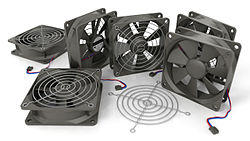
A computer fan is any fan inside, or attached to, a computer case used for active cooling. Fans are used to draw cooler air into the case from the outside, expel warm air from inside and move air across a heat sink to cool a particular component. Both axial and sometimes centrifugal (blower/squirrel-cage) fans are used in computers. Computer fans commonly come in standard sizes, such as 92 mm, 120 mm (most common), 140 mm, and even 200–220 mm. Computer fans are powered and controlled using 3-pin or 4-pin fan connectors.
Usage of a cooling fan
[edit]While in earlier personal computers it was possible to cool most components using natural convection (passive cooling), many modern components require more effective active cooling. To cool these components, fans are used to move heated air away from the components and draw cooler air over them. Fans attached to components are usually used in combination with a heat sink to increase the area of heated surface in contact with the air, thereby improving the efficiency of cooling. Fan control is not always an automatic process. A computer's BIOS can control the speed of the built-in fan system for the computer. A user can even supplement this function with additional cooling components or connect a manual fan controller with knobs that set fans to different speeds.[1]
In the IBM PC compatible market, the computer's power supply unit (PSU) almost always uses an exhaust fan to expel warm air from the PSU. Active cooling on CPUs started to appear on the Intel 80486, and by 1997 was standard on all desktop processors.[2] Chassis or case fans, usually one exhaust fan to expel heated air from the rear and optionally an intake fan to draw cooler air in through the front, became common with the arrival of the Pentium 4 in late 2000.[2]
Applications
[edit]
Case fan
[edit]
Fans are used to move air through the computer case. The components inside the case cannot dissipate heat efficiently if the surrounding air is too hot. Case fans may be placed as intake fans, drawing cooler outside air in through the front or bottom of the chassis (where it may also be drawn over the internal hard drive racks), or exhaust fans, expelling warm air through the top or rear. Some ATX tower cases have one or more additional vents and mounting points in the left side panel where one or more fans may be installed to blow cool air directly onto the motherboard components and expansion cards, which are among the largest heat sources.
Standard axial case fans are 40, 60, 80, 92, 120, 140, 200 and 220 mm in width and length. As case fans are often the most readily visible form of cooling on a PC, decorative fans are widely available and may be lit with LEDs, made of UV-reactive plastic, and/or covered with decorative grilles. Decorative fans and accessories are popular with case modders. Air filters are often used over intake fans, to prevent dust from entering the case and clogging up the internal components. Heatsinks are especially vulnerable to being clogged up, as the insulating effect of the dust will rapidly degrade the heatsink's ability to dissipate heat.
PSU fan
[edit]While the power supply (PSU) contains a fan with few exceptions, it is not to be used for case ventilation. The hotter the PSU's intake air is, the hotter the PSU gets. As the PSU temperature rises, the conductivity of its internal components decrease. Decreased conductivity means that the PSU will convert more of the input electric energy into thermal energy (heat). This cycle of increasing temperature and decreased efficiency continues until the PSU either overheats, or its cooling fan is spinning fast enough to keep the PSU adequately supplied with comparatively cool air. The PSU is mainly bottom-mounted in modern PCs, having its own dedicated intake and exhaust vents, preferably with a dust filter in its intake vent.
CPU fan
[edit]Used to cool the CPU (central processing unit) heatsink. Effective cooling of a concentrated heat source such as a large-scale integrated circuit requires a heatsink, which may be cooled by a fan;[3] use of a fan alone will not prevent overheating of the small chip.
Graphics card fan
[edit]
Used to cool the heatsink of the graphics processing unit or the memory on graphics cards. These fans were not necessary on older cards because of their low power dissipation, but most modern graphics cards designed for 3D graphics and gaming need their own dedicated cooling fans. Some of the higher powered cards can produce more heat than the CPU (dissipating up to 350 watts[4]), so effective cooling is especially important. Since 2010, graphics cards have been released with either axial fans, or a centrifugal fan also known as a blower, turbo or squirrel cage fan.
Chipset fan
[edit]Used to cool the heatsink of the northbridge of a motherboard's chipset; this may be needed where the system bus is significantly overclocked and dissipates more power than as usual, but may otherwise be unnecessary. As more features of the chipset are integrated into the central processing unit, the role of the chipset has been reduced and the heat generation reduced also.
Hard drive cooling
[edit]Fans may be mounted next to or onto a hard disk drive for cooling purposes. Hard drives can produce considerable heat over time, and are heat-sensitive components that should not operate at excessive temperatures. In many situations, natural convective cooling suffices, but in some cases fans may be required. These may include:
- Faster-spinning hard disks with greater heat production. (As of 2011[update] less expensive drives rotated at speeds up to 7,200 RPM; 10,000 and 15,000 RPM drives were available but generated more heat.)
- Large or dense arrays of disks (including server systems where disks are typically mounted densely)
- Any disks which, due to the enclosure or other location they are mounted in, cannot easily cool without fanned air.
Multiple purposes
[edit]
A case fan may be mounted on a radiator attached to the case, simultaneously operating to cool a liquid cooling device's working fluid and to ventilate the case. In laptops, a single blower fan often cools a heat sink connected to both CPU and GPU using heat pipes. In gaming laptops and mobile workstations, two or more heavy duty fans may be used. In rack-mounted servers, a single row of fans may operate to create an airflow through the chassis from front to rear, which is directed by passive ducts or shrouds across individual components' heat sinks.
Other purposes
[edit]Fans are, less commonly, used for other purposes such as:
- Water-cooling radiator transfers a lot of heat, and radiator fans have large static pressure (opposed to case fans that have high airflow) for dissipating heat.
- Laptop computers lack large openings in the case for warm air to escape. The laptop may be placed on a cooler – somewhat like a tray with fans built in – to ensure adequate cooling.
- Some high-end machines (including many servers) or when additional reliability is required, other chips like SATA/SAS controller, high speed networking controllers (40 Gbps Ethernet, Infiniband), PCIe switches, coprocessor cards (for example some Xeon Phi), some FPGA chips, south bridges are also actively cooled with a heatsink and a dedicated fan. These can be on a main motherboard itself or as a separate add-on board, often via PCIe card.
- Expansion slot fan – a fan mounted in one of the PCI or PCI Express slots, usually to supply additional cooling to the graphics cards, or to expansion cards in general.
- Optical drive fan – some internal CD and/or DVD burners included cooling fans.
- Memory fan – modern computer memory can generate enough heat that active cooling may be necessary, usually in the form of small fans positioned above the memory chips. This applies especially when the memory is overclocked or overvolted,[5] or when the memory modules include active logic, such as when a system uses Fully Buffered DIMMs (FB-DIMMs).[6] However, with newer lower voltages in use, such as 1.2v DDR4, this is less commonly needed than used to be the case.[citation needed] Most of the time memory modules, located close to CPU will receive enough of the air flow from the case or CPU fan, even if the air from CPU fan and radiator is warm. If the main CPU is water cooled, this small amount of airflow might be missing, and additional care about some airflow in a case or a dedicated memory cooling is required. Unfortunately most memory modules do not provide temperature monitoring to easily measure it.
- High power voltage regulators (VRM) often using switch mode power supplies do generate some heat due to power losses, mostly in the power MOSFET and in an inductor (choke). These, especially in overclocking situations require active cooling fan together with heatsink. Most of the MOSFETs will operate correctly at very high temperature, but their efficiency will be lowered and potentially lifespan limited. Proximity of electrolytic capacitors to a source of heat, will decrease their lifespan considerably and end in a progressively higher power losses and eventual (catastrophic) failure.[citation needed]
Physical characteristics
[edit]Due to the low pressure, high volume air flows they create, most fans used in computers are of the axial flow type; centrifugal and crossflow fans type.[7] Two important functional specifications are the airflow that can be moved, typically stated in cubic feet per minute (CFM), and static pressure.[8] Given in decibels, the sound volume figure can be also very important for home and office computers; larger fans are generally quieter for the same CFM.
Dimensions
[edit]| Fan size (mm) | Center of mounting hole spacing (mm) |
|---|---|
| 40 | 32 |
| 50 | 40 |
| 60 | 50 |
| 70 | 60 |
| 80 | 71.5 |
| 92 | 82.5 |
| 120 | 105 |
| 140 | 124.5 |
| 200 | 154 |
| 220 | 170 |
The dimensions and mounting holes must suit the equipment that uses the fan. Square-framed fans are usually used, but round frames are also used, often so that a larger fan than the mounting holes would otherwise allow can be used (e.g., a 140 mm fan with holes for the corners of a 120 mm square fan). The width of square fans and the diameter of round ones are usually stated in millimeters. The dimension given is the outside width of the fan, not the distance between mounting holes. Common sizes include 40 mm, 60 mm, 80 mm, 92 mm, 120 mm and 140 mm, although 8 mm,[9] 17 mm,[10] 20 mm,[11] 25 mm,[12] 30 mm,[13] 35 mm,[14] 38 mm,[15] 45 mm,[16] 50 mm,[17] 70 mm,[18] 200 mm, 220 mm,[19] 250 mm[20] and 360 mm[21] sizes are also available. Heights, or thickness, are typically 10 mm, 15 mm, 25 mm or 38 mm.

Typically, square 120 mm and 140 mm fans are used where cooling requirements are demanding, as for computers used to play games, and for quieter operation at lower speeds. Larger fans are usually used for cooling case, CPUs with large heatsink and ATX power supply. Square 80 mm and 92 mm fans are used in less demanding applications, or where larger fans would not be compatible. Smaller fans are usually used for cooling CPUs with small heatsink, SFX power supply, graphics cards, northbridges, etc.
Rotational speed
[edit]The speed of rotation (specified in revolutions per minute, RPM) together with the static pressure determine the airflow for a given fan. Where noise is an issue, larger, slower-turning fans are quieter than smaller, faster fans that can move the same airflow. Fan noise has been found to be roughly proportional to the fifth power of fan speed; halving the speed reduces the noise by about 15 dB.[22] Axial fans may rotate at speeds of up to around 38,000 rpm for smaller sizes.[23]
Fans may be controlled by sensors and circuits that reduce their speed when temperature is not high, leading to quieter operation, longer life, and lower power consumption than fixed-speed fans. Fan lifetimes are usually quoted under the assumption of running at maximum speed and at a fixed ambient temperature.
Air pressure and flow
[edit]A fan with high static pressure is more effective at forcing air through restricted spaces, such as the gaps between a radiator or heatsink; static pressure is more important than airflow in CFM when choosing a fan for use with a heatsink. The relative importance of static pressure depends on the degree to which the airflow is restricted by geometry; static pressure becomes more important as the spacing between heatsink fins decreases. Static pressure is usually stated in either mm Hg or mm H2O.
Bearing types
[edit]The type of bearing used in a fan can affect its performance and noise. Most computer fans use one of the following bearing types:
- Sleeve bearings use two surfaces lubricated with oil or grease as a friction contact. They often use porous sintered sleeves to be self-lubricating, requiring only infrequent maintenance or replacement. Sleeve bearings are less durable at higher temperatures as the contact surfaces wear and the lubricant dries up, eventually leading to failure; however, lifetime is similar to that of ball-bearing types (generally a little less) at relatively low ambient temperatures.[24] Sleeve bearings may be more likely to fail at higher temperatures, and may perform poorly when mounted in any orientation other than vertical. The typical lifespan of a sleeve-bearing fan may be around 30,000 hours at 50 °C (122 °F). Fans that use sleeve bearings are generally cheaper than fans that use ball bearings, and are quieter at lower speeds early in their life, but can become noisy as they age.[24]
- Rifle bearings are similar to sleeve bearings, but are quieter and have almost as much lifespan as ball bearings. The bearing has a spiral groove in it that pumps fluid from a reservoir. This allows them to be safely mounted with the shaft horizontal (unlike sleeve bearings), since the fluid being pumped lubricates the top of the shaft.[25] The pumping also ensures sufficient lubricant on the shaft, reducing noise, and increasing lifespan.
- Fluid bearings (or "Fluid Dynamic Bearing", FDB) have the advantages of near-silent operation and high life expectancy (though not longer than ball bearings), but tend to be more expensive.
- Ball bearings: Though generally more expensive than fluid bearings, ball bearing fans do not suffer the same orientation limitations as sleeve bearing fans, are more durable at higher temperatures, and are quieter than sleeve-bearing fans at higher rotation speeds. The typical lifespan of a ball bearing fan may be over 60,000 hours at 50 °C (122 °F).[24]
- Magnetic bearings or maglev bearings, in which the fan is repelled from the bearing by magnetism.
- Ceramic bearings are presumed to be more durable, relying on a stable ceramic that has resistance to wear against a stainless steel shaft.
Connectors
[edit] | This section possibly contains original research. (August 2020) |

Connectors usually used for computer fans are the following:
- Three-pin Molex connector KK family
- This Molex connector is used when connecting a fan to the motherboard or other circuit board. It is a small, thick, rectangular in-line female connector with two polarizing tabs on the outer-most edge of one long side. Pins are square and on a 0.1 inch (2.54 mm) pitch. The three pins are used for ground, +12 V power, and a tachometer signal. The Molex part number of receptacle is 22-01-3037. The Molex part number of the individual crimp contacts is 08-50-0114 (tin plated) or 08-55-0102 (semi gold plated). The matching PCB header Molex part number is 22-23-2031 (tin plated) or 22-11-2032 (gold plated). A corresponding wire stripper and crimping tools are also required.
- Four-pin Molex connector KK family
- This is a special variant of the Molex KK connector with four pins but with the locking/polarisation features of a three-pin connector. The additional pin is used for a pulse-width modulation (PWM) signal to provide variable speed control.[26] These can be plugged into 3-pin headers, but will lose their fan speed control. The Molex part number of receptacle is 47054-1000. The Molex part number of individual crimp contacts is 08-50-0114. The Molex part number of the header is 47053-1000.
- Four-pin Molex connector
- This connector is used when connecting the fan directly to the power supply. It consists of two wires (yellow/12 V and black/ground) leading to and splicing into a large in-line four-pin male-to-female Molex connector. The other two wires of the connector provide 5V (red) and ground (black too), and are not used in this case. This is the same connector as used on hard drives before the SATA became standard.
- Three-pin Molex connector PicoBlade family
- This connector is used with notebook fans or when connecting the fan to the video card.
- Dell proprietary
- This proprietary Dell connector is an expansion of a simple three-pin female IC connector by adding two tabs to the middle of the connector on one side and a lock-tab on the other side. The size and spacing of the pin sockets is identical to a standard three-pin female IC connector and three-pin Molex connector. Some models have the wiring of the white wire (speed sensor) in the middle, whereas the standard 3-pin Molex connector requires the white wire as pin #3, thus compatibility issues may exist.
- Others
- Some computer fans use two-pin connectors, of various designs.
Alternatives
[edit]If a fan is not desirable, because of noise, reliability, or environmental concerns, there are some alternatives. Some improvement can be achieved by eliminating all fans except one in the power supply which also draws hot air out of the case.[27]
Systems can be designed to use passive cooling alone, reducing noise and eliminating moving parts that may fail. This can be achieved by:
- Natural convection cooling: carefully designed, correctly oriented, and sufficiently large heatsinks can dissipate up to 100 W by natural convection alone
- Heatpipes to transfer heat out of the case
- Undervolting or underclocking to reduce the need for heat dissipation, by lowering voltage or reducing compute intensity
- Submersive liquid cooling, placing the motherboard in a non-electrically conductive fluid, provides excellent convection cooling and protects from humidity and water without the need for heatsinks or fans. Special care must be taken to ensure compatibility with adhesives and sealants used on the motherboard and ICs. This solution is used in some external environments such as wireless equipment located in the wild.[citation needed]
Other methods of cooling include:
- Water cooling
- Mineral oil
- Liquid nitrogen
- Refrigeration, e.g. by Peltier effect devices
- Ionic wind cooling is being researched, whereby air is moved by ionizing air between two electrodes. This replaces the fan and has the advantage of no moving parts[28] and less noise.[29]
See also
[edit]
- Glossary of computer hardware terms
- Fan (machine)
- Centrifugal fan
- Computer cooling
- Computer fan control
- Small form factor (SFF)
- Software programs for controlling PC fans: Argus Monitor and SpeedFan
References
[edit]- ^ Gordon, Whitson (2017-07-03). "How to Auto-Control Your PC's Fans for Cool, Quiet Operation". How-To Geek. Retrieved 2017-08-18.
- ^ a b Mueller, Scott 2005. Upgrading and Repairing PCs. Que Publishing. 16th edition. pp 1274–1280
- ^ Acosta, Jeremy. "Air Cooling or Liquid Cooling for PC What to Choose and Why?". Games and Gears. Archived from the original on 2017-02-11. Retrieved 2017-02-14.
- ^ "Nvidia's new RTX 3090 is a $1,499 monster GPU designed for 8K gaming". The Verge. September 2020. Retrieved 2020-10-21.
- ^ "The CoolIT Systems RAM Fan Review: Does Memory Really Need a Fan?". Retrieved 2013-02-05.
- ^ Anand Lal Shimpi (2006-08-09). "Apple's Mac Pro: A Discussion of Specifications". AnandTech. Archived from the original on June 6, 2011. Retrieved 2014-10-15.
- ^ Pelonis, Sam (2015-11-04). "Axial Vs. Centrifugal Fans". Pelonis Technologies. Retrieved 2017-08-18.
- ^ Acosta, Jeremy. "High Airflow vs Static Pressure Fans". Games and Gears Elite. Archived from the original on 2020-03-29. Retrieved 2017-02-17.
- ^ "SunOn UF383-100 8×8×3 mm fan" (PDF). Retrieved 2015-03-07.
- ^ "EC 1708 fan series". evercool.com.tw. Archived from the original on 2015-05-15. Retrieved 2015-02-20.
- ^ "EC 2008 fan series". evercool.com.tw. Archived from the original on 2015-09-24. Retrieved 2015-02-20.
- ^ "2.5cm Black Fan – Akasa Thermal Solution". akasa.com.tw. Retrieved 1 April 2015.
- ^ "RETAIL PACKAGE 3010 SERIES – EVERCOOL". evercool.com.tw. Archived from the original on 2019-02-11. Retrieved 2018-02-20.
- ^ "RETAIL PACKAGE 3510 SERIES – EVERCOOL". evercool.com.tw. Archived from the original on 2019-02-10. Retrieved 2018-02-20.
- ^ "EC 3838 fan series". evercool.com.tw. Archived from the original on 2015-09-24. Retrieved 2015-02-20.
- ^ "RETAIL PACKAGE 4510 SERIES – EVERCOOL". evercool.com.tw. Archived from the original on 2019-02-10. Retrieved 2018-02-20.
- ^ "5cm Black Fan – Akasa Thermal Solution". akasa.com.tw. Retrieved 2018-02-20.
- ^ "7cm Black Fan – Akasa Thermal Solution". akasa.com.tw. Retrieved 2018-02-20.
- ^ "22cm Black Fan – Akasa Thermal Solution". akasa.com.tw. Retrieved 2018-02-20.
- ^ "250 mm-Lüfter – SHARKOON Technologies GmbH". sharkoon.com. Retrieved 1 April 2015.
- ^ "360mm Silent Jumbo Fan". rexflo.com. Archived from the original on 2 April 2015. Retrieved 1 April 2015.
- ^ "Top 10 noise control techniques" (PDF). www.hse.gov.uk. UK Health and Safety Executive.
- ^ "May 28, 2020 San Ace | Product News | Products | SANYO DENKI".
- ^ a b c Williams, Melody. "Ball vs Sleeve: A Comparison in Bearing Performance" (PDF). Archived from the original (PDF) on 2011-01-02. Retrieved 2007-10-30.
- ^ "Coolermaster Neon LED Case Fans Review". 2003-03-25. Retrieved 2007-12-05.
- ^ "4-Wire Pulse Width Modulation (PWM) Controlled Fans Specification, Revision 1.3" (PDF). Intel Corporation. September 2005. Archived from the original (PDF) on 2011-07-26. Retrieved 2009-12-11.
- ^ Silent PC Review Recommended Power Supplies, retrieved 2010-08-01
- ^ Greene, Kate (2009-05-19). "A Laptop Cooled with Ionic Wind | MIT Technology Review". Technologyreview.com. Archived from the original on 2011-11-15. Retrieved 2015-02-20.
- ^ Patel, Prachi (2007-08-22). "Cooling Chips with an Ion Breeze | MIT Technology Review". Technologyreview.com. Archived from the original on 2011-06-07. Retrieved 2015-02-20.
External links
[edit]- 4-Wire PWM Controlled Fans Specification v1.3 – Intel
- 3-Wire and 4-Wire Fan Connectors – Intel
- 3-Wire and 4-Wire Fan Pinouts – AllPinouts
- How PC Fans Work (2/3/4-wire) – PCB Heaven
- Why and How to Control (2/3/4-wire) Fan Speed for Cooling Electronic Equipment – Analog Devices
- PWM Fan Controller project – Alan's Electronic Projects
Computer fan
View on GrokipediaOverview and History
Purpose and Basic Operation
A computer fan is typically an axial device consisting of rotating blades mounted on a central shaft that draws in ambient air and propels it parallel to the axis of rotation, directing airflow over heat-generating components such as central processing units (CPUs), graphics processing units (GPUs), and power supply units (PSUs) to prevent thermal damage.[4] While centrifugal fans, which redirect airflow perpendicular to the intake, are occasionally used in specialized computing setups for higher pressure applications, axial designs dominate due to their high-volume, low-pressure characteristics suited for general enclosure cooling.[4] These fans function as low-pressure air pumps, converting electrical energy from a motor into kinetic energy to generate directed airflow.[5] The core purpose of computer fans lies in enabling forced convective cooling, where heat from electronic components is transferred to the surrounding air through molecular collisions enhanced by air movement, far more efficiently than passive conduction or natural convection alone.[6] By creating structured airflow paths—typically with intake fans pulling cooler external air across hot surfaces and exhaust fans expelling warmed air—fans maintain component temperatures within safe operational limits, typically below 80–90°C for most processors, thereby extending hardware lifespan and ensuring stable performance.[6] This convective process relies on the fan's ability to increase the heat transfer coefficient at component surfaces, with airflow rates often measured in cubic feet per minute (CFM) to quantify cooling efficacy.[7] Key structural elements include the impeller (comprising angled blades that capture and accelerate air), the hub (a central mounting that houses the bearing and connects to the motor shaft), the frame (a rigid enclosure that secures the assembly and mounts to chassis or heatsinks), the motor (usually a brushless DC type for efficient, variable-speed operation), and an optional shroud (which channels airflow to minimize turbulence and improve directionality).[8] These components work in unison to optimize air displacement while minimizing noise and vibration. Fan operation is governed by performance curves that illustrate the inverse relationship between speed (measured in revolutions per minute, RPM) and applied voltage for DC-controlled models, where lower voltages reduce speed and airflow for quieter idle states, while higher voltages (up to 12V) boost cooling under load.[9] These curves, often software-configurable via motherboard BIOS or dedicated controllers, map fan RPM to system temperature thresholds, ensuring proportional response to thermal demands without constant high-speed operation.[9] A prevalent failure mode in basic fan operation stems from dust accumulation on blades, within the hub, or across intake filters, which can significantly impede airflow over time, elevating temperatures and risking component throttling or permanent damage.[10] Regular maintenance, such as compressed air cleaning every 3–6 months, mitigates this by restoring unimpeded air paths and preventing imbalance-induced bearing wear.[10]Historical Development
The use of fans for cooling in computing dates back to the 1970s, when mainframe systems from manufacturers like IBM incorporated air-cooling mechanisms, including fans, to manage heat in densely packed racks as part of hybrid air-liquid systems developed during that decade.[11] By the early 1980s, personal computers began integrating fans, with the IBM PC Model 5150, released in 1981, featuring an internal fan in its power supply unit to dissipate heat from the system's components.[12] This marked an initial step toward active cooling in consumer-grade machines, though early designs relied primarily on passive airflow supplemented by these basic fans. During the 1980s and 1990s, computer fans shifted toward greater standardization to accommodate rising component densities and performance demands. Smaller 80mm fans became common for CPU coolers, particularly with Intel's early processor designs like the Pentium series, while 120mm sizes emerged for case ventilation as enclosures grew larger; by the late 1990s, these dimensions were widely adopted across PC hardware for compatibility and efficiency.[13] Intel's CPU reference coolers further promoted 80mm fans as a de facto standard, enabling better heat dissipation without excessive noise in desktop systems. In the 2000s, advancements focused on smarter control mechanisms to optimize performance and acoustics. Intel introduced the 4-wire Pulse Width Modulation (PWM) specification in November 2003, allowing variable fan speeds based on temperature feedback via a dedicated PWM pin, which reduced constant high-speed operation and improved energy efficiency in systems like those using the Pentium 4 processors.[14] The 2010s brought aesthetic and durability enhancements alongside form factor innovations. RGB lighting integration began in the early 2010s with LED-equipped fans from brands like Corsair and NZXT, enabling customizable illumination synchronized with PC components for gaming builds.[15] Bearing technologies transitioned from basic sleeve types to more robust ball and fluid dynamic bearings, offering longer lifespans (up to 70,000 hours) and reduced wear in high-RPM applications.[16] For laptops, slim fans under 10mm thick proliferated, driven by demands for thinner chassis in ultrabooks, with manufacturers like Nidec developing micro-sized impellers to maintain airflow in compact spaces.[17] From 2020 to 2025, trends addressed escalating thermal challenges and sustainability. High thermal design power (TDP) GPUs, exceeding 300W in models like NVIDIA's RTX 40-series, led to noisier axial fans, prompting hybrid liquid-air cooling systems that combine radiator-assisted liquid loops with auxiliary air fans for quieter operation in AI and gaming rigs.[18] Post-2020 environmental regulations, including the U.S. Department of Energy's finalization of a test procedure for fans and blowers in 2023 (with proposed conservation standards later withdrawn in early 2025), spurred eco-friendly low-power designs with variable-speed motors and reduced energy consumption, aligning with broader EU ecodesign directives tightening minimum efficiency thresholds by 2026.[19][20]Applications in Computing Systems
Case and Chassis Fans
Case and chassis fans are integral to maintaining optimal thermal conditions within a desktop computer's enclosure by facilitating directed airflow that removes heat generated by internal components. These fans primarily function to create either positive or negative air pressure: positive pressure occurs when intake fans push more air into the case than exhaust fans remove, forcing hot air out through vents and minimizing unfiltered air entry; negative pressure, conversely, involves more exhaust than intake, pulling air in through any openings but potentially increasing dust ingress if not managed. This airflow prevents hotspots by ensuring cool ambient air circulates over heat-producing elements like the motherboard and graphics card, with studies showing that balanced configurations can reduce overall system temperatures by 5-10°C compared to stagnant setups.[21][22] Common configurations position intake fans at the front (typically 2-3 units) to draw in cool air, while exhaust fans (1-2 units) are mounted at the rear and top to expel warmed air, following a front-to-back and bottom-to-top flow path that aligns with natural convection. Guidelines recommend a slight positive pressure bias—such as three 140mm front intakes paired with one rear exhaust—to optimize cooling without excessive dust accumulation, as this setup leverages intake filters to capture particulates while maintaining 200-250 CFM total airflow in mid-tower cases. Fan placement adheres to ATX standards, with mounting points spaced for standard diameters and oriented to avoid turbulence from obstructing components like drive bays.[21][23] These fans significantly influence system thermals by promoting uniform air distribution, where positive pressure configurations can result in slightly lower CPU and GPU temperatures (typically less than 2°C) under load compared to negative pressure setups, primarily due to filtered, consistent intake. Interaction with dust filters on intake vents is crucial, as they significantly reduce particulate buildup in positive pressure environments, extending component lifespan by preventing thermal throttling from clogged heatsinks; however, empirical tests indicate that filter quality matters more than pressure differential alone for dust control. High-speed operation can introduce noise, often mitigated by fluid dynamic bearing types for smoother rotation.[23][21] In ATX cases, the most prevalent sizes are 120mm and 140mm fans, which fit standard mounting holes spaced 105mm and 125mm apart, respectively, allowing compatibility across most mid-tower enclosures that support up to six such units. Mounting typically uses M3 screws through pre-drilled chassis holes for secure attachment, or rubber dampers inserted into fan frames and case slots to absorb vibrations and reduce transmitted noise by 5-10 dB. For enthusiast builds prioritizing silence, the Noctua NF-A12x25 PWM series exemplifies high-performance case fans, delivering 60 CFM at 22.6 dB(A) with advanced aerodynamic designs for low-turbulence airflow in quiet-oriented systems.[24][25]Processor and Component-Specific Fans
Processor and component-specific fans are engineered to target localized heat sources in computing systems, providing direct airflow to critical elements such as central processing units (CPUs), graphics processing units (GPUs), and supporting circuitry. These fans differ from general chassis cooling by their close proximity and tailored integration, ensuring efficient heat dissipation without relying on ambient case airflow. In high-performance setups, they prevent overheating that could lead to performance degradation or hardware damage. CPU fans primarily employ two main designs: air-based tower coolers and all-in-one (AIO) liquid cooling hybrids. Tower coolers feature a large heatsink with multiple heatpipes and one or two 120mm or 140mm fans pushing air through fins, offering robust cooling for desktop processors; for instance, the Noctua NH-D15 G2 uses a dual-tower configuration to handle thermal design power (TDP) ratings exceeding 250W quietly.[26] AIO hybrids integrate a pump directly on the CPU with a remote radiator cooled by multiple fans, providing superior performance for overclocked systems; models like the Arctic Liquid Freezer III 360 manage TDPs up to 300W or more in 2025-era CPUs such as Intel's Core i9 series or AMD's Ryzen 9, where sustained loads can reach up to around 250W (Intel PL2 or equivalent for AMD). Heatsink-integrated designs, common in stock coolers, use smaller 80-92mm fans clipped directly to aluminum or copper bases for mid-range TDPs around 65-125W.[27] GPU fans focus on the graphics card's power-hungry dies, typically using axial configurations for consumer cards. High-end NVIDIA GeForce RTX series, such as the RTX 5090, often incorporate triple 90-100mm axial fans mounted on an open-air heatsink to exhaust heat sideways into the case, supporting TDPs over 400W in gaming workloads.[28] Consumer graphics cards typically feature either dual-fan or triple-fan axial coolers. Triple-fan GPUs generally offer better cooling performance (lower temperatures and more thermal headroom) and lower noise levels than dual-fan GPUs due to larger heatsinks, greater airflow, and the ability to run fans at lower RPMs for the same cooling effect. Dual-fan designs can be comparable or quieter in some cases (especially with larger fans on mid-range cards) but often run hotter and louder under heavy load, particularly on high-power GPUs. The difference depends on the specific model and GPU tier, with triple-fan typically superior for demanding use.[29][30] In contrast, blower-style fans employ a single radial impeller to draw air through the card and expel it via a rear exhaust, optimizing for multi-GPU setups like SLI by directing hot air out of the chassis and minimizing thermal interference between cards.[31] This design, seen in variants like the PNY RTX 4070 blower edition, is particularly suited for dense server or workstation environments.[32] Chipset and voltage regulator module (VRM) fans address secondary heat from motherboard components, using compact 40mm units to cool the southbridge chipset (a legacy term for I/O controllers) and power delivery phases. These low-profile fans, often 12V 0.08A models with 2-pin connectors, mount directly onto heatsinks via clips or adhesives, reducing temperatures by 10-15°C in high-load scenarios like overclocking.[33] They are essential for maintaining stability in enthusiast boards where VRMs handle 100A+ currents.[34] Mounting standards ensure compatibility and secure attachment for these fans. CPU coolers typically use a motherboard backplate with spring-loaded clips or screws to press the heatsink against the processor, aligning with sockets like AMD's AM4/AM5 or Intel's LGA 1700/1851 for even pressure distribution.[35] Individual fans on heatsinks employ wire clips hooked into frame holes and notches for quick installation.[36] For GPUs, fans integrate into a unified shroud—a plastic or aluminum cover bolted to the PCB—that channels airflow over the GPU core and memory, with fan mounts using screw fittings or push-pins for modular replacement.[37] To prevent thermal throttling, where CPUs or GPUs reduce clock speeds above 90-100°C to avoid damage, these fans ramp up via sensor feedback loops. Temperature sensors embedded in the processor monitor die heat in real-time, signaling the motherboard's BIOS or GPU firmware to increase fan speeds proportionally—often using pulse-width modulation (PWM) for precise control—keeping cores below throttling thresholds during bursts up to 300W.[38] This dynamic response ensures sustained performance without manual intervention.[39]Power Supply and Storage Cooling
Power supply units (PSUs) in computers typically employ axial fans ranging from 120 mm to 135 mm in diameter to exhaust heat generated by internal components such as transformers and rectifiers. These fans draw in cool air through the PSU's bottom intake and direct it across heat-producing elements before expelling hot air out the rear exhaust, a bottom-to-top airflow pattern common in modular ATX designs to isolate PSU thermals from the main chassis.[40] Higher 80+ efficiency certifications, such as Gold or Platinum, reduce overall heat generation by minimizing energy waste— for instance, a Platinum-rated PSU converts up to 94% of input power at typical loads, lowering the thermal load on the fan and allowing it to operate at lower speeds or less frequently.[41] In practice, this efficiency enables features like zero-RPM modes in PSUs from manufacturers such as Corsair, where the fan remains off during low-load conditions (below approximately 40-50% utilization) to eliminate noise, activating only when internal temperatures exceed a threshold around 50-60°C.[42] However, PSUs face unique challenges from dust accumulation, which clogs fan blades and filters, impeding airflow and leading to overheating failures; regular cleaning is essential, as dust buildup can reduce cooling efficiency by up to 20-30% over time in dusty environments.[43] For longevity in such conditions, sleeve or ball-bearing fans are often preferred due to their tolerance for particulate matter.[44] Storage cooling focuses on dedicated fans for hard disk drives (HDDs) and solid-state drives (SSDs) in enclosures or RAID arrays, where 40 mm to 80 mm fans are mounted in bays to target 3.5-inch drives, providing directed airflow to maintain operating temperatures below 50°C and prevent thermal throttling.[45] In multi-drive RAID configurations, vibration from spinning HDD platters can induce rotational vibration (RV) that misaligns read/write heads, causing data errors or array failures; vibration-dampening mounts, such as rubber grommets or silicone isolators, significantly absorb these harmonics, ensuring data integrity without excessive noise transmission.[46] SSDs generate minimal heat (typically under 5W per drive) and require less aggressive cooling than HDDs, but in dense server RAID setups, shared bay fans still benefit them by promoting overall airflow to avoid localized hotspots.[47]Specialized and Multi-Function Uses
In portable computing devices such as laptops and ultrabooks, specialized thin fans measuring 5mm to 10mm in thickness are employed to maintain compact form factors while providing effective airflow.[17] These ultra-slim fans, often utilizing advanced bearing technologies like hydraulic or ball bearings, operate at high speeds up to 2500 RPM to dissipate heat efficiently in space-constrained environments.[48] Integration with vapor chambers enhances thermal transfer by spreading heat across a larger surface area before it reaches the fans, allowing for quieter operation and lower temperatures in thin-and-light models.[49] Gaming laptops frequently incorporate dual-fan configurations, where two independent fans target the CPU and GPU separately, supporting sustained high-performance workloads without excessive throttling.[50] In server and rackmount systems, high-static-pressure fans are critical for overcoming airflow resistance in densely packed data center environments. These fans, such as axial types with static blades, achieve static pressures up to 1100 Pa and airflow rates of 0.83 m³/min, enabling efficient cooling of components like CPUs and storage arrays in 1U server chassis.[51] Counter-rotating designs further boost performance, delivering up to 1700 Pa of pressure and 0.93 m³/min of airflow by minimizing turbulence through opposing blade rotations.[51] Redundant fan arrays provide failover capabilities, ensuring continuous operation if individual units fail, which is essential for high-availability data centers handling intensive computational loads.[52] Multi-function computer fans extend beyond pure cooling by incorporating aesthetic and organizational features. Many modern case fans integrate addressable RGB lighting, allowing synchronized illumination effects that enhance visual appeal while maintaining airflow up to 70 CFM.[53] These RGB-equipped fans often come in modular kits supporting up to 10 units per controller, facilitating customizable lighting in gaming setups.[54] External USB-powered fans serve as versatile aids for enclosures, such as NAS or media servers, with dual-ball bearings and multi-speed controls delivering quiet operation at 120mm sizes for targeted cooling without internal modifications.[55] For gaming peripherals, add-on cooling fans address overheating in consoles like the PlayStation 5 through clip-on or stand-mounted designs. These accessories feature triple high-speed fans operating at 5500 RPM with 4.9 CFM per unit, drawing power from the console's USB port to exhaust hot air and prevent thermal throttling during extended sessions.[56] In virtual reality headsets, micro-fans provide targeted airflow to reduce fogging and user discomfort. Hybrid axial-radial models, such as the 17mm RaAxial MF17B05, integrate into compact coolers to blow air sideways through heat sinks, offering lightweight, low-noise solutions weighing under 50 grams.[57] As of 2025, emerging applications in AI accelerators for edge devices leverage silicon-based micro-cooling fans to manage heat in compact, power-efficient systems. These piezo-MEMS fans, as thin as 1mm, enable reversible airflow via software commands and scale through arrays to handle thermal loads from advanced processors without traditional noise or bulk.[58] Such innovations support on-device AI inference in smartphones and IoT hardware, reducing throttling and extending operational reliability in thermally constrained environments.[58]Design and Performance Characteristics
Size and Form Factors
Computer fans are standardized by their frame dimensions, which determine compatibility with PC chassis and mounting points. The most common sizes include 40 mm, 80 mm, 92 mm, 120 mm, and 140 mm, referring to the outer square frame that houses the blades and motor.[59] These dimensions ensure interchangeable use across various hardware configurations, with 120 mm and 140 mm being predominant in modern desktop builds for balancing space and cooling capacity.[60] Thickness, or depth, varies to accommodate different installation scenarios, typically ranging from 15 mm for slim profiles to 38 mm for standard models. Slimmer 15 mm or 25 mm variants are essential for small form factor (SFF) systems, such as Mini-ITX builds, where space constraints demand compact cooling without sacrificing airflow paths.[61] In contrast, thicker 30 mm or 38 mm fans provide enhanced blade length for improved performance in full-size ATX or extended ATX cases.[24] Form factors predominantly feature square frames with four corner mounting holes for secure attachment using screws or clips. Hole spacing follows industry conventions, such as 105 mm center-to-center for 120 mm fans and 125 mm for 140 mm fans, enabling precise alignment with case vents and radiator brackets.[62] While square designs dominate case and chassis applications, round form factors occasionally appear in specialized mounts, like certain CPU coolers or legacy hardware, though they are less common due to compatibility challenges.[63] These sizes align with PC form factor standards like ATX and Mini-ITX, where case manufacturers incorporate matching mounting apertures to support modular upgrades. For instance, ATX mid-tower cases often include multiple 120 mm or 140 mm slots, while ITX enclosures prioritize 80 mm or 92 mm options to fit compact layouts.[21] The choice of fan size directly influences case design, as larger dimensions require wider panels and airflow-optimized layouts to prevent turbulence and ensure even thermal distribution.[64] Beyond standard sizes, custom variations extend to 200 mm and larger for high-capacity cooling in enthusiast-grade cases. These oversized fans, such as those from Noctua or Cooler Master, fit specialized large-form-factor chassis like full towers, providing expansive airflow coverage for multi-GPU or server setups.[65]Speed, Airflow, and Pressure
The rotational speed of computer fans, measured in revolutions per minute (RPM), typically ranges from 800 to 3000 RPM, depending on the fan's design and application, with quieter models operating below 1500 RPM and high-performance variants exceeding 2000 RPM.[66][67] Fan curves, which graph RPM against system load (often tied to temperature sensors), allow dynamic adjustment to balance cooling and noise; for instance, speeds may remain low (e.g., 500-1000 RPM) under light loads and ramp up to maximum under heavy thermal stress.[68][69] Airflow quantifies the volume of air a fan displaces, expressed in cubic feet per minute (CFM), with typical 120mm computer fans delivering 50-100 CFM at full speed.[70] A basic approximation for airflow calculation is CFM = (RPM × blade area × efficiency factor), where blade area accounts for the fan's swept volume and efficiency reflects aerodynamic design losses, though actual values follow fan affinity laws for precise scaling.[71] For example, the Phanteks T30 achieves 101 CFM at 3000 RPM in its high-performance mode.[72] Static pressure measures a fan's ability to overcome airflow resistance from components like heatsinks or radiators, rated in millimeters of water (mmH2O), with values often ranging from 1.0 to 7.0 mmH2O for computer fans.[73] High-static-pressure fans, optimized with denser blades and higher RPM for confined spaces, contrast with high-airflow fans, which prioritize broader blade spans for unrestricted case ventilation; the Noctua NF-A12x25, for instance, provides 60.1 CFM airflow and 2.34 mmH2O static pressure at a maximum of 2000 RPM, while the be quiet! Silent Wings Pro 4 delivers 83.9 CFM and 5.31 mmH2O at a maximum of 3000 RPM, highlighting trade-offs where higher maximum speeds enable greater airflow and pressure capabilities.[73][74][75] Performance metrics like airflow and static pressure are evaluated under standardized conditions, such as those in ISO 5801, which outlines procedures for testing fan aerodynamics in controlled airways, including volume flow rate and total pressure measurements with uncertainty quantification.[76] Comparisons often normalize for noise to assess efficiency across models. In 2025, variable-speed fans with optimized blade angles, such as the Phanteks T30 in hybrid mode, deliver over 100 CFM at reduced RPM (e.g., 1200-2000) while maintaining low noise through semi-passive operation below certain PWM thresholds.[72][77]Bearing and Construction Types
Computer fans employ various bearing types to support the rotation of the fan blade assembly, influencing durability, noise levels, and operational lifespan. The primary bearing mechanisms include sleeve, ball, fluid dynamic, rifle, and magnetic levitation designs, each balancing cost, performance, and longevity in cooling applications.[78][16] Sleeve bearings, the most economical option, consist of a simple cylindrical shaft rotating within a lubricated sleeve, offering initial quiet operation at low speeds but suffering from rapid lubricant evaporation and wear, typically lasting 30,000 to 40,000 hours under continuous use. As the lubricant degrades and wear progresses, sleeve bearings often develop rattling or grinding noises due to increased shaft play and friction.[16][79][80] Ball bearings use rolling steel balls between races to minimize friction, providing greater durability with lifespans of 60,000 to 75,000 hours, though they generate more noise from ball impacts, particularly at reduced speeds.[16] Fluid dynamic bearings (FDB) leverage a thin film of lubricant pressurized by the shaft's motion to create hydrodynamic lift, achieving near-silent operation and extended lifespans up to 150,000 hours or more, making them ideal for high-reliability PC cooling.[81] Rifle bearings represent a hybrid evolution of sleeve designs, incorporating helical grooves along the shaft to enhance lubricant circulation and reduce evaporation, thereby extending service life to approximately 40,000 to 50,000 hours while maintaining affordability and moderate noise levels; these became popular in the 2010s for mid-range computer fans seeking balanced cost and performance. Like sleeve bearings, prolonged use can lead to wear manifesting as rattling noises.[82][78] Magnetic levitation (MagLev) bearings, featured in premium models from the late 2010s and 2020s, suspend the rotor using magnetic fields to eliminate physical contact, minimizing friction and wear for lifespans exceeding 200,000 hours and exceptionally low noise.[83][84] Degraded bearings, particularly in sleeve and rifle types, are a common cause of rattling noises in computer fans. While some fans with accessible bearings allow for limited user maintenance—such as carefully removing the rear label (if present), cleaning the shaft, and applying a few drops of light machine oil or appropriate lubricant—this is not suitable for sealed designs like ball or fluid dynamic bearings, may provide only temporary relief, and carries risks of contamination or further damage if performed improperly. For persistent or severe noise issues indicative of bearing wear, replacement with a fan featuring more durable bearings is the most reliable solution to restore quiet and efficient operation.[80][85] Fan construction typically utilizes injection-molded plastic for frames and blades to ensure lightweight design and cost-effectiveness, with some high-performance models incorporating aluminum blades for enhanced rigidity and resistance to deformation under high speeds.[86] Anti-vibration features, such as rubberized corners or silicone gaskets on mounting points, are integrated to dampen mechanical resonance and transmit less noise to the chassis.[87][88] All modern computer fans rely on brushless DC (BLDC) motors, which use electronic commutation to drive the rotor without physical brushes, delivering high efficiency (up to 70% better than brushed alternatives), reduced electrical noise, and extended operational life by avoiding brush wear.[89][90] Premium 2020s fans may incorporate MagLev principles into BLDC motors for further friction reduction.[84] Lifespan is quantified via mean time between failures (MTBF) ratings, which estimate the time until 50% of units fail under specified conditions like 24/7 operation at ambient temperatures; for instance, ball bearing fans often rate at 250,000 to 300,000 hours in ideal scenarios.[91] Dust accumulation accelerates bearing degradation by increasing friction and restricting lubricant flow, potentially halving effective life in dusty environments, while elevated temperatures exacerbate wear—fan life roughly halves for every 10°C rise above optimal levels.[92][93] Bearing choice also imposes practical speed limits due to friction thresholds and contributes to noise via mechanical vibrations, though detailed metrics fall outside mechanical construction focus.[91][94]| Bearing Type | Typical Lifespan (hours) | Noise Profile | Cost/Use Case |
|---|---|---|---|
| Sleeve | 30,000–40,000 | Quiet initially, increases with wear | Low-cost, budget fans |
| Ball | 60,000–75,000 | Noisier, especially low RPM | Durable, industrial-grade |
| Fluid Dynamic | 100,000–150,000+ | Very quiet | High-reliability PC cooling |
| Rifle (Hybrid) | 40,000–50,000 | Moderate | Mid-range 2010s models |
| Magnetic Levitation | 200,000+ | Extremely quiet | Premium 2020s enthusiasts |