Hubbry Logo
Computer towerComputer towerMain
Open search
Computer tower
Community hub
Computer tower
logo
8 pages, 0 posts
0 subscribers
Be the first to start a discussion here.
Contribute something
Computer tower
Computer tower
from Wikipedia

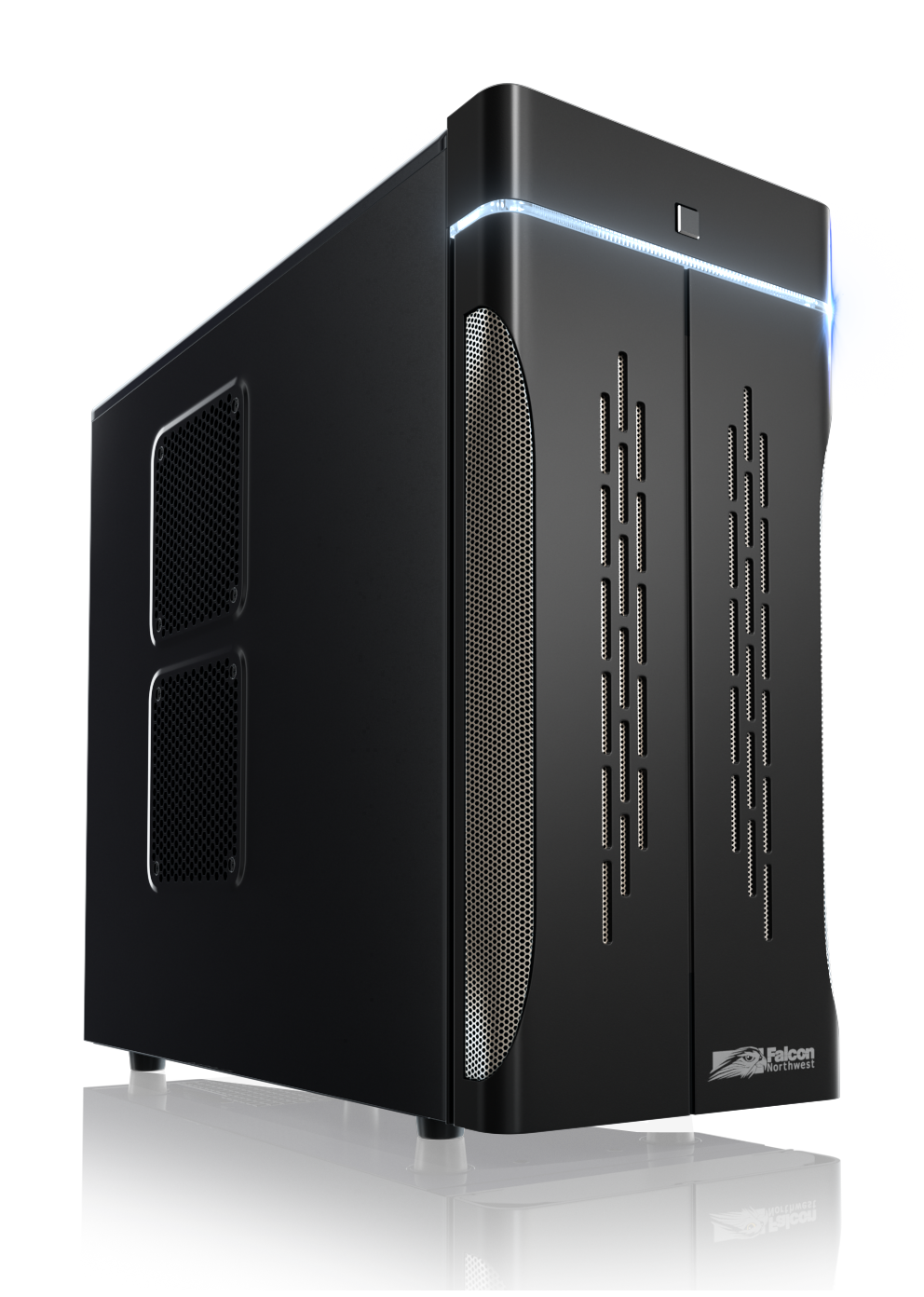
A mid-tower computer case from c. 2011

In personal computing, a tower unit, or simply a tower, is a form factor of desktop computer case whose height is much greater than its width, thus having the appearance of an upstanding tower block, as opposed to a traditional "pizza box" computer case whose width is greater than its height and appears lying flat.

Compared to a pizza box case, the tower tends to be larger and offers more potential for internal volume for the same desk area occupied, and therefore allows more hardware installation and theoretically better airflow for cooling. Multiple size subclasses of the tower form factor have been established to differentiate their varying sizes, including full-tower, mid-tower, midi-tower, mini-tower, and deskside; these classifications are however nebulously defined and inconsistently applied by different manufacturers.

Although the traditional layout for a tower system is to have the case placed on top of the desk alongside the monitor and other peripherals, a far more common configuration is to place the case on the floor below the desk or in an under-desk compartment, in order to free up desktop space for other items.[1] Computer systems housed in the horizontal "pizza box" form factor—once popularized by the IBM PC in the 1980s but fallen out of mass use since the late 1990s—have been given the term desktops to contrast them with towers that are often situated under the desk.

Subclasses

[edit]

Tower cases are often categorized as mini-tower, midi-tower, mid-tower, full-tower, and deskside. The terms are subjective and inconsistently defined by different manufacturers.[2][3][4]

Full-tower

[edit]
A full-tower computer case from c. 2010

Full-tower cases, typically 20 inches (51 cm) or more in height, are designed for maximum scalability.[5] For case modding enthusiasts and gamers wanting to play the most technically challenging video games, the full-tower case also makes for an ideal gaming PC case because of their ability to accommodate extensive water cooling setups and larger case fans.[6] Traditionally, full-tower systems had between four and six externally accessible half-height 5.25-inch drive bays and up to ten 3.5-inch drive bays.[6][5]: 138  Some full-tower cases included locking side-doors and other physical security features to prevent theft of the discs inside those bays.[7] However, as modern computing technology has moved away from mechanical hard drives and optical drives toward solid-state devices such as USB flash drives, solid-state drives (SSDs), large-capacity external storage, and cloud storage, such an abundance of internal and external drive bays is less common.[8][9] More recent full-tower cases instead only have one or two external drive bays, or none at all, with the internal bays moved elsewhere in the case to free up room and improve airflow.[10]

Full-tower cases readily fit full-size ATX motherboards but may also accommodate smaller microATX motherboards due to the former standard's interoperability in mounting holes. Full-tower cases may also have increased dimensional depth and length over their shorter counterparts, allowing them to accommodate Extended ATX motherboards, larger graphics cards and heat sinks.[10] Since the 2010s, full-tower cases are commonly used by enthusiasts as showpiece cases with custom water cooling, RGB LED lighting, and tempered glass or acrylics side panel.[11][12][13] They may also hold two motherboards (as is the case with the Corsair 1000D) and dual power supplies (Corsair 900D).[14][15]

Mid-tower

[edit]

Mid-tower cases, usually between 16 inches (41 cm) and 20 inches (51 cm) in height, are the most common form factor of personal computer towers.[6][10][16] Before the late 2010s, mid-towers contained between three and four 5.25-inch drive bays and an equivalent number of 3.5-inch bays to house optical disc drives, floppy disk drives and hard disk drives, leaving just enough room for a standard ATX motherboard and power supply unit.[16] Since the widespread adoption of USB flash drives, solid-state drives (which take up far less space than spinning hard disk drives) and the declining usage of internal optical drives, the number of drive bays has become less of a concern to the contemporary computer user, the internal space of mid-towers is now used more commonly for closed-loop water coolers, dual graphics cards, and tightly stacked SSDs.[10]

Midi-tower

[edit]

The marketing term midi-tower sometimes refers to cases smaller than a mid-tower but still larger than a mini-tower (see below), typically with two to three external bays.[17] Other times the term may be synonymous with mid-tower.[18]

Mini-tower

[edit]

Mini-tower cases, between 12 inches (30 cm) and 16 inches (41 cm) in height,[19] slot between the Mini-ITX specification for small-form-factor PCs and the archetypal mid-tower. Mini-towers typically will only accommodate microATX motherboards and for this reason sell in fewer numbers in the consumer market than the other size classes of computer towers.[10][20]: 94–95  Traditionally, mini-towers had only one or two disk drive bays (either 5.25-inch or 3.5-inch).[21]

Deskside

[edit]
An SGI Onyx deskside computer

The term deskside is primarily a term of art in the workstation market, referring to computer towers with a much wider footprint than traditional domestic tower units. These wider deskside cases accommodate a far greater amount of central processing units (CPUs), drive bays, memory slots, expansion slots, peripherals, and I/O adapters, among other devices.[4][22]: 20 [23]: 57 

History

[edit]
The horizontally configured system unit of the original IBM PC set a de facto standard for the physical setup of personal computers from the early 1980s to the mid-1990s.

The tower form factor may be seen as a proportional miniaturization of mainframe computers and minicomputers, some of which comprise massive tall enclosures standing almost to the ceiling.[24] In the advent of the microcomputer era, most systems were configured with the keyboard built into the same chassis that the main system circuit board resides. Such computers were also termed home computers and counted such popular systems as the Apple II, TRS-80, VIC-20, and Commodore 64, among others. In 1981, IBM introduced the IBM Personal Computer, a system which was met widespread adoption in both enterprises and home businesses within a couple years and set a new de facto standard for the physical configuration of microcomputers. The IBM PC and successors housed the system board and expansion cards in a separate horizontal unit, with the keyboard usually in front and the prescribed CRT monitor resting on top of the system unit; the front of the system unit houses one or more disk drives.[25]

In 1982, NCR introduced the Tower series of workstation computers, named so for their tall, upright configuration, intended to be stowed away under a desk. The first, the Tower 1632, is 29 inches tall and featured a Motorola 68000 microprocessor. Costing upwards of $12,500, the 1632 is meant to run Unix and supports up to 16 simultaneous networked users.[26] NCR continued adding to the Tower line into the late 1980s.[27][28][29]

In 1983, Tandy Corporation offered their Tandy 2000 with an optional floor stand, turning the normally horizontal desktop case on its side and allowing it to be stashed under-desk; the square badge on the Tandy 2000 can be removed and rotated upright in turn.[30] IBM followed suit with their PC/AT in 1984, which included an optional "floor-standing enclosure" for $165.[31] Of the three initial entrants in the company's RT PC line in 1986, two were tower units, while the other was a traditional horizontal case like the AT and the PCs before it.[32]

An IBM PS/2 Model 60 (left) and an PS/2 Model 80 (right) side by side. These models were IBM's first Intel-based PCs built in a tower form factor.

In 1987, IBM introduced the PS/2 Model 60, an initial entry in the company's Personal System/2 line of personal computers. It was IBM's first Intel-based PC built entirely into a tower case.[33] The PS/2 Model 60 was comparable in technical specification to its sibling the PS/2 Model 50, which sported a horizontal desktop form factor. Whereas the Model 50 had only four expansion slots and three drive bays, however, the Model 60 featured eight expansion slots and four drive bays. Because of the latter's increased potential for connectivity and multitasking, technology journalists envisioned the PS/2 Model 60 as a multiuser machine, although multiuser operating systems supporting the 80286 processor of both the Models 50 and 60 were hard to come by in 1987.[34] IBM followed up with the tower-based PS/2 Model 80 later that year, their first PC powered by an i386 processor.[35]

According to The New York Times in 1988, the PS/2 Models 60 and 80 started the trend of computer manufacturers offering IBM PC compatibles in optional tower form factors:

A countertrend is to take PCs off the desk and put them on the floor. IBM started it with the tower configuration for its PS/2 Models 60 and 80, and at least a dozen companies were showing floor-standing PCs at Comdex. Freed from the need to fit on a desk, some of the tower models are actually getting bigger to accommodate large disk drives, a variety of floppy drives and backup devices, and room for up to a dozen slots for plug-in boards.[36]

Aftermarket floor stands, allowing existing horizontal desktop computers to be stored upright on the floor, were sold in the late 1980s by companies such as Curtis Computer Products.[37] Recommending such kits in The Washington Post in 1989, Brit Hume called the tower the best configuration for ergonomics and noted that, "Contrary to popular myth, standing vertically will not hurt the computer or throw off your disk drives."[37]

The transition in dominance from horizontal desktop computers to towers was mostly complete by 1994, according to a period article in PC Week.[38] Computer cases or pre-built systems offered in the traditional horizontal form factor have since been separately categorized as desktops, to contrast them with the usually-floor-situated towers.[21]

Brian Benchoff of Hackaday argued that the popularity of the Macintosh Quadra 700 was the turning point for computer manufacturers to move over to the tower form factor en masse. The tower form factor of the Quadra 700 was by necessity: common peripherals of the Quadra were the relatively extremely heavy color CRT monitors offered by Apple (those whose screens measured 20 inches and over diagonally could weigh 80 lbs or more) favored by the desktop publishing industry during the 1990s. Such monitors threatened to crush the plastic frames of the Macintosh IIcx and Macintosh IIci; customers might have been tempted to fit such heavy monitors atop the IIcx and IIci because of their horizontal form factor.[25]

See also

[edit]

References

[edit]
Revisions and contributorsEdit on WikipediaRead on Wikipedia
from Grokipedia
A computer tower is a vertical form factor of case designed to enclose and protect the primary internal components of a , including the , (CPU), (RAM), storage drives, power supply unit (PSU), and expansion cards such as graphics cards. This tall, narrow enclosure typically stands beside or under a desk, distinguishing it from flatter horizontal desktop cases or integrated all-in-one systems. Unlike laptops, the tower does not include peripherals like monitors, keyboards, or mice, which must be connected separately. The tower's vertical orientation promotes efficient heat dissipation, as warm air rises naturally and exits through vents or fans, reducing the risk of overheating compared to horizontal layouts. It also facilitates easier access to internals via removable side panels, making upgrades—such as adding RAM, swapping storage for solid-state drives (SSDs), or installing cooling solutions—more straightforward for users. Towers are categorized by size and capacity: mini-towers for compact builds with limited expansion (e.g., suitable for home offices); mid-towers as the standard for most consumer desktops, balancing space and airflow; and full-towers for high-end systems requiring multiple drives or advanced cooling, often used in gaming or professional workstations. The tower form factor originated in the early , with early examples like the NCR Tower series introduced in 1982 and 's RT 6150 workstation offered in tower configurations shortly thereafter, evolving from the horizontal AT cases popularized by in 1984. It gained widespread popularity in the 1990s alongside the standard, which standardized layouts and improved component organization, as personal computers became more powerful and required better expandability for drives and peripherals. By the early 2000s, towers shifted from utilitarian beige metal boxes to aesthetically focused designs, incorporating features like transparent acrylic or side panels, RGB lighting, and optimized to appeal to gamers and enthusiasts. Today, modern towers emphasize modularity, dust filtration, and support for liquid cooling, reflecting ongoing advancements in hardware performance and user customization.

Overview

Definition and Purpose

A computer tower is a tall, upright designed to enclose the core components of a desktop personal computer, such as the , , storage drives, and expansion cards, typically positioned vertically on a or the . This vertical orientation distinguishes it from earlier horizontal "" designs, allowing for a compact footprint while providing ample internal volume for hardware arrangement. Tower cases are prevalent in consumer and enthusiast PC builds due to their balance of accessibility and capacity. The primary purpose of a computer tower is to offer and physical protection for internal components against dust, spills, and accidental damage, while facilitating organized to maintain system integrity. It also promotes efficient through integrated vents and fan mounts, which helps dissipate heat from high-performance parts like processors and cards to prevent throttling. Additionally, towers emphasize expandability, featuring multiple drive bays and PCIe slots that enable easy upgrades, such as adding storage devices or high-end cards for gaming or workloads. This design influences cooling efficiency and overall system noise levels by accommodating larger cooling solutions. The tower form factor emerged in the personal computing era of the as a response to the limitations of horizontal desktop cases, providing a more space-efficient alternative that maximized expandability without dominating surfaces. Subclasses like full-tower variants further cater to high-end gaming setups requiring extensive customization.

Comparison to Other Form Factors

Computer towers, also known as tower cases, are vertical enclosures designed primarily for desktop personal computers, offering a distinct form factor that balances space efficiency, expandability, and cooling compared to alternatives. Unlike more compact or integrated designs, towers prioritize and , making them suitable for enthusiasts and professionals requiring frequent upgrades or high-performance components. This vertical orientation allows for taller motherboards and additional drive bays, though it demands more vertical desk space than horizontal alternatives. Horizontal desktop cases, also known as slim or low-profile cases, differ from standard towers by their wider, shallower , which fits better under monitors or in tight spaces on desks. These cases support or micro-ATX motherboards but limit vertical expansion, such as fewer full-size expansion cards or radiators, due to their reduced height, making them less ideal for gaming rigs or workstations needing extensive cooling solutions. In contrast, towers provide superior vertical stacking for components like multiple GPUs, enhancing for power users. All-in-one PCs integrate the computer components directly behind a monitor, creating a compact, space-saving form factor that eliminates the need for a separate tower but sacrifices upgradeability. Unlike towers, where users can easily swap CPUs, RAM, or storage, all-in-ones often have soldered or proprietary parts, limiting repairs to minimal SSD or RAM additions in some models. Additionally, the enclosed can lead to thermal throttling under heavy loads, as heat dissipation is constrained by the slim profile compared to the open-air potential of towers with multiple fans. Small form factor (SFF) cases, including builds, represent ultra-compact alternatives to full towers, often resembling cubes or mini-towers for portability and minimal desk footprint. While SFF designs support high-end components in a smaller volume, they impose restrictions on GPU length, CPU cooler height, and storage options, potentially compromising cooling efficiency during prolonged intensive tasks. Towers, by comparison, accommodate larger heatsinks and more fans, reducing noise and temperatures for sustained performance. Server racks, typically 19-inch wide standardized enclosures mounted horizontally or vertically in data centers, prioritize and for multiple systems over individual consumer or ease of access. Unlike consumer towers, which focus on single-user setups with visual appeal and straightforward , racks emphasize hot-swappable components and redundant power supplies but require specialized infrastructure like cooling units, making them impractical for home or desktops. A key trade-off in choosing towers lies in their superior and upgrade paths relative to laptops, which offer portability but feature soldered components and integrated cooling that hinder extensive modifications or repairs. Towers thus excel in scenarios demanding and customization, such as or gaming, where vertical space enables better and component . Tower subclasses, like mid-tower or full-tower, further vary in to address these needs across different applications.

Design and Components

Case Structure and Materials

The external panels of computer tower cases are primarily constructed from durable materials such as for , aluminum for heat dissipation, or for side panels to provide a clear view of internal components. The front panel typically integrates input/output (I/O) ports, including or Type-C connectors, 3.5mm audio jacks for headphones and microphones, and buttons for power and reset functions, facilitating easy peripheral access without opening the case. These panels are designed to balance protection with accessibility, often using screwless or magnetic latches for tool-free removal during maintenance. Tower cases generally adhere to standard dimensions that support and compatible motherboards, with heights ranging from approximately 40 to 70 cm, widths of 15 to 25 cm, and depths around 40 to 50 cm, allowing for vertical orientation on desks or floors. Weight varies significantly based on materials— constructions can exceed 10 kg for enhanced durability and vibration dampening, while aluminum variants are lighter at 5-8 kg, improving portability without compromising strength. These specifications ensure compatibility with standard components like power supplies and graphics cards, while the choice of material influences overall build quality and thermal performance. Ventilation is a core structural element, featuring mesh panels on the front and top for optimal intake and exhaust airflow, often paired with pre-installed 120mm or 140mm fans to direct cool air over heat-generating components. Removable magnetic or fine-mesh dust filters cover intake areas to minimize particulate buildup, balancing cooling efficiency with long-term system cleanliness. This design prevents overheating in high-performance setups, with many cases supporting up to six or more fan mounts for customized airflow paths. Modern tower cases incorporate aesthetic features like dedicated mounts for RGB LED strips and fans, enabling customizable lighting effects synchronized with for visual enhancement. Integrated cable management grommets and channels along panel edges route wires neatly behind the tray, reducing clutter and improving while contributing to a premium appearance. These elements are particularly prominent in consumer-oriented designs, where panels amplify the showcase of illuminated internals. Safety features emphasize electromagnetic interference (EMI) shielding, achieved through the conductive properties of metal chassis that form a Faraday cage to contain emissions and comply with FCC Part 15 Class B standards for residential environments. Grounding is ensured via the power supply unit's three-prong plug and chassis connections to the motherboard, dissipating static charges and preventing electrical hazards during operation or assembly. These measures protect sensitive electronics from interference and ensure user safety without impeding the case's modular design.

Internal Layout and Component Compatibility

The internal layout of a computer tower case is engineered to organize standard PC hardware vertically, facilitating front-to-back while maximizing for components like the , storage drives, expansion cards, , and cooling systems. This arrangement typically features a central chamber for the and , with dedicated bays and mounts positioned to minimize interference and optimize thermal performance. Tower cases adhere to form factor standards such as , ensuring compatibility with a wide range of hardware while allowing for modular upgrades. Motherboard mounting in tower cases supports ATX (305 mm × 244 mm), micro-ATX (244 mm × 244 mm), and (170 mm × 170 mm) form factors, with the board installed vertically on the right side of the using pre-drilled screw points and standoffs to prevent short-circuiting. The specification requires nine mounting holes aligned in a specific pattern, where standoffs—typically 6.35 mm (0.25 inch) in height with 6-32 UNC threading—are installed to elevate the board 6.5 mm minimum from the metal tray, fitting within a 10 mm × 10 mm footprint per standoff. These standoffs are screwed into the case's tray, and the is then secured with matching screws, ensuring stability without excessive torque that could damage traces. Drive bays and expansion slots provide storage and peripheral support, with most tower cases offering 2 to 10 bays for 3.5-inch HDDs or SSDs, often in modular cages that can be reconfigured for 2.5-inch drives. External 5.25-inch bays for optical drives are common in larger towers, typically numbering 1 to 3, while internal PCIe expansion slots—up to seven per standard—accommodate graphics cards with lengths up to 400 mm, depending on case depth and front fan configuration. This setup allows for high-end GPUs like those in the 40 series, which may exceed 300 mm, without obstructing airflow paths. The power supply unit (PSU) follows the 12V standard (150 mm × 86 mm × 140 mm minimum), mounted either at the bottom or top of the case to draw cool intake air and exhaust heat efficiently. Bottom-mounted PSUs, prevalent in modern designs, typically position the unit with its fan facing downward to intake cool air from below through a dust filter, with a shroud to separate and hot air exhausting out the rear; top-mounted variants exhaust heat directly out the top, though they may run slightly warmer. Modular or semi-modular PSUs with detachable cables enhance compatibility by reducing clutter, allowing only necessary connectors for 24-pin , CPU, and peripheral power. Cable management features are integrated into the to route wires behind the tray, typically via a rear compartment with grommets, ties, and routing channels up to 25 mm wide, reducing obstruction and improving temperatures by segregating cables from the main path. These provisions include clip-on ties and compartments that conceal cabling, promoting better and aesthetics without impeding component access. Cooling provisions emphasize optimization, with tower cases supporting 8 to 12 fan mounts—usually 120 mm or 140 mm—via headers on the or included fan hubs, positioned as front intake (3-4 fans), top/rear exhaust (2-3 fans), and bottom intake (2-3 fans) for positive pressure. support for liquid cooling accommodates 120 mm to 360 mm sizes in front or top panels, with 240 mm common for AIO CPU coolers and 360 mm for custom loops, ensuring compatibility with thick radiators up to 60 mm without conflicting with RAM or GPU clearance. Variations exist across tower types, with full-towers offering more mounts than mini variants.

Classifications

Full-tower

A full-tower computer case represents the largest subclass of tower form factors, designed to accommodate extensive hardware configurations in a vertical . These cases typically measure 50-70 cm in height and 20-30 cm in width, providing ample internal space while supporting extended (E-ATX) motherboards up to 305 mm by 330 mm. This size allows for superior airflow and component isolation compared to smaller towers, making full-towers ideal for builds requiring maximum expandability without spatial constraints. Full-towers excel in storage and expansion capacity, often featuring 8 or more drive bays, including combinations of 2.5-inch SSD and 3.5-inch HDD mounts, some with hot-swappable options. They support dual or multiple graphics cards (GPUs) in configurations up to 400 mm in length, enabling high-performance setups like SLI or . Additionally, these cases accommodate extensive liquid cooling solutions, such as radiators up to 480 mm in length and trays for 20 or more fans, facilitating efficient thermal management for overclocked components. Primarily targeted at enthusiast gamers, professional workstations, and entry-level servers, full-towers prioritize scalability for users needing robust multi-component systems, such as rigs or AI training setups. Representative examples include the Corsair 1000D, a super-tower with a volume exceeding 140 liters, and the PC-O11 Dynamic XL, which offers modular bays and certification for optimized high-end builds. A distinctive feature in many models is the use of multiple internal chambers to segregate power supply units (PSUs) and heat-generating components from the primary CPU and GPU areas, enhancing and reducing thermal interference.

Mid-tower

The mid-tower is the most prevalent subclass of computer towers, offering a versatile balance between compactness and expandability for a wide range of desktop applications. It typically measures 40-50 cm in height and 18-20 cm in width, with support for standard and micro-ATX motherboards, making it suitable for most consumer builds without excessive bulk. In terms of internal capacity, mid-towers generally accommodate 4-6 drive bays for storage devices, a single (GPU) up to 350 mm in length, and liquid cooling radiators ranging from 240 mm to 360 mm. This configuration supports everyday computing tasks such as office work, web browsing, and , as well as mid-range gaming setups that require moderate performance without the need for extreme or multi-GPU configurations. Compared to full-towers, mid-towers prioritize space efficiency for users who do not require extensive expansion options. Representative examples include the Meshify C and the H510, both with internal volumes around 40-60 liters, providing ample room for and component installation in a footprint that fits standard desks. Mid-towers are often optimized for single-chamber designs, featuring front mesh panels that facilitate high intake volumes to maintain efficient cooling for CPUs and GPUs during prolonged use.

Midi-tower

The midi-tower represents a transitional subclass of computer tower cases that emerged in the late and early , bridging the bulky full-tower designs of the early PC era with the more standardized mid-tower form factors that followed the adoption of specifications. These cases were particularly adapted to accommodate legacy motherboard form factors such as Baby-AT or older AT boards, which featured non-standard I/O port placements and dimensions (typically 330 mm x 216 mm for Baby-AT), requiring specific internal layouts with adjustable mounting points and wider drive cage positioning compared to modern -compatible towers. Typical dimensions for midi-towers ranged from 45 to 55 cm in height, with widths around 20 cm and depths of 45-50 cm, resulting in internal volumes of 50-70 liters that provided a balance of compactness and expandability without the excessive footprint of full-towers. In terms of capacity, midi-towers generally offered 3-5 drive bays, including 2-3 external 5.25-inch bays for optical drives and 1-2 external 3.5-inch bays often dedicated to drives, alongside 2-3 internal 3.5-inch bays for hard drives. They supported graphics cards up to approximately 300 mm in length, suitable for the era's AGP or early cards, and included basic fan mounting options for 4-6 fans (typically 80-120 mm sizes) to ensure adequate airflow in the constrained space. This configuration emphasized practicality for everyday computing rather than extreme or multi-GPU setups. Primarily targeted at budget-conscious users or those upgrading legacy systems during the 1990s-2000s transition, midi-towers facilitated cost-effective builds by reusing older components while offering improved and ventilation over desktop cases. By the , they have become less common in mainstream production, though some models persist for compatibility with vintage hardware or niche retro builds. Representative examples include older SX-series cases like the SX1030 (52.2 cm tall, 3x 5.25-inch bays, tool-less side panel access) and Wave Master series (early 2000s models with 4x 5.25-inch bays and aluminum construction for easier assembly). A distinctive feature of midi-towers was their emphasis on external bays for legacy peripherals, such as 5.25-inch slots for or DVD drives and 3.5-inch slots for floppy drives, reflecting the storage conventions of the 1990s-2000s when optical media and magnetic disks were standard. Many incorporated early tool-less assembly elements, like thumbscrew drive rails, to simplify maintenance in home environments. This design evolved from the upright towers of the , adapting to the growing popularity of vertical orientations for better desk placement.

Mini-tower

The mini-tower represents the smallest standard subclass of computer towers, designed primarily for compact builds that prioritize space efficiency without sacrificing essential functionality. These cases typically measure 30-40 cm in height and 15-18 cm in width, allowing them to fit neatly on desks or in tight spaces while supporting micro-ATX or motherboards. In terms of internal capacity, mini-towers generally accommodate 2-4 drive bays, suitable for a combination of 3.5-inch hard drives and 2.5-inch SSDs, along with graphics cards up to 250 mm in length and radiators limited to 120-240 mm for cooling setups. This configuration supports moderate performance needs, such as integrated or discrete GPUs for everyday , while keeping overall volumes between 20-40 liters to maintain portability. Representative examples include the InWin 301, which offers a 25-liter with support for up to 310 mm GPUs and a 240 mm front , and similar models like the Thermaltake Versa H17, emphasizing efficient in constrained layouts. Mini-towers are ideally suited for target applications like home offices, home theater PCs (HTPCs), and entry-level gaming rigs where desk space is limited, enabling quiet operation and easy integration into multimedia or productivity setups. Unique features often include slim profiles for reduced footprint and optional vertical GPU mounts to optimize space in narrow interiors, enhancing and aesthetics without expanding the case's external dimensions. For even smaller requirements, users may consider small form factor (SFF) alternatives that further minimize volume.

Deskside

The deskside computer tower represents a subclass of tower cases optimized as a hybrid form factor for direct placement on desks, emphasizing in professional settings while maintaining expandability akin to traditional towers. Primarily a term employed by workstation manufacturers, it caters to environments requiring high performance without the vertical footprint of floor-standing units. Typical dimensions for deskside towers range from 35 to 45 cm in height, with widths of 25 to 40 cm to accommodate a more horizontal emphasis that facilitates desk integration, as exemplified by the Prism deskside system's 34.3 cm height, 40.1 cm width, and 54.4 cm depth. These cases often exhibit volumes of 40 to 50 liters, providing a balance between compactness and internal space, such as the 7920 Tower's 50.1-liter chassis. In terms of capacity, deskside towers support 4 to 6 drive bays for storage and optical drives, full motherboard compatibility, and graphics processing units (GPUs) up to 320 mm in length, offering mid-tower-like versatility in a desk-oriented . A distinguishing trait is the side-facing I/O panel layout, which enhances user convenience by aligning ports toward the desk edge for quick peripheral connections. Deskside towers target office environments and media centers, where they serve professionals in fields like , , and by enabling easy access without floor space demands. Representative examples include proprietary cases from series and workstations, such as the with its 38.5 cm height and integrated tool-less access, as well as BOXX APEXX models featuring aluminum for durability. Unique features prioritize user proximity, including low-profile feet for stable desk mounting and acoustic dampening materials to ensure quiet operation, with the HP Z2 G9 achieving deskside levels as low as 3.59 dB(A) at idle. Many incorporate integrated handles for straightforward relocation, enhancing portability in setups. This form factor shares size similarities with mini-towers but differentiates through its deskside orientation and enhanced professional .

History

Origins and Early Development

The origins of the computer tower can be traced to the early , amid the rise of personal computing following the release of the Personal Computer (model 5150) in 1981, which featured a horizontal "pizza box" form factor designed to house its limited components on a desktop. This layout prioritized compactness for office environments but quickly proved restrictive as users sought greater expandability for peripherals and storage. By 1984, IBM introduced the PC/AT (model 5170), retaining a horizontal chassis made of stamped steel for structural integrity while supporting enhanced hardware like larger memory and expansion cards, yet the design still emphasized a low-profile . One of the earliest tower designs was the NCR Tower series, introduced in as a super running Unix, pioneering the vertical form factor for better expandability. The shift toward vertical tower configurations accelerated in the mid-1980s, driven by the growing adoption of hard disk drives—which debuted in personal computers around 1980 with capacities starting at 5 MB—and the need for business-oriented systems to accommodate multiple drives and cards without consuming excessive desk space. further advanced tower adoption with the RT PC 6150 workstation in 1986, available in a tower configuration, and the PS/2 Model 80 in 1987, a workstation-class system available in a vertical cabinet that rotated the traditional layout 90 degrees to support up to six drives and eight expansion slots, marking one of the earliest mass-market towers for professional use. Early towers like these utilized durable steel chassis for shielding and rigidity, often with minimalistic beige exteriors and basic venting to manage heat from components such as the 80386 processor. Systems from Commodore and , such as the (1985) and (1985), featured modular horizontal cases that influenced subsequent vertical form factors by demonstrating the benefits of separable components for upgrades, though dedicated towers emerged primarily among IBM-compatible clones. Although towers gained traction through these 1980s innovations, the standard introduced in 1995 formalized , , and case dimensions, building on earlier vertical precedents to enable widespread standardization.

Evolution and Modern Standardization

The introduction of the form factor specification by in 1995 marked a pivotal shift in computer tower , standardizing layouts, positioning, and overall compatibility to accommodate growing consumer demands during the era. This standardization facilitated the widespread adoption of mid-tower cases as the preferred form for home and office PCs, offering a balance of expandability for components like sound cards and early 3D graphics accelerators while fitting desk spaces more efficiently than larger full-tower predecessors. By the late , mid-towers dominated the market, enabling easier assembly and upgrades amid the surge in personal computing for and use. In the 2000s, aesthetic and functional innovations began to differentiate gaming-oriented towers from utilitarian designs, with a notable shift toward transparent side panels and integrated lighting. The Nine Hundred, released in 2006, exemplified this trend through its acrylic windowed side panel and three blue LED-equipped 120mm fans, prioritizing visibility of internal components and enhanced cooling for high-performance builds. Around the same period, modular power supply units (PSUs) gained traction, with early fully modular models like the 2004 Ultra XConnect allowing detachable cables to improve and airflow within towers, a feature that became standard by 2008 in units from manufacturers such as Corsair. The and emphasized and compatibility with power-hungry hardware, driven by the rise of high-end graphics cards. Post-2015, front panels emerged as a choice, replacing solid or slatted intakes to maximize and reduce temperatures in compact mid-towers, as seen in models from brands like and that supported radiators up to 360mm. Towers adapted to accommodate GPUs like NVIDIA's RTX series, which by the early required cases with GPU clearance exceeding 300mm and PSU capacities over 750W to handle wattages up to 450W per card (e.g., RTX 4090). The in 2020 further accelerated demand for home-built towers, with global PC shipments reaching their highest levels in a due to and learning needs. Ongoing standardization efforts, guided by Intel's specifications and the Small Form Factor (SFF) Committee's guidelines, have ensured and through the 2020s, with revisions like ATX12V 2.52 in 2017 addressing modern connector needs for efficient power delivery in towers up to 2025. Recent trends include sustainability features, such as the incorporation of recycled plastics in by 2023, as promoted in eco-friendly designs from and others to minimize environmental impact without compromising durability. Additionally, smart integration has proliferated, with app-controlled fans via software like CAM enabling real-time monitoring and automation of cooling profiles in mid- and full-tower cases.

Usage Considerations

Advantages and Disadvantages

Computer towers offer significant advantages in expandability, allowing users to easily upgrade components such as graphics processing units (GPUs) and central processing units (CPUs) without replacing the entire system, which extends the lifespan and adaptability of the hardware. This modularity is particularly beneficial for gamers, content creators, and professionals handling demanding workloads, as it supports the addition of multiple storage drives, RAM modules, and expansion cards that may not fit in more compact form factors. Another key benefit is superior cooling potential, enabled by larger that accommodate multiple high-capacity fans and liquid cooling radiators, resulting in component temperatures that are generally lower under heavy loads compared to laptops with similar specifications. This enhanced thermal management prevents thermal throttling, sustains higher performance levels, and improves overall system reliability during prolonged use. Towers are also cost-effective for custom builds, providing better value per performance dollar than pre-built alternatives or laptops, with entry-level configurations starting around $500 that deliver robust capabilities for years. Full-tower variants, for instance, maximize these benefits through greater internal space, though mid- and mini-towers balance expandability with slightly reduced footprints. Despite these strengths, computer towers have notable disadvantages, including their larger physical footprint, which can occupy substantial or space and may not suit small or minimalist workspaces. Dust accumulation is a common issue, as the expansive design and intake fans draw in more particles, necessitating regular cleaning to maintain and prevent overheating or component . Additionally, non-optimized cases often produce higher noise levels from multiple fans operating at high speeds, which can be disruptive in quiet environments. Ergonomic concerns arise from typical floor placement, which requires users to bend or kneel during maintenance, potentially straining the back and increasing risk over time. Portability is severely limited compared to all-in-one systems, making towers impractical for users needing to relocate their setup frequently. On the environmental front, towers generally consume more power than laptops or small form factor alternatives. In the 2025 context, the advantages of computer towers are amplified by the sustained rise in , where approximately 22% of U.S. workers operate from home setups that benefit from the expandability and performance for tasks. Disadvantages like and are increasingly mitigated by modular tower designs, such as those featuring detachable panels and optimized airflow paths, allowing for easier maintenance and quieter operation in home offices.

Assembly and Maintenance

Assembling a computer tower requires careful preparation to ensure compatibility and prevent to components. Essential tools include a Phillips head screwdriver for securing parts, zip ties or twist ties for , for the CPU cooler installation, and an anti-static wrist strap to ground the user and avoid . Safety measures are critical: always power off and unplug the system before opening the case, work on a non-carpeted surface to minimize static buildup, and handle components by their edges without touching pins or circuits. The assembly process begins outside the case for initial testing. Install the CPU into the socket by aligning the triangle marker and gently lowering the lever to secure it, then apply a pea-sized amount of to the CPU before mounting the cooler and connecting its fan to the CPU_FAN header. Next, insert RAM modules by opening the slot latches, aligning the notch, and pressing firmly until they click into place. For the , snap the I/O shield into the case's rear opening, align the board's ports with the shield, and secure it to the standoffs using screws, ensuring no contact with the case metal. Mount the power supply unit (PSU) at the bottom or top of the case with its fan facing outward for exhaust, securing it with four screws, then connect the 24-pin ATX and 8-pin CPU power cables to the motherboard. Route cables neatly behind the motherboard tray using zip ties to maintain airflow, connecting front-panel headers like power switch and LEDs according to the motherboard manual. For storage drives, mount them in dedicated bays using anti-vibration screws if provided, then attach SATA data cables to the motherboard and power cables from the PSU. This organized layout facilitates easier assembly by accommodating standard ATX components without excessive interference. Regular extends the lifespan of a tower PC and prevents performance degradation. Clean dust filters and vents every 3-6 months using to remove buildup, especially in dusty environments, and perform a deeper clean every 6-12 months by powering off the system, opening panels, and blowing out dust from fans, heatsinks, and crevices. Reapply to the CPU annually or after removing the cooler, using a fresh pea-sized application to ensure efficient . Monitor fan speeds through the during routine checks to verify proper operation and adjust curves if needed for optimal cooling. Common troubleshooting issues during or after assembly often stem from loose connections or restrictions. Poor can cause throttling; resolve this by reseating components like the CPU to ensure secure mounting and clearing dust from vents. If the system fails to , reseat RAM sticks one at a time in recommended slots, verify all power cables (including PCIe for GPUs and for drives) are firmly connected, and double-check front-panel wiring against the manual.

References

Add your contribution
Related Hubs
Contribute something
User Avatar
No comments yet.