


Community hub
Recent from talks
Contribute something
Nothing was collected or created yet.
FreeDOS
View on Wikipedia
| FreeDOS | |
|---|---|
 | |
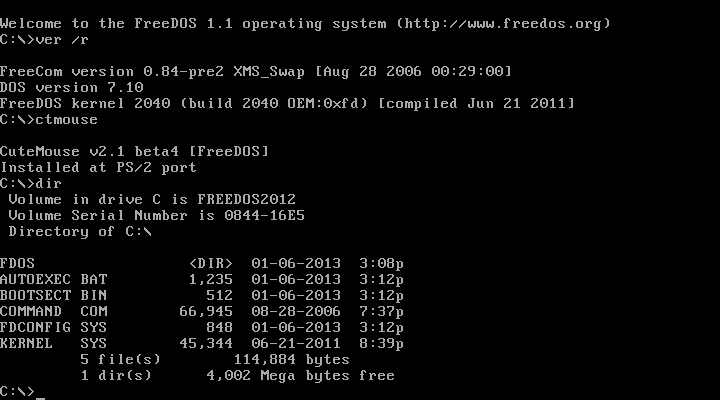
 FreeDOS 1.1 default shell, FreeCOM | |
| Developer | Jim Hall & The FreeDOS team |
| Written in | Assembly language, C[1] |
| OS family | DOS |
| Working state | Current |
| Source model | Open source[2] |
| Initial release | 16 September 1994[3] |
| Latest release | 1.4  / 5 April 2025[4] / 5 April 2025[4] |
| Repository | |
| Available in | English, German, Dutch, French, Turkish, Swedish, Spanish |
| Supported platforms | x86 |
| Kernel type | Monolithic kernel[5] |
| Influenced by | MS-DOS |
| Default user interface | Command-line interface (COMMAND.COM) |
| License | GNU GPL[2] with various different licenses for utilities |
| Official website | freedos |
FreeDOS (formerly PD-DOS) is a free software operating system for IBM PC compatible computers. It intends to provide a complete MS-DOS-compatible environment for running legacy software and supporting embedded systems.[6] FreeDOS can be booted from a floppy disk or USB flash drive[7][8] and is designed to run well under virtualization or x86 emulation.[9]
The FreeDOS project began under Jim Hall in 1994, and the first stable version was released in 2006. Unlike most versions of MS-DOS,[10] FreeDOS is composed of free software, licensed under the terms of the GNU General Public License.[2] However, other packages that form part of the FreeDOS project include non-GPL software considered worthy of preservation, such as 4DOS, which is distributed under a modified MIT License.[11]
Distribution
[edit]FreeDOS 1.1, released on 2 January 2012,[12] is available for download as a CD-ROM image: a limited install disc that only contains the kernel and basic applications, and a full disc that contains many more applications (games, networking, development, etc.), not available as of November 2011[update] but with a newer, fuller 1.2.[13] The legacy version 1.0 (2006) consisted of two CDs, one of which was an 8 MB install CD targeted at regular users and the other which was a larger 49 MB live CD that also held the source code of the project.[13]
Commercial uses
[edit]FreeDOS is used by several companies:
- Dell preloaded FreeDOS with its n-series desktops to reduce their cost. The firm has been criticized for making these machines no cheaper, and harder to buy, than identical systems with Windows.[14]
- Hewlett-Packard provided FreeDOS as an option in its HP Compaq dc5750 Small Form Factor PC, Mini 5101 netbooks and Probook laptops.[15][16][17] FreeDOS is also used as bootable media for updating the BIOS firmware in HP systems.[18]
- FreeDOS is included by Steve Gibson's hard drive maintenance and recovery program, SpinRite.[19]
- Intel's Solid-State Drive Firmware Update Tool loaded the FreeDOS kernel.[20]
- Many motherboard vendors recommend a bootable FreeDOS for running low level BIOS and firmware updates.
Non-commercial uses
[edit]FreeDOS is also used in multiple independent projects:
- FED-UP is the Floppy Enhanced DivX Universal Player.[21]
- FUZOMA is a FreeDOS-based distribution that can boot from a floppy disk and converts older computers into educational tools for children.[22]
- XFDOS is a FreeDOS-based distribution with a graphical user interface, porting Nano-X and FLTK.[23][24][25][26]
Development and version history
[edit]| Version | Status | Codename | Date |
|---|---|---|---|
| 0.01 | ALPHA | None | 16 September 1994 |
| 0.02 | ALPHA | None | December 1994 |
| 0.03 | ALPHA | None | January 1995 |
| 0.04 | ALPHA | None | June 1995[29] |
| 0.05 | ALPHA | None | 10 August 1996 |
| 0.06 | ALPHA | None | November 1997 |
| 0.1 | BETA | Orlando | 25 March 1998 |
| 0.2 | BETA | Marvin | 28 October 1998 |
| 0.3 | BETA | Ventura | 21 April 1999 |
| 0.4 | BETA | Lemur | 9 April 2000 |
| 0.5 | BETA | Lara | 10 August 2000 |
| 0.6 | BETA | Midnite | 18 March 2001 |
| 0.7 | BETA | Spears | 7 September 2001 |
| 0.8 | BETA | Nikita | 7 April 2002 |
| 0.9 | BETA | None | 28 September 2004 |
| 1.0 | FINAL | None | 3 September 2006 |
| 1.1 | FINAL | None | 2 January 2012 |
| 1.2 | FINAL | None | 25 December 2016 |
| 1.3 | FINAL | None | 20 February 2022 |
| 1.4 | FINAL | None | 5 April 2025 |
The FreeDOS project began on 29 June 1994, after Microsoft announced it would no longer sell or support MS-DOS. Jim Hall, who at the time was a student,[30] posted a manifesto proposing the development of PD-DOS, a public domain version of DOS.[31] Within a few weeks, other programmers including Pat Villani and Tim Norman joined the project. Between them, a kernel (by Villani), the COMMAND.COM command line interpreter (by Villani and Norman), and core utilities (by Hall) were created by pooling code they had written or found available.[32][33] For some time, the project was maintained by Morgan "Hannibal" Toal. There have been many official pre-release distributions of FreeDOS before the final FreeDOS 1.0 distribution.[34] GNU/DOS, an unofficial distribution of FreeDOS, was discontinued after version 1.0 was released.[35][36]

Blinky the Fish is the mascot of FreeDOS. He was designed by Bas Snabilie.[37]
Compatibility
[edit]Hardware
[edit]FreeDOS requires a PC/XT machine with at least 640 kB of memory.[38] Programs not bundled with FreeDOS often require additional system resources.
MS-DOS and Win32 console
[edit]FreeDOS is mostly compatible with MS-DOS. It supports COM executables, standard DOS executables and Borland's 16-bit DPMI executables. It is also possible to run 32-bit DPMI executables using DOS extenders. The operating system has several improvements relative to MS-DOS, mostly involving support for newer standards and technologies that did not exist when Microsoft ended support for MS-DOS, such as internationalization, or the Advanced Power Management TSRs.[39] Furthermore, with the use of HX DOS Extender, many Windows Console applications function properly in FreeDOS, as do some rare GUI programs, like QEMM and Bochs.[40]
DOS-based Windows
[edit]FreeDOS is able to run Microsoft Windows 1.0 and 2.0 releases. Windows 3.x releases, which had support for i386 processors, cannot fully be run in 386 Enhanced Mode,[41] except partially in the experimental FreeDOS kernel 2037.[citation needed]
Windows 95, Windows 98 and Windows Me use a stripped-down version of MS-DOS. FreeDOS cannot be used as a replacement because the undocumented interfaces between MS-DOS 7.0–8.0 and Windows "4.xx" are not emulated by FreeDOS; however, it can be installed and used beside these systems using a boot manager program, such as BOOTMGR or METAKERN included with FreeDOS.[citation needed]
Windows NT and ReactOS
[edit]Windows NT-based operating systems, including Windows 2000, XP, Vista, 7, 8, 8.1, 10 and 11 for desktops, and Windows Server 2003, 2008 and 2008 R2 for servers, do not make use of MS-DOS as a core component of the system. These systems can make use of the FAT file systems which are used by MS-DOS and earlier versions of Windows; however, they typically use the NTFS (New Technology File System) by default for security and other reasons. FreeDOS can co-exist on these systems on a separate partition or on the same partition on FAT systems. The FreeDOS kernel can be booted by adding it to the Windows 2000 or XP's NT Boot Loader configuration file, boot.ini,[42] or the freeldr.ini equivalent for ReactOS.[43]
Virtualization
[edit]FreeDOS is designed to work well with virtualization software such as VirtualBox and VMware. The installation process is identical to real hardware. It is also possible to install FreeDOS on DOSBox and its derivatives. By doing so, it provides additional functionality not present in the emulator.[44][45]
File systems
[edit]
FAT32 is fully supported and is the preferred format for the boot drive.[46] Depending on the BIOS used, up to four Logical Block Addressing (LBA) hard disks of up to 128 GB, or 2 TB, in size are supported.[47] There has been little testing with large disks, and some BIOSes support LBA, but produce errors on disks larger than 32 GB; a driver such as OnTrack or EZ-Drive resolves this problem.[citation needed] FreeDOS can also be used with a driver called LFNDOS to enable support for Windows 95-style long file names,[48] but most pre-Windows 95 programs do not support long file names, even with a driver loaded. There is no planned support for NTFS, ext2 or exFAT, but there are several external third-party drivers available for that purpose. To access ext2 file systems, LTOOLS, a counterpart to Mtools, can sometimes be used to copy data to and from ext2 file system drives.[citation needed]
See also
[edit]
References
[edit]- ^ "FreeDOS Spec". FreeDOS Wiki. Freedos. 2008-12-24. Archived from the original on 2023-05-26. Retrieved 2017-02-09.
- ^ a b c "FDOS/kernel". GitHub. Retrieved 2021-05-31.
- ^ "Releases/Alpha 1". FreeDOS Wiki. Freedos. 2021-04-22. Retrieved 2023-06-07.
- ^ a b "FreeDOS Download Page". The FreeDOS Project.
- ^ Villani, Pat (1996). FreeDOS Kernel. Emeryville, CA, USA: Miller Freeman. ISBN 0-87930-436-7.
- ^ "Main Page". FreeDOS Wiki. The FreeDOS Project. Archived from the original on 2023-06-25. Retrieved 2017-02-09.
- ^ Franske, Ben (2007-08-21). "Booting DOS from a USB flash drive". Archived from the original on 2010-02-18. Retrieved 2008-08-04.
- ^ "How to Create a Bootable FreeDOS Floppy Disk". 2005-07-19. Retrieved 2008-08-04.
- ^ Gallagher, Sean (2014-07-14). "Though "barely an operating system," DOS still matters (to some people)". ArsTechnica. Condé Nast. Retrieved 2017-02-09.
But FreeDOS has become much more friendly to virtualization and hardware emulation—it's even the heart of the DOSEMU emulator
- ^ Turner, Rich (2018-09-28). "Re-Open-Sourcing MS-DOS 1.25 and 2.0". Windows Command Line Tools For Developers. Retrieved 2018-09-29.
- ^ "4DOS". FreeDOS. The FreeDOS Project. Archived from the original on 2021-06-24. Retrieved 2014-06-06.
- ^ Hall, Jim (2012-01-02). "Announcement on official FreeDOS homepage". SourceForge. Retrieved 2012-01-02.
- ^ a b "FreeDOS 1.0". FreeDOS.org. The FreeDOS Project. Archived from the original on 2011-11-05. Retrieved 2015-12-21.
- ^ Vance, Ashlee. "How Dell repels attempts to buy its 'open source' PC". The Register. Retrieved 2008-01-02.
- ^ "HP Compaq dc5750 Business PC". Hewlett-Packard. Archived from the original on 2012-11-13. Retrieved 2016-11-27.
- ^ "First Look at HP's Low-Cost ProBook Laptop Lineup". EWeek. Archived from the original on 2013-01-22. Retrieved 2009-03-26.
- ^ McCracken, Harry (2009-06-23). "HP's Mini 5101: Netbook Deluxe, With All the Trimmings". Technologizer. Retrieved 2009-08-01.
- ^ "FreeDOS Bootable Media". Hewlett-Packard. 2010-10-25. Archived from the original on 2012-03-08. Retrieved 2011-01-13.
- ^ Goldstein, Leon A. (2004-07-19). "SpinRite 6.0 for Linux Users". Linux Journal. Retrieved 2017-02-09.
- ^ "Intel SATA Solid-State Drive Firmware Update Tool". Intel. Archived from the original on 2010-03-25. Retrieved 2016-11-27.
- ^ "Floppy Enhanced DivX Universal Player". Retrieved 2009-12-18.
- ^ "FUZOMA Educational Software". Retrieved 2009-12-18.
- ^ kraileth (2012-10-12). "An extraordinary TK example! | eerielinux". Eerielinux.wordpress.com. Retrieved 2019-01-29.
- ^ kraileth (2014-12-30). "An interview with the Nanolinux developer | eerielinux". Eerielinux.wordpress.com. Retrieved 2019-01-29.
- ^ "Artificial Intelligence Methods". Archived from the original on 1999-04-20. Retrieved 2019-01-29.
- ^ "Georg's Personal Homepage". Georgpotthast.de. Retrieved 2019-01-29.
- ^ "FreeDOS software package comparison". Ibiblio.org. Retrieved 2019-01-29.
- ^ Hall, Jim (2007-10-02). "Removing old distributions from ibiblio" (Mailing list). Retrieved 2009-10-07.
- ^ "The Free-DOS Project - Files [Free-DOS Alpha 4 archive comment and files give date 28 June 1995 - but it could be an update]". Free-DOS (sunsite). 1996-12-25. Archived from the original on 1996-12-25. Retrieved 2023-07-06.
- ^ Hall, Jim interviewed on the TV show FLOSS weekly on the TWiT.tv network
- ^ Hall, Jim (1994-06-29). "PD-DOS project *announcement*". comp.os.msdos.apps. Retrieved 2008-06-14.
- ^ Hall, Jim (2002-03-25). "The past, present, and future of the FreeDOS Project". LinuxGizmos.com. Archived from the original on 2013-12-24. Retrieved 2008-06-14.
- ^ Hall, Jim (2006-09-23). "About". FreeDOS. The FreeDOS Project. Archived from the original on 2007-05-27. Retrieved 2014-06-17.
- ^ "FreeDOS History". Freedos.org. Retrieved 2019-01-29.
- ^ Adams, David. "Introducing GNU/DOS 2005". OSNews. Retrieved 2016-11-27.
- ^ Marinof, Mihai (2006-12-02). "GNU/DOS Project Discontinued". Retrieved 2016-11-27.
- ^ "FreeDOS official logos". Archived from the original on 2021-06-24. Retrieved 2019-05-31.
- ^ Lowe, Scott (2003-07-22). "Configure IT Quick: Use FreeDOS as a replacement for MS-DOS". TechRepublic. CBS Interactive. Retrieved 2017-02-09.
- ^ Broersma, Matthew (2006-09-04). "DOS lives! Open source reinvents past". Techworld. Archived from the original on 2013-11-02.
- ^ Grech, Andreas. "HX DOS Extender". Archived from the original on 2014-10-03.
- ^ Santamaria-Merino, Aitor (2014-09-03). "Windows on FreeDOS?". FreeDOS. Retrieved 2017-02-09.[permanent dead link]
- ^ Herbert, Marc (2004-10-01). "Install FreeDOS without any CD, floppy, USB-key, nor any other removable media". Retrieved 2009-05-26.
- ^ "FreeLoader — ReactOS Wiki". reactos.org. Retrieved 2017-06-30.
- ^ "Installing FreeDOS tools on DOSBox using FDIMPLES \ VOGONS".
- ^ "Installing FreeDOS in DOSBox-X". dosbox-x.com. Retrieved 2024-11-11.
- ^ Hilpert, Dominik (2015-05-07). "Creating a Bootable DOS USB Stick". Retrieved 2017-02-09.
- ^ Mueller, Scott (2013-03-22). Upgrading and Repairing PCs (21st ed.). Que Publishing.
- ^ Gallagher, Sean (2014-07-03). "Old school: I work in DOS for an entire day". ArsTechnica. Condé Nast. Retrieved 2017-02-09.
Further reading
[edit]- MacCallum, Scott C., ed. (Summer–Fall 2004). "Interview with FreeDOS Creator Jim Hall" (PDF). PHRAINE - Computer Technology Enlightenment Without the Noise. Vol. 1, no. 2(4). pp. 3–6. Archived (PDF) from the original on 2019-02-27. Retrieved 2019-02-27.
- Wohlscheid, John Paul, ed. (2017-11-21). "Interview with FreeDOS Founder and Lead Dev Jim Hall". It's FOSS. Archived from the original on 2023-09-30. Retrieved 2023-09-30.
- Proven, Liam, ed. (2023-01-18). "Founder of FreeDOS recounts the story so far, and the future - What is dead may never die, and it's all thanks to Jim Hall". OSes. The Register. London, UK: Situation Publishing. Archived from the original on 2023-09-30. Retrieved 2023-09-30. [1]
External links
[edit]
- Official website

- FreeDOS on SourceForge
- FreeDOS Orphanage Archived 2021-10-09 at the Wayback Machine
| General | |||
|---|---|---|---|
| Software packages | |||
| Community | |||
| Organisations | |||
| Licenses |
| ||
| Challenges | |||
| Related topics | |||


Disk operating systems (DOS) | |
|---|---|
| MS-DOS, IBM PC DOS, compatible systems | |
| Other x86 | |
| Other platforms |
|

FreeDOS
View on GrokipediaDevelopment
Origins and Goals
FreeDOS originated in 1994 when Jim Hall, then an undergraduate student, founded the project under the initial name PD-DOS as a response to Microsoft's announcement that it would cease standalone development and support for MS-DOS in favor of Windows 95.[6][7] Hall sought to preserve the DOS ecosystem amid concerns that proprietary licensing would limit access to command-line tools and legacy software he valued alongside emerging systems like Linux.[8] On June 29, 1994, Hall publicly announced the PD-DOS project via the Usenet newsgroup comp.os.msdos.apps, calling for collaborators to build a complete, public domain operating system fully compatible with MS-DOS.[3][8] The announcement emphasized the need for a free alternative to ensure continued availability of DOS functionality without restrictions, highlighting strong community interest from prior discussions. The core goals of Free-DOS (renamed FreeDOS in 1996 after originating as PD-DOS in 1994) centered on achieving comprehensive MS-DOS compatibility to run legacy applications and games from the 1980s and 1990s, while supporting older hardware that Windows could not.[3][6] It aimed to provide open-source tools and utilities for developers, distributed under the GNU General Public License (GPL) and other free software licenses to promote long-term maintainability and community-driven enhancements.[6] This focus on modularity—developing the kernel, command shell, and utilities as separate, interchangeable programs—facilitated collaborative contributions and easier updates.[3] Early development faced challenges in recruiting contributors, as the project relied on volunteer programmers to implement complex components like the kernel and file system drivers.[3] Hall's manifest outlined tasks for these modular elements, but progress depended on distributed efforts across email and Usenet, underscoring the grassroots nature of the initiative.[8]Version History
The development of FreeDOS began with its first alpha release, version 0.01, on September 16, 1994, followed by additional alpha versions in 1995 and 1996, and beta releases starting in 1998 that continued through the early 2000s.[3] These early releases focused on building core functionality and gathering community feedback, with betas such as Beta 1 "Orlando" in March 1998 and Beta 7 "Spears" in 2001 incorporating contributions from volunteers to replace proprietary DOS components.[3] The project achieved a major milestone with the stable release of FreeDOS 1.0 on September 3, 2006, which provided full feature parity with MS-DOS 6.22, enabling compatibility with most legacy DOS software.[3][9] Subsequent updates refined and expanded capabilities: FreeDOS 1.1, released on January 2, 2012, introduced improved networking support via a high-performance TCP/IP suite and initial USB 1.1 controller compatibility for UHCI standards.[3][10] FreeDOS 1.2 followed on December 25, 2016, emphasizing bug fixes, a new installer, and additional commands for enhanced reliability.[3][11] FreeDOS 1.3 arrived on February 20, 2022, with updates to modern compilers like OpenWatcom, kernel enhancements for stability, and support for FAT32 in 8086 mode.[3][12][13] The latest version, FreeDOS 1.4, was released on April 5, 2025, featuring an updated FreeCOM shell with bug fixes and new translations, refreshed tools including the installer, FDISK, FORMAT, and EDLIN, plus compatibility improvements for broader hardware support; it also introduced a floppy-only edition tailored for vintage systems using 720kB to 1.44MB disks.[14][15] FreeDOS development remains volunteer-driven, hosted on GitHub for collaborative contributions, with a strong emphasis on maintaining backward compatibility; the project issues periodic alpha and beta releases for testing alongside monthly updates to integrate community patches.[16][13][3]Technical Features
Core Components
The FreeDOS kernel, known as FDKERNEL, serves as the foundational component of the operating system, implementing core MS-DOS and PC-DOS compatible functions such as process management, memory allocation, and system calls.[17] Derived from Pat Villani's DOS-C kernel, it features a modular design that allows for extensibility through loadable device drivers and optional components.[17] This modularity allows for extensibility through loadable device drivers and optional components. The kernel supports access to extended memory via compatible memory managers and DOS extenders, enabling applications to utilize memory beyond the traditional 640 KB conventional limit, while handling interrupts for hardware events and providing device drivers for essential input/output operations like console, keyboard, and disk access.[17] The command shell, FreeCOM, acts as an enhanced replacement for the MS-DOS COMMAND.COM, offering a command-line interface for user interaction and system control.[18] It includes built-in commands for file management, environment variable handling, and prompt customization, with robust support for batch file processing that allows scripting of command sequences using features like conditional statements (IF/ELSE), loops, and subroutine calls via the CALL command.[18] In FreeDOS 1.4 as of the release on April 5, 2025, FreeCOM version 0.86 introduced numerous stability fixes, improved compatibility with legacy DOS applications, and enhanced internationalization through additional language translations.[5] FreeDOS incorporates a suite of standard utilities that replicate and extend classic DOS tools, ensuring a familiar environment for users and developers. The EDIT utility provides a full-screen text editor for creating and modifying files, supporting features like search/replace, block operations, and menu-driven navigation accessible via keyboard shortcuts such as Ctrl+F for find and Ctrl+S for save.[19] Similarly, XCOPY enables advanced file and directory copying, including recursive operations for entire trees, with options for attribute preservation and verification; its version 1.8b in FreeDOS 1.4 as of the release on April 5, 2025, optimizes stack usage for deeper directory structures.[5] For programming, FreeDOS includes ports of tools like the GCC compiler (IA16 variant for 16-bit x86) and the NASM assembler, facilitating the development of DOS-compatible executables directly on the system.[20] Package management in FreeDOS is handled by FDIMPLES (FreeDOS Installer - My Package List Editor Software), an interactive tool that allows users to browse, install, and remove software add-ons from distribution media.[21] It organizes over 100 official packages into categories such as base system tools, applications, and drivers, with examples including the mTCP suite for TCP/IP networking (supporting FTP, Telnet, and HTTP clients), graphics libraries like FreeVGA for extended video modes, and archiving utilities such as Info-ZIP for compression and extraction.[22][23] The core components of FreeDOS are distributed under open-source licenses to promote community development and compatibility. The kernel and most utilities, including FreeCOM and FDIMPLES, are licensed under the GNU General Public License version 2 (GPL v2), ensuring that modifications and derivatives remain freely available.[17] Some components adopt BSD-like permissive licenses to accommodate integration with proprietary or legacy code without imposing copyleft requirements.[17]File Systems and Storage
FreeDOS provides native support for the FAT12, FAT16, and FAT32 file systems, offering full read and write capabilities comparable to those in MS-DOS. These file systems enable compatibility with legacy storage media, allowing FreeDOS to manage partitions up to several terabytes on FAT32 volumes when supported by the underlying hardware and BIOS.[24][25] Extensions enhance FreeDOS's file system capabilities, including limited VFAT support for long filenames through drivers such as DOSLFN or LFNDOS, which enable the use of filenames exceeding the traditional 8.3 character limit on FAT volumes. Experimental read-only access to exFAT and NTFS file systems is possible via third-party drivers, though these are not integrated into the core distribution and may require additional configuration for reliability.[24][26][27][28] Key storage utilities in FreeDOS include FDISK for creating, deleting, and managing hard disk partitions; FORMAT for preparing disks and floppies with the supported FAT variants; and LABEL for assigning or modifying volume labels on drives. In FreeDOS 1.4 as of the release on April 5, 2025, these tools received updates to better handle large disks, such as improved partition recognition beyond 8 GB and enhanced formatting options for modern storage sizes.[29][30][31][14][5] FreeDOS lacks built-in support for journaling file systems or advanced RAID configurations, relying instead on BIOS-level detection for IDE/ATAPI devices during initialization. The boot process begins with BIOS loading the master boot record (MBR) from floppies, hard drives, or USB media, followed by the FreeDOS kernel; recent versions include updated bootloaders to facilitate USB booting on compatible hardware.[32][14]Compatibility
Hardware Support
FreeDOS requires IBM PC-compatible systems based on x86 architecture, starting from the 8086 processor or later, with a minimum of 640 KB of conventional RAM and support for BIOS-based booting or UEFI in Legacy/CSM mode; native UEFI support is not available without third-party extensions. Installation typically needs at least 20 MB of hard disk space, though the core system can fit on less for basic operation. These requirements ensure compatibility with the original MS-DOS environment while allowing installation on a wide range of hardware from vintage machines to modern systems configured for legacy booting.[14] The operating system primarily operates in real mode on 8086 and 80286 processors, providing full compatibility for early IBM PC, XT, and AT models, while supporting protected mode extensions on 80386 and later CPUs through memory managers like EMM386 for expanded memory access beyond the 1 MB limit. FreeDOS can run on bare-metal x86 hardware up to contemporary 32-bit systems without an underlying OS, but it lacks native 64-bit support, limiting it to 32-bit protected mode at most. A special floppy-only edition in version 1.4 accommodates original IBM PCs using 720 KB or 1.44 MB floppy drives for installation and booting on hardware without hard disks or optical drives.[14][33] Device support in FreeDOS centers on legacy peripherals, with built-in drivers for standard PS/2 keyboards and mice, serial and parallel ports for printers and modems, and basic VGA graphics for text-mode and simple graphical output. Sound is handled through compatibility with Sound Blaster and similar cards via included utilities and drivers in the distribution, such as those for SB16 emulation. USB support is limited; starting with version 1.3, basic UHCI and OHCI controllers are accessible for keyboards and mice via BIOS legacy USB enabling, but full USB storage or advanced devices require external drivers and are not natively robust.[14][23] Power management features are minimal, emphasizing legacy compatibility over modern energy efficiency, with tools like FDAPM providing basic APM and ACPI controls for battery status, suspend states, and cache flushing on supported hardware, though these are most effective on older systems without advanced power-saving profiles.[34]Software Compatibility
FreeDOS provides full compatibility with MS-DOS 6.22 executables, including .COM, .EXE, and .BAT files, enabling the execution of a wide range of legacy DOS software such as utilities and games like Doom and Wolfenstein 3D without modification.[35][36] This compatibility extends to most DOS-era applications, allowing users to run classic programs directly on FreeDOS as they would on original MS-DOS systems.[37] Support for DOS extenders further enhances FreeDOS's ability to handle larger programs beyond the 640 KB conventional memory limit. For instance, DOS/4GW and its open-source alternative DOS/32A enable protected-mode execution for 32-bit DOS applications, while the HX DOS Extender allows certain Win32 console applications to run under FreeDOS by providing a Win32 API emulation layer.[38][39][40] In terms of Windows compatibility, FreeDOS can run Windows 3.1 in standard mode, supporting basic graphical operations within the constraints of real-mode execution.[41] It offers partial support for Windows for Workgroups 3.11, primarily in text or standard modes, but lacks full enhanced mode capabilities due to memory addressing limitations inherent to DOS architectures.[42][43] Third-party enhancements bolster FreeDOS's software ecosystem, including CWSDPMI, a 32-bit DPMI host that facilitates protected-mode access for 32-bit DOS applications developed with tools like DJGPP.[44] Networking capabilities are enabled through Packet Drivers for TCP/IP applications or NDIS drivers converted via tools like DIS_PKT, allowing connectivity with legacy Ethernet hardware.[45][46] Extensive testing has verified compatibility with thousands of DOS applications, with community-maintained lists documenting successful runs of utilities, games, and productivity software.[47] FreeDOS 1.4 introduces specific improvements, such as enhanced batch processing in utilities like XCOPY and MOVE to handle recursive operations more reliably, alongside fixes in FreeCOM for better interrupt handling in edge cases, reducing crashes in complex scripts and legacy app interactions.[5]Modern Systems Integration
FreeDOS integrates with contemporary computing environments primarily through virtualization, enabling it to operate as a guest operating system within hypervisors that emulate legacy hardware. It has been tested and confirmed to run effectively in VirtualBox, VMware, and QEMU, with support for emulated SoundBlaster audio devices via the VSBHDA driver version 1.8.[1][48] These platforms allow users to install and boot FreeDOS without requiring physical legacy hardware, facilitating tasks such as running classic applications or development in isolated environments. The release of FreeDOS 1.4 in 2025 introduced stability enhancements and updated utilities, including improved installers and tools like FDISK and FORMAT, which contribute to better performance in virtual machines by reducing boot times and enhancing compatibility with emulated peripherals.[14][49] Additionally, FreeDOS 1.4 provides pre-configured virtual machine disk images (VMDK format) compatible with these hypervisors, streamlining setup for users.[50] For USB integration in virtualized setups, FreeDOS 1.4 includes FullUSB and LiteUSB distributions designed for booting from USB drives, supporting passthrough of USB devices when configured in the host hypervisor.[14] This allows access to external storage and peripherals within the guest, though performance depends on the hypervisor's implementation. While DOSBox primarily emulates DOS applications rather than hosting a full FreeDOS installation, it can execute FreeDOS binaries for lightweight testing, bridging emulation with native DOS execution.[1] FreeDOS can be configured for multiboot scenarios alongside modern operating systems, such as Linux, using bootloaders like GRUB to chainload its kernel from a dedicated partition.[51] This setup enables seamless switching between FreeDOS and contemporary OSes on systems supporting legacy BIOS mode, preserving access to DOS-specific workflows without full virtualization overhead. In development contexts, FreeDOS serves as a testing platform for projects like ReactOS, where it provides a DOS environment to verify compatibility with NT-based subsystems during early boot phases.[52] FreeDOS finds practical application in embedded and maintenance tasks on current hardware, particularly for BIOS and UEFI firmware updates from manufacturers like Dell and HP. HP's DOSFlash.exe utility explicitly supports execution within FreeDOS environments to update system firmware, requiring a bootable DOS session for operations like password-protected flashing.[53] Similarly, Dell systems permit BIOS updates via bootable USB drives formatted for DOS compatibility, where FreeDOS can host the flashing executables when Windows is unavailable.[54] For live USB booting on UEFI-only systems, FreeDOS relies on compatibility modes like CSM (Compatibility Support Module) or DOS-compatible loaders such as bootx64.efi, though full native UEFI support remains limited, often necessitating hybrid boot configurations.[55] Despite these integrations, FreeDOS faces inherent challenges on modern hardware due to its reliance on legacy BIOS for bare-metal booting, as UEFI firmware lacks direct compatibility with DOS boot sectors.[56] Systems manufactured after approximately 2020, which prioritize UEFI without legacy options, cannot run FreeDOS natively, restricting it to virtualization or emulated environments.[57] Workarounds for development include running FreeDOS within Windows Subsystem for Linux (WSL) via QEMU emulation or using Cygwin to compile and test DOS applications in a POSIX-like layer, allowing cross-platform workflows without full OS installation.[1]Applications
Commercial Uses
FreeDOS is employed in embedded systems for industrial and enterprise applications, where its minimal footprint and compatibility with legacy hardware enable efficient operation in resource-constrained environments such as appliances, kiosks, and industrial controllers.[58] [59] The system's ability to boot and run dedicated applications without unnecessary overhead makes it suitable for these deployments, providing a royalty-free alternative to proprietary DOS variants.[60] [61] Major hardware manufacturers, including Dell and HP, incorporate FreeDOS in diagnostic tools and for BIOS/UEFI firmware flashing on x86 systems, leveraging its DOS compatibility to ensure reliable updates in pre-OS environments.[62] [63] [64] For example, HP bundles FreeDOS with utilities like PC Doctor for hardware diagnostics on new systems, while users and official guides confirm its use for BIOS updates across these vendors' platforms.[63] This approach allows manufacturers to ship lightweight, bootable environments that support maintenance without a full operating system.[65] In enterprise settings, FreeDOS supports the maintenance of legacy software, such as older CAD systems and accounting applications, particularly in industries hesitant to migrate to modern operating systems due to compatibility risks or high costs.[1] Its MS-DOS compatibility ensures these tools continue to function on aging hardware, facilitating ongoing operations in sectors like manufacturing and finance.[2] The open-source nature of FreeDOS, distributed under licenses compatible with the GNU General Public License, permits commercial redistribution and integration into proprietary products without royalties, enabling its use in specialized hardware like automotive diagnostic systems and retail scanners.[1] This licensing model supports enterprise-level deployments by allowing vendors to embed FreeDOS while complying with source code distribution requirements.[65] Recent developments, including the FreeDOS 1.4 release on April 5, 2025, include stability enhancements to core components like the kernel and utilities. As of November 2025, the project continues active development with monthly test releases and package updates, such as NASM 3.01 in October 2025.[14] [66] [67] [1]Non-Commercial Uses
FreeDOS is widely adopted in non-commercial settings for personal hobbyist pursuits, educational initiatives, and community-driven retro computing activities, providing a free, open-source alternative to proprietary DOS systems.[1] In retro gaming, FreeDOS functions as a native platform for executing classic DOS titles such as Wolfenstein 3D, Doom, Commander Keen, and Duke Nukem, often requiring memory managers like EMS or XMS for optimal performance on compatible hardware.[36] Enthusiasts also run these games within virtual machines to bridge compatibility with modern systems, while preservation projects benefit from FreeDOS by allowing users to extract and play DOS games ported by GOG.com—originally bundled for DOSBox—directly under its environment.[36] For education and learning, FreeDOS supports computer science curricula focused on operating system fundamentals, with resources like The FreeDOS Kernel by Pat Villani offering in-depth explanations of the DOS-C kernel's construction and operation to illustrate historical OS design principles.[68] It enables hands-on assembly programming through included tools such as NASM 3.01, allowing students to develop low-level code in a authentic DOS context.[1] Batch scripting is taught via practical guides in Get Started with FreeDOS, where learners create and execute.BAT files to automate tasks, mirroring early computing workflows.[69] Furthermore, Writing FreeDOS Programs in C provides tutorials for building command-line applications and even simple games, fostering understanding of legacy programming paradigms.[70]
Data recovery represents another key non-commercial application, where FreeDOS powers specialized tools like SpinRite 6.1 for diagnosing and repairing hard drives on legacy media.[71] This utility, which boots via a self-contained FreeDOS environment on USB or floppy media, is particularly valued by hobbyists restoring vintage systems, as it handles BIOS-compatible firmware and performs read/write operations to recover data from aging storage devices.[71]
As a testing ground for open-source development, FreeDOS facilitates the creation and debugging of DOS-compatible code, with its full source availability enabling developers to modify components for custom applications.[1] It supports contributions to emulator projects, such as installing FreeDOS within MAME to simulate authentic DOS environments for game testing and archival software preservation.[72]
FreeDOS engages community events within the retro computing scene, where its active user base of enthusiasts gathers for demonstrations and discussions, as highlighted during the project's 30th anniversary celebrations.[73] The FreeDOS 1.4 floppy edition, supporting 720kB to 1.44MB disk formats, aids these meetups by enabling installations and runs on original 1980s hardware like IBM PC, XT, or AT systems without modern dependencies.[14]