


Community hub
Recent from talks
Contribute something
Nothing was collected or created yet.
RStudio
View on Wikipedia| RStudio | |
|---|---|
 | |
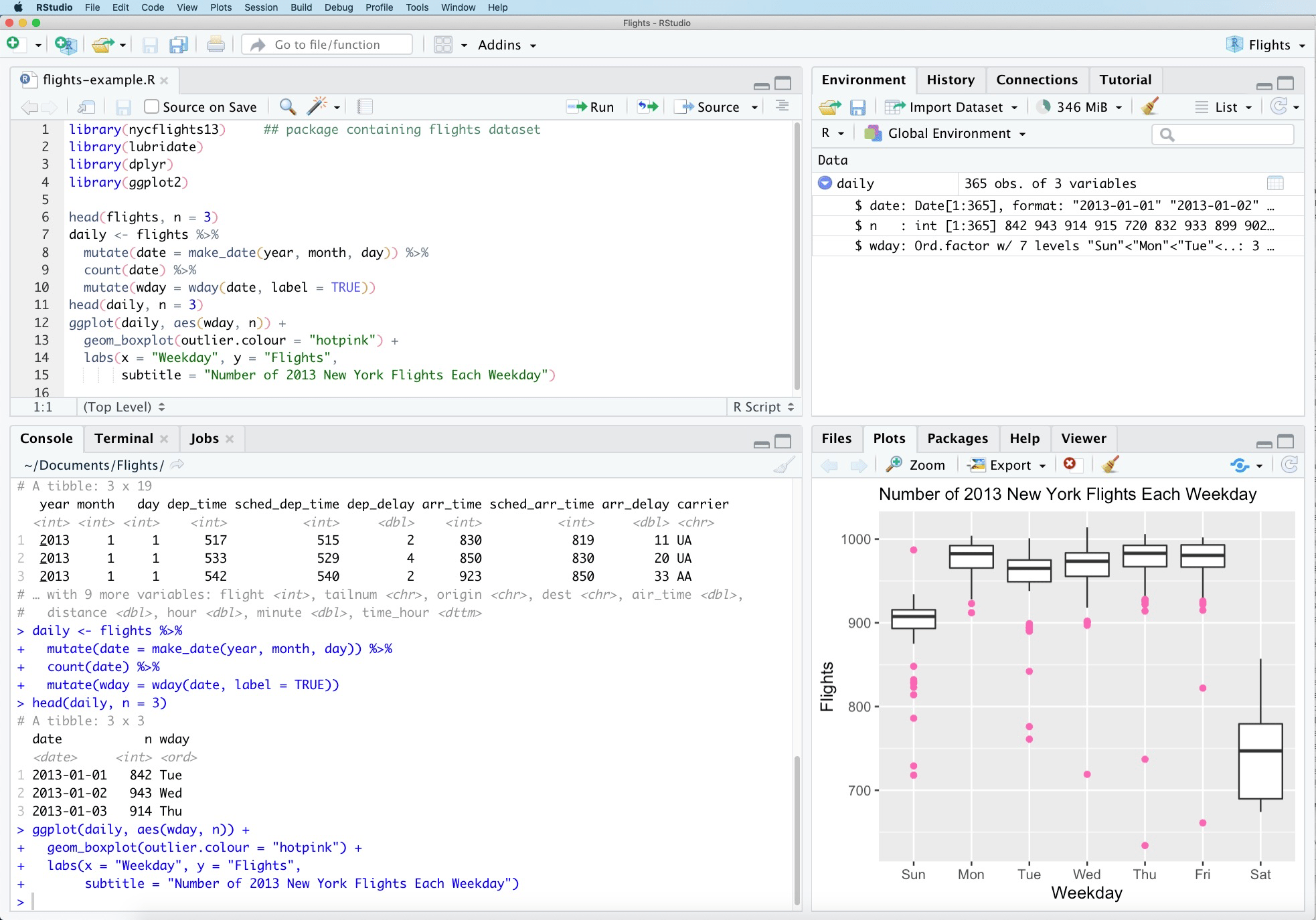
 RStudio Version 1.4.1564 on MacOS 10.15.7 | |
| Developer | Posit PBC |
| Initial release | 28 February 2011[1] |
| Stable release | 2025.09.1[2]  / 1 October 2025
 |
| Repository | |
| Written in | Java, C++, JavaScript[3] |
| Operating system | Ubuntu, Fedora, Red Hat Linux, openSUSE, macOS, Windows NT |
| Platform | IA-32, x86-64; Qt |
| License | GNU Affero General Public License v3[4] |
| Website | posit |
RStudio IDE (or RStudio) is an integrated development environment for R, a programming language for statistical computing and graphics. It's available in two formats: RStudio Desktop is a regular desktop application while RStudio Server runs on a remote server and allows accessing RStudio using a web browser. The RStudio IDE is a product of Posit PBC (formerly RStudio PBC, formerly RStudio Inc.).
Reproducible analyses with vignettes
[edit]A strength of RStudio is its support for reproducible analyses[5] with R Markdown vignettes. These allow users to mix text with code in R, Python, Julia, shell scripts, SQL, Stan, JavaScript, C, C++, Fortran, and others,[6] similar to Jupyter Notebooks. R Markdown can be used to create dynamic reports that are automatically updated when new data become available. These reports can also be exported in various formats, including HTML, PDF, Microsoft Word, and LaTeX, with templates specific to the requirements of many scientific journals.[7]
R Markdown vignettes and Jupyter notebooks make the data analysis completely reproducible. R Markdown vignettes have been included as appendices with tutorials on Wikiversity.[8]
In 2022, Posit announced an R Markdown-like publishing system called Quarto. In addition to combining results of R, code and results using Python, Julia, Observable JavaScript, and Jupyter notebooks can also be used in Quarto documents. Compared to the file extension .Rmd that R Markdown has, Quarto documents have the file extension .qmd.[9]
One difference between R Markdown files and Quarto documents is defining options in code chunks. In R Markdown, they would be inline within the curly brackets.
```{r chunk_name, echo=FALSE, warning=FALSE}
print(42)
```
In contrast, Quarto documents define the chunk options below the curly brackets, prefixed using a pound character and vertical pipe (or "hash-pipe").
```{r}
#| label: chunk_name
#| echo: false
#| warning: false
print(42)
```
Licensing model
[edit]The RStudio integrated development environment (IDE) is available with the GNU Affero General Public License version 3. The AGPL v3 is an open source license that guarantees the freedom to share the code.
RStudio Desktop and RStudio Server are both available in free and fee-based (commercial) editions. OS support depends on the format/edition of the IDE. Prepackaged distributions of RStudio Desktop are available for Windows, macOS, and Linux. RStudio Server and Server Pro run on Debian, Ubuntu, Red Hat Linux, CentOS, openSUSE and SLES.[10]
Overview and history
[edit]The RStudio IDE is partly written in the C++ programming language and uses the Qt framework for its graphical user interface.[11] The bigger percentage of the code is written in Java. JavaScript is also used.[12]
Work on the RStudio IDE started around December 2010,[13] and the first public beta version (v0.92) was officially announced in February 2011.[1] Version 1.0 was released on 1 November 2016.[14] Version 1.1 was released on 9 October 2017.[15]
Addins
[edit]The RStudio IDE provides a mechanism for executing R functions interactively from within the IDE through the Addins menu.[16] This enables packages to include graphical user interfaces (GUIs) for increased accessibility. Popular R packages that use this feature include:
- bookdown – a knitr extension to create books
- colourpicker – a graphical tool to pick colours for plots
- datasets.load – a graphical tool to search and load datasets
- googleAuthR – Authenticate with Google APIs
Development
[edit]The RStudio IDE is developed by Posit, PBC, a public-benefit corporation[17] founded by J. J. Allaire,[18] creator of the programming language ColdFusion. Posit has no formal connection to the R Foundation, a not-for-profit organization located in Vienna, Austria,[19] which is responsible for overseeing development of the R environment for statistical computing. Posit was formerly known as RStudio Inc. In July 2022, it announced that it changed its name to Posit, to signify its broadening exploration towards other programming languages such as Python.[20]
See also
[edit]
References
[edit]- Monya Baker (25 May 2016). "1500 scientists lift the lid on reproducibility". Nature. 533: 452–454. ISSN 1476-4687. Wikidata Q124151114.
- Karl Popper (1968), The Logic of Scientific Discovery, Harper, Wikidata Q124151064
- Yihui Xie (25 May 2023), bookdown: Authoring Books and Technical Documents with R Markdown, Chapman & Hall, Wikidata Q124151352
- Yihui Xie; Joseph J. Allaire; Garrett Grolemund (30 December 2023), R Markdown: The Definitive Guide, Chapman & Hall, Wikidata Q76441281
- Yihui Xie; Christophe Dervieux; Emily Riederer (30 December 2023), R Markdown Cookbook, Chapman & Hall, Wikidata Q124151180
Notes
[edit]- ^ a b "RStudio, new open-source IDE for R | RStudio Blog". Blog.rstudio.org. 28 February 2011. Archived from the original on 2015-01-24. Retrieved 2015-05-01.
- ^ https://docs.posit.co/ide/news/#rstudio-2025.09.1.
{{cite web}}: Missing or empty|title=(help) - ^ "rstudio/rstudio". GitHub. RStudio. Archived from the original on 5 April 2019. Retrieved 18 December 2016.
- ^ Pylvainen, Ian (2016-03-24). "What license is RStudio available under? – RStudio". rstudio.com. Archived from the original on 2018-05-26. Retrieved 2018-05-25.
- ^ Reproducibility is key in science. In The Logic of Scientific Discovery, Karl Popper wrote, "non-reproducible single occurrences are of no significance to science." But a theory is "falsified only if we discover a reproducible effect which refutes the theory". Popper (1968, p. 86). However, reproducibility is not easy to obtain. In a 2016 survey of over 1,500 scientists, 52% agreed that there was "a significant crisis" in the reproducibility of scientific results. Another 38% said there was "a slight crisis"; 7% "didn't know", and only 3% said there was no crisis. Worse, "more than 70% of researchers had tried and failed to reproduce another scientist's experiments, and more than half had failed to reproduce their own experiments (emphasis added). See Baker (2016).
- ^ Xie et al. (2023, esp. sec. 2.7).
- ^ Xie, Allaire, and Grolemund (2023).
- ^ e.g., v:US Gross Domestic Product (GDP) per capita and v:Forecasting nuclear proliferation, accessed 5 January 2024. Many more examples are included in Xie, Dervieux, and Riederer (2023).
- ^ Machlis, Sharon (2022-07-28). "What is Quarto? RStudio rolls out next-generation R Markdown". InfoWorld. Retrieved 2024-05-17.
- ^ "RStudio". rstudio.com. Archived from the original on 30 October 2015. Retrieved 2 December 2016.
- ^ Verzani, John (23 September 2011). Getting Started with RStudio. O'Reilly Media, Inc. p. 4. ISBN 9781449309039.
- ^ "rstudio/rstudio". GitHub. Archived from the original on 2018-06-10. Retrieved 2018-09-13.
- ^ "portable download of java dependencies · rstudio/rstudio@484cb88 · GitHub". Github.com. 2010-12-07. Archived from the original on 2019-04-05. Retrieved 2015-05-01.
- ^ "Announcing RStudio v1.0!". RStudio Blog. 1 November 2016. Archived from the original on 30 June 2017. Retrieved 1 November 2016.
- ^ "RStudio v1.1 Released". RStudio Blog. 9 October 2017. Archived from the original on 28 October 2021. Retrieved 23 December 2017.
- ^ "RStudio Addins". RStudio. Archived from the original on 2018-09-10. Retrieved 2018-09-16.
- ^ "Posit Benefit Corporation Annual Report". Archived from the original on 2023-01-19. Retrieved 2023-01-19.
- ^ "About". Posit.co. Archived from the original on 2022-11-02. Retrieved 2015-12-15.
- ^ ""Statutes of "The R Foundation for Statistical Computing""" (PDF). The R Foundation. Archived (PDF) from the original on 2020-04-03. Retrieved 2019-08-12.
- ^ "RStudio is becoming Posit". Posit.co. 27 July 2022. Archived from the original on 2022-11-02. Retrieved 2022-07-28.
External links
[edit]| Features |  | |
|---|---|---|
| Implementations |
| |
| Packages | ||
| Interfaces | ||
| People | ||
| Organisations |
| |
| Publications | ||
RStudio
View on GrokipediaHistory
Founding and Early Development
RStudio was founded in 2009 by J.J. Allaire, a software engineer and entrepreneur previously known for creating ColdFusion and founding Allaire Corporation, along with a small team at RStudio, Inc. The motivation stemmed from Allaire's own experiences using R for data analysis, where the language's reliance on a basic command-line console limited productivity for tasks like code editing, debugging, and visualization, particularly for non-programmers such as statisticians and researchers.[9][10] The company's early development centered on building an integrated development environment (IDE) tailored specifically for R, with the goal of streamlining workflows and making advanced statistical computing more approachable without requiring additional external tools. Development began in earnest around 2010, focusing on cross-platform compatibility for Windows, macOS, and Linux to broaden accessibility.[11][4] RStudio Desktop's initial public beta release arrived on February 28, 2011, offered as free and open-source software under the AGPL license, which encouraged community contributions and rapid iteration. This version emphasized simplifying R scripting through features like real-time syntax highlighting and error detection during editing. In September 2011, RStudio released version 0.95, introducing RStudio Server in beta, providing browser-based access to the RStudio IDE on remote Linux servers and facilitating collaborative workflows.[12][11] Key innovations in these first iterations included an integrated plotting pane that displayed graphs directly within the IDE without needing separate windows or commands, and a dedicated workspace browser allowing users to interactively explore variables, data frames, and environments—features that significantly reduced friction in exploratory data analysis for statisticians and data scientists. These tools addressed core pain points in R's native interface, fostering greater adoption by enabling more intuitive debugging and visualization workflows.[11][10]Key Milestones and Rebranding
RStudio introduced Shiny in 2012, a web application framework that allows users to build interactive web apps directly from R code without requiring knowledge of web technologies like HTML, CSS, or JavaScript.[13] In 2014, RStudio launched R Markdown, a tool for creating dynamic documents that integrate R code, results, and narrative text, enabling reproducible reports in formats such as HTML, PDF, and Word.[14] This marked a significant advancement in literate programming for R users, building on the knitr package to streamline the creation of publication-ready outputs. The release of RStudio version 1.0 in November 2016 represented a major milestone, introducing enhanced project management capabilities, integrated version control support via Git and SVN, and improved workspace handling to boost productivity for data scientists and statisticians.[12] In 2022, the company underwent a rebranding from RStudio, Inc. to Posit, PBC, announced on July 27, to better reflect its expanded mission supporting open-source tools beyond R, including Python and other languages for data science.[15] This shift culminated in the official transition on November 2, 2022, with updated product names like Posit Workbench for the former RStudio Server Pro.[4] That same year, Posit introduced Quarto on July 28, a multi-language publishing system that extends R Markdown's functionality to support Python, Julia, and Observable JS, offering improved cross-language reproducibility and advanced publishing features like computational Jupyter notebooks.[16] Subsequent updates in the 2020s have focused on enhancing Quarto integration within the IDE, including better support for multi-format outputs and visual editing tools.[17]Rebranding and Corporate Evolution
This transition, revealed during rstudio::conf(2022), marked a strategic evolution to encompass a wider ecosystem beyond R, including support for Python and other languages, while prioritizing positive societal impact through sustainable open-source development.[18] Unlike a conventional acquisition involving financial exchange, the change represented an internal reincorporation of RStudio, PBC, with no external buyer or monetary transaction, enabling Posit to reinforce its mission of fostering accessible data science without disrupting its core operations.[15] The rebranding underscored a commitment to maintaining free, open-source products like the RStudio IDE, even as the company expanded enterprise solutions to ensure long-term viability.[4] Post-rebranding, Posit advanced deployment capabilities through Posit Connect, an evolution of RStudio Connect, which was launched in January 2017 as a platform for publishing and sharing Shiny applications, R Markdown documents, and APIs within organizations.[19] From 2023 to 2025, Posit emphasized integrations for artificial intelligence and machine learning, including the development of multi-language tools to streamline AI workflows.[20] A key milestone came in August 2025 with the stable release of Positron, a next-generation IDE supporting both R and Python, featuring AI enhancements like the Positron Assistant for code completion, error debugging, and session-aware queries using generative models.[21] At posit::conf(2025), Posit showcased additional AI innovations, such as ellmer for exploratory data analysis, chatlas for interactive charting, and ragnar for machine learning model governance, further embedding responsible AI into data science practices.[22] To support these advancements, Posit secured approximately $165 million in total funding across prior rounds, enabling expansion of enterprise offerings while upholding free access to core open-source tools.[23]Overview
Core Functionality as an IDE
RStudio serves as a free and open-source integrated development environment (IDE) for the R programming language, designed to enhance productivity by integrating essential tools for coding, execution, and data visualization within a unified graphical user interface.[1] It combines a syntax-highlighting script editor, an interactive console for running R commands, an environment pane to monitor variables and data structures, and a dedicated viewer for plots and graphical outputs, allowing users to streamline their workflow without switching between multiple applications.[24] This architecture supports seamless interaction between writing code, executing it, inspecting results, and visualizing data, making it particularly accessible for statisticians, data scientists, and researchers.[25] The core user interface of RStudio features a customizable four-pane layout that organizes these components efficiently. The upper-left Source pane provides a multi-file editor for writing and editing R scripts, with features like code completion, syntax highlighting, and bracket matching to facilitate error-free coding. Below it, the Console pane hosts an interactive R session where users can execute commands line-by-line or send code from the editor for immediate evaluation, displaying output and error messages in real time. The upper-right pane includes tabs for Environment, which lists active variables and their values, and History, which records past commands for reuse; this setup enables quick inspection and debugging of the workspace state. In the lower-right pane, tabs for Files (a file browser), Plots (inline viewing of generated graphics), Packages (installed package management), and Help (documentation search) provide contextual resources without disrupting the primary workflow. RStudio supports fundamental file types central to R development, including plain R scripts (.R files) for general-purpose coding and R Markdown notebooks (.Rmd files) that interweave executable code chunks with narrative text and output for dynamic documents. For project organization, it uses .Rproj files to define self-contained workspaces, automatically setting the working directory, restoring session state, and managing version control integration upon opening, which promotes reproducible and collaborative coding practices. Available across multiple platforms, RStudio runs on Windows, macOS, and Linux operating systems, ensuring broad accessibility for diverse users.[25] It requires an underlying installation of R version 3.6.0 or higher to function, as it interfaces directly with the R interpreter rather than bundling it.[26]Relationship to the R Language
RStudio serves as an integrated development environment (IDE) that acts as a graphical front-end to the R programming language, providing tools to write, execute, and manage R code without altering the underlying R interpreter. It requires a separate installation of R, typically obtained from the Comprehensive R Archive Network (CRAN) or other repositories, with RStudio supporting R versions 3.6.0 and higher.[26] This separation allows users to update R independently while leveraging RStudio's interface for enhanced productivity, but it means RStudio cannot function without an existing R installation.[27] The IDE offers seamless integration with the R ecosystem, particularly through its Packages pane, which enables users to browse, install, load, and update R packages directly from CRAN or other sources. For instance, packages likeggplot2 for data visualization can be installed and loaded via this interface, streamlining workflows for statistical analysis and graphics. RStudio supports core R-specific tasks, such as data import using functions like read.csv() to load comma-separated values files, statistical modeling with lm() for linear regression, and visualization via ggplot2 for creating layered plots, all executed within an interactive console that provides syntax highlighting and auto-completion.[28][29]
While RStudio emphasizes usability for beginners and non-programmers entering the R language by simplifying code editing and environment management, it does not bundle R itself, potentially requiring additional setup for new users. RStudio also offers native support for Python, allowing users to write and execute Python scripts directly, and incorporates interoperability with packages like reticulate (introduced in 2017) for embedding Python code within R sessions. As of 2025, updates have enhanced Python support, including better interpreter discovery.[29][30][31][32]
Features
Integrated Development Tools
RStudio's integrated development tools provide a suite of features designed to enhance coding efficiency and streamline the development workflow for programmers working with R and Python. The code editor includes syntax highlighting, which color-codes elements such as functions, variables, and strings to improve readability and reduce errors during coding. Auto-completion, also known as code completion, suggests function names, arguments, and object names as the user types, drawing from loaded packages and the current workspace to accelerate script writing. Additionally, the editor supports code folding, allowing users to collapse and expand sections of code for better navigation in large files, and snippets, which are predefined code templates that can be inserted quickly via keyboard shortcuts or the completion menu to automate repetitive tasks.[2][33][34] These tools extend to Python support, enabling syntax highlighting, auto-completion, direct code execution from the editor, and viewing/sharing of Python data objects with R via the reticulate package. An interactive debugger is available for diagnosing and fixing errors in Python code, similar to R debugging capabilities.[35] Debugging capabilities in RStudio enable precise troubleshooting through an interactive debugger integrated into the IDE. Users can set breakpoints directly in the source editor by clicking in the margin next to a line of code, causing execution to pause at that point when the script is run. Once in debug mode, step-through execution allows navigation line by line, into functions, or over them using toolbar buttons or keyboard shortcuts like F10 for step over and F11 for step into, facilitating examination of code flow. Variable inspection occurs primarily through the Environment pane, which displays the current state of variables, data frames, and functions in a hierarchical view, updating in real-time during debugging sessions to reveal values and structures without additional commands.[36][37][38] Version control integration is seamlessly embedded within the IDE, supporting Git and Subversion (SVN) to manage code changes collaboratively. After configuring the system paths in Tools > Global Options > Git/SVN, users can initialize repositories, commit changes, and view diff views directly in the Git tab, which highlights modifications line-by-line for review before staging. Commit history is accessible via a dedicated history view, showing timelines of changes, authors, and messages, while pull and push operations to remote repositories like GitHub are handled through intuitive buttons, promoting best practices in collaborative development.[7] Project management tools facilitate organized workflows across multiple endeavors, with RStudio Projects serving as containers that maintain dedicated working directories, history, and settings for each initiative. Multi-project support allows switching between projects without altering global configurations, ensuring isolation of environments and dependencies. For package development, built-in build tools in the Build pane enable tasks such as checking code with R CMD Check, running tests via testthat, and installing packages, all while providing output logs for errors. Environment resetting is straightforward through the Session menu's Restart R option, which clears the workspace, reloads the project, and reinitializes the session to mimic a fresh start, aiding in reproducible debugging and testing.[39][40] Customization options extend productivity by allowing users to tailor the interface to their preferences, including keyboard shortcuts and visual elements. Over 100 default shortcuts exist for actions like executing code (Ctrl+Enter) or jumping to functions (F2), and users can modify or add bindings via Tools > Modify Keyboard Shortcuts, searching and assigning keys to commands for personalized efficiency. Panes, such as Source, Console, and Environment, can be rearranged or resized through Global Options > Pane Layout, supporting multi-monitor setups or additional source columns for parallel editing. Themes offer visual customization with built-in options like Modern and Sky for the overall interface, plus editor-specific themes including syntax color schemes, accessible via Global Options > Appearance to reduce eye strain during extended sessions.[41][42][43][44]Reproducible Analyses and Vignettes
RStudio provides seamless integration with R Markdown, an authoring framework that allows users to create dynamic documents by combining executable R code, its output, and narrative text within a single .Rmd file.[45] These files support a notebook-style interface where code chunks can be executed interactively, and results such as plots, tables, and statistics are embedded directly into the document.[45] Upon completion, users can "knit" the .Rmd file using RStudio's built-in tools to generate polished outputs in formats like HTML, PDF, or Microsoft Word, ensuring the final document includes both the explanatory text and the computed results for full transparency.[45] A key aspect of R Markdown in RStudio is its support for package vignettes, which serve as automated, long-form documentation for R packages.[39] Vignettes are typically authored as .Rmd or .Rnw (R noweb) files placed in the vignettes/ directory of a package source.[39] During package building—facilitated through RStudio's Build pane or the command R CMD build—these files are automatically compiled into readable formats like PDF or HTML using knitr, providing users with detailed examples, workflows, and explanations of the package's functionality without requiring separate manual documentation.[39] To enhance reproducibility, RStudio incorporates tools such as session information capture via the sessionInfo() function, which records the R version, loaded packages, and platform details for exact environment replication. Additionally, setting random seeds with set.seed() ensures consistent results from stochastic processes like simulations or sampling, a standard practice integrated into R Markdown workflows to make analyses deterministic across runs. The renv package, natively supported in RStudio, further aids reproducibility by managing project-specific package versions through a lockfile (renv.lock), isolating dependencies and allowing easy restoration of the exact library state with commands like renv::init() and renv::restore().[46] The workflow for creating reproducible documents in RStudio revolves around customizable code chunk options in R Markdown.[47] Users can control code visibility with echo=TRUE to display the source code or echo=FALSE to hide it, focusing on results; enable caching via cache=TRUE to store and reuse expensive computations across knits, speeding up iterative development; and handle errors gracefully with error=TRUE to continue knitting despite failures in a chunk, or error=FALSE to halt on issues for debugging.[47] For scientific publishing, R Markdown in RStudio offers significant advantages, including inline results that automatically update as code changes, ensuring figures, tables, and values reflect the latest analysis without manual editing.[45] It supports cross-references to sections, figures, and tables using syntax like @ref(fig:plot1), facilitating navigation in complex documents. Bibliographies are integrated via YAML headers specifying BibTeX or CSL files, with citations rendered in styles suitable for journals (e.g., APA or Vancouver) through Pandoc's citation processing during knitting. These features promote literate programming, where code and prose coexist, making it easier to produce peer-reviewed articles that are both computationally verifiable and narratively clear.[45]Add-ins and Extensions
RStudio add-ins enable users to execute R functions interactively within the integrated development environment (IDE), integrating them seamlessly into the user interface via keyboard shortcuts, the Addins menu, or the Command Palette.[48] These add-ins are distributed as R packages and allow for enhanced productivity by providing quick access to custom tools without switching to the console.[49] To install add-ins, users typically load them from CRAN using standard R package installation commands or from GitHub repositories via the devtools package with functions likedevtools::install_github().[50] Once installed, RStudio automatically discovers and registers the add-ins if the package includes an inst/rstudio/addins.dcf file specifying the functions and their menu placements.[48] Users can then bind these add-ins to custom keyboard shortcuts through the Tools > Addins > Keyboard Shortcuts menu, facilitating rapid invocation during coding sessions.[50]
Developing add-ins involves creating R functions that leverage the rstudioapi package to interact with the IDE, such as selecting text, inserting code, or launching dialogs.[48] For instance, the official addinexamples package demonstrates simple add-ins like one that inserts the %in% operator at the cursor or another that performs find-and-replace operations on source code.[51] Package authors register add-ins by documenting them in the DCF file or using rstudioapi functions during package loading, ensuring they appear in the Addins menu upon installation.[48]
Popular add-ins extend core workflows; for example, the esquisse add-in provides a drag-and-drop interface for building ggplot2 visualizations interactively, generating corresponding R code for reproducibility.[52] Similarly, the styler add-in, built on the styler package, automates code formatting according to the tidyverse style guide, improving code readability with one click. For Shiny app development, add-ins like those in the radiant package offer Shiny-based interfaces for exploratory data analysis and modeling, allowing users to preview results directly in the IDE viewer pane.[52]
Beyond add-ins, RStudio supports limited extensions through its API, primarily for community-contributed themes and custom keybindings rather than full plugins. Themes, such as those from the rstudio-themes repository, modify the IDE's visual appearance and can be installed via the Appearance > Themes menu, using CSS files compatible with the RStudio API. Keybindings for add-ins or built-in commands are configurable via the RStudio API's shortcut management, enabling users to tailor shortcuts to personal preferences without external tools.[48]
Shiny integration is a key aspect of add-ins, where developers can create Shiny gadgets—compact Shiny applications—that launch as modal dialogs or viewer panes within RStudio.[53] These gadgets, registered as add-ins, facilitate tasks like data exploration or parameter tuning; for example, a gadget might accept user input via sliders and return formatted R code to the editor upon completion.[53] This allows seamless building and previewing of interactive web apps directly in the IDE, enhancing the development loop for Shiny-based projects.[48]
For discovering add-ins, the addinslist package serves as a centralized resource, providing an interactive RStudio add-in that browses a curated list of over 200 community add-ins, checks installation status, and facilitates installation or uninstallation from CRAN or GitHub.[54] Available on CRAN since 2016, it updates its list periodically to highlight useful extensions, making it easier for users to explore and adopt productivity tools without manual searching.[55]