Hubbry Logo
Barebone computerBarebone computerMain
Open search
Barebone computer
Community hub
Barebone computer
logo
8 pages, 0 posts
0 subscribers
Be the first to start a discussion here.
Barebone computer
Barebone computer
from Wikipedia
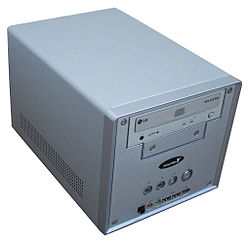
Shuttle SN41G2 (non-standard form factor). This series typically contains a custom-size motherboard and power supply, while CPU, memory and drives (2 HDD can be fitted) must be purchased separately. Graphics is usually added via PCI-Express expansion card (double width supported) but processor graphics, if present, is accessible. Processor cooling evolved from relying on the cooler that is sold with CPU till recently offered highly custom laptop-style heat sinks.[1]
Supermicro 5016T-MTFB (1U server). CPU and memory slots are empty; also contains one (topmost) dummy fan that can be replaced by functional fan if required. While blue SATA cables to hard drives are installed (top edge), hard drives themselves are not included. The available PCI-Express slot (riser card in the middle) is also empty. Includes motherboard, CD-ROM and power supply (bottom).[2] Old PCI slot is still present on the motherboard but requires separately sold riser card to be reachable.

A barebone computer is a partially assembled platform or an unassembled kit of computer parts allowing more customization and lower costs than a retail computer system.[3] They are available for desktop computer, notebook (see barebook) and server purposes, and in nearly any form factor. Manufacturers are also able to produce systems of a specialized or non-standard form factor, since the system is sold as a pre-built unit, with the motherboard and power supply already installed.[4]

Components

[edit]

Assembling a barebone computer by hand is usually less expensive than buying a pre-configured computer from a retailer, and may save time and labor compared with building a system from scratch. A typical barebone desktop system consists of a CPU, a computer case (or tower), with a pre-fitted motherboard and power supply. If not already provided, the purchaser of such a platform only has to equip it with a RAM, and optionally a hard drive (in some cases, an operating system is/can be installed to a lower-cost flash drive instead). Additional input/output devices may be required depending on their needs. Sometimes, it is necessary to install an operating system if the one built into the motherboard is deemed insufficient (or not present at all). An audio adapter or network adapter may be added but this is less common as recent motherboards often already contain capable solutions.

Peripherals, such as a keyboard, mouse and monitor, almost always must be acquired separately. Barebone systems sometimes include a graphics processor or RAM, but rarely any mass storage media (hard drives), operating system or other software. Sometimes PCs with everything a normal desktop PC has except Microsoft Windows operating systems are sold as a barebone computer, but may include free software such as Linux. Refurbished and used computers may also be repackaged as barebone computers, as many computers returned for refurbishing may have missing, broken, or obsolete parts such as hard drives and peripherals.

Barebook

[edit]

A barebook computer (or barebone laptop) is an incomplete notebook PC. A barebone laptop is similar to a barebone computer, but in a laptop form.

As it leaves the factory, it contains only elements strictly tied to the computer's design (case, motherboard, display, keyboard, pointing device, etc.), and the consumer or reseller has to add standardized off-the-shelf components such as CPU and GPU (when not integrated on the motherboard), memory, mass storage, WiFi card, etc. separately.

Because it is not manufactured with storage media such as harddisks or SSDs, a barebook does not typically include an operating system, which may make barebooks appealing to opposers of the bundling of Microsoft Windows.[5]

Upgrade limitations

[edit]

Future upgradeability of a barebone system may be limited, especially the motherboard component, which may have less space for extra I/O devices and fewer memory and PCI card slots than desired. The motherboard may not be compatible with faster processors and memory than those originally purchased with the barebone system. Barebones may also have limit on the maximal processor thermal design power (TDP) and not be able to support CPUs that would otherwise fit into the socket.

Manufacturers

[edit]

The following companies currently manufacture barebone computers:

See also

[edit]

References

[edit]
[edit]
Revisions and contributorsEdit on WikipediaRead on Wikipedia
from Grokipedia
A barebone computer, also known as a barebone system, is a partially assembled platform consisting of essential hardware components such as the , unit (PSU), and , but lacking key elements like the (CPU), (RAM), and storage drives, which users must supply and install themselves to complete the build. This modular approach gained prominence in the early with the advent of small form factor designs, such as those popularized by brands like Shuttle and the standard introduced by in 2001, enabling compact yet customizable computing solutions. Barebone systems typically support specific processor sockets (e.g., Intel LGA or AMD AM series) and memory types (e.g., DDR4 or DDR5 as of 2025), with expansion options for graphics cards, optical drives, and additional peripherals depending on the form factor, which ranges from space-saving to more expandable towers. Popular manufacturers as of 2025 include , , , and Shuttle, offering models tailored for various applications, from home entertainment to professional workstations. The primary advantages of barebone computers lie in their cost-effectiveness—generally cheaper than equivalent pre-built systems due to the absence of bundled components—and high customizability, allowing users to select high-performance or specialized parts like SSDs for faster boot times or discrete GPUs for gaming. They are particularly suited for enthusiasts, small businesses, and scenarios requiring tailored setups, such as media centers, home servers, or compact office PCs, though they demand technical knowledge for assembly and compatibility verification to avoid issues like mismatched chipsets. Despite these benefits, drawbacks include the need for additional purchases of peripherals (e.g., keyboard, ) and warranty considerations for user-added components.

Definition and Overview

Definition

A barebone computer is a partially assembled platform or an unassembled kit of computer parts that includes essential hardware components such as the , case, unit (PSU), and sometimes basic cooling solutions, while excluding critical elements like the (CPU), (RAM), storage devices, and peripherals. This configuration provides a foundational structure for users to build upon, distinguishing it from fully assembled retail systems that come ready-to-use with all hardware and often software pre-installed. Key characteristics of barebone computers emphasize flexibility for do-it-yourself (DIY) builders, allowing customization of performance and features to match specific requirements, such as gaming, , or media centers. They offer significant cost savings over pre-built personal computers by enabling purchasers to source and integrate higher-quality or more suitable components independently, without paying premiums for assembly and branding. Typically employed in home or small office setups, barebones appeal to enthusiasts and budget-conscious users seeking reliable, tailored computing solutions without unnecessary extras. The term "barebone" originates from the English idiom "bare bones," which denotes the minimal or essential elements of something, evoking the image of a devoid of flesh or embellishments. Unlike a bare-metal system—referring to hardware running software directly without an operating system—or a complete homebuilt PC that incorporates all necessary parts from the outset, a barebone focuses on providing just the core chassis and connectivity framework for user expansion. Barebone computers evolved from early kits popularized in the 1990s, which similarly encouraged hands-on assembly.

History and Evolution

The concept of barebone computers emerged in the early , driven by the growing demand for compact, customizable personal computing solutions amid the expansion of consumer PCs. Taiwanese manufacturer Shuttle Inc. pioneered the format with the launch of the SV24 in the third quarter of 2001, marking the first small form factor (SFF) barebone system at approximately 8.72 liters in volume. This shoebox-sized kit integrated essential components like a , , and case, while requiring users to add a CPU, RAM, and storage, appealing to enthusiasts seeking space-efficient builds without the bulk of traditional desktops. Key milestones shaped the barebone's development, including Intel's introduction of the (NUC) platform in the first quarter of 2013. The initial NUC kits, featuring early processors such as the Sandy Bridge-based 847 or Ivy Bridge Core i3, standardized ultra-compact form factors (UCFF) at approximately 0.5 liters, emphasizing modularity and broad compatibility for home theater and office use. Intel discontinued the NUC line in 2023, licensing it to for ongoing production and development. Post-2010, designs increasingly prioritized energy efficiency in response to global initiatives, which promoted reduced power consumption and lower environmental impact through optimized hardware like low-TDP processors and efficient cooling. This shift aligned barebones with broader trends in . By the 2020s, barebones evolved from bulky desktop kits to ultra-slim mini-PC configurations, fueled by the rise of and (IoT) applications requiring versatile, low-profile systems. The integration of AMD's APUs, starting with architectures around 2017, enabled powerful all-in-one capabilities with integrated graphics, supporting tasks like light gaming and multimedia without discrete GPUs. Manufacturers like expanded this with BRIX series barebones featuring 7 processors, enhancing portability for hybrid work environments. As of 2025, ARM-based barebones have gained prominence for low-power , exemplified by Pi-inspired industrial kits such as the ALPON X5, which deliver AI processing in rugged, energy-sipping form factors under 1 liter for IoT deployments.

Components and Assembly

Included Components

A barebone computer kit provides the core structural elements necessary to build a functional PC, serving as the "skeleton" by integrating key hardware that ensures compatibility and basic operation. These kits emphasize compactness and efficiency, allowing users to customize performance around a pre-matched foundation. The is the central (PCB) in a barebone kit, housing the , input/output (I/O) ports, and expansion slots for peripherals such as graphics cards. It often features a design tailored to the kit's , supporting specific form factors like or Micro-ATX to optimize space and integration. The case and form a compact that protects internal components while facilitating airflow for thermal management. Designed for small form factors, such as Micro-ATX, these s include mounting points for drives and expansion cards, with ventilation features like perforated panels or fan mounts to prevent overheating in confined spaces. A unit (PSU) is included to deliver stable to the , typically integrated or modular with ratings of 250-500W to suit low-to-mid power needs in compact builds. This wattage supports efficient operation without excess capacity, often certified for reliability like 80+ Bronze efficiency. Cooling solutions in barebone kits consist of basic components such as stock fans, heatsinks, or pre-applied to manage heat from the CPU and other parts. These are sufficient for entry-level use but exclude advanced options like liquid cooling, prioritizing simplicity over high-performance thermal demands. Other essentials may include front-panel I/O for convenient access to USB and audio ports, optical drive bays in select models for legacy media needs, and antennas in modern kits for wireless connectivity. These features enhance usability without adding bulk. Variations across barebone kits often involve pre-wiring of front-panel connectors to the for easier assembly and pre-testing of components for compatibility, ensuring the kit arrives ready for user additions like the CPU.

Required Additional Components

To complete a barebone computer , users must acquire and install several key components separately, as these kits typically provide only the foundational hardware such as the , , and power supply unit (PSU). The primary additions revolve around processing power, , and , with options for enhancement depending on the intended use. This DIY approach allows customization but requires careful selection to ensure compatibility with the included 's specifications. The central processor, or CPU, is essential and not included in standard barebone kits, necessitating a purchase that matches the motherboard's socket type. For instance, as of 2025, Intel-based barebones often support sockets compatible with 12th to 14th-generation Core processors or for Core Ultra 200 series, while variants typically use AM5 sockets for 7000/9000 series CPUs. Users must also verify thermal requirements, ensuring the CPU's heat output aligns with any bundled cooling solution, such as a basic air cooler or heatsink provided in the kit, to prevent overheating during operation. Memory modules, specifically RAM, are another required addition, installed into the motherboard's slots. Barebone systems generally support DDR4 or DDR5 configurations, with capacities ranging from 8GB to 128GB or more, depending on the chipset's maximum limits— for example, many modern boards cap at 64GB of DDR5-6000 for high-performance setups. Compatibility checks are crucial, as mismatched speeds or types (e.g., attempting DDR4 in a DDR5 slot) will prevent , and dual-channel kits (two matched sticks) are recommended for optimal bandwidth. Storage devices provide the system's data capacity and are selected based on the motherboard's interfaces, such as for traditional hard disk drives (HDDs) or slots for solid-state drives (SSDs). No drives come pre-installed, offering flexibility for users to choose between 500GB HDDs for bulk storage or NVMe SSDs (e.g., 1TB PCIe 4.0 models) for faster boot times and application loading. This modularity supports varied needs, from basic computing with a single SSD to expanded arrays via multiple ports. Graphics capabilities often rely on the CPU's integrated (iGPU), such as those in or processors with UHD or Iris Xe, eliminating the need for additions in light-duty systems. However, for demanding tasks like gaming or , a discrete can be installed if the barebone includes expansion slots like PCIe x16. Peripherals such as a keyboard, , and operating system (e.g., or distributions) are also not part of the kit and must be sourced separately, along with any display or input devices. Assembly involves basic tools like a Phillips screwdriver and anti-static wrist strap to avoid damaging components. Users should perform compatibility verifications, including checking for updates to support newer CPUs, before installation— a that typically takes 1-2 hours for experienced builders. The total additional cost for these essentials generally ranges from $200 to $500, covering a mid-range CPU (150250),16GBRAMkit(150-250), 16GB RAM kit (50-100), and 512GB SSD ($40-80), though prices fluctuate based on market conditions and performance tiers.

Types and Form Factors

Desktop Barebones

Desktop barebones refer to traditional full-sized or mid-tower systems designed for standard desktop environments, emphasizing expandability over compactness. These kits typically include a chassis, power supply unit (PSU), and sometimes a motherboard, supporting ATX or Micro-ATX form factors to accommodate larger components. Key design features include compatibility with ATX and Micro-ATX motherboards, which enable multiple expansion slots for peripherals, along with several drive bays—often 3.5-inch or 2.5-inch—for storage arrays and standard PSU sizes ranging from 500W to 1000W or higher to power demanding configurations. This setup promotes better airflow and cooling compared to smaller variants, allowing for sustained performance in extended use. Such systems suit applications where physical space is not limited, including home servers for centralized and media , gaming rigs capable of high-frame-rate rendering, and office workstations for productivity tasks like or CAD software. For instance, home servers leverage the multiple drive bays for configurations, while gaming setups benefit from robust PSU support for . Notable examples include TUF Gaming barebone kits, such as those featuring the Lancool 206 mid-tower for enhanced expandability and cooling, available from retailers like as of 2023. During assembly, the larger provides superior accessibility, simplifying the installation of full-size GPUs—up to 300mm or longer—along with and component alignment without the spatial constraints of mini systems.

Barebook Laptops

Barebone laptops, also known as barebooks, are partially assembled systems that include the essential components such as the display, keyboard, battery compartment, and ports, but exclude key internals like the (CPU), (RAM), and storage drives. These kits typically feature a designed for mobile processors, often from or , allowing users to select and install compatible components for customization. Unlike fully integrated retail laptops, barebooks provide a foundation for building tailored systems without pre-installed operating systems, emphasizing user-driven assembly for specific performance needs. Design challenges in barebone laptops stem from the need to balance portability with modularity, resulting in proprietary motherboards optimized for slim profiles that accommodate laptop form factors. These motherboards frequently incorporate soldered elements, such as certain CPU sockets or integrated graphics, which restrict upgrade paths compared to desktop barebones; for instance, while some models support replaceable MXM graphics modules, access to components like the CPU often requires partial disassembly of the cooling system. The compact layout prioritizes thermal management and battery integration, but this integration limits expandability, with features like fixed-resolution displays and limited RAM slots under the keyboard further constraining modifications. Barebone laptops find applications in creating custom ultrabooks for professionals requiring specific hardware configurations or in repair and rebuild projects for technology enthusiasts seeking to extend device lifespans. They enable targeted builds for tasks like productivity, , or even in portable formats, appealing to users who value control over components without the bloat of pre-configured systems. Examples of barebone laptop kits include those from Taiwanese manufacturer , which has offered barebooks since the , and resellers like Sager, which rebranded Clevo chassis in models such as the NP2330 (based on Clevo 2300C) during the late 1990s and early . In the , kits like the Clevo P775DM3-G provided options for desktop-grade CPUs and upgradable GPUs, as seen in reviewed configurations supporting i7 processors and GTX 1080 graphics. More recent models, such as the Clevo V370WNNQ, support Ultra Series 2 processors and RTX 50 series graphics as of 2025. Today, such kits remain available through specialized vendors like RJTech, but their scarcity in mainstream markets arises from the industry's shift toward fully integrated manufacturing, where soldered components and standardized designs dominate to streamline production and reduce costs.

Mini and Small Form Factor Barebones

Mini and small form factor barebones represent ultra-compact computing kits designed for space-constrained environments, typically adhering to or smaller standards with volumes ranging from 1 to 4 liters. These systems emphasize integrated ports, such as USB, , and Ethernet, alongside low-profile cooling solutions like slim heatsinks or fanless designs to minimize noise and heat dissipation. Key features include support for low-power processors, such as i-series U or H variants and mobile series, which enable efficient operation without high thermal demands. Storage options prioritize NVMe SSDs for fast, compact data access, while many models incorporate VESA mounting brackets for seamless integration behind monitors or into furniture. These barebones often arrive with onboard and , facilitating wireless connectivity in tight setups. Such systems find applications in media centers and home theater PCs (HTPCs) for streaming high-definition content, embedded industrial setups for , and office environments where desk space is limited. Their popularity has surged in the for , powering 4K displays in retail, hospitality, and public spaces due to low energy use and remote management capabilities. Prominent examples include the ROG NUC series (formerly Intel NUC), first launched in 2013 as a pioneering small form factor kit and evolving to the ROG NUC (2025) supporting Ultra Series 2 processors offering up to 24 cores and graphics in an approximately 3-liter as of 2025. ASRock's DeskMini line, such as the X600 model, provides barebones in volumes as small as 2 liters, with modular expansion for custom builds and updates including support in 2025. Zotac's ZBOX series, like the MAGNUS EN275060TC (2025), delivers Ultra-based kits with graphics, targeting high-performance operation in a 2.65-liter .

Advantages and Limitations

Benefits

Barebone computers offer substantial cost savings over pre-built equivalents by excluding markup on user-selected components like processors, , and storage, allowing buyers to source these items independently at competitive prices. For instance, barebone kits including the , , and can enable users to assemble a complete for less than many comparable off-the-shelf options. This modular approach not only reduces upfront expenses but also avoids unnecessary features bundled in pre-built systems, making barebones particularly appealing for budget-conscious builders or organizations. A key advantage lies in customization, enabling users to precisely tailor hardware specifications to their requirements without compromise. For example, one can prioritize high-capacity RAM and efficient storage for server applications or integrate a discrete for gaming and content creation, ensuring optimal performance for targeted use cases. This flexibility extends to scalability, as components can be upgraded over time to meet evolving needs, extending the system's lifespan beyond that of rigid pre-built configurations. Reliability is enhanced through pre-tested core components, such as the and , which minimizes assembly errors and ensures compatibility from the outset. The further simplifies , as individual parts can be isolated and replaced without affecting the entire system. Component warranties typically remain intact when installed correctly, providing peace of mind for users. Mini and small form factor barebones promote energy efficiency with compact power supplies and low-TDP components, resulting in reduced overall power draw compared to full-sized desktops. For example, the DeskMini X600 supports processors up to 65W TDP and achieves idle power consumption as low as 10-11W under optimized conditions (e.g., with dummy plug), making it suitable for always-on applications like home servers while lowering costs. Additionally, assembling a barebone offers significant educational value, serving as a hands-on introduction to fundamentals, including component installation, , and basic skills. This practical experience is invaluable for hobbyists, students, and IT professionals seeking to deepen their understanding of PC architecture.

Upgrade and Customization Limitations

Barebone computers often feature hardware designs, such as custom that restrict CPU and GPU options to specific compatible models, limiting user flexibility for like , which is typically unsupported due to integrated power delivery and constraints. For instance, in NUC systems, the processor is frequently soldered directly to the , preventing any CPU and contributing to a shorter device lifespan as performance needs evolve. Similarly, Shuttle barebones employ specialized where upgrading to a different board is not recommended, as it can lead to hardware incompatibilities with the case's port placements, , and cooling systems. Space constraints in barebone systems, particularly in mini and small form factor models, further hinder customization by offering limited expansion slots and, in some cases, soldered components like RAM or modules. Many compact barebones, including certain NUC variants, use soldered memory or Wi-Fi cards, eliminating upgrade paths for these elements and forcing reliance on external adapters if needed. GPU upgrades are especially challenging due to the tight interiors, which rarely accommodate discrete cards without external enclosures, though eGPUs can provide a at the cost of added complexity. Compatibility issues exacerbate these limitations, with BIOS firmware often tailored to initial hardware configurations, restricting support for newer components and potentially causing boot failures or suboptimal performance. Thermal throttling is a common byproduct of compact cases in barebones, where restricted leads to automatic clock speed reductions under sustained loads to prevent overheating, as seen in Shuttle's slim models. Over time, these factors diminish long-term viability, as major platform shifts—such as moving to a new CPU generation—typically require replacing the entire barebone kit rather than piecemeal upgrades, unlike more modular standard desktops. Users may also face additional costs for operating system licenses, such as , and limited manufacturer support for issues arising from incompatible hardware, which may not be covered under . While barebones offer initial customization benefits like selecting core components, these post-assembly constraints can offset such advantages for users anticipating frequent modifications.

Market and Manufacturers

Major Manufacturers

Shuttle Inc., a Taiwan-based manufacturer founded in 1983, pioneered the barebone computer market in the 1990s with its focus on small form factor systems and became widely recognized for the XPC series launched in 2001, which emphasized compact desktops suitable for home and office use. The company evolved through the 2000s as a leader in innovative mini PCs, introducing lines like the XPC Cube and Slim models that integrated efficient cooling and modular designs, though it faced market challenges post-peak popularity around 2008. Today, Shuttle continues to produce barebones under the XPC branding, maintaining a global presence with products targeted at professional and embedded applications. Intel introduced its Next Unit of Computing (NUC) line in 2012, revolutionizing mini-ITX barebones with ultra-compact designs that prioritized portability and low power consumption, influencing the broader small form factor ecosystem. The NUC series, spanning from 2013 to 2023, offered customizable kits supporting processors and was adopted for , kiosks, and home theaters due to its emphasis on integrated graphics and expandability. In 2023, Intel discontinued direct production of consumer NUCs to refocus on core businesses, transferring the reference design to partners like , which has continued the line under its own branding. ASRock contributes to the barebone sector through its DeskMini series, launched in the mid-2010s, which supports both and platforms in form factors for DIY enthusiasts seeking high-performance compact builds. The series, including models like the DeskMini X600 and B860 as of 2025, accommodates up to discrete graphics cards and dual-channel memory, positioning as a key player in customizable mini PCs for gaming and productivity. Gigabyte's BRIX line, introduced around 2013, targets versatile barebones with embedded processors, offering slim profiles and support for up to 96GB of DDR5 memory in recent iterations like the GB-BRU7 series featuring Ultra chips. Known for robust I/O including 7 and multiple display outputs, BRIX systems appeal to business and users. Zotac's ZBOX series, debuting in the early , provides low-profile barebones including fanless options such as the CI669 nano and actively cooled models like the MI673, supporting recent processors with features like Gigabit LAN for professional workflows. The line emphasizes silent operation where applicable and multi-display support, making it suitable for and industrial applications. Lenovo and HP are also major players, offering enterprise-focused barebones like the ThinkCentre Tiny series and HP ProDesk Mini, which support customizable and configurations for office and workstation use as of 2025. Emerging manufacturers like ACEMAGIC have gained traction in the performance segment with barebone options such as the F3A model, supporting AI processors and customizable RAM/SSD configurations for AI workloads and gaming applications. These systems, priced around $700 for barebones as of November 2025, highlight the growing accessibility of high-performance compact in developing markets. In recent years, the barebone computer market has experienced significant growth in mini form factors, particularly for and applications, accelerated by the post-2020 pandemic shift toward and smart home ecosystems. The global mini PC market, which includes barebone kits, reached approximately USD 1.89 billion in 2025 and is projected to grow at a CAGR of 8.28% through 2034, driven by demand for compact, power-efficient devices capable of local AI processing. Examples include Sapphire's EDGE Mini PC series, a barebone system based on AI 300 processors for edge tasks, and ASRock's 4X4 BOX-AI350, supporting up to 96GB DDR5 RAM for handling in setups. This surge reflects broader adoption in industrial edge AI, such as Portwell's barebone systems for defect detection in , and consumer hubs leveraging mini barebones for IoT integration. Conversely, traditional desktop barebones have faced challenges, including a decline due to the dominance of pre-built PCs and the rising popularity of ARM-based and alternatives, which are diminishing demand for x86 architectures. The overall desktop PC segment has waned amid hybrid work trends favoring portable and efficient devices, with pre-builts offering easier assembly and warranties that appeal to non-enthusiasts. , exemplified by the M4-powered , has captured a significant share of the mini PC market with superior power efficiency, prompting x86 vendors like and to integrate NPUs for AI competitiveness, yet ARM options like Qualcomm's Snapdragon X series are expected to expand in 2025 PCs priced around $700. disruptions from the 2020-2023 global , exacerbated by demand surges and ongoing AI chip constraints, have further impacted availability, leading to price volatility and delays in barebone production into the mid-2020s. Pricing for barebone kits typically ranges from $200 to $800, with basic mini models starting at $213 on platforms like and Amazon, where online sales dominate distribution. Innovations in barebone designs emphasize enhanced connectivity and sustainability, with integration of (and emerging support) for high-speed peripherals and for ultra-low latency performance. Models like the barebone incorporate these features alongside aluminum for better thermal management. Eco-friendly approaches are also prominent, featuring recyclable materials and energy-efficient components to reduce environmental impact; for instance, GEEKOM's A5 series uses sustainable designs and low-power processors. Looking ahead, the market holds potential for modular standards, such as Intel's proposed architecture for mini PCs and laptops, enabling easier component upgrades and repairs by 2026 to extend device longevity amid e-waste concerns.

References

Add your contribution
Related Hubs
User Avatar
No comments yet.