


Community hub
Recent from talks
Contribute something
Nothing was collected or created yet.
Color Graphics Adapter
View on Wikipedia IBM CGA graphics card | |
| Release date | 1981 |
|---|---|
| Architecture | Motorola 6845, ATI CW16800 |
| Cards | |
| Entry-level | IBM Color Graphics Adapter, ATi Graphics Solution Rev 3, ATi Color Emulation Card, Tseng Labs ColorPAK, |
| Mid-range | ATi Graphics Solution plus, ATi Graphics Solution Plus SP, ATi Graphics Solution SR, Number Nine Graphics System |
| High-end | ATi Small Wonder Graphics Solution, Tseng Labs EVA/480 |
| Enthusiast | ATi Small Wonder Graphics Solution with game port |
| History | |
| Successor | |
The Color Graphics Adapter (CGA), originally also called the Color/Graphics Adapter or IBM Color/Graphics Monitor Adapter,[1] introduced in 1981, was IBM's first color graphics card for the IBM PC and established a de facto computer display standard.
Hardware design
[edit]The original IBM CGA graphics card was built around the Motorola 6845 display controller,[2] came with 16 kilobytes of video memory built in, and featured several graphics and text modes. The highest display resolution of any mode was 640 × 200, and the highest color depth supported was 4-bit (16 colors).
The CGA card could be connected either to a direct-drive CRT monitor using a 4-bit digital (TTL) RGBI interface, such as the IBM 5153 color display, or to an NTSC-compatible television or composite video monitor via an RCA connector.[3] The RCA connector provided only baseband video, so to connect the CGA card to a television set without a composite video input required a separate RF modulator.[1]
IBM produced the 5153 Personal Computer Color Display for use with the CGA, but this was not available at release[4] and would not be released until March 1983.[5]
Although IBM's own color display was not available, customers could either use the composite output (with an RF modulator if needed), or the direct-drive output with available third-party monitors that supported the RGBI format and scan rate. Some third-party displays lacked the intensity input, reducing the number of available colors to eight,[4] and many also lacked IBM's unique circuitry which rendered the dark-yellow color as brown, so any software that used brown would be displayed incorrectly.
Output capabilities
[edit]CGA offered several video modes.[6][7]
Graphics modes:
- 160 × 100 in 16 colors, chosen from a 16-color palette, utilizing a specific configuration of the 80 × 25 text mode.
- This used 4 bits per pixel, with a total memory use of (160 × 100 × 4) / 8 = 8 kilobytes.
- 320 × 200 in 4 colors, chosen from 3 fixed palettes, with high- and low-intensity variants, with color 1 chosen from a 16-color palette.
- This used 2 bits per pixel, with a total memory use of (320 × 200 × 2) / 8 = 16 kilobytes.
- 640 × 200 in 2 colors, one black, one chosen from a 16-color palette.
- This used 1 bit per pixel, with a total memory use of (640 × 200) / 8 = 16 kilobytes.
Some software achieved greater color depth by utilizing artifact color when connected to a composite monitor.
Text modes:
- 40 × 25 with 8 × 8 pixel font (effective resolution of 320 × 200)
- 80 × 25 with 8 × 8 pixel font (effective resolution of 640 × 200)
IBM intended that CGA be compatible with a home television set. The 40 × 25 text and 320 × 200 graphics modes are usable with a television, and the 80 × 25 text and 640 × 200 graphics modes are intended for a monitor.[2]
- CGA graphics modes comparison
-
 320 × 200 in 4 colors palette 0
 -
 320 × 200 in 4 colors palette 0 low intensity
 -
 320 × 200 in 4 colors palette 1
 -
 320 × 200 in 4 colors palette 1 low intensity
 -
 320 × 200 in 4 colors palette 3
 -
 320 × 200 in 4 colors palette 3 low intensity
 -
 640 × 200 in 2 colors
 -
 160 × 100 in 16 colors
 -
 Composite artifact colors (from 640 × 200 monochrome)
 -
 Composite artifact colors (from 320 × 200 palette 1)
 -
 Composite artifact colors (from 320 × 200 palette 0)


- CGA software images
-
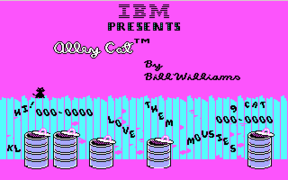 Example of typical 320 × 200 CGA graphics on "Alley Cat", an early IBM PC self-booting game
 -
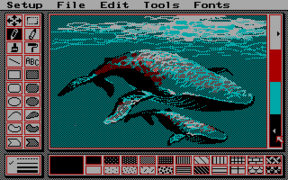 PCPaint in 320 × 200 3rd palette low intensity, showing a typical low resolution interface. Note the use of dithering to overcome the CGA palette limitations
 -
 SimCity in 640 × 200 monochrome. Note the use of dithering to simulate gray tones and non-square pixel ratio that deforms the fonts
 -
 PakuPaku in 160 × 100 16 color mode
 -
 Fractint rendered Mandelbrot set using 320 × 200 palette 1


Color palette
[edit]CGA uses a 4-bit RGBI 16-color gamut, but not all colors are available at all times, depending on which graphics mode is being used. In the medium- and high-resolution modes, colors are stored at a lower bit depth and selected by fixed palette indexes, not direct selection from the full 16-color palette.
When four bits are used (for low-resolution mode, or for programming color registers) they are arranged according to the RGBI color model:[8]
- The lower three bits represent red, green, and blue color components
- The fourth "intensifier" bit, when set, increases the brightness of all three color components (red, green, and blue).[9]
| Color | I | R | G | B | Color | I | R | G | B |
|---|---|---|---|---|---|---|---|---|---|
| Black | 0 | 0 | 0 | 0 | Gray 2 | 1 | 0 | 0 | 0 |
| Blue | 0 | 0 | 0 | 1 | Light Blue | 1 | 0 | 0 | 1 |
| Green | 0 | 0 | 1 | 0 | Light Green | 1 | 0 | 1 | 0 |
| Cyan | 0 | 0 | 1 | 1 | Light Cyan | 1 | 0 | 1 | 1 |
| Red | 0 | 1 | 0 | 0 | Light Red | 1 | 1 | 0 | 0 |
| Magenta | 0 | 1 | 0 | 1 | Light Magenta | 1 | 1 | 0 | 1 |
| Brown | 0 | 1 | 1 | 0 | Light Yellow | 1 | 1 | 1 | 0 |
| Gray 1 | 0 | 1 | 1 | 1 | White | 1 | 1 | 1 | 1 |
These four colour bits are then interpreted internally by the monitor, or converted to NTSC colours (see below).
With an RGBI monitor
[edit]When using a direct-drive monitor, the four color bits are output directly to the DE-9 connector at the back of the card.
Within the monitor, the four signals are interpreted to drive the red, green and blue color guns. With respect to the RGBI color model described above, the monitor would translate the digital four-bit color number to some seven distinctive analog voltages in the range from 0.0 to 1.0 for each gun.[10]
| dark yellow | |
|---|---|
| 6 | #AAAA00 |
Color 6 is treated specially; normally, color 6 would become dark yellow, as seen to the right, but in order to achieve a more pleasing brown tone, special circuitry in most RGBI monitors, starting with the IBM 5153 color display,[11] makes an exception for color 6 and changes its hue from dark yellow to brown by reducing the analogue green signal's amplitude. The exact amount of reduction differed between monitor models: the original IBM 5153 Personal Computer Color Display reduces the green signal's amplitude by about one third,[12] while the IBM 5154 Enhanced Color Display internally converts all 4-bit RGBI color numbers to 6-bit ECD color numbers,[8] which amounts to halving the green signal's amplitude. The Tandy CM-2,[13] CM-4[14] and CM-11[15] monitors provide a potentiometer labelled "BROWN ADJ." to adjust the amount of green signal reduction.
This "RGBI with tweaked brown" palette was retained as the default palette of later PC graphics standards such as EGA and VGA, which can select colors from much larger gamuts, but default to these until reprogrammed.
Later video cards/monitors in CGA emulation modes would approximate the colors with the following formula:
red   := 2/3×(colorNumber & 4)/4 + 1/3×(colorNumber & 8)/8
green := 2/3×(colorNumber & 2)/2 + 1/3×(colorNumber & 8)/8
blue  := 2/3×(colorNumber & 1)/1 + 1/3×(colorNumber & 8)/8
if (color == 6)
   green := green * 2/3
which yields the canonical CGA palette:[10]
| 0 | black #000000 |
8 | dark gray #555555 |
| 1 | blue #0000AA |
9 | light blue #5555FF |
| 2 | green #00AA00 |
10 | light green #55FF55 |
| 3 | cyan #00AAAA |
11 | light cyan #55FFFF |
| 4 | red #AA0000 |
12 | light red #FF5555 |
| 5 | magenta #AA00AA |
13 | light magenta #FF55FF |
| 6 | brown #AA5500 |
14 | yellow #FFFF55 |
| 7 | light gray #AAAAAA |
15 | white #FFFFFF |
Note: Color hex values shown are 8-bit RGB equivalents, internally CGA is 4-bit RGBI
With a composite color monitor/television set
[edit]
For the composite output, these four-bit color numbers are encoded by the CGA's onboard hardware into an NTSC-compatible signal fed to the card's RCA output jack. For cost reasons, this is not done using an RGB-to-YIQ converter as called for by the NTSC standard, but by a series of flip-flops and delay lines.[16][17]
Consequently, the hues seen are lacking in purity; notably, both cyan and yellow have a greenish tint, and color 6 again looks dark yellow instead of brown.[18]
The relative luminances of the colors produced by the composite color-generating circuit differ between CGA revisions: they are identical for colors 1-6 and 9-14 with early CGAs produced until 1983,[19] and are different for later CGAs due to the addition of additional resistors.[20]
Standard text modes
[edit] |
CGA offers four BIOS text modes (Modes 0 to 3, called alphanumeric or A/N modes in IBM's documentation). In these modes, individual pixels on the screen cannot be addressed directly. Instead, the screen is divided into a grid of character cells, each displaying a character defined in one of two bitmap fonts, "normal" and "thin", included in the card's ROM. The fonts are fixed and cannot be modified or selected from software, only by a jumper on the board itself.
Fonts are stored as bitmaps at a color depth of 1-bit, with a "1" representing the character and a "0" representing the background. These colors can be chosen independently, for each character on the screen, from the full 16-color CGA palette. The character set is defined by hardware code page 437.
The font bitmap data is only available to the card itself, it cannot be read by the CPU. In graphics modes, text output by the BIOS operates by copying text from the font ROM bit-by-bit to video memory.
40 × 25 mode
[edit]BIOS Modes 0 and 1 are both 40 columns by 25 rows text modes, with each character a pattern of 8 × 8 dots. The effective screen resolution in this mode is 320 × 200 pixels (a pixel aspect ratio of 1:1.2.) The card has sufficient video RAM for eight different text pages in this mode.
The difference between these two modes can only be seen on a composite monitor, where mode 0 disables the color burst, making all text appear in grayscale. Mode 1 enables the color burst, allowing for color. Mode 0 and Mode 1 are functionally identical on RGB monitors and on later adapters that emulate CGA without supporting composite color output.
80 × 25 mode
[edit]BIOS Modes 2 and 3 select 80 columns by 25 rows text modes, with each character still an 8 × 8 dot pattern, but displayed at a higher scan rate. The effective screen resolution of this mode is 640 × 200 pixels. In this mode, the card has enough video RAM for four different text pages.
As with the 40-column text modes, Mode 2 disables the color burst in the composite signal and Mode 3 enables it.
Textmode color
[edit]Each character cell stored four bits for foreground and background color. However, in the card's default configuration, the fourth bit of the background color does not set intensity, but sets the blink attribute for the cell. All characters on the screen with this bit set will periodically blink, meaning their foreground color will be changed to their background color so the character becomes invisible. All characters blink in unison.
By setting a hardware register, the blink feature can be disabled, restoring access to high-intensity background colors.
All blinking characters on the screen blink in sync. The blinking attribute effect is enabled by default and the high-intensity background effect is disabled; disabling blinking is the only way to freely choose the latter eight-color indexes (8-15) for the background color.
Notably, the GW-BASIC and Microsoft QBASIC programming languages included with MS-DOS supported all the text modes of the CGA with full color control, but did not provide a normal means through the BASIC language to switch the CGA from blink mode to 16-background-color mode. This was still possible however by directly programming the hardware registers using the OUT statement of the BASIC language.
Standard graphics modes
[edit]CGA offers graphics modes at three resolutions: 160 × 100, 320 × 200 and 640 × 200. In all modes every pixel on the screen can be set directly, but the color depth for the higher modes does not permit selecting freely from the full 16-color palette.
320 × 200
[edit]In the medium-resolution 320 × 200 modes (Modes 4 and 5), each pixel is two bits, which select colors from a four-color palette. In mode 4, there are two palettes, and in mode 5 there is a single palette.
| # | Mode 4 | Mode 5 | ||||
|---|---|---|---|---|---|---|
| Palette 0 | Palette 1 | low intensity | high intensity | |||
| low intensity | high intensity | low intensity | high intensity | |||
| 0 | 0 – background | 0 – background | 0 – background | 0 – background | 0 – background | 0 – background |
| 1 | 2 – green | 10 – light green | 3 – cyan | 11 – light cyan | 3 – cyan | 11 – light cyan |
| 2 | 4 – red | 12 – light red | 5 – magenta | 13 – light magenta | 4 – red | 12 – light red |
| 3 | 6 – brown | 14 – yellow | 7 – light gray | 15 – white | 7 – light gray | 15 – white |
Several choices can be made by programming hardware registers. First, the selected palette. Second, the intensity – which is defined for the entire screen, not on a per-pixel basis. Third, color 0 (the "background" color) can be set to any of the 16 colors.
The specific BIOS graphics mode influences which palettes are available. BIOS Mode 4 offers two palettes: green/red/brown and cyan/magenta/white.
As with the text modes 0 and 2, Mode 5 disables the color burst to allow colors to appear in grayscale on composite monitor. However, unlike the text modes, this also affects the colors displayed on an RGBI monitor, altering them to the cyan/red/white palette seen above. This palette is not documented by IBM, but was used in some software.
640 × 200
[edit]In the high-resolution 640 × 200 mode (Mode 6), each pixel is one bit, providing two colors which can be chosen from the 16-color palette by programming hardware registers.
In this mode, the video picture is stored as a simple bitmap, with one bit per pixel setting the color to "foreground" or "background". By default the colors are black and bright white, but the foreground color can be changed to any entry in the 16-color CGA palette. The background color cannot be changed from black on an original IBM CGA card.
This mode disables the composite color burst signal by default. The BIOS does not provide an option to turn the color burst on in 640 × 200 mode, and the user must write directly to the mode control register to enable it.
Further graphics modes and tweaks
[edit]A number of official and unofficial features exist that can be exploited to achieve special effects.
- In 320 × 200 graphics mode, the background color (which also affects the border color), which defaults to black on mode initialization, can be changed to any of the other 15 colors of the CGA palette. This allows for some variation, as well as flashing effects, as the background color can be changed without having to redraw the screen (i.e. without changing the contents of the video RAM).
- In text mode, the border color (displayed outside the regular display area and including the overscan area) can be changed from the default black to any of the other 15 colors.
- Through precision timing, it is possible to switch to another palette while the video is being output, allowing the use of any one of the six palettes per scanline. An example of this is California Games,[21] when run on a stock 4.77 MHz 8088. Running on a faster computer does not produce the effect, as the method the programmers used to switch palettes at predetermined locations is extremely sensitive to machine speed. The same can be done with the background color, as is used to create the river and road in Frogger.[22] Another documented example of the technique is in Atarisoft's port of Jungle Hunt to the PC.
- Additional colors can be approximated using dithering.
- Using palette 0 at low intensity and dark blue as the background color provides the three primary RGB colors, as well as brown.
Some of these above tweaks can be combined. Examples can be found in several games.[23]
160 × 100 16 color mode
[edit]

Technically, this mode is not a graphics mode, but a tweak of the 80 × 25 text mode.[24] The character cell height register is changed to display only two lines per character cell instead of the normal eight lines. This quadruples the number of text rows displayed from 25 to 100. These "tightly squeezed" text characters are not full characters. The system only displays their top two lines of pixels (eight each) before moving on to the next row.

|
Character 221 |

|
221 with blue text and red background color |

|
221 with red text and blue background color. |

|
Character 222 |
Character 221 of the CGA character set consists of a box occupying the entire left half of the character matrix. (Character 222 consists of a box occupying the entire right half.)
Because each character can be assigned different foreground and background colors, it can be colored (for example) blue on the left (foreground color) and bright red on the right (background color). This can be reversed by swapping the foreground and background colors.
Using either character 221 or 222, each half of each truncated character cell can thus be treated as an individual pixel—making 160 horizontal pixels available per line. Thus, 160 × 100 pixels at 16 colors, with an aspect ratio of 1:1.2, are possible.
Although a roundabout way of achieving a 16-color graphics display, this works quite well and the mode is even mentioned (although not explained) in IBM's official hardware documentation.[25] This mode was used as early as 1983 on the game Moon Bugs.[26][27][28]
More detail can be achieved in this mode by using other characters, combining ASCII art with the aforesaid technique. This was explored by Macrocom, Inc on two games: Icon: Quest for the Ring (released in 1984) and The Seven Spirits of Ra (released in 1987).[28][29][30]
The same text cell height reduction technique can also be used with the 40 × 25 text mode, yielding a resolution of 80 × 100.
Composite output
[edit]Using the composite output instead of an RGBI monitor produced lower-quality video, due to NTSC's inferior separation between luminance and chrominance.[31] This is especially a problem with 80-column text:[32]

For this reason, each of the text and graphics modes has a duplicate mode which disables the composite colorburst, resulting in a black-and-white picture, but also eliminating color bleeding to produce a sharper picture. On RGBI monitors, the two versions of each mode are usually identical, with the exception of the 320 × 200 graphics mode, where the "monochrome" version produces a third palette.
Extended artifact colors
[edit]Programmers discovered that this flaw could be turned into an asset, as distinct patterns of high-resolution dots would turn into consistent areas of solid colors, thus allowing the display of completely new artifact colors. Both the standard 320 × 200 four-color and the 640 × 200 color-on-black graphics modes could be used with this technique.
Internal operation
[edit]Direct colors are the normal 16 colors as described above under "The CGA color palette".
Artifact colors are seen because the composite monitor's NTSC chroma decoder misinterprets some of the luminance information as color. By carefully placing pixels in appropriate patterns, a programmer can produce specific cross-color artifacts yielding a desired new color; either from purely black-and-white pixels in 640 × 200 mode, or resulting from a combination of direct and artifact colors in 320 × 200 mode, as seen on the following pictures:
- CGA composite artifact color generation: pixels as displayed on a RGBI (left) or composite (right) monitor.
-
 640 × 200
 -
 320 × 200 palette 0
 -
 320 × 200 palette 1


Thus, with the choice between 320 × 200 vs. 640 × 200 mode, the choice between the two palettes, and one freely-selectable color (the background in 320 × 200 modes and the foreground in 640 × 200 mode), it is possible to use many different sets of artifact colors, making for a total gamut of over 100 colors.

Later demonstrations by enthusiasts have increased the maximum number of colors the CGA can display at the same time to 1024.[33][34] This technique involves a text mode tweak which quadruples the number of text rows. Certain ASCII characters such as U and ‼ are then used to produce the necessary patterns, which result in non-dithered images with an effective resolution of 80 × 100 on a composite monitor.[33]
160 cycles of the NTSC color clock occur during each line's output, so in 40-column mode each pixel occupies half a cycle and in 80-column mode each pixel uses a quarter of a cycle. Limiting the character display to the upper one or two scanlines, and taking advantage of the pixel arrangement in certain characters of the codepage 437, it is possible to display up to 1024 colors.[33] This technique was used in the demo 8088 MPH.[34]
Availability and caveats
[edit]The 320 × 200 variant of this technique (see above) is how the standard BIOS-supported graphics mode looks on a composite color monitor. The 640 × 200 variant, however, requires modifying a bit (color burst disable) directly in the CGA's hardware registers. As a result, it is usually referred to as a separate "mode".
Being completely dependent on the NTSC encoding/decoding process, composite color artifacting is not available on an RGBI monitor, nor is it emulated by EGA, VGA or contemporary graphics adapters.
The modern, games-centric PC emulator DOSBox supports a CGA mode, which can emulate a composite monitor's color artifacting. Both 640 × 200 composite mode and the more complex 320 × 200 variant are supported.
Resolution and usage
[edit]Composite artifacting, whether used intentionally or as an unwanted artifact, reduces the effective horizontal resolution to a maximum of 160 pixels, more for black-on-white or white-on-black text, without changing the vertical resolution. The resulting composite video display with "artifacted" colors is sometimes described as a 160 × 200 / 16-color "mode", though technically it was a technique using a standard mode.
The low resolution of this composite color artifacting method led to it being used almost exclusively in games. Many high-profile titles offered graphics optimized for composite color monitors. Ultima II, the first game in the game series to be ported to IBM PC, used CGA composite graphics. King's Quest I also offered 16-color graphics on the PC, PCjr and Tandy 1000, but provided a 'RGB mode' at the title screen which would utilize only the ordinary CGA graphics mode, limited to 4 colors.
- Examples of CGA games on RGBI and composite monitors
-
 Microsoft Decathlon. Top: game in composite mode; bottom: game in RGB mode; left: with RGB monitor; right: with composite monitor.
 -
 King's Quest. Top: game in composite mode; bottom: game in RGB mode; left: with RGB monitor; right: with composite monitor.
 -
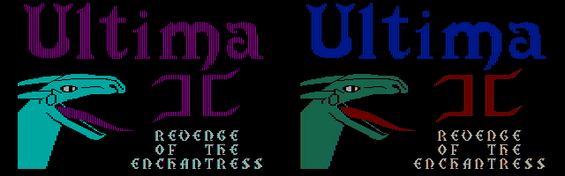 Ultima II. Left: with RGB monitor; right: with composite monitor.


Limitations, bugs and errata
[edit]Video timing on the CGA is provided by the Motorola 6845 video controller. This integrated circuit was originally designed only for character-based alphanumeric (text) displays and can address a maximum of 128 character rows.
To realize graphics modes with 200 scanlines on the CGA, the MC6845 is programmed with 100 character rows per picture and two scanlines per character row. Because the video memory address output by the MC6845 is identical for each scanline within a character row, the CGA must use the MC6845's "row address" output (i.e. the scanline within the character row) as an additional address bit to fetch raster data from video memory.[35]
This implies that unless the size of a single scanline's raster data is a power of two, raster data cannot be laid out continuously in video memory. Instead, graphics modes on the CGA store the even-numbered scanlines contiguously in memory, followed by a second block of odd-numbered scanlines starting at video memory position 8,192. This arrangement results in additional overhead in graphics modes for software that manipulates video memory.
Even though the MC6845 video controller can provide the timing for interlaced video, the CGA's circuitry aligns the synchronization signals in such a way that scanning is always progressive. Consequently, it is impossible to double the vertical resolution to 400 scanlines using a standard 15 kHz monitor.
The higher bandwidth used by 80-column text mode results in random short horizontal lines appearing onscreen (known as "snow") if a program writes directly to video memory during screen drawing. The BIOS avoids the problem by only accessing the memory during horizontal retrace, or by temporarily turning off the output during scrolling. While this causes the display to flicker, IBM decided that doing so was better than snow.[2] The "snow" problem does not occur on any other video adapter, or on most CGA clones.
In the 80-column text mode, the pixel clock frequency is doubled, and all synchronization signals are output for twice the number of clock cycles in order to last for their proper duration. The composite output's color burst signal circuit is an exception: because it still outputs the same number of cycles, now at the doubled clock rate, the color burst signal produced is too short for most monitors, yielding no or unstable color. Hence, IBM documentation lists the 80-column text mode as a "feature" only for RGBI and black-and-white composite monitors.[36] Stable color can still be achieved by setting the border color to brown, which happens to produce a phase identical to the correct color burst signal and serves as a substitute for it.
Dual-head support
[edit]The CGA was released alongside the IBM MDA, and can be installed alongside the MDA in the same computer. A command included with PC DOS permits switching the display output between the CGA and MDA cards.[37] Some programs like Lotus 1-2-3[38] and AutoCAD support using both displays concurrently.
Software support
[edit]CGA was widely supported in PC software up until the early 1990s. Some of the software that supported the board was:
- Visi On (an early GUI, used the 640x200 monochrome mode)
- Windows 3.0 (and earlier versions, supported the 640x200 monochrome mode[39])
- OS/2 1.1 (and earlier versions)
- Graphics Environment Manager (GEM)
Competing adapters
[edit]BYTE in January 1982 described the output from CGA as "very good—slightly better than color graphics on existing microcomputers".[4] PC Magazine disagreed, reporting in June 1983 that "the IBM monochrome display is absolutely beautiful for text and wonderfully easy on the eyes, but is limited to simple character graphics. Text quality on displays connected to the color/graphics adapter ... is at best of medium quality and is conducive to eyestrain over the long haul".[40]
In a retrospective commentary, Next Generation also took a negative view on the CGA, stating: "Even for the time (early 1980s), these graphics were terrible, paling in comparison to other color machines available on the market."[41]
CGA had several competitors:
- For business and word processing use, IBM provided the Monochrome Display Adapter (MDA) at the same time as CGA. MDA was much more popular than CGA at first.[42] Since a great many PCs were sold to businesses, the sharp, high-resolution monochrome text was more desirable for running applications.
- In 1982, the non-IBM Hercules Graphics Card (HGC) was introduced, the first third-party video card for the PC. In addition to an MDA-compatible text mode, it offered a monochrome graphics mode with a resolution of 720 × 348 pixels, higher than the CGA.
- Also in 1982 the Plantronics Colorplus board was introduced, with twice the memory of a standard CGA board (32k, compared to 16k). The additional memory can be used in graphics modes to double the color depth, giving two additional graphics modes—16 colors at 320 × 200 resolution, or 4 colors at 640 × 200 resolution.
- The IBM PCjr (1984) and compatible Tandy 1000 (1985) featured onboard "extended CGA" video hardware that extended video RAM beyond 16 kB, allowing 16 colors at 320 × 200 resolution and four colors at 640 × 200 resolution. Because the Tandy 1000 long outlived the PCjr, the video modes became known as "Tandy Graphics Adapter" or "TGA", and were very popular for games during the 1980s. Similar but less widely used was the Plantronics Colorplus.
- In 1984, IBM also introduced the Professional Graphics Controller, a high-end graphics solution intended for e.g. CAD applications. It was mostly backwards compatible with CGA. The PGC did not see widespread adoption due to its $4,000 price tag, and was discontinued in 1987.
Other alternatives:
- Paradise Systems introduced in 1984 the first successful CGA-compatible card for MDA monitors. It displayed CGA's 16 colors in shades of monochrome. Because it was hardware-compatible with CGA, the Paradise card did not need special software support or additional drivers.[43]
- Another extension in some CGA-compatible chipsets (including those in the Olivetti M24 / AT&T 6300, the DEC VAXmate, and some Compaq and Toshiba portables) is a doubled vertical resolution. This gives a higher quality 8 × 16 text display and an additional 640 × 400 graphics mode.
The CGA card was succeeded in the consumer space by IBM's Enhanced Graphics Adapter (EGA) card, which supports most of CGA's modes and adds an additional resolution (640 × 350) as well as a software-selectable palette of 16 colors out of 64 in both text and graphics modes.
Specifications
[edit]DE-9 connector for RGBI monitor
[edit]
The Color Graphics Adapter uses a standard DE-9 connector for direct-drive video (to an RGBI monitor). The connector on the card is female and the one on the monitor cable is male.
| Pin | Function |
|---|---|
| 1 | Ground |
| 2 | Ground |
| 3 | Red |
| 4 | Green |
| 5 | Blue |
| 6 | Intensity |
| 7 | Reserved |
| 8 | Horizontal Sync |
| 9 | Vertical Sync |
| Type | Digital, TTL |
|---|---|
| Resolution | 640h × 200v, 320h × 200v |
| H-freq | 15699.8 Hz (14.318181 MHz/8/114) |
| V-freq | 59.923 Hz (H-freq/262) |
| Colors | 16 |
RCA connector for composite monitor or television
[edit]_(15808883229).jpg)
The Color Graphics Adapter uses a standard RCA connector for connection to an NTSC-compatible television or composite video monitor.[3] The connector on the card is female and the one on the monitor cable is male.
| Type | Analog composite NTSC compatible |
|---|---|
| Resolution | 640h × 200v, 320h × 200v |
| H-freq | 15699.8 Hz (14.318181 MHz/8/114) |
| V-freq | 59.923 Hz (H-freq/262) |
| Colors | 16, hundreds of artifact colors |
See also
[edit]References
[edit]- ^ a b IBM CGA manual (PDF). p. 1.
- ^ a b c Bradley, David J. (September 1990). "The Creation of the IBM PC". BYTE. pp. 414–420. Retrieved 2 April 2016.
- ^ a b A. Kumar (2002). Encyclopaedia of Management of Computer Hardware. Anmol Publications. p. 1050. ISBN 978-81-261-1030-8.[permanent dead link]
- ^ a b c Williams, Gregg (January 1982). "A Closer Look at the IBM Personal Computer". BYTE. p. 36. Retrieved 19 October 2013.
- ^ International Business Machines Corporation (February 4, 1983). Announcement Letter Number 183-002 - IBM COLOR DISPLAY, 5153.
- ^ IBM CGA manual (PDF). p. 2.
- ^ Leonard, Jim. "CGA Compatibility Tester reference video". Retrieved 2020-10-14.
- ^ a b c IBM Personal Computer Hardware Reference Library: IBM Enhanced Color Display (PDF). p. 4.
- ^ The color brown, represented by R=1, G=1, B=0, I=0, is an exception; whereas a straight interpretation of these bit values would resolve this color as dark yellow, the intensity of the green component is reduced, to produce brown, for only this one 4-bit value. See this page for details. This special RGBI interpretation for brown is performed in the monitor; the IBM 5153 monitor designed for the CGA performs it, but some early third-party monitors did not.
- ^ a b "The IBM 5153's True CGA Palette and Color Output". VileR. 2022-06-11. Retrieved 2024-05-18.
- ^ International Business Machines Corporation (1983): IBM Personal Computer XT Technical Reference Manual, pages D-42 to D-43.
- ^ "Representing IBM 5153 color output more accurately | Vintage Computer Federation Forums". Forum.vcfed.org. December 2021. Retrieved 2022-03-21.
- ^ Tandy CM-2 Color Monitor Service Manual. p. 48.
- ^ Tandy CM-4 Color Monitor Service Manual. p. 41.
- ^ Sams&Company ComputerFacts Technical Service Data: Magnavox® Model 7BM613074G - Radio Shack® Model CM11 Monitor. 1988. p. 11.
- ^ Dean et al. (1984): Composite video color signal generation from digital color signals. U.S. Patent #4,442,428
- ^ International Business Machines Corporation (1983): IBM Personal Computer XT Technical Reference Manual, page D-40.
- ^ VileR (Apr 15, 2015). "CGA in 1024 Colors - a New Mode: the Illustrated Guide". Retrieved 2020-10-17.
... CGA palette, as rendered by an early ('old-style') card's composite output
- ^ IBM Personal Computer (PDF) (Technical Reference). IBM Personal Computer Hardware Reference Library (revised ed.). April 1983. p. D-50.
- ^ IBM Color/Graphics Monitor Adapter (PDF) (Technical Reference). IBM Options and Adapters. p. 32.
- ^ "California Games Screenshots for DOS". MobyGames. Archived from the original on 2022-08-11.
- ^ "Frogger (1983) screenshots". MobyGames.
- ^ "Video Modes Supported : CGA (Tweaked)". MobyGames.
- ^ IBM Color/Graphics Monitor Adapter (PDF). 6361509. IBM. pp. 9, 20 – via IBM Personal Computer Hardware Reference Library.
- ^ "ibm :: pc :: cards :: Technical Reference Options and Adapters Volume 2 Apr84". The Internet Archive. April 1984. p. 50. Retrieved 2020-01-09.
- ^ "Moon Bugs (1983) screenshots". MobyGames. Retrieved 2023-01-06.
- ^ Windmill Software (1983), Moon Bugs, retrieved 2023-01-06
- ^ a b "CGA in 1024 Colors - a New Mode: the Illustrated Guide". int10h.org. Retrieved 2023-01-06.
- ^ "Icon: Quest for the Ring for DOS (1984)". MobyGames. Retrieved 2023-01-06.
- ^ "The Seven Spirits of Ra for DOS (1987)". MobyGames. Retrieved 2023-01-06.
- ^ Analog Devices. "Low Cost RGB to NTSC/PAL Encoder with Luma Trap Port" (PDF). p. 14. Retrieved 2020-10-18.
A basic problem arises when the luma signal ... contains frequency components that fall within the chroma band.
- ^ Analog Devices. "Low Cost RGB to NTSC/PAL Encoder with Luma Trap Port" (PDF). p. 15. Retrieved 2020-10-18.
The sharp transitions from black to white ... contain frequency components ..., and those in the chroma band create cross chrominance.
- ^ a b c VileR (2015-04-15). "8088 MPH: CGA in 1024 Colors - a New Mode: the Illustrated Guide". int10h.org. Retrieved 2022-10-15.
- ^ a b "1K colours on CGA: How it's done". Reenigne Blog. 2015-04-08. Retrieved 2018-04-27.
- ^ IBM Enhanced Graphics Adapter (PDF) (Technical Reference). IBM Options and Adapters. August 2, 1984. p. 41.
- ^ IBM Color/Graphics Monitor Adapter (PDF) (Technical Reference). IBM Options and Adapters. p. 7.
- ^ "Dual-Head operation on vintage PCs". www.seasip.info. Retrieved 2020-08-16.
- ^ Derfler, Frank J. Jr. (March 1983). "A Program You Can Count On". PC Magazine. Vol. 1, no. 10. p. 187. Retrieved 2013-10-21.
- ^ "Manually Installing the CGA Display Driver".
- ^ Fastie, Will (June 1983). "The Graphical PC". PC Magazine.
- ^ "The Next Generation 1996 Lexicon A to Z". Next Generation. No. 15. Imagine Media. March 1996. p. 31.
- ^ Curran, Lawrence J.; Shuford, Richard S. (November 1983). "IBM's Estridge". BYTE. pp. 88–97. Retrieved 19 March 2016.
- ^ Stark, Craig L. (1984-10-02). "Paradise Graphics Card: It's Easier Being Green". PC Magazine. p. 59. Retrieved 25 October 2013.
- Notes
- IBM PC-Compatible CGA Video Reference – includes technical details
- CGA monitor calibration – Technical information on the IBM 5153 monitor's color decoding and calibration
- IBM Personal Computer Hardware Library: Technical Reference (Revised edition, 1983)
- This article was originally based on material from the Free On-line Dictionary of Computing.
External links
[edit]
Color Graphics Adapter
View on GrokipediaHistory and Development
Release and Context
The Color Graphics Adapter (CGA) was introduced by IBM in 1981 as an optional expansion card for the newly launched IBM Personal Computer (model 5150), marking the company's first foray into color graphics for personal computing. Priced at $300, the CGA was designed to plug into one of the PC's expansion slots, providing users with an affordable upgrade path from monochrome displays to support color output for both text and basic graphics applications. This release coincided directly with the IBM PC's debut on August 12, 1981, positioning the system as a versatile platform for business and emerging home computing needs.[4][5] In the early personal computer market of the late 1970s and early 1980s, the IBM PC and its CGA option entered a landscape dominated by systems like the Apple II, which had offered color graphics since its 1977 launch and appealed strongly to hobbyists, educators, and gamers through vibrant visuals in software such as games and educational tools. IBM aimed to bridge the gap between professional business computing—previously limited to text-only monochrome displays like the Monochrome Display Adapter (MDA)—and the colorful, interactive experiences that drove consumer adoption in the home market. The CGA's inclusion addressed this by enabling color for text modes and simple graphics, facilitating applications in data visualization for business users while opening doors for entertainment software that could leverage limited color palettes.[6] Key to the CGA's functionality was its reliance on the Motorola 6845 cathode-ray tube controller for timing and display synchronization, allowing the IBM PC to output to compatible color monitors and thus expand its appeal beyond corporate environments.[4] This strategic release helped the IBM PC gain traction in a competitive field, eventually standardizing color graphics as an essential feature in the evolving PC ecosystem.Design Objectives
The IBM Color/Graphics Monitor Adapter (CGA) was engineered primarily to introduce affordable color display capabilities to the IBM Personal Computer family, extending beyond the monochrome limitations of prior systems while targeting business environments that benefited from enhanced visual differentiation in text-based applications.[7] This design emphasized cost-effectiveness for professional users, enabling features like color attributes to improve readability and data organization in productivity software, alongside basic support for emerging gaming applications to broaden the PC's appeal.[7] A key compromise in the CGA's development was restricting the maximum resolution to 640×200 pixels, which allowed the adapter to repurpose existing television broadcasting standards such as NTSC and PAL, thereby minimizing hardware complexity and production costs compared to more advanced, higher-resolution systems of the era.[7] This approach not only reduced expenses but also facilitated compatibility with readily available consumer display equipment, making color graphics accessible without requiring specialized, expensive monitors.[7] The CGA's objectives were heavily influenced by IBM's established monochrome heritage, particularly the Monochrome Display Adapter (MDA), with the goal of ensuring seamless backward compatibility for text modes to support legacy business software and ease the transition for users accustomed to high-contrast monochrome displays.[7] By building directly on the MDA foundation, the design maintained essential text functionality while layering in color support via interfaces like RGBI, striking a balance between innovation and reliability in early personal computing ecosystems.[7]Hardware Design
Technical Architecture
The Color Graphics Adapter (CGA) relies on a Motorola 6845 CRT controller as its primary video address generator, which handles raster scan operations, video timing signals, memory addressing, display refresh, cursor positioning, and synchronization with the display device.[2] This chip interfaces with 16 KB of dual-ported dynamic random-access memory (DRAM) for video storage, accessible by the CPU starting at address B8000h, enabling simultaneous access by the processor and the display circuitry to store and retrieve pixel, character, font, and attribute data.[2] Complementary TTL logic circuits form the composite color generator, which processes memory contents to produce baseband video color signals, ensuring efficient generation of analog output from digital data.[2] The CGA's 16 KB address space is organized into segmented pages to support distinct data types: dedicated regions for character attributes, a fixed ROM-based font generator providing 256 character patterns, and allocatable areas for pixel bitmaps or additional attribute storage.[2] This mapping allows for a 16 KB regeneration buffer on the color card, with the 6845 controller dynamically addressing memory during scan lines to fetch and assemble display elements without interrupting CPU operations.[2] The dual-port design resolves contention between CPU writes and video readout through prioritized arbitration logic, maintaining stable refresh rates.[2] Clocking is derived from a 14.31818 MHz master oscillator, which is divided to generate key timing signals: division by 3 yields the 4.77 MHz processor clock, while division by 4 produces the 3.58 MHz color burst subcarrier for NTSC compatibility.[2] For pixel-level timing, the clock is further divided to support bandwidths such as 7 MHz, 14 MHz in graphics operations, with the 6845 using these to control horizontal and vertical scan rates via programmable registers.[2] This hierarchical clock distribution ensures precise synchronization across the TTL-based timing generator, memory controller, and color encoder, forming the operational backbone of the adapter's display pipeline.[2]Connector Specifications
The Color Graphics Adapter (CGA) utilized a DE-9 (also known as DB-9) connector for its primary RGBI video output, providing a digital interface compatible with dedicated color monitors such as the IBM 5153. This 9-pin D-subminiature female connector on the card carried TTL-level signals for red, green, blue, intensity, horizontal sync, vertical sync, and grounds, enabling direct-drive display of the CGA's 16-color palette without external modulation.[8][9][10] The pin assignments for the DE-9 connector are as follows:| Pin | Signal | Description |
|---|---|---|
| 1 | GND | Ground |
| 2 | GND | Ground |
| 3 | R | Red (TTL) |
| 4 | G | Green (TTL) |
| 5 | B | Blue (TTL) |
| 6 | I | Intensity (TTL) |
| 7 | RES | Reserved |
| 8 | HSYNC | Horizontal Sync (TTL) |
| 9 | VSYNC | Vertical Sync (TTL) |
Display Capabilities
Output Interfaces
The Color Graphics Adapter (CGA) features two primary output interfaces designed to accommodate both dedicated computer monitors and consumer television sets, enabling versatile display options for early IBM Personal Computer systems. The RGBI digital interface provides a high-fidelity digital video signal optimized for color monitors, while the composite video interface offers compatibility with standard televisions and composite monitors through an analog signal. These interfaces allow the CGA to support a range of text and graphics modes, with color reproduction varying based on the connected display type.[13] The RGBI digital interface utilizes a 9-pin D-shell connector to deliver TTL-level signals for red, green, blue, and intensity (RGBI), supporting a 4-bit color depth that enables up to 16 discrete colors from a predefined palette. This interface is intended for direct connection to compatible color monitors, such as the IBM 5153 Color Display, where it produces sharp, artifact-free imagery in modes like 320×200 pixels with four colors or 640×200 pixels in monochrome. The digital nature of the RGBI output ensures precise color and resolution without the signal degradation common in analog connections, making it suitable for professional and technical applications requiring accurate visual representation.[13][14] In contrast, the composite video interface employs a standard female RCA phono jack to output a baseband analog signal compatible with NTSC televisions or composite monitors, facilitating broader consumer accessibility by allowing connection to home entertainment devices often requiring an RF modulator for channel tuning. This interface supports the same display modes as RGBI but encodes color information in a manner that can introduce visual artifacts and reduced color fidelity due to the limitations of composite signal transmission. While capable of displaying color in text and low-to-medium resolution graphics modes, the composite output prioritizes compatibility over precision, resulting in softer imagery and potential color bleeding compared to the digital alternative.[13][14] The CGA card supports simultaneous output to both the RGBI and composite interfaces from a single adapter, allowing users to connect multiple displays concurrently for demonstration or multi-viewing purposes. However, this dual-output capability shares the card's processing and memory resources, imposing limitations such as synchronized signal generation and no independent mode selection per interface, which can constrain performance in demanding scenarios. This feature enhances the adapter's flexibility in mixed environments, such as educational or small office settings where both high-quality monitor viewing and television projection are desired.[14]Color Palette Basics
The Color Graphics Adapter (CGA) employs a 4-bit color indexing system that supports 16 distinct colors, numbered from 0 to 15, derived from combinations of red, green, blue, and intensity components.[15] These colors are fixed and predefined, allowing selection through memory attributes in text modes or pixel values in graphics modes.[16] The palette includes:| Index | Color Name | RGBI Bits (I R G B) |
|---|---|---|
| 0 | Black | 0000 |
| 1 | Blue | 0001 |
| 2 | Green | 0010 |
| 3 | Cyan | 0011 |
| 4 | Red | 0100 |
| 5 | Magenta | 0101 |
| 6 | Brown | 0110 |
| 7 | Light Gray | 0111 |
| 8 | Dark Gray | 1000 |
| 9 | Bright Blue | 1001 |
| 10 | Bright Green | 1010 |
| 11 | Bright Cyan | 1011 |
| 12 | Bright Red | 1100 |
| 13 | Bright Magenta | 1101 |
| 14 | Yellow | 1110 |
| 15 | White | 1111 |
Text Modes
40 × 25 Character Mode
The 40 × 25 character mode of the Color Graphics Adapter (CGA) supports a text-based display consisting of 40 columns and 25 rows of characters, with each character occupying an 8 × 8 pixel cell to yield an effective pixel resolution of 320 × 200.[9][17] This configuration draws from a built-in 8 × 8 character generator ROM containing 256 alphanumeric and graphic symbols, where the font is typically rendered in a 7 × 7 double-dotted pattern within the cell for improved visibility on low-resolution displays.[14] It corresponds to BIOS modes 0 (color) and 1 (black-and-white).[2] This mode requires 2 KB of video RAM from the CGA's 16 KB total, allocated as 1,000 bytes for character codes and 1,000 bytes for associated color attributes, enabling efficient storage for the full screen buffer at base memory address B8000h.[9] The display timing is managed by the onboard Motorola MC6845 CRT controller, which uses a 14.318 MHz master oscillator divided to produce a 7.159 MHz pixel clock specifically for low-resolution operations like this mode, resulting in a non-interlaced vertical refresh rate of approximately 60 Hz.[17][18] Horizontal timing accommodates 40 characters plus border, with the character clock effectively at about 0.895 MHz to support the reduced density compared to higher-column modes.[18] A low-resolution text mode available on IBM PC systems, selectable via BIOS INT 10h function 00h with AL=00h for color or AL=01h for black-and-white; the power-on default is 40×25 black-and-white even on CGA. It provides clear readability on CGA-compatible RGB monitors or, via the composite video output, on standard home television sets where its lower horizontal bandwidth demands ensured better synchronization and compatibility without the color bleeding issues seen in denser layouts.[9][14] Color application in this mode relies on per-character attributes for foreground and background selection from a 16-color palette, with optional blinking, though detailed attribute handling is mode-agnostic across text resolutions.[14]80 × 25 Character Mode
The 80 × 25 character mode of the Color Graphics Adapter (CGA) provides a text resolution of 80 columns by 25 rows, corresponding to a pixel resolution of 640 × 200.[2] Each character occupies an 8 × 8 pixel cell, with the glyph typically rendered in a 7 × 7 pixel pattern and one scanline reserved for descenders in lowercase letters.[2] This mode utilizes 4 KB of video RAM per display page (calculated as 80 columns × 25 rows × 2 bytes per character, where one byte holds the ASCII code and the other the attribute byte), with the CGA's total 16 KB supporting up to four such pages (4 KB each), accessible starting at memory address B800:0000h.[2][9] It corresponds to BIOS modes 2 (color) and 3 (black-and-white).[2] The display operates at a 60 Hz vertical refresh rate in non-interlaced fashion, with a horizontal scan frequency of approximately 15.75 kHz, enabling compatibility with composite video monitors and RGB displays.[2] Horizontal timing is finer than in lower-density modes, with the Motorola MC6845 cathode-ray tube controller (CRTC) programmed to generate 16 character clock cycles per column (eight visible pixels plus blanking intervals), supporting the denser 640-pixel width without exceeding standard television signal constraints.[2] As the primary text mode for professional and productivity applications on early IBM PCs, the 80 × 25 configuration served as the default for MS-DOS command-line interfaces, BIOS setup screens, and software such as word processors and spreadsheets, offering sufficient density for tabular data and code editing while integrating with the shared 16-color attribute system for foreground/background and blinking effects.[2] This emphasis on high-density text distinguished it from coarser modes suited to television viewing, prioritizing readability on dedicated monitors for business use.[2]Text Mode Color Attributes
In CGA text modes, each screen character is defined by a pair of bytes in video memory: the first byte specifies the character code from the 256-entry ROM font, while the second byte is the attribute byte that determines the visual styling of that character.[9] The attribute byte consists of 8 bits with the following structure:| Bit | Function | Description |
|---|---|---|
| 7 | Blink/Background Intensity | When the blink enable bit (bit 5) in the CGA mode control register is set (standard for text modes), bit 7 enables blinking for the character; otherwise, it sets background intensity for brighter backgrounds.[9] |
| 6 | Background Red | Sets the red component of the background color (1 = red enabled).[9] |
| 5 | Background Green | Sets the green component of the background color (1 = green enabled).[9] |
| 4 | Background Blue | Sets the blue component of the background color (1 = blue enabled).[9] |
| 3 | Foreground Intensity | Enables high-intensity (bright) mode for the foreground color (1 = bright).[9] |
| 2 | Foreground Red | Sets the red component of the foreground color (1 = red enabled).[9] |
| 1 | Foreground Green | Sets the green component of the foreground color (1 = green enabled).[9] |
| 0 | Foreground Blue | Sets the blue component of the foreground color (1 = blue enabled).[9] |