


Community hub
Recent from talks
Contribute something
Nothing was collected or created yet.
Spotlight (Apple)
View on Wikipedia
| Spotlight | |
|---|---|
 | |
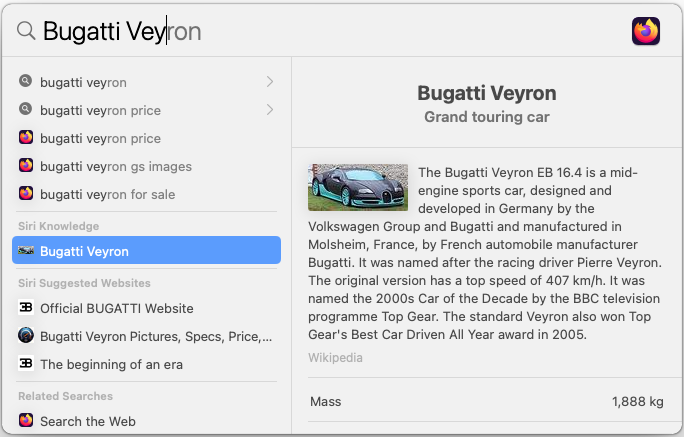
 Spotlight in macOS Big Sur showing the Wikipedia article for Bugatti Veyron | |
| Operating system | Mac OS X Tiger and later, iPhone OS 3 and later (Spotlight Search), iPadOS, visionOS |
| Predecessor | Sherlock |
| Type | Desktop search |
| Website | support |
Spotlight is a system-wide desktop search feature of Apple's macOS, iOS, iPadOS, and visionOS operating systems. Spotlight is a selection-based search system, which creates an index of all items and files on the system. It is designed to allow the user to quickly locate a wide variety of items on the computer, including documents, pictures, music, applications, and System Settings. In addition, specific words in documents and in web pages in a web browser's history or bookmarks can be searched. It also allows the user to narrow down searches with creation dates, modification dates, sizes, types and other attributes. Spotlight also offers quick access to definitions from the built-in New Oxford American Dictionary and to calculator functionality. There are also command-line tools to perform functions such as Spotlight searches.
Spotlight was first announced at the June 2004 Worldwide Developers Conference,[1] and then released with Mac OS X Tiger in April 2005.[2]
A similar feature for iPhone OS 3 with the same name was announced on March 17, 2009.
macOS
[edit]Indices of filesystem metadata are maintained by the Metadata Server (which appears in the system as the mds daemon, or mdworker). The Metadata Server is started by launchd when macOS (formerly Mac OS X, then OS X) boots and is activated by client requests or changes to the filesystems that it monitors. It is fed information about the files on a computer's hard disks by the mdimport daemon; it does not index removable read-only media such as CDs or DVDs,[3] but it will index removable, writable external media connected via USB, FireWire, or Thunderbolt, and Secure Digital cards. Aside from basic information about each file like its name, size and timestamps, the mdimport daemon can also index the content of some files, when it has an Importer plug-in that tells it how the file content is formatted. Spotlight comes with importers for certain types of files, such as Microsoft Word, MP3, and PDF documents. Apple publishes APIs that allow developers to write Spotlight Importer plug-ins for their own file formats.[3]
The first time that a user logs onto the operating system, Spotlight builds indexes of metadata about the files on the computer's hard disks.[3] It also builds indexes of files on devices such as external hard drives that are connected to the system. This initial indexing may take some time, but after this the indexes are updated continuously in the background as files are created or modified. If the system discovers that files on an external drive have been modified on a system running a version of macOS older than Mac OS X Tiger, it will re-index the volume from scratch.[3]
Within Tiger, Spotlight can be accessed from a number of places. Clicking on an icon in the top-right of the menu bar opens up a text field where a search query can be entered. Finder windows also have a text field in the top-right corner where a query can be entered, as do the standard load and save dialogue boxes. Both of these text fields immediately start listing results of the search as soon as the user starts typing in a search term, returning items that either match the term, or items that start with the term. The search results can be further refined by adding criteria in a Finder window such as "Created Today" or "Size Greater than 1 KB".[3]
Mac OS X Tiger and later also include command line utilities for querying or manipulating Spotlight. The mdimport command, as well as being used by the system itself to index information, can also be used by the user to import certain files that would otherwise be ignored or force files to be reimported. It is also designed to be used as a debugging tool for developers writing Importer plug-ins. mdfind allows the user to perform Spotlight queries from the command line, also allowing Spotlight queries to be included in things like shell scripts. mdls lists the indexed attributes for specific files, allowing the user to specify which files and/or which attributes. The indexes that Spotlight creates can be managed with mdutil, which can erase existing indexes causing them to be rebuilt if necessary or turn indexing off.[4] These utilities are also available on Darwin.[citation needed]
Although not widely advertised, Boolean expressions can be used in Spotlight searches.[5] By default if one includes more than one word, Spotlight performs the search as if an "AND" was included in between words. If one places a '|' between words, Spotlight performs an OR query. Placing a '-' before a word tells Spotlight to search for results that do not include that word (a NOT query).[6]
Currently Spotlight is unable to index and search NTFS volumes shared via SMB.[7]
Leopard
[edit]
With Mac OS X Leopard, Apple introduced some additional features. With Spotlight in Tiger, users can only search devices that are attached to their computers. With Leopard, Spotlight is able to search networked Macs running Leopard (both client and server versions) that have file sharing enabled. A feature called Quick Look has been added to the GUI that will display live previews of files within the search results, so applications do not have to be opened just to confirm that the user has found the right file. The syntax has also been extended to include support for worded Boolean operators ("AND", "OR" and "NOT").[8] These variants of the operators are localized; while users that have their System language set to English may use an "AND", German users, for example, would have to use "UND". The character variants work with any system language.[9]
Also while Spotlight is not enabled on the server version of Tiger,[10] it is on the server release of Leopard.[11]
In addition, where Spotlight in Tiger had a unique and separate window design, Spotlight in Leopard now shares windows with the Finder, allowing for a more unified GUI.
The unique Spotlight window in Tiger allowed sorting and viewing of search results by any metadata handled by the Finder; whereas Spotlight Finder windows in Leopard are fixed to view and sort items by last opened date, filename and kind only. Under Leopard there is currently no way to save window preferences for the Finder window that is opened via Spotlight.
Since Leopard the Spotlight menu has doubled as a calculator, with functionality very similar to the Google search feature (but without the need to be online), as well as a dictionary that allows one to look up the definition of an English word using the Oxford Dictionary included in macOS.
Yosemite
[edit]
In OS X Yosemite, the Spotlight search UI was completely redesigned. Instead of it acting as a drop-down menu, it is now located in the center of the screen by default, though the search bar (and/or the window itself) can be dragged to wherever the user prefers it to pop up. In addition to doing everything that the previous versions of Spotlight could do, the Yosemite revamp of Spotlight adds a preview or info pane on the right side (with results on the left side), and also adds support for searching through Wikipedia, Maps, and other sources.
Tahoe
[edit]Following the Liquid Glass design language, Spotlight has been redesigned in macOS Tahoe. The Launchpad functionality has been merged with Spotlight, and can be used to search for apps and display an categorized app grid. Spotlight has also gained the ability to take system actions and run Shortcuts.
iOS and iPadOS
[edit]
A search tool also named Spotlight has been included on iOS (formerly iPhone OS) products since iPhone OS 3 and in iPadOS. The feature helps users search contacts, mail metadata,[12] calendars, media and other content.[12] Compared to Spotlight on macOS, the iOS search ability is limited.[12] The Spotlight screen is opened with a finger-flick to the right from the primary home screen, or, as of iOS 7, by pulling down on any of the home screens.[12]
The feature was announced in March 2009 and released with iPhone OS 3 in June 2009. The release of iOS 4.0 included the ability to search text messages. In iOS 6, the folder that an application is inside of is now shown (if applicable). Since the Introduction of iOS 7, Spotlight no longer has its own dedicated page, but is accessible by pulling down on the middle of any home screen.
On September 17, 2014, Spotlight Search was updated with iOS 8 to include more intuitive web results via Bing and Wikipedia, as well as quicker access to other content.[13]
With iOS 9, Spotlight Search has been updated to include results of content in apps.[14]
In 2021, Apple introduced Image Search in Spotlight on iOS, Spotlight now uses intelligence to search photos by location, people, scenes, or objects, and using Live Text, Spotlight can find text and handwriting in photos.
Privacy concerns
[edit]Since the release of Yosemite, Spotlight sends all entered queries and location information to Apple by default. The data is accompanied by a unique identifying code, which Apple claims to rotate every 15 minutes to a new identifier. In response to privacy concerns, Apple has stated that they do not use the data to create profiles of their users, and that query and location information is only shared with their partner, Bing, under a strict contract which prohibits the information from being used for advertising purposes. In 2017, Bing was replaced by Google as the search engine for Spotlight.[15] Additionally, Apple has stated that while Spotlight seeks to obscure exact locations, the information is typically more precise in densely populated areas and less so in sparse ones. Spotlight data sharing may be disabled from Spotlight System Preferences by deselecting the Spotlight Suggestions checkbox. When this is done, data is not shared with Apple.[16][17][18]
See also
[edit]References
[edit]- ^ Ina Fried (June 28, 2004). "For Apple's Tiger, the keyword is search". Retrieved November 15, 2009.
- ^
Apple, Inc. (April 12, 2005). "Apple to Ship Mac OS X "Tiger" on April 29". Retrieved November 15, 2009.
Spotlight searches the contents inside documents and information about those documents, or metadata
- ^ a b c d e John Siracusa (April 28, 2005). "Mac OS X 10.4 Tiger". ArsTechnica.com. Retrieved April 4, 2007.
- ^ Kirk McElhearn (July 8, 2005). "Command spotlight". Macworld. Archived from the original on April 3, 2007. Retrieved April 4, 2007.
- ^ "10.4: Use Boolean (NOT, OR) searches in Spotlight". MacOSXHints.com. May 12, 2005. Archived from the original on October 10, 2014. Retrieved November 9, 2008.
- ^ Hiram (April 30, 2005). "Boolean search in Spotlight". Ipse dixit. Archived from the original on October 10, 2006. Retrieved January 21, 2007.
- ^ "Can't connect via SMB".
- ^ "Apple - Mac OS X - Leopard Sneak Peek - Spotlight". Apple.com. August 7, 2006. Archived from the original on January 17, 2007. Retrieved January 21, 2007.
- ^ "Hidden Gems: Boolean Spotlight Queries". Archived from the original on April 26, 2012. Retrieved April 1, 2012.
- ^ Robert Mohns (2005). "Tiger Review: Examining Spotlight". Macintouch.com. Archived from the original on May 1, 2007. Retrieved April 4, 2007.
- ^ "Apple - Leopard Server Sneak Peek - Spotlight Server". Apple.com. August 7, 2006. Archived from the original on August 27, 2007. Retrieved April 4, 2007.
- ^ a b c d Frakes, Dan (2009). "Hands on With IPhone 3.0's Spotlight". PC World / Macworld. Archived from the original on July 21, 2009. Retrieved December 26, 2009.
iPhone Spotlight doesn't search the full content of every file on your phone
- ^ "Apple - iOS 8 - Spotlight". Apple. 2014. Archived from the original on September 24, 2014. Retrieved September 17, 2014.
- ^ Fleishman, Glenn (September 16, 2015). "Hands-on with the new, proactive Spotlight in iOS 9". Macworld. IDG Consumer & SMB. Retrieved July 29, 2016.
- ^ Axon, Samuel (September 25, 2017). "Siri and Spotlight will now use Google, not Bing, for Web searches". Ars Technica. Retrieved April 11, 2021.
- ^ Ashkan Soltani and Craig Timberg (October 20, 2014). "Apple's Mac computers can automatically collect your location information". The Washington Post. Retrieved February 24, 2015.
- ^ Steven Musil (October 20, 2014). "Apple clarifies Spotlight Suggestions data collection practices". Cnet. Archived from the original on July 27, 2015. Retrieved February 24, 2015.
- ^ "OS X Yosemite: Spotlight Suggestions". Archived from the original on July 27, 2015.
External links
[edit]
- Official website
- Apple's File Metadata Query Expression Syntax
- "Working with Spotlight". OSX. Developer. Apple. Archived from the original on November 15, 2004.

iOS and iOS-based products | |||||||||||||||||||||||||||
|---|---|---|---|---|---|---|---|---|---|---|---|---|---|---|---|---|---|---|---|---|---|---|---|---|---|---|---|
| Hardware |
| .svg) | |||||||||||||||||||||||||
| Software |
| ||||||||||||||||||||||||||
| Services |
| ||||||||||||||||||||||||||
| Other | |||||||||||||||||||||||||||

Spotlight (Apple)
View on GrokipediaHistory
Introduction in Mac OS X Tiger (2005)
Spotlight was previewed by Apple on June 28, 2004, at the Worldwide Developers Conference as a core feature of the forthcoming Mac OS X version 10.4, codenamed Tiger.[1] Described as a "lightning fast" system for locating files, documents, and application-generated information through intuitive keyword queries akin to web searches, it marked a shift toward metadata-driven discovery rather than traditional file-system traversal.[1] The feature replaced the aging Sherlock search tool, which had relied on slower, less integrated methods, by introducing continuous background indexing of content metadata across the user's data.[8] Mac OS X Tiger, including Spotlight, shipped on April 29, 2005, for Macintosh computers with PowerPC processors, priced at $129 for upgrades.[9] Spotlight's implementation centered on a centralized index of extracted metadata—such as author names, dates, keywords, and file contents—built incrementally to minimize performance impact, enabling near-instantaneous "as-you-type" results via a dedicated menu accessible by clicking the Finder's magnifying glass icon or using the Command-Space keyboard shortcut.[9] This indexing supported queries beyond filenames, encompassing text within PDFs, emails, calendars, and contacts, with results categorized by type (e.g., applications, documents, folders) for quick navigation.[10] Integration extended Spotlight into native applications like Mail for searching message contents, Address Book for contact details, Finder for file browsing, and System Preferences for settings, fostering a unified search experience across the operating system.[9] Users could also create "Smart Folders," dynamic virtual collections based on persistent Spotlight queries, which updated automatically as indexed data changed, enhancing workflow efficiency without manual organization.[11] Initial reception highlighted its speed and relevance over predecessors, though early adopters noted occasional indexing delays on large drives and limited third-party importer support, which Apple addressed via subsequent updates.[12]Evolution Through macOS Versions (Leopard to Ventura)
In macOS Leopard (version 10.5, released October 26, 2007), Spotlight received enhancements including an extended query language for more precise searches, support for indexing and querying content on networked file shares enabled via file sharing, and integration with the newly introduced Quick Look feature, which allowed users to preview documents, images, and other files directly from search results by pressing the space bar.[8][13] These updates built on Spotlight's foundational metadata-based indexing from Tiger, emphasizing faster access to previews without opening applications.[14] macOS Snow Leopard (version 10.6, released August 28, 2009) focused on performance optimizations for Spotlight, including a shift to a 64-bit Spotlight server process (mds) for improved indexing speed and efficiency on Intel-based Macs, alongside reduced memory usage during searches.[15] These under-the-hood refinements supported broader system stability but introduced no major user-facing feature additions to the Spotlight interface or query capabilities. Subsequent versions like Lion (10.7, July 20, 2011) added popover-based Quick View previews for search results encompassing documents, web history, contacts, emails, and media, streamlining result inspection without full app launches.[16] In OS X Mavericks (10.9, October 22, 2013), Spotlight expanded searchable metadata attributes in the Finder's search window, enabling more granular filtering by properties like file kind, date modified, or author, which enhanced precision for local file hunts.[8] OS X Yosemite (10.10, October 16, 2014) marked a significant overhaul, introducing a redesigned translucent interface, natural language query processing (e.g., "documents from last week"), integrated web searches via partnerships with Bing, Wikipedia previews, and app-specific suggestions like weather or sports scores directly in results.[17][18] This "global" search merged local and online results, with Spotlight Suggestions providing contextual recommendations based on user data and cloud processing.[8] macOS Sierra (10.12, September 20, 2016) evolved Suggestions into Siri Suggestions, leveraging anonymized cloud data from Apple servers to predict and surface personalized results such as app launches, calendar events, or nearby restaurant queries, while maintaining on-device processing for privacy-sensitive items.[8] Intermediate releases like El Capitan (10.11, September 30, 2015), High Sierra (10.13, September 25, 2017), Mojave (10.14, September 24, 2018), and Catalina (10.15, October 7, 2019) delivered incremental refinements, such as better indexing compatibility with APFS in High Sierra and adaptation to system-wide Dark Mode in Mojave, but lacked transformative Spotlight-specific updates.[19] macOS Big Sur (11, November 12, 2020) redesigned Spotlight's interface to align with the system's neumorphic aesthetic, featuring larger icons, rounded corners, and increased translucency; however, it defaulted to hiding inline previews (requiring a hover or space bar press to reveal), which some users noted reduced at-a-glance utility compared to prior versions.[20] macOS Monterey (12, October 25, 2021) restored and expanded Quick Look integration by displaying thumbnail previews directly in Spotlight results for images, PDFs, and other supported formats without additional input, alongside basic app shortcuts for actions like creating notes or contacts.[21] macOS Ventura (13, October 24, 2022) further enriched Spotlight with quick actions (e.g., summarizing selected text or rotating images inline), advanced image search via natural language (e.g., "photos of dogs"), richer web result previews that remain within the Spotlight window rather than redirecting to browsers, and expanded App Intents for third-party integrations, enabling tasks like sending messages or playing media without app switching.[22][23] These enhancements emphasized action-oriented search, processing queries on-device where possible to prioritize speed and privacy.Recent Developments (Sonoma, Sequoia, and Tahoe)
In macOS Sonoma (version 14), released on September 26, 2023, Spotlight introduced quick access to system controls, allowing users to toggle settings such as Bluetooth, Wi-Fi, Dark Mode, and Focus modes directly from search results without navigating to System Settings.[24] This enhancement streamlined common tasks by integrating actionable previews and switches into the Spotlight interface, building on prior query processing capabilities.[24] macOS Sequoia (version 15), released on September 16, 2024, did not introduce substantial architectural changes to Spotlight, focusing instead on system-wide integrations like Apple Intelligence for enhanced contextual suggestions in searches.[25] Subsequent updates, such as Sequoia 15.1 and 15.2, emphasized Apple Intelligence features like improved writing tools and image generation but maintained Spotlight's core functionality with minor refinements for compatibility with new AI-driven content indexing.[26][27] macOS Tahoe (version 26), released on September 15, 2025, significantly overhauled Spotlight, transforming it into a more versatile hub that incorporates app browsing, file searching, clipboard history access, and hundreds of keyboard-driven actions.[28] Users can now navigate dedicated sub-menus via hotkeys—such as Command+1 for Applications, Command+2 for Files, and Command+3 for Actions—enabling rapid filtering of recent items, windows, and cloud content without leaving the keyboard.[29][30] Spotlight also gained a native clipboard manager, allowing searches of past copied items, and effectively replaced Launchpad for app launching, with smarter result prioritization for productivity.[31][32] These updates leverage expanded metadata importers and query processing to surface context-aware results faster, addressing long-standing user feedback on search efficiency.[33]Platforms and Implementation
macOS
![Spotlight interface on macOS]float-right Spotlight on macOS provides a system-wide search functionality that indexes and retrieves files, applications, emails, contacts, and other content using metadata extraction and querying.[34] Introduced in Mac OS X 10.4 Tiger, it operates through the Spotlight service, which maintains an inverted index of file attributes stored in a proprietary database on each volume, typically in a.Spotlight-V100 directory.[3] The indexing process employs file system events via the FSEvents framework to detect changes, triggering metadata importers (mdimporters) to extract relevant attributes such as text content, dates, and keywords from diverse file formats.[35]
Metadata importers, which are pluggable components written by Apple or third-party developers, parse specific file types to populate the index with searchable data, enabling efficient queries without scanning entire files at search time.[36] Users can exclude volumes or folders from indexing via System Settings > Spotlight > Privacy to manage privacy or performance, and the index can be rebuilt manually if corrupted, using commands like sudo mdutil -E / to erase and reindex.[37] This architecture supports rapid searches across local storage, with results categorized into sections like Applications, Documents, and Folders, accessible via Command-Space or the menu bar icon.[3]
In macOS Sequoia (version 15), Spotlight integrates Apple Intelligence for enhanced semantic search capabilities, allowing natural language queries and AI-driven suggestions beyond traditional keyword matching, such as summarizing content or generating actions.[38] Developers extend Spotlight through Core Spotlight APIs, donating app-specific items to the index for discoverability, including thumbnails and custom attributes, while ensuring compatibility with system privacy controls.[39] Quick Look previews and inline actions, like unit conversions or calculations, further augment results, performed directly in the Spotlight overlay without launching apps.[3]
iOS and iPadOS
Spotlight search was introduced in iOS 3.0 on June 17, 2009, enabling users to query contacts, email metadata, calendars, media files, and application content from a unified interface accessible by swiping left on the home screen or using the search bar.[40] Initially limited compared to its macOS counterpart, it expanded in subsequent versions to include web searches and app-specific data. In iOS and iPadOS, Spotlight operates via on-device indexing powered by the Core Spotlight framework, which allows third-party applications to contribute searchable metadata without transmitting data to external servers, prioritizing user privacy through local processing.[41] Users access Spotlight by swiping downward from the center of the home screen, revealing a search field that dynamically updates results as text is entered, encompassing apps, contacts, messages, photos (including Live Text recognition for on-screen text), notes, and system-wide content like weather or stocks.[5] Quick actions appear alongside results, such as initiating calls, sending messages, or performing calculations directly from the interface, with Siri Suggestions providing context-aware recommendations based on usage patterns, location, and habits—configurable via Settings > Siri & Search to toggle categories like apps or mail.[41] In iOS 16 and later, enhancements include image-based app searches, richer web previews, and improved Live Text integration for querying visual content.[42] iPadOS, forked from iOS starting with version 13.1 on September 24, 2019, inherits Spotlight's core functionality but adapts it for larger displays and productivity workflows, supporting keyboard shortcuts like Command + Space for faster invocation on external keyboards.[43] Features remain largely consistent across platforms, though iPadOS benefits from Spotlight in multitasking scenarios, such as quick-launching apps amid split-view sessions or searching files in the enhanced Files app. Developer extensibility via Core Spotlight APIs enables custom indexing for iPad-optimized apps, but lacks some macOS-level depth in query processing.[44] Recent updates in iOS 18 and iPadOS 18 (released September 16, 2024) integrate Apple Intelligence for more precise natural language queries and action predictions, while maintaining on-device computation for supported devices.[45] As of iOS 18.1 and iPadOS 18.1 (October 2024), Spotlight supports hundreds of contextual actions, from summarizing content to executing Shortcuts, without requiring keyboard input in many cases.[46]visionOS and Other Integrations
Spotlight delivers system-wide search capabilities in visionOS, the operating system powering Apple Vision Pro, allowing users to locate and open apps, retrieve content from integrated applications such as Mail and Messages, and access web-based suggestions.[47] Activation occurs via a gesture—looking upward and pinching—or through voice commands to Siri, with results displayed in a spatial interface that supports quick actions like previews and launches.[47] This implementation leverages Core Spotlight for indexing device content and app data, ensuring efficient querying akin to iPadOS foundations upon which visionOS is built.[34] A distinctive visionOS enhancement is Visual Search, which harnesses the device's outward-facing cameras to analyze real-world elements for Spotlight integration. Introduced at WWDC 2023 and available from visionOS 1.0 launch on February 2, 2024, it permits users to identify physical objects, detect and copy text from surroundings, and perform related actions without manual input.[48] For instance, pointing at an item triggers metadata extraction, such as species identification for plants or nutritional details for packaged goods, feeding directly into Spotlight results.[48] visionOS 2, released in September 2024, extends Spotlight with Apple Intelligence features, including enhanced natural language processing for semantic queries and integration with on-device AI models for refined suggestions. Developers can further embed app-specific content and actions into Spotlight using the App Intents framework, which unifies extensibility across visionOS, iOS, and macOS ecosystems launched in June 2024 updates. Core Spotlight APIs support semantic search advancements, enabling attribute-based filtering and relevance ranking for visionOS-native spatial apps.[49] Beyond visionOS, Spotlight maintains limited cross-platform ties through iCloud syncing of indexed content, such as documents and contacts, accessible via Continuity features on linked Apple devices, though primary invocation remains platform-specific without direct search bridging to watchOS or tvOS. Third-party integrations rely on standardized importers for metadata, ensuring consistent search exposure in hybrid environments like compatible iPadOS apps ported to visionOS.[50]Technical Architecture
Metadata Indexing and Importers
Spotlight metadata importers, known as MDImporters, are extensible plugins that extract structured attributes from files in custom or proprietary formats, enabling the system to index content beyond basic file system properties.[35] These importers are typically implemented as bundles using the Metadata framework, where developers define a schema specifying supported Uniform Type Identifiers (UTIs) and the metadata keys they provide, such as document authors, keywords, or embedded text excerpts.[51] Upon file creation, modification, or movement, the Spotlight server—managed by themds daemon—detects changes via file system notifications and invokes appropriate mdworker processes to load the matching importer for that file type.[52] The importer parses the file content without altering it, returning a dictionary of key-value pairs that conform to Spotlight's predefined or custom attributes, which are then validated against the schema before ingestion.[36]
The extracted metadata feeds into Spotlight's indexing pipeline, where it is stored in a proprietary database format within a volume's .Spotlight-V100 directory, organized into stores that support efficient querying across attributes like text content, dates, and geospatial data.[53] This background indexing occurs continuously for enabled volumes, prioritizing recent changes to maintain index currency, with full reindexing triggered by events like system updates or explicit user commands via mdutil.[37] Apple provides built-in importers for common formats such as PDF, Microsoft Office documents, and images, covering over 200 attributes including kMDItemTextContent for searchable full-text extraction via frameworks like Core Text.[54] Third-party developers can create custom importers to extend coverage, though they must be installed in /Library/Spotlight/ or user-specific locations and registered via UTI declarations to avoid compatibility issues across macOS versions.[55]
In newer macOS implementations, such as those supporting Core Spotlight extensions, importers can integrate with app-specific data sources beyond files, using APIs like CSImportExtension to handle dynamic content while adhering to sandboxing for security.[56] This architecture ensures metadata remains localized to the device, with no cloud dependency for core indexing, though empirical analysis shows index sizes can grow significantly—often tens of gigabytes on large volumes—due to accumulated historical data and thumbnails.[57] Importer failures, such as from malformed files or unsupported types, result in fallback to generic attributes, potentially reducing search precision, as documented in system logs accessible via mdutil or Console.app.[58]
Query Processing and Core Spotlight
Core Spotlight serves as the primary framework for integrating app-specific content into Apple's system-wide search index, enabling efficient query evaluation against indexed metadata. When a query is initiated—whether via the Spotlight interface or programmatically— the system parses the input into a predicate-based string using the Spotlight Query Language, a subset of predicate formatting that supports attribute matching (e.g.,kMDItemTitle == "document"), operators (==, !=, >, <), and modifiers (e.g., c for case-insensitive, cd for diacritic-insensitive). This language allows precise filtering on over 100 metadata attributes, such as file types, dates, and content excerpts, extracted during indexing.[59][60]
The query processing engine, part of the underlying Metadata framework, evaluates these predicates against the pre-built index store, which contains tokenized metadata and full-text content from files and apps. Evaluation occurs on-device, scanning the index for matches without rescanning source files, leveraging an efficient inverted index structure for sub-second response times even on large datasets. Results are ranked primarily by relevance to the query terms, with app-contributed items via Core Spotlight prioritized based on domain-specific attributes and user interaction history, though exact ranking algorithms remain proprietary. Asynchronous delivery ensures non-blocking performance, with APIs like CSSearchQuery providing results through handlers or sequences, allowing apps to fetch additional attributes (e.g., title, thumbnail) via CSSearchQueryContext.[55][61][62]
In practice, Core Spotlight extends this core processing by enabling developers to execute queries directly within apps, mirroring system Spotlight behavior. For instance, a query string is passed to CSSearchQuery, which matches indexed CSSearchableItem objects—each encapsulating attributes like keywords, timestamps, and actions—against the private, on-device index. This integration ensures seamless discoverability, as app items appear in global Spotlight results without data leaving the device, supporting features like semantic enhancements in macOS Sequoia and later, where natural language inputs are interpreted into equivalent predicates for broader matching. Limitations include dependency on accurate indexing; incomplete or outdated indexes can degrade query precision, as evidenced by occasional rebuilds required via mdutil for corrupted stores.[39][63][64]
Extensibility for Developers
Spotlight provides developers with mechanisms to extend its indexing and search capabilities, primarily through metadata importers and APIs for app content integration. Metadata importers, known as MDImporters, are plugin bundles that extract custom attributes from proprietary file formats, enabling Spotlight to index and retrieve non-standard data such as embedded metadata in documents or media files.[36] These importers operate as CFPlugins with an .mdimporter extension, loaded by the Spotlight server when files are modified, and must define a schema specifying supported attributes via an XML file.[51] Developers implement extraction logic in C, Objective-C, or Swift, returning key-value pairs that conform to Spotlight's metadata framework, which supports over 100 standard attributes like kMDItemTitle or custom ones declared in the schema.[52] For non-file-based content, the Core Spotlight framework allows applications to programmatically add items to the system-wide index using CSSearchableItem objects, facilitating search of app-specific data such as contacts, messages, or database entries without relying on file system metadata.[34] Introduced in iOS 9 and extended to macOS, this API enables developers to "donate" searchable items via CSSearchableIndex, which batches updates for efficiency and supports attributes like domain identifiers to scope results to specific apps.[65] Items can include thumbnails, actions, and rich content previews, with indexing occurring on-device to maintain privacy, though developers must handle reindexing on app updates or data changes.[66] In macOS Sequoia (version 15), Spotlight extensions further enhance extensibility by allowing third-party apps to integrate app-specific search providers, managed through system settings under Login Items & Extensions.[67] These extensions, built as app extensions, enable querying of external or app-internal sources directly in Spotlight results, such as searching within a note-taking app's database or cloud-synced content, with user toggles for privacy control.[68] However, extensions require explicit user approval and can be disabled individually, reflecting Apple's emphasis on user oversight amid potential performance impacts from unoptimized plugins.[69] Developers must adhere to Uniform Type Identifiers (UTType) for importer compatibility, ensuring seamless integration with Finder's Get Info panels and Quick Look previews.[70]Features and Capabilities
Core Search Functions
Spotlight's core search functions center on indexing and querying metadata from local files, applications, and user data to deliver instant results across macOS, iOS, and iPadOS. Users can search for applications by name to launch them directly, files including documents, images, videos, and PDFs by content or attributes like kind or date, contacts via names or phone numbers, email messages and attachments, calendar events, messages in apps like Mail and Messages, music tracks, bookmarks, and system settings.[3] [41] Activation occurs via Command-Space on macOS or swiping down from the home screen on iOS/iPadOS, with results updating in real-time as queries are typed and categorized into sections like top hits, suggestions, and web previews.[3] [41] Filtering refines results by specifying types, such as "kind:folder" for directories or "from:[email protected]" for emails, while natural language queries support phrases like "emails from John yesterday." Core functionality includes quick actions on results, such as opening files, calling contacts, or viewing locations, without needing to navigate apps.[3] On mobile platforms, searches extend to photos (including text via Live Text), notes, and device-specific content like Wi-Fi networks, with results enabling direct interactions like toggling settings or initiating calls.[41] These functions rely on an on-device index built from metadata importers, prioritizing relevance through ranking algorithms that favor recency and usage patterns.[39]Action-Oriented Commands and AI Enhancements
Spotlight supports action-oriented commands that enable users to perform tasks directly from search results without navigating to separate applications. These include quick calculations, unit conversions, dictionary lookups, and system controls such as setting alarms or toggling Do Not Disturb mode.[3] For instance, entering a mathematical expression like "15 * 23" yields the result inline, while queries like "convert 5 km to miles" provide immediate conversions powered by built-in importers.[71] In macOS Sequoia (version 15, released September 16, 2024), Spotlight expanded these capabilities by integrating with the Shortcuts app, allowing users to run custom automations—such as sending messages or processing files—via natural keyword triggers.[72] Further enhancements in macOS Tahoe (version 16, announced June 2025) introduced a dedicated Actions tab accessible via Command-3 after opening Spotlight with Command-Space, offering hundreds of predefined system and app-specific commands.[30] Quick Keys, short character sequences like "sm" for screenshot markup, streamline frequent operations, reducing reliance on menu navigation.[72] Developers can extend these through App Intents, exposing app actions like editing documents or querying databases directly in Spotlight results.[73] AI enhancements, integrated via Apple Intelligence starting in iOS 18 and macOS Sequoia (both released in fall 2024), enable semantic understanding of natural language queries. Users can search with descriptive phrases like "photos from last summer's beach trip" instead of exact keywords, leveraging on-device machine learning models to match intent across files, apps, and content.[64] This extends to app-specific semantic search, such as finding messages by context ("conversations about project deadlines") or photos via natural descriptions in iOS 18.1 (released October 2024).[74] Core Spotlight's indexing supports these by embedding vector representations of content for similarity-based retrieval.[49] In macOS Tahoe, Spotlight Actions incorporate generative AI for tasks like text summarization, image generation, or querying external models. Users access this by typing "Use Model" in Spotlight, selecting on-device processing, Private Cloud Compute, or integrated ChatGPT for privacy-preserving computations.[75] These features prioritize on-device inference using Apple Silicon's Neural Engine, with off-device fallback only for complex queries, though empirical tests show limitations in handling ambiguous or highly creative prompts compared to cloud-native alternatives.[76] Apple claims these integrations maintain end-to-end encryption and minimal data transmission, but independent audits have not yet verified the full extent of on-device accuracy for non-English languages or niche domains.[77]Suggestions, Customization, and Controls
Spotlight provides predictive suggestions as users type queries, drawing from indexed content, installed apps, and optionally web sources or Apple services to offer quick actions, app launches, or related searches. These suggestions appear dynamically in the Spotlight overlay, prioritizing frequently accessed items or contextually relevant results such as recent documents or contacts.[3] On macOS, users can enable or disable suggestions from Apple partners, including content like definitions or object recognition in images, via System Settings > Spotlight > Search & Privacy Suggestions.[78] Customization options allow users to tailor Spotlight's behavior across platforms. In macOS, System Settings > Spotlight permits selection of result categories, such as Applications, Documents, or Web, enabling users to hide unwanted sections like Fonts or Images from search previews.[79] The Privacy tab facilitates exclusion of specific folders, disks, or external volumes from indexing to prevent certain files from appearing in results.[80] On iOS and iPadOS, Settings > Siri & Search (or Settings > Search in newer versions) lets users toggle app inclusion in Spotlight, disable suggestions within specific apps, and control whether content from the device or cloud appears.[41] Location-based suggestions, which incorporate geodata for contextual results, can be turned off via Settings > Privacy & Security > Location Services > System Services > Suggestions & Search.[5] Controls for Spotlight include keyboard and gesture shortcuts for invocation and management. On macOS, the default shortcut is Command-Space to summon the search field, with Command-Option-Space opening Spotlight within Finder for file-specific searches; users can remap these via System Settings > Keyboard > Keyboard Shortcuts > Spotlight, though options are limited to standard bindings.[3] In iOS and iPadOS, swiping down from the home screen middle activates Spotlight, with no native gesture customization but toggleable visibility of suggestions in Lock Screen or app previews.[5] Advanced controls, such as clearing the search field with Escape or browsing actions without typing, enhance usability but remain fixed in core functionality.[81]Privacy and Security
Apple's Privacy Claims and Mechanisms
Apple asserts that Spotlight's core search functionality operates entirely on-device, indexing user data such as files, emails, apps, and messages locally without transmitting content or metadata to Apple servers, thereby minimizing exposure to external risks.[82] This local processing relies on the Spotlight daemon and metadata importers that build a proprietary database stored in protected directories like/System/Volumes/Data/.Spotlight-V100, enabling rapid queries without network dependency for standard searches.[78] Apple emphasizes this architecture as a key privacy mechanism, contrasting it with cloud-reliant search systems that aggregate user data remotely.[83]
For enhanced features like Spotlight Suggestions, which offer contextual recommendations from apps, web results, and news, Apple implements anonymization techniques including the generation of a new random device identifier every 15 minutes to prevent linkage across sessions.[82] Precise location data is withheld from servers; instead, for iOS and iPadOS, location is blurred on-device before any transmission for suggestion relevance, as detailed in Apple's iOS Security Guide. These suggestions are opt-in and processed via Apple's servers only after applying differential privacy noise to aggregate patterns without identifying individuals, though Apple notes that individual query strings may be retained temporarily for service improvement if users enable data sharing.[82]
User-configurable mechanisms further support these claims, such as the Spotlight Privacy settings in System Settings, where folders, disks, or the entire volume can be excluded from indexing to prevent metadata extraction from sensitive areas.[37] Additionally, macOS and iOS provide toggles to disable Siri & Spotlight suggestions entirely, halting any potential data transmission for personalization while preserving core local search.[78] Apple maintains that no full content from indexed items is sent off-device, with indexing focused on metadata and short excerpts to balance utility and privacy, though the system requires ongoing permissions via Transparency, Consent, and Control (TCC) for third-party app data access.[84]
Known Vulnerabilities and Data Risks
In July 2025, Microsoft Threat Intelligence disclosed a vulnerability in macOS Spotlight, dubbed "Sploitlight" and tracked as CVE-2025-31199, which allowed attackers to bypass the Transparency, Consent, and Control (TCC) framework by exploiting Spotlight importer plugins.[85][86] These plugins, designed to extract metadata from files for indexing, could be abused to access protected directories such as the user's Downloads folder or Apple Intelligence caches without explicit consent, potentially exposing sensitive data including geolocation metadata and biometric information stored in processed files.[87][88] Apple patched the issue in security updates for macOS Sequoia prior to public disclosure, confirming no known active exploitation occurred.[89][90] The vulnerability stemmed from insufficient validation of plugin execution contexts within Spotlight's indexing process, enabling unprivileged local attackers or malware to invoke plugins that read restricted file contents under the guise of legitimate metadata extraction.[85] This highlighted a broader risk in Spotlight's extensible architecture, where third-party or custom importers could inadvertently or maliciously circumvent macOS privacy safeguards designed to limit app access to user files.[86] Post-patch analysis indicated the flaw affected macOS versions prior to Sequoia 15.1, with recommendations for users to apply updates promptly to mitigate local privilege escalation risks tied to file indexing.[91][92] Beyond exploits, Spotlight's local metadata database poses data risks through potential exposure of indexed personal information, such as file paths, contents previews, and application data, if the system is compromised via other vectors like physical access or unrelated malware.[93] The database, stored in ~/Library/Metadata/Spotlight/, aggregates details from user documents, emails, and apps, which could reveal patterns of activity or sensitive keywords in forensic analysis or unauthorized searches, though Apple enforces on-device processing to avoid cloud transmission.[85] Independent security research has noted that unpatched or legacy Spotlight plugins remain a vector for similar TCC evasions in evolving macOS versions, underscoring ongoing challenges in securing dynamic indexing mechanisms.[93] Users can reduce these risks by disabling Spotlight indexing for specific volumes via System Settings or using Privacy preferences to exclude sensitive folders, though comprehensive protection relies on system-wide updates and endpoint detection tools.[90]User Controls and Empirical Criticisms
Users can exclude specific folders, disks, or volumes from Spotlight indexing by navigating to System Settings > Spotlight > Search Privacy and adding items via the "+" button, which prevents the creation of searchable metadata for those locations and mitigates exposure of sensitive files.[94] This control leverages themdutil command-line tool internally to disable indexing on targeted paths, allowing granular privacy management without disabling Spotlight entirely.[95]
Spotlight also permits disabling web-based suggestions and content from Apple partners through its settings pane, reducing reliance on server-side queries that could transmit search terms or context to Apple for personalization and improvement.[78] Apple's documentation discloses that enabled suggestions may send anonymized query data to enhance services, with users able to opt out to keep searches strictly local.[96]
Despite these controls, empirical vulnerabilities have exposed limitations in Spotlight's privacy safeguards. In July 2025, Microsoft Threat Intelligence disclosed CVE-2025-31199 ("Sploitlight"), a flaw in Spotlight's metadata importer plugins that enabled malicious third-party apps to bypass macOS's Transparency, Consent, and Control (TCC) framework and extract sensitive indexed data, including photo metadata, GPS locations, and Apple Intelligence processing caches—data typically protected from unauthorized access.[87][89] Apple patched the issue in macOS updates by improving data redaction in logging, but the vulnerability underscored risks from Spotlight's aggressive local indexing of user files, even when exclusions are applied, as plugins could still probe cached metadata.[86]
Critics, including security researchers, have noted that default indexing behaviors can inadvertently cache recoverable sensitive information, with the Sploitlight case providing concrete evidence of exfiltration potential despite user-configured exclusions, as the flaw exploited core importer mechanisms rather than user settings directly.[97] Earlier incidents, such as macOS Yosemite's transmission of user location and search queries to Apple via Spotlight suggestions in 2014, further illustrate persistent tensions between functionality and data isolation, though Apple has since emphasized on-device processing.[98] These findings, drawn from independent vulnerability disclosures rather than self-reported claims, highlight causal risks in Spotlight's architecture where local aggregation amplifies breach impacts if protections fail.