Hubbry Logo
BackBoxBackBoxMain
Open search
BackBox
Community hub
BackBox
logo
8 pages, 0 posts
0 subscribers
Be the first to start a discussion here.
Contribute something
BackBox
BackBox
from Wikipedia
BackBox Linux
DeveloperBackBox Team [1]
OS familyLinux (Unix-like)
Working stateActive
Source modelOpen source
Latest release9 / October 30, 2024 (2024-10-30)[2]
Supported platformsi386(x86), amd64(x86-64)
Kernel typeLinux
Default
user interface
XFCE
LicenseFree software licenses
(mainly GPL)
Official websitewww.backbox.org

BackBox is a penetration test and security assessment oriented Ubuntu-based Linux distribution providing a network and informatic systems analysis toolkit.[3] It includes a complete set of tools required for ethical hacking and security testing.[4]

Contents

[edit]

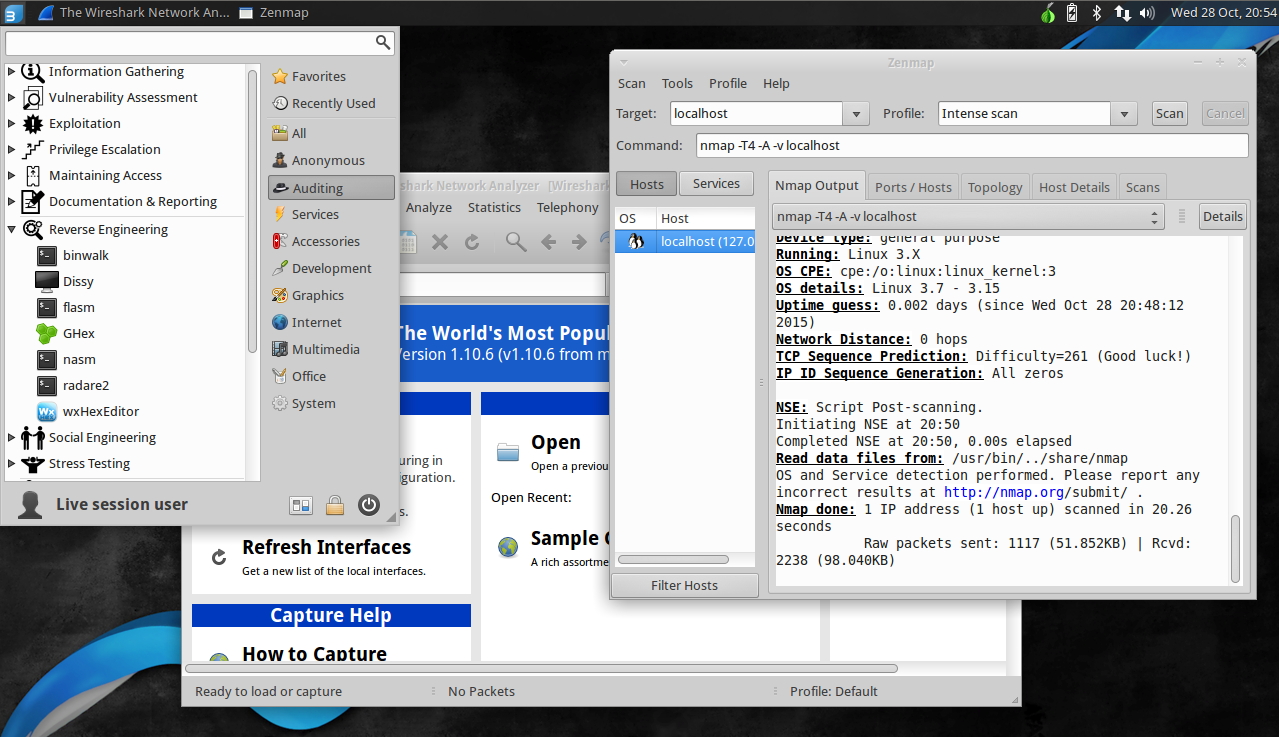
The main aim of BackBox is providing an alternative, highly customizable, and well performing system. BackBox uses the light window manager Xfce.[5] It delivers a fast, effective, customizable, and complete experience. It also has a very helpful community behind it.[6]

It includes some of the most used security and analysis Linux tools, aiming for a wide spread of goals, ranging from web application analysis to network analysis, from stress tests to sniffing, also including vulnerability assessment, computer forensic analysis and exploitation.

Part of the power of this distribution comes from its Launchpad repository core, constantly updated to the latest stable version of the most known and used ethical hacking tools. The integration and development of new tools in the distribution follows the open source community, particularly the Debian Free Software Guidelines criteria.

Releases

[edit]
Date Release
Sep 9, 2010 BackBox Linux RC
Sep 3, 2011 BackBox Linux 2[7][8]
Jan 2, 2012 BackBox Linux 2.01[9]
Apr 24, 2012 BackBox Linux 2.05
Oct 24, 2012 BackBox Linux 3.0[10][11]
Jan 23, 2013 BackBox Linux 3.01[12]
May 23, 2013 BackBox Linux 3.05[13]
Sep 20, 2013 BackBox Linux 3.09[14]
Jan 16, 2014 BackBox Linux 3.13[15]
Oct 11, 2014 BackBox Linux 4.0[16]
Jan 29, 2015 BackBox Linux 4.1[17]
Apr 27, 2015 BackBox Linux 4.2[18]
Jul 20, 2015 BackBox Linux 4.3[19][20]
Oct 12, 2015 BackBox Linux 4.4[21][22]
Jan 27, 2016 BackBox Linux 4.5[23]
Mar 08, 2016 BackBox Linux 4.5.1
May 26, 2016 BackBox Linux 4.6
December 8, 2016 BackBox Linux 4.7
July 21, 2017 BackBox Linux 5[24]
March 9, 2018 BackBox Linux 5.1
August 9, 2018 BackBox Linux 5.2
February 18, 2019 BackBox Linux 5.3
June 11, 2019 BackBox Linux 6[25]
May 15, 2020 BackBox Linux 7
November 15, 2022 BackBox Linux 8[26]
November 9, 2023 BackBox Linux 8.1
October 30, 2024 BackBox Linux 9[2]

Categories

[edit]

BackBox Linux categories listed as follow:

Tools

[edit]

References

[edit]
[edit]
Revisions and contributorsEdit on WikipediaRead on Wikipedia
from Grokipedia
BackBox is a free and open-source based on , developed specifically for penetration testing, ethical hacking, and security assessments of networks and information systems. It provides a lightweight yet complete with pre-installed tools for tasks such as vulnerability scanning, packet analysis, and forensic investigation, emphasizing speed, ease of use, and resource efficiency. The distribution supports x86_64 architecture and uses the desktop for its minimal footprint, making it suitable for both live sessions and installed systems. Initiated in 2010 in as a , BackBox was founded by Raffaele Forte, who remains the primary developer, alongside a team handling , repository maintenance, and other contributions. The project originated from a single individual's effort to create a specialized toolkit for IT professionals and has since grown into an open-source initiative promoting and best practices in environments. Early releases, starting around 2011, were based on LTS versions and integrated core tools like and , evolving to include over 70 dedicated security utilities by later iterations. BackBox maintains its own software repositories to ensure up-to-date ethical hacking tools while adhering to a fixed release cycle aligned with 's schedule. The latest version, BackBox 9, released on October 30, 2024, is built on 24.04 LTS with 6.8, offering enhanced performance, improved features, and compatibility with modern hardware. Notable for its focus on , the distribution includes categories of tools for information gathering, , exploitation, post-exploitation, and reporting, all accessible via a categorized menu system. As a non-profit effort, BackBox encourages user contributions through forums and bounties, fostering ongoing development without commercial dependencies.

Introduction

Overview

BackBox is an Ubuntu-based designed for penetration testing, ethical hacking, and security assessments. It serves as a specialized toolkit for network and , offering a streamlined environment that prioritizes performance and usability for security professionals. As a free, open-source founded in 2010, BackBox seeks to foster a culture of in the IT sector by providing accessible tools and resources for ethical security practices. Its development emphasizes reliability and community involvement, ensuring the distribution remains a practical option for both beginners and experienced users in cybersecurity. BackBox distinguishes itself through its design, which minimizes resource usage for efficient operation on various hardware, along with built-in anonymity features such as an integrated Tor-based anonymous mode to enhance user privacy during assessments. In contrast to broader distributions like , which include hundreds of tools and may prioritize extensive functionality over everyday stability, BackBox focuses on a curated set of over 70 essential tools to maintain a more stable and user-friendly experience.

Purpose and Development

BackBox Linux serves as a specialized platform for ethical hacking, vulnerability assessments, , and training within secure IT environments, offering a comprehensive toolkit for network and systems analysis without requiring users to configure tools from scratch. It targets security professionals, penetration testers, educators, and enthusiasts who seek an efficient, out-of-the-box solution for conducting assessments and learning cybersecurity practices. The distribution is developed and maintained by a volunteer community through official forums and a dedicated for release announcements and contributions, fostering collaborative improvements to its security-focused features. Updates follow a fixed release model aligned with Ubuntu's (LTS) cycles, occurring approximately every two years to prioritize stability and long-term compatibility, as seen in major versions based on Ubuntu 20.04 LTS, 22.04 LTS, and 24.04 LTS. Unique to BackBox is its emphasis on , delivering a yet fully functional that ensures fast performance on standard hardware. It supports live from USB media, enabling anonymous operations and forensic investigations without altering the host or leaving traces. Additionally, pre-installed tools are curated and optimized for seamless integration, allowing efficient execution of tasks like those in penetration testing and vulnerability scanning categories.

History

Origins

BackBox Linux originated in 2010 in , founded by cybersecurity specialist Raffaele Forte as a specialized distribution to address the increasing demand for accessible penetration testing and security assessment tools in an era of rising cyber threats. The project's initial motivations centered on creating a lightweight, efficient alternative to resource-intensive security distributions like BackTrack, offering a user-friendly Ubuntu-based platform that balanced comprehensive tooling with everyday usability for professionals and enthusiasts. Early development commenced as a customized of 10.04 LTS, integrating essential open-source security tools such as for exploit frameworks and for network scanning, with the first alpha versions emerging in late 2010. A pivotal milestone came in early 2011 with the stable release of version 1.0, which utilized 10.04 LTS as its foundation and incorporated the to ensure low resource consumption and high performance on modest hardware.

Release Timeline

BackBox Linux follows a release strategy aligned with Ubuntu's (LTS) versions to ensure long-term stability and security updates, with major releases introducing significant base system changes and point releases providing bug fixes, tool updates, and minor enhancements. The second major version, BackBox 2.05, was released on April 26, 2012, based on 11.04, and introduced improvements in wireless auditing capabilities through pre-installed tools. Subsequent versions 3.x and 4.x, spanning 2013 to 2016, aligned with 12.04 LTS initially for 3.x (with the final 3.13 on January 16, 2014) before transitioning to 14.04 LTS for 4.x starting with 4.0 on October 11, 2014; these releases integrated 4.10 as the and reorganized the tool menu for better usability.
VersionRelease DateUbuntu BaseKey Updates
4.2April 27, 201514.04 LTSTool updates and stability fixes
4.3July 22, 201514.04 LTSEnhanced compatibility
4.4October 12, 201514.04 LTSKernel updates and installer improvements
4.5January 27, 201614.04 LTSMinor tool enhancements
4.6May 27, 201614.04 LTSSecurity patches
4.7December 6, 201614.04 LTS 4.4 LTS integration
Versions 5 and 6, released between 2017 and 2019, shifted to newer LTS bases: version 5 on July 21, 2017, used 16.04 LTS with 4.8 and default anonymity features including Tor integration; version 6 on June 11, 2019, adopted 18.04 LTS, emphasizing tool updates and system performance. In the mid-period, versions 7 and 8 focused on kernel enhancements and hardware compatibility: version 7, released May 15, 2020, was based on 20.04 LTS with a hardened kernel for improved security; version 8 on November 16, 2022, used 22.04 LTS, followed by a point release 8.1 on November 9, 2023, both prioritizing stability and modern hardware support. As of November 2025, the latest major release is version 9, launched on October 30, 2024, based on 24.04 LTS with 6.8, featuring updates to over 100 security tools for enhanced stability and compatibility; no further major releases have been announced post-2024.

Technical Features

Base System and Architecture

BackBox is derived from (LTS) releases, with the current version 9 based on 24.04 LTS (Noble Numbat). This foundation ensures long-term stability and access to a vast repository of pre-compiled software. As an derivative, it employs the Advanced Package Tool (APT) for Debian package management, facilitating seamless installation, updates, and dependency resolution through repositories compatible with 's ecosystem. The distribution standardizes on 64-bit architecture for modern hardware compatibility, though earlier versions such as BackBox 4 supported both 32-bit and 64-bit processors to accommodate legacy systems. At its core, BackBox utilizes the 6.8 in version 9, which includes enhancements for hardware support and in security-oriented tasks. This kernel configuration incorporates Ubuntu's default security modules, such as for , to enforce application confinement and mitigate risks. BackBox employs a minimalist optimized for resource efficiency, recommending a minimum of 1024 MB RAM, 30 GB disk space, and a 64-bit processor with support for 800×600 resolution. This lean architecture supports deployment in virtual machines, environments, and bare-metal installations, including multi-boot configurations via standard partitioning tools. For security, it features hardened defaults including the (UFW) for network traffic control, LVM-based disk encryption options during installation, and sandboxing mechanisms to isolate penetration testing activities from the host . The kernel also enables injection capabilities essential for network auditing tools, through compatible drivers and modules without requiring extensive user modifications.

Desktop Environment and Usability

BackBox utilizes the desktop environment, a lightweight and modular graphical interface renowned for its efficiency and minimal resource footprint, which aligns with the distribution's focus on performance during security assessments. This choice enables smooth operation on hardware with limited resources, providing a visually appealing yet unobtrusive platform that avoids the overhead of heavier environments like or . In BackBox Linux 9, the latest release as of October 2024, version 4.16 is employed, offering enhancements in panel customization, file management, and overall responsiveness while maintaining compatibility with 24.04 LTS underpinnings. The environment features custom theming options, including support for dark modes suitable for prolonged low-light operations common in penetration testing scenarios. is further bolstered by pre-configured application menus that categorize tools into pentesting-specific sections, such as information gathering and vulnerability analysis, allowing users to launch relevant software directly from the desktop menu without extensive navigation. Workflow optimizations include the integrated Terminal, which serves as the primary with built-in support for keyboard shortcuts and aliases for frequently used security commands, enabling seamless transitions between graphical and CLI modes. Multi-monitor support is natively handled through Xfce's display settings, facilitating extended workspaces for monitoring multiple assessment outputs simultaneously. For accessibility, the environment integrates compatibility, and emphasizes keyboard-driven navigation via configurable global shortcuts, promoting efficiency for users with diverse needs. Live sessions offer options for USB installations, ensuring customized configurations and tool states are retained across reboots.

Security Tools

Tool Categories

BackBox structures its security toolkit into functional categories designed to guide users through systematic penetration testing phases, emphasizing ethical and methodical security assessments. The main categories include Information Gathering for reconnaissance activities, for detecting system weaknesses, Exploitation for simulating attack vectors, for gaining higher access, Maintaining Access for post-exploitation persistence, Forensics for digital investigation, Reporting for documentation and analysis synthesis, and for ensuring user privacy during operations. These categories are implemented via metapackages that bundle related tools, accessible through dedicated submenus in the desktop environment's main "Audit" menu, enabling quick navigation without cluttering the interface. Over 70 pre-installed tools populate these categories, carefully selected to support professional pentesting while minimizing bloat and focusing on stable, widely-adopted utilities for ethical use (as of BackBox 9, 2024). The organizational approach has evolved significantly since the distribution's ; initial versions offered basic groupings centered on core pentesting tasks, expanding by v4 to dedicated categories through the introduction of metapackages for finer granularity. This progression continued into v9, providing comprehensive coverage across , attack simulation, and post-assessment phases, with updated tools and structural changes for improved stability, while integrating seamlessly with the menu system for usability. To promote best practices, the category structure supports phased workflows, such as conducting information gathering prior to exploitation, allowing testers to build progressive assessments methodically. Representative examples include reconnaissance tools like in Information Gathering and vulnerability scanners like in , with full tool profiles available in dedicated sections.

Notable Pre-installed Tools

BackBox Linux includes a curated selection of over 70 pre-installed tools focused on penetration testing and assessment, prioritizing stability and relevance over exhaustive inclusion to avoid redundancy with upstream repositories (as of BackBox 9, 2024). These tools are organized into functional categories accessible via the desktop menu, enabling efficient workflows for ethical hacking tasks. Among the core tools, the Metasploit Framework stands out for exploit development and testing, providing a comprehensive platform to identify, exploit, and validate vulnerabilities in systems. facilitates detailed packet analysis, allowing users to capture and inspect network traffic for anomalies or security issues. enables port scanning and host discovery, mapping network topologies and services to support phases. supports web vulnerability testing through proxy interception, scanning, and intrusion tools tailored for application-layer assessments. is integrated for wireless auditing, offering capabilities like packet capture and WEP/WPA key cracking to evaluate security. Specialized tools enhance targeted operations, such as for password cracking via brute-force and dictionary attacks on hashed credentials. Complementary options like provide GPU-accelerated cracking for high-performance scenarios, though availability may depend on hardware support in live sessions. For memory forensics, Volatility aids in analyzing RAM dumps to detect malware or hidden processes, fitting into post-exploitation investigations. The Social-Engineer Toolkit (SET) simulates phishing and credential harvesting attacks, streamlining social engineering assessments. BackBox features unique customizations through metapackages like backbox-tools, which manage the installation and updates of the toolset for seamless maintenance and stability. These include category-specific packages (e.g., for exploitation or ) that allow modular additions without bloating the core system. Enhanced integrations, such as patched modules in for better compatibility, and built-in scripts for tool chaining—automating sequences like scanning followed by exploitation—optimize usability in live environments. This approach ensures tools are pre-configured and ready, with auto-updates via the metapackage keeping them current against upstream changes.

Community and Usage

Installation Process

BackBox Linux installation supports multiple deployment methods, including live booting from USB, full hard disk installation, and setup, all leveraging its Ubuntu-based for straightforward deployment. The process starts with the latest ISO image (e.g., BackBox 9 for amd64 , approximately 6.1 GiB) from the official website, followed by verification of the file's integrity using the provided SHA256 to ensure no tampering occurred during . System requirements for installation include a 64-bit processor, at least 1024 MB of RAM, 30 GB of disk space, and a capable of 800×600 resolution. To prepare a live USB, select a USB drive with at least 8 GB capacity and use cross-platform tools like Balena Etcher or platform-specific software such as Rufus on Windows to write the ISO image to the drive. Insert the USB into the target machine, enter the BIOS/UEFI settings to set it as the primary boot device (disabling Secure Boot if necessary), and boot into the BackBox environment. Available boot options include "Try BackBox without installing" for a non-persistent live session, "BackBox (safe graphics)" for compatibility issues, or persistent live mode to retain file changes across reboots by allocating space on the USB during setup. For dual-boot configurations with Windows or another Linux distribution, ensure the boot loader (GRUB) is installed to the correct partition during later steps. For a full installation on physical hardware, boot into the live environment and launch the graphical Ubiquity installer from the desktop icon. The installer guides users through selecting language and keyboard layout, checking for updates during installation, and configuring network settings. In the partitioning step, opt for manual partitioning to create encrypted volumes using LUKS (Linux Unified Key Setup) for enhanced security, such as setting up an encrypted root partition alongside a separate /home or swap space; this protects data at rest and is recommended for security-focused deployments. For dual-boot setups, resize existing partitions (e.g., Windows NTFS) using the installer's tools or gparted in live mode, then designate the new ext4 partitions for BackBox while installing GRUB to the master boot record or EFI system partition. Create minimal user accounts during setup—limiting to essential administrative and standard users—to promote isolation and reduce attack surface; avoid unnecessary privileges. Complete the process by setting a strong root password and rebooting into the installed system. Virtual machine deployment is suitable for testing or isolated environments. For or , create a new VM with at least 2 GB RAM, 2 CPU cores, and 30 GB virtual disk, then attach the BackBox ISO as the boot medium and follow the Ubiquity installer as described above; alternatively, import pre-built OVA/OVF images if available from community sources. Enable (VT-x/AMD-V) in the host for optimal performance. After installation, into the and perform initial updates by opening a terminal and executing sudo apt update && sudo apt upgrade to fetch the latest packages and security patches from the default repositories. To access additional security tools, ensure the BackBox-specific repositories (hosted on Launchpad) are enabled—typically pre-configured in the installation but verifiable via /etc/apt/sources.list.d/—and run sudo apt update followed by installing desired packages like backbox-tools for an extended toolkit. For enhanced , configure VPN services (e.g., via Network Manager) or Tor Browser post-installation, integrating them into the workflow for secure testing sessions. These steps establish a hardened BackBox setup, prioritizing and from the outset.

Community Support and Resources

BackBox's community structure revolves around collaborative platforms that facilitate discussion, support, and development. The official forum at forum.backbox.org serves as the primary hub, featuring categories for general discussions, hardware and software support, tool requests, and howtos, with over 9,000 posts from more than 1,200 registered members. Real-time interaction occurs via the IRC channel #backbox on irc.autistici.org, enabling users to seek immediate assistance and collaborate with developers. Additionally, a Telegram group (BackBox Community) provides another avenue for user interaction and support. Contributions, including bug reports and pull requests for package updates, are managed through the official Launchpad PPA at launchpad.net/~backbox, where community members can submit tools and enhancements to advance the distribution's evolution. The project operates a for reporting security vulnerabilities on BackBox.org, rewarding eligible disclosures with free membership. Support resources emphasize self-service and educational materials to promote responsible usage. The forum's howtos section provides step-by-step guides for common tasks, while video tutorials on cover installation, tool usage, and best practices, aiding users in mastering the distribution's capabilities. The project underscores ethical guidelines and legal compliance, positioning BackBox as a tool for authorized penetration testing and assessments to foster a of responsible IT . Opportunities for contribution are diverse and encourage broad participation. Users can package and submit new security tools via Launchpad, contribute translations to enable multi-language support in documentation and interfaces, and engage in community events like security conferences for demonstrations and feedback. The initiative is funded primarily through community donations, ensuring its sustainability as a free open-source project. Maintenance and updates reflect a community-driven approach, with the project active since its inception in 2010 by an Italian development team. Features and improvements often arise from user suggestions on the forum and Launchpad, integrated alongside Ubuntu's updates for timely patches and stability. The core contributor base, comprising developers, translators, and testers, has grown steadily, supporting ongoing releases like BackBox 9 in 2024.

References

Add your contribution
Related Hubs
Contribute something
User Avatar
No comments yet.