Hubbry Logo
Digital calendarDigital calendarMain
Open search
Digital calendar
Community hub
Digital calendar
logo
8 pages, 0 posts
0 subscribers
Be the first to start a discussion here.
Contribute something
Digital calendar
Digital calendar
from Wikipedia
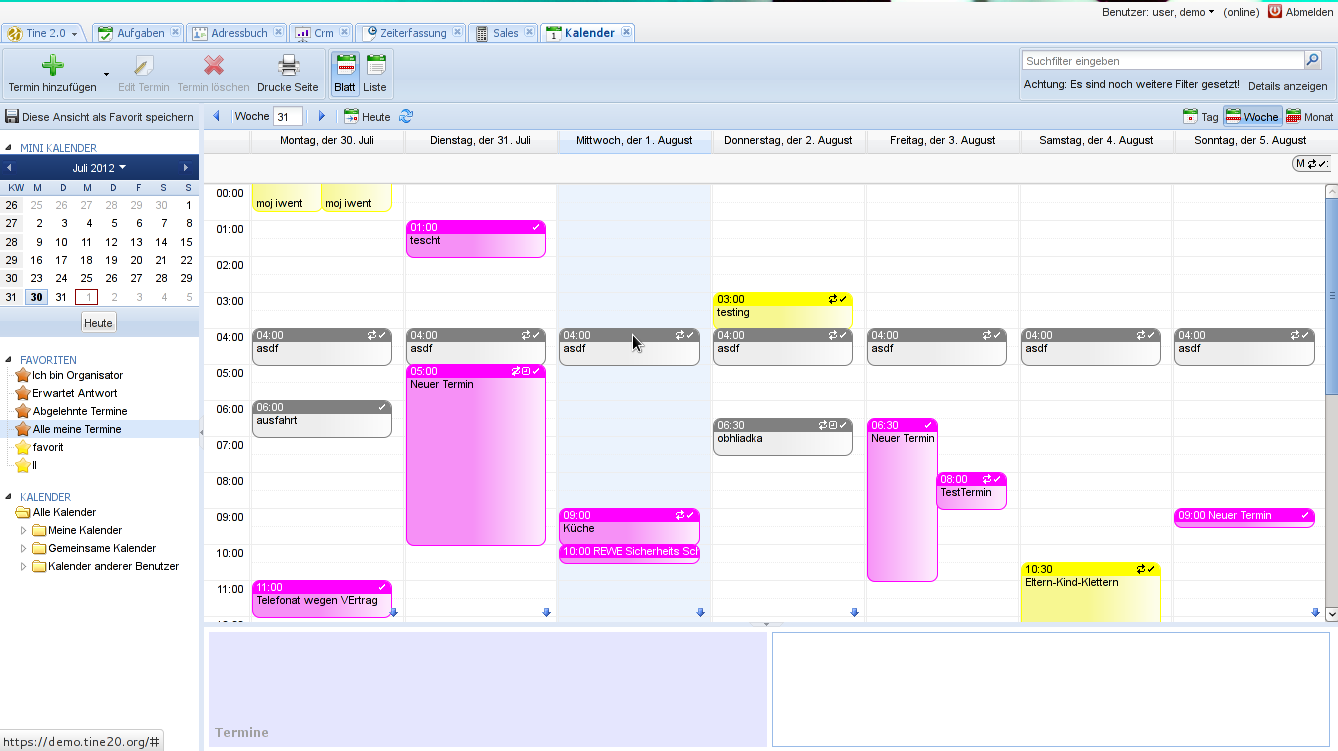
A digital calendar in week view with 24-hour time
A digital calendar in month view with ISO week numbers

A digital calendar is a collaborative or personal time management software with a calendar that can be used to keep track of planned events. The calendar can also contain an appointment book, address book or contact list. Common features of digital calendars are that users can:

  • Enter their own events
  • Change the visibility (whether events, groups of events or entire calendars are private, shared with selected users/user groups, or are public)
  • Subscribe to other calendars
  • Set up meetings that can be shared or where others can be invited
  • Different options for setting up reminders

There are several varieties of digital calendars. Some have the ability to be connected or synchronized with other calendars across different vendors. The iCalendar 1.0 and 2.0 specifications and its associated standards have been a cornerstone of the standardization and interoperability of calendar software across different vendors. A digital calendar can be viewed as an extension of many of the features provided by time management software such as desk accessory packages and computer office automation systems.[citation needed]

History

[edit]

A calendar command appeared in Version 7 AT&T UNIX (1979). Unix calendar programs checks current directory or user directories for files with calendar entries (date separated with tab character) and prints lines that begin with today's date or tomorrow's. Calendar implementation shipped with Linux systems is from FreeBSD.[1] There is a separate cal program that just prints a calendar for a month or a year and the date of Easter originally from Version 1 AT&T UNIX (1971). Free implementation ncal appeared in FreeBSD 2.2.6.[2] Alternative implementation is GNU gcal.[3]

Microsoft Windows included Calendar app from version 1.0. After Windows 3.1x Windows didn't include a calendar application until Windows Calendar in Windows Vista.

Calendar included with Apple macOS is named Calendar. It was known as iCal before OS X Mountain Lion version in 2012.

Today, digital calendars are common on many desktop environments, office suites, and in collaborative software for personal computers (desktop and laptop) as well as smartphones and tablets. Google Calendar is shipped with most Android phones and available in web.

In the 1990s and early 2000s, digital calendars was a standard feature of many personal digital assistants (PDAs) and enterprise digital assistants (EDAs). Since the early 2000s, PDAs and EDAs have been replaced by smartphones and tablets with similar functionality.

Features

[edit]

Calendar software can include several features. Some examples are:

Appointment calendar

[edit]

An appointment calendar is a list of appointments and the attendees for the appointments. This software may include the capability of detecting scheduling conflicts, notifying the participants of the conflict, and suggesting alternate meeting times.

Some appointment software has the ability to automatically suggest shortened events by default or in cases when there are back-to-back meetings in a calendar.[4] For example, instead of a 30 minute meeting at 13:00, a calendar software may suggest that an event is shortened to 25 minutes and either starts late (for example 5 minutes late at 13:05) or ends early (for example 13:25). Some software may have the options of combining both start late and end early. Benefits of this includes minimising the risk of needing to wait for participants who otherwise might be late for the meeting startup due to being hung up in wrapping up a previous meeting, as well as alleviating further propagation of this issue to the meetings following after. Such time buffers between meetings also gives attendees a short break between meetings.[5]

Period views

[edit]

Different period views is a feature which allow users to select how their calendar is displayed: one day, a work week, one week, one month, one year, etc.

Exporting calendar

[edit]

Many digital calendars have the option of exporting the calendar to various file formats, including the iCalendar standard. In this way, the user can, for example, take the calendar with them from one computer to another, or from an old e-mail account to a new one. It also makes it possible to share a calendar with others at a given point in time.

Calendar publishing

[edit]

Some calendar tools allow the user to publish select calendar information on a public link. It may also be possible for other users to subscribe. This can be useful, for example, for a sports team with announcing matches.

Timeblocking

[edit]

Timeblocking is a technique where users can organize their days into segments where they set aside specified periods of time for various tasks. With digital calendars, it is possible to do this interactively and with the option of sharing your availability and reserved time with others.

Availability and capacity checking

[edit]

Availability and capacity checking is an advanced function which can check the availability of all other employee and resource calendars in a group, and which may be useful assigning work decide on projects as part of resource planning.

Availability sharing

[edit]

Availability sharing enables users to share when they are available. It is often possible to choose how much detail should be visible to others (for example, whether one is only "busy", the title of the event, or title and details). This can facilitate meeting scheduling amongst several individuals.

Collaborative scheduling

[edit]

Collaborative scheduling means that the software suggests meeting times when all participants are free. In some cases, it is also possible for the invitees to suggest times that suit them best, so that the organizer can choose a meeting time that works well for all the participants.

In order for the software to be able to propose meeting times for participants across different organisations, the invitees' calendars must be set up to share outside their organisation when they are free.

Group calendar

[edit]

A group calendar is a calendar which displays events for groups in addition to individual calendars. These can often be switched on and off, and can be used as a tool to coordinate time available for meetings.

Several calendars

[edit]

A user can have multiple calendars that can be toggled on and off. This function makes it possible to categorize different events into separate calendars (such as work calendar, sports calendar, children school calendar).

Reminders

[edit]

Calendars themselves can basically be seen as a passive reminder that the user has to check themselves, and can be seen as a form of reminder software. It is often also possible to set up active reminders. Various reminder techniques can be used, such as pop-up notifications, dialog boxes or auditory alarms 15 minutes or 1 hour before an event.

Events for which reminders are wanted may include birthdays, holidays, anniversaries, or various one-off events. Calendars are often supplied with a number of pre-installed events (such as national holidays) and allow the user to create their own events. Context-aware reminder systems can set reminders based on the user's current location.[6]

International and regional settings

[edit]
The first day of the week in various countries according to the Common Locale Data Repository project:[7]
  Monday
  Friday
  Saturday
  Sunday
Table showing different methods for week numbering:
  Red frame: ISO 8601 (international week numbers)
  Blue background: USA and Canada
  Green frame and text: Middle East
— Each table line represents the period around the New Year when January 1 falls on a specific weekday, and hence the start of the weekday counting.
Use of 24-hour or 12-hour clock in different countries:
  24 hours
  24 hours written (12 orally)
  Both are common
  12 hours

Calendars can be set up with international or regional settings. Which settings become active may depend on settings in the computer/smartphone, settings in the browser, settings in the user profile on the calendar application, settings in the profile of the user principal name, or (typically on a work accounts) that certain settings are controlled by the organisation. These settings can in many cases be overridden manually. Sometimes the settings are tied to the language selected.

Some examples of international or regional settings might be:

  • Selecting a date format, such as the international ISO 8601 (YYYY-MM-DD) or other formats such as the American (MM/DD/YYYY) or European (DD.MM.YYYY)
  • Selecting a week count method and week format, such as the international ISO weeks (Monday is the first day of the week, week 1 starts in the first four-day week of the year). In addition to the international standard, at least five other systems are in use.[8][9] One example is the American format (Sunday is the first day of the week, week 1 starts on the first day of the year). It is also possible to start the counting on the first full week of the year (DOT calendar and the U.S. broadcast calendar), or traditional western counting (before ISO), or a separate variant for the Middle East.
  • Selecting a clock format, such as the 24-hour clock (00:00–23:59, most common internationally) or the 12-hour clock (12:00 a.m.–11:59 p.m., most common in the US and parts of Africa).
  • Select a time zone, such as Coordinated Universal Time (UTC), or one of the other time zones such as for example the Central European Time (CET) used in most of Europe.
  • Additionally, users may have to select units for other functionalities, such as a temperature scale and wind speed for weather forecasts, and a distance measurement for walking (and driving) distances. With metric units the corresponding units will be Celsius, meters per second (or kilometers per hour), and meters/kilometers. In the U.S., respectively, the units would be Fahrenheit, miles per hour, and statute miles/yards/feet.

Locally or in the cloud

[edit]

It is a common functionality to have a calendar on computers and smartphones, often via locally installed email programs or webmail that can be accessed with a standard browser.

Some examples of locally installed applications for individual use are the Lightning extension for Mozilla Thunderbird, Microsoft Outlook without Exchange Server, or Windows Calendar.

Examples of calendars which allow the sharing of information between users are Windows Live Calendar, Google Calendar, or Microsoft Outlook with Exchange Server.

Web-based interface

[edit]

Web-based interfaces allow users to access their calendars from any computer, tablet or mobile phone with a web browser. This can be implemented for most calendars which can be accessed over the internet.

Online calendar

[edit]

An online calendar is a web application that allow one or more users to edit, and optionally share with other users, online access to a digital calendar.

Features may include:

  • Drag and drop functions for creating events
  • Support for recurring daily, weekly, monthly and yearly events
  • Viewing by day, week or month
  • Multiple calendar support
  • Multiple language support
  • Ability to work with different browsers, such as Firefox, Google Chrome, Safari and Internet Explorer
  • Email notification
  • Mobile version

Online calendars that are free to use include Google Calendar, Yahoo Calendar, Windows Calendar and Dayhaps Calendar.

Online calendars that provide an email reminder service: Google Calendar, Outlook Calendar, DayViewer [1] and Calendar.online [2].

See also

[edit]

References

[edit]
[edit]
Revisions and contributorsEdit on WikipediaRead on Wikipedia
from Grokipedia
A digital calendar is an electronic software tool designed for personal or collaborative , enabling users to create, organize, and exchange scheduling information such as events, appointments, to-dos, and journal entries across devices and applications. These systems have evolved from basic standalone applications on personal computers and personal digital assistants (PDAs) to sophisticated, cloud-integrated platforms that support real-time synchronization and social awareness among users. The standardization of digital calendars was advanced by the (iCal) format, first specified by the (IETF) in November 1998 as a transport-independent method for representing and sharing calendaring data. This format underpins between diverse systems, allowing seamless exchange of schedule details without reliance on proprietary protocols. Early adoption occurred in professional environments, where digital calendars facilitated workgroup coordination by tracking attendance and availability, as seen in tools integrated with PDAs and desktop software by the early 2000s. Notable examples include Apple's iCal, introduced on July 17, 2002, as a free application for Mac OS X that emphasized easy sharing and colorful visual organization of events. , launched in April 2006, revolutionized accessibility by offering free, web-based functionality with features like automatic event invitations and integration with for parsing schedules from s. Microsoft Outlook's calendar, a core component since the product's early versions, has long supported enterprise-level features such as resource booking and meeting room integration within email ecosystems. Key functionalities across these systems include recurring event setup, automated reminders, multi-user sharing, and mobile synchronization, making digital calendars essential for both individual and team in modern workflows.

History and Evolution

Early Developments

The origins of digital calendars trace back to the mid-20th century, when rudimentary scheduling programs emerged on large mainframe computers in research institutions and businesses. These early systems were primarily designed for rather than personal use, running on hardware like the introduced in 1964. For instance, the IBM Project Control System (PCS), developed in 1963, enabled basic activity scheduling on mainframes using precedence diagramming methods, allowing overlaps and dependencies to be tracked via punch cards and storage. Such tools marked the initial shift from paper-based planning to computerized coordination, though they were confined to institutional environments with and no real-time interaction. Advancements in the coincided with the rise of personal computers, enabling the development of standalone calendar applications for individual users. Borland Sidekick, launched in 1984 as one of the first personal information managers (PIMs), integrated a simple calendar alongside a notepad, calculator, and phone directory, operating as a terminate-and-stay-resident (TSR) program under to allow quick access without exiting other applications. Similarly, the computer, released in 1983, introduced a graphical desk accessory calendar within its pioneering , permitting users to view and enter events in a windowed environment for the first time on a personal machine. Microsoft followed with Schedule+, a dedicated scheduling tool released in 1992 that supported appointment tracking and basic resource allocation on Windows and Macintosh systems. By the 1990s, digital calendars integrated into portable personal digital assistants (PDAs), extending functionality beyond desktop constraints. The , debuted in 1993, featured for event entry and a calendar application that organized appointments with rudimentary reminders, syncing data via serial cables to desktop computers. The , introduced in 1996, further advanced this with its intuitive stylus-based interface for scheduling, to-do lists, and contacts, supporting through a cradle cable or beaming between devices. These early digital calendars operated under significant hardware and software limitations that shaped their adoption. Networking was absent, isolating devices and preventing shared access, while storage was severely constrained—for example, the original offered only 128 KB of RAM, sufficient for hundreds of events but inadequate for . Interfaces remained largely text-based or minimally graphical, lacking visual overviews like monthly grids, and relied on manual input without automation, highlighting the era's focus on basic portability over seamless integration.

Key Milestones in the and Beyond

The marked a pivotal shift in digital calendars from standalone desktop or PDA-based tools to internet-connected services that emphasized accessibility, synchronization, and social integration, building briefly on the foundations laid by personal digital assistants like the Palm Pilot. This era saw the rise of web-based platforms that allowed users to manage schedules across multiple devices without physical hardware limitations. A landmark development occurred on April 13, 2006, when launched as a free, web-based service, introducing seamless cloud syncing that enabled users to access and update their schedules from any internet-connected device. The platform pioneered event sharing through email invitations, allowing recipients to directly and view shared calendars, which fostered collaborative planning among groups. Additionally, its integration with facilitated automatic event detection by parsing emails for details like dates, times, and locations, streamlining the creation of calendar entries from correspondence. The late 2000s witnessed the explosive growth of mobile integration, transforming digital calendars into always-on companions. Apple's Calendar app debuted with the original on June 29, 2007, offering synchronization with Mac or PC calendars via , which laid the groundwork for on-the-go . As smartphones proliferated, subsequent updates introduced push notifications for third-party apps starting with 3.0 in 2009. Similarly, Android's native Calendar app, introduced with the platform's 1.0 release in September 2008, evolved rapidly to support push notifications by Android 2.2 (Froyo) in 2010 and GPS integration for location-aware features, enabling users to receive contextual reminders tied to their physical whereabouts. These advancements made digital calendars indispensable for mobile lifestyles, with adoption surging as smartphones became widespread. Entering the 2010s, enterprise-grade digital calendars proliferated with robust cloud infrastructure to support professional workflows. rolled out its cloud-based Outlook via Office 365 in June 2011, with enhancements to shared calendar access in subsequent years that improved real-time updates across devices. Apple's iCloud Calendar, launched as part of the service on October 12, 2011, extended this by providing automatic, real-time syncing of calendars across , macOS, and web platforms, including shared family or work calendars that updated instantly for all participants. GPS-based reminders for calendar events were introduced in in 2012. These tools addressed scalability needs for businesses, with Office 365 serving over 258 million paid seats by 2020. The 2020s brought intelligence and specialization to digital calendars, amplified by the pandemic's push toward remote capabilities from 2020 to 2022. The crisis accelerated the embedding of virtual meeting links—such as Zoom or invites—directly into calendar events, with platforms reporting significant increases (up to 3-5x) in video conferencing usage to support distributed teams and reduce coordination friction. In 2023, integrated Duet AI (now Gemini) into , including , introducing AI-driven auto-scheduling that analyzes user preferences, availability, and priorities to propose and book optimal meeting times without manual input. Complementing this, family-focused innovations like the 2024 Skylight Calendar Max emerged as wall-mounted digital displays with chore integration, syncing household schedules, tasks, and rewards via touchscreen interfaces connected to cloud calendars, aimed at streamlining family logistics in smart homes. In 2024, Apple introduced Apple Intelligence features in iOS 18, enabling for easier event creation and smarter suggestions in the Calendar app. These developments reflect a broader trend toward proactive, context-aware systems that enhance productivity amid evolving work and home dynamics.

Core Features

Event Management

Event management in digital calendars encompasses the essential processes for creating, editing, and organizing individual events, forming the foundation of personal scheduling. Users can add appointments by specifying start and end times, along with optional details such as descriptions, locations, and attachments. The standard, defined in RFC 5545, structures these as VEVENT components, requiring a DTSTART property for the event's beginning and optionally a DTEND for its conclusion, while provides textual details, indicates the venue, and ATTACH links to files or resources. This standardization ensures interoperability across applications, allowing events to include elements like "Project Review Meeting" in the description or a URL to an agenda document via ATTACH. Support for recurring events enhances organization by automating repetitive scheduling, such as weekly meetings, through patterns like "every ." In , the RRULE property governs this, using parameters like FREQ=WEEKLY and BYDAY=TU to define the repetition, with options for intervals, counts, or end dates to limit occurrences. Editing recurring events typically allows modifications to the series or individual instances, preserving the overall pattern unless explicitly altered. These features reduce manual entry, enabling users to set up ongoing commitments like bi-weekly check-ins with a single configuration. Time blocking is a key technique integrated into , where fixed time slots are allocated for tasks to prevent overbooking and promote focused . Users create dedicated blocks—such as 9:00 AM to 11:00 AM for deep work—treating them as non-negotiable appointments, which helps in estimating task durations and building buffer time. Visual aids like color-coding categorize these blocks, distinguishing work from personal activities; for example, blue for professional tasks and green for , making the schedule easier to scan and adhere to. This method encourages realistic planning by breaking larger goals into scheduled subtasks, fostering better time allocation without overwhelming the day. Capacity checking mechanisms ensure efficient resource use by enforcing limits on event durations or overlaps, such as alerting users to potential double-bookings for a single asset like a meeting room. In practice, digital calendars scan existing entries during creation to flag conflicts, allowing adjustments to avoid simultaneous commitments on the same resource calendar. Popular tools like facilitate quick entry via intuitive interfaces, where users can input details like "Lunch at 1 PM tomorrow" to auto-populate times and titles, streamlining the process. Events can then be viewed across various periods, such as day or week views, to verify no unintended overlaps occur.

Display and Navigation Options

Digital calendars offer a range of display options designed to present events and schedules in visually intuitive formats, enabling users to browse and plan effectively across different time scales. These layouts typically include period-based views such as day, week, month, or year, which provide varying levels of detail depending on the user's needs. For instance, a day view focuses on hourly breakdowns to highlight a single day's commitments, while a month view offers a broader grid overview for long-term planning. Agenda-style lists serve as an alternative for users with dense schedules, presenting events in a chronological text-based format rather than a graphical grid, which can reduce visual clutter and emphasize timelines. Customizable grids within these views often incorporate free/busy indicators, shading unavailable time slots to visually distinguish availability without revealing sensitive details. Popular applications like and allow users to switch between these views seamlessly via toolbar buttons or dropdown menus, with options to adjust grid densities or highlight weekends. Multi-calendar handling enhances organization by allowing users to overlay multiple calendars—such as work, personal, or family schedules—within a single interface, providing a consolidated view of commitments. In overlay mode, events from different calendars stack transparently, often color-coded to differentiate sources, while side-by-side layouts position them adjacent for comparison. Toggles enable users to show or hide specific layers, promoting clarity and preventing overload; for example, Outlook's Arrange group includes a Split view option to alternate between these modes. This feature is particularly useful for balancing professional and without constant switching. Navigation tools facilitate efficient exploration of calendar content, including zooming for granular or expansive perspectives, keyword or date-based searching, and timeline scrolling for fluid movement through periods. Zooming, often achieved via pinch gestures on touch devices or slider controls on desktops, allows transitions between detailed hourly views and broader overviews, as seen in Apple Calendar's interface. Search functions scan events by title, location, or time, returning filtered results, while scrolling supports horizontal or vertical panning across timelines. Responsive designs ensure these tools adapt to device constraints: desktop interfaces leverage larger screens for expansive grids and multi-pane navigation, whereas mobile versions prioritize vertical scrolling and simplified menus to accommodate smaller displays and touch interactions. Accessibility features are integral to in digital calendars, adhering to standards like WCAG 2.1 for perceivable and operable content. High-contrast modes enhance readability by increasing color differentiation, meeting minimum ratios of 4.5:1 for text, which benefits users with low vision. Voice-over support integrates with screen readers to audibly describe events, dates, and navigation elements, enabling keyboard-only operation via shortcuts. Customizable fonts and text scaling allow adjustments for size and style, ensuring compatibility with assistive technologies across platforms; , for instance, leverages system-level options for these enhancements.

Reminders and Notifications

Digital calendars employ a range of reminder types to proactively inform users of scheduled events, including pop-up alerts on desktop interfaces, notifications for asynchronous access, messages, and push notifications on mobile devices. These mechanisms allow for customizable timing, such as alerts set 10, 15, or 30 minutes in advance, with the option to configure multiple reminders per event for layered notifications. For instance, supports device-specific pop-ups and emails, while defaults to a 15-minute pop-up reminder that can be adjusted or disabled. Escalation features for missed events are implemented in some systems through persistent or repeating alerts until the user acknowledges them, ensuring critical appointments are not overlooked. Integration with device hardware enhances the effectiveness of these reminders by leveraging sensory feedback beyond visual or auditory cues. On wearables like the , calendar apps deliver haptic vibrations to provide discreet notifications, with intensity adjustable via system settings to suit user preferences. Similarly, smart speakers such as the enable voice-based announcements through Alexa integration, where linked calendars trigger spoken event summaries at designated times, allowing hands-free awareness in home environments. Snooze and dismissal functionalities offer flexibility in managing interruptions, permitting users to temporarily defer reminders for intervals like 5, 9, or 10 minutes before a follow-up alert resumes, or to dismiss them entirely to mark completion. In , for example, desktop notifications can be snoozed until one minute before the event, with customizable timing available in settings. Apple Calendar provides an automatic 9-minute snooze option that reactivates at the event start if needed. Some advanced implementations include basic on reminder interactions, such as snooze frequency, to inform users about patterns in their responsiveness and suggest adjustments for better adherence. To address battery and performance concerns on mobile platforms, digital calendar notifications are optimized for efficient delivery, minimizing background processes while ensuring reliability. Developers recommend exempting calendar apps from aggressive battery optimization features in Android and , as restrictions like Doze mode can delay alerts; for example, advises verifying that is not optimized to prevent silent notifications. This balance allows timely reminders without significantly impacting device longevity, with iOS Focus modes further enabling users to batch or silence non-essential alerts during specific periods.

Advanced Capabilities

Time Management Techniques

Digital calendars enhance time blocking by allowing users to go beyond simple event creation, incorporating intuitive tools for dynamic rescheduling and strategic spacing. Drag-and-drop functionality, available in applications like Sunsama and , enables users to visually reposition tasks or events on the calendar interface, facilitating quick adjustments to priorities or unexpected changes without manual date editing. This feature promotes by reducing the of rescheduling and minimizing errors in dense schedules. To further prevent scheduling conflicts, many digital calendars include automated buffer times between appointments, accounting for travel, preparation, or transitions. For instance, Reclaim.ai's Buffer Time tool automatically inserts customizable breaks—such as 15-minute gaps—around meetings or focus sessions, ensuring realistic pacing and reducing the risk of overcommitment. These buffers can be tailored by event type, helping users maintain levels and avoid the associated with back-to-back obligations. Task integration within digital calendars allows for seamless embedding of to-do lists and priorities directly into time slots, transforming the calendar into a comprehensive hub. In Fantastical, enables users to input tasks effortlessly, such as typing "Prioritize report drafting at 2pm tomorrow," which creates a slotted task with assigned priority and integrates it into the visual timeline. Progress tracking is supported through simple completion checkboxes, with overdue items automatically carrying forward to prevent oversight, fostering accountability and alignment between tasks and available time. Analytics features in digital calendars provide users with insights into time allocation, often through automated weekly reports that highlight patterns in usage. Reclaim.ai, for example, generates summaries breaking down hours spent in meetings versus focused work, helping individuals identify inefficiencies such as excessive meeting loads. These reports emphasize conceptual shifts by analyzing deep versus shallow work distributions. Pomodoro-style timers are increasingly built into digital calendars to support short-interval focused sessions, typically 25 minutes of work followed by 5-minute breaks, with options to auto-start during detected calendar gaps. Some applications integrate these timers with calendar views to initiate sessions in unoccupied slots, capitalizing on free time for concentrated effort and thereby combating and enhancing sustained . Reminders can briefly notify users at the start of these blocks to reinforce the technique.

Data Export and Publishing

Digital calendars support exporting data in standardized formats to facilitate interoperability and archival. The (ICS) format, defined by RFC 5545, is the primary standard for exporting events, to-dos, and journal entries, enabling compatibility across applications such as , , and Apple Calendar. For instance, allows users to export individual calendars or all calendars at once as a ZIP file containing multiple ICS files, preserving event details like titles, descriptions, locations, and recurrence rules. provides export options to ICS via the "Save Calendar" feature or to CSV through the Import/Export wizard, which structures data into columns for start/end times, subjects, and attendees suitable for spreadsheet analysis. Apple Calendar exports events exclusively to ICS files, with bulk operations selecting multiple calendars for a single file output. PDF exports, while not native in all platforms, can be generated from printable views in tools like Outlook or via conversion utilities to create static, shareable schedules. Publishing calendar data extends accessibility beyond local use by generating shareable links or embeds. In , users can create public URLs for read-only views, allowing external access to event lists without editing rights, and embed calendars via iframes on websites for dynamic display. Privacy controls are integral, such as restricting published views to "see only free/busy" information to hide sensitive details like event descriptions, or requiring authentication for access. Some platforms, like Trumba Calendar, offer additional protections including password authentication for published feeds, ensuring only authorized viewers can access the data. Multi-calendar exports can be published collectively by bundling ICS files or using aggregated links, though this requires manual configuration to maintain separation. Common use cases for data export and publishing include disseminating conference schedules via ICS attachments in , enabling attendees to events directly into their calendars for seamless integration. Syncing with email clients, such as subscribing to an ICS URL from Outlook to , automates updates for recurring professional commitments without manual re-entry. Limitations arise with large datasets, where Google Calendar imposes practical caps around 25,000 to 50,000 events per export to prevent overload, potentially requiring users to split files and risking incomplete transfers if not managed carefully. Data loss can occur during conversions, such as from ICS to CSV, if custom fields or attachments exceed format constraints, necessitating verification post-export. Version control for exported files is absent in native tools, treating outputs as static snapshots that overwrite previous versions unless archived manually or via external systems like for ICS backups.

Multi-Calendar Handling

Digital calendar applications enable users to create and manage multiple distinct calendars within a single interface, facilitating segmented organization of personal and professional commitments. For instance, separate calendars can be established for categories such as work, , and fitness, each with customizable attributes like unique colors for visual differentiation and granular permissions to regulate access levels. In , users create a new calendar via the settings menu, assign a distinct color to all events within it, and set sharing permissions that range from "See only free/busy" (viewing availability without details) to "Make changes and manage sharing" (full editing rights). Similarly, Apple Calendar allows creation of multiple calendars through the app's calendar list, where users select a color via the info icon and configure sharing permissions for read-only or edit access. Microsoft Outlook supports this by enabling users to add calendars in the navigation pane, apply color categories to events or entire calendars, and adjust permissions such as "Can view when I'm busy" or "Can edit" for shared access. These features promote efficient organization by linking related events to specific calendars while maintaining privacy controls. Synchronization across multiple calendars occurs through automatic integration in the application's unified view, where events from all active calendars are merged and displayed together to provide a cohesive schedule. Overlapping events from different calendars are visually stacked or offset, allowing users to identify conflicts at a glance, though built-in prompts for resolution are typically manual rather than automated. For example, in , the system overlays events without preventing overlaps but highlights them in the interface, prompting users to edit or delete as needed during event creation. Apple Calendar similarly merges calendars in its day or week view, showing overlaps side-by-side if from different calendars, with users resolving issues by adjusting timings manually. In , synchronization via Exchange or ensures real-time merging, and conflict resolution involves reviewing sync errors or using the "Automatic Processing of Meeting Requests" setting to flag potential overlaps. This approach minimizes discrepancies while empowering users to handle resolutions based on priority. External calendars, such as lists or sports schedules, can be imported into digital calendar apps via subscription links in the (.ics) format, enabling automatic updates without manual entry. Google facilitates this by allowing users to add a calendar "From " in the settings, subscribing to feeds like national holidays from official sources, which syncs events periodically. Apple Calendar supports subscription through the "Add Subscription Calendar" option, where users enter a .ics for sources like regional holidays, ensuring seamless integration and real-time refreshes. Microsoft permits importing .ics files or subscribing online via the "Add calendar" feature, pulling in schedules such as sports events from provider links for ongoing synchronization. This capability extends the app's utility by incorporating dynamic external data into personal multi-calendar setups. To maintain responsiveness when handling numerous calendars, applications implement performance optimizations like , which defers the full retrieval of event data until required, such as when scrolling to a specific date range. This prevents interface lag by initially loading only visible or nearby events, scaling efficiently for users with dozens of calendars. In designs for apps like , lazy loading combined with indexed lookups ensures smooth navigation across extensive datasets without overwhelming system resources. Users can briefly reference overlaid views to assess combined schedules, enhancing overall multi-calendar usability.

Collaboration and Sharing

Individual Availability Tools

Individual availability tools in digital calendars enable users to evaluate and manage their personal schedule openness independently, facilitating and selective disclosure to others. These features typically include visual representations of free and busy periods, allowing individuals to identify gaps in their day or week without external input. For instance, calendar interfaces often color-code time blocks—such as shading busy periods in gray or red—to provide an at-a-glance view of availability, helping users query their own capacity for tasks like finding a two-hour next week. Free/busy status serves as a core mechanism for this self-assessment, where users designate events as "busy" to reserve time or "free" to indicate openness, with the calendar aggregating these to highlight available slots. In , for example, the "Show As" option within event settings allows toggling between Free, Tentative, Busy, or Out of Office, updating the calendar view accordingly to reveal personal free time visually. Similarly, permits setting events to Busy by default, enabling users to scan for open periods through the agenda or day view, which blocks out occupied times while leaving gaps prominent. Apple Calendar supports this via event status indicators that mark time as unavailable, aiding individual planning by obscuring the full schedule into a simplified timeline. These tools empower solo users to maintain an overview of their potential without algorithmic interference. Sharing availability extends this personal insight to one-off interactions, often through temporary links or views that display open times without exposing event specifics, ideal for ad-hoc invitations like client calls. Google Calendar's Appointment Schedules feature generates a booking page where users predefine available slots, sharing a link that reveals only free periods for selection, concealing underlying appointments. In Outlook, users can share their calendar with "Can view when I'm busy" permissions, producing a view-only link that masks details and shows solely free/busy blocks for the recipient. This approach ensures privacy while streamlining personal outreach, such as sending a link to a potential collaborator to pick a mutually convenient slot. Integration with email enhances responsiveness by automating communications tied to availability, particularly when declining invitations. Outlook includes an option to "Decline and Propose New Time" in meeting responses, which scans the user's calendar for alternative slots and suggests them directly in the reply, summarizing open periods without manual effort. , linked to , supports out-of-office events that auto-decline overlapping invitations and send replies including a brief availability note, such as upcoming free days, configured via event settings. As of October 2025, Google's "Help me schedule" feature, powered by Gemini AI, further automates this by suggesting ideal meeting slots directly in based on the user's calendar and email context. These integrations reduce back-and-forth by embedding personal schedule insights into email workflows, allowing users to convey openness efficiently during declinations. Privacy toggles provide granular control over what portions of the schedule remain hidden, enabling users to expose general free time while masking sensitive events. In , the "Default visibility" setting for individual events can be adjusted to Private, which hides details from shared views but retains a busy indicator, allowing free slots to show without revealing contexts like medical appointments. Outlook offers similar masking through sensitivity labels or permission levels, where private items display as opaque busy blocks in shares, preserving overall openness data. Apple Calendar's private event option achieves this by graying out entries in shared calendars, showing only the time reservation as unavailable while keeping descriptions concealed. Such controls balance transparency for personal scheduling with of confidential , often extending to group contexts where individual free time informs broader coordination.

Group Scheduling Features

Group scheduling features in digital calendars facilitate coordination among multiple participants by integrating tools that aggregate and analyze availability data to propose and resolve meeting times efficiently. These capabilities draw on participants' individual availability as input to minimize manual and reduce scheduling errors in collaborative settings. Polling and voting mechanisms enable organizers to create proposals with predefined time slots, allowing participants to indicate preferences without revealing full details. Platforms like provide intuitive interfaces for generating such polls, where users select from options via or web links, and responses are tallied in real-time to highlight slots with the highest consensus. This approach streamlines by automating the collection of availability votes and notifying participants of the selected time, often integrating with external calendars for seamless adoption. Auto-suggest algorithms enhance this process by automatically generating time recommendations based on aggregated free slots from participants' calendars, incorporating factors such as duration, priorities, and time zones. In , the Scheduling Assistant employs an AutoPick function that scans attendee availability and suggests optimal slots, prioritizing conflict-free periods while allowing customization for preferences like buffer times. As of 2025, in Outlook extends this with AI capabilities to search calendars by category, create meeting agendas, and schedule events via chat, further improving suggestions for up to two participants. These algorithms typically use techniques to evaluate overlaps and rank proposals, ensuring equitable distribution of meeting burdens in team environments. Conflict detection tools provide real-time alerts for scheduling overlaps within shared views, enabling proactive resolution during planning. Outlook's Scheduling Assistant visually highlights busy periods for attendees and resources, displaying color-coded indicators for conflicts and offering drag-and-drop functionality to adjust events directly in the interface. This immediate feedback prevents double-bookings by cross-referencing all involved calendars and prompting alternative suggestions when issues arise. In enterprise contexts, these features extend to , such as integrating room bookings with group scheduling workflows. Outlook supports this through the Room Finder tool, which filters available conference spaces based on capacity, , and while checking for conflicts with attendee schedules, allowing seamless addition of resources to meeting invites. This integration is particularly valuable in large organizations, where it automates allocation of shared assets alongside personnel availability.

Shared Calendar Access

Shared calendar access in digital calendars enables multiple users to view and collaboratively edit a persistent communal schedule, supporting ongoing coordination for teams, families, or organizations. This functionality typically includes configurable permission levels that determine the scope of access granted to participants. For instance, users can assign read-only access, allowing others to view event details without modifications; edit permissions, which permit adding, updating, or deleting events; or admin roles, enabling management of sharing settings and ownership transfer. Additionally, features allow assistants or proxies to manage calendars on behalf of the owner, such as scheduling events or responding to invitations, while maintaining the principal's oversight. As of May 2025, Outlook delegates can create and apply categories to a delegator's calendar, enhancing management capabilities. Real-time syncing ensures that changes made by any authorized user propagate instantly across all connected devices and platforms, minimizing discrepancies in shared views. This is facilitated through cloud-based synchronization protocols that update event details, locations, and attachments without delay. Many systems also provide version history or activity logs to track modifications, allowing users to review who altered an event and when, which aids in resolving conflicts or maintaining transparency. For example, in enterprise environments, administrators can access detailed trails of activities. Group calendars serve as dedicated shared spaces tailored for specific collectives, such as chore rotations or timelines in professional settings, where members can collectively populate and refine the . These calendars often integrate embedded comments or discussion threads directly on events, enabling contextual notes, feedback, or task assignments without leaving the calendar interface. This fosters iterative , with notifications alerting participants to updates or responses. To maintain control and security, shared calendar systems include revocation tools that allow owners to instantly remove access for specific users or groups, effectively halting their ability to view or edit the calendar. Auditing capabilities complement this by all interactions, including views, edits, and deletions, to ensure accountability and compliance, particularly in organizational contexts where is essential. Brief references to individual availability within these groups can enhance coordination, but the primary emphasis remains on the editable communal resource.

Deployment Models

Local and Desktop Implementations

Local and desktop digital calendars consist of standalone software applications installed directly on personal computers, emphasizing self-contained operation on individual devices or small local networks. These implementations prioritize and management on the local hardware, enabling users to handle scheduling tasks without reliance on remote servers. Representative examples include Apple , integrated into macOS, which stores calendar data in a local database within the user's Library folder, facilitating seamless event management on the device itself. Similarly, Microsoft Outlook's desktop version employs .pst (Personal Storage Table) files to archive emails, contacts, and calendar items locally on the hard drive, supporting POP3 accounts or offline backups for independent use. A key advantage of these local implementations is their full offline functionality, allowing users to create, view, edit, and delete events entirely without an connection, as all data resides on the device. For instance, in Apple Calendar, local calendars not linked to or external accounts remain accessible and modifiable at any time, with changes queued for later if needed. Microsoft desktop similarly enables complete calendar operations in offline mode, where .pst files provide immediate access to stored events, and users can manually synchronize data via USB transfers, attachments, or file exports when connectivity is available. This setup ensures uninterrupted in environments with poor or no , such as remote fieldwork or . For sharing within local networks, these applications support access via a local server, particularly in small office settings, through protocols like , which extends to enable calendar data exchange over HTTP. allows clients to create, update, and query calendar collections on a local server, using methods such as MKCALENDAR for setup and queries for retrieving events by time range or status, thus facilitating intra-device communication without external infrastructure. Apple Calendar, for example, permits sharing of individual -hosted calendars with users on the same local server, enabling controlled access to events among team members. These local and desktop calendars offer high privacy benefits by avoiding cloud dependencies, as data never leaves the device or network, reducing risks of remote breaches; however, they face limitations in multi-device synchronization, often requiring manual interventions or third-party add-ons for broader access across machines.

Cloud-Based and Web Interfaces

Cloud-based digital calendars provide hosted services accessible through web browsers or dedicated applications, enabling users to manage schedules without local installations while leveraging server-side storage for persistence and synchronization. These platforms, such as Google Calendar and Apple iCloud Calendar, utilize modern web technologies to deliver seamless experiences across devices, emphasizing real-time collaboration and data availability over the internet. Web-based interfaces allow direct browser access to calendar functionalities, often powered by HTML5 standards that eliminate the need for additional plugins. For instance, Google Calendar's web application supports interactions for creating and rescheduling events, relying on the HTML5 Drag and Drop API to handle user gestures efficiently within the browser environment. Similarly, Apple Calendar at iCloud.com offers web access for organizing events, viewing shared calendars, and editing details, with changes propagating across linked devices. This approach ensures compatibility with standard web browsers on desktops, laptops, and even mobile devices without requiring software downloads. In mobile and app ecosystems, native applications integrate with cloud services to provide synchronized experiences, including push mechanisms for real-time updates. Apple's iCloud Calendar, for example, syncs events across and devices using push notifications, ensuring that additions, edits, or deletions made on one device appear instantly on others signed in with the same , provided Calendar is enabled in settings. This push-based synchronization maintains consistency without manual refreshes, enhancing usability during on-the-go access. Scalability in cloud-based systems supports enterprise-level deployments, handling large user bases through robust infrastructure and integration options. Microsoft Exchange Online, part of , accommodates organizations with thousands of users by supporting up to 100,000 members in distribution groups and 5,000 recipients per meeting invitation, allowing efficient calendar sharing and scheduling at scale. Custom integrations are facilitated via the , which enables developers to build extensions for calendar data access, automation, and third-party connectivity. Accessibility is a core advantage, as these interfaces require no installation and function on any internet-connected device, broadening reach to diverse hardware. (PWA) capabilities further enhance this by enabling offline caching; , for instance, allows users to enable offline mode in settings, caching recent events for viewing and basic editing without connectivity, with data syncing upon reconnection. This no-install model, combined with responsive design, supports inclusive use across platforms, including browsers on low-end devices.

Customization and Standards

International and Regional Configurations

Digital calendars incorporate robust time zone handling to facilitate accurate scheduling across global users. They typically employ automatic detection of the user's local time zone based on device location services or system settings, applying UTC offsets for conversions. For instance, Google Calendar uses Coordinated Universal Time (UTC) as the internal standard to store events, automatically converting display times to the viewer's local zone regardless of creation location, which helps mitigate issues with daylight saving time adjustments. Apple Calendar similarly detects the current time zone from the Mac or iOS device's location and allows users to override it or display multiple zones simultaneously. Microsoft Outlook supports manual or automatic time zone selection per calendar, with events converting via UTC offsets to prevent scheduling errors during travel. Additionally, floating events—those not tied to a specific time zone—adjust dynamically based on the viewer's location, a feature available in Apple Calendar where selecting "Floating" ensures the event time remains consistent relative to local context. To accommodate diverse user preferences, digital calendars support regional date formats aligned with locale settings. Common conventions include DD/MM/YYYY in much of and MM/DD/YYYY in the United States, with applications like and automatically adapting displays based on the user's system region. These tools also handle alternative calendar systems, such as the Gregorian for standard use and lunar-based systems for specific holidays, ensuring compatibility without manual reconfiguration. Holiday integration enhances usability by enabling automatic import of country-specific observances into the calendar. Google Calendar offers subscription to regional holiday feeds, allowing users to add events like in or Lunar New Year in countries such as and , with automatic updates for recurring or variable dates. Microsoft Outlook provides similar functionality through country selection in its holiday calendar feature, auto-populating events for selected regions and supporting subscriptions for ongoing synchronization in Microsoft 365 accounts. Apple Calendar integrates holidays via iCal subscriptions or Contacts-linked observances, though it relies more on third-party feeds for comprehensive regional coverage like Asian lunar festivals. Language localization ensures by providing UI translations and right-to-left (RTL) support for scripts like . is available in over 80 languages, including full Arabic translation with RTL layout mirroring to maintain readability and navigation flow. extends handling across its interface, supporting RTL languages such as Arabic and Hebrew for seamless event entry and viewing. Apple Calendar follows system-wide localization, incorporating RTL variants for Arabic and Hebrew in and macOS, with automatic text alignment and icon adjustments per .

Interoperability Standards

Interoperability standards ensure that digital calendars from various providers can exchange and synchronize data seamlessly, enabling users to integrate events across different platforms without loss of information. The primary format for this exchange is , defined in RFC 5545, which specifies a structured text-based representation for calendaring and scheduling data, including events, to-dos, and journal entries. This standard uses components such as VEVENT for individual appointments or meetings, and properties like DTSTART for start times and DTEND for end times to capture temporal details precisely. To facilitate server-client synchronization, protocols like extend the Web Distributed Authoring and Versioning () framework, allowing clients to access, manage, and share calendar resources stored in format over HTTP. supports push and pull operations for calendar data, enabling real-time updates between devices and servers. Complementing this for contact integration, CardDAV provides similar extensions for address book data, often used alongside in comprehensive syncing environments. These standards enjoy widespread adoption in major applications, with supporting iCalendar import and subscription for seamless event integration. Similarly, , through its extension, allows users to subscribe to feeds and create new calendars in the format. Extensions in these tools handle additional features like attachments via the ATTACH property and alarms through the VALARM component. The standard evolved significantly with version 2.0 in RFC 5545, published in September 2009, which introduced enhancements such as detailed recurrence rules (RRULE) for repeating events and VTIMEZONE components for accurate handling across global users. These updates addressed ambiguities in prior versions, improving cross-platform reliability.

Security, Privacy, and Future Directions

Data Protection Measures

Digital calendars employ robust methods to safeguard user data. Data at rest in services like is encrypted using AES-256, a symmetric standard that protects stored information across Google Cloud platforms. For data in transit, with TLS protocols ensures secure transmission between user devices and servers, preventing interception during synchronization or access. Additionally, select editions offer client-side for calendar events, where event details such as descriptions and attachments are encrypted on the user's device before upload, rendering them indecipherable to Google servers. Privacy risks in digital calendars primarily stem from data breaches and unauthorized access mechanisms. Phishing attacks via spoofed calendar invites have surged, with malicious embedded in event descriptions or emails tricking users into divulging credentials, potentially exposing entire schedules and enabling account takeovers. Unauthorized access often occurs through improperly configured shared , where or broadly shared calendars inadvertently reveal sensitive details like meeting times and locations to unintended parties. deployment vulnerabilities, such as misconfigured access controls, can exacerbate these risks by allowing external to exploit weak permissions. Compliance with standards like the General Data Protection Regulation (GDPR) is essential for digital calendars serving users, mandating explicit consent for processing and sharing , including schedules that may reveal or attendance patterns. Calendar providers must obtain active, before sharing data with third parties and provide mechanisms to withdraw it at any time. Features such as two-factor authentication, integrated into accounts for apps like , add a verification layer to prevent unauthorized logins and align with GDPR's security requirements. User controls in digital calendars enable fine-tuned management of data access and retention. Granular permissions allow owners to restrict viewers to free/busy information only, full event details, editing rights, or complete management capabilities, minimizing exposure during sharing. Users can submit data deletion requests under GDPR, prompting providers like to erase personal calendar data from active systems up to 180 days (approximately six months) for complete removal, subject to applicable retention obligations. Audit logs track access history, including who viewed or modified events, providing transparency and aiding in breach investigations within enterprise environments like .

Integration with Emerging Technologies

Digital calendars are leveraging to automate and optimize scheduling through algorithms that predict conflicts and suggest arrangements. For example, Calendar's AI enhancements, introduced in updates through 2024 and expanded in 2025, enable features like intelligent event suggestions and conflict resolution by analyzing user patterns and external data. Similarly, integrations with tools like Google's Duplex allow for to book appointments via voice calls, automatically populating calendars with confirmed details while adhering to user preferences. Integration with (IoT) devices extends digital calendars into physical environments, enabling seamless synchronization across hardware. The Hearth Display, for instance, connects to , iCal, and Outlook to project shared family schedules on wall-mounted screens, supporting color-coded views for multiple users and real-time updates from school or sports apps. Voice assistants like further enhance accessibility, permitting users to query, add, or modify events verbally—such as "Alexa, what's on my calendar today?"—with bidirectional syncing to linked calendars like or Outlook, improving hands-free management in smart homes. Broader ecosystem connections via application programming interfaces (APIs) link digital calendars to productivity suites and wearables, fostering holistic workflows. Platforms like facilitate no-code automations between calendars and task apps, such as triggering Trello cards from new events or syncing deadlines across and , which streamlines cross-app coordination for teams. In health contexts, wearables like smartwatches integrate calendar data for context-aware reminders, delivering vibration alerts for exercise breaks tied to low-activity periods in a user's or medication prompts aligned with appointments, thereby promoting wellness without overwhelming notifications. Looking toward future developments as of 2025, digital calendars are incorporating to mitigate risks like burnout by forecasting overload from schedule density and suggesting buffer times based on historical data and biometric inputs. technology is emerging for secure shared ledgers, enabling decentralized, tamper-proof collaborative calendars where participants verify event changes without central authorities, as seen in early pilots for privacy-focused group scheduling. Additionally, (AR) trends point to overlays that visualize events in real-world contexts, such as projecting calendar itineraries onto users' environments via AR glasses for intuitive during conferences or .

References

Add your contribution
Related Hubs
Contribute something
User Avatar
No comments yet.