Hubbry Logo
EmailEmailMain
Open search
Email
Community hub
Email
logo
8 pages, 0 posts
0 subscribers
Be the first to start a discussion here.
Email
Email
from Wikipedia

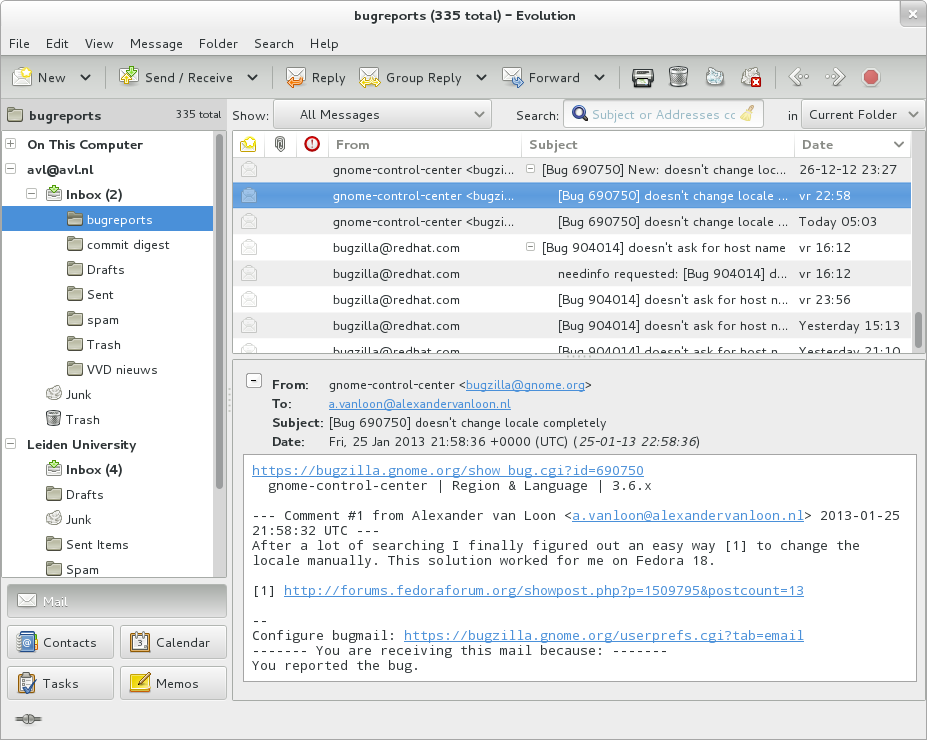
This screenshot shows the "Inbox" page of an email client; users can see new emails and take actions, such as reading, deleting, saving, or responding to these messages.
When a "robot" on Wikipedia makes changes to image files, the uploader receives an email about the changes made.

Electronic mail (usually shortened to email; alternatively hyphenated e-mail) is a method of transmitting and receiving digital messages using electronic devices over a computer network. It was conceived in the late–20th century as the digital version of, or counterpart to, mail (hence e- + mail). Email is a ubiquitous and very widely used communication medium; in current use, an email address is often treated as a basic and necessary part of many processes in business, commerce, government, education, entertainment, and other spheres of daily life in most countries.

Email operates across computer networks, primarily the Internet, and also local area networks. Today's email systems are based on a store-and-forward model. Email servers accept, forward, deliver, and store messages. Neither the users nor their computers are required to be online simultaneously; they need to connect, typically to a mail server or a webmail interface to send or receive messages or download it.

Originally a text-only ASCII communications medium, Internet email was extended by MIME to carry text in expanded character sets and multimedia content such as images. International email, with internationalized email addresses using UTF-8, is standardized but not widely adopted.[1]

Terminology

[edit]

The term electronic mail has been in use with its modern meaning since 1975, and variations of the shorter E-mail have been in use since 1979:[2][3]

  • email is now the common form, and recommended by style guides.[4][5][6] It is the form required by IETF Requests for Comments (RFC) and working groups.[7] This spelling also appears in most dictionaries.[8][9][4][10]
  • e-mail was originally the form favored in edited published American English and British English writing, and was formerly preferred by some style guides.[4]
  • E-mail is sometimes used.[11] The original usage in June 1979 occurred in the journal Electronics in reference to the United States Postal Service initiative called E-COM, which was developed in the late 1970s and operated in the early 1980s.[2][3]
  • EMAIL was used by CompuServe starting in April 1981, which popularized the term.[12][13]
  • EMail is a traditional form used in RFCs for the "Author's Address".

The service is often simply referred to as mail, and a single piece of electronic mail is called a message. The conventions for fields within emails—the "To", "From", "CC", "BCC" etc.—began with RFC-680 in 1975.[14]

An Internet email consists of an envelope and content;[15] the content consists of a header and a body.[16]

History

[edit]

Computer-based messaging between users of the same system became possible after the advent of time-sharing in the early 1960s, with a notable implementation by MIT's CTSS project in 1965.[17] Most developers of early mainframes and minicomputers developed similar, but generally incompatible, mail applications. In 1971 the first ARPANET network mail was sent, introducing the now-familiar address syntax with the '@' symbol designating the user's system address.[18] Over a series of RFCs, conventions were refined for sending mail messages over the File Transfer Protocol.

Proprietary electronic mail systems soon began to emerge. IBM, CompuServe and Xerox used in-house mail systems in the 1970s; CompuServe sold a commercial intraoffice mail product in 1978 to IBM and to Xerox from 1981.[nb 1][19][20][21] DEC's ALL-IN-1 and Hewlett-Packard's HPMAIL (later HP DeskManager) were released in 1982; development work on the former began in the late 1970s and the latter became the world's largest selling email system.[22][23]

The Simple Mail Transfer Protocol (SMTP) was implemented on the ARPANET in 1983. LAN email systems emerged in the mid-1980s. For a time in the late 1980s and early 1990s, it seemed likely that either a proprietary commercial system or the X.400 email system, part of the Government Open Systems Interconnection Profile (GOSIP), would predominate. However, once the final restrictions on carrying commercial traffic over the Internet ended in 1995,[24][25] a combination of factors made the current Internet suite of SMTP, POP3 and IMAP email protocols the standard (see Protocol Wars).[26][27]

Operation

[edit]

The following is a typical sequence of events that takes place when sender Alice transmits a message using a mail user agent (MUA) addressed to the email address of the recipient.[28]

Email operation
  1. The MUA formats the message in email format and uses the submission protocol, a profile of the Simple Mail Transfer Protocol (SMTP), to send the message content to the local mail submission agent (MSA), in this case smtp.a.org.
  2. The MSA determines the destination address provided in the SMTP protocol (not from the message header)—in this case, bob@b.org—which is a fully qualified domain address (FQDA). The part before the @ sign is the local part of the address, often the username of the recipient, and the part after the @ sign is a domain name. The MSA resolves a domain name to determine the fully qualified domain name of the mail server in the Domain Name System (DNS).
  3. The DNS server for the domain b.org (ns.b.org) responds with any MX records listing the mail exchange servers for that domain, in this case mx.b.org, a message transfer agent (MTA) server run by the recipient's ISP.[29]
  4. smtp.a.org sends the message to mx.b.org using SMTP. This server may need to forward the message to other MTAs before the message reaches the final message delivery agent (MDA).
  5. The MDA delivers it to the mailbox of user bob.
  6. Bob's MUA picks up the message using either the Post Office Protocol (POP3) or the Internet Message Access Protocol (IMAP).

In addition to this example, alternatives and complications exist in the email system:

  • Alice or Bob may use a client connected to a corporate email system, such as IBM Lotus Notes or Microsoft Exchange. These systems often have their own internal email format and their clients typically communicate with the email server using a vendor-specific, proprietary protocol. The server sends or receives email via the Internet through the product's Internet mail gateway which also does any necessary reformatting. If Alice and Bob work for the same company, the entire transaction may happen completely within a single corporate email system.
  • Alice may not have an MUA on her computer but instead may connect to a webmail service.
  • Alice's computer may run its own MTA, so avoiding the transfer at step 1.
  • Bob may pick up his email in many ways, for example logging into mx.b.org and reading it directly, or by using a webmail service.
  • Domains usually have several mail exchange servers so that they can continue to accept mail even if the primary is not available.

Many MTAs used to accept messages for any recipient on the Internet and do their best to deliver them. Such MTAs are called open mail relays. This was very important in the early days of the Internet when network connections were unreliable.[30][31] However, this mechanism proved to be exploitable by originators of unsolicited bulk email and as a consequence open mail relays have become rare,[32] and many MTAs do not accept messages from open mail relays.

Email pre-dates instant messaging, and transmission favors reliability over speed, in order to be able to cope with unreliable network links and busy servers (more common in the early days of the Internet). Reasons for slower delivery include:[33]

  • Messages going to a large number of recipients require more processing
  • Large messages (e.g. with large attachments) require more time to transmit over the network
  • Messages need to pass through multiple servers (sometimes multiple servers inside the same organization)
  • One or more mail servers are overloaded (possibly due to spam or denial-of-service attack) and queuing incoming mail or temporarily refusing incoming connections
  • SMTP requires multiple back-and-forths, which can amplify the impact of a slow network or dropped packets
  • Sender or recipient temporarily disconnected from the network (e.g. a laptop out of wifi range)
  • Slow DNS response
  • Server down for maintenance or malfunction

Mail can be queued and retried for up to five days before senders are notified of a permanent delivery failure.[33] Messages are timestamped as they pass through each server, allowing for diagnosis of slow delivery, though analysis is complicated by time zones and computer clocks that are inaccurately set.[33]

Email messages classified as spam by a spam filter may be sorted into a separate folder which the recipient must check manually, or may be dropped entirely.

Message format

[edit]

The basic Internet message format used for email[34] is defined by RFC 5322, with encoding of non-ASCII data and multimedia content attachments defined in RFC 2045 through RFC 2049, collectively called Multipurpose Internet Mail Extensions or MIME. The extensions in International email apply only to email. RFC 5322 replaced RFC 2822 in 2008. Earlier, in 2001, RFC 2822 had in turn replaced RFC 822, which had been the standard for Internet email for decades. Published in 1982, RFC 822 was based on the earlier RFC 733 for the ARPANET.[35]

Internet email messages consist of two sections, "header" and "body". These are known as "content".[36][37] The header is structured into fields such as From, To, CC, Subject, Date, and other information about the email. In the process of transporting email messages between systems, SMTP communicates delivery parameters and information using message header fields. The body contains the message, as unstructured text, sometimes containing a signature block at the end. The header is separated from the body by a blank line.

Message header

[edit]

RFC 5322 specifies the syntax of the email header. Each email message has a header (the "header section" of the message, according to the specification), comprising a number of fields ("header fields"). Each field has a name ("field name" or "header field name"), followed by the separator character ":", and a value ("field body" or "header field body").

Each field name begins in the first character of a new line in the header section, and begins with a non-whitespace printable character. It ends with the separator character ":". The separator is followed by the field value (the "field body"). The value can continue onto subsequent lines if those lines have space or tab as their first character. Field names and, without SMTPUTF8, field bodies are restricted to 7-bit ASCII characters. Some non-ASCII values may be represented using MIME encoded words.

Header fields

[edit]

Email header fields can be multi-line, with each line recommended to be no more than 78 characters, although the limit is 998 characters.[38] Header fields defined by RFC 5322 contain only US-ASCII characters; for encoding characters in other sets, a syntax specified in RFC 2047 may be used.[39] In some examples, the IETF EAI working group defines some standards track extensions,[40][41] replacing previous experimental extensions so UTF-8 encoded Unicode characters may be used within the header. In particular, this allows email addresses to use non-ASCII characters. Such addresses are supported by Google and Microsoft products, and promoted by some government agents.[42]

The message header must include at least the following fields:[43][44]

  • From: The email address, and, optionally, the name of the author(s). Some email clients are changeable through account settings.
  • Date: The local time and date the message was written. Like the From: field, many email clients fill this in automatically before sending. The recipient's client may display the time in the format and time zone local to them.

RFC 3864 describes registration procedures for message header fields at the IANA; it provides for permanent and provisional field names, including also fields defined for MIME, netnews, and HTTP, and referencing relevant RFCs. Common header fields for email include:[45]

  • To: The email address(es), and optionally name(s) of the message's recipient(s). Indicates primary recipients (multiple allowed), for secondary recipients see Cc: and Bcc: below.
  • Subject: A brief summary of the topic of the message. Certain abbreviations are commonly used in the subject, including "RE:" and "FW:".
  • Cc: Carbon copy; Many email clients mark email in one's inbox differently depending on whether they are in the To: or Cc: list.
  • Bcc: Blind carbon copy; addresses are usually only specified during SMTP delivery, and not usually listed in the message header.
  • Content-Type: Information about how the message is to be displayed, usually a MIME type.
  • Precedence: commonly with values "bulk", "junk", or "list"; used to indicate automated "vacation" or "out of office" responses should not be returned for this mail, e.g. to prevent vacation notices from sent to all other subscribers of a mailing list. Sendmail uses this field to affect prioritization of queued email, with "Precedence: special-delivery" messages delivered sooner. With modern high-bandwidth networks, delivery priority is less of an issue than it was. Microsoft Exchange respects a fine-grained automatic response suppression mechanism, the X-Auto-Response-Suppress field.[46]
  • Message-ID: Also an automatic-generated field to prevent multiple deliveries and for reference in In-Reply-To: (see below).
  • In-Reply-To: Message-ID of the message this is a reply to. Used to link related messages together. This field only applies to reply messages.
  • List-Unsubscribe: HTTP link to unsubscribe from a mailing list.
  • References: Message-ID of the message this is a reply to, and the message-id of the message the previous reply was a reply to, etc.
  • Reply-To: Address should be used to reply to the message.
  • Sender: Address of the sender acting on behalf of the author listed in the From: field (secretary, list manager, etc.).
  • Archived-At: A direct link to the archived form of an individual email message.

The To: field may be unrelated to the addresses to which the message is delivered. The delivery list is supplied separately to the transport protocol, SMTP, which may be extracted from the header content. The "To:" field is similar to the addressing at the top of a conventional letter delivered according to the address on the outer envelope. In the same way, the "From:" field may not be the sender. Some mail servers apply email authentication systems to messages relayed. Data pertaining to the server's activity is also part of the header, as defined below.

SMTP defines the trace information of a message saved in the header using the following two fields:[47]

  • Received: after an SMTP server accepts a message, it inserts this trace record at the top of the header (last to first).
  • Return-Path: after the delivery SMTP server makes the final delivery of a message, it inserts this field at the top of the header.

Other fields added on top of the header by the receiving server may be called trace fields.[48]

  • Authentication-Results: after a server verifies authentication, it can save the results in this field for consumption by downstream agents.[49]
  • Received-SPF: stores results of SPF checks in more detail than Authentication-Results.[50]
  • DKIM-Signature: stores results of DomainKeys Identified Mail (DKIM) decryption to verify the message was not changed after it was sent.[51]
  • Auto-Submitted: is used to mark automatic-generated messages.[52]
  • VBR-Info: claims VBR whitelisting[53]

Message body

[edit]

Content encoding

[edit]

Internet email was designed for 7-bit ASCII.[54] Most email software is 8-bit clean, but must assume it will communicate with 7-bit servers and mail readers. The MIME standard introduced character set specifiers and two content transfer encodings to enable transmission of non-ASCII data: quoted printable for mostly 7-bit content with a few characters outside that range and base64 for arbitrary binary data. The 8BITMIME and BINARY extensions were introduced to allow transmission of mail without the need for these encodings, but many mail transport agents may not support them. In some countries, e-mail software violates RFC 5322 by sending raw[nb 2] non-ASCII text and several encoding schemes co-exist; as a result, by default, the message in a non-Latin alphabet language appears in non-readable form (the only exception is a coincidence if the sender and receiver use the same encoding scheme). Therefore, for international character sets, Unicode is growing in popularity.[55]

Plain text and HTML

[edit]

Most modern graphic email clients allow the use of either plain text or HTML for the message body at the option of the user. HTML email messages often include an automatic-generated plain text copy for compatibility.

Advantages of HTML include the ability to include in-line links and images, set apart previous messages in block quotes, wrap naturally on any display, use emphasis such as underlines and italics, and change font styles. Disadvantages include the increased size of the email, privacy concerns about web bugs, abuse of HTML email as a vector for phishing attacks and the spread of malicious software.[56] Some e-mail clients interpret the body as HTML even in the absence of a Content-Type: html header field; this may cause various problems.

Some web-based mailing lists recommend all posts be made in plain text, with 72 or 80 characters per line for all the above reasons,[57][58] and because they have a significant number of readers using text-based email clients such as Mutt. Various informal conventions evolved for marking up plain text in email and usenet posts, which later led to the development of formal languages like setext (c. 1992) and many others, the most popular of them being markdown.

Some Microsoft email clients may allow rich formatting using their proprietary Rich Text Format (RTF), but this should be avoided unless the recipient is guaranteed to have a compatible email client.[59]

Servers and client applications

[edit]
The interface of an email client, Thunderbird

Messages are exchanged between hosts using the Simple Mail Transfer Protocol with software programs called mail transfer agents (MTAs); and delivered to a mail store by programs called mail delivery agents (MDAs, also sometimes called local delivery agents, LDAs). Accepting a message obliges an MTA to deliver it,[60] and when a message cannot be delivered, that MTA must send a bounce message back to the sender, indicating the problem.

Users can retrieve their messages from servers using standard protocols such as POP or IMAP, or, as is more likely in a large corporate environment, with a proprietary protocol specific to Novell Groupwise, Lotus Notes or Microsoft Exchange Servers. Programs used by users for retrieving, reading, and managing email are called mail user agents (MUAs).

When opening an email, it is marked as "read", which typically visibly distinguishes it from "unread" messages on clients' user interfaces. Email clients may allow hiding read emails from the inbox so the user can focus on the unread.[61]

Mail can be stored on the client, on the server side, or in both places. Standard formats for mailboxes include Maildir and mbox. Several prominent email clients use their own proprietary format and require conversion software to transfer email between them. Server-side storage is often in a proprietary format but since access is through a standard protocol such as IMAP, moving email from one server to another can be done with any MUA supporting the protocol.

Many current email users do not run MTA, MDA or MUA programs themselves, but use a web-based email platform, such as Gmail or Yahoo! Mail, that performs the same tasks.[62] Such webmail interfaces allow users to access their mail with any standard web browser, from any computer, rather than relying on a local email client.

Filename extensions

[edit]

Upon reception of email messages, email client applications save messages in operating system files in the file system. Some clients save individual messages as separate files, while others use various database formats, often proprietary, for collective storage. A historical standard of storage is the mbox format. The specific format used is often indicated by special filename extensions:

eml
Used by many email clients including Novell GroupWise, Microsoft Outlook Express, Lotus notes, Windows Mail, Mozilla Thunderbird, and Postbox. The files contain the email contents as plain text in MIME format, containing the email header and body, including attachments in one or more of several formats.
emlx
Used by Apple Mail.
msg
Used by Microsoft Office Outlook and OfficeLogic Groupware.
mbx
Used by Opera Mail, KMail, and Apple Mail based on the mbox format.

Some applications (like Apple Mail) leave attachments encoded in messages for searching while also saving separate copies of the attachments. Others separate attachments from messages and save them in a specific directory.

URI scheme mailto

[edit]

The URI scheme, as registered with the IANA, defines the mailto: scheme for SMTP email addresses. Though its use is not strictly defined, URLs of this form are intended to be used to open the new message window of the user's mail client when the URL is activated, with the address as defined by the URL in the To: field.[63][64] Many clients also support query string parameters for the other email fields, such as its subject line or carbon copy recipients.[65]

Types

[edit]

Web-based email

[edit]

Many email providers have a web-based email client. This allows users to log into the email account by using any compatible web browser to send and receive their email. Mail is typically not downloaded to the web client, so it cannot be read without a current Internet connection.

POP3 email servers

[edit]

The Post Office Protocol 3 (POP3) is a mail access protocol used by a client application to read messages from the mail server. Received messages are often deleted from the server. POP supports simple download-and-delete requirements for access to remote mailboxes (termed maildrop in the POP RFC's).[66] POP3 allows downloading messages on a local computer and reading them even when offline.[67][68]

IMAP email servers

[edit]

The Internet Message Access Protocol (IMAP) provides features to manage a mailbox from multiple devices. Small portable devices like smartphones are increasingly used to check email while traveling and to make brief replies, larger devices with better keyboard access being used to reply at greater length. IMAP shows the headers of messages, the sender and the subject and the device needs to request to download specific messages. Usually, the mail is left in folders in the mail server.

MAPI email servers

[edit]

Messaging Application Programming Interface (MAPI) is used by Microsoft Outlook to communicate to Microsoft Exchange Server—and to a range of other email server products such as Axigen Mail Server, Kerio Connect, Scalix, Zimbra, HP OpenMail, IBM Lotus Notes, Zarafa, and Bynari where vendors have added MAPI support to allow their products to be accessed directly via Outlook.

Uses

[edit]

Business and organizational use

[edit]

Email has been widely accepted by businesses, governments and non-governmental organizations in the developed world, and it is one of the key parts of an 'e-revolution' in workplace communication (with the other key plank being widespread adoption of highspeed Internet). A sponsored 2010 study on workplace communication found 83% of U.S. knowledge workers felt email was critical to their success and productivity at work.[69]

It has some key benefits to business and other organizations, including:

Facilitating logistics
Much of the business world relies on communications between people who are not physically in the same building, area, or even country; setting up and attending an in-person meeting, telephone call, or conference call can be inconvenient, time-consuming, and costly. Email provides a method of exchanging information between two or more people with no set-up costs and that is generally far less expensive than a physical meeting or phone call.
Helping with synchronization
With real time communication by meetings or phone calls, participants must work on the same schedule, and each participant must spend the same amount of time in the meeting or call. Email allows asynchrony: each participant may control their schedule independently. Batch processing of incoming emails can improve workflow compared to interrupting calls.
Reducing cost
Sending an email is much less expensive than sending postal mail, or long distance telephone calls, telex or telegrams.
Increasing speed
Much faster than most of the alternatives.
Creating a "written" record
Unlike a telephone or in-person conversation, email by its nature creates a detailed written record of the communication, the identity of the sender(s) and recipient(s) and the date and time the message was sent. In the event of a contract or legal dispute, saved emails can be used to prove that an individual was advised of certain issues, as each email has the date and time recorded on it.
Possibility of auto-processing and improved distribution
As well pre-processing of customer's orders or addressing the person in charge can be realized by automated procedures.

Email marketing

[edit]

Email marketing via "opt-in" is often successfully used to send special sales offerings and new product information.[70] Depending on the recipient's culture,[71] email sent without permission—such as an "opt-in"—is likely to be viewed as unwelcome "email spam".

Personal use

[edit]

Personal computer

[edit]

Many users access their personal emails from friends and family members using a personal computer in their house or apartment.

Mobile

[edit]

Email has become used on smartphones and on all types of computers. Mobile "apps" for email increase accessibility to the medium for users who are out of their homes. While in the earliest years of email, users could only access email on desktop computers, in the 2010s, it is possible for users to check their email when they are away from home, whether they are across town or across the world. Alerts can also be sent to the smartphone or other devices to notify them immediately of new messages. This has given email the ability to be used for more frequent communication between users and allowed them to check their email and write messages throughout the day. As of 2011, there were approximately 1.4 billion email users worldwide and 50 billion non-spam emails that were sent daily.[64]

Individuals often check emails on smartphones for both personal and work-related messages. It was found that US adults check their email more than they browse the web or check their Facebook accounts, making email the most popular activity for users to do on their smartphones. 78% of the respondents in the study revealed that they check their email on their phone.[72] It was also found that 30% of consumers use only their smartphone to check their email, and 91% were likely to check their email at least once per day on their smartphone. However, the percentage of consumers using email on a smartphone ranges and differs dramatically across different countries. For example, in comparison to 75% of those consumers in the US who used it, only 17% in India did.[73]

Declining use among young people

[edit]

As of 2010, the number of Americans visiting email web sites had fallen 6 percent after peaking in November 2009. For persons 12 to 17, the number was down 18 percent. Young people preferred instant messaging, texting and social media. Technology writer Matt Richtel said in The New York Times that email was like the VCR, vinyl records and film cameras—no longer cool and something older people do.[74][75]

A 2015 survey of Android users showed that persons 13 to 24 used messaging apps 3.5 times as much as those over 45, and were far less likely to use email.[76]

Issues

[edit]

Attachment size limitation

[edit]

Email messages may have one or more attachments, which are additional files that are appended to the email. Typical attachments include Microsoft Word documents, PDF documents, and scanned images of paper documents. In principle, there is no technical restriction on the size or number of attachments. However, in practice, email clients, servers, and Internet service providers implement various limitations on the size of files, or complete email – typically to 25MB or less.[77][78][79] Furthermore, due to technical reasons, attachment sizes as seen by these transport systems can differ from what the user sees,[80] which can be confusing to senders when trying to assess whether they can safely send a file by email. Where larger files need to be shared, various file hosting services are available and commonly used.[81][82]

Information overload

[edit]

The ubiquity of email for knowledge workers and "white collar" employees has led to concerns that recipients face an "information overload" in dealing with increasing volumes of email.[83][84] With the growth in mobile devices, by default employees may also receive work-related emails outside of their working day. This can lead to increased stress and decreased satisfaction with work. Some observers even argue it could have a significant negative economic effect,[85] as efforts to read the many emails could reduce productivity.

Spam

[edit]

Email "spam" is unsolicited bulk email. The low cost of sending such email meant that, by 2003, up to 30% of total email traffic was spam,[86][87][88] and was threatening the usefulness of email as a practical tool. The US CAN-SPAM Act of 2003 and similar laws elsewhere[89] had some impact, and a number of effective anti-spam techniques now largely mitigate the impact of spam by filtering or rejecting it for most users,[90] but the volume sent is still very high—and increasingly consists not of advertisements for products, but malicious content or links.[91] In September 2017, for example, the proportion of spam to legitimate email rose to 59.56%.[92] The percentage of spam email in 2021 is estimated to be 85%.[93][better source needed]

Malware

[edit]

Emails are a major vector for the distribution of malware.[94] This is often achieved by attaching malicious programs to the message and persuading potential victims to open the file.[95] Types of malware distributed via email include computer worms[96] and ransomware.[97]

Email spoofing

[edit]

Email spoofing occurs when the email message header is designed to make the message appear to come from a known or trusted source. Email spam and phishing methods typically use spoofing to mislead the recipient about the true message origin. Email spoofing may be done as a prank, or as part of a criminal effort to defraud an individual or organization. An example of a potentially fraudulent email spoofing is if an individual creates an email that appears to be an invoice from a major company, and then sends it to one or more recipients. In some cases, these fraudulent emails incorporate the logo of the purported organization and even the email address may appear legitimate.

Email bombing

[edit]

Email bombing is the intentional sending of large volumes of messages to a target address. The overloading of the target email address can render it unusable and can even cause the mail server to crash.

Privacy concerns

[edit]

Today it can be important to distinguish between the Internet and internal email systems. Internet email may travel and be stored on networks and computers without the sender's or the recipient's control. During the transit time it is possible that third parties read or even modify the content. Internal mail systems, in which the information never leaves the organizational network, may be more secure, although information technology personnel and others whose function may involve monitoring or managing may be accessing the email of other employees.

Email privacy, without some security precautions, can be compromised because:

  • email messages are generally not encrypted.
  • email messages have to go through intermediate computers before reaching their destination, meaning it is relatively easy for others to intercept and read messages.
  • many Internet Service Providers (ISP) store copies of email messages on their mail servers before they are delivered. The backups of these can remain for up to several months on their server, despite deletion from the mailbox.
  • the "Received:"-fields and other information in the email can often identify the sender, preventing anonymous communication.
  • web bugs invisibly embedded in HTML content can alert the sender of any email whenever an email is rendered as HTML (some e-mail clients do this when the user reads, or re-reads the e-mail) and from which IP address. It can also reveal whether an email was read on a smartphone or a PC, or Apple Mac device via the user agent string.

There are cryptography applications that can serve as a remedy to one or more of the above. For example, Virtual Private Networks or the Tor network can be used to encrypt traffic from the user machine to a safer network while GPG, PGP, SMEmail,[98] or S/MIME can be used for end-to-end message encryption, and SMTP STARTTLS or SMTP over Transport Layer Security/Secure Sockets Layer can be used to encrypt communications for a single mail hop between the SMTP client and the SMTP server.

Additionally, many mail user agents do not protect logins and passwords, making them easy to intercept by an attacker. Encrypted authentication schemes such as SASL prevent this. Finally, the attached files share many of the same hazards as those found in peer-to-peer filesharing. Attached files may contain trojans or viruses.

[edit]

It is possible for an exchange of emails to form a binding contract, so users must be careful about what they send through email correspondence.[99][100] A signature block on an email may be interpreted as satisfying a signature requirement for a contract.[101]

Flaming

[edit]

Flaming occurs when a person sends a message (or many messages) with angry or antagonistic content. The term is derived from the use of the word incendiary to describe particularly heated email discussions. The ease and impersonality of email communications mean that the social norms that encourage civility in person or via telephone do not exist and civility may be forgotten.[102]

Email bankruptcy

[edit]

Also known as "email fatigue", email bankruptcy is when a user ignores a large number of email messages after falling behind in reading and answering them. The reason for falling behind is often due to information overload and a general sense there is so much information that it is not possible to read it all. As a solution, people occasionally send a "boilerplate" message explaining that their email inbox is full, and that they are in the process of clearing out all the messages. Harvard University law professor Lawrence Lessig is credited with coining this term, but he may only have popularized it.[103]

Internationalization

[edit]

Originally Internet email was completely ASCII text-based. MIME now allows body content text and some header content text in international character sets, but other headers and email addresses using UTF-8, while standardized[104] have yet to be widely adopted.[1][105]

Tracking of sent mail

[edit]

The original SMTP mail service provides limited mechanisms for tracking a transmitted message, and none for verifying that it has been delivered or read. It requires that each mail server must either deliver it onward or return a failure notice (bounce message), but both software bugs and system failures can cause messages to be lost. To remedy this, the IETF introduced Delivery Status Notifications (delivery receipts) and Message Disposition Notifications (return receipts); however, these are not universally deployed in production.[nb 3]

Many ISPs now deliberately disable non-delivery reports (NDRs) and delivery receipts due to the activities of spammers:

  • Delivery Reports can be used to verify whether an address exists and if so, this indicates to a spammer that it is available to be spammed.
  • If the spammer uses a forged sender email address (email spoofing), then the innocent email address that was used can be flooded with NDRs from the many invalid email addresses the spammer may have attempted to mail. These NDRs then constitute spam (backscatter) from the ISP to the innocent user.

In the absence of standard methods, a range of system based around the use of web bugs have been developed. However, these are often seen as underhand or raising privacy concerns,[108][109] and only work with email clients that support rendering of HTML. Many mail clients now default to not showing "web content".[110] Webmail providers can also disrupt web bugs by pre-caching images.[111]

See also

[edit]

Notes

[edit]

References

[edit]

Further reading

[edit]
[edit]
Revisions and contributorsEdit on WikipediaRead on Wikipedia
from Grokipedia
Email, or electronic mail, is a store-and-forward messaging service that enables the exchange of digital messages between users across computer networks using standardized protocols for submission, transfer, and delivery. Developed initially in 1971 by while working on the , email introduced the use of the "@" symbol to separate user names from host computers, marking the first transmission of messages between distinct systems. Over the subsequent decades, it evolved into a cornerstone of global communication through key (IETF) standards, including the (SMTP) for message transport (RFC 5321) and the Internet Message Format (IMF) for structuring content (RFC 5322). The architecture of Internet Mail divides responsibilities among several components to ensure reliable end-to-end delivery: Message User Agents (MUAs) for composing and reading messages; Mail Submission Agents (MSAs) for initial acceptance and validation; Message Transfer Agents (MTAs) for relaying across networks; Mail Delivery Agents (MDAs) for depositing into mailboxes; and Mail Retrieval Agents (MRAs) for user access via protocols like POP or IMAP. This modular design, refined since the 1970s, supports multimedia extensions through and internationalized addresses, accommodating over 4.6 billion users worldwide as of 2025. Today, email remains ubiquitous for personal, professional, and commercial purposes, with an estimated 376 billion messages sent daily globally in 2025, though it faces challenges from spam, security threats, and competition from platforms. Despite these, its role in digital infrastructure persists, underpinning workflows in (where 93% of professionals check it daily) and serving as a vector for and that necessitates ongoing protocol enhancements like Domain-based Message Authentication, Reporting, and Conformance ().

Terminology and Concepts

Definitions and Etymology

Email, short for electronic mail, refers to the exchange of digital messages between computer users over a communications network, such as the , using standardized protocols to ensure reliable delivery and retrieval. This system enables asynchronous communication, where messages are stored on servers until the recipient accesses them, distinguishing it from real-time methods. The term "electronic mail" originated in the early 1970s amid the rise of networked computing, with credited for implementing the first networked email system in 1971 while working on . The abbreviation "email" (or "e-mail") first appeared in print in 1979 and became common in the 1980s, reflecting the technology's evolution from systems to widespread use. Developers chose "electronic mail" to parallel traditional postal services, emphasizing structured delivery and addressing to make the concept accessible to non-technical users. Email differs from postal mail, which relies on physical transport and can take days, by providing near-instantaneous digital transmission without tangible media. In contrast to , which supports synchronous, conversation-like exchanges often requiring both parties to be simultaneously, email allows deferred reading and attachment of files or . , meanwhile, is constrained to brief texts via cellular networks, lacking email's capacity for complex formatting or long-form content. Many email-specific terms draw from postal analogies to aid user familiarity. "Inbox" and "outbox" mimic physical trays for incoming and outgoing correspondence in office mailrooms, a convention established in early email software to simulate interoffice memo handling. The term "spam," denoting unsolicited bulk messages, stems from a 1970 comedy sketch where the word "Spam" is repeated incessantly, a first applied to disruptive online posts in 1980s multi-user dungeons (MUDs) and later to email in the early 1990s.

Core Components

An email system relies on several interconnected core components to facilitate the composition, submission, transfer, storage, and retrieval of messages. At its foundation, the sender's device hosts a Message User Agent (MUA), which serves as the interface for composing and submitting emails. This client software interacts with a Mail Submission Agent (MSA) to initiate the process, ensuring messages are properly formatted and authenticated before entering the network. On the recipient side, a corresponding Recipient MUA (rMUA) enables the viewing and management of incoming messages, typically after retrieval from a remote server. Central to the system's operation are the message servers, which handle the intermediary roles of transfer and delivery. Message Transfer Agents (MTAs) act as relays, routing emails across networks by examining addresses and forwarding them hop-by-hop without modifying the content, except for adding trace information. Mail Delivery Agents (MDAs), in turn, perform the final deposition of messages into designated storage. These server-based components operate within Administrative Management Domains (ADMDs), distinguishing local ecosystems—such as intra-organizational handling within a single domain—from remote ones that span multiple domains and require boundary relays for secure handoff. Email addresses play a pivotal role in this architecture, structured in the format <local-part>@<domain>, where the local-part identifies a specific mailbox within the domain, and the domain specifies the responsible ADMD for routing and delivery. Domains are resolved globally via the (DNS), enabling accurate navigation through the decentralized network. Mailboxes function as digital repositories within a Message Store (MS) on the recipient's server, holding incoming messages until accessed by the rMUA; they also support storage for outgoing drafts or sent items on the sender's side. This separation underscores the conceptual divide between local components, like an individual's MUA on their device, and remote ones, such as MTAs and MDAs hosted on infrastructure servers.

History

Early Development

The development of electronic mail began in the 1960s as part of early computer systems. In 1965, at the Massachusetts Institute of Technology (MIT), programmers Tom Van Vleck and Noel Morris created the first computer-based messaging program on the (CTSS) running on an 7094. This system, implemented as the MAIL command and added on August 6, 1965, allowed users logged into the same mainframe to exchange asynchronous messages stored in files, limited to 2592 BCD characters for security and efficiency. A significant advancement occurred in 1971 with the , the precursor to the , where , working at Bolt, Beranek and Newman (BBN), modified the TENEX operating system's SNDMSG program to enable messaging between users on different computers. Tomlinson sent the first network email that year, a test message whose content he later described as something like "QWERTYUIOP," and introduced the "@" symbol to denote user-host addressing, such as user@host, standardizing the format for inter-system communication. This innovation transformed intra-system messaging into a networked capability, with the updated SNDMSG incorporating memo fields like "To," "Subject," and "cc" for structured delivery. By early 1972, the program was released to sites, and email traffic soon accounted for about 75% of the network's usage by 1973. During the 1970s, further experiments expanded email's scope. At Xerox Palo Alto Research Center (PARC), researchers integrated email into the system, developing Laurel in the mid-1970s as an interface for reading, composing, and filing messages within the Distributed Message System, which supported networked office communication on Ethernet. Meanwhile, initial commercial implementations emerged, such as Software Technology Systems Consultants (STSC)'s MAILBOX service offered in September 1972 for systems, followed by Tymnet's OnTyme store-and-forward service in 1977 and CompuServe's email for personal computers launched on September 24, 1979. Key figures shaped these early efforts, with Tomlinson widely credited for networked email's foundational syntax and protocols. In 1978, V.A. Shiva Ayyadurai, then a teenager at the University of Medicine and Dentistry of New Jersey (UMDNJ), developed a prototype electronic mail system called EMAIL, modeled after interoffice paper mail with features including Inbox, Outbox, folders, and headers like To:, From:, Cc:, Bcc:, Subject:, and attachments; it became operational in 1980 and was copyrighted in 1982. Ayyadurai has claimed that this system constitutes the invention of email, though this assertion is not accepted by most computer historians, who credit earlier developments such as Tomlinson's networked system. Email saw early adoption in universities connected to ARPANET, such as MIT's MSGDMS system for TENEX in 1975 and the University of California, Berkeley's Delivermail client-server program in 1979, facilitating academic collaboration among institutions like UCLA and USC.

Standardization and Widespread Adoption

The standardization of email began in the early 1980s with the publication of key (RFC) documents by the (IETF). RFC 821, issued in August 1982, defined the (SMTP), which established a reliable and efficient method for transferring mail between servers across the and emerging internet infrastructure. Complementing this, RFC 822, also from August 1982, specified the format for ARPA Internet text messages, including syntax for headers and bodies to ensure interoperability among diverse systems. These RFCs formed the foundational internet standards for email, enabling seamless transmission and message structuring that persists in modern implementations, albeit with later updates like RFC 5321 and RFC 5322. The 1990s marked a period of explosive growth for email, fueled by the internet boom and the commercialization of access. As internet service providers expanded, companies like America Online (AOL) integrated email into their dial-up services, attracting millions of users by the mid-1990s through user-friendly interfaces and bundled offerings. A pivotal innovation came in 1996 with the launch of Hotmail, the first free web-based email service, which allowed users to access inboxes from any browser without proprietary software, rapidly scaling to over 8 million users within 18 months and inspiring competitors like Yahoo Mail. This era's commercialization democratized email, shifting it from academic and enterprise tools to a mainstream communication medium, with global adoption surging alongside rising internet penetration rates. By the late , the volume of physical letters had begun to decline in many developed regions due to the rise of email, reflecting its efficiency and cost-effectiveness for personal and . The further accelerated this through mobile integration, beginning with the 2003 release of devices that enabled on cellular networks, allowing real-time access and transforming email into an always-on tool. Subsequent smartphones, such as the in 2007, embedded email clients natively, boosting usage as mobile became ubiquitous and integrating email into daily workflows. Recent developments through 2025 have focused on enhancing email's security and usability. In 2012, the (DANE) protocol, outlined in RFC 6698, introduced authentication for SMTP using DNS records, providing a downgrade-resistant method to verify server certificates without relying solely on . Building on this, RFC 7672 in 2015 specified SMTP security via opportunistic DANE, promoting encrypted transport to mitigate and spoofing risks. Concurrently, from 2020 onward, AI-assisted composition tools have emerged, leveraging to draft, summarize, and personalize messages; the AI-powered email assistant market, valued at USD 2.11 billion in 2025, is projected to double by 2029, driven by integrations in platforms like and Outlook that automate routine tasks while maintaining user oversight.

Technical Operation

Transmission Process

The transmission of an email message begins when the sender composes it using a mail user agent (MUA), which formats the message and submits it to the sender's mail transfer agent (MTA) via the . The MTA acts as the originating server responsible for initiating the relay process. The sender's MTA then resolves the recipient's domain by querying the for records, which specify the and priority of the mail servers responsible for accepting mail for that domain. These records enable routing by directing the MTA to the appropriate next-hop server, typically the one with the lowest priority value; if multiple records exist, the MTA attempts delivery in order of increasing priority. The sender's MTA establishes a TCP connection to the recipient's MTA on port 25 (or port 587 for submission) and initiates the SMTP session. The SMTP handshake commences with the client sending an EHLO or HELO command to identify itself, to which the server responds with a status code listing supported extensions. A transaction follows, distinguishing the from the content: the , which handles routing, is defined by the MAIL FROM command specifying the sender's reverse-path and one or more RCPT TO commands for recipients' forward-paths; the content, comprising headers and body, is transmitted via the DATA command, terminated by a line containing only a period (.). Each successful hop adds a "Received:" header to trace the path, and the receiving MTA assumes responsibility for delivery or further relay. If delivery succeeds, the recipient's MTA queues the message for local storage or forwards it if needed; however, errors are managed through status codes returned during the SMTP dialogue. Temporary failures (4xx codes, such as 421 for service unavailable) prompt queuing and retry by the sender's MTA, often with . Permanent failures (5xx codes, like 550 for no such user) trigger a , where the receiving server generates an undeliverable mail notification to the envelope sender. For enhanced error reporting, the Delivery Status Notifications (DSN) extension to SMTP allows senders to request notifications for , failure, delay, or never via the NOTIFY parameter in RCPT TO commands. Upon failure, the server issues a DSN multipart/report message detailing the status, action (e.g., failed), and diagnostic information, using a null reverse-path to prevent loops. This mechanism, advertised via the DSN EHLO keyword, ensures reliable feedback without relying solely on basic bounces.

Protocols for Access and Delivery

The (SMTP) serves as the primary mechanism for delivering email messages between servers after initial transmission. Defined in RFC 5321, SMTP operates over TCP on port 25 and uses a store-and-forward model where messages are relayed hop-by-hop until reaching the recipient's mail server, guided by DNS MX records. A typical SMTP transaction begins with the client sending an EHLO or HELO command to identify itself and query server extensions, followed by MAIL FROM to specify the sender's reverse-path, one or more RCPT TO commands for recipients' forward-paths, and the command to transmit the message content, which ends with a line containing only a period (.). The server responds with three-digit status codes, such as 250 for success, and may add Received headers to trace the message path during relaying. For client access to stored email, the version 3 (POP3), specified in RFC 1939, enables retrieval from a server maildrop, primarily in a download-and-delete fashion suitable for single-device use. POP3 sessions proceed in three states: authorization via USER and PASS commands for username/password (or APOP for MD5-challenge-response), transaction for handling, and update for cleanup upon logout. Key transaction commands include STAT to report message count and size, LIST to enumerate messages, RETR to fetch a full , and DELE to mark one for deletion, with the server typically removing marked messages only at session end to allow recovery. This model minimizes server storage by transferring messages to the client, though extensions like UIDL provide unique identifiers to prevent re-downloading in subsequent sessions. In contrast, the version 4rev1 (IMAP4rev1), outlined in RFC 3501, supports server-side management and multi-device synchronization, allowing clients to access, organize, and manipulate messages without full downloads. occurs via LOGIN or AUTHENTICATE commands, followed by SELECT to open a mailbox for read-write access, enabling commands like FETCH for partial or full message retrieval, STORE to modify flags (e.g., seen or deleted), and COPY to move messages between folders. IMAP maintains hierarchical folder structures with CREATE, DELETE, and commands, using unique identifiers (UIDs) and UIDVALIDITY values to ensure consistent synchronization across sessions and devices, even after server-side changes. Unlike POP3, IMAP keeps messages on the server by default, supporting real-time updates and partial fetches that reduce bandwidth for large inboxes. To secure these protocols against eavesdropping, the STARTTLS extension, defined in RFC 3207, upgrades plaintext connections to (TLS) through opportunistic negotiation. For SMTP, a client issues STARTTLS after EHLO if the server advertises support (via 250 STARTTLS response), initiating a TLS before resuming the session with a new EHLO; similar processes apply to POP3 and IMAP on their respective ports. This provides and for credentials and message content, though it relies on server certificates for trust. POP3 and IMAP differ in efficiency based on usage: POP3 excels in low-bandwidth scenarios for complete offline access on a single device, as it downloads entire messages once, but lacks native support for folders or partial sync, potentially leading to data duplication across devices. IMAP, while requiring more ongoing server resources and bandwidth for metadata queries, offers greater efficiency for multi-device environments through selective fetching and server-side operations, reducing redundant transfers and enabling seamless state . For instance, IMAP's UID-based model avoids re-fetching unchanged messages, making it preferable for users with mobile and desktop access.

Message Format

Headers and Metadata

Email headers form the metadata portion of an email message, providing essential routing, identification, and descriptive information that enables the delivery and processing of the message across the . Defined in the Internet Message Format (IMF) by RFC 5322, headers precede the message body and consist of structured fields that adhere to a specific , ensuring among email systems. These fields are crucial for servers to route messages correctly, for clients to display sender details and timestamps, and for diagnostic purposes during transmission. Standard header fields specified in RFC 5322 include several key elements for basic message identification and addressing. The "From:" field contains a comma-separated list of one or more mailbox specifications, indicating the author(s) or sender(s) of the message, typically formatted as a display name followed by an in angle brackets, such as " [email protected]". The "To:" field specifies the primary recipient(s) with a comma-separated list of addresses, while the "Cc:" field lists secondary recipients who receive a copy, and the "Bcc:" field includes recipients whose addresses are not visible to other recipients, often left empty or containing an address list that is removed before delivery. The "Subject:" field provides a brief, unstructured text description of the message's topic, limited to printable US-ASCII characters. The "Date:" field records the date and time the message was originated or prepared for delivery, using a specific format like "Fri, 21 Nov 1997 09:55:06 -0600" that includes the day, time, and timezone offset. Finally, the "Message-ID:" field assigns a globally to the message, formatted as "unique@domain", which aids in threading and deduplication. To manage long header lines and support international content, RFC 5322 outlines folding and encoding mechanisms. Header fields may be folded across multiple lines by inserting a carriage return-line feed (CRLF) followed by white space (space or horizontal tab) where folding white space (FWS) is permitted, ensuring no single line exceeds 998 characters excluding the CRLF; unfolding reconstructs the original by removing the CRLF and adjacent white space. For international characters beyond US-ASCII, RFC 2047 extends the format using "encoded-words" in the structure =?charset?encoding?encoded-text?=, where "charset" specifies the character set (e.g., ), "encoding" is either "Q" for or "B" for , and the encoded text replaces non-ASCII content; these encoded words are limited to 75 characters and can appear in fields like Subject or display names but not in addresses or Received fields. Trace headers, particularly the "Received:" field, record the path of the message through the mail system for diagnostic and verification purposes. Each relaying server prepends a "Received:" header with details such as the origin host, destination, protocol used, and a , formatted as "Received: from originating-host by destination-host; date-time", allowing reconstruction of the full delivery chain when multiple such fields are present in reverse chronological order. These headers facilitate path tracking and are commonly analyzed in anti-spam efforts to verify sender legitimacy, detect forwarding loops, and assess relay authenticity by examining IP addresses and timestamps. Custom headers, often prefixed with "X-" to denote non-standard extensions, allow additional functionality beyond core RFC 5322 fields. These optional fields follow the general syntax of field-name followed by a colon and unstructured text, provided they do not conflict with standard names, and are used by applications for proprietary or specialized purposes such as indicating membership or unsubscribe options. For example, mailing lists commonly employ headers defined in RFC 2369, like "List-Unsubscribe:", which provides a or email command for recipients to , enhancing compliance and reducing spam complaints.

Body Structure and Encoding

The body of an email contains the primary content intended for the recipient, distinct from the headers that provide metadata. Traditionally, email bodies were limited to in 7-bit US-ASCII format as specified in the original Message Format. To support richer content, including non-text attachments and formatted text, the Multipurpose Mail Extensions () standard was developed, which extends the format to allow multipart structures and various encodings. entities, comprising headers and body parts, enable the inclusion of diverse media types while ensuring compatibility with legacy systems through specified transfer encodings. MIME supports attachments and complex messages by organizing the body into multipart types, such as multipart/mixed for combining independent parts like text and files, or multipart/alternative for offering equivalent content in different formats. These parts are separated by boundaries, unique strings defined in the Content-Type header's boundary parameter, which encapsulate individual body parts to prevent ambiguity during parsing. For example, a boundary might appear as "--boundary-string" to delimit sections, ensuring the message can be reliably reconstructed. Binary data, such as images or documents, is encoded using Base64, which converts 8-bit octets into a 65-character printable ASCII alphabet, grouping three octets into four characters with padding as needed to maintain line lengths under 76 characters. For text-heavy content with occasional non-printable characters, Quoted-Printable encoding is used, representing data with printable ASCII and escaping binary values as "=XX" (where XX is hexadecimal), allowing mostly unencoded text while complying with 7-bit transport limits. Plain text bodies use the MIME type text/plain, which assumes CRLF line endings and supports charsets like US-ASCII by default, providing simple, universal readability without rendering dependencies. In contrast, HTML-formatted bodies employ the text/html MIME type, enabling structured content with tags for styles, links, and inline elements, as standardized for email use. To accommodate recipients with varying capabilities, multipart/alternative structures present both text/plain and text/html versions, allowing clients to select the preferred format based on the Content-Type header. Inline images in HTML emails are embedded via multipart/related, where image parts (e.g., image/png) are referenced using Content-ID headers and cid: URIs in the HTML src attributes, ensuring the visuals integrate seamlessly without external fetches. For , non-ASCII characters in the body are handled through charset parameters in the Content-Type header, with as the recommended encoding for modern messages to support global scripts without loss. This allows text in languages beyond Latin alphabets, such as Chinese or , to be transmitted reliably, provided the encoding is explicitly declared to avoid garbled rendering.

Software and Services

Email Clients and Applications

Email clients, also known as email applications, are software programs that enable users to access, compose, send, receive, and organize electronic mail messages on personal devices. These applications typically connect to email servers using standard protocols such as POP3, IMAP, or SMTP to retrieve and transmit messages, providing a user-friendly interface for managing communications. Unlike web-based services, email clients operate locally on the user's device, offering greater control over and customization options. Email clients are categorized into several types based on their platform and interface. Desktop clients, such as and , run on personal computers and provide robust functionality for professional and personal use, often supporting multiple accounts and advanced organization tools. Mobile clients, exemplified by the Gmail app and on , are designed for smartphones and tablets, emphasizing touch-friendly interfaces, push notifications, and on-the-go access to inboxes. Command-line clients, like Mutt and Alpine, operate in terminal environments on systems, appealing to advanced users who prefer text-based, lightweight tools for scripting and automation. Modern email clients incorporate a range of features to enhance and . Threading organizes related messages into conversational chains, making it easier to follow discussions. Built-in search capabilities allow quick retrieval of emails using keywords, dates, or attachments, often powered by indexed databases for efficiency. Filters and rules automate sorting, labeling, and archiving based on criteria like sender or subject, reducing manual effort. Many clients also integrate with applications, enabling seamless scheduling of meetings directly from emails and syncing events across devices. The "mailto:" URI scheme facilitates linking to email composition from web pages or documents, automatically opening the user's default client with pre-filled recipient addresses, subjects, or body text. Defined in RFC 6068, this scheme supports automation in workflows, such as generating contact forms that populate email drafts. For archiving and sharing, email clients commonly export individual in the .eml format, a plain-text file extension that preserves the full including headers and attachments for into other applications. This format ensures interoperability across different clients and systems.

Servers and Web-Based Systems

Email servers form the backbone of email infrastructure, responsible for relaying, storing, and delivering messages between systems. Mail Transfer Agents (MTAs) handle the routing and transmission of emails across networks, ensuring reliable delivery from sender to recipient servers. Postfix, developed by Wietse Venema at , serves as a prominent open-source MTA designed for speed, ease of administration, and security, operating on systems as an alternative to older systems like . Mail Delivery Agents (MDAs), on the other hand, manage the final placement of incoming messages into user mailboxes. Dovecot functions as a secure MDA and IMAP server, supporting formats like and while providing high performance, flexible authentication, and integration with MTAs such as Postfix. Full email server suites integrate MTA, MDA, and additional components for comprehensive management, particularly in enterprise environments. employs a single building block architecture that scales from small organizations to large enterprises, featuring mailbox servers for handling databases, client connections, and mail routing, alongside edge transport servers for external mail flow and antispam protection. These suites often include features like Database Availability Groups to ensure resilience. Web-based email systems, or webmail services, allow users to access emails through browser interfaces hosted on remote servers, eliminating the need for local clients. , launched by on April 1, 2004, introduced innovative features such as 1 GB of free storage—significantly more than contemporaries—and advanced search capabilities, revolutionizing webmail with asynchronous and XML (AJAX) for dynamic interfaces. Yahoo Mail, launched in 1997, was one of the earliest web-based services, offering free email accounts and contributing to the widespread adoption of webmail, when approximately 10 million users worldwide had free webmail accounts. These providers emphasize scalable storage and real-time features like conversation threading. For enterprise integration, the Messaging Application Programming Interface (MAPI) enables developers to build mail-enabled applications that interact seamlessly with email systems. Developed by , MAPI provides functions for creating, manipulating, and storing messages, supporting workgroup applications and specialized services in environments like Exchange. Email hosting models vary between on-premise deployments, where servers are maintained in-house on local infrastructure, and -based options, which leverage remote data centers for managed services. On-premise setups, such as self-hosted Exchange, offer full control but require significant hardware investment and maintenance. hosting, exemplified by Exchange Online or for business, provides superior scalability for large domains, allowing automatic resource adjustment without upfront hardware costs. Hybrid models combine both, balancing compliance needs with elastic scaling.

Uses and Applications

Business and Organizational Contexts

In business and organizational settings, email serves as a foundational tool for , enabling teams to exchange information, coordinate tasks, and share documents efficiently. For instance, integrations between email clients like Outlook and (CRM) systems such as allow users to log communications, track interactions, and automate follow-ups directly within email threads, streamlining workflows and reducing manual data entry. This integration fosters a unified view of customer or project data, supporting document sharing by attaching files or linking to shared repositories while maintaining audit trails for accountability. Email marketing has become integral to organizational outreach, powering newsletters and targeted campaigns to engage customers and drive revenue. Businesses use these tools to deliver personalized content, such as product updates or promotional offers, often achieving average open rates of 17% to 28% depending on industry benchmarks. Compliance with regulations like the is mandatory, requiring accurate header information, non-deceptive subject lines, clear disclosures, valid physical addresses, and functional mechanisms that must be honored within 10 days. Violations can result in penalties up to $53,088 per email, emphasizing the need for robust monitoring of third-party senders. Organizations implement strict policies for email archiving and retention to meet legal and operational needs, particularly in e-discovery processes during litigation. These policies often involve automated systems to preserve emails for defined periods, such as seven years for financial records, preventing deletion and ensuring accessibility for court orders under frameworks like the . E-discovery tools facilitate searching and producing relevant emails, with maturity models recommending early integration of retention strategies to minimize risks and costs in legal reviews. Such practices help organizations comply with discovery obligations while balancing storage efficiency. By 2025, email's role in business has evolved with (AI) enhancing prioritization and in organizational inboxes. AI-driven features, such as for categorizing incoming messages and generative AI for drafting replies, reduce manual sorting and enable faster responses in high-volume environments like teams. These tools integrate with enterprise systems to automate workflows, including lead nurturing and task assignment, boosting productivity amid rising email volumes. forecasts that by 2026, 40% of enterprise applications, including email platforms, will incorporate task-specific AI agents for such , up from less than 5% in 2025.

Personal and Everyday Use

Individuals access email through various platforms tailored to personal use, including PC-based desktop applications such as and , which provide robust features like advanced search and calendar integration for managing daily inboxes. Mobile apps, including those from and Spark, enable on-the-go access via and Android devices, often with intuitive interfaces for quick reading and replying. Cross-device synchronization is facilitated by protocols like IMAP, allowing seamless updates across PC, tablet, and ; for instance, Spark offers fast syncing for and other accounts, ensuring unread emails and folders remain consistent regardless of the device used. In everyday life, email serves as a primary channel for personal correspondence, with 99% of users checking their accounts daily and 58% doing so first thing in the morning to exchange messages with friends and . Subscriptions to newsletters and alerts from services like outlets or communities form a significant portion of personal inboxes, as 72% of consumers prefer email for promotional updates and information. Online shopping confirmations, including order receipts and shipping notifications, are another common activity, influencing purchase decisions for over half of through targeted promotional emails. Younger generations, such as Gen Z and , particularly rely on email for these transactional aspects of . Email usage among youth experienced a decline during the , with U.S. teens aged 12-17 seeing a 59% drop in 2010 alone as preferences shifted toward faster platforms like and for casual interactions. Despite this historical trend, email maintains strong adoption among younger users, with 91% of those aged 15-24 actively using it compared to 88% for , underscoring its persistence for formal needs such as assignments or official notifications. As of 2025, email usage among younger age groups is increasing. By 2025, overall daily email volume reaches 376.4 billion globally, reflecting its enduring role in personal routines even as social alternatives proliferate. Accessibility features in personal email have advanced significantly by 2025, incorporating voice-to-text dictation for composing messages without typing; for example, Outlook's Dictate tool allows users to speak directly into emails with high accuracy, integrated via a microphone in the interface. Adaptive interfaces enhance usability by automatically adjusting elements like font sizes (minimum 14px, scalable to 200%) and color contrast ratios (at least 4.5:1) to accommodate visual impairments, as seen in clients like and that comply with WCAG guidelines. These features, including screen reader compatibility with semantic HTML and alt text for images, ensure broader inclusivity for diverse users in daily email interactions.

Challenges and Issues

Security and Privacy Risks

Email users face significant risks from malware distributed through attachments and hyperlinks, which can infect systems upon opening or clicking. Viruses and other malicious software often arrive in seemingly legitimate emails, exploiting trust in known contacts by spoofing sender addresses, and can auto-forward to further propagate without user intervention. Phishing attacks, a common vector, mimic trusted entities like banks or software vendors to trick recipients into downloading harmful files or revealing credentials, potentially leading to data theft or ransomware deployment. In 2025, AI-enhanced phishing attacks have surged, with deepfakes and generated content complicating detection efforts. Antivirus software detects and blocks many such threats by scanning attachments in real time, though users should verify unsolicited files with senders and disable auto-download features to mitigate risks. Spam, or unsolicited bulk email, overwhelms inboxes and serves as a conduit for scams, consuming bandwidth and increasing exposure to . These messages are filtered using techniques like Bayesian classifiers, which statistically analyze word probabilities from trained corpora of spam and legitimate emails to assign a spam likelihood, achieving high accuracy with low false positives by adapting to evolving patterns. Blacklists maintain records of known spam-sending IP addresses or domains, blocking emails from these sources at the server level to prevent delivery. Spoofing involves forging email headers to impersonate legitimate senders, enabling or unauthorized access, while email bombing floods a recipient's inbox with massive volumes of messages to conduct a , degrading server performance and causing downtime. The Sender Policy Framework (SPF) counters spoofing by publishing DNS records listing authorized sending IPs, allowing receivers to verify the client's IP against the domain's policy during SMTP transactions. DomainKeys Identified Mail (DKIM) adds cryptographic signatures to messages using private keys, with public keys retrieved from DNS for verification, ensuring message integrity and sender authenticity despite minor transit changes. Domain-based Message Authentication, Reporting, and Conformance (DMARC) builds on SPF and DKIM by requiring alignment between authenticated domains and the visible sender, enforcing policies like rejection of failures, and providing reports on authentication outcomes to refine protections. Privacy in email is compromised by unencrypted transmission and storage, exposing content to interception, and by breaches at service providers that leak user data. Standards like S/MIME employ X.509 certificates for end-to-end encryption, digital signatures, and integrity checks, integrating with public key infrastructure for federal systems, while PGP (or OpenPGP) uses a web-of-trust model with asymmetric keys for similar protections, though key distribution poses challenges. These enable only intended recipients to decrypt messages, preserving confidentiality beyond transport-layer security like TLS. Data breaches at email providers have escalated costs, with the global average reaching $4.88 million in 2024 but decreasing to $4.44 million in 2025 (IBM Cost of a Data Breach Report 2025), often involving stolen credentials via phishing, underscoring the need for robust encryption and monitoring.

Usability and Social Concerns

One major usability challenge in email communication is , where users receive an excessive volume of messages that overwhelms their capacity to process them effectively. Studies indicate that professionals often spend more than eight hours per week managing emails, equivalent to about 20% of a standard 40-hour workweek. At institutions like the University of Hradec Králové in 2012, users received an average of 242 emails per month, with 29% deemed irrelevant, leading 71% of recipients to feel overloaded at least occasionally. This influx contributes to stress, with 67% of U.S. adults reporting feeling overwhelmed by their inboxes and 73% experiencing guilt or anxiety over unread messages. To mitigate overload, users and organizations employ tools such as email filters, threading features, and AI-driven sorting systems that categorize messages by urgency or sender . For instance, interval checking—limiting inbox access to scheduled times—has been recommended to reduce constant interruptions, though adoption remains inconsistent. In extreme cases, individuals declare "email ," a practice where they delete or abandon large portions of their inbox to regain control; a 2022 survey found that 30% of U.S. adults have done so, often citing the sheer volume of unsolicited emails (73% of respondents) as a trigger. Another social concern arises from flaming, the tendency for email exchanges to escalate into aggressive or hostile tones due to the absence of nonverbal cues like facial expressions and . This lack of contextual signals in text-based communication can lead to misinterpretations, where neutral or mildly critical messages are perceived as attacks, amplifying conflicts. Research on attributes flaming to reduced social accountability and cue absence, resulting in uninhibited expression that disrupts organizational harmony. For example, a study of emails identified flaming behaviors—such as insults or —as contributors to broader interpersonal tensions, with 38.8% of email users reporting observed instances in the early . Email tracking mechanisms, including read receipts and embedded pixel trackers, raise usability issues by enabling senders to monitor recipients' behavior without explicit , often eroding trust and awareness. Read receipts notify senders when a is opened, while invisible 1x1 images—present in 24.6% of a sampled 2.3 million emails—log details like open times, device types, and locations upon loading. A 2018 crowdsourcing study revealed that over half of users were unaware of such tracking practices, though 86% viewed them as a serious once informed, highlighting a gap in user education and tool transparency. Social shifts in email usage reflect broader cultural changes, particularly among , who in the 2020s show reduced reliance on email in favor of apps. Surveys indicate that 67% of Gen Z individuals rarely or never use email for personal communication with friends and family, preferring platforms like , , or for their immediacy and casual nature—68% opt for texting most of the time. In professional settings, executives report that about 10% of young workers at firms like check email monthly or less, turning instead to tools like for quicker interactions, signaling email's declining role amid rising chat alternatives. Email systems impose various technical limitations that affect functionality and reliability. One prominent constraint is the size limit on attachments, which is typically set between 10 and 25 MB by major providers to manage storage and transmission efficiency. For instance, enforces a 25 MB cap on total message size, including attachments, while limits attachments to 25 MB and Exchange Online defaults to 25 MB but allows configuration up to 150 MB. These restrictions prevent overload on servers and networks but necessitate workarounds for larger files, such as compressing documents, splitting them into multiple emails, or sharing via links like , which integrates automatically for files exceeding 's limit. Bandwidth limitations further constrain email operations, particularly for high-volume or data-intensive use. Providers like apply daily bandwidth quotas—such as 2500 MB for IMAP/POP access—to curb abuse and ensure service stability, temporarily suspending accounts that exceed these thresholds through rapid large-file transfers or excessive syncing. This impacts enterprise environments where legacy applications or automated systems may inadvertently trigger limits during bulk operations. Legally, email's role in forming enforceable contracts hinges on traditional principles of offer, , and , with exchanges potentially binding even if informal, provided intent is clear. The enforceability of electronic signatures in emails is affirmed by the Electronic Signatures in Global and National Commerce Act (ESIGN Act) of 2000, which grants electronic records and signatures equivalent legal validity to paper counterparts, prohibiting denial of effect solely due to their digital form. This applies to email-based agreements in interstate commerce, though state laws like the (UETA) harmonize similar protections. Internationalization presents technical challenges in handling diverse scripts and temporal data. Support for right-to-left (RTL) scripts, such as and Hebrew, relies on standards and algorithms to prevent rendering errors in headers and bodies, with email clients using markup like the Unicode Right-to-Left Mark (RLM) for proper display. Time zones in email headers follow RFC 5322, requiring the "Date" field to specify timestamps in UTC with offsets, though recipient-side rendering may adjust for , complicating cross-border coordination. Adoption of in email, enabled by RFC 6532 for internationalized headers, allows non-ASCII characters in addresses and content, but legacy systems often lack full compatibility, leading to garbled text. Email body encoding for international text uses mechanisms like , as detailed in related standards. Compatibility with legacy systems remains a persistent infrastructural hurdle, as older email infrastructures often rely on outdated protocols like unencrypted SMTP or unsupported TLS versions, causing delivery failures when interfacing with modern secure networks. Future-proofing against threats is emerging, as algorithms like Shor's could decrypt current email encryption (e.g., using RSA), prompting transitions to standards from NIST, such as CRYSTALS-Kyber and CRYSTALS-Dilithium, to safeguard long-term confidentiality.

References

Add your contribution
Related Hubs
User Avatar
No comments yet.