Recent from talks
Contribute something
Nothing was collected or created yet.
Android Gingerbread
View on Wikipedia
| Android Gingerbread | |
|---|---|
| Version of the Android operating system | |
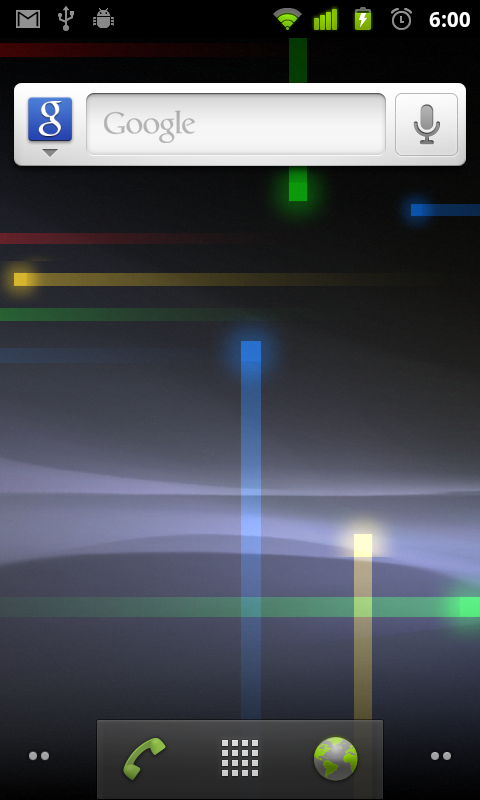
Android 2.3.7 on an Android SDK emulator | |
| Developer | |
| Initial release | December 6, 2010[1] |
| Final release | 2.3.7_r1 (GWK74)[2] / September 21, 2011 |
| Kernel type | Monolithic (Linux) |
| Preceded by | Android Froyo (2.2) |
| Succeeded by | Android Honeycomb (3.0) (tablets and Nexus One) Android Ice Cream Sandwich (4.0) (smartphones) |
| Official website | developer |
| Support status | |
| |
Android 2.3 Gingerbread is the seventh version of Android, a version of the Android mobile operating system developed by Google and released in December 2010.
Version
[edit]The Android Gingerbread release introduced support for near field communication (NFC)—used in mobile payment solutions—and Session Initiation Protocol (SIP)—used in VoIP internet telephones.[4] The first phone with Android Gingerbread was the Nexus S.
Android Gingerbread's user interface was refined, making it easier to master, faster to use, and more power-efficient. A simplified color scheme with a black background gave vividness and contrast to the notification bar, menus, and other user interface components. Improvements in menus and settings resulted in easier navigation and system control.
The Nexus S smartphone, released in December 2010, was the first phone from the Google Nexus line that ran Gingerbread, and also the first one from the line with built-in NFC functionality.[5]
As of October 2022[update], statistics issued by Google indicate that 0.11% of all Android devices accessing Google Play were running on Gingerbread.[6] Google ceased sign-in support for Android 2.3.7 and older on September 27, 2021, requiring to upgrade the Google Account Manager version to at least version 4.1.2.[7]
Features
[edit]New features introduced by Gingerbread include the following:
- Updated user interface design, providing increased ease of use and efficiency.
- Support for extra-large screen sizes and resolutions (WXGA and higher).
- Native support for SIP VoIP internet telephones.
- Improved text input using the virtual keyboard, with improved accuracy, better text suggestions, and voice input capability.
- Enhanced copy/paste functionality, allowing users to select a word by press-holding, copying, and pasting.
- Support for Near Field Communication (NFC), allowing the user to read NFC tags embedded in posters, stickers, or advertisements.
- New audio effects such as reverb, equalization, headphone virtualization, and bass boost.
- New Download Manager, giving users easy access to any file downloaded from the browser, email, or another application.
- Support for multiple cameras on the device, including a front-facing camera, if available.
- Support for WebM/VP8 video playback, and AAC audio encoding.
- Improved power management, including more active management of power-consuming applications.
- Enhanced support for native code development.
- A switch from YAFFS to ext4 file system on newer devices.
- Audio, graphical, and input enhancements for game developers.
- Concurrent garbage collection for increased performance.
- Native support for more sensors (such as gyroscopes and barometers).
- The first Android easter egg, which depicts the Android mascot standing beside a zombified gingerbread man in a field of other zombies talking on cell phones, presumably Android smartphones.
- Improved speed over Froyo due to system updates.

See also
[edit]References
[edit]- ^ "Android 2.3 Platform and Updated SDK Tools". Archived from the original on May 19, 2021. Retrieved May 27, 2021.
- ^ "Android Source". Google Git. Archived from the original on May 27, 2021. Retrieved May 27, 2021.
- ^ "Google to drop the support from Android 2.3 (Gingerbread) devices". November 22, 2016. Archived from the original on August 27, 2022. Retrieved August 27, 2022.
- ^ Graham, Flora (December 7, 2010). "What's new in Google's Android 2.3 Gingerbread?". CNET. Archived from the original on August 11, 2018. Retrieved September 3, 2015.
- ^ Hollister, Sean (November 15, 2010). "The Nexus S: a closer look". Engadget. Archived from the original on April 22, 2019. Retrieved September 3, 2015.
- ^ "Distribution dashboard". Android Developers. Archived from the original on May 1, 2017. Retrieved May 14, 2019.
- ^ Pollack, Zak (July 26, 2021). "Sign-in on Android devices running Android 2.3.7 or lower will not be allowed starting September 27". Google. Archived from the original on April 29, 2022. Retrieved August 2, 2021.
External links
[edit]
Media related to Android Gingerbread at Wikimedia Commons- Official website

Android Gingerbread
View on GrokipediaDevelopment
Announcement and preview
Android 2.3, codenamed Gingerbread, was first publicly announced and released by Google on December 6, 2010, via the Android Developers Blog, with the SDK made available to developers.[4] This announcement introduced key platform technologies and APIs aimed at refining the user experience on mobile devices.[2] The development of Gingerbread built directly on Android 2.2 Froyo, which was released on May 20, 2010, with Google prioritizing speed and battery life as core goals to address common performance bottlenecks in prior versions.[2] Engineers focused on systemic optimizations to make operations faster and more efficient across applications, including a new concurrent garbage collector that reduces pause times during memory management.[2] UI refinements were also highlighted, featuring a simplified visual theme with vivid colors against a black background for improved contrast and readability in menus and settings.[2] Google led the Gingerbread development effort, collaborating with hardware partners such as Samsung to ensure tight integration of software and hardware capabilities.[5] Samsung contributed to the Nexus S smartphone, the first device to showcase Gingerbread's advancements, highlighting optimized event handling for quicker responsiveness.[5] These early insights set the foundation for Gingerbread's evolution, emphasizing practical improvements in power efficiency and active application management.[2]Beta releases
Development of Android 2.3 Gingerbread involved internal testing phases as Google worked on refining core system behaviors following the release of Android 2.2 Froyo. These internal tests focused on prototyping enhancements to core OS functionalities, allowing engineers to iterate on stability and performance before the public release.[6] In September 2010, Google released Android SDK Tools revision 7, which provided developers with updated debugging and emulation capabilities, including improved support for the Android emulator to facilitate early testing of upcoming platform changes. This revision was designed for compatibility with ADT 0.9.8 in Eclipse and included enhancements for layout editing and performance profiling, enabling preliminary compatibility checks for applications targeting the forthcoming Gingerbread platform.[7] The Android 2.3 platform, designated with API level 9, was released on December 6, 2010, along with the updated SDK. Key features tested during internal phases included improved multitasking mechanisms, such as better memory management for running applications, and power management optimizations to extend battery life on mobile devices. Developers used the released SDK to integrate these features with existing apps.[8][6]Release history
Initial release
Android Gingerbread, designated as version 2.3 of the Android operating system, was officially released on December 6, 2010.[9] This release marked a significant update to the platform, introducing enhancements in performance and user interface while maintaining backward compatibility with prior versions.[2] The initial launch occurred alongside the debut of the Samsung Nexus S smartphone, co-developed by Google and Samsung Electronics.[9] The Nexus S served as the reference device for Android 2.3, shipping pre-installed with Gingerbread and becoming the first commercially available phone to run the update out of the box.[9] Availability began in the United States on December 16, 2010, through T-Mobile and unlocked channels at retailers like Best Buy, followed by the United Kingdom on December 20, 2010, via Carphone Warehouse and Best Buy.[9] Android 2.3 operated at API level 9, enabling developers to target new capabilities such as improved power management and application framework refinements.[10] The initial rollout focused on the Nexus S, with over-the-air (OTA) updates commencing shortly thereafter for the device itself—starting with a minor increment to build GRH78 on December 23, 2010—and later extending to select existing devices like the Nexus One beginning in February 2011.[11]Subsequent updates
Following the initial release of Android 2.3 in December 2010, Google issued a series of minor updates to Gingerbread, designated as versions 2.3.3 through 2.3.7, spanning from February to September 2011. These revisions focused on refining stability, addressing vulnerabilities, and enhancing compatibility without introducing major new features.[12] Android 2.3.3, released on February 9, 2011 (build GRI40, tag android-2.3.3_r1), primarily added support for NFC reader/writer APIs and intent dispatching for developers, alongside general bug fixes. A follow-up build, GRI54 (android-2.3.3_r1.1), addressed minor platform refinements later that month.[13][12] In April 2011, Android 2.3.4 (build GRJ22, tag android-2.3.4_r1) rolled out, incorporating bug fixes and performance improvements, including integration of video chat capabilities in the Google Talk app for compatible devices like the Nexus S. A pre-release variant, GRJ06D (android-2.3.4_r0.9), preceded the stable version. These changes aimed to boost overall system reliability and user experience on existing hardware.[12][14] Android 2.3.5 arrived on July 25, 2011 (build GRJ90, tag android-2.3.5_r1), emphasizing security patches and performance optimizations to mitigate emerging vulnerabilities and improve app execution efficiency. Subsequent updates continued this trend: version 2.3.6, released in September 2011 (build GRK39F, tag android-2.3.6_r1, following a pre-release GRK39C), delivered additional bug fixes, including enhancements to Bluetooth stability for devices like the Nexus S.[15][12] The final update, Android 2.3.7 (build GWK74, tag android-2.3.7_r1), was issued on September 21, 2011, incorporating further security fixes, Bluetooth improvements, and app compatibility enhancements to ensure smoother integration with third-party software and peripherals. This marked the last official maintenance release for Gingerbread, solidifying its role as a stable platform for supported devices.[12] These updates were distributed primarily through over-the-air (OTA) mechanisms to eligible devices, allowing automatic delivery without requiring manual intervention or full firmware reflashing, though manual sideload options were available for some users. Supported hardware, such as Nexus devices and select carrier models, received these patches to extend usability and address post-launch issues.[16][17]Technical overview
Version details
Android Gingerbread serves as the codename for Android 2.3.x, representing the internal project designation for this iteration of the mobile operating system developed by Google.[2] This version introduced foundational enhancements to the underlying software architecture while maintaining backward compatibility with prior releases.[3] At its core, Android Gingerbread is built on Linux kernel 2.6.35, which provided stability improvements and better support for mobile hardware compared to the kernel in Android 2.2.[2] This kernel upgrade enabled more efficient power management and networking capabilities, forming the basis for the platform's runtime environment.[18] The Dalvik virtual machine, responsible for executing Android applications, underwent significant optimizations in this release. Key updates included further refinements to the just-in-time (JIT) compiler, which accelerated bytecode interpretation and execution for smoother app performance.[2] Additionally, a concurrent garbage collector was implemented to minimize pause times to under 3 milliseconds, reducing interruptions during animations and user interactions, while improved code verification enhanced security and reliability.[2] To ensure ecosystem consistency, the Android 2.3 Compatibility Definition Document outlined mandatory hardware and software requirements for compatible devices. This included full implementation of the Android APIs, at least 128 MB of RAM, support for core sensors and connectivity features, and adherence to performance benchmarks like application launch times under specified thresholds.[18] Devices meeting these criteria could use the Android trademark and access Google services.[18]System requirements
Android 2.3 Gingerbread, while compatible with lower-end hardware per the official Compatibility Definition Document (CDD), had a minimum of 128 MB RAM available to the kernel and userspace.[19] Devices with this amount could run the OS, though higher RAM such as 256 MB or more was common for better UI responsiveness and memory management.[20] Processor architectures supported included ARMv5TE (armeabi ABI) for compatibility, with support for ARMv7 enabling advanced features like hardware-accelerated graphics and media processing through NEON SIMD extensions for efficient video decoding and image manipulation.[21][19] Storage requirements per the CDD included at least 150 MB of non-volatile storage for the /data partition (user data), with devices required to provide sufficient additional non-volatile storage for applications and system data.[19] Screen specifications per the CDD required a minimum physical diagonal size of 2.5 inches, a minimum density of 100 dpi, and aspect ratios between 4:3 and 16:9, with support for multi-touch recommended to leverage updated UI elements and gesture-based interactions.[19]Key features
User interface enhancements
Android Gingerbread introduced a simplified visual theme utilizing colors against a black background to enhance contrast and vividness across UI elements, including the notification bar, menus, and other components. This dark theme was optimized for AMOLED screens, reducing power consumption by deactivating black pixels and thereby extending battery life on compatible devices. The design aimed to minimize eye strain through higher contrast while maintaining a sleek, modern aesthetic. Navigation received refinements for increased simplicity and speed, with streamlined menus and settings interfaces that provided quicker access to system functions. A new shortcut to the Manage Applications screen was added directly from the Home screen's options menu, allowing users to monitor and control running processes more efficiently. The updated Manage Applications view included a dedicated Running tab displaying active apps alongside their memory and CPU usage, enabling easier task oversight without disrupting workflow. Text rendering and input saw notable upgrades, particularly in the redesigned soft keyboard, which featured larger, more prominent text for character suggestions and the current input field to improve readability and accuracy. Multi-touch support on the keyboard facilitated faster typing, while overall UI tweaks contributed to smoother interactions and reduced visual clutter. Gingerbread expanded live wallpaper options with several new animated backgrounds, such as those simulating weather effects or abstract patterns, integrated with enhanced system resource management to ensure they operated efficiently without excessive battery drain. A whimsical addition was the platform's first Easter egg, a hidden digital artwork by zombie artist Jack Larson depicting the Android robot mascot amid a horde of smartphone-wielding zombies, including a zombified gingerbread man. Users could access it by navigating to Settings > About phone and repeatedly tapping the "Android version" entry until the image appeared, offering a lighthearted nod to the OS's dessert-themed naming convention.Connectivity features
Android 2.3 Gingerbread introduced native support for Near Field Communication (NFC), enabling devices to read and interact with NFC tags for proximity-based applications, such as contactless payments or data exchange.[2] This feature was first implemented on the Google Nexus S, the inaugural Android device with NFC hardware, allowing users to tap compatible tags on posters or stickers to trigger app responses.[9] Developers gained access to the NFC API for reading, writing tags, and peer-to-peer connections, with full support enhanced in the 2.3.3 update.[2] Gingerbread added a dedicated Download Manager, providing users with easy access to files downloaded from the browser, email, or other applications in one centralized location.[2] Built on a new system-wide download management facility, it allowed any app to leverage the service for reliable handling and storage of downloads, improving overall file management efficiency. Gingerbread added built-in support for the Session Initiation Protocol (SIP), facilitating voice over Internet Protocol (VoIP) calling directly within the platform.[2] Users could add SIP addresses to their contacts for internet-based calls, while developers utilized a complete SIP stack and call management services to integrate telephony features into applications.[2] Implementation depended on device manufacturers and carriers, ensuring compatibility with existing SIP services for enhanced communication options.[2] The platform expanded the Camera API to support access to multiple cameras on a device, including front-facing ones, enabling applications for video calling and face detection.[2] Developers could query camera characteristics and types, allowing seamless integration of front-facing hardware for features like self-portraits or real-time facial recognition in apps.[2] This update marked a significant step in supporting dual-camera setups common in emerging smartphones.[2] Bluetooth capabilities saw enhancements through an updated BlueZ stack, improving overall networking stability for profiles like A2DP used in audio streaming.[2] Devices were required to implement the RFCOMM-based Bluetooth API and support key profiles including A2DP and AVRCP for reliable wireless audio and remote control functionality.[3] These updates contributed to more stable connections during media playback over Bluetooth, reducing interruptions in streaming scenarios.[3]Performance improvements
Android 2.3 Gingerbread introduced several under-the-hood optimizations to enhance overall system performance, focusing on reducing latency and improving resource efficiency. A key advancement was the implementation of a concurrent garbage collector in the Dalvik virtual machine, which operates in the background to minimize application pauses to under 3 milliseconds. This change significantly reduced stuttering during animations and scrolling, contributing to a smoother user experience across apps.[2] Additionally, Gingerbread accelerated event distribution for touch and keyboard inputs, lowering CPU utilization and enabling faster responsiveness without compromising stability.[2] Battery management saw notable refinements, with the system taking a more proactive role in monitoring and controlling power-hungry applications. Gingerbread automatically identifies and closes apps that keep the device awake excessively or consume excessive CPU cycles, helping to extend battery life by curbing unnecessary resource drain. Users gained access to detailed battery usage breakdowns by app and system component, allowing for informed adjustments to power consumption. These features built on prior versions by integrating smarter app oversight directly into the OS framework.[2][22] Memory management benefited from the concurrent garbage collector, which helped mitigate memory fragmentation and reduced the frequency of full pauses that could interrupt app performance. This allowed for more efficient RAM allocation, particularly on devices with limited memory, by enabling ongoing cleanup without halting foreground processes. Complementing this, the Manage Applications interface was updated with a dedicated "Running" tab, providing visibility into active services and background processes, along with options to force-stop them for immediate memory recovery.[2] Multitasking was streamlined through these resource controls, enabling better handling of background apps without frequent manual intervention. The OS's improved process management prioritized foreground tasks while more aggressively terminating low-priority background activities, resulting in fewer interruptions and a more fluid switch between applications. This approach balanced performance gains with stability, ensuring that multitasking felt more reliable on hardware typical of the era.[2]Input and media support
Android 2.3 Gingerbread introduced expanded copy-paste functionality, enabling users to perform one-touch word selection by pressing and holding on text, with adjustable selection boundaries via on-screen arrows for precise control.[2] This enhancement allowed copying selected text to the system clipboard and pasting it across a broader range of applications and text fields, including web browsers and messaging apps, marking a significant improvement over the limited implementation in prior versions.[2] Additionally, cursor repositioning was facilitated by sliding a finger while pressing the spacebar or dragging the cursor handle, streamlining text editing tasks.[2] Voice typing received native integration in Gingerbread, permitting users to switch to a voice input mode directly from the keyboard to dictate text or replace selected content via speech-to-text conversion powered by Google's recognition engine.[2] This feature accelerated text composition in scenarios like email drafting or note-taking, with spoken words transcribed in real-time upon activation of the microphone icon, though it required an internet connection for optimal accuracy.[2] In terms of media handling, Android 2.3 incorporated native support for the VP8 video codec and WebM container format, facilitating efficient playback of open-standard web videos directly in the browser without requiring third-party plugins.[2] This integration, part of a broader media framework overhaul, ensured lower latency and reduced resource usage for streaming content from sites like YouTube, while also adding AAC encoding and AMR-WB for improved audio quality in recordings.[2]Device compatibility and adoption
Launch devices
The Samsung Nexus S was the first smartphone to launch with Android 2.3 Gingerbread pre-installed, debuting in December 2010 as a collaborative effort between Google and Samsung.[23] Released on December 16 in the United States through T-Mobile and Best Buy, it featured innovative hardware including near-field communication (NFC) support, marking the initial integration of this technology in Android devices.[24][25] Key specifications of the Nexus S included a 1 GHz Samsung Hummingbird processor, 512 MB of RAM, and a 4-inch Super AMOLED display with 800x480 resolution, providing a vibrant viewing experience optimized for the new OS enhancements.[26] It also incorporated a 5-megapixel rear camera with LED flash and a VGA front-facing camera, alongside 16 GB of internal storage without expandable memory options.[23] Regional variants of the Nexus S catered to different markets, with an unlocked global model available internationally and carrier-specific versions such as the T-Mobile US edition priced at $199 on a two-year contract.[27] Later iterations, like the Nexus S 4G for Sprint released in May 2011, added WiMAX support while retaining the core Gingerbread software.[28] Beyond the initial launch device, several existing smartphones received over-the-air (OTA) updates to Android Gingerbread shortly after its debut, including models from the Sony Ericsson Xperia series such as the Xperia X10.[29] These updates, rolled out starting in mid-2011, allowed compatible devices to adopt Gingerbread's features without requiring new hardware purchases.[30]Manufacturer and carrier support
Major manufacturers played a key role in extending Android 2.3 Gingerbread support beyond initial launch devices, with Samsung providing over-the-air (OTA) updates to its Galaxy S series, including the international GT-I9000 model in early 2011 and the Galaxy S II, which shipped with Gingerbread pre-installed.[31][32] Motorola followed suit by delivering an OTA Gingerbread update to the Droid X on Verizon's network starting May 27, 2011, enhancing performance on the device originally launched with Android 2.1.[33] HTC provided Gingerbread updates to select models such as the Desire HD and Incredible S via OTA in May 2011, though the original HTC Desire was excluded due to hardware memory limitations, as announced in June 2011.[34][35] Carriers actively facilitated these rollouts, with Verizon deploying Gingerbread to multiple Motorola devices like the Droid Charge and Droid Pro in mid-2011, ensuring compatibility with their 4G LTE networks.[36][37] AT&T committed to updating its entire 2011 Android lineup to Gingerbread, beginning with the Motorola Atrix 4G in July 2011 and extending to devices like the Samsung Captivate in January 2012.[38][39] International providers, including Vodafone, pushed updates such as the one for the Samsung Galaxy S in the UK starting April 2011 and for the HTC Desire HD in May 2011, often tailored to regional network requirements.[40][41] Manufacturers customized Gingerbread to align with their branding, exemplified by Samsung's TouchWiz 4.0 interface on Galaxy S II and updated older models, which modified the UI with enhanced widgets, live wallpapers, and gesture support while preserving core Gingerbread functionality.[32] Rollouts faced challenges from certification processes, leading to delays; for instance, AT&T's Samsung Infuse 4G received Gingerbread only in February 2012, nearly a year after the OS's debut, due to extensive carrier testing.[42] Similarly, Verizon's Droid X update encountered post-deployment issues requiring further patches, highlighting the complexities of integrating manufacturer and carrier modifications.[43] These delays stemmed from the need for compatibility certification across diverse hardware and network configurations, impacting timely access for many users.[44]Market penetration
Initial adoption rates
Android 2.3 Gingerbread, released in December 2010, experienced a slow initial rollout, with fewer than 0.5% of active Android devices running the update by mid-January 2011, largely due to limited availability beyond the Nexus S launch device.[45] Adoption accelerated through over-the-air (OTA) updates to devices on the preceding Android 2.2 Froyo version, such as the Nexus One, which began rolling out in February 2011 and contributed to broader distribution.[46] By July 2011, Gingerbread had reached approximately 24% of active devices, reflecting a surge driven by these updates and new device shipments.[47] The update's primary distribution channels were sales of the Google Nexus S smartphone, which shipped with Gingerbread out of the box starting in December 2010 in select markets, and subsequent OTA pushes to compatible Froyo-equipped handsets from manufacturers like HTC and Samsung. This approach helped Gingerbread surpass 20% adoption by mid-2011, though growth varied regionally, with quicker uptake in Europe and Asia where unlocked devices and manufacturer-led rollouts faced fewer barriers compared to the U.S., where carrier approvals delayed updates for many 2011 models until mid-year.[48] Positive critical reception, particularly for Gingerbread's performance enhancements like improved application speed and power management, encouraged user upgrades and influenced manufacturer prioritization of the update.[49] These factors, including faster UI responsiveness reported in early reviews, drove the version's rapid climb from under 1% in early 2011 to 43.9% by October.[50]Long-term usage statistics
Android Gingerbread's usage share peaked at approximately 55.9% of all Android devices in early 2012, according to Google's platform version distribution data reported at the time.[51] This dominance reflected its widespread adoption on mid-range and entry-level smartphones shortly after its December 2010 release, but fragmentation began to erode its prevalence as newer versions like Ice Cream Sandwich and Jelly Bean rolled out. By mid-2013, usage had declined to 36.5%, highlighting early challenges in update delivery across diverse hardware.[52] Google's quarterly reports consistently illustrated Android's fragmentation issues, with Gingerbread's share dropping to 5.7% by August 2015 amid the rise of Lollipop and Marshmallow.[53] This decline was driven by limited manufacturer support for updates on older devices, leaving a significant portion of the install base on outdated software. By May 2019, usage further contracted to 0.3%, as reported in Google's distribution update.[54]| Year | Usage Share (%) | Source |
|---|---|---|
| 2012 | 55.9 | Google via Mobile World Live[51] |
| 2013 | 36.5 | Google via The Next Web[52] |
| 2015 | 5.7 | OpenSignal report via The Next Web[53] |
| 2019 | 0.3 | Google distribution update via Fossbytes[54] |
End of life and legacy
Support timeline
Official support for Android Gingerbread (versions 2.3 to 2.3.7) transitioned through several key end-of-life phases, marking the gradual discontinuation of security, services, and account features by Google. The last official update for Android Gingerbread was version 2.3.7, released on September 21, 2011, after which no further security patches were provided for the OS itself.[58] In January 2017, Google dropped support for Gingerbread in Google Play Services with version 10.2.0, which raised the minimum API level to 14 (corresponding to Android 4.0), thereby blocking subsequent app updates and core Google functionality reliant on Play Services for devices running 2.3.x.[59] Further restricting usability, Google ended support for Google Account sign-ins on devices running Android 2.3.7 or lower on September 27, 2021, preventing new logins and access to services like Gmail, YouTube, and Drive to enhance overall account security. As of 2025, Android Gingerbread holds 0% market share, with all Google services inaccessible on unsupported devices, rendering them effectively obsolete for modern app ecosystems.[60][57] Third-party efforts to extend Gingerbread's viability were limited; for instance, the popular custom ROM CyanogenMod 7, based on Android 2.3, received its final updates until the project's overall discontinuation in December 2016, after which the community forked it into LineageOS but with reduced focus on such legacy versions.[61]Lasting impact
Android Gingerbread's introduction of Near Field Communication (NFC) support in version 2.3 marked a foundational step for mobile payments in the Android ecosystem. Released in December 2010, this feature enabled the first NFC-capable Android device, the Nexus S, which supported secure data exchange over short distances. This laid the groundwork for subsequent innovations like Android Beam for peer-to-peer sharing and Google Wallet, launched in 2011, which utilized NFC for contactless transactions and expanded into broader digital payment systems.[62][63][64] The widespread adoption of Gingerbread also exemplified early Android fragmentation challenges, where diverse hardware from multiple manufacturers led to uneven update distribution. By late 2012, over 54% of Android devices remained on Gingerbread despite newer releases, slowing feature rollout and complicating app development across versions. This persistent issue underscored the need for structural reforms, influencing Google's Project Treble in Android 8.0 (2017), which modularized the OS framework from vendor-specific code to accelerate updates and reduce compatibility barriers.[65][66][67] Gingerbread's SDK tools, corresponding to API levels 9 and 10, reinforced Android's commitment to backward compatibility, a principle that shaped long-term developer practices. Developers could specify minimum and target SDK versions in the app manifest via the<uses-sdk> element, ensuring apps ran on older platforms while accessing new features conditionally. This mechanism became a standard for maintaining broad device support, influencing subsequent SDK revisions and libraries like the Android Support Library for emulating modern APIs on legacy systems.[68][69]
Culturally, Gingerbread represented a pivotal maturation of Android in 2010, as the platform aggressively vied for market leadership against iOS. As Android's global smartphone market share grew from 17.2% in Q2 2010 to 25.5% in Q3, the release of Gingerbread at the end of 2010—with its refinements in UI, performance, and gaming support—helped sustain and accelerate this momentum into 2011, positioning Android as a viable, open alternative to Apple's ecosystem dominance.[70][71][72]