
Hubbry Logo
Apple Thunderbolt DisplayApple Thunderbolt DisplayMain
Open search
Apple Thunderbolt Display
Community hub
Apple Thunderbolt Display
logo
8 pages, 0 posts
0 subscribers
Be the first to start a discussion here.
Apple Thunderbolt Display
from Wikipedia

Apple Thunderbolt Display
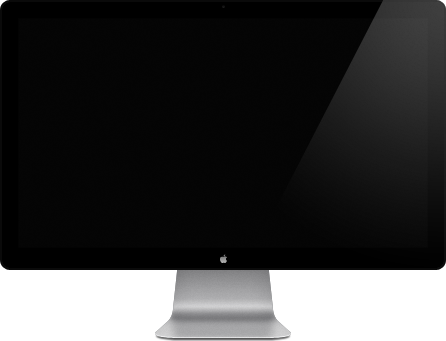
The Apple Thunderbolt Display
DeveloperApple Inc.
TypeComputer monitor
Release dateJuly 20, 2011; 14 years ago (2011-07-20)
DiscontinuedJune 23, 2016 (2016-06-23)
PredecessorApple Cinema Display
SuccessorLG UltraFine (consumer, Apple-endorsed third party)
Apple Studio Display (consumer, Apple-branded)
Pro Display XDR (professional)
WebsiteOfficial website at the Wayback Machine (archived February 7, 2015)

The Apple Thunderbolt Display is a 27-inch flat panel computer monitor developed by Apple Inc. and sold from July 2011 to June 2016. Originally priced at $999, it replaced Apple’s 27-inch Cinema Display.[1] It integrates a webcam, speakers and microphone, as well as several ports (ethernet, FireWire 800, USB 2.0, and a downstream Thunderbolt port).[2]

The Thunderbolt Display was discontinued in June 2016, and replaced by LG UltraFine displays Apple developed with LG on the consumer end, while the Pro Display XDR succeeded it in 2019 as Apple's professional display. In 2022, the Apple Studio Display was released as the first Apple-branded consumer display since its discontinuation.

The Thunderbolt Display requires a computer with a Thunderbolt port; only Mac computers are supported officially.[2] Most Macs released since 2011 (with some exceptions) are compatible. Mac models released since 2016 are supported but require a Thunderbolt 3 to Thunderbolt 2 adapter.[3] Despite using the same physical connector, it does not work with Mini DisplayPort input, and similarly, the adapter does not make it compatible with USB-C in general.[3]

Overview

[edit]

Like its predecessor, the 27-inch LED Cinema Display, the resolution is 2560×1440 pixels in a 16:9 aspect ratio. Its chassis is made of aluminum and glass, resembling the contemporary ranges of iMac and MacBook Pro unibody designs. The display features a built-in 720p[4] FaceTime HD camera (replacing the iSight in the previous model), microphone, and stereo speaker system with subwoofer (2.1 channel). An octopus cable with Thunderbolt and MagSafe is permanently attached to the back of the display for data and charging MacBooks, respectively. On the rear of the display is a Thunderbolt port, a FireWire 800 port, three USB 2.0 ports, and a Gigabit Ethernet port.

The Thunderbolt port allows for the possibility of daisy chaining Thunderbolt Displays from a supported Mac, or connecting other devices that have Thunderbolt ports, such as external hard drives and video capture devices. In July 2012, Apple began including a MagSafe to MagSafe 2 adaptor in the box.[5]

Discontinuation and successors

[edit]

On June 23, 2016, Apple announced through a statement it was discontinuing the Thunderbolt Display and would exit the stand-alone display market.[6] Apple subsequently worked with LG to design the Thunderbolt 3-enabled UltraFine line, consisting of 21.5-inch (later 24-inch) 4K and 27-inch 5K displays, which were the only displays sold by Apple from 2016 to 2019.[7] In December 2019, Apple released the Pro Display XDR, the first Apple-branded display since the Thunderbolt Display's discontinuation. In March 2022, Apple released the Apple Studio Display, the first Apple-branded consumer display since the Thunderbolt Display's discontinuation, which similarly includes integrated speakers and a webcam.[8]

Compatibility

[edit]

The Thunderbolt Display drops compatibility with all previous standards, including VGA, DVI, and DisplayPort.[9] It is not compatible with computers that do not have a Thunderbolt port, including pre-2011 Macs and the vast majority of desktop PCs. The 12-inch Retina MacBook and 2012 Mac Pro do not support Thunderbolt. The following Macs support the Thunderbolt Display without an adapter:

  • MacBook Pro (2011 to 2015)
    • 2011 and non-Retina 2012 models are compatible with the MagSafe charger; Retina 2012 to 2015 models require the MagSafe to MagSafe 2 adapter
  • MacBook Air (2011 to 2017)
    • 2011 models are compatible with the MagSafe charger; 2012 to 2017 models require the MagSafe to MagSafe 2 adapter
  • Mac Mini (2011 to 2014)
  • iMac (2011 to 2015)
  • Mac Pro (2013)

Macs released after 2016 with Thunderbolt 3 and later, which uses a USB-C connector, are compatible using Apple's Thunderbolt 3-to-2 adapter.[10]

Using multiple displays

[edit]

MacBook Pro

[edit]
  • Macbook Pro (2011): 2 Displays: Can daisy chain two Apple Thunderbolt Displays together to get two displays, but the laptop's LCD may turn off.[11][12]
  • Macbook Pro (2012): 2+2 Displays: Can daisy chain two Apple Thunderbolt Displays, in addition to one HDMI display and the MacBook Pro's own display, for four displays total[13][14]
  • MacBook Pro (Late 2016): Apple released a Thunderbolt 3 to Thunderbolt 2 Adapter for enabling the Thunderbolt 3 ports of MacBook Pro (Late 2016) to connect to Thunderbolt 2 devices.
  • MacBook Pro (2017–2019) Using 2 of the Thunderbolt 3 to Thunderbolt 2 Adapters can run 4 Thunderbolt Displays in addition to the built in Retina Display for a total of 5.
  • Macbook Pro 13-inch M1/M2 (2020–2022) Using 1 of the Thunderbolt 3 to Thunderbolt 2 Adapters can run 1 Thunderbolt Display in addition to the built in Retina Display for a total of 2.
  • MacBook Pro M1/M2 Pro (2021–2023) Using 1 of the Thunderbolt 3 to Thunderbolt 2 Adapters can run 2 Thunderbolt Displays in addition to the built in Retina Display for a total of 3.
  • MacBook Pro M1/M2 Max (2021–2023) Using 2 of the Thunderbolt 3 to Thunderbolt 2 Adapters can run 4 Thunderbolt Displays in addition to the built in Retina Display for a total of 5.

MacBook Air

[edit]
  • MacBook Air (Mid 2011): 1+1 Displays: Can use one Apple Thunderbolt display, in addition to the MacBook Air's own display.[15][11]
  • MacBook Air (Mid 2012 to Mid 2017): 2+1 Displays: Can daisy chain two Apple Thunderbolt displays, in addition to the MacBook Air's own display.[16]
  • MacBook Air (Intel, Late 2018 to Early 2020): 2+1 Displays: Can daisy chain two Apple Thunderbolt displays, in addition to the MacBook Air's own display.
  • MacBook Air (M1, 2020): 1+1 Displays: Can use one Apple Thunderbolt Display (with Thunderbolt 3 to Thunderbolt 2 adapter), in addition to the MacBook Air's own display. Further displays have to rely on virtual display output like DisplayLink or Apple Sidecar.[17]
  • MacBook Air (M2, 2022): 1+1 Displays: Can use one Apple Thunderbolt Display (with Thunderbolt 3 to Thunderbolt 2 adapter), in addition to the MacBook Air's own display. Further displays have to rely on virtual display output like DisplayLink or Apple Sidecar.[17]

Mac Pro

[edit]
  • Mac Pro (Late 2013): 6 Displays: Can run six Apple Thunderbolt Displays using six Thunderbolt ports.[18]

Mac mini

[edit]
  • Mac mini (Mid 2011): 1 Display. 2 Displays daisy chained: AMD version[19]
  • Mac mini (Late 2012): 2 Displays daisy chained.[20]
  • Mac mini (Late 2014): 2 Displays.[21]
  • Mac mini (2018): 2 Displays using TB3 to TB2 converter.[22]
  • Mac mini (2020): 1 Display using TB3 to TB2 converter.[23]
  • Mac mini (2023): 1 Display using TB3 to TB2 converter.[23]
  • Mac mini M4 (2024): 2 Displays using TB3 to TB2 converter.[23]
  • Mac mini M4 Pro (2024): 3 Displays using TB3 to TB2 converter.[23]

Technical specifications

[edit]
Table of models
Component LED-backlit LCD
Model Apple Thunderbolt Display (27-Inch)[2][24]
Release date(s) July 20, 2011
Discontinued June 23, 2016
Model number(s) A1407
Display 27.00 inches (68.6 cm), IPS active-matrix TFT LCD, glossy glass covered screen, QHD (2560 × 1440) resolution, LED edge-lit backlight.
16∶9 aspect ratio (widescreen)
Pixel density 109 px/in
Response time 12 ms
Maximum Refresh rate 59.95 Hz
Colors 16,777,216 (8 bpc / 24 bit/px True Color)
Contrast ratio 1,000∶1
Maximum Brightness 375 cd/m2
Viewing angle 178° horizontal; 178° vertical
Power input IEC 60320 C7 port, 100–240 V AC @ 50–60 Hz (Up to 250 W while charging a MacBook Pro via MagSafe cable, 2 W or less in energy saver mode)
Material


Aluminum frame and glass front
Audio output 2.1-channel speaker system (49 W)
Cables and peripheral connections

Cables

Peripheral connections

Miscellaneous
Dimensions (H × W × D, with stand) 19.35 in × 25.7 in × 8.15 in (49.1 cm × 65.3 cm × 20.7 cm)
Mass 23.5 lb (10.7 kg)
System Requirements Mac OS X 10.6.8 or later, Thunderbolt port

See also

[edit]

References

[edit]
[edit]
Revisions and contributorsEdit on WikipediaRead on Wikipedia
from Grokipedia
The Apple Thunderbolt Display is a 27-inch IPS LCD flat-panel developed and sold by Apple Inc., introduced on July 20, 2011, as the world's first display to integrate I/O technology for high-speed data transfer and daisy-chaining capabilities. Designed primarily as an all-in-one for -enabled Mac computers, it combines a high-resolution screen with built-in peripherals including a HD camera, microphone, 2.1 speaker system, and , all connected via a single cable that also supplies power through an integrated charger. The display features a of 2560 × 1440 pixels at a 16:9 , supporting 16.7 million colors with a of 375 cd/m², a static of 1000:1, and 178° viewing angles in both horizontal and vertical directions. Its connectivity options include one port (supporting up to 10 Gbps bidirectional bandwidth and daisy-chaining of up to five additional devices), three USB 2.0 ports, one FireWire 800 port, and one port, making it a versatile hub for peripherals and networking. Measuring 19.35 inches in height, 25.7 inches in width, and 8.15 inches in depth, the monitor weighs 23.5 pounds and uses energy-efficient LED backlighting, earning 5.1 certification and EPEAT Gold status for its mercury-free, arsenic-free glass and PVC-free materials. Priced at a suggested retail of $999 in the United States, the Display required macOS 10.6.8 or later on a compatible -equipped Mac for full functionality and remained in production until its discontinuation on June 23, 2016, after which Apple shifted focus to newer display technologies like the 5K models. It remains compatible with newer Macs using adapters.

Introduction

Overview

The Apple Thunderbolt Display is a 27-inch IPS LCD monitor released by Apple in 2011, designed for seamless integration with Thunderbolt-equipped Mac computers to enhance professional workflows. As Apple's inaugural display featuring connectivity, it introduced a high-speed interface that enabled data transfer, video output, and power delivery through a single cable, transforming the monitor into a versatile for peripherals. Key innovations include a built-in HD camera and microphone for video conferencing, integrated high-fidelity stereo speakers with a dedicated for immersive audio, and additional ports that expand connectivity options without cluttering the user's desk. This all-in-one design catered to professionals such as creative workers and executives who required an efficient solution for video calls, multimedia playback, and peripheral management directly from their Mac setup. Launched at a price of $999, the Display quickly became a staple for users seeking premium display quality and ecosystem integration, marking a significant evolution in Apple's external monitor lineup.

Release History

The Apple Thunderbolt Display was announced on July 20, 2011, through an official press release from Apple, positioning it as the world's first display incorporating I/O technology. It became available for purchase approximately two months later, with shipments to customers beginning in mid-September 2011. The display was developed as a successor to Apple's 27-inch LED Cinema Display, leveraging the newly introduced 1 interface, which was co-developed by Apple and to enable high-speed data transfer and simplified connectivity for Mac systems. Throughout its production run, there were no major hardware revisions, though Apple released minor updates—such as versions 1.1 in 2011 and 1.2 in 2014—to improve stability, address fan noise, and enhance device connectivity via macOS software. Apple discontinued the Thunderbolt Display on June 23, 2016, immediately removing it from the company's online store while allowing continued availability through physical Apple retail locations and authorized resellers until supplies were depleted. By June 2021, Apple classified the product as "vintage," indicating it had not been sold for more than five but less than seven years. It was further reclassified as "obsolete" worldwide on May 31, 2023, meaning hardware service was no longer available from Apple or authorized providers after seven years from discontinuation.

Design and Features

Physical Design

The Apple Thunderbolt Display features an anodized aluminum enclosure in a silver finish, providing a premium build quality that matches the aesthetic of Apple's Mac computers during its era. This construction emphasizes durability and a minimalist , with the aluminum serving as the primary structural material, accounting for about 2,810 grams of the total weight. The display measures 25.7 inches (65 cm) in width, 19.35 inches (49.1 cm) in height, and 8.15 inches (20.7 cm) in depth including the stand, with an overall of 23.5 pounds (10.8 kg). The tilt-adjustable stand allows for up to 20 degrees of backward tilt to optimize viewing angles but does not support height adjustment or swivel functionality. Integrated enhances desk organization, as the cable is built into the rear of the display and routed through the stand, terminating in a connector for charging compatible models. For added security, the enclosure includes a on the back.

Display and Audio Components

The Apple Thunderbolt Display features a 27-inch diagonal (TFT) active-matrix (LCD) utilizing in-plane switching (IPS) technology, which provides wide viewing angles and consistent color reproduction across the screen. This IPS panel ensures that colors remain accurate when viewed from various positions, making it suitable for professional applications such as and . The display incorporates a built-in 2.1 speaker delivering a total output of 49 watts for enhanced bass and clarity in audio playback. This configuration allows users to experience immersive sound directly from the monitor without external speakers, supporting music, movies, and video calls. Integrated at the top of the display is a HD camera paired with a built-in , enabling seamless video conferencing capabilities over platforms like FaceTime. The camera and microphone combination facilitates clear communication, with the microphone capturing audio effectively for professional and personal use. The display also includes an that automatically adjusts screen brightness based on surrounding lighting conditions. The display achieves a response time of 12 milliseconds, contributing to smooth motion handling in dynamic content such as videos and animations without noticeable blurring. This performance characteristic supports fluid visuals, particularly beneficial for creative workflows involving fast-paced media. By combining the IPS display, 2.1 audio system, and HD camera into a single unit, the Display creates an all-in-one setup that minimizes desk clutter and streamlines connectivity for creative professionals. This integrated design allows a single cable to power video, audio, and peripheral functions, enhancing efficiency in workflows like and .

Connectivity

Ports and Interfaces

The Apple Thunderbolt Display utilizes a single 1 port as its primary input for both video and data connectivity, offering bidirectional transfer speeds of 10 Gbps to compatible Mac computers. This port integrates protocol for video signal transmission and for data, enabling seamless integration with Thunderbolt-enabled systems. Complementing the Thunderbolt port, the display incorporates three powered USB 2.0 ports, each capable of data transfer rates up to 480 Mbps for connecting peripherals such as keyboards and external drives; a FireWire 800 port supporting speeds of 800 Mbps for legacy high-speed devices; and a RJ-45 port providing network connectivity at up to 1 Gbps. These interfaces transform the display into a multifunctional hub, allowing direct attachment of multiple peripherals without additional adapters. The port facilitates daisy-chaining, supporting up to five additional devices through passthrough connections, which expands peripheral options while maintaining a single cable link to the host Mac. This capability underscores the display's role as an early docking solution. Video input is handled exclusively via the port, delivering native support for 2560x1440 resolution at 60 Hz, with no provisions for or inputs. As a result, the display relies on for all visual data, emphasizing its integration within Apple's ecosystem. Overall, these ports and interfaces position the Thunderbolt Display as a comprehensive , enabling efficient peripheral expansion for items like mice, storage units, and networking equipment directly through the monitor.

Integrated Power Features

The Apple Display incorporates a universal supply designed for global use, accepting input voltages ranging from 100 to 240 V at frequencies of 50 to 60 Hz, with a maximum power consumption of 250 W during operation while simultaneously charging a connected . This internal is not user-replaceable, requiring professional disassembly for any servicing, as evidenced by detailed teardown analyses that highlight its integrated construction with the display chassis. A key feature is the integrated charging capability, which allows the display to power and charge compatible 13-inch and 15-inch models via a dedicated connector built into the connection cable, delivering up to 85 W to meet the laptops' power requirements without needing a separate . This setup enables a single-cable solution for video, data, and charging, enhancing desk setup convenience for supported systems. The display emphasizes energy efficiency, complying with 5.1 standards and achieving EPEAT Gold certification, with power usage dropping to 2 W or less in to minimize standby consumption. In standby, the built-in ports continue to supply power to connected peripherals, such as iOS devices, even if the host Mac is asleep or disconnected, with the FireWire 800 port supporting up to 7 W and the USB ports up to 2.5 W each for ongoing charging needs. However, charging is limited to MagSafe-equipped MacBook Pro models from the era; it does not support charging MacBook Air systems or later USB-C-based models without additional adapters to bridge the connection types.

Compatibility and Usage

Supported Devices

The Apple Thunderbolt Display is compatible with Thunderbolt-equipped Mac computers introduced from mid-2011 onward, including models such as the (Early 2011 and later), (Mid 2011 and later), (Mid 2011 and later), (Mid 2011 and later), and (Late 2013 and later). These models feature native 1 or 2 ports, enabling full integration of the display's video, audio, camera, and peripheral connectivity without additional hardware. Software requirements include macOS 10.6.8 () or later. For Mac models from 2016 onward, including those with M1, M2, M3, and M4 chips (2020 and later), compatibility requires the Apple Thunderbolt 3 (USB-C) to 2 Adapter to connect via the display's port. However, on Macs, while video output functions reliably, the integrated camera, microphone, speakers, and downstream USB/FireWire/Ethernet ports often exhibit partial or no functionality due to driver and protocol incompatibilities. The display is not supported on Intel-based Macs without Thunderbolt ports, such as those prior to mid-2011, or on non-Mac devices lacking compatibility. Community testing indicates continued usability on (13.x) and later versions via adapters on hardware, though with persistent limitations on audio, camera, and peripherals, and occasional display recognition issues after OS updates. As of macOS Sequoia (15.x) and later in 2025, users report recognition failures post-updates on M-series Macs, but video output typically works with adapters.

Multiple Display Configurations

The Apple Thunderbolt Display supports daisy-chaining, allowing users to connect up to two displays in a single chain from a compatible Mac, such as by linking the first display's downstream port to the second display using a cable. This configuration leverages the 1 interface's bandwidth to maintain full 2560-by-1440 resolution at 60 Hz on both displays without performance degradation. For models from 2011 to 2015, multiple Displays can be configured via ports with daisy-chaining to support up to two external displays simultaneously at native resolutions, depending on the model's port count and GPU capabilities (e.g., non- 13-inch models support two external in clamshell mode via a single port chain; models support built-in plus two external). See the Technical Specifications section for model-specific details. MacBook Air models from 2011 to 2017 are restricted to a single external display natively through their or , precluding direct daisy-chaining of multiple Thunderbolt Displays without additional hardware. To achieve multiple displays, users must employ a compatible or hub that splits the output, as the integrated graphics do not support simultaneous multi-monitor configurations beyond one external screen. The from late 2013 to 2019, with its six 2 ports, accommodates up to six Thunderbolt Displays directly or via daisy-chaining, providing extensive capabilities for workflows. Each port can initiate a chain of up to two displays, allowing full utilization of the system's display output potential without resolution limitations on the supported 2560-by-1440 panels. Mac mini models from 2011 to 2014 support two external displays, typically one connected via the port (with daisy-chaining to a second Thunderbolt Display) and the other via or , both at up to 2560-by-1600 resolution. This setup requires cables for the chain to ensure proper video and data passthrough between devices. With modern M-series Macs, Thunderbolt Displays connect via adapters (such as to ), but daisy-chaining is not supported due to compatibility differences between 1 and later standards; base models like the M1 and M2 support only one external display, while higher-end configurations (e.g., M1 Pro/Max) allow up to two via separate ports, and an port can add a third non- display. For optimal setup, certified cables are essential to maintain in any chain, and users should verify GPU limitations per model to avoid resolution or constraints.

Technical Specifications

Video and Display Details

The Apple Thunderbolt Display utilizes an IPS LCD panel with a of 2560 x 1440 pixels, supporting a of 60 Hz for smooth video playback and standard desktop use. This resolution provides ample screen real estate on its 27-inch diagonal display, enabling detailed visuals suitable for professional workflows like photo editing and . It supports a of 16.7 million colors (8-bit per channel), delivering vibrant and accurate representation for most creative applications without the need for higher bit depths. The is 16:9, aligning with content standards and optimizing space for multitasking. Viewing angles reach 178° both horizontally and vertically, ensuring consistent image quality from off-axis positions, a hallmark of IPS technology. Brightness is rated at 375 cd/m², providing sufficient illumination for typical office and studio environments under moderate ambient lighting. The static contrast ratio stands at 1000:1, offering good differentiation between light and dark areas for enhanced image depth. The response time is 12 ms. Video input is limited to a single Thunderbolt port, which handles both display signals and data over a daisy-chain connection, but the panel lacks native support for resolutions beyond 2560 x 1440, such as 4K or higher, restricting it to its inherent capabilities.

Electrical and Environmental Standards

The Apple Thunderbolt Display operates on an input voltage of 100-240V AC at 50-60Hz, with a maximum continuous power draw of 250W, including scenarios where it charges a connected . In energy saver mode, the display consumes 2W or less, contributing to lower idle power usage. For reliable operation, the display functions within an ambient temperature range of 50° to 95° F (10° to 35° C), with storage conditions rated from -4° to 116° F (-20° to 47° C). It maintains performance at relative humidity levels of 20% to 80% noncondensing and up to a maximum operating altitude of 10,000 feet (3,000 meters). The display adheres to Version 5.1 requirements for energy efficiency and achieves a Gold rating under the (EPEAT) program in the and . Its construction features a recyclable aluminum enclosure weighing 2810g, along with lead-free, mercury-free, BFR-free, PVC-free, and arsenic-free components, supporting Apple's sustainability goals as outlined in the 2011 Product Environmental Report.

Legacy

Discontinuation and Reasons

Apple officially discontinued the Thunderbolt Display on June 23, 2016, without announcing a direct replacement, allowing remaining inventory to be cleared quietly through Apple.com, retail stores, and authorized resellers while supplies lasted. The decision marked Apple's exit from producing standalone consumer monitors at the time, redirecting users toward third-party alternatives compatible with Macs. Several factors contributed to the discontinuation. The display relied on 1 technology, which provided a maximum bandwidth of 10 Gbps, rendering it outdated amid the rise of 3 at 40 Gbps over for faster data transfer and multi-display support. Additionally, Apple shifted focus to partnerships with manufacturers like , introducing co-developed UltraFine displays with modern 4K and 5K resolutions shortly after, rather than maintaining its own aging product line. In the broader market, intensifying competition from affordable 4K monitors—such as Dell's Ultra HD models priced around $500—highlighted the Display's $999 cost and 2560×1440 resolution as uncompetitive, prompting Apple's pivot away from consumer external displays in favor of integrated solutions like the 5K . The immediate aftermath saw third-party resale prices for new and refurbished units climb above $500 as Apple stock depleted, driven by demand for the display's built-in , speakers, and charging despite its technological limitations. While no software support cutoff was imposed—allowing continued macOS compatibility—hardware obsolescence became evident; by May 2023, Apple designated the Display as obsolete, terminating repair services while affirming its ongoing with current hardware via adapters.

Successors and Modern Relevance

Following the discontinuation of the Apple Thunderbolt Display in , Apple partnered with to co-develop the UltraFine 5K display, introduced in late as a direct consumer-oriented successor optimized for 3 connectivity and featuring a 27-inch panel. This model maintained similarities in form factor and integration with macOS while upgrading to higher for sharper visuals. In 2022, Apple released its own Studio Display, a 27-inch 5K model with 4 support, a built-in A13 processor for features like Center Stage camera functionality, and a starting price of $1,599, positioning it as the primary in-house replacement for everyday professional and creative workflows. For high-end professional applications, the 2019 offers a 32-inch 6K panel with extreme (up to 1,000,000:1 contrast) and 1,600 nits peak brightness, targeted at video editors, photographers, and 3D artists requiring reference-grade accuracy. As of 2025, the Thunderbolt Display remains a viable option for budget-conscious setups, with used units available for approximately $200 on secondary markets, appealing to users seeking an affordable all-in-one monitor with built-in speakers, camera, and ports. It connects to modern M4-based Macs, such as the or , for video output using Apple's official Thunderbolt 3 (USB-C) to Thunderbolt 2 , enabling display functionality over a single cable. However, while the built-in camera, , speakers, and function fully, the display cannot deliver power to charge the Mac, unlike with certain Intel-based models. Enthusiast communities have extended its usability through hardware modifications, such as retrofitting the proprietary cable with compatibility to enable single-cable connections for power, video, and peripherals on newer systems. These adaptations make it popular in retro Mac configurations or as a secondary monitor in mixed-display setups alongside modern Apple displays. Despite this, the Thunderbolt Display's native 2560x1440 resolution falls short of contemporary 4K or 5K standards, resulting in less sharp text and UI scaling on high-DPI macOS interfaces. Additionally, its power consumption—up to 250W maximum and around 100W in active use—proves less efficient compared to modern panels like the Studio Display, which prioritize lower energy draw for sustainability.

References

Add your contribution
Related Hubs
User Avatar
No comments yet.