


Community hub
Recent from talks
Contribute something
Nothing was collected or created yet.
Apple Cinema Display
View on Wikipedia | This article has multiple issues. Please help improve it or discuss these issues on the talk page. (Learn how and when to remove these messages)
|

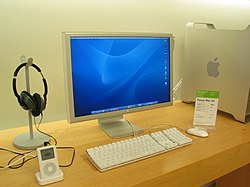
 An aluminum model Apple Cinema Display connected to a Power Mac G5, as seen with a 4th generation iPod Classic | |
| Developer | Apple Inc. |
|---|---|
| Type | Computer monitor |
| Release date | September 1, 1999 |
| Discontinued | July 20, 2011 |
| Predecessor | Apple Studio Display (1998–2004) |
| Successor | Apple Thunderbolt Display |
| Website | Official website at the Wayback Machine (archived January 3, 2010) |
The Apple Cinema Display is a line of flat-panel computer monitors developed and sold by Apple Inc. between 1999 and 2011. It was initially sold alongside the older line of Studio Displays, but eventually replaced them. Apple offered 20, 22, 23, 24, 27, and 30-inch sizes, with the last model being a 27-inch size with LED backlighting.
The Cinema Display line had three distinct design languages during its lifetime, the first featuring transparent polycarbonate plastic, and the later two featuring anodized aluminum. The first displays were designed to match the colorful plastic of the Power Mac G3 and later the Power Mac G4, while the second revisions were designed to match the aluminum aesthetics of the Power Mac G5 and PowerBook G4. The last available design matched the unibody laptops released in October 2008, and had a glossy screen.
The Apple Cinema Display name was retired in July 2011 with the introduction of the Apple Thunderbolt Display. Cinema Display models were no longer offered on the Apple Store website as of August 2014.
Models
[edit]Cinema Display
[edit]The first model—the 22-inch Apple Cinema Display—was introduced in September 1999 alongside the Power Mac G4 and used DVI for video input. It was enclosed in a high-density plastic frame with an easel-style stand and had a display resolution of 1600×1024.[1]
The 22-inch model was upgraded in July 2000 with the Apple Display Connector (ADC), which ran DVI, USB, and 28V power through a single connector.[2] It did not require an external power brick when it was connected to a computer with an ADC port on it.
It was eventually replaced by a 20-inch model on January 28, 2003, that also used an ADC connector and sported a widescreen display with up to 1680×1050 resolution and a brightness of 230 cd/m2.[3]
The 20-inch Cinema Display was updated again June 28, 2004 to match the aluminum design of the new Cinema HD Display. It retained the 1680x1050 resolution of the previous model but saw its brightness increased to 250 cd/m2, and was introduced at a $1,299 price point.[4] Apple continued to sell this display with no further changes until October 2008.
Cinema HD Display
[edit]The 23-inch model, dubbed the "Cinema HD Display," was introduced on March 21, 2002, and supported full 1:1 1080p playback on a 1920x1200 pixel display.
On June 28, 2004, Apple introduced a redesigned line of Cinema Displays, along with a new 30-inch model that, like the 23-inch model, carried the "Cinema HD Display" name. The new models had an anodized aluminum enclosure that matched Apple's high-end lines of professional products. An alternative stand or a wall mount could be used with a VESA mount adapter kit that was sold separately. Though the display enclosures had not been redesigned for a long period of time, several "silent" improvements were made to the brightness levels and contrast ratios.[5]
30-inch model compatibility
[edit]Due to the high resolution (2560×1600), the 30-inch model requires a graphics card that supports dual-link DVI. When the monitor was released, no Macintosh models were sold with a dual-link DVI port. A Power Mac G5 with the new Nvidia GeForce 6800 Ultra DDL graphics card was initially required to run the display at full resolution.[6]
All Power Mac G5, PowerBook G4, and Mac Pro mid 2006 to mid 2010 models are capable of supporting it without the use of any adapters. Discrete MacBook Pros are also capable of driving the 30-inch display, while all Macs released after October 2008 require an additional adapter. The 30-inch Cinema Display was introduced together with the GeForce 6800, which supports two DVI-DL ports. ATI's aftermarket AGP X800 Mac Edition also supports dual-link DVI, but has only one port. The Radeon 9600 Mac/PC was another aftermarket graphics card that supported dual-link DVI and was also compatible with older AGP-based Power Macs.
If a computer with a single-link DVI port (such as a Mac laptop with a mini-DVI connector) is connected to the 30-inch display, it will only run at 1280×800, even if the computer is capable of supporting 1920×1200 over a single-link connection.
LED Cinema Display
[edit]
On October 14, 2008, the 20-inch Cinema Display and the 23-inch Cinema HD Display were discontinued and replaced with the 24-inch LED Cinema Display. Its chassis is made with aluminum and glass, reflecting the appearances of the current iMac, unibody MacBook Pro, and unibody MacBook designs. The display features a built-in iSight camera, microphone and dual speaker system. A MagSafe cable runs from the back of the display and provides 85W of charging for MacBooks. It is the first Cinema Display to use LED backlighting and Mini DisplayPort for video input; however, the LED backlighting is edge-lit as opposed to the fully back-lit CCFL of the previous models, resulting in a lower brightness cd/m2 output.
The 24-inch LED Cinema Display is only officially compatible with Macs that have a Mini DisplayPort port. A third-party converter must be used in order to use the display with older Macs.
Newer MacBooks that only have USB-C (or Thunderbolt 3) ports can connect to the 24-inch LED Cinema Display using a USB-C to Mini DisplayPort adapter. However, Apple's Thunderbolt 3 to Thunderbolt 2 adapter cannot be used even though it has the same physical connections. Due to differences in the electrical signaling of Thunderbolt 2 and Mini DisplayPort, a generic USB-C to Mini DisplayPort adapter must be used instead.[7]

With the introduction of LED panels, the matte, anti-glare screen panels were retired, except for the 30-inch Cinema Display. Apple had already moved away from matte screens in its line of iMac desktop computers on August 7, 2007. Apple had not offered any equipment with a matte, anti-glare screen after the 15-inch non-Retina MacBook Pro was discontinued in October 2013 until the introduction of the Pro Display XDR in 2019. This had been a cause for concern among users who wanted matte screens for their area of work, particularly graphic designers, photographers and users who extensively view their screens.[8] Matte screens, like matte-surface photographs, diffuse reflected light and cannot provide the same black levels as glossy screens, which are required for working with HDR images and videos and thus are disadvantaged in this area. However, the matte screens have a far lower level of reflectivity, which improves ease-of-use.
The Wall Street Journal referred to Apple's removal of the matte screen as one of their worst design decisions.[9]
On July 26, 2010, the 24-inch LED Cinema Display and the 30-inch Cinema HD Display were replaced by a 27-inch model that supports up to 2560×1440 resolution. This model was sold for $999.[10]
On July 20, 2011, the LED Cinema Display was discontinued and replaced by the Apple Thunderbolt Display.
Technical specifications
[edit]LCD models
[edit]| Table of models | |||||||
|---|---|---|---|---|---|---|---|
| Component | LCD | ||||||
| Model | Apple Cinema Display | Apple Cinema HD Display | Apple Cinema Display | Apple Cinema HD Display | |||
| Model number | M5662 | M8149[11] | M8536 | A1038 | A1081 | A1082 | A1083 |
| Order number | N/A | M8058ZM/A | M8537ZM/A | M8893ZM/A | M9177LL/A | M9178LL/A | M9179LL/A |
| Release date(s) | September 1, 1999 | July 19, 2000 | March 21, 2002 | January 28, 2003 | June 28, 2004 | ||
| Discontinued date | July 19, 2000 | January 28, 2003 | June 28, 2004 | October 14, 2008 | July 26, 2010 | ||
| Display (all 16:10 and matte) | 22" 1600 × 1024 (fullscreen) | 23" 1920 × 1200 | 20" 1680 × 1050 | 23" 1920 × 1200 | 30" 2560 × 1600 | ||
| Pixel density (in pixels per inch) | 86.35 | 98.4 | 101.6 | ||||
| Brightness | 180 cd/m2 | 200 cd/m2 | 230 cd/m2 | 250 (or 300*) cd/m2 | 270 (or 400*) cd/m2 | 270 (or 400*) cd/m2 | |
| Contrast ratio | 300:1 | 350:1 | 400:1 (or 700:1*) | ||||
| Response time | Unknown | 16 ms | |||||
| Power | 62–77 W | 35–77 W | 70 W | 60 W | 65 W | 90 W | 150 W |
| Material | Polycarbonate frame | Aluminum frame | |||||
| Input | DVI-D | Apple Display Connector | DVI-D | Dual-link DVI-D | |||
| Output | None | 2 FireWire 400 ports and 2 USB 2.0 ports | |||||
- On August 7, 2006 the Aluminium Cinema displays had a silent upgrade that boosted the brightness and contrast ratios to 300/400 cd/m2 and 700:1. The last Cinema displays are still desirable to professionals being the last anti-glare displays made by Apple (until the Pro Display XDR) and having a true IPS 8-bit (no dithering) fully back-lit panel and slightly higher brightness than that of the newer Apple Thunderbolt displays, which have a reflective glossy screen and an edge-lit panel. These displays (including the LED Cinema 24”) are the last Apple desktop monitors made in 16:10 aspect ratio that is also used on MacBook Pros and provides more vertical work space.
LED-backlit LCD models
[edit]| Table of models | ||
|---|---|---|
| Component | LED-backlit LCD | |
| Model | LED Cinema Display (24")[12] | LED Cinema Display (27")[13][14] |
| Model number | A1267 | A1316 |
| Order number | MB382LL/A | MC007LL/A |
| Release date | October 14, 2008 | July 26, 2010 |
| Discontinued date | July 26, 2010 | December 2, 2013[citation needed] |
| Display (all widescreen) |
24", glossy glass covered screen, LCD, 1920 × 1200 | 27", glossy glass covered screen, LCD, 2560 × 1440[15] |
| 16:10 aspect ratio | 16:9 aspect ratio[15] | |
| Built-in camera | iSight 640 x 480 | |
| Brightness | 330 cd/m2 | 375 cd/m2 |
| Colors | 16.7 million (maximum) True Color | |
| Pixel density (in pixels per inch) |
94.3 | 109 |
| Response time | 13 ms | |
| Power | Up to 212 W (while charging a MacBook Pro) | Up to 250 W (while charging a MacBook Pro) |
| Material | Aluminum frame and glass front | |
| Cables and peripheral connections |
Cables
Peripheral connections | |
| Original price | US$899 | US$999[16] |
References
[edit]- ^ "Apple Cinema Display Original (22-Inch) Specs (Cinema Display, N/A, M5662): EveryMac.com". everymac.com. Retrieved November 17, 2021.
- ^ "Apple Cinema Display ADC (22-Inch) Specs (Cinema Display, M8058ZM/A, M8149): EveryMac.com". everymac.com. Retrieved November 17, 2021.
- ^ "Apple Cinema Display 20-Inch Specs (20" Cinema Display, M8893ZM/A, A1038): EveryMac.com". everymac.com. Retrieved November 30, 2023.
- ^ "Apple Cinema Display 20-Inch (Aluminum) Specs".
- ^ Taghap, Herschell (March 28, 2006). "Apple's 30" Cinema Display gets quiet upgrade". Ars Technica. Retrieved August 3, 2010.
- ^ "NVIDIA GeForce 6800 Ultra DDL (Mac Version)". barefeats.com. Retrieved January 26, 2021.
- ^ "How to connect your old Apple display to your new Mac". Macworld. Retrieved November 17, 2021.
- ^ Which? Magazine poll shows 89% of users want matte screens Archived August 14, 2011, at the Wayback Machine Which? magazine, June 9, 2011
- ^ Steve Jobs’s Worst Design Decisions? The Wall Street Journal, August 29, 2011
- ^ "Apple Cinema Display LED (27-Inch) Specs".
- ^ "22-inch Apple Cinema Display" (PDF). Apple. Retrieved November 17, 2021.
- ^ "LED Cinema Display – Technical Specifications". Apple Inc. Retrieved June 9, 2011.
- ^ "LED Cinema Display (27-inch) – Technical Specifications". Apple Inc. Retrieved June 9, 2011.
- ^ "Apple 27-inch Cinema Display review | TechRadar". August 17, 2022. Archived from the original on August 17, 2022. Retrieved November 30, 2023.
{{cite web}}: CS1 maint: bot: original URL status unknown (link) - ^ a b c "Apple LED Cinema Display (27-inch review: Apple LED Cinema Display (27-inch - CNET". November 30, 2023. Archived from the original on November 30, 2023. Retrieved November 30, 2023.
{{cite web}}: CS1 maint: bot: original URL status unknown (link) - ^ "Apple 27-inch LED Cinema Display Review". Archived from the original on September 10, 2013. Retrieved November 30, 2023.
{{cite web}}: CS1 maint: bot: original URL status unknown (link)
External links
[edit]- Apple Cinema Display 20/23/30-inch User's Guide at Apple
- Apple Cinema Display (1999) at Apple Matters[dead link]
- Apple Cinema Display Series at EveryMac
Articles
[edit]- Kubicki, Kristopher. "The 20 inch LCD shootout: Dell versus Apple", "AnandTech", April 27, 2005.
- Luepke, Lara. "Battle of the 30-inch monitors: Apple Cinema Display vs. Dell UltraSharp 3007WFP", "CNET prizefight", March 22, 2006.
Apple Cinema Display
View on GrokipediaHistory
Launch and Early Development
The Apple Cinema Display line debuted with the introduction of its flagship 22-inch model on September 1, 1999, coinciding with the launch of the Power Mac G4 at a special Apple event. Priced at $3,999, this pioneering flat-panel LCD monitor represented Apple's bold entry into high-resolution digital displays, featuring a DVI connector for video input and an integrated USB hub to support professional setups. The model was initially available bundled exclusively with the highest-end Power Mac G4 configurations, underscoring its positioning as a premium accessory for advanced computing tasks.[11][12][2] This launch marked a strategic rebranding from Apple's earlier Studio Display series, which had primarily served general consumer and entry-level professional needs with CRT technology. The "Cinema Display" name was selected to evoke cinematic quality and precision, specifically targeting creative professionals in fields such as video editing, graphic design, and digital content creation. Apple emphasized the display's superior color accuracy and integration with ColorSync technology, making it ideal for workflows involving Adobe software like Photoshop and Premiere, where consistent color reproduction across devices was essential. The acrylic enclosure and minimalist design further distinguished it as a high-end product aimed at multimedia creators, designers, and educators requiring expansive, high-fidelity screens.[11][13] Early development saw rapid refinements to address connectivity and accessibility. In July 2000, the 22-inch model received an update incorporating the Apple Display Connector (ADC), a proprietary cable that combined DVI video, USB data, and power delivery into a single connection, simplifying setups for Power Mac users. In 2002, the 22-inch line evolved further with refined LCD panels and enclosure designs, solidifying the Cinema Display as a cornerstone of Apple's professional display ecosystem before later expansions like the Cinema HD series.[14][2]Evolution and Discontinuation
The Cinema HD series represented a major evolution in Apple's display lineup, introducing higher-resolution LCD panels tailored for professional workflows. In March 2002, Apple launched the 23-inch Cinema HD Display with a native resolution of 1,920×1,200 pixels at a price of $1,999, enabling creative professionals—particularly those using Final Cut Pro for HDTV content authoring—to work with widescreen formats efficiently. This model built on the foundational 1999 Cinema Display by transitioning to flat-panel technology while maintaining a focus on color accuracy and performance for demanding applications. In January 2003, Apple introduced the 20-inch Cinema Display featuring a 1680×1050 resolution and priced at $1,299, providing a more affordable entry into widescreen displays for professionals.[4] The series expanded in June 2004 with the 30-inch Cinema HD Display, priced at $3,499 and offering a 2,560×1,600 resolution, which provided an expansive canvas for video editing, graphic design, and other high-end creative tasks. In 2009, this model received an update supporting Mini DisplayPort connectivity through Apple's dedicated adapter, extending compatibility with newer Mac systems equipped with the port. A pivotal shift occurred in October 2008 when Apple introduced LED-backlit models, starting with the 24-inch LED Cinema Display at $899, which incorporated Mini DisplayPort and an ambient light sensor for automatic brightness adjustment based on surrounding conditions. This was followed by the 27-inch LED Cinema Display in July 2010, priced at $999 and also featuring the ambient light sensor, further enhancing energy efficiency and user convenience for professional setups. The line's discontinuation began in July 2010, when Apple ended production of the 30-inch Cinema HD and 24-inch LED models, consolidating around the 27-inch variant. The full Cinema Display series was retired in July 2011 upon the launch of the Thunderbolt Display as its successor, driven by industry trends toward slimmer product designs that aligned with Apple's unibody Mac aesthetics and advancements in integrated GPUs, which diminished the need for standalone high-resolution external monitors among many users. The displays had achieved strong adoption among creative professionals, underscoring their impact in professional visual workflows.Models
Original Cinema Display
The Apple Cinema Display line was introduced in September 1999 with the 22-inch model, marking Apple's entry into high-end flat-panel monitors designed for professional use alongside the Power Mac G4. This original model featured a 22-inch active-matrix LCD panel with a native resolution of 1600×1024 pixels and support for 16.7 million colors, providing sharp text and graphics in a letterbox format. It included a tilt-and-swivel stand for ergonomic adjustment and weighed 25 pounds (11.4 kg), emphasizing durability for creative workflows.[2][11] Priced at $3,999 upon launch, the 22-inch Cinema Display was often bundled with high-end Power Mac G4 configurations, targeting entry-level professional users transitioning from CRT monitors like the predecessor Studio Display series. Its all-digital DVI interface ensured distortion-free imaging, and it integrated a two-port USB hub for peripheral connectivity, enhancing productivity in design and media applications.[2][11] In 2003, Apple expanded the lineup with the 20-inch Cinema Display, the first more affordable widescreen option in the series at $1,299, featuring a 1680×1050 resolution and a 16:10 aspect ratio suitable for professional color-accurate work. This model maintained the line's focus on active-matrix LCD technology with 16.7 million colors and was available through Apple Stores and authorized resellers, often paired with Power Mac G4 systems for creative professionals seeking larger viewing areas without premium pricing.[4][15]Cinema HD Display
The Cinema HD Display series represented Apple's mid-range professional monitors from the early 2000s, offering widescreen LCD panels with resolutions exceeding standard-definition capabilities, targeted at creative professionals requiring precise color and expansive workspaces. These models featured active-matrix LCD technology with cold cathode fluorescent lamp (CCFL) backlighting, aluminum enclosures in later variants, and integrated hubs for peripherals, bridging the gap between entry-level displays and high-end options. Introduced amid the transition to digital video interfaces, the series emphasized compatibility with Power Mac systems and support for 16.7 million colors via 10-bit color depth.[5][4] The 20-inch Cinema HD Display, launched in June 2004, provided a 1680-by-1050 resolution in a 16:10 aspect ratio, delivering over 1.7 million pixels for detailed imaging suitable for graphic design and video editing. It utilized an Apple Display Connector (ADC) hybrid that combined digital video, USB data, and power in a single cable, along with a built-in two-port USB hub for connectivity. Priced initially at $1,299, the model was updated to an aluminum enclosure with dual FireWire 400 and dual USB 2.0 ports, while retaining DVI compatibility in later revisions; production continued until 2009.[16] The 23-inch Cinema HD Display debuted in March 2002 as Apple's first widescreen LCD offering, with a 1920-by-1200 resolution supporting high-definition content like 1080p video in a letterbox format. Housed initially in a clear acrylic enclosure with an ADC connector and integrated USB hub, it launched at $3,499 before a price reduction to $1,999 in January 2003 to broaden accessibility. A 2004 redesign introduced an aluminum frame, dual FireWire 400 ports, and dual USB 2.0 ports, with DVI-only connectivity in subsequent updates; the model remained in production through 2008, evolving to meet demands for professional workflows.[5][17][10] The flagship 30-inch Cinema HD Display, introduced in June 2004, marked the largest consumer-market LCD at the time, boasting a 2560-by-1600 resolution—over 4 million pixels—for immersive applications in film editing and 3D modeling. It featured a Dual-Link DVI connector for high-bandwidth video, alongside a built-in hub with two FireWire 400 and two USB 2.0 ports, and was priced at $3,299. Compatible with Power Mac G5 systems equipped with graphics cards like the NVIDIA GeForce 6800 Ultra DDL, it required upgrades such as the ATI Radeon X800 XT for early Intel-based Macs to achieve full resolution; a late 2005 DVI-only update refined compatibility, with production spanning until 2008 and encompassing around five variants across enclosure and interface iterations.[6][18]LED Cinema Display
The LED Cinema Display series marked Apple's shift to energy-efficient LED-backlit LCD technology for its professional monitors, emphasizing slim profiles and integrated peripherals while building upon the design principles of prior Cinema HD models. Introduced between 2008 and 2010, these displays prioritized compatibility with contemporary Mac systems via Mini DisplayPort and incorporated multimedia features to enhance user experience in creative workflows.[19] The inaugural 24-inch LED Cinema Display, released in late 2008, featured a native resolution of 1920×1200 pixels on a glossy widescreen panel, powered by mercury-free LED backlighting for instant-on performance and reduced environmental impact. Priced at $899, it included a built-in iSight camera for video calls, stereo speakers, a three-port USB 2.0 hub for peripherals, and an integrated MagSafe charger to power compatible MacBooks. The enclosure adopted a thin 0.75-inch aluminum unibody design with an adjustable stand, measuring 21.2 inches wide and weighing 21 pounds (9.5 kg), which contributed to its modern aesthetic and portability.[7][20][21] Apple expanded the lineup in July 2010 with the 27-inch model, delivering a higher 2560×1440 resolution at a 16:9 aspect ratio for enhanced detail in video editing and graphic design, also utilizing LED backlighting and priced at $999. Key additions included an ambient light sensor that automatically adjusted brightness based on surrounding conditions, alongside the same iSight camera, speakers, USB hub, and MagSafe integration as the 24-inch version. Its edge-to-edge glass front and thin profile, supported by a height- and tilt-adjustable aluminum stand, weighed 23.5 pounds (10.7 kg) and earned EPEAT Gold certification for sustainability.[8][22][19] Comprising these two variants, the LED Cinema Display line was fully discontinued by mid-2011—the 24-inch model in July 2010 and the 27-inch in July 2011—transitioning Apple's offerings toward Thunderbolt-enabled displays with further refinements.[20][22]Design and Features
Enclosure and Build Quality
The Apple Cinema Display line began with the original 22-inch model in 1999, featuring a high-density polycarbonate enclosure designed for durability and a sleek, translucent aesthetic that complemented Apple's contemporary computer designs. This enclosure was paired with an easel-style tilt-only stand, allowing for a 10- to 30-degree adjustment to optimize viewing angles without swivel or height capabilities. The overall depth measured approximately 8.3 inches at minimum, expanding to 12.2 inches with the stand, while the unit weighed 25 pounds, contributing to its stable but substantial desktop presence.[23][24][25] Transitioning to early 2000s LCD models, such as the 20-inch variant introduced in 2003, the enclosure adopted an aluminum and polycarbonate hybrid construction, balancing lightweight rigidity with cost-effective molding. This design supported VESA mount compatibility for third-party arms or wall installations, enhancing ergonomic flexibility beyond the fixed stand. The 20-inch model achieved a slimmer profile with a depth of 6.8 inches and a weight of 14.5 pounds, making it easier to position on modern desks compared to its predecessor. Connectivity ports, including USB and FireWire, were seamlessly integrated into the enclosure's rear for a clean setup.[16][26][27] The Cinema HD series, spanning 2002 to 2006, refined the build with anodized aluminum bezels that provided a premium, corrosion-resistant finish and minimalistic appearance, reducing visible edges to under 1 inch on models like the 23-inch version. The enclosure depth for the 23-inch display measured 7.1 inches, supporting tilt adjustments via an included aluminum stand, while larger 30-inch models included an aluminum stand supporting tilt adjustment, with an optional VESA Mount Adapter for third-party mounting solutions. The unit weighed 27.5 pounds (12.5 kg).[28][29][30][6] In the LED era from 2008 to 2010, the 24-inch model introduced an ultra-thin enclosure with a depth of just 0.75 inches for the panel itself, encased in a glossy glass front over an aluminum frame for a modern, frameless look that weighed 11.6 pounds without the stand. Integrated cable management routed the proprietary single-cable system—combining power, video, and USB—through the stand's base, minimizing desk clutter and promoting a streamlined ergonomic setup with tilt-only adjustment.[31][20][32] Across generations, durability was enhanced by scratch-resistant coatings on aluminum and glass surfaces, though the glossy finishes on later LED models were susceptible to fingerprints and required regular cleaning for optimal appearance. Starting in 2008, Apple incorporated recyclable materials, including mercury-free components and arsenic-free glass, into the enclosures to meet environmental standards while maintaining structural integrity.[33][7]Integrated Peripherals and Connectivity
Early models in the Cinema Display line, such as the original 22-inch and 15-inch variants, integrated USB 1.1 hubs with two ports for peripheral connectivity, enhancing the Macintosh ecosystem without additional adapters. The Cinema HD series expanded this with dual USB 2.0 and FireWire 400 ports on the 20-inch, 23-inch, and 30-inch models, allowing direct connection of keyboards, mice, and storage devices.[2][10] The LED Cinema Displays introduced more advanced integrated peripherals. The 24-inch model (2008) featured a built-in 2.1 speaker system and a microphone, while the 27-inch version (2010) added an iSight camera for video conferencing, alongside three USB 2.0 ports and a MagSafe connector for charging compatible MacBooks via the single-cable solution.[7][8] Connectivity evolved from Apple's proprietary ADC (Apple Display Connector) in early models, which combined analog video, USB, and power, to DVI in mid-2000s Cinema HD displays for broader compatibility. Later LED models adopted Mini DisplayPort, supporting higher resolutions and daisy-chaining, with adapters available for DVI or VGA inputs on non-Mac systems.[34][20]Technical Specifications
Display Technology and Performance
The Apple Cinema Display line utilized thin-film transistor (TFT) active-matrix liquid crystal display (LCD) technology from its inception, transitioning from cold cathode fluorescent lamp (CCFL) backlighting in early models to light-emitting diode (LED) backlighting in later iterations for improved energy efficiency and color performance.[34] The original 22-inch model, introduced in 1999, featured a native resolution of 1600 × 1024 pixels, a typical brightness of 180 cd/m², and a contrast ratio of 300:1, with a viewing angle of 160 degrees horizontal and vertical.[34][2] Subsequent LCD models employed TFT panels with CCFL backlighting, offering resolutions tailored to screen sizes such as 1680 × 1050 for the 20-inch model, 1920 × 1200 for the 23-inch Cinema HD Display, and 2560 × 1600 for the 30-inch Cinema HD Display.[17] These displays achieved typical brightness levels of 200 to 270 cd/m² initially, later upgraded to 400 cd/m² in 2006 models like the 23-inch and 30-inch variants, paired with contrast ratios ranging from 350:1 to 700:1 and viewing angles of 160 to 178 degrees.[10] The LED-backlit models introduced in 2008 marked a shift to in-plane switching (IPS) panels, enhancing color consistency across wide viewing angles of 178 degrees and supporting 16.7 million colors.[19] The 24-inch LED Cinema Display delivered a 1920 × 1200 resolution with 330 cd/m² brightness and a 1000:1 contrast ratio, while the 27-inch model offered 2560 × 1440 resolution, 375 cd/m² brightness, the same contrast ratio, and a typical response time of 12 ms.[20][19] Color accuracy across the series was supported through Apple's ColorSync technology, enabling hardware-based calibration for professional workflows, though specific Pantone validation was not a standard feature for these models.[35] Representative examples, such as the 23-inch and 30-inch Cinema HD Displays, demonstrated reliable color reproduction suitable for creative tasks when calibrated.[10]Power and Environmental Specs
The Apple Cinema Display series featured varying power requirements depending on the model and backlight technology. The 30-inch Cinema HD Display, utilizing CCFL backlighting, had a maximum power draw of 150 watts, with energy saver mode limited to 3 watts or less.[36] In contrast, the 27-inch LED Cinema Display operated at around 94 watts in on mode across various voltages, though it could reach up to 250 watts maximum when simultaneously charging a connected MacBook Pro via its integrated MagSafe port.[37][19] Power adapters for the series evolved with the models. Early Cinema Displays, including the 30-inch Cinema HD variant, relied on external power bricks rated at 150 watts to supply the necessary voltage.[36] The LED Cinema Display integrated its power supply more seamlessly, featuring an external 250-watt brick that supported both the display's needs and up to 85 watts of charging output through a built-in MagSafe connector, eliminating the need for separate adapters in many setups.[19][38] Environmental compliance was a key aspect of later models, aligning with Apple's broader sustainability initiatives. Starting with 2007 models, the Cinema Display line met the European Union's RoHS Directive by restricting hazardous substances like lead, mercury, and certain flame retardants.[39] The LED Cinema Displays achieved EPEAT Gold certification in regions including the U.S., Canada, and several European countries, recognizing their reduced environmental impact through features such as arsenic-free glass and PVC-free materials.[19][37] These models also used mercury-free LED backlights, a significant improvement over the mercury-containing CCFL backlights in earlier CCFL-based displays like the 30-inch Cinema HD.[19] By 2008, packaging for the LED Cinema Display incorporated a minimum of 25 percent post-consumer recycled content, contributing to material efficiency and waste reduction.[39] All models in the series shared similar operating conditions to ensure reliable performance. They were designed for ambient temperatures between 50°F and 95°F (10°C to 35°C), with relative humidity ranging from 20% to 80% non-condensing to prevent moisture-related issues.[19][28]| Model | Maximum Power Draw | Energy Saver Mode | Backlight Type |
|---|---|---|---|
| 30-inch Cinema HD | 150W | ≤3W | CCFL |
| 27-inch LED | 250W (with charging) / 94W (on) | ≤1W | LED |