Hubbry Logo
Graphics softwareGraphics softwareMain
Open search
Graphics software
Community hub
Graphics software
logo
8 pages, 0 posts
0 subscribers
Be the first to start a discussion here.
Graphics software
Graphics software
from Wikipedia
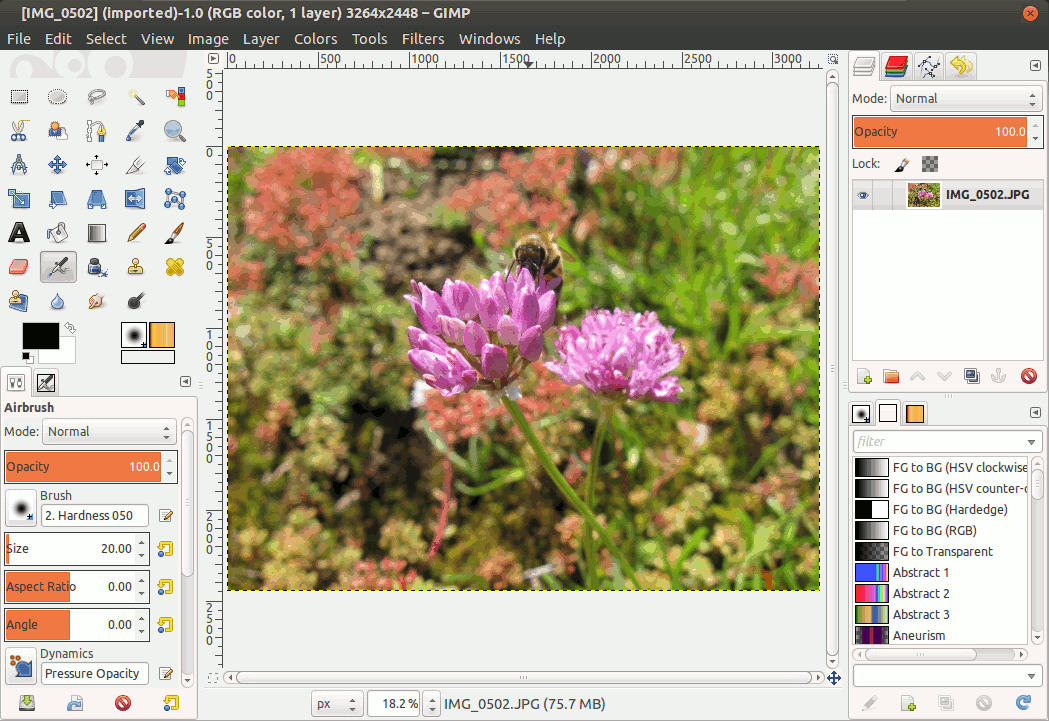
GIMP image editor

In computer graphics, graphics software refers to a program or collection of programs that enable a person to manipulate images or models visually on a computer.[1]

Computer graphics can be classified into two distinct categories: raster graphics and vector graphics, with further 2D and 3D variants. Many graphics programs focus exclusively on either vector or raster graphics, but there are a few that operate on both. It is simple to convert from vector graphics to raster graphics, but going the other way is harder. Some software attempts to do this.

In addition to static graphics, there are animation and video editing software. Different types of software are often designed to edit different types of graphics such as video, photos, and vector-based drawings. The exact sources of graphics may vary for different tasks, but most can read and write files.[2]

Most graphics programs have the ability to import and export one or more graphics file formats, including those formats written for a particular computer graphics program. Such programs include, but are not limited to: GIMP, Adobe Photoshop, CorelDRAW, Microsoft Publisher, Picasa, etc.[3]

The use of a swatch is a palette of active colours that are selected and rearranged by the preference of the user. A swatch may be used in a program or be part of the universal palette on an operating system. It is used to change the colour of a text or image and in video editing. Vector graphics animation can be described as a series of mathematical transformations that are applied in sequence to one or more shapes in a scene. Raster graphics animation works in a similar fashion to film-based animation, where a series of still images produces the illusion of continuous movement.

History

[edit]

SuperPaint was one of the earliest graphics software applications, first conceptualized in 1972 and achieving its first stable image in 1973[4]

Fauve Matisse (later Macromedia xRes) was a pioneering program of the early 1990s, notably introducing layers in customer software.[5]

Currently Adobe Photoshop is one of the most used and best-known graphics programs in the Americas, having created more custom hardware solutions in the early 1990s, but was initially subject to various litigation. GIMP is a popular open-source alternative to Adobe Photoshop.

See also

[edit]

References

[edit]
Revisions and contributorsEdit on WikipediaRead on Wikipedia
from Grokipedia
Graphics software refers to computer programs designed to create, edit, manipulate, and enhance visual content, including two-dimensional images, vector illustrations, and three-dimensional models. These tools enable users to generate digital for various purposes, from simple photo editing to complex animations, by providing features like drawing instruments, layer management, and format conversion. The primary categories of graphics software include raster-based editors, which operate on pixel grids to handle photographic and detailed images, and vector-based editors, which use mathematical equations to define scalable shapes and lines without loss of quality. Additional specialized types encompass software for constructing virtual objects and rendering engines for producing photorealistic visuals, often integrated in suites for comprehensive workflows. Common examples include for raster editing and for vector design, which support professional applications across industries. The origins of graphics software trace back to the 1960s, with Ivan Sutherland's 1963 program marking the first interactive system, revolutionizing visual manipulation through a interface. Subsequent advancements in the and , driven by hardware like frame buffers and personal computers, led to widespread adoption, evolving into modern tools that power production. Today, graphics software is integral to fields such as , , , and gaming, facilitating efficient and innovation in creation.

Overview

Definition and Scope

Graphics software encompasses computer programs specifically engineered to facilitate the creation, editing, and manipulation of visual content, such as digital images, animations, and three-dimensional models. These tools enable users to generate and refine graphical representations through computational processes, transforming abstract ideas into tangible visual outputs. The scope of graphics software is broad, spanning accessible consumer-oriented applications for everyday to sophisticated professional systems for advanced rendering and modeling. Consumer tools typically focus on intuitive interfaces for tasks like photo retouching, while professional variants support high-fidelity workflows in industries requiring complex visualizations, such as and . This duality ensures versatility across user levels, from hobbyists to experts, without compromising core functionality. At its core, graphics software serves multiple purposes, including visualization of complex datasets, of visual media, of real-world phenomena, and representation of through graphical means. These functions underpin applications in scientific , where patterns are rendered for interpretation, and in creative fields, where simulations aid prototyping. Such purposes highlight the software's integral role in enhancing comprehension and innovation across disciplines.

Key Features and Functionality

Graphics software typically includes layers as a fundamental feature, allowing users to organize and manipulate different elements of an image independently without affecting underlying content. Brushes provide versatile tools for drawing, painting, and texturing, often with customizable options for size, opacity, and shape to simulate various artistic mediums. Filters apply effects such as blurring, sharpening, or stylization to alter the appearance of images or selections, enabling quick enhancements or creative transformations. systems ensure consistent color representation across devices, supporting models like RGB for digital displays and CMYK for print, which reconcile differences in color reproduction. Support for file formats such as for lossless raster images with transparency and for is standard, facilitating compatibility and efficient storage. Input and output functionality in graphics software encompasses importing and exporting assets in multiple formats to integrate with other tools or workflows. Undo and redo systems enable reversal or reapplication of actions, often through a history dialog that tracks multiple steps for precise control. Plugin architectures extend core capabilities by allowing third-party extensions, such as custom filters or automation scripts, to be integrated seamlessly. User interface paradigms commonly feature toolbars for quick access to brushes, selection tools, and other instruments, alongside a central that serves as the primary workspace for . Non-destructive editing techniques, such as adjustment layers or smart objects, permit modifications without permanently altering original data, preserving flexibility for . Performance aspects address resolution handling by supporting high-DPI canvases and scalable outputs to maintain quality across devices. optimizes resource allocation for large files, with adjustable RAM usage and scratch disks to prevent slowdowns during intensive operations like multilayer editing.

Types of Graphics Software

2D Graphics Software

2D graphics software refers to applications specialized in the creation, manipulation, and editing of flat images represented either as raster grids of pixels or vector paths of geometric shapes. These tools form the backbone of production, enabling users to generate visual content without the complexities of spatial depth. Raster-based programs excel in handling detailed, photographic content, while vector-based ones prioritize scalable, resolution-independent designs, though both support hybrid workflows for and composition. The primary uses of 2D graphics software encompass digital painting for artistic creation, photo retouching to enhance or restore images, and layout design for arranging elements in compositions such as posters or web graphics. In digital painting, users apply brushes and textures to build illustrations directly on a , simulating traditional media like oils or inks. Photo retouching involves correcting imperfections, adjusting colors, and elements to achieve professional results, often for or portraiture. Layout design facilitates the organization of text, images, and shapes into cohesive visuals, supporting print and digital media production. Key tools in 2D graphics software include selection mechanisms, which allow precise isolation of image regions for targeted modifications, such as the lasso or magic wand for irregular or color-based areas. Transformation operations rely on affine transformations—linear mappings that preserve straight lines and parallelism—to perform scaling, , shearing, and without distorting proportions. Masking provides non-destructive control by applying maps to layers, revealing or concealing parts of an image to enable complex blending and adjustments. Prominent examples include , a raster editor renowned for its advanced photo retouching and capabilities through features like generative AI brushes and object removal tools. As an open-source counterpart, offers comparable raster editing functions, including customizable brushes for and layer-based for layouts, making it accessible for users seeking free alternatives. A typical in 2D graphics software progresses from initial sketching or importing assets, where users outline concepts using basic drawing tools, to iterative editing involving selections, affine transformations for repositioning, and masking for refinement. This leads to final composition, where layers are merged and effects applied, followed by export in formats like or . streamlines repetitive tasks, such as resizing multiple images or applying filters across a series, enhancing efficiency for large projects. Unlike 3D graphics software, which incorporates volumetric modeling and scene rendering, 2D graphics software remains focused on planar operations for streamlined image handling.

3D Graphics Software

3D graphics software encompasses applications designed for the creation, manipulation, and visualization of three-dimensional models, scenes, and animations, emphasizing computations in spatial dimensions to simulate depth, perspective, and realistic interactions. These tools enable users to build complex virtual environments by defining , applying surface properties, simulating light behavior, and sequencing motions over time. Unlike planar representations, 3D software handles volumetric data, allowing for rotations, scaling, and projections that mimic real-world physics. Core components of 3D graphics software include modeling techniques such as polygonal meshes, which represent objects as networks of connected vertices, edges, and faces for efficient manipulation and rendering, and Non-Uniform Rational B-Splines (NURBS), which use parametric curves and surfaces for smooth, scalable representations ideal for industrial designs. Texturing involves mapping 2D images or procedural patterns onto 3D surfaces to add detail and realism, often integrated with setups that simulate light sources, shadows, and reflections to enhance visual fidelity. Animation relies on keyframe , where users define object poses at specific timestamps, and the software computes intermediate frames to create fluid motion sequences. Rendering techniques in 3D graphics software distinguish between real-time and offline methods, with the former prioritizing speed for interactive applications like , often using rasterization to project 3D scenes onto 2D screens at 30-60 frames per second, and the latter enabling photorealistic outputs through computationally intensive processes. Ray tracing, a foundational offline technique, simulates light paths by tracing rays from the camera through the scene to detect intersections with geometry, computing reflections, refractions, and for lifelike results, though it demands significant processing time. Real-time ray tracing has emerged with hardware advancements, balancing quality and performance for dynamic scenes. Prominent examples include , an open-source suite that supports a complete 3D pipeline from polygonal and NURBS modeling to keyframe , texturing, lighting, and rendering, making it accessible for independent creators and studios. , widely used in film production, excels in character rigging, nonlinear , and simulation for creating detailed 3D assets in projects like Guardians of the Galaxy Vol. 3. These tools integrate with hardware acceleration via APIs such as , which exposes GPU capabilities for efficient 3D transformations, shading, and rendering across diverse platforms. The foundational shift to 3D graphics software occurred in the , driven by early simulations like flight programs that introduced wireframe rendering.

Specialized Applications

Vector and Raster Distinctions

represent images using a grid of , where each stores color and intensity to form the complete picture. This pixel-based model excels in rendering photorealistic images, such as photographs, by capturing fine gradations in color and texture that mimic natural visuals. However, suffer from scalability limitations; enlarging an image reveals , and issues like —jagged edges or moiré patterns—arise due to the discrete grid structure, particularly on diagonal lines or curves. In contrast, vector graphics employ mathematical descriptions of paths, lines, and shapes defined by points, rather than pixels, enabling infinite scalability without quality degradation. A common primitive in is the , which uses control points to define smooth, parametric curves that can be precisely manipulated and rendered at any resolution. This approach is ideal for creating logos, icons, and illustrations that require crisp edges and adaptability across sizes, from small web elements to large prints. Conversion between these models is essential in graphics workflows. Rasterization transforms vector paths into pixel grids by sampling the mathematical descriptions to fill pixels with appropriate colors, often using algorithms that interpolate across edges to determine coverage. Conversely, vectorization algorithms analyze raster images to detect edges and contours, approximating them with paths and curves to produce a scalable vector representation, though results may vary in fidelity depending on image complexity. Many graphics software tools support hybrid workflows, combining vector and raster capabilities for versatile design. For instance, primarily handles but incorporates raster effects, such as gradients and to convert images into editable vectors, allowing seamless integration of both paradigms. In 2D graphics software, these distinctions enable specialized editing for photographic manipulation versus scalable artwork creation.

CAD and Technical Software

Computer-aided design (CAD) and technical software are specialized graphics applications designed for creating precise technical drawings, models, and simulations used in , , and . These tools enable professionals to develop detailed representations of products and structures, ensuring compliance with industry standards for accuracy and functionality. Unlike general graphics software, CAD emphasizes parametric relationships and computational integration to support and production processes. Primary functions of CAD and technical software include parametric modeling, which allows users to define geometric shapes through adjustable parameters and constraints, facilitating modifications that propagate changes throughout the model to maintain design intent. This approach is essential for creating blueprints—detailed 2D and 3D technical drawings that serve as guides—and for running simulations, such as visualizing stress analysis to predict material behavior under load. For instance, finite element analysis (FEA) within these tools simulates structural integrity, helping engineers identify potential failures before physical prototyping. Key features encompass advanced dimensioning tools for annotating measurements with high precision, constraint solvers that enforce geometric relationships like parallelism or tangency, and standards for seamless data exchange with manufacturing systems. Dimensioning supports the addition of linear, angular, and radial annotations directly to drawings, ensuring clarity in specifications. Constraint solvers automate the resolution of dependencies in models, reducing errors during edits. is achieved through formats like STEP (), which enables neutral exchange of 3D product data across disparate CAD platforms without loss of fidelity. Prominent examples include , widely used for 2D and 3D drafting in architectural and mechanical projects, offering robust tools for creating scalable technical drawings. excels in mechanical design, providing parametric modeling for assemblies and integrated simulation capabilities to evaluate performance metrics like stress and . These applications support vector-based representations, which are ideal for technical contexts due to their and exactness in rendering lines and curves. In contrast to artistic graphics software, CAD and technical tools prioritize accuracy and adherence to standards, such as ISO tolerances for (GD&T), which define permissible deviations in dimensions to ensure manufacturability. Artistic software focuses on creative expression and visual appeal, often tolerating approximations, whereas CAD enforces precise measurements—down to fractions of a millimeter—and compliance with norms like ISO 129 for dimension indication, minimizing production risks.

History and Evolution

Early Developments

The origins of graphics software trace back to mid-20th-century efforts to enable interactive visual computing, building on analog display technologies. In the early , the computer, developed at MIT's Servomechanisms Laboratory, introduced one of the first real-time digital systems with a cathode-ray tube (CRT) display for output, allowing dynamic visualization of data such as scopes for military applications. This marked a shift from static analog instruments to programmable digital displays, laying groundwork for interactive graphics by enabling direct manipulation of visual elements on screen. A pivotal advancement came in 1963 with Ivan Sutherland's , created as his MIT doctoral thesis on the TX-2 computer, which pioneered the first (GUI) for drawing and manipulating geometric shapes using a . introduced core concepts like object-oriented drawing, constraints for maintaining relationships between elements, and real-time feedback, influencing subsequent interactive systems. Concurrently, at Stanford Research Institute advanced interactive graphics through his Augmentation Research Center, developing early pointing devices including the in 1964 and demonstrating integrated text-graphics editing in his 1968 "," which showcased collaborative visual interfaces over networks. By the 1970s, these foundations evolved into initial commercial and research tools on mainframe systems. Xerox PARC's Alto computer, operational from 1973, featured the first high-resolution bitmap display with 606x808 s, enabling pixel-level manipulation and (what you see is what you get) editing of graphics and text. That same year, Richard Shoup at PARC developed SuperPaint, the earliest raster-based paint program using a to allow freehand drawing, color selection, and image capture on a video display, which influenced later tools. Raster concepts also emerged in video games, as seen in titles like (1978), where grids on raster-scan monitors facilitated scalable, filled-shape rendering for dynamic gameplay visuals. These developments set the stage for the transition toward more complex 3D graphics in later decades.

Modern Advancements

The advent of personal computing in the 1980s and 1990s marked a significant expansion in graphics software accessibility, driven by the rise of dedicated PC applications that democratized and . , initially developed in 1987 by brothers Thomas and John Knoll and first released by Systems in 1990 after licensing in 1988, revolutionized editing with tools for image display, selection, , and basic tailored for Macintosh systems; subsequent versions introduced layers in 1994 and masks in 2008, solidifying its status as the industry standard for digital photography and design. Concurrently, the gaming sector propelled 3D graphics forward with id Software's , released in 1996, which leveraged emerging 3D accelerators like Voodoo cards to enable hardware-accelerated textured polygons and dynamic lighting, achieving frame rates previously unattainable in software rendering and influencing broader graphics pipelines. The 2000s witnessed an open-source surge that broadened graphics software's reach, exemplified by Blender's transition to free availability in October 2002 under the GNU General Public License, following a community-funded buyout from its original developer, Not a Number. This release empowered independent creators with a comprehensive 3D suite for modeling, animation, and rendering, fostering rapid community-driven enhancements like improved and particle systems. Complementing this, advancements in graphics processing units (GPUs) transformed real-time rendering; NVIDIA's series in the early 2000s introduced programmable shaders, allowing developers to offload complex calculations from CPUs, which exponentially increased rendering speeds for applications in gaming and visualization. From the onward, graphics software evolved toward cloud-based and mobile paradigms, enhancing collaborative workflows and portability. , founded in 2012 and publicly launched in 2016, pioneered browser-based vector design with real-time multiplayer editing, enabling teams to iterate on interfaces without file versioning conflicts, and integrating seamlessly with developer handoff tools. Mobile graphics apps further extended this trend, with Procreate's 2011 iPad debut offering intuitive touch-based raster painting with pressure-sensitive brushes, and Fresco's 2019 release introducing live brushes that simulate oil and watercolor physics on tablets. These developments were underpinned by hardware progress aligned with , where transistor density doubling roughly every two years drove GPU performance gains that outpaced traditional expectations, reducing rendering times from hours to seconds for complex scenes and enabling on-device processing in mobile contexts. In the 2020s, (AI) emerged as a transformative force, with tools like —launched in beta in March 2023—enabling text-to-image generation, vector creation, and ethical AI features trained on licensed content for commercial safety, integrated into applications like Photoshop to accelerate ideation and content production across industries.

Integration with Emerging Technologies

Graphics software has increasingly integrated (AI) to enhance creative workflows, particularly through generative tools that allow users to create or modify visual content from textual descriptions. Since 2022, , a diffusion-based , has been incorporated into major editors such as via plugins like Stability AI's beta tool, enabling text-to-image generation, , and style transfer directly within the software interface. Similarly, Autodesk's 3ds Max supports integration via third-party plugins such as tyFlow, for generating mood boards, artistic styles, and textures applicable to 3D models, streamlining and visualization processes. These integrations leverage pre-trained models to produce high-fidelity outputs, reducing manual effort in ideation and prototyping. Adobe has also advanced native AI capabilities, such as Firefly generative tools in Photoshop and , enabling seamless text-to-image and editing features as of 2025 updates. AI-driven auto-upscaling features further augment graphics software by intelligently enhancing without introducing artifacts. In , the Neural Filters use to upscale low-resolution images up to 4x or more, analyzing pixel patterns to reconstruct details and improve clarity for professional editing. Tools like Topaz Labs' AI upscaler employ specialized algorithms to increase resolution by up to 8x, preserving textures in photographs and , which is particularly useful for restoring archival graphics or preparing assets for high-DPI displays. Virtual reality (VR) and augmented reality (AR) technologies have been seamlessly woven into graphics software via real-time rendering engines, enabling immersive design experiences. Unity and serve as foundational platforms for integrating VR/AR into graphics workflows, supporting photorealistic rendering pipelines that allow designers to interact with 3D models in virtual environments. For instance, Unreal Engine's Nanite and Lumen systems facilitate real-time ray tracing in AR/VR applications, permitting architects and product designers to visualize and iterate on graphics assets within mixed reality setups without compromising performance. Unity's High Definition Render Pipeline (HDRP) similarly enables efficient real-time rendering for AR overlays in design software, enhancing collaboration through shared immersive sessions. Machine learning extends to object recognition and procedural generation, automating complex tasks in graphics editing. In photo editing suites like , ML algorithms identify objects, scenes, and faces to automate tagging, masking, and selective adjustments, such as removing backgrounds or enhancing specific elements with minimal user input. Procedural generation, powered by ML, allows for the algorithmic creation of expansive content like terrains or textures; for example, search-based and methods in tools like Houdini generate varied assets dynamically, improving scalability in and . These techniques draw on to predict and synthesize elements, fostering efficiency in large-scale projects. Despite these advancements, integrating emerging technologies into graphics software presents significant challenges, including ethical concerns and computational hurdles. AI-generated art raises issues of , as models trained on vast datasets may reproduce protected works without attribution, potentially undermining artists' livelihoods and rights. Ethical debates also encompass in training data, which can perpetuate in generated visuals, and the environmental impact of energy-intensive training processes. Computationally, AI features demand substantial GPU resources; generative tasks like require high-end hardware for real-time performance, leading to accessibility barriers for users without advanced setups and escalating operational costs in cloud-based workflows. Addressing these requires balanced approaches, such as transparent data sourcing and optimized algorithms to mitigate resource strain.

Open-Source and Commercial Landscape

The graphics software market in 2025 remains dominated by commercial offerings, particularly Adobe's Creative Cloud suite, which shifted to a subscription-based model in 2013 to ensure recurring revenue and continuous updates. This model has solidified Adobe's position, capturing over 70% of the creative software market share as of 2024, with Creative Cloud accounting for approximately 60% of the company's total revenue. Autodesk's ecosystem, encompassing tools like Maya and , further reinforces commercial leadership in and technical graphics, generating $1.6 billion in quarterly revenue in fiscal 2025 through similar subscription and enterprise licensing structures. These platforms prioritize professional workflows, integration, and features that drive widespread adoption among enterprises and freelancers. In contrast, the open-source sector has experienced notable growth, driven by community-driven projects that offer cost-free alternatives to . Tools like for and for have built robust user bases, with serving as a primary open-source counterpart to and rivaling Photoshop in raster editing capabilities. Contributions via platforms like have accelerated development, enabling frequent updates and feature enhancements through collaborative efforts from global developers, fostering accessibility for hobbyists, educators, and small-scale creators who seek customizable, no-cost solutions. Market trends in 2025 highlight the proliferation of models and Software-as-a-Service (SaaS) delivery, which lower entry barriers while monetizing advanced features. Platforms like exemplify this approach, blending free basic tools with premium upgrades to attract non-professionals and scale to over 240 million monthly active users as of 2025. Among professionals, paid tools maintain strong adoption, with serving over 30 million subscribers and representing the preferred choice for 70% of ers in high-stakes environments, underscoring the value of integrated, subscription-based ecosystems over free alternatives. Overall market valuation for software stands at approximately $9.62 billion in 2025, reflecting a 10.1% fueled by these hybrid models. Looking ahead, future directions in graphics software emphasize for secure digital asset ownership, enabling creators to verify and royalties for visual content through decentralized ledgers, with the digital rights management market projected to reach $1.25 billion by 2029. Additionally, practices are gaining traction in , focusing on energy-efficient algorithms and reduced computational footprints to minimize environmental impact, as seen in initiatives integrating eco-conscious optimizations into for long-term viability.

References

Add your contribution
Related Hubs
User Avatar
No comments yet.