



Community hub
 | This article needs additional citations for verification. (October 2025) |

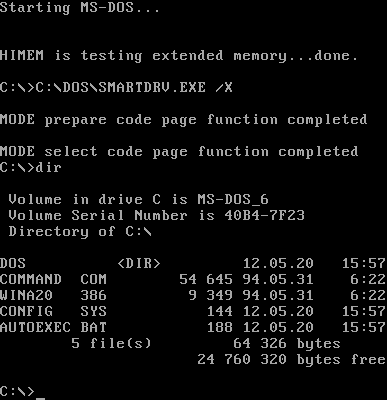
_on_Bochs_sshot20040912.png)
DOS (/dɒs/, /dɔːs/) is a family of disk-based operating systems for IBM PC compatible computers.[1] The DOS family primarily consists of IBM PC DOS and a rebranded version, Microsoft's MS-DOS, both of which were introduced in 1981. Later, compatible systems from other manufacturers are DR-DOS (1988), ROM-DOS (1989), PTS-DOS (1993), and FreeDOS (1994). MS-DOS dominated the IBM PC compatible market between 1981 and 1995.
Although the name has come to be identified specifically with MS-DOS and compatible operating systems, DOS is a platform-independent acronym for disk operating system,[2] whose use predates the IBM PC. Dozens of other operating systems also use the acronym, beginning with the mainframe DOS/360 from 1966. Others include Apple DOS, Apple ProDOS, Atari DOS, Commodore DOS, TRSDOS, and AmigaDOS.
History
[edit]Origins
[edit]
IBM PC DOS (and the separately sold MS-DOS) and its predecessor, 86-DOS, ran on Intel 8086 16-bit processors. It was developed to be similar to Digital Research's CP/M—the dominant disk operating system for 8-bit Intel 8080 and Zilog Z80 microcomputers—in order to simplify porting CP/M applications to MS-DOS.

When IBM introduced the IBM PC, built with the Intel 8088 microprocessor, they needed an operating system. Chairman John Opel had a conversation with fellow United Way National Board Executive Committee member Mary Maxwell Gates, who referred Opel to her son Bill Gates for help with an 8088-compatible build of CP/M.[3] IBM was then sent to Digital Research, and a meeting was set up. However, initial negotiations for the use of CP/M broke down: Digital Research wished to sell CP/M on a royalty basis, while IBM sought a single license, and to change the name to "PC DOS". Digital Research founder Gary Kildall refused, and IBM withdrew.[4][5]
.png)
IBM again approached Bill Gates. Gates in turn approached Seattle Computer Products. There, programmer Tim Paterson had developed a variant of CP/M-80, intended as an internal product for testing SCP's new 16-bit Intel 8086 CPU card for the S-100 bus. The system was initially named QDOS (Quick and Dirty Operating System), before being made commercially available as 86-DOS. Microsoft purchased 86-DOS, allegedly for US$50,000. This became Microsoft Disk Operating System, MS-DOS, introduced in 1981. Within a year Microsoft licensed MS-DOS to over 70 other companies,[6] which supplied the operating system for their own hardware, sometimes under their own names such as Zenith Data Systems's Z-DOS.[7] Microsoft later required the use of the MS-DOS name, with the exception of the IBM variant. IBM continued to develop their version, PC DOS, for the IBM PC. Digital Research became aware that an operating system similar to CP/M was being sold by IBM (under the same name that IBM insisted upon for CP/M), and threatened legal action. IBM responded by offering an agreement: they would give PC consumers a choice of PC DOS or CP/M-86, Kildall's 8086 version. Side-by-side, CP/M cost US$200 more than PC DOS, and sales were low. CP/M faded, with MS-DOS and PC DOS becoming the marketed operating system for PCs and PC compatibles.[4]
Microsoft originally sold MS-DOS only to original equipment manufacturers (OEMs). One major reason for this was that not all early PCs were 100% IBM PC compatible. DOS was structured such that there was a separation between the system specific device driver code (IO.SYS) and the DOS kernel (MSDOS.SYS). Microsoft provided an OEM Adaptation Kit (OAK) which allowed OEMs to customize the device driver code to their particular system. By the early 1990s, most PCs adhered to IBM PC standards so Microsoft began selling a retail version of MS-DOS, starting with MS-DOS 5.0.
In the mid-1980s, Microsoft developed a multitasking version of DOS.[8][9] This version of DOS is generally referred to as "European MS-DOS 4" because it was developed for ICL and licensed to several European companies. This version of DOS supports preemptive multitasking, shared memory, device helper services and New Executable ("NE") format executables. None of these features were used in later versions of DOS, but they were used to form the basis of the OS/2 1.0 kernel. This version of DOS is distinct from the widely released PC DOS 4.0 which was developed by IBM and based upon DOS 3.3.

Digital Research attempted to regain the market lost from CP/M-86, initially with Concurrent DOS, FlexOS and DOS Plus (both compatible with both MS-DOS and CP/M-86 software), later with Multiuser DOS (compatible with both MS-DOS and CP/M-86 software) and DR DOS (compatible with MS-DOS software). Digital Research was bought by Novell, and DR DOS became PalmDOS and Novell DOS; later, it was part of Caldera (under the names OpenDOS and DR-DOS 7.02/7.03), Lineo, and DeviceLogics.
Gordon Letwin wrote in 1995 that "DOS was, when we first wrote it, a one-time throw-away product intended to keep IBM happy so that they'd buy our languages."[10] Microsoft expected that it would be an interim solution before the introduction of Xenix. The company planned to improve MS-DOS over time, so it would be almost indistinguishable from single-user Xenix, or XEDOS, which would also run on the Motorola 68000, Zilog Z-8000, and LSI-11; they would be upwardly compatible with Xenix, which BYTE in 1983 described as "the multi-user MS-DOS of the future".[11][12]

IBM, however, did not want to replace DOS.[13] After AT&T began selling Unix, Microsoft and IBM began developing OS/2 as an alternative.[10] The two companies later had a series of disagreements over two successor operating systems to DOS, OS/2 and Windows.[14] They split development of their DOS systems as a result.[15] The last retail version of MS-DOS was MS-DOS 6.22; after this, MS-DOS became part of Windows 95, 98 and Me. The last retail version of PC DOS was PC DOS 2000 (also called PC DOS 7 revision 1), though IBM did later develop PC DOS 7.10 for OEMs and internal use.
The FreeDOS project began on 26 June 1994, when Microsoft announced it would no longer sell or support MS-DOS. Jim Hall then posted a manifesto proposing the development of an open-source replacement. Within a few weeks, other programmers including Pat Villani and Tim Norman joined the project. A kernel, the COMMAND.COM command line interpreter (shell), and core utilities were created by pooling code they had written or found available. There were several official pre-release distributions of FreeDOS before the FreeDOS 1.0 distribution was released on 3 September 2006. Made available under the GNU General Public License (GPL), FreeDOS does not require license fees or royalties.[16][17]
Decline
[edit]Early versions of Microsoft Windows ran on MS-DOS.[18] By the early 1990s, the Windows graphical shell saw heavy use on new systems. In 1995, Windows 95 was bundled as a standalone operating system that did not require a separate DOS license. Windows 95 (and Windows 98 and ME, that followed it) took over as the default OS kernel, though the MS-DOS component remained for compatibility. With Windows 95 and 98, but not ME, the MS-DOS component could be run without starting Windows.[19][20][21] With DOS no longer required to use Windows, the majority of users stopped using it directly.
Continued use
[edit]
As of 2025[update], available compatible systems are FreeDOS, ROM-DOS, PTS-DOS, RxDOS[22] and REAL/32. Some computer manufacturers, including Dell and HP, sell computers with FreeDOS as an OEM operating system,[23][24] [needs update] and some developers and computer engineers still use it because it is close to the hardware.[citation needed]
Embedded systems
[edit]DOS's structure of accessing hardware directly allows it to be used in embedded devices. The final versions of DR-DOS are still aimed at this market.[25] ROM-DOS was used as operating system for the Canon PowerShot Pro 70.[26]
Emulation
[edit]On Linux, it is possible to run DOSEMU, a Linux-native virtual machine for running DOS programs at near native speed. There are a number of other emulators for running DOS on various versions of Unix and Microsoft Windows such as DOSBox.[27][28] DOSBox is designed for legacy gaming (e.g. King's Quest, Doom) on modern operating systems.[18][27] DOSBox includes its own implementation of DOS which is strongly tied to the emulator and cannot run on real hardware, but can also boot MS-DOS, FreeDOS, or other DOS operating systems if needed.
Design
[edit]MS-DOS and IBM PC DOS related operating systems are commonly associated with machines using the Intel x86 or compatible CPUs, mainly IBM PC compatibles. Machine-dependent versions of MS-DOS were produced for many non-IBM-compatible x86-based machines, with variations from relabelling of the Microsoft distribution under the manufacturer's name, to versions specifically designed to work with non-IBM-PC-compatible hardware. As long as application programs used DOS APIs instead of direct hardware access, they could run on both IBM-PC-compatible and incompatible machines. The original FreeDOS kernel, DOS-C, was derived from DOS/NT for the Motorola 68000 series of CPUs in the early 1990s. While these systems loosely resembled the DOS architecture, applications were not binary compatible due to the incompatible instruction sets of these non-x86-CPUs. However, applications written in high-level languages could be ported easily.
DOS is a single-user, single-tasking operating system with basic kernel functions that are non-reentrant: only one program at a time can use them, and DOS itself has no functionality to allow more than one program to execute at a time. The DOS kernel provides various functions for programs (an application program interface), like character I/O, file management, memory management, program loading and termination.
DOS provides the ability for shell scripting via batch files (with the filename extension .BAT). Each line of a batch file is interpreted as a program to run. Batch files can also make use of internal commands, such as GOTO and conditional statements.[29]
The operating system offers an application programming interface that allows development of character-based applications, but not for accessing most of the hardware, such as graphics cards, printers, or mice. This required programmers to access the hardware directly, usually resulting in each application having its own set of device drivers for each hardware peripheral. Hardware manufacturers would release specifications to ensure device drivers for popular applications were available.[30]
Boot sequence
[edit]- The bootstrap loader on PC-compatible computers, the master boot record, is located beginning at the boot sector, the first sector on the first track (track zero), of the boot disk. The ROM BIOS will load this sector into memory at address 0000h:7C00h, and typically check for a signature "55h AAh" at offset +1FEh. If the sector is not considered to be valid, the ROM BIOS will try the next physical disk in the row, otherwise it will jump to the load address with certain registers set up.
- If the loaded boot sector happens to be a Master Boot Record (MBR), as found on partitioned media, it will relocate itself to 0000h:0600h in memory,[31] otherwise this step is skipped. The MBR code will scan the partition table, which is located within this sector, for an active partition (modern MBRs check if bit 7 is set at offset +1BEh+10h*n, whereas old MBRs simply check for a value of 80h), and, if found, load the first sector of the corresponding partition, which holds the Volume Boot Record (VBR) of that volume, into memory at 0000h:7C00h in the similar fashion as if it had been loaded by the ROM BIOS itself. The MBR will then pass execution to the loaded portion with certain registers set up.
- The sector content loaded at 0000h:7C00h constitutes a VBR now. VBRs are operating system specific and cannot be exchanged between different DOS versions in general, as the exact behaviour differs between different DOS versions. In very old versions of DOS such as DOS 1.x, the VBR would load the whole IO.SYS/IBMBIO.COM file into memory at 0000h:0600h.[32] For this to work, these sectors had to be stored in consecutive order on disk by SYS. In later issues, it would locate and store the contents of the first two entries in the root directory at 0000h:0500h and if they happen to reflect the correct boot files as recorded in the VBR, the VBR would load the first 3 consecutive sectors of the IO.SYS/IBMBIO.COM file into memory at 0070h:0000h. The VBR also has to take care to preserve the contents of the Disk Parameter Table (DPT). Finally, it passes control to the loaded portion by jumping to its entry point with certain registers set up (with considerable differences between different DOS versions).
- In later[clarification needed] DOS versions, where the VBR has loaded only the first 3 sectors of the IO.SYS/IBMBIO.COM file into memory, the loaded portion contains another boot loader, which will then load the remainder of itself into memory, using the root directory information stored at 0000h:0500h. For most versions, the file contents still need to be stored in consecutive order on disk. In older versions of DOS, which were still loaded as a whole, this step is skipped.
- The DOS system initialization code will initialize its built-in device drivers and then load the DOS kernel, located in MSDOS.SYS on MS-DOS systems, into memory as well. In Windows 9x, the DOS system initialization code and built-in device drivers and the DOS kernel are combined into a single IO.SYS file while MSDOS.SYS is used as a text configuration file.
- The CONFIG.SYS file is then read to parse configuration parameters. The SHELL variable specifies the location of the shell which defaults to COMMAND.COM.
- The shell is loaded and executed.
- The startup batch file AUTOEXEC.BAT is then run by the shell.[33][34]
The DOS system files loaded by the boot sector must be contiguous and be the first two directory entries.[35] As such, removing and adding this file is likely to render the media unbootable. It is, however, possible to replace the shell at will, a method that can be used to start the execution of dedicated applications faster. This limitation does not apply to any version of DR DOS, where the system files can be located anywhere in the root directory and do not need to be contiguous. Therefore, system files can be simply copied to a disk provided that the boot sector is DR DOS compatible already.
In PC DOS and DR DOS 5.0 and above, the DOS system files are named IBMBIO.COM instead of IO.SYS and IBMDOS.COM instead of MSDOS.SYS. Older versions of DR DOS used DRBIOS.SYS and DRBDOS.SYS instead.
Starting with MS-DOS 7.0 the binary system files IO.SYS and MSDOS.SYS were combined into a single file IO.SYS whilst MSDOS.SYS became a configuration file similar to CONFIG.SYS and AUTOEXEC.BAT. If the MSDOS.SYS BootGUI directive is set to 0, the boot process will stop with the command processor (typically COMMAND.COM) loaded, instead of executing WIN.COM automatically.
File system
[edit]DOS uses a filesystem which supports 8.3 filenames: 8 characters for the filename and 3 characters for the extension. Starting with DOS 2 hierarchical directories are supported. Each directory name is also 8.3 format but the maximum directory path length is 64 characters due to the internal current directory structure (CDS) tables that DOS maintains. Including the drive name, the maximum length of a fully qualified filename that DOS supports is 80 characters using the format drive:\path\filename.ext followed by a null byte.
DOS uses the File Allocation Table (FAT) filesystem. This was originally FAT12 which supported up to 4078 clusters per drive. DOS 3.0 added support for FAT16 which used 16-bit allocation entries and supported up to 65518 clusters per drive. Compaq MS-DOS 3.31 added support for FAT16B which removed the 32‑MiB drive limit and could support up to 512 MiB. Finally MS-DOS 7.1 (the DOS component of Windows 9x) added support for FAT32 which used 32-bit allocation entries and could support hard drives up to 137 GB (127 GiB) and beyond.
Starting with DOS 3.1, file redirector support was added to DOS. This was initially used to support networking but was later used to support CD-ROM drives with MSCDEX. IBM PC DOS 4.0 also had preliminary installable file system (IFS) support but this was unused and removed in DOS 5.0. DOS also supported Block Devices ("Disk Drive" devices) loaded from CONFIG.SYS that could be used under the DOS file system to support network devices.
Drive naming scheme
[edit]In DOS, drives are referred to by identifying letters. Standard practice is to reserve "A" and "B" for floppy drives. On systems with only one floppy drive DOS assigns both letters to the drive, prompting the user to swap disks as programs alternate access between them. This facilitates copying from floppy to floppy or having a program run from one floppy while accessing its data on another. Hard drives were originally assigned the letters "C" and "D". DOS could only support one active partition per drive. As support for more hard drives became available, this developed into first assigning a drive letter to each drive's active primary partition, then making a second pass over the drives to allocate letters to logical drives in the extended partition, then a third pass to give any other non-active primary partitions their names (where such additional partitions existed and contained a DOS-supported file system). Lastly, DOS allocates letters for optical disc drives, RAM disks, and other hardware. Letter assignments usually occur in the order the drivers are loaded, but the drivers can instruct DOS to assign a different letter; drivers for network drives, for example, typically assign letters nearer to the end of the alphabet.[36]
Because DOS applications use these drive letters directly (unlike the /dev directory in Unix-like systems), they can be disrupted by adding new hardware that needs a drive letter. An example is the addition of a new hard drive having a primary partition where a pre-existing hard drive contains logical drives in extended partitions; the new drive will be assigned a letter that was previously assigned to one of the extended partition logical drives. Moreover, even adding a new hard drive having only logical drives in an extended partition would still disrupt the letters of RAM disks and optical drives. This problem persisted through Microsoft's DOS-based 9x versions of Windows until they were replaced by versions based on the NT line, which preserves the letters of existing drives until the user changes them.[36] Under DOS, this problem can be worked around by defining a SUBST drive and installing the DOS program into this logical drive. The assignment of this drive would then be changed in a batch job whenever the application starts. Under some versions of Concurrent DOS, as well as under Multiuser DOS, System Manager and REAL/32, the reserved drive letter L: will automatically be assigned to the corresponding load drive whenever an application starts.
Reserved device names
[edit]
There are reserved device names in DOS that cannot be used as filenames regardless of extension as they are occupied by built-in character devices. These restrictions also affect several Windows versions, in some cases causing crashes and security vulnerabilities.[37]
The reserved names are:
COM1throughCOM9(serial communication ports)LPT1throughLPT9(Parallel port for line printers)CON("console"; represents keyboard in the input stream and display in the output stream)AUX("auxiliary"; represents the first connected COM port)[38]PRN("printer"; represents the first connected LPT port)[38]NUL(null device) added in 86-DOS 1.10 and PC DOS 1.0
In Windows 95 and Windows 98, typing in the location of the reserved name (such as CON/CON, AUX/AUX, or PRN/PRN) crashes the operating system, of which Microsoft has provided a security fix for the issue. In Windows XP, the name of the file or folder using a reserved name silently reverts to its previous name, with no notification or error message. In Windows Vista and later, attempting to use a reserved name for a file or folder brings up an error message saying "The specified device name is invalid."
These names (except for NUL) have continued to be supported in all versions of MS-DOS, PC DOS and DR-DOS ever since.[39] LST was also available in some OEM versions of MS-DOS 1.25, whereas other OEM versions of MS-DOS 1.25 already used LPT1 (first line printer) and COM1 (first serial communication device) instead, as introduced with PC DOS. In addition to LPT1 and LPT2 as well as COM1 to COM3, Hewlett-Packard's OEM version of MS-DOS 2.11 for the HP Portable Plus also supported LST as alias for LPT2 and 82164A as alias for COM2;[40][41] it also supported PLT for plotters.[40][41] Otherwise, COM2, LPT2, LPT3 and the CLOCK$ (still named CLOCK in some issues of MS-DOS 2.11[42][40][41]) clock device were introduced with DOS 2.0, and COM3 and COM4 were added with DOS 3.3.[39] Only the multitasking MS-DOS 4 supported KEYBD$ and SCREEN$. DR DOS 5.0 and higher and Multiuser DOS support an $IDLE$ device for dynamic idle detection to saving power and improve multitasking. LPT4 is an optional built-in driver for a fourth line printer supported in some versions of DR-DOS since 7.02. CONFIG$ constitutes the real mode PnP manager in MS-DOS 7.0–8.0.
AUX typically defaults to COM1, and PRN to LPT1 (LST),[39] but these defaults can be changed in some versions of DOS to point to other serial or parallel devices.[40][41][43] The PLT device (present only in some HP OEM versions of MS-DOS) was reconfigurable as well.[40][41]
Filenames ended with a colon (:) such as NUL: conventionally indicate device names, but the colon is not actually a part of the name of the built-in device drivers. Colons are not necessary to be typed in some cases, for example:
ECHO This achieves nothing > NUL
It is still possible to create files or directories using these reserved device names, such as through direct editing of directory data structures in disk sectors. Such naming, such as starting a file name with a space, has sometimes been used by viruses or hacking programs to obscure files from users who do not know how to access these locations.
Memory management
[edit]DOS was designed for the Intel 8088 processor, which can only directly access a maximum of 1 MiB of RAM.[44] Both IBM and Microsoft chose 640 kibibytes (KiB) as the maximum amount of memory available to programs and reserved the remaining 384 KiB for video memory, the read-only memory of adapters on some video and network peripherals, and the system's BIOS. By 1985, some DOS applications were already hitting the memory limit, while much of reserved was unused, depending on the machine's specifications.[45]
Specifications were developed to allow access to additional memory. The first was the Expanded Memory Specification (EMS) was designed to allow memory on an add-on card to be accessed via a 64 KiB page frame in the reserved upper memory area.[46] 80386 and later systems could use a virtual 8086 mode (V86) mode memory manager like EMM386 to create expanded memory from extended memory without the need of an add-on card.[47] The second specification was the Extended Memory Specification (XMS) for 80286 and later systems. This provided a way to copy data to and from extended memory, access to the 65,520-byte high memory area[48] directly above the first megabyte of memory and the upper memory block area. Generally XMS support was provided by HIMEM.SYS or a V86 mode memory manager like QEMM or 386MAX which also supported EMS.[49]
Starting with DOS 5,[50] DOS could directly take advantage of the HMA by loading its kernel code and disk buffers there via the DOS=HIGH statement in CONFIG.SYS. DOS 5+ also allowed the use of available upper memory blocks via the DOS=UMB statement in CONFIG.SYS.[51]
DOS under OS/2 and Windows
[edit]The DOS emulation in OS/2 and Windows runs in much the same way as native applications do. They can access all of the drives and services, and can even use the host's clipboard services. Because the drivers for file systems and such forth reside in the host system, the DOS emulation needs only provide a DOS API translation layer which converts DOS calls to OS/2 or Windows system calls. The translation layer generally also converts BIOS calls and virtualizes common I/O port accesses which many DOS programs commonly use.
In Windows 3.1 and 9x, the DOS virtual machine is provided by WINOLDAP. WinOldAp creates a virtual machine based on the program's PIF file, and the system state when Windows was loaded. The DOS graphics mode, both character and graphic, can be captured and run in the window. DOS applications can use the Windows clipboard by accessing extra published calls in WinOldAp, and one can paste text through the WinOldAp graphics.
The emulated DOS in OS/2 and Windows NT is based upon DOS 5. Although there is a default configuration (config.sys and autoexec.bat), one can use alternate files on a session-by-session basis. It is possible to load drivers in these files to access the host system, although these are typically third-party.
Under OS/2 2.x and later, the DOS emulation is provided by DOSKRNL. This is a file that represents the combined IBMBIO.COM and IBMDOS.COM, the system calls are passed through to the OS/2 windowing services. DOS programs run in their own environment, the bulk of the DOS utilities are provided by bound DOS / OS2 applications in the \OS2 directory. OS/2 can run Windows 3.1 applications by using a modified copy of Windows (Win-OS/2). The modifications allow Windows 3.1 programs to run seamlessly on the OS/2 desktop, or one can start a WinOS/2 desktop, similar to starting Windows from DOS.
OS/2 allows for 'DOS from Drive A:', (VMDISK). This is a real DOS, like MS-DOS 6.22 or PC DOS 5.00. One makes a bootable floppy disk of the DOS, adds a number of drivers from OS/2, and then creates a special image. The DOS booted this way has full access to the system, but provides its own drivers for hardware. One can use such a disk to access cdrom drives for which there is no OS/2 driver.
In all 32-bit (IA-32) editions of the Windows NT family since 1993, DOS emulation is provided by way of a virtual DOS machine (NTVDM). 64-bit (IA-64 and x86-64) versions of Windows do not support NTVDM and cannot run 16-bit DOS applications directly; third-party emulators such as DOSbox can be used to run DOS programs on those machines.
User interface
[edit]DOS systems use a command-line interface. A program is started by entering its filename at the command prompt. DOS systems include utility programs and provide internal commands that do not correspond to programs.[52]
In an attempt to provide a more user-friendly environment, numerous software manufacturers wrote file management programs that provided users with WIMP interfaces. Microsoft Windows is a notable example, eventually resulting in Microsoft Windows 9x becoming a self-contained program loader, and replacing DOS as the most-used PC-compatible program loader. Text user interface programs included Norton Commander, DOS Navigator, Volkov Commander, Quarterdesk DESQview, and Sidekick. Graphical user interface programs included Digital Research's GEM (originally written for CP/M) and GEOS.
Eventually, the manufacturers of major DOS systems began to include their own environment managers. MS-DOS/IBM DOS 4 included DOS Shell;[53] DR DOS 5.0, released the following year, included ViewMAX, based upon GEM.[54]
Terminate and stay resident
[edit]Although DOS is not a multitasking operating system, it does provide a terminate-and-stay-resident (TSR) function which allows programs to remain resident in memory. These programs can hook the system timer or keyboard interrupts to allow themselves to run tasks in the background or to be invoked at any time, preempting the current running program and effectively implementing a simple form of multitasking on a program-specific basis. The DOS PRINT command does this to implement background print spooling. Borland Sidekick, a popup personal information manager (PIM), also uses this technique.
Terminate-and-stay-resident programs are also used to provide additional features not available by default. Programs like CED and DOSKEY provide command-line editing facilities beyond what is available in COMMAND.COM. Programs like the Microsoft CD-ROM Extensions (MSCDEX) provide access to files on CD-ROM disks.
Some TSRs can even perform a rudimentary form of task switching. For example, the shareware program Back and Forth (1990)[55] has a hotkey to save the state of the currently-running program to disk, load another program, and switch to it, making it possible to switch "back and forth" between programs (albeit slowly, due to the disk access required). Back and Forth could not enable background processing however; that needed DESQview (on at least a 386).
Software
[edit]
- Arachne, a 16-bit graphical web browser
- dBase, database program
- Harvard Graphics, a presentation graphics design program
- Lotus 1-2-3, a spreadsheet which has been credited with the success of the IBM PC[56]
- Norton Commander and XTree, file management utilities
- PKZIP, the utility that quickly became the standard in file compression
- ProComm, Qmodem, and Telix, modem communication programs
- Sidekick, personal information manager that could be used from within other programs
- WordPerfect, a word processor that was dominant in the 1980s
- WordStar, word processor originally for CP/M that became popular on the IBM PC
Development tools
[edit]- BASIC language interpreters. BASICA and GW-BASIC
- DJGPP, the 32-bit DPMI DOS port of gcc
- Microsoft Macro Assembler, Microsoft C, and CodeView from Microsoft
- Watcom C/C++ from Watcom
- Turbo Pascal, Turbo BASIC, Turbo C, Turbo Prolog, and Turbo Assembler from Borland
See also
[edit]- COMMAND.COM (the command line interpreter for DOS and Windows 9x)
- CP/M (Digital Research early operating system similar to DOS)
- Disk Control Program (DCP, an MS-DOS derivative by the former East-German VEB Robotron)
- DOS API
- DOS/V
- Index of DOS games
- List of disk operating systems called DOS
- PC-MOS/386 (a DOS-compatible multiuser operating system)
- VGA text mode, the base of DOS's TUI on IBM PC compatibles
References
[edit]- ^ Murdock, Everett (1988). DOS the Easy Way. EasyWay Downloadable Books. ISBN 0-923178-00-7.
- ^ Dictionary.com Archived 2017-11-12 at the Wayback Machine
- ^ "Mary Gates, 64; Helped Her Son Start Microsoft". New York Times. 1994-06-11. Retrieved 2023-04-11.
- ^ a b Rolander, Tom. "The rest of the story: How Bill Gates beat Gary Kildall in OS war, Part 1". The Scoble Show (Interview). Interviewed by Scoble, Robert. Archived from the original on 2007-11-04.
- ^ Bove, Tony (2005). Just Say No to Microsoft. No Starch Press. pp. 9–11. ISBN 1-59327-064-X.
- ^ Freiberger, Paul (1982-08-23). "Bill Gates, Microsoft and the IBM Personal Computer". InfoWorld: 22. Archived from the original on 2015-03-18. Retrieved 2015-01-29.
- ^ Freiberger, Paul (1982-09-13). "Zenith challenges IBM's share of micro market". InfoWorld. p. 35. Retrieved 2025-03-19.
- ^ "Did you know that OS/2 wasn't Microsoft's first non Unix multi-tasking operating system?". Archived from the original on 2012-11-04.
- ^ "Larry Osterman's Biography". Archived from the original on 2013-06-02.
- ^ a b Letwin, Gordon (1995-08-17). "What's happening to OS/2". Newsgroup: comp.os.os2.advocacy. Usenet: DDFvKo.G4M@lab.lwpi.com. Retrieved 2013-11-06.
- ^ Morgan, Chris (January 1982). "Of IBM, Operating Systems, and Rosetta Stones". BYTE: 6. Retrieved 2013-10-19.
- ^ Fiedler, Ryan (October 1983). "The Unix Tutorial / Part 3: Unix in the Microcomputer Marketplace". BYTE: 132. Retrieved 2015-01-30.
- ^ Howitt, Doran (1984-12-10). "Unix and the Single User". InfoWorld: 28. Archived from the original on 2018-01-29. Retrieved 2015-02-07.
- ^ Pollack, Andrew (1991-07-27). "Microsoft Widens Its Split With I.B.M. Over Software". The New York Times. Archived from the original on 2010-11-02. Retrieved 2008-09-02.
- ^ Brinkley, Joel (1999-05-28). "I.B.M. Executive Describes Price Pressure by Microsoft". New York Times. Archived from the original on 2008-12-11. Retrieved 2008-09-02.
- ^ Hall, Jim (2002-03-25). "The past, present, and future of the FreeDOS Project". Archived from the original on 2012-05-29. Retrieved 2008-06-14.
- ^ Hall, Jim (2006-09-23). "History of FreeDOS". freedos.org. Archived from the original on 2007-05-27. Retrieved 2007-05-28.
- ^ a b Bannan, James (2006-10-13). "HOW TO: Coax retro DOS games to play on Vista". Archived from the original on 2008-08-01. Retrieved 2008-07-03.
- ^ "Finding The DOS In Windows 95". Smart Computing. March 1996. Archived from the original on 2004-07-07. Retrieved 2008-07-12.
- ^ Chen, Raymond (2007-12-24). "What was the role of MS-DOS in Windows 95?". The Old New Thing - Site Home - MSDN Blogs. Archived from the original on 2014-02-05. Retrieved 2014-02-05.
- ^ "Description of Restarting Computer in MS-DOS Mode". support.microsoft.com. 2007-01-19. Archived from the original on 2014-02-05. Retrieved 2014-02-05.
- ^ "Home". rxdos.sourceforge.net.
- ^ Hall, Jim (2007-07-13). "Jim Hall's blog - 2007". Archived from the original on 2012-10-25. Retrieved 2008-06-12.
- ^ "Dell PCs Featuring FreeDOS". Archived from the original on 2008-03-19. Retrieved 2008-06-14.
- ^ "DR-DOS Embedded DOS". Archived from the original on 2008-12-21. Retrieved 2008-09-26.
- ^ "Datalight DOS Selected for Canon's New Line of Digital Still Cameras". Business Wire. 1999-08-24. Archived from the original on 2012-07-09. Retrieved 2008-09-26.
- ^ a b "DOSBox Information". Archived from the original on 2008-05-25. Retrieved 2008-05-18.
- ^ "DOSEMU Home". 2007-05-05. Archived from the original on 2008-07-23. Retrieved 2008-07-03.
- ^ "Batch File Help". computerhope.com. Archived from the original on 2008-09-07. Retrieved 2008-09-10.
- ^ Matczynski, Michael. "ZINGTECH - Guide to the New Game Programmer". Archived from the original on 2008-12-19. Retrieved 2008-09-02.
- ^ "The Master Boot Record (MBR) and What it Does". Archived from the original on 2013-05-27. 090912 dewassoc.com
- ^ "Reverse-Engineering DOS 1.0 – Part 1: The Boot Sector « pagetable.com". Archived from the original on 2009-05-11. 090912 pagetable.com
- ^ "CONFIG.SYS Commands". Archived from the original on 2009-05-02. 090913 academic.evergreen.edu
- ^ Kozierok, Charles (2001). "The DOS Boot Process". The PC Guide. Archived from the original on 2008-07-19. Retrieved 2008-09-02.
- ^ "misc.txt". Archived from the original on 2010-06-29. 090912 arl.wustl.edu
- ^ a b "Drive Letter Assignment and Choosing Primary vs. Logical Partitions". The PC Guide. 2001-04-17. Archived from the original on 2012-04-17. Retrieved 2012-04-04.
- ^ "Microsoft Windows MS-DOS Device Name DoS Vulnerability". Archived from the original on 2011-07-25. Retrieved 2008-09-02.
- ^ a b "DOS device names definition". PC Magazine. Archived from the original on 2008-09-29. Retrieved 2008-09-02.
- ^ a b c "MS-DOS Device Driver Names Cannot be Used As File Names". Revision 2.0. Microsoft. 2003-05-12. KB74496, Q74496. Archived from the original on 2012-07-21.
- ^ a b c d e Hewlett-Packard - Technical Reference Manual - Portable PLUS (1 ed.). Corvallis, OR, USA: Hewlett-Packard Company, Portable Computer Division. August 1985. 45559-90001. Retrieved 2016-11-27.
- ^ a b c d e Hewlett-Packard - Technical Reference Manual - Portable PLUS (PDF) (2 ed.). Portable Computer Division, Corvallis, OR, USA: Hewlett-Packard Company. December 1986 [August 1985]. 45559-90006. Archived (PDF) from the original on 2016-11-28. Retrieved 2016-11-27.
- ^ Paterson, Tim; Microsoft (2013-12-19) [1983]. "Microsoft DOS V1.1 and V2.0: /msdos/v20source/SKELIO.TXT, /msdos/v20source/HRDDRV.ASM". Computer History Museum, Microsoft. Archived from the original on 2014-03-26. Retrieved 2014-03-25. (NB. While the publishers claim this would be MS-DOS 1.1 and 2.0, it actually is SCP MS-DOS 1.25 and a mixture of Altos MS-DOS 2.11 and TeleVideo PC DOS 2.11.)
- ^ Paul, Matthias R. (1997-10-02). "Caldera OpenDOS 7.01/7.02 Update Alpha 3 IBMBIO.COM README.TXT". Archived from the original on 2003-10-04. Retrieved 2009-03-29. [1]
- ^ Bailes & Mueller 1992, p. 5.
- ^ Bailes & Mueller 1992, pp. 42–44.
- ^ Bailes & Mueller 1992, pp. 67–68.
- ^ Mueller 1998, pp. 169.
- ^ Mueller 1998, pp. 243–244.
- ^ Bailes & Mueller 1992, p. 79–80.
- ^ Mueller 1998, p. 243.
- ^ Bailes & Mueller 1992, pp. 150–151.
- ^ Murdock, Everett (2008). DOS the Easy Way. EasyWay Downloadable Books. pp. 7–12. ISBN 978-0-923178-02-4.
- ^ Murdock, Everett (2008). DOS the Easy Way. EasyWay Downloadable Books. p. 71. ISBN 978-0-923178-02-4. Archived from the original on 2015-03-18.
- ^ Dvorak, John Charles; Anis, Nick (1991). Dvorak's Guide to DOS and PC Performance. Osborne McGraw-Hill. pp. 442–444.
- ^ Version 1.47 is archived at "Back and Forth 1.47". Archived from the original on 2013-11-05. Retrieved 2013-08-05. and says "(C) 1990 by Progressive Solutions, Inc."
- ^ Darrow, Barbara (2002-02-01). "Whatever Happened To Lotus 1-2-3?". Archived from the original on 2009-01-09. Retrieved 2008-07-12.
Further reading
[edit]- IBM Corp., IBM, (January 1984). "IBM DOS Release 2.10 Cloth bound retail hard board box". 1st edition. IBM Corp. Item Number. 6183946
- IBM Corp., IBM, (January 1984). "Disk Operating System User's guide (DOS Release 2.10)". 1st edition. Microsoft Corp. (100 pages including colour illustrations) Item Number. 6183947
- IBM Corp., IBM, (January 1984). "Disk Operating System Manual (DOS Release 2.10)". 1st edition. Microsoft Corp. (574 looseleaf pages in 3 ring folder) Item No. 6183940
- Mueller, Scott (1998). Upgrading and Repairing PCs (Eighth ed.). Que Publishing. ISBN 0-7897-1295-4. Retrieved 2021-11-02.
- Bailes, Lenny; Mueller, John (1992). Memory Management and Multitasking Beyond 640K. McGraw-Hill. ISBN 0-8306-3476-2. Retrieved 2021-11-02.
External links
[edit]- Origins of DOS, articles and manuals by Tim Paterson.
- Timeline of DOS and Windows versions at the Wayback Machine (archived 2007-10-28)
- "DOS - where hardware is the only limit". Archived from the original on 2010-08-15. Retrieved 2010-08-29.
- Batfiles: The DOS batch file programming handbook
- "The Rise of DOS: How Microsoft Got the IBM PC OS Contract". pcmag.com. 2021-08-12. Retrieved 2022-12-24.
- "Application Software - DOS Short File Name Family". www.jumpjet.info. Archived from the original on 2020-02-17. Retrieved 2020-02-07. "(...) An archive of carefully hand selected FREE [and abandoned] software for DOS."
- Online Windows XP Simulator
- MS-DOS v1.25, v2.0, v4.0 Source Code
Disk operating systems (DOS) | |
|---|---|
| MS-DOS, IBM PC DOS, compatible systems | |
| Other x86 | |
| Other platforms |
|

