


Community hub
Recent from talks
Contribute something
Nothing was collected or created yet.
Ext JS
View on Wikipedia| Ext JS JavaScript Framework | |
|---|---|
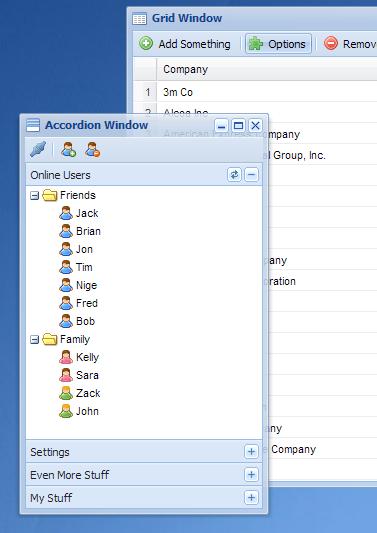
 Ext JS 2.0 Web Desktop | |
| Initial release | January 8, 2007 |
| Stable release | 7.8.0
/ May 21, 2024[1] |
| Type | JavaScript library |
| License | Proprietary |
| Website | www |
Ext JS is a JavaScript application framework for building interactive cross-platform web applications[2] using techniques such as Ajax, DHTML and DOM scripting. It can be used as a simple component framework (for example, to create dynamic grids on otherwise static pages) but also as a full framework for building single-page applications (SPAs).
Originally built as an add-on library extension[3] of YUI by Jack Slocum on April 15, 2007,[4] Ext JS has had no dependencies on external libraries beginning with version 1.1.[5] Nowadays, Ext JS can be used both as a single script (with all classes and components in one file) or by building the application with the Sencha CMD.
Features
[edit]GUI controls (components)
[edit]Ext JS includes a set of GUI-based form controls (or "widgets") for use within web applications:
- text field and textarea input controls
- date fields with a pop-up date-picker
- numeric fields
- list box and combo boxes
- radio and checkbox controls
- html editor control
- grid control (with both read-only and edit modes, sortable data, lockable and draggable columns, and a variety of other features)
- tree control
- tab panels
- toolbars
- desktop application-style menus
- region panels to allow a form to be divided into multiple sub-sections
- sliders
- vector graphics charts
Themes and toolkits
[edit]Sencha also provides some themes to style the components. Changing a theme requires simply changing CSS and a script of the theme. When using Sencha CMD a re-build of the application might be required.[6]
All components should work with each theme, but their look&feel will change. For example Classic theme has rather small elements not suited for touch devices. Neptune Touch has bigger elements better suited for tablets and phones.
Ext JS comes in two flavours called modern and classic toolkit. They differ not only with available themes but there are also some API differences between them. So it is not as easy to migrate from one toolkit to the other as it is for themes. There are plans to even out some differences between the toolkits in Ext JS 7.1, which is planned for 2019.[needs update][7]
Programming toolkit
[edit]Ext JS is a composition of classes that has many capabilities. Some examples:
- an abstract layer for browsers (e.g.
Ext.isArraythat can be used as a replacement forArray.isArray) - state management (stores)
- server communication layer (proxies and
Ext.Ajax.request) - layout and window management
- event management (with simplified creation of custom events for custom components)
- routing
Class system
[edit]Ext JS has its own class system.[8][9] Classes are defined with Ext.define and then an instance can be created with Ext.create. Some classes (e.g. components and stores) can have aliases and can be created by an alias. Instances of components are created automatically when the parent component is created.
Class can extend both custom and built-in classes. Typically custom components would extend built in components (e.g. MyApp.views.ProductsTable would extend built-in Ext.grid.Panel).[10]
There is a built-in dynamic loader so classes can have dynamic dependencies (loaded on-demand). There are two types of dependencies in ExtJS. Dependencies declared with requires property are loaded before the instance of the class is created. Dependencies defined in uses property might be loaded after the instance of the class is created.
It is also possible to override classes. Even built-in classes. Overriding built-in classes might be useful to e.g. provide internationalization[11] or create patches. Overridden class gets merged with new declaration. Each class can be overridden as many times as required (e.g. providing i18n and then l10n).
Ext JS version history
[edit]Ext JS 2.0
[edit]Ext JS version 2.0 was released on 4 December 2007. This version was promoted as providing an interface and features more similar to those traditionally associated with desktop applications. Also promoted were the new user documentation, API documentation, and samples.[12]
Ext JS 2.0 did not provide a backward compatibility with version 1.1. A migration guide was developed to address this.[13]
Ext JS 3.0
[edit]Ext JS version 3.0 was released on 6 July 2009. This version added communication support for REST and a new Ext.Direct server side platform. New flash charting and ListView elements were added to the standard display components. It was backwards compatible with version 2.0 code.
Ext JS 4.0
[edit]Version 4.0 of the Ext framework was released on April 26, 2011. It includes a completely revised class structure,[14] a revised data package, an animation and drawing package that uses SVG and VML,[15] and revised charting and theming. It also includes an optional architecture that provides a model–view–controller (MVC) style of code organization.
Ext JS 5.0
[edit]Version 5.0 of the Ext JS framework was released on June 2, 2014.[16] It includes the ability to build desktop apps on touch-enabled devices[17]—using a single code base, a Model View ViewModel (MVVM) architecture, two-way data binding, responsive layouts, and other component upgrades with support for adding widgets inside a grid cell for data visualization and big data analytics.[18] Ext JS 5 also includes an upgraded touch-optimized charting package along with additional financial charting capabilities.
Ext JS 5 supports modern and legacy browsers including: Safari 6+, Firefox, IE8+, Chrome, and Opera 12+. On the mobile platform, Ext JS 5 supports Safari on iOS 6 and 7, Chrome on Android 4.1+, and Windows 8 touch-screen devices (such as Surface and touch-screen laptops) running IE10+.
Important: From the Ext JS 5 version you cannot buy license for fewer than 5 developers.
Ext JS 6.0
[edit]Version 6.0 of the Ext JS framework was released on July 1, 2015.[19] It merges the Sencha Touch (mobile) framework into Ext JS.[20]
Ext JS 7.0
[edit]Version 7.0 of Ext JS framework was released on August 29, 2019.[21] This version introduced several new components in the Modern Toolkit. The Classic Toolkit received the Material Design Theme.
Sencha
[edit]On 15-Jun-2010, the merge of Ext JS with JQTouch and Raphaël was announced[22] forming a new organisation called Sencha Inc. Ext JS continues to be available as a main product on the new Sencha website[23] together with Sencha Touch, Sencha GWT (now Sencha GXT), Sencha Architect, Sencha Animator and Ext core.
On 23-Aug-2017, Sencha was acquired by IDERA (which in turn owns Embarcadero Technologies). Embarcadero is known for acquisitions of rapid application development software such as Delphi (which relies on Object Pascal as its primary programming language).[24]
Sencha JetBrains plugin
[edit]Sencha’s JetBrains plugin is an Integrated Development Environment tool that creates a confluence between Sencha Frameworks and JetBrains software. This integration comes in the form of code completion, inspection, and suggestion, while cooperating with native JetBrains behavior.
Ext.NET
[edit]Ext.NET is an ASP.NET component framework integrating the Ext library,[25] current version (as of September 2017) is 4.4 which integrates ExtJS version 6.5.1.
License history
[edit]YUI-Ext was available under the BSD license. In April 2008, the open source license associated with Ext was changed. In version 2.0.2, the authors stated that Ext was available under an LGPL-style license as long as you "plan to use Ext in a personal, educational or non-profit manner" or "in an open source project that precludes using non-open source software" or "are using Ext in a commercial application that is not a software development library or toolkit". This was no longer the case with Ext 2.1.[26] The Ext authors claim that section 7[27] of the LGPL as it is worded did not apply to "conditions" which their license required before distribution under the LGPL was permitted as opposed to "additional restrictions", which section 7 allowed a distributor to remove.[28]
On 20 April 2008, Ext 2.1 was released under a new dual license structure which allowed the options of the full GPL 3.0 license or a proprietary license.[29]
The change in license over time, from a permissive open source license to a restrictive dual license, caused controversy in the Ext user community.[30][31][32][33]
Sencha has published details about its commercial and GPL license terms on its website.[34]
In November 2018 Sencha announced its Community Edition that is free but restricted by annual revenue of either a person or company using ExtJS.[35][36]
See also
[edit]
References
[edit]- ^ "Ext JS 7.8 Has Arrived". Sencha.com. 21 May 2024. Retrieved 21 May 2024.
- ^ See also, Rich Internet application
- ^ "Ten Questions with YAHOO.ext Author Jack Slocum". Archived from the original on 2015-09-13. Retrieved 2015-08-11.
- ^ "@jackslocum #ExtJS 1.0 was released April 15th, 2007. Happy birthday. @Sencha". Jack Slocum. Retrieved 2013-04-14.
- ^ As of version 2.0, Ext JS works with different base libraries or adapters. (e.g. YUI, jQuery, Prototype), or it can work stand-alone. The capability to work with multiple base libraries was removed in the 4.0 release.
- ^ "Theming System | Ext JS 6.5.3". Sencha Documentation. Retrieved 2018-06-11.
- ^ "Sencha Product Roadmap Update". Sencha.com. 2017-11-29. Retrieved 2018-06-11.
- ^ "The Class System | Ext JS 6.5.3". Sencha Documentation. Retrieved 2018-06-11.
- ^ "Basics of OOP | Ext JS 6.5.3". Sencha Documentation. Retrieved 2018-06-11.
- ^ "Components | Ext JS 6.5.3". Sencha Documentation. Retrieved 2018-06-10.
- ^ "Localization | Ext JS 6.5.3". Sencha Documentation. Retrieved 2018-06-11.
- ^ "Ext JS 4.0.7 - Sencha Docs". Extjs.com. Retrieved 2012-11-19.
- ^ [1] Archived February 20, 2008, at the Wayback Machine
- ^ "Countdown to Ext JS 4: Dynamic Loading and New Class System | Blog". Sencha. 2011-01-19. Retrieved 2012-11-19.
- ^ "Countdown to Ext JS 4: Data Package | Blog". Sencha. 2011-01-21. Retrieved 2012-11-19.
- ^ "Announcing Sencha Ext JS 5 | Blog". Sencha. 2014-06-02. Retrieved 2014-07-16.
- ^ "Sencha Ext JS 5 Unifies Mobile, Desktop App Dev". eWeek. 2014-06-14. Retrieved 2014-09-11.
- ^ "Sencha Ext JS 5 Streamlines and Unifies". Dr. Dobb's. 2014-06-05. Retrieved 2014-09-11.
- ^ "Release Notes for EXT JS 6.0.2". Retrieved 6 January 2017.
- ^ "Sencha Unifies JavaScript Development Frameworks". Retrieved 28 August 2015.
- ^ "Release Notes for EXT JS 7.0.0". Retrieved 9 July 2019.
- ^ "Ext JS + jQTouch + Raphaël = Sencha | Blog". Sencha. 2010-06-14. Retrieved 2012-11-19.
- ^ "Industry Leading JavaScript Framework for Building Desktop Web Apps | Sencha Ext JS | Products". Sencha. Retrieved 2012-11-19.
- ^ Diamandopoulos, Cybele (August 25, 2017). "IDERA, Inc. Acquires Sencha to Strengthen Developer Tools Business". sencha.com. Sencha, Inc. Retrieved September 12, 2017.
- ^ "– ASP.NET (WebForm + MVC) component framework integrating the Sencha Ext JS JavaScript Library | ASP.NET Web Components for WebForms and MVC application. Integrates the Sencha ExtJS framework". Ext.NET. 2011-09-20. Retrieved 2012-11-17.
- ^ "License Change?". Extjs.com. Retrieved 2022-05-06.
- ^ "GNU Lesser General Public License - Version 3, 29 June 2007". Gnu.org. Retrieved 2012-11-17.
- ^ "Sencha Forums, ExtJS License Change".
- ^ "Ext JS 2.1 and Ext GWT 1.0 released, preview of Ext JS 3.0 | Blog | Sencha". Extjs.com. 2008-04-22. Retrieved 2012-11-19.
- ^ Monday April 28, 2008 3:08PM by Tim O'Brien in Opinion (2008-04-28). "License Fake-out hits ExtJS and Java Service Wrapper: Communities Alienated - O'Reilly ONJava Blog". Oreillynet.com. Retrieved 2012-11-19.
{{cite web}}: CS1 maint: numeric names: authors list (link) - ^ Asay, Matt (2008-02-25). "ExtJS: When open source is not open at all | The Open Road - CNET News". News.cnet.com. Retrieved 2012-11-19.
- ^ "Ext JS and the fun with Open Source licenses". Ajaxian. 2008-04-26. Retrieved 2012-11-19.
- ^ "Brewing Controversy Surround EXTJS « The Byte Stops Here". Bytestopshere.com. Retrieved 2012-11-19.
- ^ "Sencha Licensing | Website | Sencha". Sencha.com. 2011-01-13. Retrieved 2016-05-16.
- ^ "Announcing Sencha Ext Community Edition". Sencha.com. 2018-11-06. Retrieved 2019-12-06.
- ^ "Ext JS Community Edition". Sencha.com. 2018-10-31. Retrieved 2019-12-06.
Bibliography
[edit]- Orchard, Leslie M.; Pehlivanian, Ara; Koon, Scott; Jones, Harley (August 31, 2009). Professional JavaScript Frameworks: Prototype,YUI, ExtJS, Dojo and MooTools (1st ed.). Wrox Press. p. 888. ISBN 978-0-470-38459-6. Archived from the original on July 6, 2011. Retrieved August 15, 2009.
- Frederick, Shea; Ramsay, Colin; 'Cutter' Blades, Steve (November 28, 2008). Learning Ext JS (1st ed.). Packt Publishing. p. 299. ISBN 978-1-84719-514-2.
- Gonzalez, Armando; Villa, Crysfel (2012-10-08). Learning Ext JS 4 (1st ed.). Packt Publishing. p. 434. ISBN 978-1-84951-684-6.
External links
[edit]| Dialects | |||||||||
|---|---|---|---|---|---|---|---|---|---|
| Engines | |||||||||
| Frameworks |
| ||||||||
| People |
| ||||||||
| Other | |||||||||
 Lists: JavaScript libraries • Ajax frameworks • Server-side JavaScript Comparison: JavaScript web frameworks Lists: JavaScript libraries • Ajax frameworks • Server-side JavaScript Comparison: JavaScript web frameworks | |||||||||
Ext JS
View on GrokipediaOverview
Definition and Purpose
Ext JS is a pure JavaScript application framework designed for building interactive, cross-platform web and mobile applications using techniques such as Ajax, DHTML, and DOM scripting.[1][8] The primary purpose of Ext JS is to enable the rapid development of enterprise-grade, data-intensive user interfaces (UIs) through a rich set of over 140 pre-built, high-performance UI components, facilitating the creation of scalable applications without the need for extensive custom coding.[9][10][6] Key benefits include its optimized performance for handling large datasets, such as through virtual scrolling and buffered updates in components like data grids; robust cross-browser compatibility across major browsers including Chrome, Firefox, Safari, and Edge; adaptive layouts that support responsive designs for desktop, tablet, and mobile devices via unified toolkits; and built-in accessibility features compliant with ADA standards and Section 508 requirements, including ARIA support.[11][10][12][1] A distinctive aspect of Ext JS is its focus on developing rich internet applications (RIAs) as a standalone framework, independent of modern meta-frameworks like React or Angular, allowing developers to leverage its comprehensive ecosystem for complex, data-heavy enterprise solutions.[13][14]Development Origins
Ext JS originated in 2006 when developer Jack Slocum created YUI-Ext, a JavaScript library designed as an extension to the Yahoo! User Interface Library (YUI). Slocum's work addressed key limitations in contemporary JavaScript libraries, particularly the lack of robust UI components such as advanced grids, enabling developers to build more sophisticated, Ajax-driven web applications with reusable, desktop-like interfaces.[15][4] The project gained momentum through Slocum's blogging and open-source sharing, leading to its first public release as Ext JS 1.0 on April 15, 2007. Although initially retaining dependencies on YUI, version 1.1 severed these ties, establishing it as a fully independent framework focused on providing a comprehensive set of cross-browser compatible widgets for rich internet applications.[4][16] Ext JS rapidly achieved early adoption due to its modular architecture and high extensibility, which allowed developers to customize and extend components easily. This spurred significant community involvement, including contributions to documentation and enhancements, before the library's formal commercialization via the establishment of Ext JS Inc. in 2007.[15][17] A pivotal shift occurred in June 2010 when Ext JS Inc. merged with the JQTouch and Raphael projects to form Sencha Inc., reorienting the company toward a broader ecosystem of JavaScript tools. Under Sencha, the framework retained its name as Ext JS to emphasize its desktop-oriented capabilities, while the new Sencha Touch framework was developed specifically for mobile web applications, creating a clear distinction between the two offerings.[5][18]Core Features
UI Components
Ext JS provides a comprehensive library of over 140 pre-built, customizable UI controls designed to facilitate the development of rich, interactive web applications. These components encompass a wide range of graphical elements, such as grids for tabular data display, trees for hierarchical structures, forms for user input, charts for data visualization, pivot grids for multidimensional analysis, and D3 visualizations for advanced graphical representations.[1] The library organizes components into key categories to support diverse interface needs. Layout containers, such as the border layout for region-based positioning (e.g., north, south, east, west, center) and vbox layout for vertical arrangement with flexible sizing, enable structured organization of other elements within panels.[19] Data views include buffered grids, which efficiently handle large datasets by rendering only visible rows plus a buffer zone, allowing smooth scrolling through thousands of records without performance degradation.[20] Interactive elements feature combo boxes, which combine text input with dropdown selection lists supporting autocomplete and remote loading from data stores, and calendars, which provide multi-view interfaces (e.g., day, week, month) for event management and navigation.[21][22] Components in Ext JS are highly extensible, inheriting from the base Ext.Component class to support event handling for user interactions, customizable rendering processes, and seamless integration with data models for dynamic content updates. For instance, data grids incorporate virtual scrolling mechanisms that virtualize the rendering of rows, enabling the handling of potentially infinite datasets with minimal impact on client-side performance by loading data on demand as users scroll.[23] Modern enhancements in Ext JS include adaptive rendering capabilities across its classic toolkit for desktop environments and modern toolkit for touch and mobile devices, ensuring responsive interfaces that adjust to different screen sizes and input methods without requiring separate codebases.[1]Theming and Layouts
Ext JS employs a robust theming system that enables developers to define consistent visual styles across applications using Sass-based variables and mixins, ensuring maintainability and scalability.[24] Built-in themes such as Neptune and Triton provide out-of-the-box options, with Neptune serving as a foundational theme featuring a clean, professional aesthetic suitable for desktop applications, while Triton offers a modern, flat design optimized for both classic and touch interfaces.[24] These themes leverage Sass and Compass for compilation, allowing styles to be generated via Sencha Cmd, which handles the transformation of source files into optimized CSS.[24] Customization in the theming system occurs primarily through theme variables that control aspects like colors (e.g.,$base-color), fonts, and spacing, enabling developers to override defaults without altering core component code.[25] The Sencha Themer tool facilitates this process graphically, permitting visual adjustments to palettes, fonts via Google Fonts integration, and component states (e.g., hover or pressed) without writing code, and it exports themes as packages integrable into Ext JS applications.[26] For advanced tweaks, theme mixins allow the creation of custom UIs, such as redefining panel headers with specific background colors, while image slicing supports legacy browser compatibility for effects like rounded corners.[25] Accessibility is enhanced through variables supporting high-contrast modes, ensuring compliance with standards like WCAG by adjusting color contrasts and focus indicators.[24]
The layout system in Ext JS organizes components within containers using specialized managers that automate sizing and positioning for fluid, responsive designs.[19] Key layout algorithms include HBox for horizontal arrangement, VBox for vertical stacking, and BorderLayout for dividing space into regions like north, south, east, west, and center, mimicking traditional desktop windowing.[19] These managers integrate with modern CSS standards, supporting Flexbox for flexible box-based layouts and Grid for two-dimensional arrangements, allowing applications to adapt seamlessly to varying screen sizes and orientations.[19]
Ext JS supports two primary toolkits to address diverse device needs: the Classic toolkit, tailored for desktop browsers with comprehensive component support and precise control over layouts for complex interfaces, and the Modern toolkit, designed for touch-enabled devices with built-in gesture recognition for interactions like swiping and pinching.[7] Theming and layouts in the Classic toolkit emphasize detailed customization via JavaScript overrides, while the Modern toolkit prioritizes lightweight, CSS3-driven responsiveness to ensure performant rendering on mobile hardware.[7] Developers configure toolkits and themes in the app.json manifest, enabling unified applications that switch contexts based on the runtime environment.[24]
Data Management
Ext JS's data management is facilitated through its Data Package, which provides robust mechanisms for defining, loading, manipulating, and persisting data in web applications. At the core are Models, which represent individual data entities and define schemas with fields of various types (e.g., string, integer, date). Models support associations such as hasMany, hasOne, belongsTo, and many-to-many relationships to link related entities, enabling efficient data traversal and synchronization. Validation rules, configured via validators like presence, length, or custom functions, ensure data integrity before storage or submission.[27][28] Stores serve as collections of Model instances, acting as a client-side cache that supports sorting, filtering, and grouping operations. Local operations can be performed directly on the Store, while remote equivalents—such as server-side sorting, filtering, paging, and grouping—are enabled through configurations likeremoteSort, remoteFilter, and pageSize. Proxies handle communication between Stores and data sources, with types including AJAX for standard HTTP requests, REST for CRUD operations on RESTful services, JSONP for cross-domain access, and LocalStorage for offline support using the browser's HTML5 localStorage API. This allows applications to cache data locally, enabling functionality without network connectivity.[29][30]
For integration, Stores bind directly to UI components such as grids, providing automatic updates when data changes. To optimize performance with large datasets, Ext JS employs buffered loading via BufferedStore (in classic toolkit) or VirtualStore (in modern), which load only visible portions of data in pages, prefetching buffer zones (e.g., leading and trailing pages) to minimize latency and memory usage. These virtual mechanisms, combined with differential loading that fetches only new or changed data, enable efficient handling of millions of records without loading the entire dataset into memory.[31][28]
The following example illustrates a basic Model-Store-Proxy configuration:
Ext.define('MyApp.model.User', {
    extend: 'Ext.data.Model',
    fields: [
        { name: 'id', type: 'int' },
        { name: 'name', type: 'string' }
    ],
    validators: {
        name: [{ type: 'presence' }, { type: 'length', min: 2 }]
    },
    proxy: {
        type: 'rest',
        url: '/users',
        reader: { type: 'json' }
    }
});

var store = new Ext.data.Store({
    model: 'MyApp.model.User',
    pageSize: 50,
    remoteSort: true,
    remoteFilter: true,
    sorters: [{ property: 'name', direction: 'ASC' }]
});
Ext.define('MyApp.model.User', {
    extend: 'Ext.data.Model',
    fields: [
        { name: 'id', type: 'int' },
        { name: 'name', type: 'string' }
    ],
    validators: {
        name: [{ type: 'presence' }, { type: 'length', min: 2 }]
    },
    proxy: {
        type: 'rest',
        url: '/users',
        reader: { type: 'json' }
    }
});

var store = new Ext.data.Store({
    model: 'MyApp.model.User',
    pageSize: 50,
    remoteSort: true,
    remoteFilter: true,
    sorters: [{ property: 'name', direction: 'ASC' }]
});
Class System
Ext JS employs a robust object-oriented class system that enables developers to define, extend, and compose classes in a structured manner, facilitating reusable and maintainable code for building complex web applications.[33] This system is built on JavaScript prototypes but provides higher-level abstractions to mimic classical OOP paradigms, including encapsulation, inheritance, and polymorphism.[33] At its core, the system uses a class manager to handle class registration, dependency resolution, and instantiation, ensuring efficient loading and execution in both development and production environments. Classes in Ext JS are declared using theExt.define method, which takes a class name as a string (following a namespaced convention like 'MyApp.view.UserPanel'), a members object containing properties, methods, and configurations, and an optional callback invoked after class creation.[33] The members object can include instance properties, the constructor function for initialization, and static members defined under a statics property for class-level methods and properties shared across instances.[33] For example, a basic class might be defined as follows:
Ext.define('MyApp.model.Person', {
    statics: {
        species: 'Homo Sapiens'
    },
    constructor: function(name) {
        this.name = name || 'Anonymous';
    },
    introduce: function() {
        return 'Hi, my name is ' + this.name;
    }
});
Ext.define('MyApp.model.Person', {
    statics: {
        species: 'Homo Sapiens'
    },
    constructor: function(name) {
        this.name = name || 'Anonymous';
    },
    introduce: function() {
        return 'Hi, my name is ' + this.name;
    }
});
Ext.create('MyApp.model.Person', 'John').[33]
Inheritance is achieved through the extend property in the members object, specifying the superclass (e.g., extend: 'Ext.data.Model'), which automatically incorporates the parent's prototype and statics into the subclass.[33] Method customization occurs via the override property, which patches existing methods on the superclass or other classes without modifying their source, promoting non-intrusive extensions.[33] Dependencies on other classes or mixins are declared using the requires array, ensuring they are loaded before the current class during dynamic evaluation.[33] For modularity, classes support singleton: true to enforce a single global instance, accessible directly by class name, and alternateClassName as an array of aliases for easier referencing or backward compatibility.[33]
To incorporate reusable behaviors without full inheritance, Ext JS provides mixins via the mixin or mixins array in the class definition, pulling in methods and properties from mixin classes that extend Ext.Mixin. Plugins offer dynamic enhancements, typically added as an array of plugin instances or configurations (e.g., plugins: [{ ptype: 'responsive' }]), where ptype refers to registered plugin classes that extend Ext.plugin.Base and inject functionality at runtime, such as event handling or UI modifications. These mechanisms promote composition over inheritance, allowing classes to adopt orthogonal concerns like observability (Ext.mixin.Observable) or traversability without bloating the class hierarchy.
The config system streamlines property management by treating declared configs (under a config object) as observable properties with automatically generated getter and setter methods, prefixed by 'get' and 'set' (e.g., getTitle and setTitle for a 'title' config).[33] Custom logic can be injected via applyConfigName (to validate or transform values before setting) and updateConfigName (to react after changes, such as firing events).[33] This enables reactive programming, as config changes automatically trigger events like 'configchange' or property-specific events (e.g., 'titlechange'), allowing listeners to respond declaratively.[34] For instance:
Ext.define('MyApp.view.Panel', {
    extend: 'Ext.panel.Panel',
    config: {
        title: 'Default Title'
    },
    applyTitle: function(title) {
        return title ? title.toUpperCase() : 'Untitled';
    },
    updateTitle: function(newTitle, oldTitle) {
        this.fireEvent('titlechange', this, newTitle, oldTitle);
    }
});
Ext.define('MyApp.view.Panel', {
    extend: 'Ext.panel.Panel',
    config: {
        title: 'Default Title'
    },
    applyTitle: function(title) {
        return title ? title.toUpperCase() : 'Untitled';
    },
    updateTitle: function(newTitle, oldTitle) {
        this.fireEvent('titlechange', this, newTitle, oldTitle);
    }
});
Architecture and Tooling
Application Frameworks
Ext JS supports structured application development through its Ext.app namespace, which provides built-in implementations of the Model-View-Controller (MVC) and Model-View-ViewModel (MVVM) architectural patterns. These patterns enable developers to organize complex web applications by separating concerns, promoting maintainability and testability. In MVC, the Model handles data and business logic, the View renders the user interface, and the Controller mediates interactions between them; MVVM extends this by introducing a ViewModel layer for declarative data binding, reducing direct dependencies between Views and Models.[35] The MVC pattern in Ext JS divides applications into dedicated folders such as app/model, app/view, and app/controller, with classes namespaced accordingly (e.g., MyApp.view.Main). Models define data structures and validation, Views are typically Ext JS components like panels or grids, and Controllers manage event handling and logic, often using refs for component references. For MVVM, ViewModels bind data to Views via formulas and stores, allowing automatic UI updates without explicit Controller intervention, which is particularly useful for reactive interfaces.[35] Key components facilitate application structure: the Viewport serves as the root container, automatically instantiated from the application's mainView configuration in app.js to fill the browser window. The Router enables client-side navigation by mapping URL hashes to Controller methods, defined in viewControllers via the routes config (e.g., {'users': 'onUsers'}), supporting deep linking and history management through redirectTo. Controller lifecycles are tied to their associated Views, with events like init (post-view initialization) and destroy (for cleanup) ensuring automatic management without manual instantiation.[36][37] For cross-device compatibility, Ext JS supports universal applications with a unified codebase, using profiles to adapt to different toolkits—classic for desktop and tablet, modern for mobile—via Ext.beforeLoad in index.html, loading device-specific Views while sharing Models, Stores, and logic. State management is handled by Ext.state.Provider, an abstract class for persisting UI states like component sizes or positions across sessions, with implementations such as CookieProvider for browser storage; the Ext.state.Manager coordinates access, allowing components to save and restore state via set and get methods.[38][39]Build and Development Tools
Sencha Cmd is a command-line interface tool designed for scaffolding Ext JS applications, resolving class dependencies, and generating optimized production builds that include code minification and concatenation.[40] It automates the creation of application structures using commands likesencha generate app, manages workspace configurations, and integrates with the Ext JS framework to handle theme compilation and resource optimization during development and deployment.[41] This tool ensures efficient build processes by analyzing code dependencies and producing lightweight bundles suitable for enterprise-scale applications.[40]
Sencha Architect serves as a visual integrated development environment (IDE) for Ext JS, enabling drag-and-drop assembly of UI components, hierarchical project navigation, and real-time previews of application layouts.[42] It facilitates rapid prototyping by allowing developers to configure components visually, generate boilerplate code, and synchronize changes between the visual editor and underlying JavaScript files, thereby reducing manual coding efforts for complex interfaces.[43] The tool supports integration with Sencha Cmd for building and exporting projects, making it ideal for iterative design in team environments.[42]
For testing, Sencha Test provides a comprehensive solution for unit and end-to-end testing of Ext JS applications, with built-in support for the Jasmine testing framework to author and execute tests across multiple browsers.[44] It automates test creation through record-and-playback in Sencha Studio and supports granular validation of application behaviors, including asynchronous operations and component interactions.[45] Debugging is enhanced by tools like the Sencha Inspector, which offers runtime inspection of Ext JS components, event monitoring, and performance profiling directly within the browser.[46]
Ext JS also incorporates modern development workflows through support for NPM and Yarn package managers, allowing installation of the framework and add-ons via commands like npm install @sencha/ext, which pulls from the official public registry for seamless integration into Node.js-based projects.[47] TypeScript definitions are available through the open tooling ecosystem, enabling typed development with IDE autocompletion and compile-time checks when using the framework's npm packages.[48] Additionally, the Ext JS Upgrade Adviser scans application code to detect compatibility issues and deprecated features, providing actionable reports to facilitate migrations between versions.[49]
Version History
Ext JS 1.0 to 3.0
Ext JS 1.0 marked the initial public release of the framework as a standalone JavaScript library in April 2007, evolving from the earlier yui-ext project as an extension to the Yahoo! User Interface (YUI) library.[50] This version introduced core UI widgets such as grids, trees, forms, and toolbars, along with built-in Ajax support for dynamic data loading and adapters for integration with YUI, Prototype, or jQuery as the underlying engine.[50] It emphasized object-oriented programming principles, including class inheritance, to facilitate modular development, while addressing common issues like memory leaks in browser environments to enable more robust rich internet applications (RIAs).[50] Ext JS 2.0, released later in 2007, built on this foundation by becoming a fully self-contained framework independent of external libraries, incorporating an expanded set of widgets and a cross-browser abstraction layer for consistent rendering across platforms.[50] Key additions included drag-and-drop functionality, animation effects, and a charting package for data visualization, alongside improved layout managers for complex UI arrangements.[50] This release also introduced a dual licensing model, offering the framework under the GNU General Public License (GPL) for open-source use or a commercial license for proprietary applications, which broadened its accessibility while supporting enterprise adoption.[51] Ext JS 3.0 arrived in July 2009, focusing on enhancing RIA maturity with features like full support for RESTful communication protocols to streamline server interactions and an integrated charting package for advanced data representation.[50] It introduced additional widgets, such as list views, and a preview of the Ext JS Designer tool—a visual interface for building and prototyping applications—while prioritizing backward compatibility with prior versions to ease upgrades.[50] Improvements in accessibility, including better keyboard navigation and ARIA attribute support, were also incorporated to meet emerging web standards for inclusive design.[50] These early releases from 1.0 to 3.0 established Ext JS as a cornerstone for enterprise web development by fostering a vibrant open-source community through its GPL option and demonstrating reliability in data-intensive applications across industries like finance and healthcare.[4] The framework's emphasis on comprehensive UI components and Ajax-driven interactions drove key adoptions in building scalable, desktop-like web interfaces during the rise of dynamic web technologies.[4]Ext JS 4.0
Ext JS 4.0 was released on April 26, 2011, marking a significant architectural overhaul that introduced a comprehensive class-based system using theExt.define method, enabling developers to create extensible, object-oriented components with improved inheritance and mixin support.[52][53] This shift to a full class-based OOP paradigm replaced earlier prototype-based approaches, providing a more structured foundation for building scalable applications.[53] Additionally, the release incorporated an MVC architecture, featuring over 270 new APIs and 35 new classes to facilitate the separation of models, views, and controllers in application development.[52] Enhanced data validation was introduced through VTypes, a singleton object offering built-in functions for common checks like email and URL formats, alongside mechanisms for custom validations to ensure robust form handling.
Key additions in Ext JS 4.0 included the Drawing package, which supported vector graphics rendering via SVG and VML for cross-browser compatibility from IE6 onward, enabling pixel-perfect visuals without plugins.[52] Theming capabilities were improved with fully customizable options derived from Sencha Touch technology, allowing for consistent styling across desktop and emerging touch interfaces.[52] For smoother user interactions, Sencha Animator (via Ext.fx.Animator) was added to manage animated transitions, supporting easing functions and property interpolations for dynamic effects like fades and slides.
Notable breaking changes involved the complete removal of any YUI adapter dependencies, positioning Ext JS as a fully standalone JavaScript framework without external library requirements.[54] This refocus enhanced portability and reduced overhead, while alignment with Sencha Touch introduced better mobile support through shared theming and touch event handling, bridging desktop and mobile development.[52]
The adoption of Ext JS 4.0 signified a pivotal transition to modern web standards, with performance optimizations in areas like infinite scrolling grids and charting that improved responsiveness for complex user interfaces, as evidenced by its uptake in enterprise environments such as Marketo.[52] These enhancements, including a refactored layout engine, enabled the creation of more efficient, data-intensive applications across browsers.
Ext JS 5.0
Ext JS 5.0 was released on June 2, 2014, marking a significant evolution in the framework by introducing the Model-View-ViewModel (MVVM) architectural pattern alongside support for the existing Model-View-Controller (MVC) approach.[55] This release emphasized developer productivity through advanced data management features, particularly two-way data binding, which allows automatic synchronization between the ViewModel's data and the user interface components. The ViewModel serves as an intermediary that coordinates data flow, enabling formulas for computed values and reducing manual event handling for updates across views.[18] Additionally, integration with Sencha Touch facilitated the development of hybrid applications, leveraging a shared codebase for desktop and mobile experiences while supporting tools like Cordova for packaging.[56] Key tooling advancements came with Sencha Cmd 5, which streamlined the build process by improving package management, application slicing, and theme handling without requiring external dependencies like SASS or Compass.[57] Developers could now generate optimized builds more efficiently, including Cmd-managed themes that allowed for easier customization of UI appearances.[58] Performance enhancements focused on data-heavy components, such as grids, which benefited from buffered rendering for handling large datasets and inline cell editing that embedded interactive widgets like sliders or charts directly within cells.[55] These grid improvements, including integrated filters as a framework plugin, enabled more responsive interactions without overwhelming the browser.[59] On the mobile front, Ext JS 5.0 introduced a unified API that converged core elements from Ext JS and Sencha Touch, allowing developers to target both desktop and touch-enabled devices with a single codebase.[55] Gesture support was added to the classic toolkit via a delegated event system, mapping mouse events to touch gestures such as pinch, swipe, and tap, which simplified responsive design for tablets and phones.[60] A responsive configuration mixin provided declarative syntax for adapting layouts to different screen sizes, further easing cross-device development.[59] The impact of these features was profound in reducing boilerplate code, as two-way binding and MVVM minimized the need for explicit event listeners and manual data propagation, accelerating prototyping for responsive applications.[18] By automating synchronization and enhancing tooling, Ext JS 5.0 enabled faster iteration and fewer errors in complex, data-intensive projects, positioning it as a more productive framework for building scalable web applications.[55]Ext JS 6.0
Ext JS 6.0, released on July 6, 2015, by Sencha Inc., marked a pivotal advancement by unifying the Ext JS and Sencha Touch frameworks into a single, cohesive JavaScript library for building universal applications. This release enabled developers to maintain a shared codebase that supports both desktop and mobile environments, targeting desktops, tablets, and smartphones through two distinct toolkits: the "classic" toolkit for traditional desktop interfaces derived from Ext JS, and the "modern" toolkit for touch-enabled devices inspired by Sencha Touch. By integrating these capabilities, Ext JS 6.0 eliminated the need for separate projects or code duplication, allowing applications to adapt responsively based on the target profile specified in theapp.json configuration file.[61]
A core enabler of this unification was Sencha Cmd 6, which introduced enhanced cross-platform build processes, including workspace.json for managing packages and the sencha app watch command for live reloading during development. This command monitors file changes and automatically rebuilds and refreshes the application in the browser, streamlining iterative workflows without manual intervention. Key additions in Ext JS 6.0 included the Triton theme, a modern, flat design featuring font icons (such as Font Awesome integration), Open Sans typography, and balanced sizing for both desktop and tablet contexts, providing a sleek alternative to previous gradient-heavy aesthetics. Charting was also improved via the Ext.draw package, which powers vector-based graphics and now supports advanced features like 3D pie series with enhanced labels, legends, tooltips, and plugins such as itemedit for interactive bar and scatter series editing, alongside the new Pivot Grid component for data analysis.[62][63][41]
The release introduced several breaking changes to support the new architecture, notably profile-based rendering via the toolkit system, where components render differently depending on the selected profile (classic or modern) to ensure optimal performance and visuals across devices. Legacy mobile views from prior Sencha Touch implementations were deprecated in favor of the modern toolkit, and packages like "ext-charts" were consolidated into a unified "charts" package, requiring updates to app.json dependencies. Other API shifts included removals such as Ext.container.Container.doLayout() (replaced by updateLayout()) and the Ext.EventObject singleton (superseded by Ext.event.Event), alongside changes to chart event parameters and series configurations for better standards compliance. These adjustments, while necessitating code migrations, were designed to modernize the framework without overly disrupting existing Ext JS 5.0 applications.[64][62]
The unification in Ext JS 6.0 significantly simplified maintenance for responsive, multi-device applications, reducing development complexity and costs for enterprises by allowing a single team to handle cross-platform needs. This shift boosted adoption in sectors requiring robust, interactive web apps, such as finance and healthcare, where consistent user experiences across devices are essential, and laid the groundwork for future enhancements in tooling and theming.[61]
Ext JS 7.0
Ext JS 7.0 was released on August 29, 2019, marking a significant update to the framework with enhanced support for ES6 modules via open tooling and npm integration, leveraging modern browser APIs such as HTML5 features for cross-platform development across desktop, tablet, and mobile devices.[65] This version also introduced improved accessibility through built-in ARIA attributes, keyboard navigation, focus management, and tab indexing, ensuring better compliance with standards like WCAG for users with disabilities.[66][67] Key features in Ext JS 7.0 include infinite grid scrolling enabled by buffered rendering, which dynamically loads rows as users scroll through large datasets, reducing memory usage and improving responsiveness in data-heavy interfaces.[68] The framework also provides integration with D3.js for advanced data visualizations, allowing developers to embed interactive charts and graphics within Ext JS components using SVG or Canvas rendering.[69] Additionally, better TypeScript support was added through included declaration files (.d.ts) in the npm packages, facilitating typed development and IDE autocompletion for Ext JS classes and configurations. Tooling advancements accompanied the core framework updates, with Sencha Architect 4.0 offering visual theming tools and drag-and-drop design for building Ext JS 7.0 applications more intuitively.[70] Sencha Cmd 7 introduced seamless webpack integration, enabling modern build processes like code splitting, tree shaking, and npm dependency management to streamline development workflows.[71] By de-emphasizing support for very legacy browsers like IE9 in favor of modern ones (while retaining IE11 compatibility), Ext JS 7.0 enhanced overall performance, particularly for data-intensive applications, through optimized grid handling and reduced bundle sizes.[72][65] This shift allowed for faster rendering and smoother interactions in scenarios involving millions of records.Ext JS 7.1 to 7.9
The Ext JS 7.x series saw iterative releases from 2020 to 2025, building on the modern toolkit unification introduced in version 7.0 by emphasizing stability, performance refinements, and developer tooling enhancements to support enterprise applications. Released on January 10, 2020, Ext JS 7.1 introduced improvements to grid components, including better editing, scrolling, locking, and drag-and-drop functionality, alongside performance optimizations for both Modern and Classic toolkits.[73] These updates also included enhanced text and form input components, as well as improvements to integrations like ExtReact, ExtAngular, and ExtWebComponents, with new API documentation and onboarding resources to streamline development.[73] Ext JS 7.2, released in March 2020, focused on stability enhancements and bug fixes to support remote work during the early COVID-19 period, with minor updates to theming and compatibility. Ext JS 7.3, later in 2020, added further accessibility features, including screen reader improvements and high-contrast mode support. Ext JS 7.4, released on April 23, 2021, introduced advanced grid capabilities like pivot grid enhancements and better export options for data analysis.[74] Subsequent releases continued this progression: Ext JS 7.6 in 2022 emphasized modern toolkit updates for touch interactions and responsive layouts, while Ext JS 7.7, released on April 5, 2023, delivered performance optimizations for large-scale applications, including faster rendering in grids and charts.[75] Ext JS 7.5, released on December 8, 2021, addressed remote filtering issues in the gridfilter plugin, ensuring stores respect theautoLoad: false configuration and only load data upon explicit calls when filters or sorters are applied.[76] It upgraded the Froala Editor to version 5.14.4 with support for track changes and markdown, updated Font Awesome to 5.14.4, and added localization for new grid features like Filterbar and multi-level grouping, including Hebrew translations.[76] Over 40 customer-reported issues were resolved, covering areas such as modern grid number column rendering, chart tooltips, and date pickers, contributing to smoother virtual store resizing and overall application responsiveness.[76]
Ext JS 7.8, released on May 21, 2024, extended Froala Editor integration to the Classic Toolkit with broad browser compatibility, enabling richer text editing in desktop-oriented applications.[77] It improved Node.js and NPM support by aligning Sencha Cmd, ExtGen, Architect, and Themer with Node 20 LTS, Java 17, and Java 21, while enhancing VS Code compatibility through updated IDE plugins.[77] Grid enhancements included read-only cell clipboard pasting and key event handling, with additional optimizations for combobox virtual stores, SVG chart labels, and date alignment, alongside an upgrade to Closure Compiler for ES14 syntax support.[77]
The series culminated in Ext JS 7.9 on April 22, 2025, which refined multi-selection capabilities in virtual stores for more efficient grid handling of large datasets and introduced comprehensive Japanese localization across Modern and Classic toolkits.[3] Performance received targeted fixes, such as accurate results from Ext.Date.diff for DAY and WEEK intervals, and proper handling of daylight saving time shifts in Ext.Date.parse, ensuring reliable date operations in global applications.[3] These updates, including reaffirmed Node v20 compatibility via NPM package installations, underscored Ext JS's ongoing enterprise viability through incremental quality-of-life enhancements and remote filtering optimizations accumulated across the 7.x iterations.[3] As of November 2025, Ext JS 7.9 remains the latest version, with no subsequent major releases announced.
Sencha and Ecosystem
Sencha Inc.
Sencha Inc. was formed on June 15, 2010, through the merger of Ext JS Inc. with the open-source JQTouch mobile JavaScript library and the Raphaël vector graphics project, creating a unified organization dedicated to JavaScript development tools.[5] The company was established by Jack Slocum, the original developer of Ext JS, along with key contributors from the merged projects, with initial offices in Redwood City, California, before relocating its headquarters to Austin, Texas.[4][78] This formation followed the acquisition and integration of Ext JS assets and aimed to expand beyond desktop web applications into mobile and cross-platform solutions. As the primary maintainer of Ext JS, Sencha Inc. develops and commercializes the framework, providing enterprise-grade features such as advanced UI components, data management tools, and performance optimizations tailored for complex web applications.[1] The company offers comprehensive support services, including technical assistance, consulting, and customized training programs to help developers and organizations build and deploy Ext JS-based solutions efficiently.[79] These services emphasize rapid prototyping, scalability, and integration with modern development workflows, positioning Sencha as a key enabler for enterprise software development. Key milestones for Sencha include the announcement of its 2024/2025 roadmap in July 2024, which details planned enhancements for Ext JS such as improved TypeScript integration, bundle optimization, and expanded low-code capabilities to accelerate application development.[80] The company also organizes annual events like JS Days 2025, a virtual conference held August 19–21, 2025, featuring expert sessions on JavaScript trends, Ext JS best practices, and interactive coding challenges to foster innovation in the developer community.[81] These initiatives highlight Sencha's commitment to evolving its ecosystem in response to industry demands. In its current status as a subsidiary of Idera Inc. since 2017, Sencha continues to prioritize low-code acceleration through tools like Sencha Architect for visual app design and Themer for UI customization, enabling faster time-to-market for data-intensive applications.[4] Community engagement remains a core focus, with active support provided via the official Sencha forums for troubleshooting and knowledge sharing, as well as a dedicated Discord server for real-time discussions and collaboration.[82][80]Related Tools and Plugins
Sencha's ecosystem extends Ext JS development through a suite of specialized tools and plugins designed to enhance productivity, facilitate low-code workflows, and support integration with modern development environments. These tools focus on visual design, code assistance, testing, and modernization, allowing developers to build and maintain complex applications more efficiently. Rapid Ext JS, launched in 2024, is a low-code platform integrated as a Visual Studio Code extension that enables visual application building for Ext JS. It offers drag-and-drop interfaces, real-time previews, and support for over 140 Ext JS UI components, including grids, charts, and forms, while providing multi-project management capabilities.[83][84] In its version 1.1 release in 2025, Rapid Ext JS introduced compatibility with Sencha Architect, allowing seamless import and migration of existing projects to enhance workflow continuity.[3][85] Sencha provides plugins to integrate Ext JS into popular IDEs, improving code completion, navigation, and framework-specific features. The JetBrains IDE plugin supports commercial editions of IntelliJ IDEA, WebStorm, PhpStorm, RubyMine, and PyCharm, offering syntax highlighting, auto-completion, and refactoring tools tailored for Ext JS development; it requires a valid Sencha license for full access beyond a 30-day trial.[86][87] Additionally, Sencha Stencils serve as a diagramming and design asset kit for tools like Adobe Illustrator, Adobe XD, Sketch, and Balsamiq, providing vector-based UI components and themes (such as Crisp, Material, and Triton) to create wireframes and high-fidelity mockups for Ext JS applications.[88][89] For modernization efforts, ReExt, introduced in 2024, enables the integration of Ext JS components into React applications, facilitating the creation of responsive, data-intensive UIs with features like reusable grids and charts while maintaining compatibility with Ext JS 7.x and modern React versions.[90][91] Sencha Test complements these by offering a comprehensive testing suite for unit and end-to-end validation of Ext JS apps, including Jasmine-based test creation and integration with Sencha Studio for automated quality assurance.[92][93] Community resources further support developers through platforms like examples.sencha.com, which hosts interactive demos, sample applications, and code snippets for Ext JS, ReExt, and related toolkits to accelerate prototyping and learning.[94][95] Integration enhancements include dedicated VS Code extensions, such as the Sencha Ext JS plugin for IntelliSense and definition navigation, alongside the Ext JS Upgrade Adviser, a scanning tool that identifies code blockers and compatibility issues during version upgrades.[96][49][97]Integrations and Extensions
Ext.NET
Ext.NET is an open-source ASP.NET component suite that serves as a server-side wrapper for the Ext JS JavaScript framework, enabling .NET developers to integrate Ext JS components directly into ASP.NET applications as server controls. This framework bridges the gap between the client-side capabilities of Ext JS and server-side .NET environments, facilitating the creation of rich, interactive web interfaces without extensive manual JavaScript coding. It supports both WebForms and MVC patterns, making it accessible for developers familiar with traditional ASP.NET development workflows.[98][99] Key features of Ext.NET include direct rendering of Ext JS components within Razor views using declarative syntax, such as Tag Helpers (e.g.,<ext-button> for buttons), which simplifies the markup and leverages C# code-behind for logic. It provides built-in AJAX callbacks through direct events and listeners, allowing seamless server-side processing without custom JavaScript or additional AJAX wiring, thus reducing development complexity. Additionally, Ext.NET ensures theme compatibility with Ext JS, supporting modern themes like Spotless for consistent styling across applications, and includes modern UI controls such as grids, charts, and forms that align with contemporary web design standards.[100][101]
Ext.NET versions are closely aligned with Ext JS releases to maintain compatibility and leverage new features; for instance, Ext.NET 7 corresponds to Ext JS 7.x, with the latest release being version 7.4.0 on July 26, 2023, which supports .NET 7, 6, and 5. This alignment allows developers to adopt updates from Ext JS, including enhanced performance and new components, while integrating them into .NET projects via NuGet packages like Ext.NET.Classic. However, Ext.NET reached end-of-life on December 15, 2023, and is no longer actively maintained, though its archives remain available for legacy use.[98]
In use cases, Ext.NET simplifies Ext JS adoption for C# and .NET environments, particularly in building desktop-like web applications such as enterprise dashboards, data management tools, and complex forms that require rich UI interactions. For example, developers can rapidly prototype applications with grid-based data views and AJAX-driven updates, ideal for scenarios where server-side control over client-side rendering is preferred, thereby accelerating development in .NET-centric teams.[100][98]