


Community hub
Recent from talks
Contribute something
Nothing was collected or created yet.
Smalltalk
View on Wikipedia| Smalltalk | |
|---|---|
 | |
| Paradigm | Object-oriented |
| Designed by | Adele Goldberg, Dan Ingalls, Alan Kay |
| Developer | Peter Deutsch, Adele Goldberg, Dan Ingalls, Ted Kaehler, Alan Kay, Diana Merry, Scott Wallace and Xerox PARC |
| First appeared | 1972 (development begun 1969)[citation needed] |
| Stable release | Smalltalk-80 version 2
/ 1980 |
| Typing discipline | objects, but in some implementations, strong or dynamic |
| Scope | Lexical (static) |
| Implementation language | Smalltalk |
| Platform | Xerox Alto (74181)[1][2] |
| OS | Cross-platform (multi-platform) |
| Major implementations | |
| Amber, Dolphin Smalltalk, GemStone/S, GNU Smalltalk, Pharo, Smalltalk/X, Squeak, Cuis Smalltalk, VA Smalltalk, VisualWorks | |
| Influenced by | |
| Lisp,[3] Simula,[3] Euler,[3] IMP,[3] Planner,[3] Logo,[4] Sketchpad,[3] ARPAnet,[3] Burroughs B5000[3] | |
| Influenced | |
| AppleScript, Common Lisp Object System, Dart, Dylan, Erlang, Etoys, Go, Groovy, Io, Ioke, Java, Lasso, Logtalk, Newspeak, NewtonScript, Object REXX, Objective-C, PHP 5, Python, Raku, Ruby, Scala, Scratch, Self, Swift | |
| |
Smalltalk is a purely object-oriented programming language (OOP) that was originally created in the 1970s for educational use, specifically for constructionist learning, but later found use in business. It was created at Xerox PARC by Learning Research Group (LRG) scientists, including Alan Kay, Dan Ingalls, Adele Goldberg, Ted Kaehler, Diana Merry, and Scott Wallace.
In Smalltalk, executing programs are built of opaque, atomic objects, which are instances of template code stored in classes. These objects intercommunicate by passing of messages, via an intermediary virtual machine environment (VM). A relatively small number of objects, called primitives, are not amenable to live redefinition, sometimes being defined independently of the Smalltalk programming environment.
Having undergone significant industry development toward other uses, including business and database functions, Smalltalk is still in use today. When first publicly released, Smalltalk-80 presented numerous foundational ideas for the nascent field of object-oriented programming (OOP).
Since inception, the language provided interactive programming via an integrated development environment. This requires reflection and late binding in the language execution of code. Later development has led to at least one instance of Smalltalk execution environment which lacks such an integrated graphical user interface or front-end.
Smalltalk-like languages are in active development and have gathered communities of users around them. American National Standards Institute (ANSI) Smalltalk was ratified in 1998 and represents the standard version of Smalltalk.[5]
Smalltalk took second place for "most loved programming language" in the Stack Overflow Developer Survey in 2017,[6] but it was not among the 26 most loved programming languages of the 2018 survey.[7]
History
[edit]There are a large number of Smalltalk variants.[8] The unqualified word Smalltalk is often used to indicate the Smalltalk-80 language and compatible VM, the first version to be made publicly available and created in 1980. The first hardware-environments which ran the Smalltalk VMs were Xerox Alto computers.
Smalltalk was the product of research led by Alan Kay at Xerox Palo Alto Research Center (PARC); Alan Kay designed most of the early Smalltalk versions, Adele Goldberg wrote most of the documentation, and Dan Ingalls implemented most of the early versions. The first version, termed Smalltalk-71, was created by Kay in a few mornings on a bet that a programming language based on the idea of message passing inspired by Simula could be implemented in "a page of code".[4] A later variant used for research work is now termed Smalltalk-72 and influenced the development of the Actor model. Its syntax and execution model were very different from modern Smalltalk variants.
The first Smalltalk interpreter actually implemented was for Smalltalk-72, and was written by Dan Ingalls in about 700 lines of BASIC in October 1972 for the Data General Nova. This version was demonstrated at the MIT AI Lab by Alan Kay in November that year.[4] The first bitmap line drawing routines were implemented by Ted Kaehler in late December 1972. Smalltalk-72 was ported to the Xerox Alto in April 1973, the same month the first units began operation.[9]
After significant revisions which froze some aspects of execution semantics to gain performance (by adopting a Simula-like class inheritance model of execution), Smalltalk-76 was created. This system had a development environment featuring most of the now-familiar tools, including a class library code browser/editor. Smalltalk-80 added metaclasses, to help maintain the "everything is an object" (except variables) paradigm by associating properties and behavior with individual classes, and even primitives such as integer and Boolean values (for example, to support different ways to create instances).
Smalltalk-80 was the first language variant made available outside of PARC. In 1981, it was shared with Tektronix, Hewlett-Packard, Apple Computer, and DEC for review and debugging on their platforms.[10][11] The August 1981 issue of Byte Magazine was devoted to Smalltalk-80 and brought its ideas to a large audience. Several books on Smalltalk-80 were also published. Smalltalk-80 became the basis for all future commercial versions of Smalltalk.[12] The final release of Smalltalk-80 Version 1 was in November 1981.[13] Xerox only distributed Version 1 to Apple, DEC, HP, and Tektronix, but these companies were allowed unrestricted redistribution via any system they built. This encouraged the wide spread of Smalltalk.[9] Later, in 1983, Xerox released Smalltalk-80 Version 2. This version was generally available to the public, although under a restrictive license. Versions 1 and 2 were fairly similar, although Version 2 did have some added features such as a spelling corrector. Each release consisted of a virtual image (platform-independent file with object definitions) and a virtual machine specification.[9]
ANSI Smalltalk has been the standard language reference since 1998.[14] Two currently popular Smalltalk implementation variants are descendants of those original Smalltalk-80 images. Squeak is an open source implementation derived from Smalltalk-80 Version 1 by way of Apple Smalltalk. VisualWorks is derived from Smalltalk-80 version 2 by way of Smalltalk-80 2.5 and ObjectWorks (both products of ParcPlace Systems, a Xerox PARC spin-off company formed to bring Smalltalk to the market). As an interesting link between generations, in 2001, Vassili Bykov implemented Hobbes, a virtual machine running Smalltalk-80 inside VisualWorks.[15] (Dan Ingalls later ported Hobbes to Squeak.)
During the late 1980s to mid-1990s, Smalltalk environments, including support, training and add-ons, were sold by two competing organizations: ParcPlace Systems and Digitalk, both California-based. ParcPlace Systems tended to focus on the Unix/Sun microsystems market, while Digitalk focused on Intel-based PCs running Microsoft Windows or IBM's OS/2. Both firms struggled to take Smalltalk mainstream due to Smalltalk's substantial memory needs, limited run-time performance, and initial lack of supported connectivity to SQL-based relational database servers. While the high price of ParcPlace Smalltalk limited its market penetration to mid-sized and large commercial organizations, the Digitalk products initially tried to reach a wider audience with a lower price. IBM initially supported the Digitalk product, but then entered the market with a Smalltalk product in 1995 named VisualAge/Smalltalk. Easel introduced Enfin at this time on Windows and OS/2. Enfin became far more popular in Europe, as IBM introduced it into IT shops before their development of IBM Smalltalk (later VisualAge). Enfin was later acquired by Cincom Systems, and is now sold under the name ObjectStudio, and is part of the Cincom Smalltalk product suite.
In 1995, ParcPlace and Digitalk merged into ParcPlace-Digitalk and then rebranded in 1997 as ObjectShare, located in Irvine, California. ObjectShare (NASDAQ: OBJS) was traded publicly until 1999, when it was delisted and dissolved. The merged firm never managed to find an effective response to Java as to market positioning, and by 1997 its owners were looking to sell the business. In 1999, Seagull Software acquired the ObjectShare Java development lab (including the original Smalltalk/V and Visual Smalltalk development team), and still owns VisualSmalltalk, although worldwide distribution rights for the Smalltalk product remained with ObjectShare who then sold them to Cincom.[16] VisualWorks was sold to Cincom and is now part of Cincom Smalltalk. Cincom has backed Smalltalk strongly, releasing multiple new versions of VisualWorks and ObjectStudio each year since 1999.
Cincom, GemTalk, and Instantiations, continue to sell Smalltalk environments. IBM ended VisualAge Smalltalk, having in the late 1990s decided to back Java instead and, as of 2005[update], is supported by Instantiations, Inc.[17] Instantiations renamed the product VA Smalltalk (VAST Platform) and continue to release new versions yearly. The open Squeak implementation has an active community of developers, including many of the original Smalltalk community, and was used to provide the Etoys environment on the One Laptop per Child (OLPC) project, a toolkit for developing collaborative applications Croquet Project, and the Open Cobalt virtual world application. GNU Smalltalk is a free software implementation of a derivative of Smalltalk-80 from the GNU project. Pharo Smalltalk is a fork of Squeak oriented toward research and use in commercial environments.
As of 2016, a significant development that has spread across all Smalltalk environments is the increasing usage of two web frameworks, Seaside and AIDA/Web, to simplify the building of complex web applications. Seaside has seen considerable market interest with Cincom, Gemstone, and Instantiations incorporating and extending it.
Influences
[edit]Smalltalk was one of many object-oriented programming languages based on Simula.[18] Smalltalk is also one of the most influential programming languages.[citation needed] Virtually all of the object-oriented languages that came after—Flavors,[19] CLOS, Objective-C, Java, Python, Ruby,[20] and many others—were influenced by Smalltalk. Smalltalk was also one of the most popular languages for agile software development methods, rapid application development (RAD) or prototyping, and software design patterns.[21] The highly productive environment provided by Smalltalk platforms made them ideal for rapid, iterative development.
Smalltalk emerged from a larger program of Advanced Research Projects Agency-funded research that in many ways defined the modern world of computing. In addition to Smalltalk, working prototypes of things such as hypertext, GUIs, multimedia, the mouse, telepresence, and the Internet were developed by ARPA researchers in the 1960s.[22][23] Alan Kay (one of the inventors of Smalltalk) also described a tablet computer he named the Dynabook which resembles modern tablet computers.[4]
Smalltalk environments were often the first to develop what are now common object-oriented software design patterns. One of the most popular is the model–view–controller (MVC) pattern for user interface design. The MVC pattern enables developers to have multiple consistent views of the same underlying data. It's ideal for software development environments, where there are various views (e.g., entity-relation, dataflow, object model, etc.) of the same underlying specification. Also, for simulations or games where the underlying model may be viewed from various angles and levels of abstraction.[24]
In addition to the MVC pattern, the Smalltalk language and environment were influential in the history of the graphical user interface (GUI) and the what you see is what you get (WYSIWYG) user interface, font editors, and desktop metaphors for UI design. The powerful built-in debugging and object inspection tools that came with Smalltalk environments set the standard for all the integrated development environments, starting with Lisp Machine environments, that came after.[25]
Smalltalk uses several collection filter operators that rhyme with the "-ect" suffix, collect:, select:, inject:into:, et al. This was inspired by a line from the 1967 Arlo Guthrie monologue "Alice's Restaurant Massacree," in which Guthrie underwent a battery of being "injected, inspected, detected, infected, neglected and selected."[26]
Object-oriented programming
[edit]
As in other object-oriented languages, the central concept in Smalltalk-80 (but not in Smalltalk-72) is that of an object. An object is always an instance of a class. Classes are "blueprints" that describe the properties and behavior of their instances. For example, a GUI's window class might declare that windows have properties such as the label, the position and whether the window is visible or not. The class might also declare that instances support operations such as opening, closing, moving and hiding. Each particular window object would have its own values of those properties, and each of them would be able to perform operations defined by its class.
A Smalltalk object can do exactly three things:
- Hold state (references to other objects).
- Receive a message from itself or another object.
- In the course of processing a message, send messages to itself or another object.
The state an object holds is always private to that object. Other objects can query or change that state only by sending requests (messages) to the object to do so. Any message can be sent to any object: when a message is received, the receiver determines whether that message is appropriate. If the message is not understood by the object then the virtual machine sends the doesNotUnderstand: message with the original message as an argument, and the default implementation of doesNotUnderstand: raises an exception that if not caught opens the system's debugger. Alan Kay has commented that despite the attention given to objects, messaging is the most important concept in Smalltalk: "The big idea is 'messaging'—that is what the kernel of Smalltalk/Squeak is all about (and it's something that was never quite completed in our Xerox PARC phase)."[27]
Unlike most other languages, Smalltalk code can be modified while the system is running. Live coding and applying fixes 'on-the-fly' is a dominant programming methodology for Smalltalk and is one of the main reasons for its productivity.
Smalltalk is a "pure" object-oriented programming language, meaning that, unlike C++ and Java, there are no primitive types. All values are represented as objects and computation on integers uses message sending just like any other object. In Smalltalk, types such as integers, Booleans and characters are also objects, in the sense that they are instances of corresponding classes, and operations on them are invoked by sending messages. For efficiency and generality integers are implemented by four classes, Integer, the abstract superclass of all integers, SmallInteger, whose instances fit in a machine word, for example having a 61-bit signed range in a 64-bit implementation, LargePositiveInteger and LargeNegativeInteger, the last two being vectors of bytes. Consequently Smalltalk can evaluate 52 factorial to produce 80658175170943878571660636856403766975289505440883277824000000000000. The transition from small to large integers is transparent to the programmer; variables do not require type declarations. This makes the system both concise and flexible. A programmer can change or extend (through subclassing) the classes that implement what in other languages would be primitive values, so that new behavior can be defined for their instances—for example, to implement new control structures—or even so that their existing behavior will be changed. This fact is summarized in the commonly-heard phrase "In Smalltalk everything is an object", which may be more accurately expressed as "all values are objects", as variables are not.
Since all values are objects, classes are also objects. Each class is an instance of the metaclass of that class. Metaclasses in turn are also objects, and are all instances of a class named Metaclass. Classes contain method dictionaries that map selectors (the equivalent of function procedure names in other languages) to method objects, objects that are executed to evaluate messages. Classes inherit from other classes, with either Object or ProtoObject at the root of the class hierarchy. Sending a message to an object at the most abstract involves fetching the class of the receiver (the object being sent the message) and looking up the message's selector in the class's method dictionary, followed by the superclass and so on until the method is found or doesNotUnderstand is sent. Smalltalk virtual machines use various techniques to speed up message lookup so the system provides both a simple consistent message binding mechanism and good efficiency. Code blocks—Smalltalk's way of expressing anonymous functions—are also objects.[28] They have a very lightweight syntax and are used throughout the system to implement control structures, especially for the Collection hierarchy.
Reflection
[edit]Reflection is a feature of having a meta-model as Smalltalk does. The meta-model is the part of the system that implements the programming system itself, and developers can use the meta-model to do things like walk through, examine, and modify code in the running system, or find all the instances of a certain kind of structure (e.g., all instances of the Method class in the meta-model).
Smalltalk-80 is a totally reflective system. Smalltalk-80 provides both structural and computational reflection. Smalltalk is a structurally reflective system which structure is defined by Smalltalk-80 objects. The classes and methods that define the system are also objects and fully part of the system that they help define. The Smalltalk compiler, which is itself written in Smalltalk and exists alongside all the other code in the system, compiles textual source code into method objects, typically instances of CompiledMethod. These get added to classes by storing them in a class' method dictionary. The part of the class hierarchy that defines classes can add new classes to the system. The system is extended by running Smalltalk-80 code that creates or defines classes and methods. In this way a Smalltalk-80 system is a "living" system, carrying around the ability to extend itself at run time. One can even extend the compiler at run-time; indeed this is how the compiler is developed and maintained.
Since the classes are objects, they can be asked questions such as "what methods do you implement?" or "what fields/slots/instance variables do you define?". So objects can easily be inspected, copied, (de)serialized and so on with generic code that applies to any object in the system.[29]
Smalltalk-80 also provides computational reflection, the ability to observe the computational state of the system. In languages derived from the original Smalltalk-80 the current activation of a method is accessible as an object named via a pseudo-variable (one of the six reserved words), thisContext, which corresponds to a stack frame in conventional language implementations, and is called a "context". Sending a message is done within some context, and to evaluate the message another context is created, the first being the sender of the former. In this way the stack is a linked list of context objects, and the debugger is essentially an inspector of this spaghetti stack. By sending messages to thisContext a method activation can ask questions like "who sent this message to me". These facilities make it possible to implement coroutines or Prolog-like back-tracking without modifying the virtual machine. The exception system is implemented using this facility. One of the more interesting uses of this is in the Seaside web framework which relieves the programmer of dealing with the complexity of a web browser's back button by storing continuations for each edited page and switching between them as the user navigates a web site. Programming the web server using Seaside can then be done using a more conventional programming style.[30] As with message sending Smalltalk-80 virtual machines optimize away the expensive use of contexts internally, providing the illusion and flexibility of a spaghetti stack without most its costs. Essentially, context objects are created lazily as required, for example when a message is sent to the thisContext variable.
An example of how Smalltalk can use reflection is the mechanism for handling errors. When an object is sent a message that it does not implement, the virtual machine sends the object the doesNotUnderstand: message with a reification of the message as an argument. The message (another object, an instance of Message) contains the selector of the message and an Array of its arguments. In an interactive Smalltalk system the default implementation of doesNotUnderstand: is one that opens an error window (a notifier) reporting the error to the user. Through this and the reflective facilities the user can examine the context in which the error occurred, redefine the offending code, and continue, all within the system, using Smalltalk-80's reflective facilities.[31][32]
By creating a class that understands (implements) only doesNotUnderstand:, one can create an instance that can intercept any message sent to it via its doesNotUnderstand: method. Such instances are called transparent proxies.[33] Such proxies can then be used to implement a number of facilities such as distributed Smalltalk where messages are exchanged between multiple Smalltalk systems, database interfaces where objects are transparently faulted out of a database, promises, etc. The design of distributed Smalltalk influenced such systems as CORBA.
Syntax
[edit] | This section needs additional citations for verification. (June 2014) |
Smalltalk-80 syntax is rather minimalist, based on only a handful of declarations. In fact, there are only five "keywords" in Smalltalk, names of pseudo-variables with a special meaning: true, false, nil, self, and super. These are properly termed pseudo-variables, identifiers that follow the rules for variable identifiers but denote bindings that a programmer cannot change. The true, false, and nil pseudo-variables are singleton instances. self and super refer to the receiver of a message within a method activated in response to that message, but sends to super are looked up in the superclass of the method's defining class rather than the class of the receiver, which allows methods in subclasses to invoke methods of the same name in superclasses. The only built-in language constructs are message sends, assignment, method return, literal syntax for some objects, including block literals (closures). From its origins as a language for children of all ages, standard Smalltalk syntax uses punctuation in a manner more like English than mainstream coding languages. The remainder of the language, including control structures for conditional evaluation and iteration, is implemented on top of the built-in constructs by the standard Smalltalk class library (for performance reasons, implementations may recognize and treat as special some of those messages; however, this is only an optimization and is not coded into the language syntax). The pseudo-variable thisContext may have been added in some implementations, but is not mentioned in either Smalltalk-80 or the ANSI standard. Pseudo-variables in general realise arguments passed to messages or blocks, content of these variables is read-only and cannot be modified.
The adage that "Smalltalk syntax fits on a postcard" may have originated in Alan Kay's original conception of the language, as related by him in practically each of tens or hundreds of public lectures, op. cit., or perhaps it could refer to a code snippet by Ralph Johnson, demonstrating all the basic standard syntactic elements of methods:[34][35]
exampleWithNumber: x
    | y |
    true & false not & (nil isNil) ifFalse: [self halt].
    y := self size + super size.
    #($a #a 'a' 1 1.0)
        do: [ :each |
            Transcript show: (each class name);
                       show: ' '].
    ^x < y
Literals
[edit]The following examples illustrate the most common objects which can be written as literal values in Smalltalk-80 methods.
The following list illustrates some of the possibilities for numbers.
42
-42
123.45
1.2345e2
2r10010010
16rA000
The last two entries are a binary and a hexadecimal number, respectively. The number before the 'r' is the radix or base. The base does not have to be a power of two; for example 36rSMALLTALK is a valid number equal to 80738163270632 decimal.
Characters are written by preceding them with a dollar sign:
$A
Strings are sequences of characters enclosed in single quotes:
'Hello, world!'
To include a quote in a string, escape it using a second quote:
'I said ''Hello, world!'' to them.'
Double quotes do not need escaping, since single quotes delimit a string:
'I said "Hello, world!" to them.'
Two equal strings (strings are equal if they contain all the same characters) can be different objects residing in different places in memory. In addition to strings, Smalltalk has a class of character sequence objects named Symbol. Symbols are guaranteed to be unique—there can be no two equal symbols which are different objects. Because of that, symbols are very cheap to compare and are often used for language artifacts such as message selectors (see below).
Symbols are written as # followed by a string literal. For example:
#'foo'
If the sequence does not include whitespace or punctuation characters, this can also be written as:
#foo
Arrays:
#(1 2 3 4)
defines an array of four integers.
#((1 2 3 4) [1 2 3 4] 'four' 4.0 #four)
defines a seven element array whose first element is a literal array, second element a byte array, third element the string 'four', and so on.
Many implementations support the following literal syntax for ByteArrays:
#[1 2 3 4]
defines a ByteArray of four integers.
And last but not least, blocks (anonymous function literals)
[... Some smalltalk code...]
The following takes two arguments and compares any two objects which can understand "less than", for example numbers, and strings
[:a :b| a < b]
Blocks are explained in detail further in the text.
Many Smalltalk dialects implement additional syntaxes for other objects, but the ones above are the essentials supported by all.
Variable declarations
[edit]The two kinds of variables commonly used in Smalltalk are instance variables and temporary variables. Other variables and related terminology depend on the particular implementation. For example, VisualWorks has class shared variables and namespace shared variables, while Squeak and many other implementations have class variables, pool variables and global variables.
Temporary variable declarations in Smalltalk are variables declared inside a method (see below). They are declared at the top of the method as names separated by spaces and enclosed by vertical bars. For example:
| index |
declares a temporary variable named index which contains initially the value nil.
Multiple variables may be declared within one set of bars:
| index vowels |
declares two variables: index and vowels. All variables are initialized. Variables are initialized to nil except the indexed variables of strings, which are initialized to the null character or ByteArrays which are initialized to 0.
Assignment
[edit]A variable is assigned a value via the ':=' syntax. So:
vowels := 'aeiou'
Assigns the string 'aeiou' to the formerly declared vowels variable. The string is an object (a sequence of characters between single quotes is the syntax for literal strings), created by the compiler at compile time.
In the original Parc Place image, the glyph of the underscore character ⟨_⟩ appeared as a left-facing arrow ⟨←⟩ (like in the 1963 version of the ASCII code). Smalltalk originally accepted this left-arrow as the only assignment operator. Some modern code still contains what appear to be underscores acting as assignments, harkening back to this original usage. Most modern Smalltalk implementations accept either the underscore or the colon-equals syntax.
Messages
[edit]The message is the most fundamental language construct in Smalltalk. Even control structures are implemented as message sends. Smalltalk adopts by default a dynamic dispatch and single dispatch strategy (as opposed to multiple dispatch, used by some other object-oriented languages). There are three kinds of message sends, unary messages, which have a single keyword, such as class and size, binary messages, which for example are used for arithmetic, such as a < b, a ~= b, and keyword messages where a keyword followed by a colon precedes each argument in the message, so that a between: b and: c sends the #between:and: message to a with arguments b and c. Unary messages have higher precedence than binary messages, which have higher precedence than keyword messages, and evaluation is strictly left-to-right. There is no arithmetic precedence. 1 + 2 * 3 evaluates to 9, not to 7.
The following example sends the message 'factorial' to number 42:
42 factorial
In this situation 42 is called the message receiver, while 'factorial' is the message selector. The receiver responds to the message by returning a value (presumably in this case the factorial of 42). Among other things, the result of the message can be assigned to a variable:
aRatherBigNumber := 42 factorial
"factorial" above is what is called a unary message because only one object, the receiver, is involved. Messages can carry additional objects as arguments, as follows:
2 raisedTo: 4
In this expression two objects are involved: 2 as the receiver and 4 as the message argument. The message result, or in Smalltalk parlance, the answer is supposed to be 16. Such messages are called keyword messages. A message can have more arguments, using the following syntax:
'hello world' indexOf: $o startingAt: 6
which answers the index of character 'o' in the receiver string, starting the search from index 6. The selector of this message is "indexOf:startingAt:", consisting of two pieces, or keywords.
Such interleaving of keywords and arguments is meant to improve readability of code, since arguments are explained by their preceding keywords. For example, an expression to create a rectangle using a C++ or Java-like syntax might be written as:
new Rectangle(100, 200);
It's unclear which argument is which. By contrast, in Smalltalk, this code would be written as:
Rectangle width: 100 height: 200
The receiver in this case is "Rectangle", a class, and the answer will be a new instance of the class with the specified width and height.
Finally, most of the special (non-alphabetic) characters can be used as what are called binary messages. These allow mathematical and logical operators to be written in their traditional form:
3 + 4
which sends the message "+" to the receiver 3 with 4 passed as the argument (the answer of which will be 7). Similarly,
3 > 4
is the message ">" sent to 3 with argument 4 (the answer of which will be false). The programmer is free to define new binary selectors just as they are free to define novel unary and keyword messages.
Notice that the Smalltalk-80 language itself does not imply the meaning of those operators. The outcome of the above is only defined by how the receiver of the message (in this case a Number instance) responds to messages "+" and ">".
A side effect of this mechanism is operator overloading. A message ">" can also be understood by other objects, allowing the use of expressions of the form "a > b" to compare them.
Expressions
[edit]Smalltalk is an expression-based language. Every statement, including control constructs, has a value, which is some object. An expression can include multiple message sends. In this case expressions are parsed according to a simple order of precedence. Unary messages have the highest precedence, followed by binary messages, followed by keyword messages. For example:
3 factorial + 4 factorial between: 10 and: 100
is evaluated as follows:
- 3 receives the message "factorial" and answers 6
- 4 receives the message "factorial" and answers 24
- 6 receives the message "+" with 24 as the argument and answers 30
- 30 receives the message "between:and:" with 10 and 100 as arguments and answers true
The answer of the last message sent is the result of the entire expression.
Parentheses can alter the order of evaluation when needed. For example,
(3 factorial + 4) factorial between: 10 and: 100
will change the meaning so that the expression first computes "3 factorial + 4" yielding 10. That 10 then receives the second "factorial" message, yielding 3628800. 3628800 then receives "between:and:", answering false.
Because the meaning of binary messages is not coded into Smalltalk-80 syntax, all of them are considered to have equal precedence and are evaluated simply from left to right. Because of this, the meaning of Smalltalk expressions using binary messages can be different from their "traditional" interpretation:
3 + 4 * 5
is evaluated as "(3 + 4) * 5", producing 35. To obtain the expected answer of 23, parentheses must be used to explicitly define the order of operations:
3 + (4 * 5)
Unary messages can be chained by writing them one after another:
3 factorial factorial log
which sends "factorial" to 3, then "factorial" to the result (6), then "log" to the result (720), producing the result 2.85733.
A series of expressions can be written as in the following (hypothetical) example, each separated by a period (period is a statement separator, not a statement terminator). This example first creates a new instance of class Window, stores it in a variable, and then sends two messages to it.
 | window |
  window := Window new.
  window label: 'Hello'.
  window open
If a series of messages are sent to the same receiver as in the example above, they can also be written as a cascade with individual messages separated by semicolons:
  Window new
    label: 'Hello';
    open
This rewrite of the earlier example as a single expression avoids the need to store the new window in a temporary variable. According to the usual precedence rules, the unary message "new" is sent first, and then "label:" and "open" are sent to the receiver of "new".
Code blocks
[edit]A block of code (an anonymous function) can be expressed as a literal value (which is an object, since all values are objects). This is achieved with square brackets:
[ :params | <message-expressions> ]
Where :params is the list of parameters the code can take. This means that the Smalltalk code:
[:x | x + 1]
can be understood as:
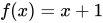
or expressed in lambda terms as:

and
[:x | x + 1] value: 3
can be evaluated as
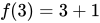
Or in lambda terms as:
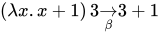
The resulting block object can form a closure: it can access the variables of its enclosing lexical scopes at any time. Blocks are first-class objects.
Blocks can be executed by sending them the value message. Compound variations exist to provide parameters to the block e.g., value:value: and valueWithArguments:.
The literal representation of blocks was an innovation which on the one hand allowed certain code to be significantly more readable; it allowed algorithms involving iteration to be coded in a clear and concise way. Code that would typically be written with loops in some languages can be written concisely in Smalltalk using blocks, sometimes in a single line. But more importantly blocks allow control structure to be expressed using messages and polymorphism, since blocks defer computation and polymorphism can be used to select alternatives. So if-then-else in Smalltalk is written and implemented as
expr ifTrue: [statements to evaluate if expr] ifFalse: [statements to evaluate if not expr]
True methods for evaluation
ifTrue: trueAlternativeBlock ifFalse: falseAlternativeBlock

     ^trueAlternativeBlock value
False methods for evaluation
ifTrue: trueAlternativeBlock ifFalse: falseAlternativeBlock

    ^falseAlternativeBlock value
positiveAmounts := allAmounts select: [:anAmount | anAmount isPositive]
This is related to functional programming, wherein patterns of computation (here selection) are abstracted into higher-order functions. For example, the message select: on a Collection is equivalent to the higher-order function filter on an appropriate functor.[36]
Control structures
[edit]Control structures do not have special syntax in Smalltalk. They are instead implemented as messages sent to objects. For example, conditional execution is implemented by sending the message ifTrue: to a Boolean object, passing as an argument the block of code to be executed if and only if the Boolean receiver is true. The two subclasses of Boolean both implement ifTrue:, where the implementation in subclass True always evaluates the block and the implementation in subclass False never evaluates the block.
The following code demonstrates this:
result := a > b
    ifTrue:[ 'greater' ]
    ifFalse:[ 'less or equal' ]
Blocks are also used to implement user-defined control structures, enumerators, visitors, exception handling, pluggable behavior and many other patterns. For example:
| aString vowels |
aString := 'This is a string'.
vowels := aString select: [:aCharacter | aCharacter isVowel].
In the last line, the string is sent the message select: with an argument that is a code block literal. The code block literal will be used as a predicate function that should answer true if and only if an element of the String should be included in the Collection of characters that satisfy the test represented by the code block that is the argument to the "select:" message.
A String object responds to the "select:" message by iterating through its members (by sending itself the message "do:"), evaluating the selection block ("aBlock") once with each character it contains as the argument. When evaluated (by being sent the message "value: each"), the selection block (referenced by the parameter "aBlock", and defined by the block literal "[:aCharacter | aCharacter isVowel]"), answers a Boolean, which is then sent "ifTrue:". If the Boolean is the object true, the character is added to a string to be returned. Because the "select:" method is defined in the abstract class Collection, it can also be used like this:
| rectangles aPoint collisions |
rectangles := OrderedCollection
  with: (Rectangle left: 0 right: 10 top: 100 bottom: 200)
  with: (Rectangle left: 10 right: 10 top: 110 bottom: 210).
aPoint := Point x: 20 y: 20.
collisions := rectangles select: [:aRect | aRect containsPoint: aPoint].
The exception handling mechanism uses blocks as handlers (similar to CLOS-style exception handling):
[
  some operation
] on:Error do:[:ex |
  handler-code
  ex return
]
The exception handler's "ex" argument provides access to the state of the suspended operation (stack frame, line-number, receiver and arguments etc.) and is also used to control how the computation is to proceed (by sending one of "ex proceed", "ex reject", "ex restart" or "ex return").
Classes
[edit]This is a stock class definition:[37]
Object subclass: #MessagePublisher
    instanceVariableNames: ''
    classVariableNames: ''
    poolDictionaries: ''
    category: 'Smalltalk Examples'
Often, most of this definition will be filled in by the environment. Notice that this is a message to the Object class to create a subclass named MessagePublisher. In other words: classes are first-class objects in Smalltalk which can receive messages just like any other object and can be created dynamically at execution time.
Methods
[edit]When an object receives a message, a method matching the message name is invoked. The following code defines a method publish, and so defines what will happen when this object receives the 'publish' message.
publish
    Transcript show: 'Hello World!'
The following method demonstrates receiving multiple arguments and returning a value:
quadMultiply: i1 and: i2
    "This method multiplies the given numbers by each other and the result by 4."
    | mul |
    mul := i1 * i2.
    ^mul * 4
The method's name is #quadMultiply:and:. The return value is specified with the ^ operator.
Objects are responsible for determining dynamically at runtime which method to execute in response to a message—while in many languages this may be (sometimes, or even always) determined statically at compile time.
Instantiating classes
[edit]The following code:
MessagePublisher new
creates (and returns) a new instance of the MessagePublisher class. This is typically assigned to a variable:
publisher := MessagePublisher new
However, it is also possible to send a message to a temporary, anonymous object:
MessagePublisher new publish
Integrated Development Environment
[edit] |
Smalltalk is one of the first systems to be based around an Integrated Development Environment. There are a rich variety of tools to support code development, and other activities, such as graphics, and music. Smalltalk was the first system in which the modern desktop paradigm of Windows, Icons, Menus, and Pointers (WIMP) was created. Although pointers had already been invented, Smalltalk was the first system to implement overlapping windows and pop-up menus. While there are several programming tools we shall describe the following five major tools. The images of the tools are from a 2024 Squeak system
- browser, the main code viewing and writing tool
- workspace, a text editor in which expressions can be evaluate
- transcript, an output window for text, which in many dialects is also a workspace
- inspector
- notifier/debugger, a window opened in response to an unhandled exception, and can morph into a full debugger
Browser
[edit]
Smalltalk-80 derived systems organize classes within "system categories", such as Kernel-Numbers, Kernel-Objects, Collections-Abstract, Collections-Sequenceable, etc, and within classes methods are organized in named categories such as accessing, arithmetic, instance creation, etc. From this follows the classic five paned browser, with four panes in the upper half of the window containing from high to left the list of system categories, that when one is selected displays in the second window the list of classes in that category, that when one is selected displays the list of message categories in the selected class, that when one is selected displays in the last pane the selectors of the methods in the selected category in the selected class. When one of the selectors in the fourth pane is selected the source for that method is displayed in the fifth pane. If only a category is selected and not a method, the fifth pane shows a template for defining a new method. If a system category is selected but no class, a template for creating a class in the category is displayed. Various pop-up menus allow one to query the tool such as searching for a class by name, finding all senders of a selected message, or all implementors of the message, and so on. In this way the browser is both a code reading and system exploration tool and a code authoring tool.

Workspace
[edit]A Workspace is a simple text editor editing a single string. One can type arbitrary text in the workspace, including Smalltalk expressions. On the pop-up menu "do it" (evaluate the selected expression), "print it" (evaluate the selected expression and insert the print string of the result immediately after the selection), and "inspect it" (open an inspector on the result of the evaluation of the selected expression, see "Inspector" below) are three oft used actions. Note that the fifth pane in the Browser is also a workspace, so that one can evaluate expressions and insert their results while editing method definitions, and a common thing is to include evalteable expressions, typically examples, in comments in a method, because almost everywhere the text of a method is shown (for example in the debugger) code is executable as in a workspace. Both workspaces and the browser's text panes are typically syntax highlighted. By using blocks to separate different expressions one can have several syntax highlighted expressions, each with their own temporaries in a single workspace.

Transcript
[edit]The Transcript is a special workspace associated with the global Transcript. So evaluating Transcript print: 52 factorial; cr; flush causes 80658175170943878571660636856403766975289505440883277824000000000000 followed by a newline to appear on the Transcript window. The Transcript therefore serves as a place to emit logging messages, although it can also function as a Workspace
Inspector
[edit]There are various inspectors, some tailored to displaying different kinds of object. The most basic inspector has two panes. To the left is a list of the object itself (with the label "self"), followed by the instance variables in the object, which will include numbered instance variables in sequences such as strings and arrays. To the right is a workspace pane. Selecting a name in the list replaces the workspace's contents with a print string of the selected variable. Editing and "accepting" the text in the workspace pane when an instance variable is selected will assign the result of the evaluation to the selected variable. One can "drill down" by using the "inspect" command on the list menu which will apply to the selected instance variable. More sophisticated inspectors (e.g. explorers) support finder-like tree access so that object structure can be traversed without opening additional windows.

Notifier/Debugger
[edit]The default response to an unhandled exception is to open a Notifier, which is a window containing a stack backtrace of the first few activations, and buttons such as "Debug", "Proceed", "Close", etc. If the programmer chooses "Debug" then the full debugger opens. This has six panes. At the top is the stack window, containing a list of the contexts in the stack. Selecting a context causes the middle pane to display the text of the context's method, and to highlight the current expression within the method. Selecting the top context will display the method raising the exception and the message raising the exception will be highlighted. Selecting a context causes the bottom four panes to be updated. The bottom left two panes are the receiver inspector, that inspect the receiver of the selected message. The bottom right two panes are the context inspector that show the argument and temporary variable names in the selected context and allow display and modification of these variables.
Sending the message self halt causes an exception which opens a notifier, providing a simple breakpoint facility (typically breakpoint facilities provide more than just the simple halt, but it was the first such facility). Workspaces also provide a "debug it" evaluator which opens a debugger on the selected expression positioned at the first message send within the expression. So selecting 52 factorial and choosing "debug it" from the pop-up menu opens a debugger with the "doit context" selected and the factorial selector highlighted. The debugger provides buttons to do "step into", "step over", etc. Hence by choosing "step into" one can explore the evaluation of 52 factorial. In this way the debugger provides an inspector of a process, allowing one to explore a halted computation.
If an exception results from a doesNotUnderstand:, or subclassResponsibility send, then the notifier will include a "Create" button, allowing the programmer to choose where in the receiver's hierarchy to define an "initial draft" of the method to be implemented. Redefining a method in the debugger causes the selected context to reset back to the first statement (arguments are not modifiable in Smalltalk so this gets the execution state back to the start of a method). In this way the debugger supports live programming, defining methods as the computation proceeds. This is an extremely productive and enjoyable way to program. Everything in the system is at your finger tips. One has the full power of workspaces to evaluate subexpressions, and the browser to search for supporting code as one programs.

Clicking on the Debug button opens the Notifier into a Debugger allowing inspecting the call stack and editing and continuing from any method activation. In this case the Notifier has created a template of the missing method that the programmer can edit, compile, and then continue the computation.

Hello World example
[edit]The Hello world program is used by virtually all texts to new programming languages as the first program learned to show the most basic syntax and environment of the language. For Smalltalk, the program is extremely simple to write. The following code, the message "show:" is sent to the object "Transcript" with the String literal 'Hello, world!' as its argument. Invocation of the "show:" method causes the characters of its argument (the String literal 'Hello, world!') to be displayed in the transcript ("terminal") window.
Transcript show: 'Hello, world!'.
To see the results of this example, a Transcript window must be open.
Image-based persistence
[edit]Most popular programming systems separate static program code (in the form of class definitions, functions or procedures) from dynamic, or run time, program state (such as objects or other forms of program data). They load program code when a program starts, and any prior program state must be recreated explicitly from configuration files or other data sources. Any settings the program (and programmer) does not explicitly save must be set up again for each restart. A traditional program also loses much useful document information each time a program saves a file, quits, and reloads. This loses details such as undo history or cursor position. Image based systems don't force losing all that just because a computer is turned off, or an OS updates.
Many Smalltalk systems, however, do not differentiate between program data (objects) and code (classes). In fact, classes are objects. Thus, most Smalltalk systems store the entire program state (including both Class and non-Class objects) in an image file. The image can then be loaded by the Smalltalk virtual machine to restore a Smalltalk-like system to a prior state.[38] This was inspired by FLEX, a language created by Alan Kay and described in his M.Sc. thesis.[39]
Smalltalk images are similar to (restartable) core dumps and can provide the same functionality as core dumps, such as delayed or remote debugging with full access to the program state at the time of error.[40]
Other languages that model application code as a form of data, such as Lisp, often use image-based persistence as well (see EMACS, for example). This method of persistence is powerful for rapid development because all the development information (e.g. parse trees of the program) is saved which facilitates debugging.
However, it also has serious drawbacks[citation needed] as a true persistence mechanism. For one thing, developers may often[citation needed] want to hide implementation details and not make them available in a run time environment. For reasons of legality and maintenance, allowing anyone to modify a program at run time inevitably[citation needed] introduces complexity and potential errors that would not be possible with a compiled system that exposes no source code in the run time environment. Also, while the persistence mechanism is easy to use, it lacks the true persistence abilities needed for most multi-user systems.[citation needed] The most obvious is the ability to do transactions with multiple users accessing the same database in parallel.[citation needed]
Level of access
[edit]Everything in Smalltalk-80, unless customised to avoid the possibility, is available for modification from within a running program. This means that, for example, the IDE can be changed in a running system without restarting it. In some implementations, the syntax of the language or the garbage collection implementation can also be changed on the fly. Even the statement true become: false is valid in Smalltalk, although executing it is not recommended except for demonstration purposes (see virtual machine, image-based persistence, and backups).
Just-in-time compilation
[edit]Smalltalk programs are usually[citation needed] compiled to bytecode, which is then interpreted by a virtual machine or dynamically translated into native machine-code. The results of previous message lookups are cached in self-modifying machine-code resulting in very high-performance sends that can out-perform the indirect function calls in C++ virtual method calls.
List of implementations
[edit]OpenSmalltalk
[edit]OpenSmalltalk VM (OS VM) is a relatively high-performance implementation of the Smalltalk virtual machine on which several modern open-source Smalltalk dialects are based.[41][42] The OS VM derives from the original Back-to-the-Future[43] (BTTF) Squeak interpreter implemented by Dan Ingalls, Ted Khaeler, John Maloney and many other contributors. As with the BTTF VM, OS VM is transpiled from the Smalltalk system in which it is developed (using a subset of Smalltalk named Slang) to native C language source code,[44] which is in turn compiled against specific platform and architecture of the hardware practically enabling cross-platform execution of the Smalltalk images. The OS VM differs from the BTTF VM in
- introducing a JIT compiler to native machine code, including sophisticated machine-code method cacheing techniques
- using "context-to-stack-mapping" to vastly reduce the overheads of context objects
- supporting both the original BTTF object representation, and Spur, a much more efficient and native 32-bit and 64-bit scheme with a much improved garbage collector, object pinning, and lazy become
The notable Smalltalk dialects based on the OS VM[45] are:
- Squeak, the original open source Smalltalk that the OpenSmalltalk VM was built for[45]: 2 , that derives from Xerox PARC's Smalltalk-80 v1
- Pharo Smalltalk, an open-source cross-platform language, that derives from Squeak
- Croquet, a replicating distributed Smalltalk for the Croquet Project
- Cuis Smalltalk that derives from Squeak
Others
[edit]- Amber Smalltalk, runs on JavaScript via transpiling
- Dolphin Smalltalk from Object Arts
- Etoys, a visual programming system for learning built in Squeak
- GemStone/S from GemTalk Systems
- GNU Smalltalk, headless (lacks GUI) implementation of Smalltalk
- Smalltalk MT Smalltalk for Windows from Object Connect
- ObjectStudio from Cincom
- Scratch a visual programming system (only versions before 2.0 are Smalltalk-based)
- Smalltalk/X from exept.de, a descendant of the original Xerox PARC Smalltalk-80
- StepTalk, GNUstep scripting framework uses Smalltalk language on an Objective-C runtime
- Strongtalk, an open-source (since 2006) Windows-only version, offers optional strong typing; initially created at Sun Microsystem Labs.[46]
- VisualAge Smalltalk from IBM
- Visual Smalltalk Enterprise, and family, including Smalltalk/V
- VisualWorks from Cincom, a descendant of the original Xerox PARC Smalltalk-80 v2
See also
[edit]References
[edit]- ^ "Alto I Schematics" (PDF). Bitsavers. p. 54. Retrieved 21 July 2016.
- ^ "History of Computers and Computing, Birth of the modern computer, Personal computer, Xerox Alto". Retrieved 2016-04-19.
- ^ a b c d e f g h Kay, Alan; Ram, Stefan (2003-07-23). "E-Mail of 2003-07-23". Dr. Alan Kay on the Meaning of 'Object-Oriented Programming'. Retrieved 2009-01-03.
- ^ a b c d Kay, Alan. "The Early History of Smalltalk". Archived from the original on 2007-09-30. Retrieved 2007-09-13.
- ^ "ANSI Smalltalk Standard". Smalltalk.org. 2004. Archived from the original on 2006-02-16. Retrieved 2021-03-02.
- ^ "Stack Overflow Developer Survey 2017".
- ^ "Stack Overflow Developer Survey 2018".
- ^ "Versions". Smalltalk.org. Archived from the original on 2015-09-08. Retrieved 2007-09-13.
- ^ a b c Ingalls, Daniel (2020). "The evolution of Smalltalk: from Smalltalk-72 through Squeak". Proceedings of the ACM on Programming Languages. 4: 1–101. doi:10.1145/3386335. S2CID 219603700.
- ^ "Tektronix invitation for First international Conference of Smalltalk-80 Implementors" (PDF). Tektronix Smalltalk Document Archive. 27 August 1981.
- ^ "Attendee list for First international Conference of Smalltalk-80 Implementors" (PDF). Tektronix Smalltalk Document Archive. 24 September 1981.
- ^ "Introducing the Smalltalk Zoo". CHM. 17 December 2020.
- ^ "VI Release Notes" (PDF). 20 November 1981.
- ^ "ANSI Smalltalk Standard". Smalltalk.org. Archived from the original on 2015-09-07. Retrieved 2007-09-13.
- ^ "Hobbes". Archived from the original on 19 April 2003.
- ^ "History". Seagull Software. Archived from the original on 2002-08-06. Retrieved 2007-09-13.
- ^ "VisualAge Smalltalk Transition FAQ".
- ^ The Simula language was also object-oriented and preceded (and was acknowledged as an influence on) Smalltalk but it was a simulation language, not a general purpose programming language.
- ^ Cannon, Howard. "Flavors A non-hierarchical approach to object-oriented programming" (PDF). softwarepreservation.org. Retrieved 17 December 2013.
- ^ "About Ruby". ruby-lang.org. Retrieved 17 December 2013.
- ^ "Where Did Refactoring Come From?". sourcemaking.com. Retrieved 17 December 2013.
- ^ "DARPA – ARPA". livinginternet.com. Retrieved 16 December 2013.
To meet this need, ARPA established the IPTO in 1962 with a mandate to build a survivable computer network to interconnect the DoD's main computers at the Pentagon, Cheyenne Mountain, and SAC HQ.
- ^ "Engelbart's Role in Early Computer Networking". dougengelbart.org. Retrieved 17 December 2013.
- ^ Krasner, Glen; Pope, Stephen (August–September 1988). "A Cookbook for Using the Model-View-Controller User Interface Paradigm in Smalltalk -80". Journal of Object-Oriented Programming.
- ^ "Our Influence". cincomsmalltalk.com. Retrieved 16 December 2013.
- ^ "Injected, Inspected, Detected, Infected, Neglected and Selected". The Weekly Squeak. 2014-04-29. Retrieved 2024-04-15.
- ^ Kay, Alan (October 10, 1998). "Prototypes vs Classes (e-mail on Squeak list)".
- ^ Goldberg, Adele; Robson, David (1989). Smalltalk-80 The Language. Addison Wesley. pp. 31, 75–89. ISBN 0-201-13688-0.
- ^ Clark, A.N. (September 18, 1997). "Metaclasses and Reflection in Smalltalk". arXiv:1804.07272 [cs.SE].
- ^ Ducasse, Stéphane; Lienhard, Adrian; Renggli, Lukas. "Seaside – A Multiple Control Flow Web Application Framework" (PDF). scg.unibe.ch. Software Composition Group Institut fur Informatik und angewandte Mathematik Universitaat Bern, Switzerland. Retrieved 16 December 2013.
- ^ Foote, Brian; Johnson, Ralph (1–6 October 1989). "Reflective facilities in Smalltalk-80". Conference proceedings on Object-oriented programming systems, languages and applications. pp. 327–335. doi:10.1145/74877.74911. ISBN 0-89791-333-7. S2CID 14207536. Retrieved 16 December 2013.
- ^ Smith, Brian C (1982-01-01). "Procedural Reflection in Programming Languages". MIT Technical Report (MIT-LCS-TR-272). Retrieved 16 December 2013.
- ^ Peck, Mariano Martinez; Bouraqadi, Noury; Denker, Marcus; Ducasse, Stéphane; Fabresse, Luc (2011-08-23). "Efficient proxies in Smalltalk". Proceedings of the International Workshop on Smalltalk Technologies. ACM. p. 1–16. doi:10.1145/2166929.2166937. hdl:20.500.12210/28011. ISBN 978-1-4503-1050-5.
- ^ Ducasse, Stéphane (2001). "Squeak: Une syntaxe minimaliste / Squeak: A minimalist syntax!" (PDF). Programmez! Le Magazine du Développement. 1. Retrieved 15 January 2024.
- ^ Ducasse, Stéphane. "Object-Oriented Design with Smalltalk — a Pure Object Language and its Environment" (PDF). Software Composition Group (University of Berne). Retrieved 15 January 2024.
- ^ Goldberg, Adele; Robson, David (1989). Smalltalk-80 The Language. Addison Wesley. pp. 17–37. ISBN 0-201-13688-0.
- ^ Goldberg, Adele; Robson, David (1989). Smalltalk-80 The Language. Addison Wesley. pp. 39–53. ISBN 0-201-13688-0.
- ^ "Image-Based Persistence". book.seaside.st. Retrieved 17 December 2013.
- ^ Kay, Allen (1968). "FLEX – A flexible extendable language". University of Utah MSC Thesis.
- ^ Fowler, Martin. "Memory Image". martinfowler.com. Archived from the original on 2011-10-07. Retrieved 17 December 2013.
- ^ "opensmalltalk-vm", OpenSmalltalk, Git hub, 2020-11-03, retrieved 2020-11-08
- ^ Eliot Miranda; Clément Bera; Elisa Gonzalez Boix; Dan Ingalls (2018). Two Decades of Smalltalk VM Development: Live VM development through Simulation Tools; Virtual Machines and Language Implementations VMIL 2018, Boston, United States (Report). hal.archives-ouvertes.fr. doi:10.1145/3281287.3281295. Archived from the original on 2022-11-05.
- ^ Ingalls, Dan; Kaehler, Ted; Maloney, John; Wallace, Scott; Kay, Alan (1997). "Back to the Future: the story of Squeak, a practical Smalltalk written in itself". ACM SIGPLAN Notices. 32 (10). ACM Digital Library: 318–326. doi:10.1145/263700.263754.
- ^ "Slang". Squeak. Retrieved 2020-11-08.
- ^ a b Miranda, Eliot; Bera, Clément; Gonzalez Boix, Elisa; Dan, Ingalls (October 8, 2018). "Two Decades of Smalltalk VM Development: Live VM development through Simulation Tools" (PDF).
- ^ "Strongtalk: A High-Performance Open Source Smalltalk With An Optional Type System". Retrieved 2021-11-25.
Further reading
[edit]- Goldberg, Adele (December 1983). Smalltalk-80: The Interactive Programming Environment. Addison-Wesley. ISBN 0-201-11372-4.
- Goldberg, Adele; Kay, Alan, eds. (March 1976). Smalltalk-72 Instruction Manual (PDF). Palo Alto, California: Xerox Palo Alto Research Center. Retrieved 2011-11-11.
- Goldberg, Adele; Robson, David (May 1983). Smalltalk-80: The Language and its Implementation. Addison-Wesley. ISBN 0-201-11371-6.
- Goldberg, Adele; Robson, David (11 January 1989). Smalltalk 80: The Language. Addison-Wesley. ISBN 0-201-13688-0.
- Kay, Alan C. (March 1993). "The Early History of Smalltalk" (PDF). ACM SIGPLAN Notices. 28 (3). ACM: 69–95. doi:10.1145/155360.155364. Archived from the original (PDF) on May 3, 2023.
- Krasner, Glen, ed. (August 1983). Smalltalk-80: Bits of History, Words of Advice. Addison-Wesley. ISBN 0-201-11669-3.
- Nierstrasz, Oscar; Ducasse, Stéphane; Pollet, Damien; Black, Andrew P. (2009-10-07). Squeak by Example. Kehrsatz, Switzerland: Square Bracket Associates. ISBN 978-3-9523341-0-2.
- Nierstrasz, Oscar; Ducasse, Stéphane; Pollet, Damien; Black, Andrew P. (February 23, 2010). Pharo by Example. Kehrsatz, Switzerland: Square Bracket Publishing. ISBN 978-3-9523341-4-0. Archived from the original on October 21, 2009.
- Winston, Patrick Henry (September 3, 1997). On to Smalltalk. MIT, USA: Addison Wesley. ISBN 978-0-201-49827-1.
- Brauer, Johannes (2015). Programming Smalltalk – Object-Orientation from the Beginning. Springer. ISBN 978-3-658-06823-3.
- "Special Issue on Smalltalk". Byte. 6 (8). McGraw-Hill. August 1981. Retrieved 2013-10-18.
- Goldberg, Adele (August 1981). "Introducing the Smalltalk-80 System". Byte. 6 (8). McGraw-Hill. Retrieved 2013-10-18.
- Ingalls, Dan (August 1981). "Design Principles Behind Smalltalk". Byte. 6 (8). McGraw-Hill. Retrieved 2011-11-11.
- Tesler, Larry (August 1981). "The Smalltalk Environment". Byte. 6 (8). McGraw-Hill. Retrieved 2016-05-02.
External links
[edit]
Smalltalk programming language | |||||||||||
|---|---|---|---|---|---|---|---|---|---|---|---|
| Software |
| ||||||||||
| Workstation | |||||||||||
| Community |
| ||||||||||
 Book Book  Category Category | |||||||||||


Smalltalk
View on GrokipediaHistory
Origins at Xerox PARC
Smalltalk originated at Xerox Palo Alto Research Center (PARC) in 1972, spearheaded by Alan Kay as part of the Learning Research Group (LRG) he led. The project was deeply tied to Kay's vision for the Dynabook, a portable personal computer designed to serve as an educational tool for children, enabling them to create and interact with dynamic media rather than merely consume content. Key contributors included Dan Ingalls, who implemented the initial interpreter, and Adele Goldberg, who played a central role in refining the system's educational applications, alongside others like Ted Kaehler and Diana Merry. This effort built on Kay's earlier experiences at the University of Utah, where he encountered influential systems that shaped his ideas about object-oriented computing.[6][1] The first version, Smalltalk-72, emerged in late 1972 as a simulation language inspired by Logo and intended to model biological and physical processes in an accessible way for learners. It featured early object-oriented concepts, such as message-passing between entities, but was initially implemented as a simple interpreter on a minicomputer before migrating to PARC's hardware. A pivotal event was the first live demonstration of Smalltalk-72 in November 1972, where Kay showcased a rudimentary "one-page" interpreter running on an SDS 940 computer, highlighting its potential for interactive programming. Influences from Ivan Sutherland's Sketchpad (1963), which introduced graphical manipulation via light pens, informed Smalltalk's emphasis on direct user interaction with visual representations. By 1976, the system had evolved into Smalltalk-76, incorporating a more complete object-oriented paradigm with uniform treatment of all entities as objects, including control structures, and running natively on the Alto workstation.[6][7][8] This development underscored a broader vision of personal computing at PARC, where Smalltalk served as the software foundation for innovative human-computer interfaces. The Alto, PARC's pioneering workstation introduced in 1973, provided the bitmap display and mouse-driven interaction essential for Smalltalk's graphical user interface (GUI), allowing users—especially children—to manipulate objects visually and extend the system dynamically. Smalltalk's design prioritized metamedia, where the computer acted as a "medium for creative thought," aligning with the Dynabook's goal of empowering users through simulation and personalization rather than rigid instruction. These early efforts at PARC laid the groundwork for Smalltalk's role in advancing pure object-oriented principles.[6][1][9]Key Milestones and Evolution
The release of Smalltalk-80 in 1980 marked a pivotal standardization of the language, introducing key features such as metaclasses for defining class behavior and streams for handling sequential data access, which solidified its pure object-oriented foundation.[10] This version, developed at Xerox PARC under the leadership of Adele Goldberg and Dan Ingalls, transitioned Smalltalk from experimental prototypes to a more robust system suitable for broader application, with the first public distribution occurring via tapes to select researchers and institutions.[11] Commercialization began with Xerox's internal deployment of Smalltalk-80 for research and development, but external licensing accelerated in the mid-1980s as demand grew for object-oriented tools. In 1988, ParcPlace Systems, a spin-off from Xerox PARC led by Adele Goldberg, was established to market Smalltalk-80 commercially, targeting workstation environments like those from Sun Microsystems and providing professional support and enhancements.[12] Concurrently, Digitalk, founded in 1983, developed Smalltalk/V as a lightweight, portable implementation optimized for personal computers, including versions for MS-DOS and Macintosh, which broadened accessibility to non-workstation users.[13] Throughout the 1990s, Smalltalk evolved toward formal standardization, culminating in the American National Standards Institute (ANSI) ratification of the Smalltalk standard (INCITS 319-1998) in May 1998, which incorporated modules via namespaces for better code organization and a comprehensive exception handling mechanism using blocks with #on:do: for robust error management. This standard, developed by the X3J20 committee with input from commercial vendors, ensured interoperability across implementations while preserving core paradigms like image-based persistence for runtime state.[14] Key figures shaped these advancements, notably Adele Goldberg, who as manager of Xerox PARC's Software Concepts Group oversaw the Smalltalk-80 release process and co-authored the seminal "Blue Book" documentation, providing the first comprehensive reference for the language's syntax, semantics, and implementation.[10] Public awareness surged with the August 1981 issue of Byte Magazine, a special edition dedicated to Smalltalk-80 featuring articles by Goldberg, Ingalls, and Larry Tesler on its design principles, virtual machine, and interactive environment, which introduced the system to a wider programming audience.[15]Transition to Open Source
The transition to open source for Smalltalk began in the mid-1990s with the development of Squeak, an implementation initiated by Apple Computer in 1996 as a derivative of Smalltalk-80.[16] Squeak was designed as a highly portable system with its virtual machine implemented entirely in Smalltalk itself, enabling easy debugging and modification.[17] Initially released under a proprietary license, Squeak became fully open source in 1998, marking the first freely available implementation of the language and broadening access beyond commercial vendors.[16] In parallel, community efforts in the 1990s fostered open initiatives through groups like the Smalltalk User Group networks and the European Smalltalk User Group (ESUG), established to promote collaboration among developers and researchers.[18] These organizations hosted conferences and shared resources, accelerating the shift toward open-source development by encouraging contributions to portable, modifiable Smalltalk environments. A pivotal event was the 2002 release of the Seaside web framework, an open-source library that leveraged Smalltalk's object-oriented features to simplify dynamic web application development through continuations and programmatic HTML generation.[19] In the 2010s, the Pharo project emerged as a fork of Squeak 3.9 in March 2008, with its first stable release in April 2010, focusing on modern software engineering practices and rapid evolution through community-driven updates.[20] This open-source transition provided key benefits, including free availability that democratized access for hobbyists and institutions, cross-platform support across Windows, macOS, and Linux, and a revival in education and research where environments like Squeak and Pharo enabled interactive learning and experimentation in object-oriented paradigms.[21][22]Design Philosophy
Foundational Influences
Smalltalk's design evolved through influences from earlier programming languages and ideas, with key distinctions between its early prototypes and later versions. Around 1967, Alan Kay coined the term "object-oriented" for architectures of small, message-passing computers, drawing from an extended Algol compiler with Simula I's "activities" and "processes" as precursors to classes and objects, emphasizing distributed communication over inheritance hierarchies.[7] The early Smalltalk-72 system was heavily shaped by Lisp's dynamic typing, FEXPRs for late binding, and metaprogramming, which informed its runtime flexibility and self-modifying capabilities, while Lisp's deeper structural influence complemented other elements.[7] Similarly, Seymour Papert's Logo language, designed for educational purposes with its turtle graphics and emphasis on exploratory learning, inspired Smalltalk's goal of accessibility for non-experts, particularly children, as Alan Kay integrated Logo's interactive pedagogy into early Smalltalk prototypes.[7] The introduction of classes and objects in Simula 67, developed by Ole-Johan Dahl and Kristen Nygaard for discrete event simulation, profoundly influenced the object-oriented structure of Smalltalk-76 and Smalltalk-80, where Dan Ingalls introduced a Simula-style class/instance model in 1976, later stabilized and documented by Adele Goldberg in Smalltalk-80.[5] From this Smalltalk-80 perspective, Goldberg emphasized that "the whole approach that was the foundation of objects and message sending comes from Simula."[23] Though Simula's class notion dominated the mature design, Lisp's contributions to dynamism persisted throughout. Alan Kay's personal intellectual background further molded Smalltalk's conceptual framework, drawing from biology, mathematics, and systems theory. Kay's undergraduate studies in molecular biology, focusing on cell metabolism and morphogenesis, led him to envision computing systems as collections of autonomous, communicating entities akin to biological cells, where simple local interactions yield complex global behaviors.[7] This biological perspective reinforced the idea that "everything is an object," promoting a uniform treatment of data, behavior, and interfaces. Additionally, Kay's exposure to cellular automata—discrete models of computation where patterns emerge from rule-based local interactions—influenced the decentralized, emergent nature of Smalltalk's object interactions, viewing programs as simulations of such systems.[7] The principles of modularity and hierarchy in Smalltalk were also informed by Christopher Alexander's Notes on the Synthesis of Form (1964), which Kay applied to software design as a way to compose complex systems from reusable, context-sensitive patterns rather than rigid blueprints.[24] Ivan Sutherland's 1963 Sketchpad system, the first to demonstrate interactive graphical objects with constraints and direct manipulation, profoundly impacted Smalltalk's user interface and object representation, with Kay recalling that the simultaneous arrival of Sutherland's thesis and a Simula distribution tape sparked the synthesis of graphical and object-oriented ideas.[25] Philosophically, Smalltalk's message-passing mechanism—central to its communication model—drew from early actor-like concepts and pattern-directed invocation in systems such as Planner, a Lisp dialect, emphasizing asynchronous, location-transparent interactions over shared memory. Kay described this as the "big idea" of OOP, where objects respond to messages much like actors in a distributed ensemble or cells in a biological network, prioritizing encapsulation and late binding to foster robust, evolvable systems.[26] These influences collectively positioned Smalltalk as a holistic environment for personal computing, extending beyond mere syntax to a paradigm of simulation and interaction.Pure Object-Oriented Paradigm
Smalltalk exemplifies the pure object-oriented paradigm through its foundational principle that everything in the system is an object, and all computational processes occur via message passing between these objects. This uniformity ensures that no aspect of the language deviates from the object model, treating even fundamental values such as numbers and booleans as full-fledged objects capable of receiving and responding to messages. As articulated by Alan Kay, one of Smalltalk's creators, object-oriented programming fundamentally involves "messaging, local retention and protection and hiding of state-process, and extreme late-binding of all things," a vision realized in Smalltalk's design.[27][10] Unlike languages with primitive types, Smalltalk eliminates any non-object elements, implementing integers, booleans, and control structures entirely within the object framework. For instance, the valuestrue and false are singleton instances of subclasses of the Boolean class, each defining methods such as ifTrue: and ifFalse: that accept blocks of code as arguments and selectively execute them based on the boolean's state. This approach extends to arithmetic and other operations, where even basic integers respond to messages like + or *, delegating to appropriate methods without invoking underlying primitives directly. Such design fosters a consistent model where developers interact solely with objects, avoiding exceptions to the paradigm for performance or simplicity.[10][28]
Message passing serves as the exclusive mechanism for execution in Smalltalk, promoting polymorphism and dynamic behavior through late binding, where the method to invoke is determined at runtime based on the receiver object's class. When an object receives a message, it searches its method dictionary (and potentially superclasses) to find a matching implementation, enabling flexible substitution of behaviors without compile-time resolution. This late binding underpins Smalltalk's extensibility, allowing new classes to respond to existing messages polymorphically, as seen in how various number types (e.g., SmallInteger or Float) uniformly handle arithmetic messages.[10][29]
In contrast to hybrid object-oriented languages like Java or C++, which incorporate primitive types, procedural control flows, and special syntax for efficiency, Smalltalk's unwavering commitment to the object model avoids such compromises. Primitive operations in hybrid languages often bypass the object system, leading to inconsistencies where not everything behaves as an object— for example, Java's int cannot receive methods directly. Smalltalk's purity, by contrast, maintains a seamless environment where performance considerations do not erode the paradigm's integrity, though it relies on optimized implementations like just-in-time compilation to mitigate any overhead. This uniformity has influenced subsequent languages but remains a hallmark of Smalltalk's design philosophy.[10][30]
Reflection and Metaprogramming
Smalltalk's reflective model enables programs to examine and alter their own structure and behavior at runtime, embodying the language's commitment to full introspection and self-modification. This capability stems from a uniform treatment of all language elements as objects, allowing meta-level operations to be expressed using the same mechanisms as base-level computations. Reflection supports metaprogramming by providing direct access to the program's internals, such as classes, methods, and execution contexts, without requiring separate meta-languages or interpreters.[31] Central to this system are metaclasses, where every class is an instance of its own metaclass, creating a hierarchical structure of self-description. For instance, the classObject is an instance of Object class, which itself is a subclass of Class, the root metaclass. Metaclasses handle class-side behavior, such as defining class methods and initializing class variables, while mirroring the inheritance chain of their associated classes to ensure consistency. This design permits dynamic class modification; developers can add, remove, or redefine methods and instance variables on a live class, with changes propagating immediately to all instances without halting execution. Such flexibility arises because classes, as objects, respond to the same reflective messages as ordinary objects.[32][33]
Reflection APIs are exposed through core classes like Behavior and MethodContext. Behavior, the abstract superclass of all classes and metaclasses, provides protocols for structural introspection and alteration, including #methodDict to retrieve or set the method dictionary, #instVarNames to list instance variables, and #addInstVarName: to dynamically add variables. MethodContext reifies method activations, enabling stack inspection via methods like #sender for the calling context, #receiver for the message recipient, and #locals for temporary variables, thus allowing programs to traverse and manipulate the call stack. These APIs form a complete reflective tower, where base-level code can invoke meta-level operations seamlessly.[31][34]
Practical examples illustrate these features' power. Compile-time evaluation occurs via Compiler evaluate:, which parses, compiles, and executes a string as Smalltalk code in the current context; for example:
[Compiler](/page/Compiler) evaluate: '3 [factorial](/page/Factorial)'
[Compiler](/page/Compiler) evaluate: '3 [factorial](/page/Factorial)'
[factorial](/page/Factorial) method on the integer 3. Runtime method addition uses compile:, enabling on-the-fly extension; for instance:
Point compile: 'distanceTo: otherPoint
    ^((self x - otherPoint x) squared + (self y - otherPoint y) squared) sqrt'
    classified: 'measuring'
Point compile: 'distanceTo: otherPoint
    ^((self x - otherPoint x) squared + (self y - otherPoint y) squared) sqrt'
    classified: 'measuring'
distanceTo: method to Point, immediately available for use on existing instances. These operations demonstrate Smalltalk's metaprogramming expressiveness, where code generation and execution are first-class activities.[35][36]
The benefits of these reflective mechanisms are profound for live programming environments. Changes made through reflection take effect instantaneously, supporting rapid prototyping, debugging, and evolution without recompilation or system restarts. This immediacy fosters an interactive development style, where the running system serves as both the program and its editor, enhancing productivity in exploratory and incremental software construction. The image-based persistence further amplifies this by saving reflective modifications across sessions.[36][37]
Language Features
Syntax Overview
Smalltalk features a minimalist syntax designed to emphasize readability and uniformity, with all computation expressed through message passing rather than traditional operators or control structures. The language employs three primary message types—unary, binary, and keyword—but keyword messages form the basis for multi-argument interactions, where the method name is a phrase incorporating colons to indicate argument positions. For instance, the expression2 add: 3 sends the message add: with argument 3 to the receiver 2, yielding 5. Similarly, 3 to: 10 by: 2 generates a sequence from 3 to 10 incrementing by 2. This keyword style allows natural-language-like phrasing, such as 'Smalltalk' allButFirst: 5, which returns 'talk'.[38]
Literals in Smalltalk are directly embeddable values that require no additional construction syntax, promoting concise code. Symbols, which are unique interned strings, are denoted by a pound sign followed by the identifier, as in #symbol for use in lookups or as keys. Strings are enclosed in single quotes, like 'text', supporting escaped characters for special cases. Arrays are literal collections prefixed with #(, containing elements such as numbers or other literals, for example #(1 2 3) creates an array. Blocks, representing closures, use square brackets enclosing expressions or parameter definitions, such as [ :x | x * 2 ] for a function doubling its argument, or simply [ Transcript show: 'Hello' ] for a parameterless block. These literals integrate seamlessly into messages, enabling immediate object creation without separate allocation statements.[38][39][40]
Variables are declared simply without type annotations, aligning with Smalltalk's dynamic nature. Temporary variables, local to a method, are introduced at the method's start using vertical bars, as in | temp |, allowing reuse within the scope; for example, | x | x := (Date today) - birthdate computes an age. Instance variables are specified during class definition via the instanceVariableNames: method, listing names space-separated in a string, such as 'name age', and accessed directly by name within instance methods. Assignment mutates variables using the := operator, like x := 5, while the ^ symbol explicitly returns a value from a method, as in ^ x; unreturned methods implicitly return self. Smalltalk eschews semicolons for statement termination—instead using periods (.) to separate expressions—and omits braces entirely, relying on whitespace and indentation for structure; blocks use brackets, and methods are sequences of period-delimited statements, with conventional two-space indents enhancing clarity.[41][42]
Classes and Objects
In Smalltalk, classes serve as blueprints for creating objects, encapsulating both the state (via instance variables) and behavior (via methods) of their instances. All classes form a single-inheritance hierarchy rooted in the class Object, ensuring that every object shares a common set of behaviors defined therein, such as responding to basic messages for equality and printing.[10] A new class is defined by sending thesubclass: message to an existing class (typically Object for leaf classes), along with specifications for the class name and instance variables; for example, the Point class might be declared as Object subclass: #Point instanceVariableNames: 'x y', where x and y represent the coordinates stored privately within each Point instance.[10] Instance variables are accessed and modified only through methods, enforcing encapsulation and promoting uniform object interfaces.[10]
Methods define how objects respond to messages and are categorized by the form of the message selector: unary (no arguments, such as size for returning an object's length), binary (infix operators like + for addition), or keyword (with named arguments, such as add: aPoint for combining points).[10] These methods are implemented as expressions in Smalltalk syntax and are stored directly within the class definition, allowing dynamic addition or modification during development.[10] Binary selectors are restricted to a predefined set of symbols (e.g., arithmetic operators, comparisons) to maintain parseability, while unary and keyword selectors offer flexibility for custom behaviors.[10]
Inheritance in Smalltalk is strictly linear, with each class having exactly one superclass from which it inherits all instance variables and methods, enabling code reuse and specialization through overrides in subclasses.[10] For instance, Integer might inherit from Number but override methods like add: to account for integer-specific behaviors.[10] Class methods, which operate on the class itself rather than instances (e.g., for factory creation), are defined in a parallel metaclass hierarchy; each class is an instance of its metaclass, which inherits from Class (itself an instance of Metaclass), with Object class serving as the root metaclass.[43] This metaclass structure ensures that classes behave as first-class objects, capable of receiving messages like subclasses.[10]
Objects are instantiated by sending the new message to a class, which allocates storage for the instance variables and returns a reference to the new object, often invoking an initialize method if defined to set initial values.[44] For example, creating and configuring a Point might involve Point new x: 1 y: 2, where new produces the blank instance and subsequent keyword messages set the coordinates via setter methods.[44] This process leverages the uniform message-passing model, treating instantiation as just another form of object interaction.[45]
Control Structures and Expressions
In Smalltalk, control structures are implemented entirely through message passing to objects, eschewing traditional keywords likeif or while found in other languages. This approach aligns with the language's pure object-oriented paradigm, where even control flow is treated as behavior delegated to receiver objects such as Booleans or Integers.[46][10]
Conditionals are handled by sending messages to boolean objects, which receive blocks—anonymous closures—as arguments. For instance, the ifTrue: message executes its block if the boolean is true, while ifFalse: does so if false; these can be combined into ifTrue:ifFalse: for complete if-then-else logic. A typical example is (x > 0) ifTrue: [Transcript show: 'positive'] ifFalse: [Transcript show: 'non-positive'], where the comparison yields a Boolean that determines block execution. This design ensures that control decisions are object responsibilities, promoting uniformity.[28][47][46]
Loops leverage blocks passed to methods on relevant objects, enabling iterative behavior without imperative statements. The whileTrue: message, sent to a block, evaluates that block repeatedly as long as it returns true, with an inner block for the loop body; whileFalse: operates inversely. For fixed iterations, Integers provide timesRepeat:, which executes a block a number of times equal to the integer's value, such as 5 timesRepeat: [Transcript show: 'hello']. Ranged loops use to:do:, iterating from a start to an end value with an argument bound to the index, exemplified by 1 to: 10 do: [:i | i printString displayOn: Transcript]. These mechanisms treat iteration as polymorphic behavior across numeric and block objects.[48][46]
Expressions in Smalltalk support cascades via the semicolon (;) operator, allowing multiple messages to be sent sequentially to the same receiver without repetition, enhancing conciseness for method chains. For example, Color red; setRed: 1.0; yourself adjusts and returns the color object. Block evaluation occurs by sending value (or variants like value: arg for parameterized blocks) to a BlockClosure instance, invoking its code, as in [:x | x * 2] value: 3, which yields 6. This integrates seamlessly with control structures, where blocks serve as deferred computations.[49][10]
Exception handling employs the on:do: message sent to a block, specifying an exception class and a handler block that receives the raised exception for processing or resumption. An example is [1 / 0] on: ZeroDivide do: [:ex | Transcript show: 'Division error: ', ex description], which catches arithmetic errors and executes custom recovery. This model supports non-local exits and restarts, with exceptions as first-class objects inheritable from Exception subclasses.[50][51]
Runtime Environment
Image-Based Persistence
Smalltalk's image-based persistence captures the entire runtime state of the system in a single binary file known as the image, typically with a .image extension, which includes all live objects, classes, methods, and execution contexts such as running processes and the stack. This state is saved through a snapshot process initiated by the virtual machine, which traverses the object graph, serializes objects into a compact binary format, and preserves references as direct pointers to maintain object identity upon restoration. The file begins with a header containing metadata like the image format version—a numeric identifier ensuring VM compatibility—and is designed to be platform-independent in contemporary implementations, allowing the system to resume execution instantaneously without recompilation or reloading.[52][53] The persistence model serializes the full object memory while retaining inter-object references, enabling faithful reconstruction of the system's state when the image is loaded into a compatible VM. To handle incremental updates without full resaving, Smalltalk employs a changes file (.changes) that appends a log of modifications, including compiled methods and class definitions, since the previous snapshot; this allows efficient reloading of recent edits. Changesets complement this by packaging related changes into self-contained units that can be applied (filed in) or exported (filed out) selectively, supporting collaborative development and version control within the image without disrupting the core state. This approach integrates seamlessly with Smalltalk's reflective capabilities, permitting persistent objects to be inspected or modified post-snapshot if needed.[52][54] One key advantage of image-based persistence is the elimination of conventional build steps, as the saved image encompasses a fully operational environment with code, data, and tools ready for immediate use, preserving the developer's exact session state across restarts and fostering fluid, live coding workflows. This enables rapid prototyping and debugging, with the system booting in seconds to the prior context, unencumbered by source file parsing or dependency resolution.[52] Despite these benefits, the model incurs drawbacks such as substantial file sizes, often exceeding tens or hundreds of megabytes as the object population grows with accumulated code and instances, which can complicate distribution and storage. Early Smalltalk implementations exhibited platform dependencies tied to specific hardware like Xerox's Alto, restricting portability until later ports and standardized formats mitigated these issues in systems like Squeak and Pharo.[55]Just-in-Time Compilation
In Smalltalk, the compilation process transforms human-readable source code into an intermediate representation known as bytecode through the Compiler, a core system component that parses the source and emits a sequence of compact instructions stored within CompiledMethod objects associated with classes. These CompiledMethod instances encapsulate the bytecode alongside metadata such as literals and primitive indices, enabling dynamic execution while supporting the language's reflective nature. The resulting bytecode serves as a platform-independent form that the virtual machine (VM) processes, either through interpretation or further translation, ensuring portability across implementations.[10] The bytecode format in Smalltalk is a stack-based set of 8-bit virtual machine instructions designed for efficient interpretation, where operations manipulate an operand stack rather than explicit registers. Common instructions include those for pushing values onto the stack, such as pushConstant (opcode 0x20-0x23 for small integers or literals from the method's literal frame) and more extended forms for larger constants, as well as sendMessage (opcodes 0xD0-0xDF for single-keyword messages or extended for multi-keyword sends), which dispatches messages to objects by looking up selectors in the method dictionary. This design facilitates the uniform treatment of all computations as message sends, with the VM fetching and dispatching bytecodes sequentially from the CompiledMethod during execution.[10][56] Just-in-time (JIT) compilation enhances performance by dynamically translating frequently executed bytecode sequences—known as "hot" methods—into native machine code at runtime, reducing the overhead of repeated interpretation. This approach was pioneered in Smalltalk dialects during the 1980s and 1990s, with early dynamic translation appearing in Smalltalk-80 implementations that decompiled and recompiled bytecodes to native code for optimization. In commercial dialects like VisualWorks, introduced in the early 1990s by ParcPlace Systems (later Cincom), the VM incorporates a JIT compiler that targets hot methods based on execution counters, generating optimized native code while maintaining the interpretive fallback for less frequent paths.[57][58] The evolution of Smalltalk's runtime from pure interpretation in the original Smalltalk-80 system, which relied solely on a bytecode interpreter for execution, to modern JIT-enabled VMs reflects ongoing efforts to balance dynamism with efficiency. Smalltalk-80's interpreter, detailed in its reference implementation, executed bytecodes directly without native translation, prioritizing simplicity and portability on limited hardware of the era. Subsequent open-source dialects advanced this with the Cog VM, developed by Eliot Miranda and introduced in Squeak 4.0 around 2010, featuring a JIT component called Cogit that scans and compiles hot methods on-the-fly using techniques like inline caching and stack-to-register mapping for near-native speeds in Pharo and Squeak environments. Compiled methods, including their bytecodes, are saved within the persistent image for seamless resumption across sessions.[10][57][59]Uniform Access Principle
The Uniform Access Principle in Smalltalk embodies the language's commitment to symmetry in object interaction, ensuring no inherent distinction between accessing data and invoking code—all such operations occur uniformly through message passing. This principle, rooted in Smalltalk's pure object-oriented design, allows clients to interact with an object's state or behavior without knowing whether a requested service involves stored data or computation. As articulated in foundational design discussions, this uniformity arises from treating every reference to an object's services as a message send, fostering a consistent model where instance variables, methods, and even global entities are accessed equivalently from the external viewpoint.[60] In practice, instance variables can be referenced directly within an object's own methods for efficiency, but external access requires sending getter or setter messages, which may simply return or modify the variable or perform computations transparently. Modern Smalltalk dialects, such as Pharo, implement this through slots—first-class objects representing instance variables—that provide encapsulation by defining explicit read and write protocols while maintaining syntactic uniformity; for example, a slot can enforce validation or lazy initialization without altering client code. Shared globals are handled via pools, which are dictionary-like structures accessed through messages to the globalSmalltalk namespace or dedicated pool instances, ensuring they integrate seamlessly into the message-based access model without special syntax.[46]/05:_The_Smalltalk_Object_Model/5.07:_Shared_Variables)
This approach yields significant benefits, including simplified reflection where message interception enables uniform inspection of state and behavior, and enhanced refactorability since internal changes (e.g., converting a direct variable to a computed value) remain invisible to clients. It also supports transparent proxies, as all accesses route through the message system, allowing interposition without modifying existing code. For instance, in a Point class with instance variables x and y, a client retrieves the x-coordinate uniformly via the message aPoint x, which invokes a method returning the stored value; within a Point method, direct access like x := 5 is possible, but sending self x: 5 aligns with the principle for consistency and future-proofing.[61][62]
Development Tools
Integrated Development Environment Components
Smalltalk's integrated development environment (IDE) is renowned for its live, interactive nature, where developers can edit, evaluate, and refactor code within a running system. Core components include tools for browsing and editing source code, ad-hoc evaluation, output logging, and version management, all designed to support rapid prototyping and exploratory programming. These elements are tightly integrated with the image-based runtime, allowing seamless interaction without traditional compile-run cycles.[63] The System Browser serves as the primary interface for navigating and modifying Smalltalk's class hierarchy and methods. It presents a hierarchical view divided into panes typically showing system categories, class names, message protocols, and method source code, enabling developers to browse inheritance structures, edit implementations directly, and perform queries such as finding all senders of a message or implementors of a selector. This tool facilitates refactoring tasks like renaming methods across the system while maintaining referential integrity. In implementations like Squeak and Pharo, the browser supports customizable views and integrates with the live object model for immediate feedback on changes.[64][65] The Workspace, often called Playground in modern dialects such as Pharo, functions as an interactive scratchpad for writing and executing Smalltalk expressions outside of class definitions. Developers can enter code snippets, store them for reuse, and evaluate them using commands like "doIt" to execute without printing results or "printIt" to display outputs, making it ideal for testing ideas, experimenting with objects, and building prototypes incrementally. This component emphasizes Smalltalk's interactive ethos, where code evaluation occurs in the context of the live environment, allowing instant inspection of results and errors.[66][67] The Transcript provides a console-like window for capturing and displaying system messages, debug output, and developer-printed information. It logs events such as startup messages, errors, and explicit prints via theTranscript show: method, serving as a persistent record accessible via the world menu. This tool is essential for monitoring application behavior during development and runtime, offering a simple yet effective way to output text-based diagnostics without interrupting the graphical interface.[68]
For change management, open Smalltalk dialects like Squeak and Pharo employ Monticello, a distributed versioning system that treats code as packages stored in repositories. Monticello supports optimistic concurrency, allowing multiple developers to commit changes independently and resolve conflicts through ancestor-based merging, with features for browsing package histories, loading updates, and saving versions to local or remote repositories. It integrates directly with the IDE, enabling version control operations from within the browser or dedicated package manager, and is compatible with file-based systems for broader collaboration.[69]
Debugging and Inspection Tools
Smalltalk's debugging and inspection tools are integral to its interactive development paradigm, enabling developers to examine and modify running programs at runtime through reflective capabilities. These tools, such as the debugger and inspector, allow for step-by-step execution analysis, object state inspection, and on-the-fly code changes, fostering a live programming environment where errors can be diagnosed and fixed without restarting the system.[70] The debugger activates automatically on exceptions or breakpoints, providing a window into the execution context. It displays the call stack, local variables, and instance variables for the current frame, allowing developers to step through code line by line, into methods, or over calls. Users can inspect temporary variables, evaluate expressions in the current context, and even edit method source code mid-execution, with changes compiled and applied immediately upon resumption. This reflective integration permits restarting method execution from any point or altering object states dynamically, enhancing troubleshooting efficiency.[71][70][72] The inspector serves as an object browser for runtime exploration, revealing an object's instance variables, class hierarchy, and methods in a hierarchical view. Developers can expand sections to view values, send arbitrary messages to the object (e.g., via a "play" button for quick evaluation), and modify attributes directly, with changes persisting in the live image. It supports nested inspections for complex structures and leverages reflective messages like#instVarAt: for deeper access, making it ideal for understanding object behavior during development or debugging.[72][20]
The notifier handles runtime errors by popping up a dialog with the exception message and a partial stack trace, prompting the user to proceed to the full debugger or abort. This mechanism, part of the default exception handler, ensures immediate visibility of issues like unhandled exceptions or doesNotUnderstand errors, integrating seamlessly with the debugger for further investigation. It uses the system's EmergencyHandler to display contextual details without disrupting the environment.[50]
For performance analysis, tools like MessageTally provide sampling-based profiling of message sends during execution. Developers invoke it on a block (e.g., MessageTally spyOn: [codeToProfile]), capturing tallies of method invocations, time spent, and call frequencies, then report results in a sorted tree view highlighting hotspots. This aids in identifying inefficient message patterns without significant overhead, though more advanced profilers like SPY extend it for custom metrics in modern dialects.[73][74][75]
Practical Examples
Hello World Program
In Smalltalk, the simplest "Hello World" program demonstrates the language's interactive nature by sending a message to the globalTranscript object, which appends the specified string to an output window.[46][76]
The code is as follows:
Transcript show: 'Hello, World!'.
Transcript show: 'Hello, World!'.
show: with the string 'Hello, World!' as its argument to the Transcript object, a global instance representing the system's transcript stream.[67] The show: method appends the string to the Transcript window without adding a newline, providing immediate visual feedback upon evaluation.[46]
To execute this, users typically enter the code in a workspace—a scratchpad for evaluating Smalltalk expressions—and select the text, then invoke the "do it" menu option (often via right-click or keyboard shortcut like Ctrl+D in some dialects), which compiles and runs the snippet as a temporary method.[76][77] This process highlights Smalltalk's live programming environment, where code evaluation yields instant results without compilation steps.[46]
For multi-line output, variations can chain messages using the cr method to insert carriage returns. For example:
Transcript cr; show: 'Hello'; show: ' World'.
Transcript cr; show: 'Hello'; show: ' World'.
cr sends a newline to the Transcript, followed by two show: messages that append the strings sequentially, resulting in "Hello World" on a new line.[67] The Transcript serves as a basic logging tool within the integrated development environment.[46]
Simple Class Definition
In Smalltalk, defining a simple class typically involves subclassing the root classObject to inherit basic object behavior, specifying no instance variables for a minimal example, and adding a method to demonstrate functionality. The following code defines a Greeter class using the standard class definition syntax: Object subclass: #Greeter instanceVariableNames: '' classVariableNames: '' poolDictionaries: '' category: 'Examples'. This creates Greeter as a direct subclass of Object with no instance variables, no class variables, no shared pools, and categorizes it under 'Examples' for organization in the development environment.[78]
To add behavior, a method named greet is defined on the class as follows:
greet
    Transcript show: 'Hello from ', self class name; cr
greet
    Transcript show: 'Hello from ', self class name; cr
Transcript object—a built-in stream for logging output visible in the development workspace—to display the string 'Hello from ' concatenated with the receiver's class name, followed by a carriage return for formatting. The self keyword refers to the instance on which the method is invoked, allowing access to its state and enabling polymorphic behavior across objects. Method definitions in Smalltalk are concise, focusing on message sends rather than explicit control structures.[78]
To use the class, an instance is created and the method invoked via: Greeter new greet. The new message, inherited from Object, allocates a new instance and initializes it by calling the initialize method if defined (though none is present here). Executing this produces output in the Transcript: "Hello from Greeter", demonstrating object instantiation, message passing, and the uniform treatment of all entities as objects. This leverages the Transcript for visibility, a common practice in interactive Smalltalk environments to observe program effects without external I/O.[78]