


Community hub
Recent from talks
Contribute something
Nothing was collected or created yet.
Grayscale
View on Wikipedia | This article needs additional citations for verification. (March 2023) |

| Color depth |
|---|
| Related |
In digital photography, computer-generated imagery, and colorimetry, a grayscale (American English) or greyscale (Commonwealth English) image is one in which the value of each pixel is a single sample representing only an amount of light; that is, it carries only intensity information. A pixel value of 0 represents black, while a value of 1 represents pure white: any pixel can have a value in-between these two numbers.[1]
Grayscale images, are black-and-white or gray monochrome, and composed exclusively of shades of gray. The contrast ranges from black at the weakest intensity to white at the strongest.[2] Grayscale images are distinct from one-bit bi-tonal black-and-white images, which, in the context of computer imaging, are images with only two colors: black and white (also called bilevel or binary images). Grayscale images have many shades of gray in between.
Grayscale images can be the result of measuring the intensity of light at each pixel according to a particular weighted combination of frequencies (or wavelengths), and in such cases they are monochromatic proper when only a single frequency (in practice, a narrow band of frequencies) is captured. The frequencies can in principle be from anywhere in the electromagnetic spectrum (e.g. infrared, visible light, ultraviolet, etc.).
A colorimetric (or more specifically photometric) grayscale image is an image that has a defined grayscale colorspace, which maps the stored numeric sample values to the achromatic channel of a standard colorspace, which itself is based on measured properties of human vision.
If the original color image has no defined colorspace, or if the grayscale image is not intended to have the same human-perceived achromatic intensity as the color image, then there is no unique mapping from such a color image to a grayscale image.
Numerical representations
[edit]The intensity of a pixel is expressed within a given range between a minimum and a maximum, inclusive. This range is represented in an abstract way as a range from 0 (or 0%) (total absence, black) and 1 (or 100%) (total presence, white), with any fractional values in between. This notation is used in academic papers, but this does not define what "black" or "white" is in terms of colorimetry. Sometimes the scale is reversed, as in printing where the numeric intensity denotes how much ink is employed in halftoning, with 0% representing the paper white (no ink) and 100% being a solid black (full ink).
In computing, although the grayscale can be computed through rational numbers, image pixels are usually quantized to store them as unsigned integers, to reduce the required storage and computation. Some early grayscale monitors can only display up to sixteen different shades, which would be stored in binary form using 4 bits.[citation needed] But today grayscale images intended for visual display are commonly stored with 8 bits per sampled pixel. This pixel depth allows 256 different intensities (i.e., shades of gray) to be recorded, and also simplifies computation as each pixel sample can be accessed individually as one full byte. However, if these intensities were spaced equally in proportion to the amount of physical light they represent at that pixel (called a linear encoding or scale), the differences between adjacent dark shades could be quite noticeable as banding artifacts, while many of the lighter shades would be "wasted" by encoding a lot of perceptually-indistinguishable increments. Therefore, the shades are instead typically spread out evenly on a gamma-compressed nonlinear scale, which better approximates uniform perceptual increments for both dark and light shades, usually making these 256 shades enough to avoid noticeable increments.[3]
Technical uses (e.g. in medical imaging or remote sensing applications) often require more levels, to make full use of the sensor accuracy (typically 10 or 12 bits per sample) and to reduce rounding errors in computations. Sixteen bits per sample (65,536 levels) is often a convenient choice for such uses, as computers manage 16-bit words efficiently. The TIFF and PNG (among other) image file formats support 16-bit grayscale natively, although browsers and many imaging programs tend to ignore the low order 8 bits of each pixel. Internally for computation and working storage, image processing software typically uses integer or floating-point numbers of size 16 or 32 bits.
Converting color to grayscale
[edit]
Conversion of an arbitrary color image to grayscale is not unique in general; different weighting of the color channels effectively represent the effect of shooting black-and-white film with different-colored photographic filters on the cameras.
Colorimetric (perceptual luminance-preserving) conversion to grayscale
[edit]A common strategy is to use the principles of photometry or, more broadly, colorimetry to calculate the grayscale values (in the target grayscale colorspace) so as to have the same luminance (technically relative luminance) as the original color image (according to its colorspace).[4][5] In addition to the same (relative) luminance, this method also ensures that both images will have the same absolute luminance when displayed, as can be measured by instruments in its SI units of candelas per square meter, in any given area of the image, given equal whitepoints. Luminance itself is defined using a standard model of human vision, so preserving the luminance in the grayscale image also preserves other perceptual lightness measures, such as L* (as in the 1976 CIE Lab color space) which is determined by the linear luminance Y itself (as in the CIE 1931 XYZ color space) which we will refer to here as Ylinear to avoid any ambiguity.
To convert a color from a colorspace based on a typical gamma-compressed (nonlinear) RGB color model to a grayscale representation of its luminance, the gamma compression function must first be removed via gamma expansion (linearization) to transform the image to a linear RGB colorspace, so that the appropriate weighted sum can be applied to the linear color components () to calculate the linear luminance Ylinear, which can then be gamma-compressed back again if the grayscale result is also to be encoded and stored in a typical nonlinear colorspace.[6]

For the common sRGB color space, gamma expansion is defined as
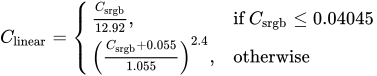
where Csrgb represents any of the three gamma-compressed sRGB primaries (Rsrgb, Gsrgb, and Bsrgb, each in range [0,1]) and Clinear is the corresponding linear-intensity value (Rlinear, Glinear, and Blinear, also in range [0,1]). Then, linear luminance is calculated as a weighted sum of the three linear-intensity values. The sRGB color space is defined in terms of the CIE 1931 linear luminance Ylinear, which is given by[7]

These three particular coefficients represent the intensity (luminance) perception of typical trichromat humans to light of the precise Rec. 709 additive primary colors (chromaticities) that are used in the definition of sRGB. Human vision is most sensitive to green, so this has the greatest coefficient value (0.7152), and least sensitive to blue, so this has the smallest coefficient (0.0722). To encode grayscale intensity in linear RGB, each of the three color components can be set to equal the calculated linear luminance (replacing by the values to get this linear grayscale), which then typically needs to be gamma compressed to get back to a conventional non-linear representation.[8] For sRGB, each of its three primaries is then set to the same gamma-compressed Ysrgb given by the inverse of the gamma expansion above as



Because the three sRGB components are then equal, indicating that it is actually a gray image (not color), it is only necessary to store these values once, and we call this the resulting grayscale image. This is how it will normally be stored in sRGB-compatible image formats that support a single-channel grayscale representation, such as JPEG or PNG. Web browsers and other software that recognizes sRGB images should produce the same rendering for such a grayscale image as it would for a "color" sRGB image having the same values in all three color channels.
Luma coding in video systems
[edit]For images in color spaces such as Y'UV and its relatives, which are used in standard color TV and video systems such as PAL, SECAM, and NTSC, a nonlinear luma component (Y′) is calculated directly from gamma-compressed primary intensities as a weighted sum, which, although not a perfect representation of the colorimetric luminance, can be calculated more quickly without the gamma expansion and compression used in photometric/colorimetric calculations. In the Y'UV and Y'IQ models used by PAL and NTSC, the rec601 luma (Y′) component is computed as where we use the prime to distinguish these nonlinear values from the sRGB nonlinear values (discussed above) which use a somewhat different gamma compression formula, and from the linear RGB components. The ITU-R BT.709 standard used for HDTV developed by the ATSC uses different color coefficients, computing the luma component as Although these are numerically the same coefficients used in sRGB above, the effect is different because here they are being applied directly to gamma-compressed values rather than to the linearized values. The ITU-R BT.2100 standard for HDR television uses yet different coefficients, computing the luma component as



Normally these colorspaces are transformed back to nonlinear R'G'B' before rendering for viewing. To the extent that enough precision remains, they can then be rendered accurately.
But if the luma component Y' itself is instead used directly as a grayscale representation of the color image, luminance is not preserved: two colors can have the same luma Y′ but different CIE linear luminance Y (and thus different nonlinear Ysrgb as defined above) and therefore appear darker or lighter to a typical human than the original color. Similarly, two colors having the same luminance Y (and thus the same Ysrgb) will in general have different luma by either of the Y′ luma definitions above.[9]
Grayscale as single channels of multichannel color images
[edit] |
Color images are often built of several stacked color channels, each of them representing value levels of the given channel. For example, RGB images are composed of three independent channels for red, green and blue primary color components; CMYK images have four channels for cyan, magenta, yellow and black ink plates, etc.
Here is an example of color channel splitting of a full RGB color image. The column at left shows the isolated color channels in natural colors, while at right there are their grayscale equivalences:

The reverse is also possible: to build a full-color image from their separate grayscale channels. By mangling channels, using offsets, rotating and other manipulations, artistic effects can be achieved instead of accurately reproducing the original image.[10]
See also
[edit]- Channel (digital image)
- Halftone
- Duotone
- False-color
- Sepia tone
- Cyanotype
- Morphological image processing
- Mezzotint
- List of monochrome and RGB color formats – Monochrome palettes section
- List of software palettes – Color gradient palettes and false color palettes sections
- Achromatopsia, total color blindness, in which vision is limited to a grayscale
- Zone System
References
[edit]- ^ "Grayscale Range - an overview | ScienceDirect Topics". www.sciencedirect.com. Retrieved 2025-11-06.
- ^ Johnson, Stephen (2006). Stephen Johnson on Digital Photography. O'Reilly. ISBN 0-596-52370-X.
- ^ Poynton, Charles (2012). Digital Video and HD: Algorithms and Interfaces (2nd ed.). Morgan Kaufmann. pp. 31–35, 65–68, 333, 337. ISBN 978-0-12-391926-7. Retrieved 2022-03-31.
- ^ Poynton, Charles A. (2022-03-14). Written at San Jose, Calif.. Rogowitz, B. E.; Pappas, T. N. (eds.). Rehabilitation of Gamma (PDF). SPIE/IS&T Conference 3299: Human Vision and Electronic Imaging III; January 26–30, 1998. Bellingham, Wash.: SPIE. doi:10.1117/12.320126. Archived (PDF) from the original on 2023-04-23.
- ^ Poynton, Charles A. (2004-02-25). "Constant Luminance". Video Engineering. Archived from the original on 2023-03-16.
- ^ Lindbloom, Bruce (2017-04-06). "RGB Working Space Information". Archived from the original on 2023-06-01.
- ^ Stokes, Michael; Anderson, Matthew; Chandrasekar, Srinivasan; Motta, Ricardo (1996-11-05). "A Standard Default Color Space for the Internet – sRGB". World Wide Web Consortium – Graphics on the Web. Part 2, matrix in equation 1.8. Archived from the original on 2023-05-24.
- ^ Burger, Wilhelm; Burge, Mark J. (2010). Principles of Digital Image Processing Core Algorithms. Springer Science & Business Media. pp. 110–111. ISBN 978-1-84800-195-4.
- ^ Poynton, Charles A. (1997-07-15). "The Magnitude of Nonconstant Luminance Errors" (PDF).
- ^ Wu, Tirui; Toet, Alexander (2014-07-07). "Color-to-grayscale conversion through weighted multiresolution channel fusion". Journal of Electronic Imaging. 23 (4) 043004. doi:10.1117/1.JEI.23.4.043004. ISSN 1017-9909.
Color topics | ||||||||||
|---|---|---|---|---|---|---|---|---|---|---|
| Color science |
|  | ||||||||
| Color philosophy |
| |||||||||
| Color terms |
| |||||||||
| Color organizations | ||||||||||
| Names |
| |||||||||
| Related | ||||||||||


Grayscale
View on GrokipediaFundamentals
Definition and Characteristics
Grayscale refers to an achromatic color space or image representation consisting exclusively of shades ranging from black to white, without any hue or saturation components.[3] In digital imaging, a grayscale image assigns each pixel a single intensity value that determines its shade of gray, effectively capturing luminance while discarding chromatic information.[6] Key characteristics of grayscale include its uniformity in representing brightness levels across the visual spectrum, which allows for consistent perception of light and dark variations without the influence of color. This lack of color data simplifies visual processing by reducing dimensionality, making it easier to analyze shapes, edges, and textures in applications such as computer vision, where grayscale images require less computational resources compared to full-color counterparts.[7] Additionally, grayscale preserves essential intensity information, enabling effective representation of contrast and detail in monochrome formats.[6] Perceptually, grayscale aligns with human vision's greater sensitivity to luminance variations, particularly in the green-yellow spectrum, where the eye perceives brighter intensities than in reds or blues; this is reflected in standard luminance calculations that weight green contributions highest (approximately 0.715 for sRGB).[8] By deriving shades from luminance alone, grayscale discards chromaticity to focus on perceived brightness, ensuring that the resulting image maintains a natural sense of light distribution as interpreted by the human visual system.[9] Common examples of grayscale appear in black-and-white photography, where tonal ranges emphasize composition and mood without color distractions, and in monochrome displays like e-ink screens on e-readers, which use grayscale to render text and images efficiently.[10] In digital formats, grayscale is often encoded with 8-bit depth, supporting 256 distinct shades for sufficient perceptual gradation.[11]Historical Development
The historical development of grayscale imaging originated with the invention of photography in the 19th century. The daguerreotype process, developed by Louis-Jacques-Mandé Daguerre and publicly announced in 1839, produced the first commercially viable photographic images, which were inherently grayscale owing to the light-sensitive silver halide chemistry applied to silver-plated copper sheets. This direct-positive method yielded unique, mirror-like images with a continuous range of tones from deep shadows to highlights, fundamentally shaping early visual documentation without the need for color sensitizers.[12][13] Advancements in film technology during the late 19th century expanded grayscale fidelity. Orthochromatic emulsions, pioneered by German photochemist Hermann Wilhelm Vogel in 1873 through the addition of sensitizing dyes that extended sensitivity from ultraviolet-blue to green wavelengths, provided more balanced tonal reproduction closer to human visual perception. Panchromatic films, capable of responding across the full visible spectrum including red, followed in the 1880s with early examples like Azaline plates developed by Vogel, and became widely adopted by the early 1900s, enabling superior grayscale accuracy in both still and motion picture applications. Paralleling these innovations, grayscale entered broadcast media in the 1930s via mechanical television systems, such as those invented by John Logie Baird, which used rotating Nipkow disks and photoelectric cells to scan and transmit black-and-white images in varying shades. Electronic systems, demonstrated by Philo T. Farnsworth in 1928, employed cathode-ray tubes to render grayscale through electron beam intensity modulation, marking a shift toward scalable visual broadcasting.[14][15][16] The digital era brought grayscale into computing and standardized media from the 1970s onward. Early CRT monitors paired with systems like the Xerox Alto, introduced in 1973, supported bitmapped monochrome displays where grayscale shades—often limited to around 16 levels—were achieved via intensity control or dithering techniques for rudimentary image rendering. In the 1980s, Adobe's PostScript language, launched in 1984, formalized grayscale handling in digital printing by defining operators for continuous-tone imaging and halftoning, revolutionizing desktop publishing. Simultaneously, the ITU-R BT.601 recommendation, approved by the CCIR in 1982, specified encoding parameters for studio digital television, including luminance values that underpin grayscale in component video signals for both 525- and 625-line standards.[17][18][19]Digital Representation
Numerical Formats
In digital imaging, grayscale is represented numerically as a single intensity value per pixel, quantifying the brightness level from black to white. This value typically ranges from 0 (black) to the maximum allowed by the bit depth, such as 255 in 8-bit formats providing 256 discrete levels, or 65,535 in 16-bit formats offering 65,536 levels for finer gradations.[20][6] Standard grayscale images commonly employ unsigned integer formats, where pixel values are stored as whole numbers within the specified range. For high dynamic range (HDR) applications, floating-point formats are used instead, such as 16-bit half-precision or 32-bit single-precision IEEE 754, enabling representation of values beyond 0-1 normalization, including those exceeding 1.0 for bright highlights. In normalized scales, these often map 0.0 to black and 1.0 to white, with values in between denoting intermediate grays, facilitating computations in rendering pipelines.[21][22] To align with human visual perception, which is more sensitive to changes in darker tones, grayscale values are often encoded non-linearly through gamma correction. In the sRGB color space, a gamma value of approximately 2.2 is applied, compressing the dynamic range so that encoded values better match perceived luminance. Linearization of these encoded values to obtain scene-referred intensities follows the formula where , though the full sRGB transfer function includes a piecewise linear segment for low values.[23][24] Grayscale encoding enhances storage efficiency compared to full-color images, as it requires only one channel per pixel versus three (red, green, blue) in RGB formats, typically reducing data volume to about one-third for equivalent bit depths and resolutions. This is evident in formats like TIFF, where grayscale images use 8 or 16 bits per pixel without additional color channels.[25][26]Role in Multichannel Images
In multichannel color models such as RGB and YCbCr, grayscale serves as the luminance channel, representing the overall intensity while separating it from chrominance information. In the YCbCr model, the Y channel specifically captures achromatic luminance, forming a grayscale equivalent that isolates brightness from color differences in Cb and Cr channels, which facilitates color separation in image processing.[27] Similarly, in the CMYK model used for printing, the K (black) channel embodies the grayscale component, providing a base for density and tone reproduction alongside cyan, magenta, and yellow inks.[28] Extraction of grayscale from multichannel images often involves isolating intensity through simple averaging of RGB values, given by the formulawhere denotes the grayscale intensity and , , are the red, green, and blue channel values, respectively.[29] This method reduces a three-channel color image to a single-channel representation, streamlining subsequent operations. In compression algorithms like JPEG, the Y channel from YCbCr conversion acts as this luminance component, enabling efficient encoding by prioritizing intensity data over subsampled chrominance.[30] In specialized multichannel contexts, grayscale channels represent intensity distributions effectively. For instance, computed tomography (CT) scans in medical imaging are typically rendered as single-channel grayscale images, where pixel values from 0 (black) to 255 (white) encode tissue density and attenuation, allowing clear visualization of anatomical structures without color interference.[31] In scientific visualization, grayscale similarly depicts scalar intensity fields, such as temperature or density gradients in simulations, providing a neutral basis for overlaying additional data layers or pseudocolor mappings.[1] The integration of grayscale in multichannel workflows offers advantages in processing efficiency, as converting to a single channel reduces computational demands and memory usage compared to handling multiple color channels. For example, Adobe Photoshop's Grayscale mode discards chrominance from RGB or CMYK images, yielding a single-channel output that simplifies editing pipelines while preserving luminance details.[32]