


Community hub
Recent from talks
Contribute something
Nothing was collected or created yet.
Logo (programming language)
View on Wikipedia| Logo | |
|---|---|
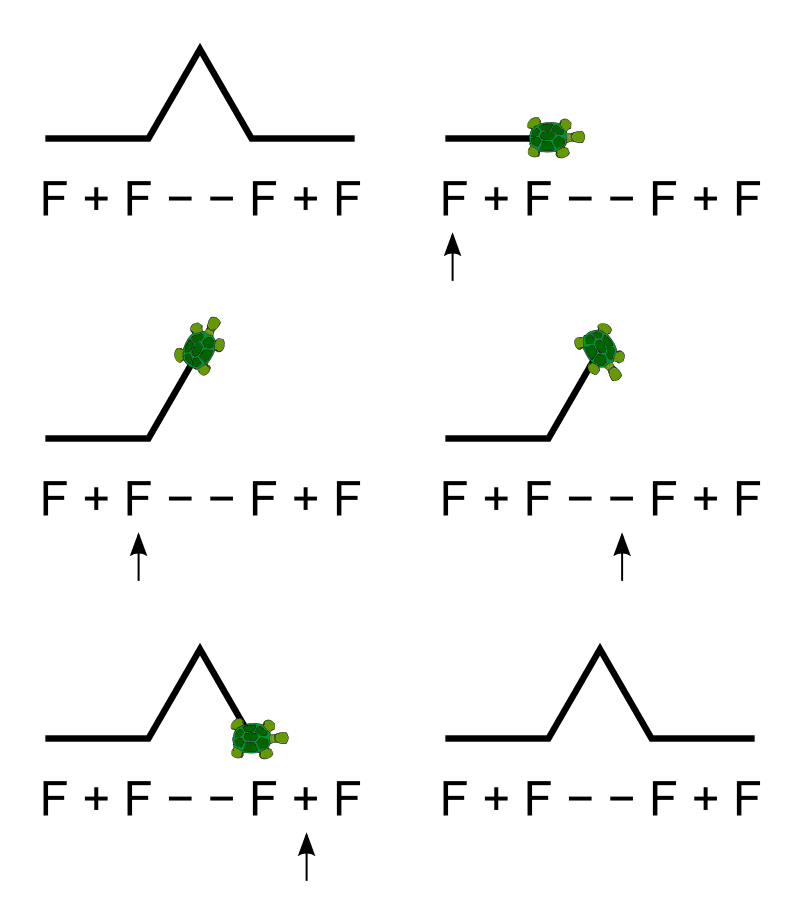
 L-system (Koch curve) turtle graphic | |
| Paradigms | Multi-paradigm: functional, educational, procedural, reflective |
| Family | Lisp |
| Designed by | Wally Feurzeig, Seymour Papert, Cynthia Solomon |
| Developer | Bolt, Beranek and Newman |
| First appeared | 1967 |
| Typing discipline | dynamic |
| Major implementations | |
| UCBLogo, many others | |
| Dialects | |
| StarLogo, NetLogo and AppleLogo | |
| Influenced by | |
| Lisp | |
| Influenced | |
| AgentSheets, NetLogo, Smalltalk, Etoys, Scratch, Microsoft Small Basic, KTurtle, REBOL, Boxer | |

Logo is an educational programming language, designed in 1967 by Wally Feurzeig, Seymour Papert, and Cynthia Solomon.[1] The name was coined by Feurzeig while he was at Bolt, Beranek and Newman,[2] and derives from the Greek logos, meaning 'word' or 'thought'.
A general-purpose language, Logo is widely known for its use of turtle graphics, in which commands for movement and drawing produced line or vector graphics, either on screen or with a small robot termed a turtle. The language was conceived to teach concepts of programming related to Lisp and only later to enable what Papert called "body-syntonic reasoning", where students could understand, predict, and reason about the turtle's motion by imagining what they would do if they were the turtle. There are substantial differences among the many dialects of Logo, and the situation is confused by the regular appearance of turtle graphics programs that are named Logo.
Logo is a multi-paradigm adaptation and dialect of Lisp, a functional programming language.[3] There is no standard Logo, but UCBLogo has the facilities for handling lists, files, I/O, and recursion in scripts, and can be used to teach all computer science concepts, as UC Berkeley lecturer Brian Harvey did in his Computer Science Logo Style trilogy.[4]
Logo is usually an interpreted language, although compiled Logo dialects (such as Lhogho and Liogo) have been developed. Logo is not case-sensitive but retains the case used for formatting purposes.
History
[edit]Logo was created in 1967 at Bolt, Beranek and Newman (BBN), a Cambridge, Massachusetts, research firm, by Wally Feurzeig, Cynthia Solomon, and Seymour Papert.[5] Its intellectual roots are in artificial intelligence, mathematical logic and developmental psychology. For the first four years of Logo research, development and teaching work was done at BBN. The first implementation of Logo, called Ghost, was written in LISP on a PDP-1. The goal was to create a mathematical land where children could play with words and sentences.[6] Modeled on LISP, the design goals of Logo included accessible power[clarification needed] and informative error messages. The use of virtual Turtles allowed for immediate visual feedback and debugging of graphic programming.
The first working Logo turtle robot was created in 1969. A display turtle preceded the physical floor turtle. Modern Logo has not changed very much from the basic concepts predating the first turtle. The first turtle was a tethered floor roamer, not radio-controlled or wireless. At BBN Paul Wexelblat developed a turtle named Irving that had touch sensors and could move forwards, backwards, rotate, and ding its bell. The earliest year-long school users of Logo were in 1968–69 at Muzzey Jr. High in Lexington, Massachusetts. The virtual and physical turtles were first used by fifth-graders at the Bridge School in the same city in 1970–71.
Turtle and graphics
[edit]
Logo's most-known feature is the turtle (derived originally from a robot of the same name),[5] an on-screen "cursor" that shows output from commands for movement and small retractable pen, together producing line graphics. It has traditionally been displayed either as a triangle or a turtle icon (though it can be represented by any icon). Turtle graphics were added to the Logo language by Seymour Papert in the late 1960s to support Papert's version of the turtle robot, a simple robot controlled from the user's workstation that is designed to carry out the drawing functions assigned to it using a small retractable pen set into or attached to the robot's body.
As a practical matter, the use of turtle geometry instead of a more traditional model mimics the actual movement logic of the turtle robot. The turtle moves with commands that are relative to its own position, LEFT 90 means spin left by 90 degrees. Some Logo implementations, particularly those that allow the use of concurrency and multiple turtles, support collision detection and allow the user to redefine the appearance of the turtle cursor, essentially allowing the Logo turtles to function as sprites.
Turtle geometry is also sometimes used in environments other than Logo as an alternative to a strictly coordinate-addressed graphics system. For instance, the idea of turtle graphics is also useful in Lindenmayer system for generating fractals.
Implementations
[edit]


Some modern derivatives of Logo allow thousands of independently moving turtles. There are two popular implementations: Massachusetts Institute of Technology's StarLogo and Northwestern University Center for Connected Learning's (CCL) NetLogo. They allow exploring emergent phenomena and come with many experiments in social studies, biology, physics, and other areas. NetLogo is widely used in agent-based simulation in the biological and social sciences.
Although there is no agreed-upon standard, there is a broad consensus on core aspects of the language. In March 2020, there were counted 308 implementations and dialects of Logo, each with its own strengths.[8] Most of those 308 are no longer in wide use, but many are still under development. Commercial implementations widely used in schools include MicroWorlds Logo and Imagine Logo.
Legacy and current implementations include:
- First released in 1980s
- Apple Logo for the Apple II Plus and Apple Logo Writer for the Apple IIe, developed by Logo Computer Systems, Inc. (LCSI), were the most broadly used and prevalent early implementations of Logo that peaked in the early to mid-1980s.
- Aquarius LOGO was released in 1982 on cartridge by Mattel for the Aquarius home computer.
- Atari Logo, developed by LCSI, was released on cartridge by Atari, Inc. in 1983 for the Atari 8-bit computers.
- Color Logo was released in 1983 on cartridge (26–2722) and disk (26–2721) by Tandy for the TRS-80 Color Computer.
- Commodore Logo was released, with the subtitle "A Language for Learning", by Commodore International. It was based on MIT Logo and enhanced by Terrapin, Inc. The Commodore 64 version (C64105) was released on diskette in 1983; the Plus/4 version (T263001) was released on cartridge in 1984.[9][10]
- SmartLOGO was released on cassette by Coleco for the ADAM home computer in 1984. It was developed by LCSI and included a primer, Turtle Talk, by Seymour Papert.
- ExperLogo was released in 1985 on diskette by Expertelligence Inc. for the Macintosh 128K.
- Hot-Logo was released in the mid-1980s by EPCOM for the MSX 8-bit computers with its own set of commands in Brazilian Portuguese.
- TI Logo (for the TI-99/4A computer) was used in primary schools, emphasizing Logo's usefulness in teaching computing fundamentals to novice programmers.
- Sprite Logo, also developed by Logo Computer Systems Inc., had ten turtles that could run as independent processes. It ran on Apple II computers, with the aid of a Sprite Card inserted in one of the computer's slots.
- IBM marketed their own version of Logo (P/N 6024076), developed jointly by Logo Computer Systems, Inc. (LCSI), for their then-new IBM PC.
- ObjectLOGO is a variant of Logo with object-oriented programming extensions and lexical scoping. Version 2.7 was sold by Digitool, Inc.[11] It is no longer being developed or supported, and does not run on versions of the Mac operating system later than 7.5.[12]
- Dr. Logo was developed by Digital Research and distributed with computers including the IBM PCjr,[13] Atari ST and the Amstrad CPC.[14][15][16]
- Acornsoft Logo was released in 1985. It is a commercial implementation of Logo for the 8-bit BBC Micro and Acorn Electron computers.[17] It was developed for Acorn Computers as a full implementation of Logo. It features multiple screen turtles and four-channel sound. It was provided on two 16kB ROMs, with utilities and drivers as accompanying software.[18]
- Lego Logo is a version of Logo that can manipulate robotic Lego bricks attached to a computer.[19] It was implemented on the Apple II and used in American and other grade schools in the late 1980s and early 1990s.[20] Lego Logo is a precursor to Scratch.[21]
- First released in 1990s
- In February 1990, Electron User published Timothy Grantham's simple implementation of Logo for the Acorn Electron under the article "Talking Turtle".[22]
- Comenius Logo is an implementation of Logo developed by Comenius University Faculty of Mathematics and Physics. It started development in December 1991, and is also known in other countries as SuperLogo, MultiLogo and MegaLogo.[23]
- UCBLogo, also known as Berkeley Logo, is a free, cross-platform implementation of standard Logo last released in 2009. George Mills at MIT used UCBLogo as the basis for MSWLogo which is more refined and also free. Jim Muller wrote a book, The Great Logo Adventure, which was a complete Logo manual and which used MSWLogo as the demonstration language.[24] MSWLogo has evolved into FMSLogo.
- First released from 2000 onwards
- aUCBLogo is a rewrite and enhancement of UCBLogo.
- Imagine Logo is a successor of Comenius Logo, implemented in 2000.[25] The English version was released by Logotron Ltd. in 2001.[26]
- LibreLogo is an extension to some versions of LibreOffice. Released in 2012, it is written in Python. It allows vector graphics to be written in Writer.
- Logo3D is a tridimensional version of Logo.
- POOL is a dialect of Logo with object-oriented extensions, implemented in 2014. POOL programs are compiled and run in the graphical IDE on Microsoft Windows. A simplified, cross-platform environment is available for systems supporting .NET Framework.
- QLogo is an open-source and cross-platform rewrite of UCBLogo with nearly full UCB compatibility that uses hardware-accelerated graphics.
- Lynx is an online version of Logo developed by Logo Computer Systems Inc. It can run a large number of turtles, supports animation, parallel processes, colour and collision detection.
- LogoMor is an open-source online 3D Logo interpreter based on JavaScript and p5.js. It supports 3D drawings, animations, multimedia, 3D models and various tools. It also includes a fully-featured code editor based on CodeMirror
- LbyM is an open-source online Logo interpreter based on JavaScript, created and actively developed (as of 2021) for Sonoma State University's Learning by Making program.[27] It features traditional Logo programming, connectivity with a customized microcontroller and integration with a modern code editor.
Influence
[edit]Logo was a primary influence on the Smalltalk programming language. It is also the main influence on the Etoys educational programming environment and language, which is essentially a Logo variant written in Squeak (itself a variant of Smalltalk). Logo influenced the procedure/method model in AgentSheets and AgentCubes to program agents similar to the notion of a turtle in Logo. Logo provided the underlying language for Boxer. Boxer was developed at University of California, Berkeley and MIT and is based on a literacy model, making it easier to use for nontechnical people.[28]
KTurtle is a variation of Logo implemented at Qt for the KDE environment loosely based on Logo.[29]
Two more results of Logo's influence are Kojo, a variant of Scala, and Scratch, a visual, drag-and-drop language which runs in a web browser.
References
[edit]- ^ Abelson, Hal; Goodman, Nat; Rudolph, Lee (December 1974). "Logo Manual". Artificial Intelligence Lab, Massachusetts Institute of Technology. hdl:1721.1/6226. Archived from the original on September 11, 2016. Retrieved August 28, 2016.
- ^ Goldenberg, E. Paul (August 1982). "Logo – A Cultural Glossary". Byte. p. 218. Retrieved 19 October 2013.
- ^ CSLS Vol 1, Preface .pxvi, Harvey 1997
- ^ Computer Science Logo Style, Brian Harvey, MIT Press (3 volumes) ISBN 0-262-58148-5, ISBN 0-262-58149-3, ISBN 0-262-58150-7. Available online Archived 2013-07-04 at the Wayback Machine
- ^ a b "Logo Foundation". el.media.mit.edu. Archived from the original on 2011-07-21. Retrieved 2011-04-07.
- ^ "logothings". logothings.wikispaces.com. Archived from the original on 2011-12-07.
- ^ Pietrocola, Giorgio (2005). "Tartapelago". Maecla.
- ^ "The Logo Tree Project" (PDF). elica.net. Archived from the original (PDF) on 2009-03-06. Retrieved 2020-03-25.
- ^ Brain, Jim; Zimmerman, Bo (2017-10-30). "Canonical List of Commodore Products". Archived from the original on 2017-12-20. Retrieved 2017-12-03.
- ^ "Logo – Software Details". Plus/4 World. Archived from the original on 2017-12-04. Retrieved 2017-12-03.
- ^ Object Logo Archived 2008-04-30 at the Wayback Machine page on the Digitool website (accessed 4 March 2008)
- ^ Object Logo ordering page on the Digitool website (accessed 4 March 2008)
- ^ "DRI ships 128K version of Dr. Logo" (PDF). Micro Notes - Technical information on Digital Research products. Vol. 2, no. 2. Pacific Grove, CA, USA: Digital Research, Inc. May 1984. p. 4. NWS-106-002. Archived (PDF) from the original on 2020-02-11. Retrieved 2020-02-11.
[…] Dr. Logo first appeared on the retail market in fall of 1983 for the IBM PC and climbed to the top of the Softsel Hot List. The retail release included SpeedStart CP/M, an abridged version of CP/M that boots automatically when the system is turned on. […]
[1] - ^ "Catalog Search | Computer History Museum". www.computerhistory.org.
- ^ "Amstrad CPC 6128 - Computer - Computing History". www.computinghistory.org.uk.
- ^ "es:manual_del_amstrad_pcw_8256_8512_ingles [PcwWiki]". www.habisoft.com.
- ^ Field, Graham (1985). LOGO on the BBC computer and Acorn Electron. Macmillan. ISBN 0-333-39566-2.
- ^ Radburn, Derek. "Four Logos for the BBC Micro". The Micro User Education Special. The Micro User. Retrieved February 20, 2012.
- ^ Resnick, Mitchel (July 1993). "Behavior Construction Kits". Communications of the ACM. 36 (7): 64–71. doi:10.1145/159544.159593. S2CID 9263998. Retrieved 5 January 2022.
- ^ "The Laboratory Schools LEGO-LOGO Project". University of Chicago Laboratory Schools. Archived from the original on 20 July 2011.
- ^ Bull, G.; Garofalo, J.; Hguyen, N. (2020), "Thinking about computational thinking: Origins of computational thinking in educational computing", Journal of Digital Learning in Teacher Education, 36 (1): 6–18, doi:10.1080/21532974.2019.1694381, S2CID 214563715
- ^ "Talking Turtle". February 1990. pp. 20–21. Archived from the original on 28 March 2017.
- ^ "History of Comenius Logo". 2002-12-09. Archived from the original on 2002-12-09. Retrieved 2022-10-12.
- ^ Muller, Jim (November 2001). "MSWLogo, An Educational programming language". Retrieved 5 January 2022.
- ^ Andrej, Kalas; Blaho, Ivan (2000). Imagine... a new generation of Logo : programmable pictures. OCLC 854959806.
- ^ "Imagine | Press Release". 2001-04-17. Archived from the original on 2001-04-17. Retrieved 2022-10-12.
- ^ "Learning by Making ¦ Make@SSU". 14 August 2017. Retrieved 8 January 2022.
- ^ "Boxer - EduTech Wiki". edutechwiki.unige.ch. Retrieved 2024-04-10.
- ^ "The KDE Education Project – KTurtle". edu.kde.org. Archived from the original on 2006-08-27.
Further reading
[edit]- Solomon, Cynthia; Harvey, Brian; Kahn, Ken; Lieberman, Henry; Miller, Mark L.; Minsky, Margaret; Papert, Artemis; Silverman, Brian (2020-06-12). "History of Logo". Proc. ACM Program. Lang. 4 (HOPL): 79:1–79:66. doi:10.1145/3386329. hdl:1721.1/133952.
- To Artificial Intelligence (1976) Early AI textbook where Logo is used extensively. (Using the Edinburgh University dialect, AI2LOGO)
- Turtle Geometry Abelson and diSessa
- Children Designers, Idit Harel Caperton, Ablex Publishing Corporation ISBN 0893917885. Available online
- Learning With Logo, Daniel Watt, McGraw Hill, ISBN 0-07-068570-3. Available Through Amazon
- Teaching With Logo: Building Blocks For Learning, Molly Watt and Daniel Watt, Addison Wesley (now Pearson) 1986, ISBN 0-201-08112-1 Available through Amazon
- "Logo" (PDF). Byte. Vol. 7, no. 8. McGraw-Hill. 1982. (Byte magazine special 1982 issue featuring multiple Logo articles).
External links
[edit] Media related to Logo (programming language) at Wikimedia Commons
 Logo Programming at Wikibooks


| Classic | |
|---|---|
| Extensions | |
| With object extensions |
|
| Other variants, extensions |
|
| People | |


| International | |
|---|---|
| National | |
| Other | |


Logo (programming language)
View on GrokipediaHistory
Origins and Early Development
Logo was invented in 1967 at Bolt, Beranek and Newman (BBN) in Cambridge, Massachusetts, by Wally Feurzeig, Seymour Papert, and Cynthia Solomon, with significant influences from Daniel Bobrow.[2][4][5] This development occurred amid the burgeoning fields of artificial intelligence and early personal computing in the 1960s, where Papert, a mathematician with a PhD from the University of the Witwatersrand and postdoctoral work under Jean Piaget at the University of Geneva, had joined MIT in 1963 as a research associate and co-founded its Artificial Intelligence Laboratory with Marvin Minsky.[6][1] Papert's background in mathematics and AI, including his contributions to early neural network theory in the book Perceptrons (1969), shaped Logo's emphasis on computational exploration as a means to bridge abstract concepts with concrete experiences.[6] The original design goals centered on creating a programming language accessible to children, aimed at fostering mathematical thinking, problem-solving skills, and computational literacy in an educational setting.[4][5] Drawing from Piaget's constructivist theories of child development, which emphasize active learning through interaction with the environment, and Papert's philosophy of "learning by doing," Logo was envisioned as a tool to build "microworlds" where young users could experiment intuitively without prior expertise.[2][1] Unlike traditional programming languages of the era, Logo sought to democratize computing by prioritizing simplicity, interactivity, and extensibility, making it suitable for integration into school curricula to empower non-experts, particularly students, in exploring ideas through code.[4] The first implementation of Logo emerged as a dialect of Lisp, stripping away complex syntax like parentheses to create a more approachable interface focused on text-based interactivity and list processing, initially without graphical elements such as turtle graphics.[5][2] By summer 1967, a working version ran on BBN's SDS-940 time-sharing system, enabling multi-user access for experimentation; early prototypes had also utilized the DEC PDP-1 computer at BBN for development.[4][5] This Lisp-based foundation allowed for symbolic computation and recursive functions, aligning with AI influences while keeping the language lightweight for educational use.[2] Early testing began in 1967 with a summer workshop led by Papert for fifth-grade students, where Solomon and Feurzeig observed interactions and iterated on the design based on feedback.[4] In fall 1968, more structured trials occurred at Muzzey Junior High School in Lexington, Massachusetts, involving seventh graders in an NSF-funded project at BBN, which highlighted Logo's potential for classroom accessibility and prompted refinements for broader curricular integration.[5] Additional pilots at sites like Hanscom School in Lincoln, Massachusetts, that year further demonstrated the language's effectiveness in engaging young learners with computing concepts through hands-on, non-intimidating sessions.[5][1]Key Milestones and Publications
In 1970, turtle graphics were introduced to Logo by Seymour Papert and Cynthia Solomon at the MIT Artificial Intelligence Laboratory, transforming the language into a visual tool for exploring geometry and programming concepts through a controllable "turtle" that drew shapes on a floor or screen.[3] This innovation was tested in trials with fifth graders at the Bridge School in Lexington, Massachusetts, during 1970-1971, marking a pivotal shift toward child-centered computational learning.[7] By 1976, the first portable implementation of Logo was released, enabling deployment beyond mainframe computers and facilitating its spread to microcomputers such as the Apple II in 1980 through pilot projects and early commercial versions.[3] This portability accelerated Logo's adoption in educational settings, with implementations like TI Logo for the TI-99/4A appearing in 1981.[1][8] The 1980 publication of Seymour Papert's Mindstorms: Children, Computers, and Powerful Ideas by Basic Books popularized Logo worldwide, articulating constructionist learning theory and emphasizing the language's role in fostering creative problem-solving among children.[9] The book drew on Logo's turtle graphics to illustrate how programming could empower learners to build knowledge through personal exploration.[2] Starting in 1984, international Logo conferences were held at MIT, including LOGO '84, LOGO '85, and LOGO '86, which gathered educators and researchers to share advancements and promote the language's pedagogical applications; these events continued annually, fostering a global community.[1] That same decade, Logo was integrated into the UK national curriculum, particularly for mathematics education, with the British Logo Users Group formed in 1983 to support its use in schools.[10] The Logo Foundation was later established in 1991 at MIT as a nonprofit to sustain educational initiatives, though early community efforts in the mid-1980s laid its groundwork.[11] During the 1990s, Logo adapted for multimedia with the 1993 release of MicroWorlds by Logo Computer Systems Inc. (LCSI), which added multitasking, sprites, and word processing to support storytelling and interactive projects on Macintosh and MS-DOS systems.[1] In the 2000s, open-source efforts proliferated, including UCBLogo's GPL licensing and derivatives like MSWLogo and FMSLogo, making the language freely accessible for customization and educational use across platforms.[5] Recent developments from 2021 to 2025 include updates to turtleSpaces, a modern Logo interpreter that extends the language with 3D graphics, multiple turtles, and VR integration for immersive game and model creation, including 2025 updates like the Model Context Protocol for AI interaction and live coding support, building on Seymour Papert's original vision.[12]Design Principles and Features
Core Syntax and Semantics
Logo is a dialect of Lisp designed for educational purposes, featuring a syntax that emphasizes readability and simplicity for beginners. Its core syntax employs prefix notation, where the command or operator precedes its arguments, such assum 2 3 to add two numbers.[13] This structure treats code as a sequence of words and lists, parsed by whitespace, with lists enclosed in square brackets to quote their contents and prevent immediate evaluation, for example, [word1 word2] represents an unevaluated list.[14] Logo is case-insensitive, allowing commands like forward and FORWARD to be equivalent, which reduces barriers for young learners.[15]
Semantically, Logo is an interpreted language that executes instructions immediately upon input, providing instant feedback in an interactive environment.[5] It uses dynamic typing, with no strict distinctions between data types; numbers and words (strings) are treated interchangeably, and automatic coercion occurs during operations, such as treating a word as a number when possible.[16] Variables are global by default and stored in the workspace, a dictionary-like structure that holds user-defined procedures, variables, and properties, accessible via commands like make for assignment.[13] Procedures, defined using to and end, can return values via the output primitive, enabling functional composition where the result of one command serves as input to another.[15]
The evaluation model follows applicative order, evaluating arguments from left to right before applying the procedure, which supports nested expressions like print sum 2 3.[5][17] Logo handles control flow and errors through primitives such as repeat for loops and if for conditionals, allowing programs to manage repetition and branching without explicit exception mechanisms, though specific errors like input mismatches yield descriptive messages.[13] Recursion is a fundamental concept, with implementations optimizing tail calls to support potentially infinite recursion without stack overflow, as in repeated self-calls at the procedure's end.[16]
Unlike traditional Lisp, Logo simplifies notation by avoiding parentheses for most expressions—relying instead on fixed-arity primitives and bracketed lists—and prioritizes English-like command names for accessibility, such as print over symbolic operators, while retaining Lisp's list-based foundation.[14] This design shifts emphasis from low-level symbolic manipulation to procedural thinking, treating all code elements as manipulable lists within the workspace.[5]
Primitives and Programming Constructs
Logo's core primitives provide foundational operations for computation and data manipulation, designed to support educational exploration of programming concepts. Mathematical primitives include basic arithmetic operators such as+ for addition, - for subtraction, * for multiplication, / for division, and sqrt for square root calculation.[18] These operate on numeric inputs and follow standard operator precedence with support for parenthesized expressions. List operations enable handling of ordered collections, with primitives like first to retrieve the initial element of a list, butlast to return all elements except the final one, and sentence to concatenate lists or words into a new list.[18] String handling primitives include word for concatenating words into a longer string and empty? to test whether a string or list contains no elements.[15] Control flow primitives facilitate conditional execution and iteration, such as if for executing a command block if a condition evaluates to true, repeat for executing a block a specified number of times, and while for looping as long as a condition holds.[15]
Procedures in Logo are defined using the to keyword followed by the procedure name and optional input parameters prefixed with :, with the body enclosed and terminated by end.[18] For instance, a simple addition procedure might be written as:
to add :a :b
  output :a + :b
end
to add :a :b
  output :a + :b
end
to factorial :n
  if :n = 1 [output 1]
  output :n * factorial (:n - 1)
end
to factorial :n
  if :n = 1 [output 1]
  output :n * factorial (:n - 1)
end
apply primitive invokes a procedure with arguments from a list, facilitating dynamic execution such as mapping a function over a list of numbers.[15] Macros, introduced in dialects like Berkeley Logo, extend procedure definition with .macro instead of to, allowing the output to be evaluated in the caller's context for creating custom control structures.[20]
Modularity is enhanced through features like local variables in later dialects, declared with the local primitive to limit variable scope to a procedure and avoid global namespace pollution.[18] Debugging tools include trace to monitor procedure execution by printing entry and exit details, and untrace to disable it, aiding in understanding program flow.[18] Extensibility is achieved via user-defined primitives, where procedures can be created and treated equivalently to built-ins, allowing learners to build a personal library of abstractions.[18]
Examples of list manipulation demonstrate these constructs' utility, such as sorting a list recursively:
to sort :lst
  if emptyp :lst [output []]
  [local](/page/.local) "pivot [local](/page/.local) "smaller [local](/page/.local) "larger
  make "pivot first :lst
  make "smaller bf (filter [? < :pivot] :lst)
  make "larger bf (filter [? >= :pivot] :lst)
  output sentence (sort :smaller) fput :pivot (sort :larger)
end
to sort :lst
  if emptyp :lst [output []]
  [local](/page/.local) "pivot [local](/page/.local) "smaller [local](/page/.local) "larger
  make "pivot first :lst
  make "smaller bf (filter [? < :pivot] :lst)
  make "larger bf (filter [? >= :pivot] :lst)
  output sentence (sort :smaller) fput :pivot (sort :larger)
end
Turtle Graphics
The Turtle Metaphor
The turtle metaphor in Logo represents a foundational concept for visualizing and interacting with programming through graphics, originating as an addition to the language in 1970 by Seymour Papert and his collaborators at MIT. Inspired by early robotic devices, it drew from a physical "turtle"—a wheeled robot equipped with a pen that could draw lines on the floor as it moved under computer control. This hardware was first trialed with children during 1970–1971 at the Bridge School in Lexington, Massachusetts, where both physical and early virtual versions were used to explore mathematical ideas. The metaphor quickly transitioned to a virtual on-screen turtle, allowing immediate visual feedback without physical machinery, thus making it accessible for educational computing environments.[7] Central to the turtle's design are its key attributes, which provide a simple yet expressive model for movement and drawing. The turtle maintains a position defined by x and y coordinates on a Cartesian plane, a heading specified as an angle in degrees (where 0 degrees points north and 90 degrees points east), a pen status that can be down (to trace lines during movement) or up (to relocate without drawing), and a visibility toggle to show or hide the turtle icon itself. These attributes enable users to command the turtle's state intuitively, starting from a standard home position at coordinates (0,0) facing north, with the screen often configured as a bounded plane that supports options like edge wrapping or display clearing to reset the workspace.[21][1] The educational philosophy underpinning the turtle emphasizes "body-syntonic" learning, a term Papert adapted to describe how children can project their own bodily knowledge and movements onto the turtle, making abstract programming concepts feel personal and embodied. By imagining themselves in the turtle's place—such as turning their body to mimic a heading change or stepping forward to grasp distance—learners build intuitive connections to geometry and logic, transforming potential frustrations into opportunities for exploration. This approach particularly aids debugging, as errors in turtle behavior mirror relatable physical mishaps, encouraging iterative fixes through analogy rather than abstract error messages. Papert argued that such syntonic engagement mobilizes children's preexisting expertise in motion, fostering confidence and deeper mathematical understanding.[21] Over time, the turtle metaphor evolved significantly from its physical roots in radio-controlled floor robots of the early 1970s to predominantly screen-based implementations by the late 1970s, enabling widespread adoption in personal computers. Early physical turtles, like those developed by the MIT Logo Group, used mechanical pens for tangible output, but virtualization allowed for dynamic, colorful graphics without hardware constraints. Advanced Logo dialects later extended the model to support multiple turtles, permitting concurrent movements and interactions for simulating complex systems like flocks or ecosystems, further enhancing its utility in collaborative and exploratory programming.[1][2]Graphics Commands and Capabilities
Logo's graphics commands primarily revolve around controlling the turtle's movement, pen state, and screen interactions to produce vector-based drawings on a coordinate plane. These primitives enable users to create lines, shapes, and patterns by issuing instructions that translate into visual outputs, with the turtle serving as the drawing instrument. The system supports absolute and relative positioning, allowing for precise control over the turtle's path and appearance.[22] Basic movement commands direct the turtle along its current heading or adjust its orientation. TheFORWARD (or FD) command moves the turtle ahead by a specified number of turtle steps (pixels in most implementations), while BACK (or BK) moves it in the opposite direction without changing the heading. Turning is handled by RIGHT (or RT) for clockwise rotation and LEFT (or LT) for counterclockwise, with angles specified in degrees (e.g., 90 for a quarter turn). These commands form the foundation for drawing straight lines and polygons.[22][23]
Pen control primitives manage how the turtle interacts with the drawing surface. PENDOWN (or PD) lowers the pen to draw lines as the turtle moves, whereas PENUP (or PU) lifts it to allow repositioning without marking the screen. Line thickness is set using SETPENSIZE (or PE in some dialects), accepting a single integer for width or a list for rectangular brush shapes. Color is adjusted via SETPENCOLOR (or PC), typically using numbers from 0 to 15, where 0 is black, 1 is blue, 4 is red, and higher values represent shades like brown (8) or gray (15), though exact mappings may vary by implementation; some dialects also support RGB lists like [red green blue] with values from 0 to 99.[22][24][23]
Screen management commands handle the display environment and turtle visibility. CLEARSCEEN (or CS) erases all drawings, resets the turtle to the home position at coordinates [0 0], and sets its heading to 0 degrees (facing up). HIDETURTLE (or HT) conceals the turtle icon to improve drawing performance, while SHOWTURTLE (or ST) makes it visible again. Position and orientation queries include XCOR and YCOR for the turtle's x and y coordinates, and HEADING for its current direction in degrees from the positive y-axis. These reporters return numeric values that can be used in computations or conditionals.[22][23]
Advanced capabilities extend drawing beyond basic lines to filled regions and repeated patterns. The FILL command fills a closed shape after the turtle outlines it, though its behavior depends on the underlying graphics hardware and may not be portable across implementations. STAMP creates a copy of the current turtle shape at its position without moving it, useful for scattering icons or patterns. For curves, the ARC primitive draws a circular arc of a given angle and radius while keeping the turtle stationary, or users can approximate circles using repetition with turns, such as REPEAT 360 [FD 1 RT 1] for a full circle. Multi-turtle coordination is supported in some dialects via commands like TOWARDS, which returns the heading needed for one turtle to face a specified position, enabling synchronized movements. Outputs are inherently vector-based for scalable graphics, and certain implementations allow exporting drawings as image files like PNG or SVG.[22][24][23]
A representative example is drawing a square:
REPEAT 4 [FD 100 RT 90]
REPEAT 4 [FD 100 RT 90]
PC 2 beforehand for green lines.[25][22]