Hubbry Logo
Graphics tabletGraphics tabletMain
Open search
Graphics tablet
Community hub
Graphics tablet
logo
8 pages, 0 posts
0 subscribers
Be the first to start a discussion here.
Graphics tablet
Graphics tablet
from Wikipedia

XP-PEN graphics tablet using Krita software

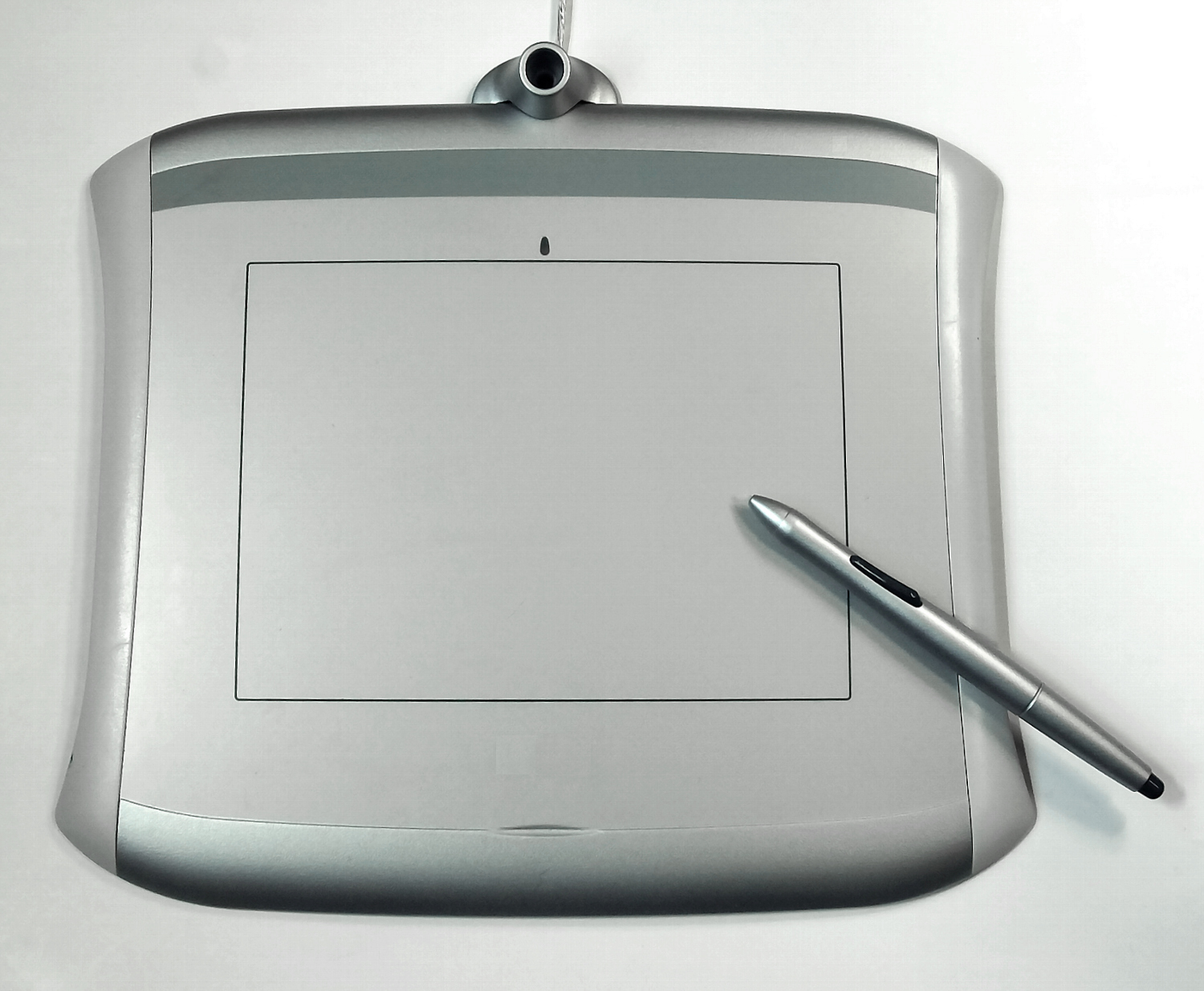
A graphics tablet (also known as a digitizer, digital graphic tablet, pen tablet, drawing tablet, external drawing pad or digital art board) is a computer input device that enables a user to hand draw or paint images, animations and graphics, with a special pen-like stylus, similar to the way a person draws pictures with a pencil and paper by hand.

Graphics tablets may also be used to capture data or handwritten signatures. They can also be used to trace an image from a piece of paper that is taped or otherwise secured to the tablet surface. Capturing data in this way, by tracing or entering the corners of linear polylines or shapes, is called digitizing.[1]

The device consists of a rough surface upon which the user may "draw" or trace an image using the attached stylus, a pen-like drawing apparatus. The image is shown on the computer monitor, though some graphic tablets now also incorporate an LCD screen for more realistic or natural experience and usability.

Some tablets are intended as a replacement for the computer mouse as the primary pointing and navigation device for desktop computers.

History

[edit]

The first electronic handwriting device was the Telautograph, patented by Elisha Gray in 1888.[2]

The first graphic tablet resembling contemporary tablets and used for handwriting recognition by a computer was the Stylator in 1957.[3] Better known (and often misstated as the first digitizer tablet) is the RAND Tablet[4] also known as the Grafacon[5] (for Graphic Converter), introduced in 1964. The RAND Tablet employed a grid of wires under the surface of the pad that encoded horizontal and vertical coordinates in a small electrostatic signal. The stylus received the signal by capacitive coupling, which could then be decoded back as coordinate information.

The acoustic tablet, or spark tablet, used a stylus that generated clicks with a spark plug. The clicks were then triangulated by a series of microphones to locate the pen in space.[6] The system was fairly complex and expensive, and the sensors were susceptible to interference by external noise.

Digitizers were popularized in the mid-1970s and early 1980s by the commercial success of the ID (Intelligent Digitizer) and BitPad manufactured by the Summagraphics Corp.[7] The Summagraphics digitizers were sold under the company's name but were also private labeled for HP, Tektronix, Apple,[8] Evans and Sutherland and several other graphic system manufacturers. The ID model was the first graphics tablet to make use of what was at the time, the new Intel microprocessor technology. This embedded processing power allowed the ID models to have twice the accuracy of previous models while still making use of the same foundation technology. Key to this accuracy improvement were two US Patents issued to Stephen Domyan, Robert Davis, and Edward Snyder. The Bit Pad model was the first attempt at a low cost graphics tablet with an initial selling price of $555 when other graphics tablets were selling in the $2,000 to $3,000 price range. This lower cost opened up the opportunities for would be entrepreneurs to be able to write graphics software for a multitude of new applications. These digitizers were used as the input device for many high-end CAD (Computer Aided Design) systems as well as bundled with PCs and PC-based CAD software like AutoCAD. These tablets used a magnetostriction technology which used wires made of a special alloy stretched over a solid substrate to accurately locate the tip of a stylus or the center of a digitizer cursor on the surface of the tablet. This technology also allowed Proximity or "Z" axis measurement.[9]

In 1981, musician Todd Rundgren created the first color graphic tablet software for personal computers, which was licensed to Apple as the Utopia Graphic Tablet System.[10]

In 1981, the Quantel Paintbox color graphic workstation was released; This model was equipped with the first pressure sensitive tablet.[11]

The first home computer graphic tablet was the KoalaPad, released in 1983. Though originally designed for the Apple II, the Koala eventually broadened its applicability to other home computers including the TRS-80 Color Computer, Commodore 64, and Atari 8-bit computers.

In the 1980s, several vendors of graphic tablets began to include additional functions, such as handwriting recognition and on-tablet menus.[12][13]

Characteristics

[edit]

Typically tablets are characterized by size of the device, drawing area, its resolution size ("active area", which is measured in lpi), pressure sensitivity (level of varying the size of strokes with pressure),[14] number of buttons and types and number of interfaces: Bluetooth, USB; etc.[15] The actual drawing accuracy is restricted to pen's nib size.[16]

Types

[edit]

There have been many attempts to categorize the technologies that have been used for graphic tablets:

Passive tablets
Passive tablets make use of electromagnetic induction technology, where the horizontal and vertical wires of the tablet operate as both transmitting and receiving coils (as opposed to the wires of the RAND Tablet which only transmit). The tablet generates an electromagnetic signal, which is received by the LC circuit in the stylus. The wires in the tablet then change to a receiving mode and read the signal generated by the stylus. Modern arrangements also provide pressure sensitivity and one or more buttons, with the electronics for this information present in the stylus. On older tablets, changing the pressure on the stylus nib or pressing a button changed the properties of the LC circuit, affecting the signal generated by the pen, which modern ones often encode into the signal as a digital data stream. By using electromagnetic signals, the tablet is able to sense the stylus position without the stylus having to even touch the surface, and powering the pen with this signal means that devices used with the tablet never need batteries. Activslate 50, the model used with Promethean white boards, also uses a hybrid of this technology.[17]
Active tablets
Active tablets differ in that the stylus used contains self-powered electronics that generate and transmit a signal to the tablet. These styluses rely on an internal battery rather than the tablet for their power, resulting in a bulkier stylus. Eliminating the need to power the pen means that such tablets may listen for pen signals constantly, as they do not have to alternate between transmit and receive modes, which can result in less jitter.
Optical tablets
Optical tablets operate by a very small digital camera in the stylus and then doing pattern matching on the image of the paper. The most successful[citation needed] example is the technology developed by Anoto.
Acoustic tablets
Early models were described as spark tablets—a small sound generator was mounted in the stylus, and the acoustic signal picked up by two microphones placed near the writing surface. Some modern designs are able to read positions in three dimensions.[18][19]
Capacitive tablets
These tablets have also been designed to use an electrostatic or capacitive signal. Scriptel's designs are one example of a high-performance tablet detecting an electrostatic signal. Unlike the type of capacitive design used for touchscreens, the Scriptel design is able to detect the position of the pen while it is in proximity to or hovering above the tablet. Many multi-touch tablets use capacitive sensing.[20][21]

For all these technologies, the tablet can use the received signal to also determine the distance of the stylus from the surface of the tablet, the tilt (angle from vertical) of the stylus, and other information in addition to the horizontal and vertical positions, such as clicking buttons of the stylus or the rotation of the stylus.

Compared to touchscreens, a graphic tablet generally offers much higher precision, the ability to track an object which is not touching the tablet, and can gather much more information about the stylus, but is typically more expensive, and can only be used with the special stylus or other accessories.

Some tablets, especially inexpensive ones aimed at young children, come with a corded stylus, using technology similar to older RAND tablets.

Pucks

[edit]
A large-format graphic tablet by manufacturer Summagraphics (OEM'd to Gerber): The puck's external copper coil can be clearly seen.

After styluses, pucks are the most commonly used tablet accessory. A puck is a mouse-like device that can detect its absolute position and rotation. This is opposed to a mouse, which can only sense its relative velocity on a surface (most tablet drivers are capable of allowing a puck to emulate a mouse in operation, and many pucks are marketed as a "mouse").

Pucks range in size and shape; some are externally indistinguishable from a mouse, while others are a fairly large device with dozens of buttons and controls. Professional pucks often have a reticle or loupe which allows the user to see the exact point on the tablet's surface targeted by the puck, for detailed tracing and computer aided design (CAD) work.

Pucks are used on the Microsoft Surface range and were recently used on the Dell Canvas. However, they have been largely discontinued by most manufactures in favour of physical hotkeys and dials.

Embedded LCD tablets

[edit]
Wacom graphics tablet

Some graphics tablets incorporate an LCD into the tablet itself, allowing the user to draw or paint directly on the screen.

Graphics tablet/screen hybrids offer advantages over both standard PC touchscreens and ordinary graphics tablets. Unlike touchscreens, they offer pressure sensitivity, and their input resolution is generally higher.[citation needed] While their pressure sensitivity and resolution are typically no better than those of ordinary tablets, they offer the additional advantage of directly seeing the location of the physical pen device relatively to the image on the screen. This often allows for increased accuracy and a more tactile, "real" feeling to the use of the device.

The graphics tablet manufacturer Wacom holds many patents on key technologies for graphics tablets,[22] which forces competitors to use other technologies or license Wacom's patents. The displays are often sold for thousands of dollars. For instance, the Wacom Cintiq series ranges from just below US$1,000 to over US$2,000.

Sketching in Krita on a Wacom Cintiq 13HD graphics tablet/screen hybrid

Some commercially available graphics tablet/screen hybrids include:

There have also been do-it-yourself projects where conventional used LCD monitors and graphics tablets have been converted to a graphics tablet-screen hybrid.[24]

Uses

[edit]

Graphic tablets, because of their stylus-based interface and ability to detect some or all of pressure, tilt, and other attributes of the stylus and its interaction with the tablet, are widely considered to offer a very natural way to create computer graphics, especially two-dimensional computer graphics. Indeed, many graphic packages can make use of the pressure (and, sometimes, stylus tilt or rotation) information generated by a tablet, by modifying the brush size, shape, opacity, color, or other attributes based on data received from the graphic tablet.

In East Asia, graphic tablets, known as "pen tablets", are widely used in conjunction with input-method editor software (IMEs) to write Chinese, Japanese, and Korean characters (CJK). The technology is popular and inexpensive and offers a method for interacting with the computer in a more natural way than typing on the keyboard, with the pen tablet supplanting the role of the computer mouse. Uptake of handwriting recognition among users who use alphabetic scripts has been slower.

Graphic tablets are commonly used in the artistic world. Using a pen-like stylus on a graphic tablet combined with a graphics-editing program, such as Illustrator, Photoshop by Adobe Systems, Corelpainter, or Krita gives artists a lot of precision when creating digital drawings or artwork. Photographers can also find working with a graphic tablet during their post processing can really speed up tasks like creating a detailed layer mask or dodging and burning.

Educators make use of tablets in classrooms to project handwritten notes or lessons and to allow students to do the same, as well as providing feedback on student work submitted electronically. Online teachers may also use a tablet for marking student work, or for live tutorials or lessons, especially where complex visual information or mathematical equations are required. Students are also increasingly using them as note-taking devices, especially during university lectures while following along with the lecturer. They facilitate smooth online teaching process and are popularly used along with face-cam to mimic classroom experience.

Tablets are also popular for technical drawings and CAD, as one can typically put a piece of paper on them without interfering with their function.

Finally, tablets are gaining popularity as a replacement for the computer mouse as a pointing device.[when?] They can feel more intuitive to some users than a mouse, as the position of a pen on a tablet typically corresponds to the location of the pointer on the GUI shown on the computer screen. Those artists using a pen for graphic work may, as a matter of convenience, use a tablet and pen for standard computer operations rather than put down the pen and find a mouse. Popular rhythm game osu! allows utilizing a tablet as a way of playing.[25]

Graphic tablets are available in various sizes and price ranges; A6-sized tablets being relatively inexpensive and A3-sized tablets far more expensive. Modern tablets usually connect to the computer via a USB or HDMI interface.

Similar devices

[edit]

Interactive whiteboards offer high-resolution wall size graphic tablets up to 95" (241,3 cm) along with options for pressure and multiple input. These are becoming commonplace in schools and meeting rooms around the world.[26]

Earlier resistive touch screen devices (like PDAs, early smartphones, tablet PCs, and the Nintendo DS) were typically equipped with styluses, but accuracy of stylus input was very limited.

The more modern capacitive touch screens such as those found on some table computers, tablet computers and laptops operate in similar ways, but they usually use either optical grids or a pressure-sensitive film instead so do not need a special pointing device. Some of the latest models with capacitive input can be equipped with specialized styluses, and then these input devices can be used similar to full-function graphics tablet.[27][28][29]

A graphic tablet is also used for Audio-Haptic products where blind or visually impaired people touch swelled graphics on a graphic tablet and get audio feedback from that.[30] The product that is using this technology is called Tactile Talking Tablet or T3.

See also

[edit]

References

[edit]
Revisions and contributorsEdit on WikipediaRead on Wikipedia
from Grokipedia
A graphics tablet, also known as a tablet or tablet, is a computer that allows users to create digital illustrations, annotations, and designs by with a on a pressure-sensitive surface, mimicking the feel of on . This technology captures the stylus's position, pressure, and sometimes tilt to translate hand movements into precise digital coordinates, enabling natural and intuitive interaction with software for tasks like sketching and editing. The origins of graphics tablets trace back to early efforts in digitizing handwriting and drawings, with the first electronic handwriting device, the , patented in 1888 by , which transmitted drawings over telegraph lines using synchronized motors. A pivotal advancement came in 1963 with the RAND Tablet, developed by M.R. Davis and T.O. Ellis at the , marking the first low-cost digital graphics tablet capable of accurately digitizing freehand inputs via a stylus sensing electrical pulses on a 10-inch by 10-inch grid with 100 lines per inch resolution. By 1972, the SuperPaint system at Xerox PARC, created by Richard Shoup, integrated a graphics tablet with a frame buffer to pioneer tools, supporting color animations and adjustments that influenced modern software like . Commercial evolution accelerated in the 1980s, with introducing its first electromagnetic resonance (EMR)-based pen tablet in 1987, establishing battery-free stylus technology that became an industry standard. Graphics tablets come in two primary types: non-display pen tablets, which connect to an external monitor and rely on cursor mirroring for indirect , and pen displays, which feature a built-in screen for direct on-surface visualization. Core technologies include EMR for , pressure-sensitive styluses offering 8,192 to 16,384 levels of sensitivity, and for touch-enabled models, with active areas ranging from small (6x4 inches) to large (24 inches or more) to suit professional workflows. Leading manufacturers like , , and dominate the market, prioritizing features such as customizable express keys, tilt recognition, and compatibility with operating systems like Windows, macOS, and . Widely used in , , , photo retouching, and , graphics tablets enhance precision and efficiency over traditional mice, particularly in software like and tools. Their adoption has grown in and , with models supporting gestures and high-resolution inputs to facilitate collaborative and portable creative processes.

Introduction

Definition and Purpose

A graphics tablet is a computer that enables users to hand-draw images, annotations, or graphical information directly onto a flat surface using a or puck, thereby mimicking the natural feel of pen-on-paper interaction. This device functions as a type of digitizer, capturing two-dimensional coordinates from the physical movements of the or cursor on the tablet's surface. The primary purpose of a graphics tablet is to provide precise control over cursor movement on a connected computer, incorporating features such as pressure-sensitive input and tilt detection to support applications that demand intuitive, gesture-based and . These capabilities allow artists and designers to vary line thickness, opacity, and brush effects in real time, enhancing the expressiveness of digital creation. Graphics tablets interface with computers through standard connections like USB, , or other protocols, which translate the user's physical inputs into digital coordinates for by software. Evolving from early digitizers, modern graphics tablets have become essential tools in and design workflows, revolutionizing user interfaces for creative tasks.

Basic Operation

To begin using a graphics tablet, connect the device to a computer via USB cable or wirelessly if supported, and install the manufacturer-provided drivers to enable recognition and advanced features. These drivers, such as those from or , are essential for Windows and macOS compatibility with creative software like or . Once set up, launch the drawing application and calibrate the tablet through the driver interface to align the tablet's active area with the monitor display. In basic operation, the user hovers or places the stylus tip on the tablet's surface, where embedded sensors detect its position, often without requiring physical contact. The tablet uses sensors based on various technologies to detect the stylus's position and transmit X and Y coordinates accurately. This positional data is transmitted to the computer, where the software maps the coordinates directly to the on-screen cursor, allowing real-time input translation for drawing or navigation. Graphics tablets primarily use absolute positioning mode, in which the entire tablet surface corresponds one-to-one with the screen area, so placing the at a specific point on the tablet moves the cursor to the equivalent location on the display for precise, intuitive control. Alternatively, relative positioning mode—often called mouse mode—treats movement as directional offsets from the current cursor position, similar to a traditional , which can be toggled for tasks requiring scrolling or dragging without fixed mapping. The driver software facilitates by prompting users to tap alignment points, ensuring accurate tracking, and allows customization of buttons or tablet express keys for functions like or tool switching.

History

Early Inventions

The telautograph, invented by Elisha Gray in 1888, served as an early precursor to graphics tablets by enabling the remote transmission of handwriting over telegraph lines using a mechanical stylus that synchronized movements between a sending and receiving device via two wires. Gray's device, patented under U.S. Patent No. 386,815, relied on electromagnetic principles to replicate pen strokes in real-time at a distant location, primarily for applications in telegraphy rather than direct computer input. Although not a digital input tool, the telautograph demonstrated foundational concepts of stylus-based position tracking and signal transmission that influenced later digitizing technologies. In 1957, engineer Tom Dimond at Bell Laboratories developed the Stylator, one of the first electronic tablets designed for computer input, which used a grid of wires beneath the surface to detect stylus position through changes in electrical . The device, detailed in Dimond's paper "Device for Reading Handwritten Characters," allowed users to write characters on a 4x4-inch pad, with the system recognizing constrained handwriting in real-time for into early computers. Limited to alphanumeric input due to its small size and reliance on vacuum tube-based processing, the Stylator marked a shift from mechanical to electronic but faced challenges in accuracy and speed from the era's bulky . The RAND Tablet, introduced by the RAND Corporation in 1963, advanced these concepts with a larger 10x10-inch active area and electromagnetic sensing via a grid of 1024 horizontal and 1024 vertical wires that generated pulsed signals detected by a non-contact stylus. Developed as part of man-machine interface research, the tablet encoded stylus coordinates in Gray code for precise vector graphics input, supporting applications like sketch-to-digital conversion without physical contact between stylus and surface. Patented under U.S. Patent No. 3,426,211 (filed 1963, issued 1969), it improved linearity and resolution over predecessors but was constrained by vacuum tube amplifiers, which produced heat, consumed high power, and suffered from frequent failures in the absence of affordable personal computing platforms. Early graphics tablet inventions, including Gray's (U.S. Patent No. 386,815) and subsequent electronic prototypes, centered on for remote replication and basic digitization for character recognition, yet grappled with technological limitations such as vacuum tube dependency, which caused unreliable , excessive size, and vulnerability to environmental factors like fluctuations. These challenges delayed widespread adoption until transistor-based systems emerged, paving the way for commercial evolution in later decades.

Commercial Development and Modern Evolution

The commercial development of graphics tablets began in the with the introduction of affordable digitizers aimed at professional and engineering applications. Summagraphics Corporation released the BitPad in 1978, marking one of the earliest low-cost commercial digitizers compatible with small computer systems, which facilitated precise coordinate input for tasks like and basic . Shortly thereafter, GTCO Corporation launched the Intelligent Digitizer (ID) in the mid-1970s, a standalone system that popularized digitizers through its integration with microcomputers, enabling accurate tracing and measurement in fields such as and CAD. These early products established the market by transitioning from bulky, lab-based prototypes to compact, commercially viable hardware. The 1980s saw popularization among home and educational users, driven by compatibility with emerging personal computers. The KoalaPad, introduced in 1983 by Koala Technologies Corporation, was designed for platforms like the and , allowing simple touch-based drawing and input with a , which broadened access to graphics creation beyond professionals. This era also featured growing integration with CAD software, as tablets like the BitPad supported vector-based design workflows in engineering environments. Wacom's emergence in the late and solidified the dominance of electromagnetic technology in the market. The company released its first cordless digitizer tablet, the WT Series, in 1984, pioneering battery-free input that enhanced mobility and precision. Building on this, introduced the Cordless Cursor in subsequent models and launched the Intuos series in 1998, which became a standard for professional artists due to its pressure-sensitive and customizable controls. The and 2000s marked a shift to USB interfaces, with models like the Intuos2 (2001) adopting USB connectivity as it replaced serial ports, improving ease of use and compatibility with Windows and Mac systems. In the and , advancements focused on wireless capabilities and ecosystem integration. Wacom's Intuos Pro Wireless, released in 2017, incorporated for untethered operation, supporting up to 16 hours of battery life and multi-monitor setups. Concurrently, graphics tablets began integrating with consumer devices like the through apps such as Astropad and , allowing styluses to function as extended inputs for mobile creative workflows. Affordable brands like and gained significant market share during this period by offering high-resolution, pressure-sensitive alternatives at lower prices, capturing segments previously dominated by through models like the Huion Inspiroy series starting in 2016. As of November 2025, recent trends emphasize enhanced hardware such as slimmer designs, higher-resolution displays, and improved wireless connectivity to meet hybrid work demands, with innovations including better integration with AI-assisted creative software for features like automated adjustments and collaborative tools across and models. Multi-device syncing via cloud integration allows real-time across tablets, computers, and mobiles, with protocols supporting low-latency transfers for professional teams.

Design and Characteristics

Hardware Components

A graphics tablet's core hardware revolves around the digitizer board, which houses a grid composed of an array of fine conductors or coils arranged in intersecting horizontal and vertical lines to form a sensing plane for detecting electromagnetic signals from the . This grid enables precise position tracking by generating and receiving inductive electromagnetic fields across the tablet's active surface. The board is typically shielded with materials like ferrite to minimize interference and direct signals effectively. The tablet's surface overlays the digitizer, usually constructed from durable or etched to balance scratch resistance with controlled for natural drawing feel. surfaces provide a textured grip that reduces slippage while wearing down stylus nibs predictably, whereas offers superior hardness to protect the underlying electronics during prolonged use. These materials ensure longevity, with the surface often treated or filmed to mimic paper-like resistance without compromising sensor accuracy. Integrated peripherals enhance usability through hardware like express keys—small, customizable mechanical buttons arrayed along the tablet's edge—and touch rings, which are capacitive dials for scrolling or tool switching. These components connect via internal wiring to the main controller, allowing users to program shortcuts for software functions such as brush size adjustment or layer toggling. Select models incorporate zones, consisting of additional capacitive sensor layers beneath the surface for like pinching to zoom. Power and connectivity rely on compact internal circuitry, including USB modules for wired data transfer and , or Bluetooth chips in wireless variants that enable cable-free operation. Wireless models feature dedicated battery compartments housing rechargeable lithium-ion cells, typically providing 10-18 hours of use before recharging via USB. This setup includes voltage regulators and antennas embedded in the board to maintain stable without external power adapters. Build variations distinguish the active area—the functional grid zone for input detection—from the total surface size, which includes non-responsive bezels housing controls and ports for a more compact overall . Ergonomic enhancements, such as adjustable stands or tiltable frames, integrate into the to support variable angles, reducing strain during extended sessions. The grid's configuration in these areas influences overall resolution, as detailed in performance specifications.

Performance Specifications

Graphics tablets are evaluated based on several key performance metrics that determine their precision, , and in and workflows. Resolution, typically measured in lines per inch (LPI), indicates the of detectable points on the tablet surface, with high-end models commonly achieving 5080 LPI for fine detail and smooth cursor movement. Report rates, expressed in points per second (PPS), measure how frequently the tablet reports position to the computer; standard rates range from 133 PPS in entry-level devices to 200-290 PPS in professional ones, ensuring lag-free tracking during fast strokes. While hardware specifications aim for low-latency performance, user experiences of lag or stuttering during drawing strokes can arise from several factors beyond the tablet's inherent capabilities. These include application-specific brush stabilization or smoothing settings that intentionally introduce delay to produce smoother lines; driver compatibility issues, such as conflicts between Windows Ink and Wintab interfaces; outdated or improperly installed drivers; connection types, with wireless options like Bluetooth potentially introducing higher latency than wired connections; system resource limitations, such as insufficient CPU, GPU, or RAM when handling large canvases; and occasional stylus hardware faults, such as worn nibs. Such issues are commonly reported in manufacturer support resources and user communities, and are often resolvable through software updates, configuration changes, or hardware adjustments. Pressure sensitivity is a core specification, quantifying the number of distinguishable pressure levels applied by the stylus, which software interprets to vary line thickness, opacity, and brush dynamics. Most contemporary tablets offer 8192 levels, though advanced models reach 16384 levels for more nuanced control in applications like . Tilt recognition complements this by detecting stylus angles up to ±60 degrees, simulating natural pen handling for shading and perspective effects. In screen-integrated tablets, —the offset between the stylus tip and cursor—must be minimized for accurate drawing; modern designs employ fully laminated displays to reduce this to near-zero, aligning the pen's physical contact with on-screen visuals. Tracking speed, often aligned with report rates at 200 PPS or higher, supports fluid , while interface standards like USB 2.0 or 3.0 provide low-latency wired connections with bandwidth sufficient for real-time data transfer. options via 5.0 extend usability up to 10 meters, though they introduce slightly higher latency compared to USB, typically under 20 ms in optimized setups. Recent advancements include hover detection, allowing the tablet to sense the stylus from distances up to 10 mm without contact, enabling cursor preview before drawing. Polling rates, which govern how often the tablet queries input data (often matching report rates at 133-200 Hz), can be customized via driver software in select models to balance responsiveness and system load. These specifications collectively ensure high-fidelity input, with hardware components like electromagnetic sensors enabling such performance outcomes.

Types and Technologies

Electromagnetic Tablets

Electromagnetic tablets represent the predominant technology in graphics tablets, utilizing or to detect the position and attributes of a . The tablet surface incorporates a grid of antenna wires that generate an alternating across the active area. When a compatible is brought near, this field induces a voltage in the stylus's internal coil, enabling the device to resonate at a specific and transmit positional data back to the tablet for precise tracking. This method allows for sub-millimeter accuracy in locating the stylus tip, often down to 0.02 mm resolution, without relying on optical or . Within electromagnetic systems, styluses are categorized as passive or active based on power sourcing. Passive styluses, such as those employing Wacom's Electro-Magnetic Resonance (EMR) technology, contain no batteries and derive energy solely from the tablet's electromagnetic field, resulting in a lightweight design weighing as little as 10 grams and eliminating the need for charging. This battery-free operation enhances reliability and reduces maintenance, as the stylus can function indefinitely without power interruptions. In contrast, active electromagnetic styluses incorporate a small battery to amplify signal strength, enabling compatibility with non-proprietary pens or extended range detection, though this adds bulk and requires periodic recharging. The passive subtype dominates professional graphics applications due to its seamless integration and low latency, typically under 10 ms, although perceived delays or stuttering can occur due to external factors such as software brush stabilization, driver configurations, connection types, or system performance. These tablets excel in delivering high precision and nuanced input, supporting up to 8,192 levels of pressure sensitivity—or 16,384 levels in some contemporary models—via variable modulation in the —often achieved by a movable that alters the inductive properties under tip force—and tilt recognition up to 60 degrees for natural stroke variation. This enables artists to replicate traditional media effects, such as varying line thickness or shading, with minimal . However, the technology mandates a specialized for operation, limiting interoperability with standard capacitive pens, and lacks native support for finger-based gestures, as detection relies exclusively on electromagnetic signals from the pen. is a strength, with nibs rated for over 50,000 strokes, but the requirement for proprietary hardware can increase costs for replacements. Prominent examples include the Cintiq series, which leverages EMR for screen-integrated models with active areas scaling up to 27.4 by 15.4 inches in the Cintiq Pro 32, providing expansive workspaces for detailed digital illustration. Similarly, Huion's Kamvas and Inspiroy lines employ comparable battery-free electromagnetic resonance, as seen in the Kamvas Pro 24 with a 23.8-inch display and 8,192 pressure levels, offering cost-effective alternatives while maintaining professional-grade precision. These models underscore the technology's versatility across pen-only tablets and displays.

Other Sensing Technologies

Optical tablets employ optical sensing mechanisms, typically involving a small camera or optical sensor in that captures patterns on the tablet surface or paper to determine cursor position through image matching and processing. This technology enables tracking without physical grid wiring, making it suitable for large or flexible surfaces, as demonstrated in transparent optical digitizers where a coded transparent material pattern is read by the stylus's optical reader. Early implementations, such as those in patent designs for illuminable digitizer tablets, used light sources and optical structures over the grid to enhance detection accuracy. However, optical systems are sensitive to environmental lighting variations and surface quality, limiting their precision in inconsistent conditions, and they have largely been supplanted by more robust methods in modern applications. Acoustic tablets, including ultrasonic variants, detect stylus position by emitting sound waves from the stylus and triangulating their travel time to sensors mounted on the tablet's edges. In one design, ultrasonic transducers in the stylus send signals to four receiving units, with a microcontroller measuring distances for coordinate calculation via PC-based triangulation, achieving resolutions up to 0.8 mm. Older models, such as spark tablets, incorporated a generator in the stylus with at the corners to pick up acoustic signals for localization. These systems offer high accuracy in controlled environments and compatibility with displays like LCDs without , as seen in the Mimio Xi whiteboard tracker operating at 100 dpi. However, they are susceptible to ambient noise and require line-of-sight paths for waves, reducing reliability in noisy or obstructed settings; legacy examples include early GTCO CalComp devices that utilized such sensing before shifting to other technologies. Capacitive tablets sense position by detecting changes in the electrical field caused by a conductive or finger interacting with a grid of electrodes on the surface. This method, common in budget-oriented models, supports gestures through projected capacitive arrays that measure variations across multiple points. Unlike electromagnetic systems, supports passive input for basic touch and navigation, but -sensitive styluses are typically active and battery-powered to transmit nuanced data. It typically offers lower sensitivity and precision for fine tasks compared to electromagnetic systems, with resolutions often around 2000-4000 lines per inch in integrated touch layers. Examples include hybrid graphics tablets from manufacturers like , where capacitive layers enable finger-based navigation alongside primary input. Pros include affordability and multi-user support, yet drawbacks such as reduced accuracy for artistic levels and interference from gloves or dry skin have confined it to supplementary or entry-level roles. These alternative technologies—optical, acoustic, and capacitive—represent minority approaches in contemporary graphics tablets, overshadowed by electromagnetic dominance due to superior precision, sensitivity, and reliability in workflows; they persist in specialized applications like large-format digitizing or cost-sensitive devices.

Screen-Integrated Tablets

Screen-integrated graphics tablets, also known as pen displays, feature a display panel directly embedded with a digitizer layer, users to draw on the screen itself while viewing the output in real time. The digitizer in many tethered models utilizes electromagnetic resonance (EMR) technology, positioned behind the LCD or screen to detect input without batteries in the pen, allowing electromagnetic signals to pass through the display layers. Wacom pioneered this design with the Cintiq series, first introduced in as the Cintiq 18SX, which combined a flat-panel LCD with an integrated digitizer for direct on-screen interaction. Contemporary models have advanced to high-resolution displays, with many offering 4K UHD (3840 x 2160) resolution for sharp detail in professional workflows, as seen in the Cintiq Pro 27 and Pro 17. OLED variants, such as the Movink 13 released in 2024, provide superior contrast and color accuracy by using organic technology integrated with the digitizer. These designs minimize physical separation between the stylus tip and the digital cursor, eliminating the hand-eye coordination disconnect found in non-screen tablets. A key advantage is the absence of , where the stylus tip aligns precisely with the on-screen cursor due to the integrated layers, resulting in an intuitive, paper-like experience that enhances accuracy and immersion for artists. This direct feedback supports fluid workflows in and , allowing creators to see strokes appear exactly where the pen touches. Additionally, the setup fosters ergonomic benefits by enabling natural pen-holding postures directly over the work area. However, screen-integrated tablets face challenges including significantly higher costs—often starting at several hundred dollars and reaching thousands for professional models—compared to screenless alternatives. Their bulkier form factor, due to the added display and protective housing, makes them less portable than traditional tablets, typically requiring stands or mounts for optimal viewing angles. To address visibility issues like from ambient , manufacturers incorporate anti-glare coatings on the etched surface, while adjustable stands or multi-angle hinges improve during extended sessions. In modern iterations, standalone devices like the Microsoft Surface Pro series function as hybrid tablets combining capacitive touch for multi-finger gestures with active electromagnetic sensing for precise input, operating independently as full platforms without to an external computer and requiring battery-powered styluses. Post-2020 developments include wireless-capable screen tablets, such as the Magic Drawing Pad (2023), which support untethered Bluetooth connections to computers or run standalone via built-in processors, enhancing mobility for creators. These variants blend pen display functionality with tablet PC capabilities, supporting 4K resolutions and advanced pressure sensitivity up to 16,384 levels in some models.

Input Devices

Stylus Variants

Styluses for graphics tablets primarily fall into two categories: passive and active, distinguished by their power requirements and interaction with the tablet's sensing technology. Passive styluses do not require batteries, instead relying on the electromagnetic field generated by the tablet to detect position, pressure, and other inputs. This design, commonly based on Electro-Magnetic Resonance (EMR) technology, allows for cordless and battery-free operation, making them lightweight and maintenance-free. A representative example is the Grip Pen, which features a rubberized, contoured grip that reduces hand by up to 40% during extended use. It supports 2,048 levels of sensitivity and tilt recognition up to 60 degrees, enabling natural and shading in software. The pen includes customizable side buttons for quick tool switching, such as erasing or undoing actions, and comes with interchangeable nibs made of plastic or felt to adjust for different drawing textures. Active styluses, in contrast, are battery-powered and contain internal electronics to transmit signals, offering compatibility with a wider range of devices beyond proprietary tablet systems. These styluses often provide enhanced features like haptic feedback for tactile confirmation of actions and hover detection for precise cursor placement before contact. The exemplifies this variant, with models like the Apple Pencil Pro incorporating barrel-roll rotation sensing for and squeeze gestures for palette access, alongside pressure and tilt support. It magnetically attaches to compatible iPads for charging and pairs via . Both types allow for customization, such as adjustable pressure curves in driver software to tailor sensitivity to user preferences, though active styluses may include programmable LEDs to indicate battery status. Interchangeable nibs remain a common feature across variants, with options like spring-loaded tips for reduced wear on tablet surfaces or varied materials for stroke variation. These capabilities integrate with tablet technologies like EMR for passive models, ensuring compatibility as outlined in types and technologies sections.

Pucks and Alternative Tools

A puck, also known as a digitizing cursor, is a handheld designed for tablets that provides high-precision pointing through a transparent lens overlaying crosshairs, allowing users to align exactly with points on maps or drawings. Unlike styluses, pucks resemble oversized mice with multiple programmable buttons—typically four or more—for executing commands like zooming or selecting tools, and they connect via a cord to the tablet for tracking position. Classic examples from , such as those bundled with early digitizer models, featured a clear or window for visibility and ergonomic grips for prolonged technical tasks. Pucks excel in applications requiring absolute accuracy over fluid sketching, such as (CAD) and cartographic mapping, where users trace detailed blueprints or geospatial data by placing the crosshairs directly over features. In these scenarios, pucks often operate in relative positioning mode, translating small movements into precise cursor control on screen, which is ideal for pinpointing endpoints or corners in drawings without the issues of pens. This makes them particularly valuable in technical fields like and , where error margins must be minimal. Alternatives to traditional pucks include corded mice adapted for tablet surfaces, which offer similar functionality but with rolling or optical tracking for general navigation. Foot pedals serve as hands-free supplements, enabling users to trigger macros or switch tools during digitizing sessions to reduce strain in prolonged workflows. In modern tools, pucks have emerged, providing cordless mobility for field data capture while maintaining crosshair precision on portable digitizers. While pucks have largely been superseded by pressure-sensitive in consumer graphics tablets for their more intuitive drawing feel, they remain relevant in industrial digitizers for legacy CAD systems and high-accuracy mapping tasks. Current implementations, such as those from Trimble, continue to support puck integration for professional environments where ergonomics are secondary to mechanical precision.

Applications

Creative and Design Fields

Graphics tablets play a pivotal role in digital illustration, enabling artists to simulate traditional techniques with enhanced precision and control. In software like , pressure sensitivity from the tablet's adjusts brush size, opacity, and flow in real-time, allowing for natural variations in line weight and that mimic pencil or ink strokes. Similarly, leverages pen pressure to dynamically alter brush dynamics, supporting customizable settings for , coloring, and texturing in and comic creation workflows. In and , graphics tablets facilitate rapid ideation and detailed visualization, particularly in professional studios. Artists at extensively use Cintiq pen displays to sketch characters, environments, and key scenes directly on screen, integrating seamlessly with animation pipelines for iterative refinements. These devices support storyboarding by allowing frame-by-frame input with tilt and pressure gestures, streamlining the transition from rough concepts to polished animatics in tools like Toon Boom Harmony or . For graphic design, graphics tablets enhance vector-based workflows in , where stylus input enables fluid path creation and manipulation for logos, icons, and scalable illustrations. They also aid in texture creation for games, as artists employ pressure-sensitive brushes in Photoshop or Substance Painter to generate seamless patterns and surface details, ensuring high-fidelity assets for 3D models in engines like Unity or Unreal. Additionally, graphics tablets are useful for 2D asset creation, UI design, or concept sketching in Unity game development. In art education, graphics tablets introduce students to digital techniques, fostering skills in software like Photoshop and through hands-on courses at institutions such as UC San Diego's Extended Studies program. Additionally, these devices promote accessibility for artists with disabilities by offering customizable interfaces, such as adjustable pressure curves and ergonomic stylus grips, which accommodate motor impairments and enable inclusive creative expression.

Professional and Industrial Uses

In (CAD) and , graphics tablets provide precise input for 2D and , often integrating directly with software like to trace legacy drawings or refine digital prototypes. Pucks, specialized cursors with crosshairs, enable accurate measurements by pinpointing coordinates on detailed engineering plans, converting analog sketches into digital formats with sub-millimeter precision. This setup enhances workflow efficiency in industries requiring high-fidelity data capture, such as mechanical and . In medical and architectural fields, graphics tablets facilitate annotation of scans and blueprints, allowing professionals to overlay notes or modifications on X-rays, MRIs, or construction drawings. For instance, surgeons use stylus-based tracing on intraoperative images to create illustrative annotations for reports or training. In architecture, tablets support direct markup on digital blueprints, improving during review phases. Additionally, handwriting recognition on tablets integrates with electronic medical record (EMR) systems, converting freehand notes into structured data for patient documentation. Business environments leverage graphics tablets as signature capture devices, where pressure-sensitive pads record legally binding electronic s for contracts and transactions. Wacom's STU series, for example, offers LCD displays with 1024 pressure levels for secure, tamper-evident signing in retail and legal settings. For remote , tablet mirroring software extends the device as a secondary input, enabling real-time annotations during virtual meetings. Emerging applications include integration with (VR) and (AR) for , where tablets serve as intuitive controllers for 3D sketching in immersive environments. Studios like StartVR use Wacom Cintiq Pro displays to transition seamlessly between 2D planning and VR prototyping, enhancing accuracy. Software such as Bluebeam Revu further supports tablet-based PDF markup for fieldwork, allowing precise of documents on-site.

Differences from Traditional Input Devices

Graphics tablets differ from traditional input devices like computer primarily in their positioning mechanisms and input capabilities. Unlike a , which relies on relative positioning where cursor movement is proportional to the physical displacement of the device across a surface, graphics tablets employ absolute positioning. This means the stylus position on the tablet directly corresponds to the cursor location on the screen, allowing for more intuitive and precise control, especially in creative tasks requiring exact placement. Additionally, graphics tablet styluses provide analog inputs such as pressure sensitivity—typically ranging from 8,192 to 16,384 levels—and tilt detection, enabling dynamic variations in line thickness, opacity, and brush effects that mimic traditional drawing tools. In contrast, a mouse offers only binary click input without these nuances, limiting its suitability for detailed artistic work. Compared to laptop touchpads, graphics tablets offer superior resolution and precision for , with electromagnetic sensing allowing sub-millimeter accuracy and natural pen-like strokes. Touchpads, while supporting multi-finger gestures for tasks like scrolling or zooming, lack the fine control needed for intricate line work due to their capacitive surface and finger-based input, which introduces and reduced detail. From an ergonomic standpoint, graphics tablets promote a pen-like grip that reduces repetitive strain injury (RSI) risks associated with prolonged mouse use, as the natural hand position minimizes wrist pronation and tension. Users can further customize pressure sensitivity curves via driver software to match individual preferences, enhancing comfort during extended sessions. Graphics tablets are compatible with most operating systems and can function as mouse replacements through switchable modes, such as relative "mouse mode" for general , though they excel in specialized creative software leveraging their full feature set. Touchscreen tablets, such as the paired with the , have emerged as versatile hybrids that blend the functionality of traditional graphics tablets with capabilities for broader device interaction. Unlike electromagnetic resonance (EMR) technology in devices like tablets, which provides battery-free precision and high pressure sensitivity up to 8,192 levels, the iPad's relies on the active for tilt and pressure detection, offering a more portable but slightly less specialized experience. This setup allows artists to work standalone without a computer, supporting apps like Procreate for on-the-go sketching, though it may require a matte screen protector to mimic paper-like absent in native surfaces. Motion-tracking devices represent another shift toward immersive 3D input, surpassing the 2D constraints of graphics tablets. VR controllers, such as those from Meta's Quest series (formerly Oculus), enable spatial drawing in virtual environments through tools like Gravity Sketch, where users sculpt and illustrate in three dimensions using hand-held trackers for natural gesture-based creation. Complementing this, motion-capture gloves like Rokoko's Smartgloves use IMU and EMF sensors to track finger movements with high fidelity, integrating directly into software such as or Unity for animating hand poses in and , thus providing an alternative for artists focused on volumetric design rather than flat . Software advancements are diminishing hardware demands by incorporating AI-assisted features that automate and enhance drawing workflows. Platforms like and Photoshop integrate generative AI for tasks such as line refinement and color suggestion, allowing users to input rough sketches via basic touch devices and receive polished outputs, thereby reducing the need for high-precision tablets. Cloud-based stylus syncing further supports this trend, with apps like and enabling seamless note and sketch synchronization across devices, where stylus inputs on tablets or phones are auto-saved and accessible in real-time for collaborative editing without specialized hardware. As of 2025, emerging trends emphasize enhanced sensory and adaptive technologies to bridge digital and physical drawing. Haptic feedback in styluses, exemplified by the Pro's vibration responses to gestures like squeezing or barrel rolling, simulates tactile sensations such as texture variations, improving intuitiveness for detailed work on iPads and potentially extending to multi-device compatibility. Foldable screens in devices like Samsung's Galaxy Z Fold series, equipped with support, offer expandable canvases for artists needing variable sizes in a single portable form factor, though they trade some precision for flexibility compared to dedicated tablets. AI integration for auto-correction, seen in tools like AI drawing fixers that clean lines and fix proportions in real-time, further evolves these devices by compensating for input inaccuracies, fostering accessibility for novice creators.

References

Add your contribution
Related Hubs
User Avatar
No comments yet.