Recent from talks
Nothing was collected or created yet.
Head-up display
View on Wikipedia
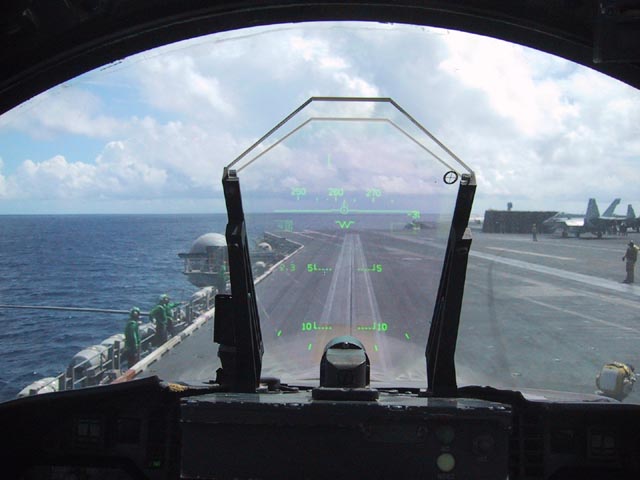
A head-up display or heads-up display,[1] also known as a HUD (/hʌd/) or head-up guidance system (HGS), is any transparent display that presents data without requiring users to look away from their usual viewpoints. The origin of the name stems from a pilot being able to view information with the head positioned "up" and looking forward, instead of angled down looking at lower instruments. A HUD also has the advantage that the pilot's eyes do not need to refocus to view the outside after looking at the optically nearer instruments.
Although they were initially developed for military aviation, HUDs are now used in commercial aircraft, automobiles, and other (mostly professional) applications.
Head-up displays were a precursor technology to augmented reality (AR), incorporating a subset of the features needed for the full AR experience, but lacking the necessary registration and tracking between the virtual content and the user's real-world environment.[2]
Overview
[edit]
A typical HUD contains three primary components: a projector unit, a combiner, and a video generation computer.[3]
The projection unit in a typical HUD is an optical collimator setup: a convex lens or concave mirror with a cathode-ray tube, light emitting diode display, or liquid crystal display at its focus. This setup (a design that has been around since the invention of the reflector sight in 1900) produces an image where the light is collimated, i.e., the focal point is perceived to be at infinity.
The combiner is typically an angled flat piece of glass (a beam splitter) located directly in front of the viewer, that redirects the projected image from projector in such a way as to see the field of view and the projected infinity image at the same time. Combiners may have special coatings that reflect the monochromatic light projected onto it from the projector unit while allowing all other wavelengths of light to pass through. In some optical layouts combiners may also have a curved surface to refocus the image from the projector.
The computer provides the interface between the HUD (i.e., the projection unit) and the systems/data to be displayed and generates the imagery and symbology to be displayed by the projection unit.
Types
[edit]Other than fixed mounted HUD, there are also head-mounted displays (HMDs.) These include helmet-mounted displays (both abbreviated HMD), forms of HUD that feature a display element that moves with the orientation of the user's head.
Many modern fighters (such as the F/A-18, F-16, and Eurofighter) use both a HUD and HMD concurrently. The F-35 Lightning II was designed without a HUD, relying solely on the HMD, making it the first modern military fighter not to have a fixed HUD.
Generations
[edit]HUDs are split into four generations reflecting the technology used to generate the images.
- First Generation—Use a CRT to generate an image on a phosphor screen, having the disadvantage of the phosphor screen coating degrading over time. The majority of HUDs in operation today are of this type.
- Second Generation—Use a solid state light source, for example LED, which is modulated by an LCD screen to display an image. These systems do not fade or require the high voltages of first generation systems. These systems are on commercial aircraft.
- Third Generation—Use optical waveguides to produce images directly in the combiner rather than use a projection system.
- Fourth Generation—Use a scanning laser to display images and even video imagery on a clear transparent medium.
Newer micro-display imaging technologies are being introduced, including liquid crystal display (LCD), liquid crystal on silicon (LCoS), digital micro-mirrors (DMD), and organic light-emitting diode (OLED).
History
[edit]

HUDs evolved from the reflector sight, a pre-World War II parallax-free optical sight technology for military fighter aircraft.[4] The gyro gunsight added a reticle that moved based on the speed and turn rate to solve for the amount of lead needed to hit a target while maneuvering.
During the early 1940s, the Telecommunications Research Establishment (TRE), in charge of UK radar development, found that Royal Air Force (RAF) night fighter pilots were having a hard time reacting to the verbal instruction of the radar operator as they approached their targets. They experimented with the addition of a second radar display for the pilot, but found they had trouble looking up from the lit screen into the dark sky in order to find the target. In October 1942 they had successfully combined the image from the radar tube with a projection from their standard GGS Mk. II gyro gunsight on a flat area of the windscreen, and later in the gunsight itself.[5] A key upgrade was the move from the original AI Mk. IV radar to the microwave-frequency AI Mk. VIII radar found on the de Havilland Mosquito night fighter. This set produced an artificial horizon that further eased head-up flying.[citation needed]
In 1955 the US Navy's Office of Naval Research and Development did some research with a mockup HUD concept unit along with a sidestick controller in an attempt to ease the pilot's burden flying modern jet aircraft and make the instrumentation less complicated during flight. While their research was never incorporated in any aircraft of that time, the crude HUD mockup they built had all the features of today's modern HUD units.[6]
HUD technology was next advanced by the Royal Navy in the Buccaneer, the prototype of which first flew on 30 April 1958. The aircraft was designed to fly at very low altitudes at very high speeds and drop bombs in engagements lasting seconds. As such, there was no time for the pilot to look up from the instruments to a bombsight. This led to the concept of a "Strike Sight" that would combine altitude, airspeed and the gun/bombsight into a single gunsight-like display. There was fierce competition between supporters of the new HUD design and supporters of the old electro-mechanical gunsight, with the HUD being described as a radical, even foolhardy option.
The Air Arm branch of the UK Ministry of Defence sponsored the development of a Strike Sight. The Royal Aircraft Establishment (RAE) designed the equipment and the earliest usage of the term "head-up-display" can be traced to this time.[7] Production units were built by Rank Cintel, and the system was first integrated in 1958. The Cintel HUD business was taken over by Elliott Flight Automation and the Buccaneer HUD was manufactured and further developed, continuing up to a Mark III version with a total of 375 systems made; it was given a 'fit and forget' title by the Royal Navy and it was still in service nearly 25 years later. BAE Systems, as the successor to Elliotts via GEC-Marconi Avionics, thus has a claim to the world's first head-up display in operational service.[8] A similar version that replaced the bombing modes with missile-attack modes was part of the AIRPASS HUD fitted to the English Electric Lightning from 1959.
In the United Kingdom, it was soon noted that pilots flying with the new gunsights were becoming better at piloting their aircraft.[citation needed] At this point, the HUD expanded its purpose beyond weapon aiming to general piloting. In the 1960s, French test-pilot Gilbert Klopfstein created the first modern HUD and a standardized system of HUD symbols so that pilots would only have to learn one system and could more easily transition between aircraft. The modern HUD used in instrument flight rules approaches to landing was developed in 1975.[9] Klopfstein pioneered HUD technology in military fighter jets and helicopters, aiming to centralize critical flight data within the pilot's field of vision. This approach sought to increase the pilot's scan efficiency and reduce "task saturation" and information overload.
Use of HUDs then expanded beyond military aircraft. In the 1970s, the HUD was introduced to commercial aviation, and in 1988, the Oldsmobile Cutlass Supreme became the first production car with a head-up display.
Until a few years ago, the Embraer 190, Saab 2000, Boeing 727, and Boeing 737 Classic (737-300/400/500) and Next Generation aircraft (737-600/700/800/900 series) were the only commercial passenger aircraft available with HUDs. However, the technology is becoming more common with aircraft such as the Canadair RJ, Airbus A318 and several business jets featuring the displays. HUDs have become standard equipment on the Boeing 787.[10] Furthermore, the Airbus A320, A330, A340 and A380 families are currently undergoing the certification process for a HUD.[11] HUDs were also added to the Space Shuttle orbiter.
Design factors
[edit]
There are several factors that interplay in the design of a HUD:
- Field of View – also "FOV", indicates the angle(s), vertically as well as horizontally, subtended at the pilot's eye, at which the combiner displays symbology in relation to the outside view. A narrow FOV means that the view (of a runway, for example) through the combiner might include little additional information beyond the perimeters of the runway environment; whereas a wide FOV would allow a 'broader' view. For aviation applications, the major benefit of a wide FOV is that an aircraft approaching the runway in a crosswind might still have the runway in view through the combiner, even though the aircraft is pointed well away from the runway threshold; whereas with a narrow FOV the runway would be 'off the edge' of the combiner, out of the HUD's view. Because human eyes are separated, each eye receives a different image. The HUD image is viewable by one or both eyes, depending on technical and budget limitations in the design process. Modern expectations are that both eyes view the same image, in other words a "binocular Field of View (FOV)".
- Collimation – The projected image is collimated which makes the light rays parallel. Because the light rays are parallel the lens of the human eye focuses on infinity to get a clear image. Collimated images on the HUD combiner are perceived as existing at or near optical infinity. This means that the pilot's eyes do not need to refocus to view the outside world and the HUD display – the image appears to be "out there", overlaying the outside world. This feature is critical for effective HUDs: not having to refocus between HUD-displayed symbolic information and the outside world onto which that information is overlaid is one of the main advantages of collimated HUDs. It gives HUDs special consideration in safety-critical and time-critical manoeuvres, when the few seconds a pilot needs in order to re-focus inside the cockpit, and then back outside, are very critical: for example, in the final stages of landing. Collimation is therefore a primary distinguishing feature of high-performance HUDs and differentiates them from consumer-quality systems that, for example, simply reflect uncollimated information off a car's windshield (causing drivers to refocus and shift attention from the road ahead.)
- Eyebox – The optical collimator produces a cylinder of parallel light so the display can only be viewed while the viewer's eyes are somewhere within that cylinder, a three-dimensional area called the head motion box or eyebox. Modern HUD eyeboxes are usually about 5 lateral by 3 vertical by 6 longitudinal inches (13x8x15 cm.) This allows the viewer some freedom of head movement but movement too far up/down or left/right will cause the display to vanish off the edge of the collimator and movement too far back will cause it to crop off around the edge (vignette.) The pilot is able to view the entire display as long as one eye is inside the eyebox.[12]
- Luminance/contrast – Displays have adjustments in luminance and contrast to account for ambient lighting, which can vary widely (e.g. from the glare of bright clouds to moonless night approaches to minimally lit fields.)
- Boresight – Aircraft HUD components are very accurately aligned with the aircraft's three axes – a process called boresighting – so that displayed data conforms to reality typically with an accuracy of ±7.0 milliradians (±24 minutes of arc), and may vary across the HUD's FOV. In this case the word "conform" means, "when an object is projected on the combiner and the actual object is visible, they will be aligned". This allows the display to show the pilot exactly where the artificial horizon is, as well as the aircraft's projected path with great accuracy. When Enhanced Vision is used, for example, the display of runway lights is aligned with the actual runway lights when the real lights become visible. Boresighting is done during the aircraft's building process and can also be performed in the field on many aircraft.[9]
- Scaling – The displayed image (flight path, pitch and yaw scaling, etc.), is scaled to present to the pilot a picture that overlays the outside world in an exact 1:1 relationship. For example, objects (such as a runway threshold) that are 3 degrees below the horizon as viewed from the cockpit must appear at the −3 degree index on the HUD display.
- Compatibility – HUD components are designed to be compatible with other avionics, displays, etc.
Aircraft
[edit]On aircraft avionics systems, HUDs typically operate from dual independent redundant computer systems. They receive input directly from the sensors (pitot-static, gyroscopic, navigation, etc.) aboard the aircraft and perform their own computations rather than receiving previously computed data from the flight computers. On other aircraft (the Boeing 787, for example) the HUD guidance computation for Low Visibility Take-off (LVTO) and low visibility approach comes from the same flight guidance computer that drives the autopilot. Computers are integrated with the aircraft's systems and allow connectivity onto several different data buses such as the ARINC 429, ARINC 629, and MIL-STD-1553.[9]
Displayed data
[edit]
Typical aircraft HUDs display airspeed, altitude, a horizon line, heading, turn/bank and slip/skid indicators. These instruments are the minimum required by 14 CFR Part 91.[13]
Other symbols and data are also available in some HUDs:
- boresight or waterline symbol — is fixed on the display and shows where the nose of the aircraft is actually pointing.
- flight path vector (FPV) or velocity vector symbol — shows where the aircraft is actually going, as opposed to merely where it is pointed as with the boresight. For example, if the aircraft is pitched up but descending as may occur in high angle of attack flight or in flight through descending air, then the FPV symbol will be below the horizon even though the boresight symbol is above the horizon. During approach and landing, a pilot can fly the approach by keeping the FPV symbol at the desired descent angle and touchdown point on the runway.
- acceleration indicator or energy cue — typically to the left of the FPV symbol, it is above it if the aircraft is accelerating, and below the FPV symbol if decelerating.
- angle of attack indicator — shows the wing's angle relative to the airflow, often displayed as "α".
- navigation data and symbols — for approaches and landings, the flight guidance systems can provide visual cues based on navigation aids such as an Instrument Landing System or augmented Global Positioning System such as the Wide Area Augmentation System. Typically this is a circle which fits inside the flight path vector symbol. Pilots can fly along the correct flight path by "flying to" the guidance cue.
Since being introduced on HUDs, both the FPV and acceleration symbols are becoming standard on head-down displays (HDD.) The actual form of the FPV symbol on an HDD is not standardized but is usually a simple aircraft drawing, such as a circle with two short angled lines, (180 ± 30 degrees) and "wings" on the ends of the descending line. Keeping the FPV on the horizon allows the pilot to fly level turns in various angles of bank.
Military aircraft specific applications
[edit]
In addition to the generic information described above, military applications include weapons system and sensor data such as:
- target designation (TD) indicator — places a cue over an air or ground target (which is typically derived from radar or inertial navigation system data.)
- Vc — closing velocity with target.
- Range — to target, waypoint, etc.
- weapon seeker or sensor line of sight — shows where a seeker or sensor is pointing.
- weapon status — includes type and number of weapons selected, available, arming, etc.
VTOL/STOL approaches and landings
[edit]During the 1980s, the United States military tested the use of HUDs in vertical take off and landing (VTOL) and short take off and landing (STOL) aircraft. A HUD format was developed at NASA Ames Research Center to provide pilots of VTOL and STOL aircraft with complete flight guidance and control information for Category III C terminal-area flight operations. This includes a large variety of flight operations, from STOL flights on land-based runways to VTOL operations on aircraft carriers. The principal features of this display format are the integration of the flightpath and pursuit guidance information into a narrow field of view, easily assimilated by the pilot with a single glance, and the superposition of vertical and horizontal situation information. The display is a derivative of a successful design developed for conventional transport aircraft.[14]
Civil aircraft specific applications
[edit]
The use of head-up displays allows commercial aircraft substantial flexibility in their operations. Systems have been approved which allow reduced-visibility takeoffs, and landings, as well as full manual Category III A landings and roll-outs.[15][16][17] Initially expensive and physically large, these systems were only installed on larger aircraft able to support them. These tended to be the same aircraft that as standard supported autoland (with the exception of certain turbo-prop types[clarification needed] that had HUD as an option) making the head-up display unnecessary for Cat III landings. This delayed the adoption of HUD in commercial aircraft. At the same time, studies have shown that the use of a HUD during landings decreases the lateral deviation from centerline in all landing conditions, although the touchdown point along the centerline is not changed.[18]
For general aviation, MyGoFlight expects to receive a STC and to retail its SkyDisplay HUD for $25,000 without installation for a single piston-engine as the Cirrus SR22s and more for Cessna Caravans or Pilatus PC-12s single-engine turboprops: 5 to 10% of a traditional HUD cost albeit it is non-conformal, not matching exactly the outside terrain.[19] Flight data from a tablet computer can be projected on the $1,800 Epic Optix Eagle 1 HUD.[20]
Enhanced flight vision systems
[edit]This section may contain an excessive amount of intricate detail that may only interest a particular audience. (August 2018) |

In more advanced systems, such as the US Federal Aviation Administration (FAA)-labeled 'Enhanced Flight Vision System',[21] a real-world visual image can be overlaid onto the combiner. Typically an infrared camera (either single or multi-band) is installed in the nose of the aircraft to display a conformed image to the pilot. "EVS Enhanced Vision System" is an industry-accepted term which the FAA decided not to use because "the FAA believes [it] could be confused with the system definition and operational concept found in 91.175(l) and (m)"[21] In one EVS installation, the camera is actually installed at the top of the vertical stabilizer rather than "as close as practical to the pilots eye position". When used with a HUD however, the camera must be mounted as close as possible to the pilots eye point as the image is expected to "overlay" the real world as the pilot looks through the combiner.
"Registration", or the accurate overlay of the EVS image with the real world image, is one feature closely examined by authorities prior to approval of a HUD based EVS. This is because of the importance of the HUD matching the real world and therefore being able to provide accurate data rather than misleading information.
While the EVS display can greatly help, the FAA has only relaxed operating regulations[22] so an aircraft with EVS can perform a CATEGORY I approach to CATEGORY II minimums. In all other cases the flight crew must comply with all "unaided" visual restrictions. (For example, if the runway visibility is restricted because of fog, even though EVS may provide a clear visual image it is not appropriate (or legal) to maneuver the aircraft using only the EVS below 100 feet above ground level.)
Synthetic vision systems
[edit]This section may contain an excessive amount of intricate detail that may only interest a particular audience. (August 2018) |
HUD systems are also being designed to display a synthetic vision system (SVS) graphic image, which uses high precision navigation, attitude, altitude and terrain databases to create realistic and intuitive views of the outside world.[23][24][25]
In the 1st SVS head down image shown on the right, immediately visible indicators include the airspeed tape on the left, altitude tape on the right, and turn/bank/slip/skid displays at the top center. The boresight symbol (-v-) is in the center and directly below that is the flight path vector (FPV) symbol (the circle with short wings and a vertical stabilizer.) The horizon line is visible running across the display with a break at the center, and directly to the left are numbers at ±10 degrees with a short line at ±5 degrees (the +5 degree line is easier to see) which, along with the horizon line, show the pitch of the aircraft. Unlike this color depiction of SVS on a head down primary flight display, the SVS displayed on a HUD is monochrome – that is, typically, in shades of green.
The image indicates a wings level aircraft (i.e. the flight path vector symbol is flat relative to the horizon line and there is zero roll on the turn/bank indicator.) Airspeed is 140 knots, altitude is 9,450 feet, heading is 343 degrees (the number below the turn/bank indicator.) Close inspection of the image shows a small purple circle which is displaced from the flight path vector slightly to the lower right. This is the guidance cue coming from the Flight Guidance System. When stabilized on the approach, this purple symbol should be centered within the FPV.
The terrain is entirely computer generated from a high resolution terrain database.
In some systems, the SVS will calculate the aircraft's current flight path, or possible flight path (based on an aircraft performance model, the aircraft's current energy, and surrounding terrain) and then turn any obstructions red to alert the flight crew. Such a system might have helped prevent the crash of American Airlines Flight 965 into a mountain in December 1995.[citation needed]
On the left side of the display is an SVS-unique symbol, with the appearance of a purple, diminishing sideways ladder, and which continues on the right of the display. The two lines define a "tunnel in the sky". This symbol defines the desired trajectory of the aircraft in three dimensions. For example, if the pilot had selected an airport to the left, then this symbol would curve off to the left and down. If the pilot keeps the flight path vector alongside the trajectory symbol, the craft will fly the optimum path. This path would be based on information stored in the Flight Management System's database and would show the FAA-approved approach for that airport.
The tunnel in the sky can also greatly assist the pilot when more precise four-dimensional flying is required, such as the decreased vertical or horizontal clearance requirements of Required Navigation Performance (RNP.) Under such conditions the pilot is given a graphical depiction of where the aircraft should be and where it should be going rather than the pilot having to mentally integrate altitude, airspeed, heading, energy and longitude and latitude to correctly fly the aircraft.[26]
Tanks
[edit]This section needs to be updated. (December 2023) |
In mid-2017, the Israel Defense Forces will begin trials of Elbit's Iron Vision, the world's first helmet-mounted head-up display for tanks. Israel's Elbit, which developed the helmet-mounted display system for the F-35, plans Iron Vision to use a number of externally mounted cameras to project the 360° view of a tank's surroundings onto the helmet-mounted visors of its crew members. This allows the crew members to stay inside the tank, without having to open the hatches to see outside.[27]
A program announced in 2025 by a collaboration of Patria Technologies and Distance Technologies aims to place the head-up display on the windshield of vehicles, so as to not require a helmet. The program also intends on using AI to aid in data display and processing.[28]
Automobiles
[edit]These displays are becoming increasingly available in production cars, and usually offer speedometer, tachometer, and navigation system displays. Night vision information is also displayed via HUD on certain automobiles. In contrast to most HUDs found in aircraft, automotive head-up displays are not parallax-free. The display may not be visible to a driver wearing sunglasses with polarised lenses.
Add-on HUD systems also exist, projecting the display onto a glass combiner mounted above or below the windshield, or using the windshield itself as the combiner.
The first in-car HUD was developed by General Motors Corporation in 1999 with the function of displaying the navigation service in front of the driver's line of sight. Moving into 2010, AR technology was introduced and combined with the existing in-car HUD. Based on this technology, the navigation service began to be displayed on the windshield of the vehicle.[29]
In 2012, Pioneer Corporation introduced a HUD navigation system that replaces the driver-side sun visor and visually overlays animations of conditions ahead, a form of augmented reality (AR.)[30][31] Developed by Pioneer Corporation, AR-HUD became the first aftermarket automotive Head-Up Display to use a direct-to-eye laser beam scanning method, also known as virtual retinal display (VRD.) AR-HUD's core technology involves a miniature laser beam scanning display developed by MicroVision, Inc.[32]
Motorcycle helmet HUDs are also commercially available.[33]
In recent years, it has been argued that conventional HUDs will be replaced by holographic AR technologies, such as the ones developed by WayRay that use holographic optical elements (HOE.) The HOE allows for a wider field of view while reducing the size of the device and making the solution customizable for any car model.[34][35] Mercedes Benz introduced an Augmented Reality-based Head Up Display[36] while Faurecia invested in an eye gaze and finger controlled head up display.[37]
Further development and experimental uses
[edit]HUDs have been proposed or are being experimentally developed for a number of other applications. In military settings, a HUD can be used to overlay tactical information such as the output of a laser rangefinder or squadmate locations to infantrymen. A prototype HUD has also been developed that displays information on the inside of a swimmer's goggles or of a scuba diver's mask.[38] HUD systems that project information directly onto the wearer's retina with a low-powered laser (virtual retinal display) are also being tested.[39][40]
A HUD product developed in 2012 could perform real-time language translation.[41] In an implementation of an Optical head-mounted display, the EyeTap product allows superimposed computer-generated graphic files to be displayed on a lens. The Google Glass was another early product.
See also
[edit]- Index of aviation articles
- Acronyms and abbreviations in avionics
- Augmented reality
- Eyes-on-the-Road-Benefit
- HUD (video gaming)
- Pepper's ghost - A stage play version of a similar reflection effect.
- Smartglasses
- Virtual retinal display
- VR positional tracking
- Wearable computer
References
[edit]- ^ Oxford Dictionary of English, Angus Stevenson, Oxford University Press – 2010, page 809 (head-up display (N.Amer. also heads-up display))
- ^ "Augmented reality brings VR to the real world in all sorts of exciting ways". Digital Trends. 2019-06-06. Retrieved 2022-10-10.
- ^ Fred H. Previc; William R. Ercoline (2004). Spatial Disorientation in Aviation. AIAA. p. 452. ISBN 978-1-60086-451-3.
- ^ D. N. Jarrett (2005). Cockpit engineering. Ashgate Pub. p. 189. ISBN 0-7546-1751-3. Retrieved 2012-07-14.
- ^ Ian White, "The History of Air Intercept Radar & the British Nightfigher", Pen & Sword, 2007, p. 207
- ^ "Windshield TV Screen To Aid Blind Flying." Popular Mechanics, March 1955, p. 101.
- ^ John Kim, Rupture of the Virtual, Digital Commons Macalester College, 2016, p. 54
- ^ Rochester Avionics Archives
- ^ a b c Spitzer, Cary R., ed. "Digital Avionics Handbook". Head-Up Displays. Boca Raton, FL: CRC Press, 2001
- ^ Norris, G.; Thomas, G.; Wagner, M. & Forbes Smith, C. (2005). Boeing 787 Dreamliner—Flying Redefined. Aerospace Technical Publications International. ISBN 0-9752341-2-9.
- ^ "Airbus A318 approved for Head Up Display". Airbus.com. 2007-12-03. Archived from the original on December 7, 2007. Retrieved 2009-10-02.
- ^ Cary R. Spitzer (2000). Digital Avionics Handbook. CRC Press. p. 4. ISBN 978-1-4200-3687-9.
- ^ "14 CFR Part 91". Airweb.faa.gov. Retrieved 2009-10-02.
- ^ Vernon K. Merrick, Glenn G. Farris, and Andrejs A. Vanags. "A Head Up Display for Application to V/STOL Aircraft Approach and Landing". NASA Ames Research Center 1990.
- ^ "Order: 8700.1 Appendix: 3 Bulletin Type: Flight Standards Handbook Bulletin for General Aviation (HBGA) Bulletin Number: HBGA 99-16 Bulletin Title: Category III Authorization for Parts 91 and 125 Operators with Head-Up Guidance Systems (HGS); LOA and Operations Effective Date: 8-31-99". Archived from the original on October 1, 2006.
- ^ Falcon 2000 Becomes First Business Jet Certified Category III A by JAA and FAA; Aviation Weeks Show News Online September 7, 1998
- ^ "Design Guidance for a HUD System is contained in Draft Advisory Circular AC 25.1329-1X, "Approval of Flight Guidance Systems" dated 10/12/2004". Airweb.faa.gov. Retrieved 2009-10-02.
- ^ Goteman, Ö.; Smith, K.; Dekker, S. (2007). "HUD With a Velocity (Flight Path) Vector Reduces Lateral Error During Landing in Restricted Visibility". International Journal of Aviation Psychology. 17 (1): 91–108. doi:10.1080/10508410709336939. S2CID 219641008.
- ^ Matt Thurber (August 24, 2018). "A HUD For the Rest of Us by". AIN online.
- ^ Matt Thurber (December 26, 2018). "This HUD's For You". AIN online.
- ^ a b U.S. DOT/FAA – Final Rule: Enhanced Flight Vision Systems www.regulations.gov
- ^ 14 CFR Part 91.175 change 281 "Takeoff and Landing under IFR"
- ^ "Slide 1" (PDF). Archived from the original (PDF) on March 9, 2008. Retrieved 2009-10-02.
- ^ For additional information see Evaluation of Alternate Concepts for Synthetic Vision Flight Displays with Weather-Penetrating Sensor Image Inserts During Simulated Landing Approaches, NASA/TP-2003-212643 Archived 2004-11-01 at the Wayback Machine
- ^ "No More Flying Blind, NASA". Nasa.gov. 2007-11-30. Retrieved 2009-10-02.
- ^ "PowerPoint Presentation" (PDF). Archived from the original (PDF) on March 9, 2008. Retrieved 2009-10-02.
- ^ IDF to trial Elbit's IronVision in Merkava MBT Peter Felstead, Tel Aviv - IHS Jane's Defence Weekly, 27 March 2017
- ^ "Patria, Distance Partner on Mixed Reality Heads-Up Display for 6x6 Vehicles". www.defensemirror.com. Retrieved 2025-04-11.
- ^ Liang, Yongshi; Zheng, Pai; Xia, Liqiao (January 2023). "A visual reasoning-based approach for driving experience improvement in the AR-assisted head-up displays". Advanced Engineering Informatics. 55 101888. doi:10.1016/j.aei.2023.101888. ISSN 1474-0346.
- ^ Alabaster, Jay (June 28, 2013). "Pioneer launches car navigation with augmented reality, heads-up displays". Computerworld.
- ^ Ulanoff, Lance (January 11, 2012). "Pioneer AR Heads Up Display Augments Your Driving Reality". Mashable.
- ^ Freeman, Champion (2014). "Madhaven—Scanned Laser Pico-Projectors: Seeing the Big Picture (with a Small Device)".
- ^ "Mike, Werner. "Test Driving the SportVue Motorcycle HUD". Motorcycles in the Fast Lane. 8 November 2005. Accessed 14 February 2007". News.motorbiker.org. Archived from the original on 30 March 2010. Retrieved 2009-10-02.
- ^ "WayRay's AR in-car HUD convinced me HUDs can be better". TechCrunch. Retrieved 2018-10-03.
- ^ "AR Smart Driving Tool Set to Replace GPS? - L'Atelier BNP Paribas". L'Atelier BNP Paribas. Retrieved 2018-10-03.
- ^ "Augmented reality heads-up displays for cars are finally a real thing". 10 July 2020.
- ^ Prabhakar, Gowdham; Ramakrishnan, Aparna; Madan, Modiksha; Murthy, L. R. D.; Sharma, Vinay Krishna; Deshmukh, Sachin; Biswas, Pradipta (2020). "Interactive gaze and finger controlled HUD for cars". Journal on Multimodal User Interfaces. 14: 101–121. doi:10.1007/s12193-019-00316-9. ISSN 1783-8738. S2CID 208261516.
- ^ Clothier, Julie. "Clothier, Julie. "Smart Goggles Easy on the Eyes". CNN.Com. 27 June 2005. CNN. Accessed 22 February 2007". CNN. Retrieved 2009-10-02.
- ^ Panagiotis Fiambolis. ""Virtual Retinal Display (VRD) Technology". Virtual Retinal Display Technology. Naval Postgraduate School. 13 February 2007". Cs.nps.navy.mil. Archived from the original on April 13, 2008. Retrieved 2009-10-02.
- ^ Lake, Matt (2001-04-26). "Lake, Matt (26 April 2001). "How It Works: Retinal Displays Add a Second Data Layer"". The New York Times. Retrieved 2009-10-02.
- ^ Borghino, Dario (29 July 2012). Augmented reality glasses perform real-time language translation. gizmag.
External links
[edit]- Rochester Archives Article—'Buccaneer HUD PDU'
- BBC Article—'Pacman comes to life virtually'
- 'Clinical evaluation of the 'head-up' display of anesthesia data'
- 'When will the Head-up go Civil' – Flight 1968 archive
- 'Elliott Brothers to BAE SYSTEMS' – a short history of Elliott Brothers[permanent dead link]
- Head-up Over the Hills – a 1964 Flight International article on flying using an early Specto head-up display
- Jaguar Unveils 'Virtual Widescreen' Technology to Assist Drivers – Latin Post
- The story of how all Miramar Tomcat squadrons got the funds to purchase riflescopes to attach to the HUD of their F-14 fighter jets
Head-up display
View on GrokipediaOverview
Definition and Purpose
A head-up display (HUD) is a transparent display system that presents critical data directly within the user's primary field of view, allowing them to maintain focus on their external environment without needing to avert their gaze to traditional instruments.[6] Typically, the HUD projects imagery onto a combiner glass or the windshield, overlaying symbolic or alphanumeric information such as speed, altitude, or flight path in a manner that appears superimposed on the real world.[11] This design originated in military aviation to support pilots in high-stakes operations.[12] The primary purpose of a HUD is to enhance situational awareness by integrating navigational, operational, and safety-related data into the user's line of sight, thereby reducing the time spent looking away from the forward view—known as head-down time—and improving overall reaction times during dynamic tasks. By minimizing distractions and cognitive load, the system helps prevent loss of visual reference to the external environment, which is particularly vital in environments requiring constant vigilance, such as aviation maneuvers.[14] Core benefits include decreased mental workload and heightened precision in decision-making, as users can process information without the disorientation caused by shifting focus between near and far objects.[15] At its core, a HUD operates on the principle of collimated optics, which render the projected image as a virtual view at optical infinity by making light rays parallel, enabling the eye to accommodate both the display and distant objects simultaneously without refocusing.[16] This optical technique ensures that the overlaid information remains sharp and aligned with the real-world view, supporting seamless integration of data into the user's perception.[5]Types and Generations
Head-up displays (HUDs) are classified into distinct types based on their physical configuration and projection mechanisms, each suited to specific operational needs in enhancing pilot focus during flight. The combiner HUD utilizes a separate, transparent reflective glass plate positioned in the pilot's line of sight to superimpose digital symbology onto the external view, providing a stable, fixed display for critical flight data without obstructing the forward vista.[17] Helmet-mounted displays (HMDs), in contrast, are integrated into the user's helmet, allowing the display to track head movements for greater mobility and enabling dynamic targeting by aligning symbology with the pilot's gaze direction.[18] Windshield-projected HUDs direct the image onto the vehicle's windshield itself, leveraging the glass as the reflective surface to create a more immersive integration with the real-world environment, though this requires specialized windshield coatings to minimize distortion.[19] A specialized variant, the contact analog HUD (also known as conformal HUD), overlays navigational data that dynamically conforms to the actual geometry of the external scene, such as rendering a flight path as a three-dimensional "highway in the sky" to intuitively guide the user through complex maneuvers.[20] These types differ fundamentally in application: fixed combiner systems excel in delivering stable, low-motion flight information to maintain consistent reference during steady operations, while helmet-mounted variants support agile, off-boresight targeting in high-maneuver scenarios, such as air-to-air combat.[21] Windshield projections offer broader integration but can introduce optical challenges like double imaging, and contact analog designs prioritize spatial conformance for enhanced situational awareness over simple data readout.[19][20] The technological progression of HUDs spans multiple generations, reflecting advances in display hardware, processing, and integration capabilities that have expanded functionality from basic instrumentation to sophisticated augmented reality systems. First-generation HUDs, emerging in the 1960s and 1970s, relied on cathode-ray tube (CRT) technology to produce monochrome symbology, sufficient for essential readouts like attitude and heading but constrained by phosphor screen degradation over time.[16] Second-generation systems, developed through the 1980s and 1990s, transitioned to solid-state light sources such as LEDs modulated by liquid crystal displays (LCDs), introducing color displays, higher brightness for daylight readability, and improved reliability over bulky CRTs.[16] Third-generation HUDs, from the 2000s onward, utilize optical waveguides to generate images directly on the combiner, eliminating traditional projection systems and enabling augmented reality (AR) features such as synthetic overlays that blend real and virtual elements, including terrain alerts or threat cues, through high-resolution imaging and real-time computing.[16] Fourth-generation HUDs incorporate advanced enhancements like scanning lasers for displaying images and video on transparent media, along with integration of synthetic terrain or infrared video via enhanced flight vision systems (EFVS), supporting compatibility with modern digital interfaces in 4th and 5th generation aircraft as of the late 2010s.[16][22] This evolution has been propelled by ongoing miniaturization of components and exponential growth in computing power, enabling HUDs to transition from supplementary tools to primary AR interfaces in aviation. As of 2025, ongoing innovations include holographic HUDs with improved 3D visualization, as demonstrated in automotive applications.[23]History
Early Concepts and Development
The concept of the head-up display (HUD) emerged during World War II as an evolution of reflector gunsights in fighter aircraft, designed to assist pilots in target acquisition without diverting their gaze from the forward view.[3] These early optical devices, such as the gyro gunsight, projected a simple reticle onto a glass plate, allowing pilots to align weapons while maintaining visual contact with the target.[24] In the 1950s, U.S. military research advanced these concepts into more sophisticated electronic display systems for combat aircraft, using cathode ray tubes (CRTs) to provide pilots with critical information like airspeed and attitude while looking through the canopy.[25] A key innovation was the optical combiner—a semi-reflective glass element that superimposed instrument data onto the pilot's external view—building on WWII foundations and emerging radar technologies to create displays capable of projecting stabilized flight information, marking the shift from simple sights to integrated avionics.[25] These early systems faced significant limitations, including low display brightness that made them difficult to read in varying light conditions and high susceptibility to sunlight glare, which could wash out the projected imagery entirely.[5] By the 1960s, HUD technology transitioned to fighter applications, with contributions from figures like French test pilot Gilbert Klopfstein, who developed standardized formats for precise guidance while maintaining visual contact. Its adoption in aircraft like the F-111 Aardvark overlaid terrain-following radar data to enable low-altitude, high-speed penetration missions while keeping the pilot's eyes on the outside world. This integration represented a pivotal step in enhancing situational awareness for tactical operations.[4]Key Milestones and Evolution
The development of head-up display (HUD) technology accelerated in the 1970s and 1980s with its integration into operational military aircraft. The General Dynamics F-16 Fighting Falcon was one of the first production fighters to feature an advanced operational HUD in 1978, introducing digital symbology that projected critical flight and targeting data directly into the pilot's field of view, enhancing situational awareness without requiring head movement.[26] BAE Systems contributed significantly to this era by developing the HUD for the Panavia Tornado, which entered service with the UK in 1979 and marked a milestone in wide-angle, high-resolution projection systems for multirole combat aircraft.[3] By the late 1980s, advancements led to the transition from monochrome to color displays, improving readability and symbology distinction in complex environments, as seen in upgraded F-16 variants.[27] The 1990s saw HUD technology expand beyond military applications into civil aviation and automotive sectors, driven by regulatory approvals and commercial viability. Alaska Airlines achieved the first commercial use of HUD in 1989, enabling Category III landings in low-visibility conditions on transport aircraft.[28][29] The Federal Aviation Administration (FAA) supported such integrations for enhanced situational awareness during approaches. In the automotive domain, General Motors pioneered production vehicle integration with the debut of a HUD in the 1988 Oldsmobile Cutlass Supreme, which projected speed and warning indicators onto the windshield, marking the first such system in a consumer car.[30] Entering the 2000s and 2010s, HUDs evolved toward helmet-mounted variants and broader integrations, particularly in rotary-wing aircraft and passenger vehicles. The U.S. Army's AH-64 Apache helicopter utilized the Integrated Helmet and Display Sighting System (IHADSS) in the 2000s, allowing pilots to aim weapons and view symbology by simply looking at targets, a capability refined through operational deployments.[31] Automotive adoption surged, exemplified by BMW's 2012 prototype augmented reality (AR) HUD in the 5 Series, which overlaid navigation and safety cues onto the real-world view.[32] This period also featured HUD integration with GPS for turn-by-turn directions and night vision systems, projecting enhanced infrared imagery to improve low-light driving in vehicles like select BMW models.[33] In the 2020s, HUD technology has diversified into advanced military vehicles and electric vehicles (EVs), with a focus on AR enhancements for autonomous operations. Patria Technologies announced a 2025 collaboration with Distance Technologies to develop mixed-reality windshield HUDs for 6x6 armored vehicles, projecting 3D tactical data without glasses for improved battlefield decision-making.[34] The aerospace HUD market was estimated at approximately $2.5 billion as of 2025, reflecting growth in demand for enhanced pilot interfaces amid rising air traffic and safety standards.[35] In the EV sector, AR HUDs have emerged with overlays for autonomous driving cues, such as lane-keeping alerts and pedestrian highlights, as demonstrated in the 2026 Cadillac LYRIQ-V.[36][37]Design Principles
Optical and Technical Components
The core hardware components of a head-up display (HUD) include the projection unit, collimating optics, combiner, and graphics generator, each contributing to the formation and presentation of the virtual image. The projection unit serves as the image source, generating the visual content that is subsequently processed and projected. Traditional systems employed cathode-ray tubes (CRTs) for this purpose due to their ability to produce high-brightness phosphor emissions suitable for collimation.[5] Contemporary designs have shifted to liquid crystal displays (LCDs) for improved resolution and compactness, or laser diodes in scanned systems for enhanced color gamut and efficiency in automotive and avionics applications.[38][39] Collimating optics, typically comprising a series of lenses such as planoconvex or aspheric elements, transform the diverging light from the projection unit into parallel rays, ensuring the image appears at optical infinity to the viewer. This setup allows the pilot or driver to focus on both the display and distant external scenery without accommodation changes. The combiner, often a partially reflective mirror or a specially coated windshield, overlays the collimated image onto the user's field of view while transmitting external light with minimal distortion; in combiner-based HUDs, it is a dedicated semi-transparent panel positioned in the line of sight.[40][41] The graphics generator, a dedicated processing unit, interfaces with these optical elements by converting raw data into displayable symbology, receiving inputs from various sensors to produce the final raster or stroke-based output.[42] The optical principles underlying HUD functionality center on collimation, where light rays from each point on the image source are rendered parallel, enabling perception at infinity and eliminating vergence-accommodation conflict. This is achieved by positioning the projection unit at or near the focal plane of the collimating lens, such that the output forms a virtual image whose rays do not converge within the eye's focal range. The virtual image distance can be derived from the thin lens equation, which relates object distance , image distance , and focal length as . Rearranging for the virtual image (where is negative in standard sign convention for virtual images behind the lens) yields . For infinite focus (), , confirming the source placement at the focal point produces parallel output rays.[5][40] Software integration in HUDs involves real-time data fusion from avionics systems, GPS, and vehicle sensors to generate dynamic symbology, ensuring the display reflects current operational states without latency. This process aggregates inputs such as attitude, heading, and position data into a unified format for the graphics generator, which then renders the output using either stroke symbology—for high-contrast vector-based symbols like flight paths—or raster symbology for filled imagery such as synthetic vision scenes, with stroke modes prioritizing brightness in high-ambient conditions.[43][44] Advancements in HUD technology include waveguide holographic combiners for compact augmented reality implementations, where holographic optical elements guide light through thin substrates to expand the field of view while maintaining collimation. Brightness control is often managed via pulse-width modulation (PWM) in LED or laser-based projection units, allowing dynamic adjustment up to 10,000 nits to match ambient lighting without excessive power draw or thermal issues.[45][46]Performance Factors and Challenges
The performance of head-up displays (HUDs) is evaluated through several key metrics that ensure usability and safety in dynamic environments like aviation. The field of view (FOV), which determines the angular extent of the projected image visible to the user, typically ranges from 20° to 40° horizontally in modern aviation HUDs to balance information density with minimal obstruction of the forward view.[47] This angular subtended FOV can be calculated using the formula , where is the full angle in radians, is the physical width of the display image, and is the effective viewing distance from the observer's eye to the virtual image plane; converting to degrees involves multiplying by , providing a precise measure of how the display scales to the external world.[48] Another critical factor is the eyebox, defined as the three-dimensional volume within which the user's eye can be positioned to view the entire HUD image without distortion or clipping, typically measuring around 75–150 mm in various dimensions for single-eye monocular systems.[49] Luminance and contrast are essential for visibility under varying lighting conditions; HUDs must provide sufficient contrast to prevent washout, with daytime luminance often reaching 10,000 cd/m² or higher in direct sunlight scenarios.[49] Resolution, measured in pixels, supports clear symbology rendering, with contemporary aviation units capable of up to 1080p (1920×1080) to enable fine details like flight path vectors without pixelation.[50] Despite these metrics, HUD implementation faces significant engineering challenges. Parallax errors arise from relative head movements, causing misalignment between the virtual image and real-world references, which can degrade accuracy in tasks requiring precise overlay; these are commonly mitigated through conformal scaling techniques that dynamically adjust symbology to match the external scene geometry.[51] Sunlight interference poses another hurdle, as direct glare can reduce visibility, necessitating polarizing filters or anti-reflective coatings on combiner optics to maintain image clarity.[52] Early cathode-ray tube (CRT)-based HUDs suffered from high weight exceeding 10 kg and elevated costs due to vacuum tube complexity, whereas modern organic light-emitting diode (OLED) variants have reduced this to under 1 kg while lowering production expenses through solid-state integration.[12] Calibration for multi-user scenarios, such as in shared cockpits or vehicles, remains challenging, as fixed eye reference points optimized for one operator can introduce errors for others, requiring adaptive alignment systems.[53] Regulatory standards further shape HUD performance, with the Federal Aviation Administration (FAA) and European Union Aviation Safety Agency (EASA) mandating compliance for certification in civil aviation; for instance, MIL-STD-3009 specifies color gamut and luminance limits for night vision imaging system (NVIS) compatibility, ensuring HUD emissions do not degrade goggle performance while meeting daytime readability thresholds.[54] These requirements, outlined in FAA Advisory Circular AC 25.1302-1 and EASA Certification Specifications CS-25, emphasize quantitative testing for FOV uniformity, eyebox stability, and contrast under simulated environmental conditions to verify operational reliability.[55]Applications in Aviation
Data Presentation and Symbology
Head-up displays (HUDs) in aviation present critical flight information directly in the pilot's forward field of view, enabling rapid comprehension without diverting attention from the external environment. Core data elements typically include the flight path vector (FPV), depicted as a chevron symbol that indicates the aircraft's actual trajectory relative to the horizon, providing intuitive feedback on direction and drift for precise control.[56][6] The horizon line serves as a reference for pitch and roll attitude, aligning with the real-world horizon to maintain spatial orientation. Additional essentials are speed, altitude, and heading tapes, displayed as dynamic scales or digital readouts that update in real-time, allowing pilots to monitor performance metrics efficiently.[6][57] Conformal symbology enhances situational awareness by scaling and positioning symbols to match the external world, such as overlaying a runway outline that aligns with the actual runway during approach, facilitating seamless integration of virtual and real cues.[58] This approach supports tasks like landing by ensuring symbols appear where the pilot expects them visually.[6] HUD symbology employs various formats to balance precision and visual fidelity. Stroke-based symbology uses vector lines to render symbols like the FPV or horizon, offering high resolution and low latency for dynamic elements, which is ideal for guidance cues.[5] In contrast, raster symbology generates full images, such as synthetic vision terrain or sensor feeds, providing contextual detail but requiring more processing power.[59] Augmented reality (AR) overlays incorporate icons for alerts, like traffic collision avoidance system (TCAS) warnings, positioned conformally to highlight threats without overwhelming the display.[6] Design principles prioritize usability to minimize cognitive load and errors. Clutter reduction is achieved through decluttering algorithms that selectively hide non-essential symbols based on flight phase or priority, preventing information overload while keeping the view of the outside world unobscured.[6][60] Color coding assigns meanings like green for nominal conditions, amber for cautions, and red for warnings, improving rapid interpretation and reducing reaction times during high-workload scenarios.[61] Compliance with human factors standards, such as those ensuring legibility at 20/20 visual acuity from typical viewing distances, ensures symbols are perceivable under varying lighting without inducing fatigue.[57] These principles draw from integration with aircraft sensors like inertial and GPS systems for accurate real-time updates.[56] In practice, the velocity vector—a variant of the FPV—assists in energy management by showing acceleration cues, helping pilots maintain optimal speed and descent rates during maneuvers. Military HUD variants often adapt similar formats for tactical needs.[62][6]Specific Uses in Military and Civil Aircraft
In military aircraft, head-up displays (HUDs) are primarily employed for weapon aiming and targeting during dynamic combat operations. For instance, in the F-15 Eagle, introduced in the 1970s, the HUD supports continuously computed impact point (CCIP) modes that project aiming symbology for unguided bomb releases, allowing pilots to maintain visual focus on the target while adjusting release parameters based on real-time ballistic computations.[63] Similarly, in the Eurofighter Typhoon, HUD cues facilitate air-to-air targeting, including missile lock indicators and steering commands for beyond-visual-range engagements, enabling rapid acquisition and fire control without diverting attention to cockpit instruments.[64] For night and low-visibility operations, HUDs integrate with forward-looking infrared (FLIR) systems, as seen in aircraft like the A-10 Thunderbolt II, where FLIR imagery is overlaid on the display to provide thermal targeting and navigation cues in degraded environments.[65] In civil aircraft, HUDs focus on enhancing safety and efficiency during routine flight phases, particularly navigation and approach procedures. The Airbus A320 family, which can be equipped with HUDs as an option since the early 2000s, displays instrument landing system (ILS) guidance bars conformally with the outside view, aiding precise alignment during low-visibility landings and reducing the need to reference head-down instruments.[6] Traffic collision avoidance system (TCAS) alerts are also presented on the HUD, showing intruder aircraft positions and resolution advisory vectors to support immediate vertical maneuvering decisions in congested airspace.[66] Additionally, HUDs monitor critical parameters such as fuel quantity, navigation waypoints, and flight path deviations, contributing to workload reduction on long-haul flights by keeping essential data in the pilot's forward field of view.[67] Key operational differences between military and civil HUD applications lie in their prioritization: military systems emphasize high-refresh-rate symbology exceeding 60 Hz for dynamic targeting in high-g maneuvers, whereas civil implementations stress conformal precision for instrument-based navigation procedures, such as RNAV approaches. In vertical/short takeoff and landing (V/STOL) aircraft like the AV-8B Harrier II, HUDs incorporate velocity vector symbols to guide short-field landings and hovers, projecting the aircraft's momentum relative to the ground for stable transition from jet-borne to wing-borne flight.[68]Integration with Vision Enhancement Systems
Head-up displays (HUDs) integrate with Enhanced Flight Vision Systems (EFVS) by overlaying real-time images from infrared or thermal cameras onto the pilot's forward view, enhancing visibility in adverse weather conditions such as fog, smoke, or low light. These systems typically employ forward-looking infrared (FLIR) sensors operating in the mid-wave infrared spectrum (3-5 μm) to detect heat signatures and penetrate obscurants that visible light cannot, enabling pilots to maintain situational awareness during critical phases of flight. The U.S. Federal Aviation Administration (FAA) first approved EFVS operations in 2004, allowing descent to 100 feet above touchdown zone elevation using HUD imagery in lieu of natural vision, with expansions in 2016 permitting touchdown and rollout for Category II and III approaches under reduced visibility minima.[69][70][71] Synthetic Vision Systems (SVS) complement HUD integration by generating three-dimensional renderings of terrain, obstacles, and runways from onboard databases, providing a virtual "out-the-window" view independent of external conditions. Originating from NASA's Aviation Safety Program in the early 2000s, SVS concepts aimed to eliminate low-visibility accidents by fusing GPS position data with high-resolution digital elevation models to depict realistic terrain textures and elevations on the HUD. A key feature is the conformal "tunnel-in-the-sky" symbology, which overlays a dynamic pathway—often visualized as a glowing tunnel or box—aligned with the aircraft's intended flight path, offering intuitive guidance even in zero-visibility environments like heavy fog or darkness.[72][73] Combined EFVS and SVS implementations position the HUD as the primary display for fused imagery, blending sensor-derived real-world views with synthetic elements to create a seamless, enhanced perspective. For instance, the Gulfstream G500 aircraft incorporates a Rockwell Collins HGS-6250 HUD that supports both EFVS infrared overlays and SVS terrain rendering, allowing pilots to conduct approaches and landings in visibilities as low as 1,000 feet RVR.[74] This integration has demonstrated safety benefits, such as reducing undetected runway incursion risks from 38% (with EFVS alone) to 0% through improved obstacle and traffic detection in simulations.[43] Similarly, the Boeing 787 Dreamliner features SVS as a standard element of its avionics suite, with HUD-compatible displays that render database-driven 3D terrain to support all-weather operations.[75][43] At the core of this integration are sensor fusion algorithms that process and align multiple data streams—real-time EFVS imagery, SVS database models, and aircraft sensors like GPS and inertial units—to produce a stabilized, low-latency composite image on the HUD. These algorithms employ techniques such as image registration and probabilistic blending to mitigate discrepancies between synthetic and enhanced views, ensuring the overlaid symbology remains conformal to the pilot's eye line. NASA's research on fused systems highlights how such integration enhances overall situational awareness, with pilots reporting up to 100% detection rates for critical hazards in low-visibility scenarios.[43][43] As of March 2024, the FAA certified the first EFVS utilizing a head-worn display, expanding options for vision enhancement integration in aviation HUD applications.[76]Applications in Land Vehicles
Military Vehicles and Tanks
In military tanks, advanced fire control sighting systems integrate real-time ballistic solutions into gunner optics, enabling precise targeting with superimposed information on the external view through stabilized periscopes or eyepieces. The M1 Abrams main battle tank, introduced in the 1980s, features a Gunner's Primary Sight (GPS) with a thermal imaging system that overlays ballistic computations onto the gunner's optic view, incorporating factors such as range, lead, and environmental conditions for accurate fire control.[77] This system, developed by Hughes Aircraft, allows gunners to engage targets effectively in low-visibility conditions, with the thermal capability operational from the tank's initial service entry.[78] Commanders in the M1 Abrams benefit from independent viewer systems, such as the Commander's Independent Thermal Viewer (CITV) introduced in the M1A2 variant, which supports 360-degree situational awareness and override capabilities for target acquisition while the gunner focuses on engagement.[77] Similarly, the German Leopard 2 tank employs the EMES 15 stabilized main sight for gunners, which integrates a laser rangefinder and digital ballistic computer to display aiming corrections directly in the optic, facilitating stabilized firing during movement.[79] The PERI R17 panoramic sight for commanders further enhances this by providing independent thermal imaging and override functions for comprehensive battlefield monitoring.[80] Beyond main battle tanks, infantry fighting vehicles like the M2 Bradley incorporate advanced fire control elements through the Improved Bradley Acquisition Subsystem (IBAS), which uses a stabilized sight with thermal imaging and ballistic computations displayed to the gunner for TOW missile and 25mm chain gun targeting, improving accuracy on the move.[81] Recent developments extend true head-up display (HUD) functionality to crew members via helmet-mounted systems, such as the Integrated Visual Augmentation System (IVAS), which, as of 2025, is in testing and limited use (e.g., at the U.S.-Mexico border) to overlay vehicle sensor feeds, including thermal and night vision, for enhanced fire control and navigation.[82][83] For unmanned ground vehicles (UGVs), remote operators utilize HUD interfaces to monitor and control operations, displaying real-time video from onboard cameras, rangefinder data, and targeting overlays to simulate direct-line visibility.[82] Key features of these systems in military vehicles include rangefinder integration for automatic lead calculations, where laser measurements feed into the ballistic computer to adjust the reticle for moving targets, and night vision overlays that fuse thermal imagery with symbology for low-light operations.[84] In the M1 Abrams, the GPS processes rangefinder inputs to compute superelevation and lead angles, projecting them onto the display for first-round hit probability.[84] The Leopard 2's EMES 15 similarly combines these elements, with the thermal channel providing detection ranges exceeding 5 km under optimal conditions.[79] These adaptations offer significant advantages, such as enabling accurate firing while the vehicle is in motion over rough terrain, thanks to stabilized optics and automated ballistic solutions that maintain target lock.[77] By allowing crews to engage threats without halting or exposing themselves through hatches, these systems reduce crew exposure time and enhance survivability in dynamic combat environments.[85]Automotive Implementations
The first production head-up display (HUD) in an automobile was introduced by General Motors in the 1988 Oldsmobile Cutlass Supreme, marking the transition of the technology from aviation to passenger vehicles.[30] This initial implementation focused on projecting basic speed and engine data to reduce driver glances away from the road. Adoption has since expanded, becoming a standard feature in luxury models; for instance, the 2025 Mercedes-Benz S-Class incorporates an augmented reality (AR) HUD that projects navigation arrows appearing approximately 10 meters ahead in the driver's view, enhancing route guidance integration.[86][87] Automotive HUDs typically display essential driving information such as current vehicle speed, navigation routes with turn-by-turn directions, and alerts from advanced driver assistance systems (ADAS), including icons for lane departure warnings or forward collision risks.[88] In AR variants, elements like highlighted pedestrian silhouettes or bounding boxes around potential hazards are overlaid on the real-world view to draw attention without diverting gaze.[89] These displays prioritize critical data to support safer decision-making during operation. HUD systems in vehicles come in two primary types: windshield-projected units, which reflect images directly onto the interior surface of the specially engineered glass, and aftermarket dash-mounted units, often portable devices that use a separate reflective combiner or mirror for projection.[90] The global automotive HUD market is valued at approximately USD 1.89 billion in 2025 and is projected to reach USD 9.25 billion by 2035, driven by increasing demand for connected and autonomous vehicle features.[91] By minimizing eyes-off-road time, HUDs offer safety benefits, with vehicles equipped with integrated HUD systems demonstrating 23% fewer driver distraction incidents compared to conventional displays.[92] However, implementation challenges include the need for HUD-compatible windshields, which feature a precise wedge shape to prevent double imaging or ghosting during projection.[93] Non-compatible glass can distort the image, potentially reducing effectiveness. Emerging integrations in electric vehicles (EVs) parallel military vehicle adaptations by emphasizing energy-efficient displays for battery and range monitoring.[94]Emerging Technologies and Future Directions
Advanced HUD Variants
Advanced head-up displays (HUDs) have evolved to incorporate augmented reality (AR) and holographic technologies, enabling full windshield immersion for enhanced situational awareness. These systems project dynamic, context-aware overlays directly onto the driver's or pilot's field of view, blending virtual elements with the real environment. For instance, AR-HUDs utilize holographic waveguides to create three-dimensional (3D) maps and navigation aids, allowing users to perceive depth and distance without diverting attention from the road or cockpit.[95][10] Waveguide technology plays a crucial role in these advancements by enabling ultra-thin profiles that minimize bulk while maintaining high optical performance. Unlike traditional combiner-based HUDs, waveguides direct light through thin, flat optical elements, reducing system volume by up to 50% and weight by 30%, which facilitates seamless integration into vehicle dashboards or aircraft panels. This approach supports larger fields of view (FOV) and brighter projections, essential for daytime visibility and complex 3D rendering. Holographic variants further enhance this by using diffractive optics to generate parallax-free 3D images, improving depth perception for overlaid hazards or trajectories.[96][97][98] Wearable integrations represent another frontier, with smart glasses functioning as portable HUDs tailored for pilots and drivers in the 2020s. Derivatives of early concepts like Google Glass have matured into lightweight AR eyewear that overlay critical data such as altitude, speed, or navigation cues directly into the user's peripheral vision. These devices leverage micro-projectors and transparent displays to provide hands-free access to information, reducing head movement and cognitive load during high-stakes operations. In aviation, such wearables enable pilots to maintain focus on external visuals while receiving real-time updates, with prototypes demonstrated in 2025 featuring heads-up displays powered by advanced platforms like Android XR.[99][100] Multi-modal HUDs incorporate haptic feedback and AI-driven predictive capabilities to create more intuitive interfaces. Haptic elements, such as vibration alerts integrated into steering wheels or seats, complement visual projections by providing tactile cues for urgent notifications, like impending collisions, thereby enhancing driver response times without overwhelming the display. AI algorithms analyze sensor inputs to anticipate hazards, generating proactive overlays—such as highlighted pedestrian paths or curve warnings—before threats fully materialize. For example, systems like XPENG's 2025 AI-integrated AR-HUD use machine learning to predict vehicle behavior and customize displays in real time, improving safety in dynamic environments.[101][102][103][104] By 2025, HUD developments increasingly feature LiDAR integration for real-time 3D overlays, fusing point cloud data with AR projections to render accurate environmental models on the windshield. This allows for precise visualization of obstacles or terrain, even in low-visibility conditions, by mapping surroundings at high resolution and overlaying navigational aids accordingly. Market drivers include regulatory pushes for advanced driver-assistance systems (ADAS) in autonomous vehicles, with safety mandates accelerating adoption to meet requirements for enhanced situational awareness and reduced distraction. The global automotive HUD market, valued at approximately USD 1.9 billion in 2025, is projected to grow significantly, fueled by these integrations and the demand for AR-enhanced autonomy.[104][105][106][107][108][91]Experimental and Non-Traditional Uses
In the medical field, experimental head-up displays (HUDs) have emerged as prototypes in the 2020s to assist surgeons by overlaying critical patient data, such as vital signs and imaging, directly into their field of view during procedures. For example, a do-it-yourself augmented reality (AR) HUD system developed in 2021 projects intraoperative images onto a transparent screen positioned in the surgeon's line of sight, enabling real-time visualization without diverting attention from the patient. Similarly, 3D heads-up surgical display systems, including head-mounted variants integrated with exoscopes, have been tested for microsurgery, improving ergonomics and collaborative viewing for surgical teams by displaying high-fidelity 3D overlays of anatomical structures and vital metrics like heart rate and blood pressure. These prototypes address challenges in traditional microscopy by reducing neck strain and enhancing precision in complex operations such as cataract surgery.[109][110][111] AR-based HUDs also show promise in medical training simulations, where they overlay virtual anatomical models and procedural guidance onto real-world scenarios to build surgeons' skills without risk to patients. A 2024 review highlights AR applications in spine surgery training, using HUD-like interfaces in mixed reality headsets to simulate incisions and visualize internal structures in immersive environments, thereby improving hand-eye coordination and decision-making. Prototypes tested in the early 2020s, such as AR simulators for airway management, integrate HUD elements to display respiratory prognostics and step-by-step instructions, allowing trainees to practice in controlled, repeatable settings.[112][113] Beyond medicine, HUD technology has been adapted for gaming and simulation, particularly in virtual reality (VR) and AR environments for flight simulators and esports. In flight simulation, high-fidelity VR headsets like those from Varjo and Oculus integrations provide HUD overlays of cockpit instruments, navigation data, and environmental cues, enabling pilots to maintain situational awareness in immersive training scenarios. For esports, AR HUDs enhance competitive play by projecting real-time stats, opponent positions, and tactical aids into mixed reality games, as seen in VR titles like Echo VR, which blend holographic displays with physical movements to create engaging, spectator-friendly experiences. These applications, prototyped throughout the 2010s and refined in the 2020s, prioritize low-latency rendering to mimic real-world HUD performance.[114][115] In drones and robotics, remote operator HUDs facilitate UAV control by overlaying telemetry, video feeds, and environmental data into the user's vision. DARPA's ULTRA-Vis program in the 2010s developed an AR HUD prototype for soldiers, integrating drone-gathered intelligence—such as terrain maps and target identification—directly onto the operator's field of view via holographic displays, reducing cognitive load during remote missions. This approach has influenced subsequent robotics projects, where HUDs enable precise manipulation of unmanned systems in urban or hazardous environments.[116][117] Non-traditional uses extend to pedestrian navigation wearables and experimental public transport applications. Portable HUD devices like the HUDWAY Glass project GPS directions, speed, and alerts onto semi-transparent lenses, aiding urban walkers in real-time pathfinding without screen distraction. In 2025, prototypes such as the full-window augmented reality system (FARS) for vehicle passengers display contextual information—like route updates and entertainment—across windshields in moving public transport, tested to enhance comfort and engagement during commutes. However, these innovations face challenges, including power efficiency in portables, where AR-HUDs struggle with high energy demands from continuous rendering and optics, often limiting battery life to 2–4 hours of intensive use in prototypes. Ethical concerns in AR augmentation also arise, encompassing privacy risks from constant data collection via cameras and sensors, as well as issues of consent and potential distraction leading to real-world hazards.[118][119][10][120][121]References
- https://www.[researchgate](/page/ResearchGate).net/publication/272299058_Airline_Head-Up_Display_Systems_Human_Factors_Considerations
