


Community hub
Recent from talks
Contribute something
Nothing was collected or created yet.
Bar chart
View on Wikipedia
A bar chart or bar graph is a chart or graph that presents categorical data with rectangular bars with heights or lengths proportional to the values that they represent. The bars can be plotted vertically or horizontally. A vertical bar chart is sometimes called a column chart and has been identified as the prototype of charts.[1]
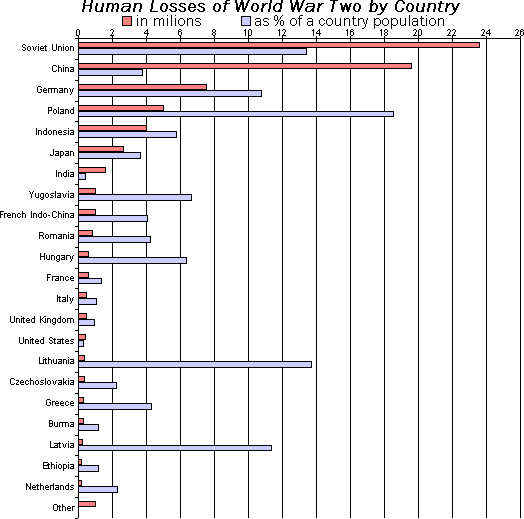
A bar graph shows comparisons among discrete categories. One axis of the chart shows the specific categories being compared, and the other axis represents a measured value. Some bar graphs present bars clustered or stacked in groups of more than one, showing the values of more than one measured variable.
History
[edit]Many sources consider William Playfair (1759–1824) to have invented the bar chart and the Exports and Imports of Scotland to and from different parts for one Year from Christmas 1780 to Christmas 1781 graph from his The Commercial and Political Atlas to be the first bar chart in history. Diagrams of the velocity of a constantly accelerating object against time published in The Latitude of Forms (attributed to Jacobus de Sancto Martino or, perhaps, to Nicole Oresme)[2] about 300 years before can be interpreted as "proto bar charts".[3][4]
Usage
[edit]


Bar graphs/charts provide a visual presentation of categorical data.[5] Categorical data is a grouping of data into discrete groups, such as months of the year, age group, shoe sizes, and animals. These categories are usually qualitative. In a column (vertical) bar chart, categories appear along the horizontal axis and the height of the bar corresponds to the value of each category.
Bar charts have a discrete domain of categories, and are usually scaled so that all the data can fit on the chart. When there is no natural ordering of the categories being compared, bars on the chart may be arranged in any order. Bar charts arranged from highest to lowest incidence are called Pareto charts.
Grouped (clustered) and stacked
[edit]Bar graphs can also be used for more complex comparisons of data with grouped (or "clustered") bar charts, and stacked bar charts.[5]
In grouped (clustered) bar charts, for each categorical group there are two or more bars color-coded to represent a particular grouping. For example, a business owner with two stores might make a grouped bar chart with different colored bars to represent each store: the horizontal axis would show the months of the year and the vertical axis would show revenue.
Alternatively, Stacked bar charts (also known as Composite bar charts) stack bars on top of each other so that the height of the resulting stack shows the combined result. Unlike a grouped bar chart where each factor is displayed next to another, each with their own bar, the stacked bar chart displays multiple data points stacked in a single row or column. This may, for instance, take the form of uniform height bars charting a time series with internal stacked colours indicating the percentage participation of a sub-type of data. Another example would be a time series displaying total numbers, with internal colors indicating participation in the total by sub-types. Stacked bar charts are not suited to data sets having both positive and negative values.
Grouped bar charts usually present the information in the same order in each grouping. Stacked bar charts present the information in the same sequence on each bar.
Variable-width (variwide)
[edit]
* countries' respective populations (along x axis),
* per-person CO2 emissions 1990–2018 (along y axis), and
* total emissions for that country (rectangle area = product
x*y of sides' lengths)Variable-width bar charts, sometimes abbreviated variwide (bar) charts, are bar charts having bars with non-uniform widths. Generally:
- Bars represent quantities with respective rectangles of areas A that are respective arithmetic products of related pairs of
- vertical-axis quantities (A/X) and
- horizontal-axis quantities (X).
- Arithmetically, the area of each bar (rectangle) is determined a product of sides' lengths:
(A/X)*X= Area A for each bar
Roles of the vertical and horizontal axes may be reversed, depending on the desired application.
Examples of variable-width bar charts are shown at Wikimedia Commons.
See also
[edit]- Data and information visualization
- Enhanced Metafile Format to use in office suites, as MS PowerPoint
- Histogram, similar appearance – for continuous data
- Misleading graph
- Progress bar
- To include bar charts in Wikipedia, see Extension:EasyTimeline.
References
[edit]- ^ Reimann, D.; Struwe, M.; Ram, N.; Gaschler, R. (2022). "Typicality effect in data graphs". Visual Communication. 24: 114–128. doi:10.1177/14703572221130445.
- ^ Clagett, Marshall (1968), Nicole Oresme and the Medieval Geometry of Qualities and Motions, Madison: Univ. of Wisconsin Press, pp. 85–99, ISBN 0-299-04880-2
- ^ Beniger, James R.; Robyn, Dorothy L. (1978), "Quantitative Graphics in Statistics: A Brief History", The American Statistician, 32 (1), Taylor & Francis, Ltd.: 1–11, doi:10.1080/00031305.1978.10479235, JSTOR 2683467
- ^ Der, Geoff; Everitt, Brian S. (2014). A Handbook of Statistical Graphics Using SAS ODS. Chapman and Hall - CRC. ISBN 978-1-584-88784-3.
- ^ a b Kelley, W. M.; Donnelly, R. A. (2009) The Humongous Book of Statistics Problems. New York, NY: Alpha Books ISBN 1592578659
External links
[edit]


Bar chart
View on GrokipediaFundamentals
Definition and Purpose
A bar chart is a fundamental data visualization tool that represents categorical data through a series of rectangular bars, with the length or height of each bar directly proportional to the magnitude of the associated value.[8] This format is designed for discrete or grouped data, where categories are distinct and non-overlapping, such as product types, regions, or time periods.[9] The primary purpose of a bar chart is to enable straightforward comparisons of quantities across multiple categories, revealing patterns, disparities, and relative magnitudes at a glance.[3] By visually encoding numerical values into bar dimensions, it facilitates rapid interpretation of discrete datasets, making it ideal for identifying trends, outliers, or dominant categories without requiring complex calculations.[8] This approach supports decision-making in fields like business, science, and social research by emphasizing differences rather than continuous flows.[3] Distinctive features of bar charts include intentional gaps between adjacent bars to underscore the separation of categories, preventing the implication of continuity that might occur in other chart types.[10] Typically, the horizontal axis accommodates categorical labels, while the vertical axis employs a linear scale to measure values, ensuring accurate proportional representation.[9] For instance, a bar chart depicting annual sales by product category—such as electronics, clothing, and books—would use bars of varying heights to proportionally show revenue figures, allowing viewers to instantly compare performance across items.[8]Basic Components
A bar chart consists of several fundamental visual elements that facilitate the comparison of discrete categories through quantitative representation. At its core, the chart features two primary axes: the horizontal x-axis, which displays categorical labels such as names, groups, or time periods without implying order or continuity, and the vertical y-axis, which represents the numerical values or magnitudes associated with each category, typically scaled linearly from zero to the maximum value for accurate proportion perception.[11][12] Scale markings along the y-axis, known as tick marks, provide reference points for reading values precisely, while labels on both axes ensure clarity in identifying categories and units of measurement.[13] The defining feature of a bar chart is its bars, which are rectangular shapes positioned along the x-axis, with their height (in vertical charts) or length (in horizontal charts) directly proportional to the corresponding data values to enable straightforward visual comparisons. These bars maintain uniform widths across all categories to avoid distorting perceptions of magnitude, and they are separated by consistent spacing, ensuring the discrete nature of the categories is emphasized—unlike histograms, where bars adjoin to represent continuous data distributions.[14][15] This separation prevents misinterpretation of categories as a continuous spectrum, promoting accurate categorical analysis.[16] Supporting elements include labels and legends that enhance interpretability without overwhelming the design. Category names appear below or beside each bar on the x-axis, while numerical values may be annotated directly on or near the bars for quick reference; the y-axis bears a scale label indicating the measurement unit, such as dollars or percentages. An optional title above the chart summarizes its purpose, and a legend may denote color coding if multiple datasets are visualized, distinguishing bars by hue or pattern to aid differentiation.[13][17] Gridlines and borders provide optional structural aids for readability, particularly in complex charts with many bars. Horizontal gridlines, extending from y-axis tick marks across the plot area, help align values visually without cluttering the view, while vertical gridlines aligned with categories can assist in locating specific bars. A subtle border or frame may enclose the chart area to define its boundaries, though these elements are minimized to focus attention on the data itself.[13][18]Historical Development
Origins in Statistics
The origins of the bar chart lie in the burgeoning field of 18th-century statistical graphics, which sought to represent economic and demographic data more intuitively than tabular forms. William Playfair, a Scottish economist and engineer, pioneered this approach in his seminal 1786 work, The Commercial and Political Atlas. There, he introduced the first modern bar charts to illustrate discrete economic quantities, such as the imports and exports of Scotland with various countries during 1780–1781, using vertical bars of varying heights to denote magnitudes. This innovation built on earlier graphical traditions but marked a deliberate effort to visualize categorical comparisons, enabling readers to grasp relative values at a glance without numerical computation.[19] Playfair expanded on this foundation in his 1801 publication, Statistical Breviary; Shewing, on a Principle Entirely New, the Resources of Every State and Kingdom in Europe. The book featured innovative colored bar charts that compared national populations and tax revenues across European countries, including France, Denmark, Sweden, Russia, Prussia, and others, alongside the United States. By employing distinct colors for different categories—such as red for population and blue for revenue—Playfair enhanced the charts' clarity and aesthetic appeal, making complex international comparisons accessible to a broader audience beyond specialists. These visualizations exemplified the bar chart's strength in highlighting disparities and proportions in discrete datasets.[20] Playfair's contributions established the bar chart as a cornerstone of statistical practice, earning him recognition as its inventor despite sporadic earlier approximations, such as 14th-century density representations by Nicole Oresme. His work facilitated a key conceptual transition in early 19th-century graphics: from line charts suited to continuous time-series data, like economic trends over years, to bars optimized for non-sequential, categorical analyses in fields like economics and demographics. This shift emphasized proportional reasoning and comparative judgment, influencing subsequent statistical methodologies and underscoring the bar chart's role in democratizing data interpretation.[21]Evolution in Visualization Tools
The 20th century marked significant milestones in the adoption of bar charts within statistical software, transitioning from manual drafting to automated generation. Early statistical packages like Minitab, released in 1972, introduced basic plotting capabilities that included bar charts for academic and research use. The porting of the Statistical Package for the Social Sciences (SPSS) to personal computers in 1984 extended these features, enabling graphical outputs like bar charts in spreadsheet-like environments and broadening access beyond mainframe users.[22] This automation extended to broader audiences with Microsoft Excel's launch in 1985, which incorporated built-in charting tools that simplified bar chart production within spreadsheets, democratizing access for business and academic users alike.[23] By the 1990s, bar charts became integral to business intelligence (BI) tools, supporting enhanced reporting and decision-making in corporate environments amid the rise of data warehousing. These tools proliferated during the decade, enabling dynamic data exploration through standardized visualizations like bar charts in systems such as early ERP integrations.[24] A key development occurred with the founding of Tableau Software in 2003, which released its first product in 2004 to advance interactive bar charts by allowing users to drag-and-drop data for real-time manipulation and visualization, bridging static outputs with exploratory analytics.[25] Although Florence Nightingale's 1858 coxcomb charts—polar area diagrams resembling segmented bar variants—profoundly influenced early graphical representations of proportional data, the modern evolution of bar charts has been inextricably linked to computing advancements.[26] In the 2000s, the widespread adoption of Unicode encoding in visualization software, starting notably with Microsoft Office 97 in 1997, facilitated international labels and multilingual support in bar charts, expanding their utility in global datasets.[27] The shift toward interactivity further transformed bar charts from static print media to dynamic web-based elements, incorporating features like tooltips, animations, and user-driven filtering. This progression was propelled by libraries such as D3.js, released in 2011, which empowered developers to create customizable, browser-rendered bar charts using JavaScript and SVG for seamless integration into web applications.[28]Construction Methods
Data Requirements and Preparation
Bar charts fundamentally require a dataset consisting of a categorical independent variable paired with a quantitative dependent variable. The categorical variable defines the discrete groups or categories along one axis, such as regions, products, or time periods, which can be nominal (e.g., types of fruit) or ordinal (e.g., education levels ranked from low to high).[29][30] The quantitative variable provides the measurable values for each category, such as sales figures, frequencies, or counts, which determine the length or height of the bars to enable direct comparison across categories.[31][32] This structure ensures that bar charts effectively represent comparisons without implying continuity between categories, distinguishing them from histograms used for continuous data.[33] Preparing data for a bar chart involves several key steps to ensure accuracy and clarity in representation. First, cleaning the data addresses issues like missing values, which should be handled transparently by excluding incomplete categories if they represent a small portion of the dataset or by explicitly indicating missing data in the chart to maintain accuracy in comparisons.[34][35][36] Next, aggregation may be necessary when raw data is granular; for example, individual transaction records can be summed to obtain total sales per product category, reducing complexity while preserving overall trends.[37][38] Finally, sorting the categories logically enhances interpretability, such as arranging them in descending order of the quantitative variable to highlight the most significant items first or alphabetically for nominal data without inherent order.[39] These steps transform disparate raw inputs into a structured format suitable for visualization, often using tools like frequency tables to tally occurrences within categories.[40] Bar charts perform best with 5 to 10 categories to maintain readability and prevent visual clutter from overly narrow or overlapping bars.[41] When the quantitative variable is expressed as ratios or percentages (e.g., market share), explicit labeling of the scale and units is crucial to avoid misinterpretation, such as implying absolute differences where proportional ones are intended.[6][42] A practical example of data preparation is converting raw survey responses into frequency counts for bar chart use. Suppose a survey collects individual answers to a multiple-choice question on preferred beverages (categories: coffee, tea, soda); each response is tallied to yield counts (e.g., 45 for coffee, 30 for tea), which then dictate the bar lengths, providing a clear visual summary of preferences without displaying every single entry.[30][38]Rendering Techniques
Bar charts can be rendered manually by hand-drawing on graph paper, ensuring uniform bar widths and even spacing while scaling bar lengths proportionally to data values—for instance, assigning 1 cm to represent 10 units on the axis to maintain clarity and accuracy. Axes must be labeled clearly, with the independent variable (categories) on one axis and the dependent variable (values) on the other, avoiding clutter to facilitate quick interpretation. This approach is particularly useful for preliminary sketches or low-tech presentations where software is unavailable.[4] Digital rendering techniques offer greater efficiency and precision, beginning with spreadsheet software like Microsoft Excel, where users select a data range and invoke the Insert > Charts > Bar option via the ribbon interface to automatically generate the visualization, complete with customizable axes and labels. For programmatic creation, Python's Matplotlib library provides theplt.bar(categories, values) function, which positions rectangular patches at specified x-coordinates with heights corresponding to the values, enabling integration into scripts for automated data analysis. Web-based rendering leverages Scalable Vector Graphics (SVG), an XML-based standard that allows browsers to draw vector bars scalable without pixelation, as implemented in tools like Google Charts, which default to SVG for modern environments.[43][44][45]
In digital environments, anti-aliasing techniques smooth the edges of bars by blending pixels at boundaries, mitigating jagged artifacts during rasterization; for example, Matplotlib applies antialiasing by default to patches like bars, while SVG rendering can be tuned via the shape-rendering attribute to balance crispness and smoothness. Color gradients may be applied to bars for visual depth, but they must preserve accessibility by ensuring a minimum 3:1 contrast ratio between graphical elements (such as bar fills) and adjacent colors or backgrounds, per WCAG 2.1 guidelines for non-text content. Proper data preparation, including categorical alignment, is essential prior to rendering to avoid misalignment in the output.[46][47][48]
Rendered bar charts support various output formats tailored to use cases: static raster images in PNG for high-quality, lossless sharing; interactive HTML embeds incorporating SVG for web responsiveness; and vector-based PDFs for scalable printing without resolution loss. These formats are generated via export functions in tools like Matplotlib's savefig method, which handles PNG, PDF, and SVG directly.