


Community hub
Recent from talks
Contribute something
Nothing was collected or created yet.
Server (computing)
View on Wikipedia


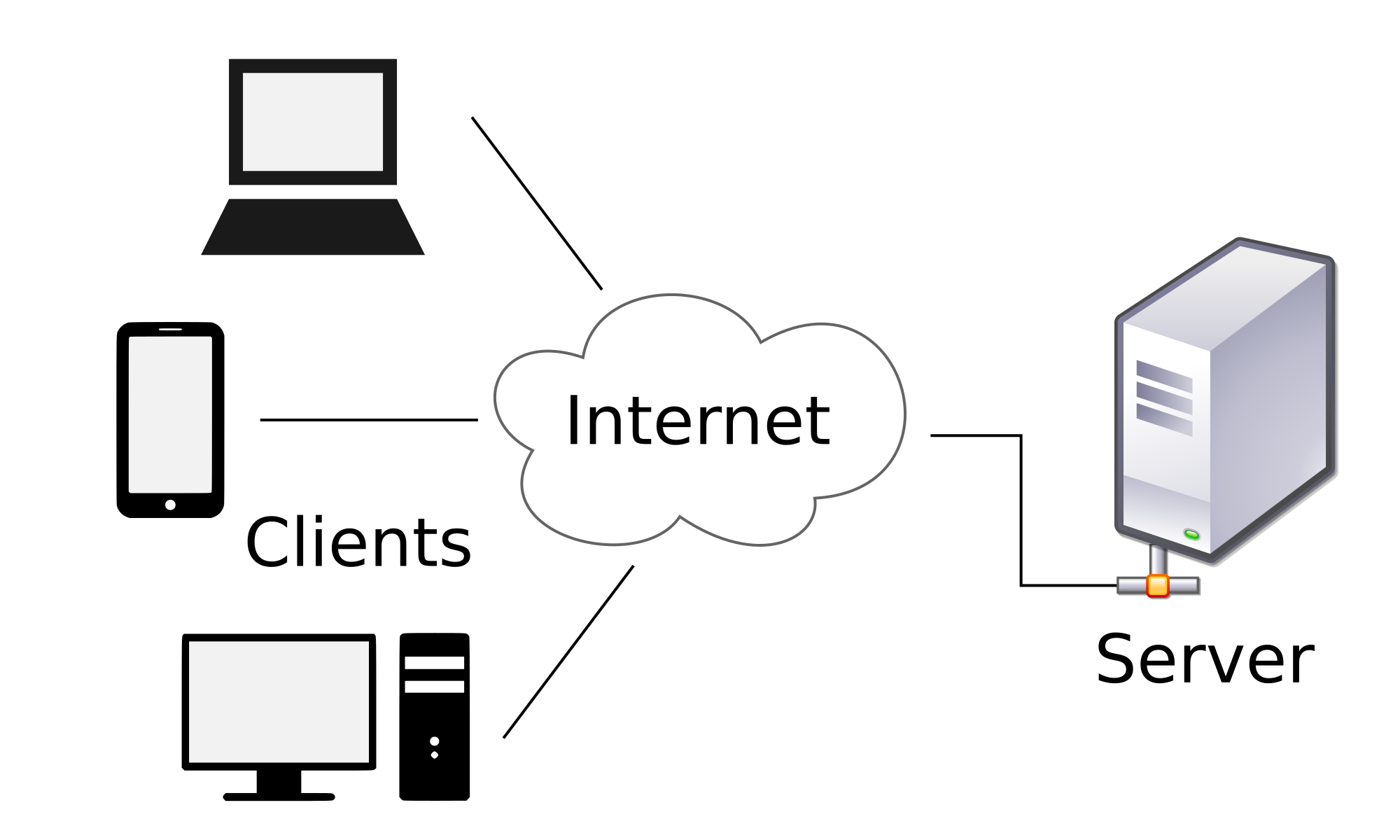
A server is a computer that provides information to other computers called "clients" on a computer network.[1] This architecture is called the client–server model. Servers can provide various functionalities, often called "services", such as sharing data or resources among multiple clients or performing computations for a client. A single server can serve multiple clients, and a single client can use multiple servers. A client process may run on the same device or may connect over a network to a server on a different device.[2] Typical servers are database servers, file servers, mail servers, print servers, web servers, game servers, and application servers.[3]
Client–server systems are most frequently implemented by (and often identified with) the request–response model: a client sends a request to the server, which performs some action and sends a response back to the client, typically with a result or acknowledgment. Designating a computer as "server-class hardware" implies that it is specialized for running servers on it. This often implies that it is more powerful and reliable than standard personal computers, but alternatively, large computing clusters may be composed of many relatively simple, replaceable server components.
History
[edit]The use of the word server in computing comes from queueing theory,[4] where it dates to the mid 20th century, being notably used in Kendall (1953) (along with "service"), the paper that introduced Kendall's notation. In earlier papers, such as the Erlang (1909), more concrete terms such as "[telephone] operators" are used.
In computing, "server" dates at least to RFC 5 (1969),[5] one of the earliest documents describing ARPANET (the predecessor of Internet), and is contrasted with "user", distinguishing two types of host: "server-host" and "user-host". The use of "serving" also dates to early documents, such as RFC 4,[6] contrasting "serving-host" with "using-host".
The Jargon File defines server in the common sense of a process performing service for requests, usually remote,[7] with the 1981 version reading:[8]
SERVER n. A kind of DAEMON which performs a service for the requester, which often runs on a computer other than the one on which the server runs.
The average utilization of a server in the early 2000s was 5 to 15%, but with the adoption of virtualization this figure started to increase the number of servers needed.[9]
Operation
[edit]
Strictly speaking, the term server refers to a computer program or process (running program). Through metonymy, it refers to a device used for (or a device dedicated to) running one or several server programs. On a network, such a device is called a host. In addition to server, the words serve and service (as verb and as noun respectively) are frequently used, though servicer and servant are not.[a] The word service (noun) may refer to the abstract form of functionality, e.g. Web service. Alternatively, it may refer to a computer program that turns a computer into a server, e.g. Windows service. Originally used as "servers serve users" (and "users use servers"), in the sense of "obey", today one often says that "servers serve data", in the same sense as "give". For instance, web servers "serve [up] web pages to users" or "service their requests".
The server is part of the client–server model; in this model, a server serves data for clients. The nature of communication between a client and server is request and response. This is in contrast with peer-to-peer model in which the relationship is on-demand reciprocation. In principle, any computerized process that can be used or called by another process (particularly remotely, particularly to share a resource) is a server, and the calling process or processes is a client. Thus any general-purpose computer connected to a network can host servers. For example, if files on a device are shared by some process, that process is a file server. Similarly, web server software can run on any capable computer, and so a laptop or a personal computer can host a web server.
While request–response is the most common client-server design, there are others, such as the publish–subscribe pattern. In the publish-subscribe pattern, clients register with a pub-sub server, subscribing to specified types of messages; this initial registration may be done by request-response. Thereafter, the pub-sub server forwards matching messages to the clients without any further requests: the server pushes messages to the client, rather than the client pulling messages from the server as in request-response.[10]
Purpose
[edit]The role of a server is to share data as well as to share resources and distribute work. A server computer can serve its own computer programs as well; depending on the scenario, this could be part of a quid pro quo transaction, or simply a technical possibility. The following table shows several scenarios in which a server is used.
| Server type | Purpose | Clients |
|---|---|---|
| Application server | Hosts application back ends that user clients (front ends, web apps or locally installed applications) in the network connect to and use. These servers do not need to be part of the World Wide Web; any local network would do. | Clients with a browser or a local front end, or a web server |
| Catalog server | Maintains an index or table of contents of information that can be found across a large distributed network, such as computers, users, files shared on file servers, and web apps. Directory servers and name servers are examples of catalog servers. | Any computer program that needs to find something on the network, such as a Domain member attempting to log in, an email client looking for an email address, or a user looking for a file |
| Communications server | Maintains an environment needed for one communication endpoint (user or devices) to find other endpoints and communicate with them. It may or may not include a directory of communication endpoints and a presence detection service, depending on the openness and security parameters of the network | Communication endpoints (users or devices) |
| Computing server | Shares vast amounts of computing resources, especially CPU and random-access memory, over a network. | Any computer program that needs more CPU power and RAM than a personal computer can probably afford. The client must be a networked computer; otherwise, there would be no client-server model. |
| Database server | Maintains and shares any form of database (organized collections of data with predefined properties that may be displayed in a table) over a network. | Spreadsheets, accounting software, asset management software or virtually any computer program that consumes well-organized data, especially in large volumes |
| Fax server | Shares one or more fax machines over a network, thus eliminating the hassle of physical access | Any fax sender or recipient |
| File server | Shares files and folders, storage space to hold files and folders, or both, over a network | Networked computers are the intended clients, even though local programs can be clients |
| Game server | Enables several computers or gaming devices to play multiplayer video games | Personal computers or gaming consoles |
| Mail server | Makes email communication possible in the same way that a post office makes snail mail communication possible | Senders and recipients of email |
| Media server | Shares digital video or digital audio over a network through media streaming (transmitting content in a way that portions received can be watched or listened to as they arrive, as opposed to downloading an entire file and then using it) | User-attended personal computers equipped with a monitor and a speaker |
| Print server | Shares one or more printers over a network, thus eliminating the hassle of physical access | Computers in need of printing something |
| Sound server | Enables computer programs to play and record sound, individually or cooperatively | Computer programs of the same computer and network clients. |
| Proxy server | Acts as an intermediary between a client and a server, accepting incoming traffic from the client and sending it to the server. Reasons for doing so include content control and filtering, improving traffic performance, preventing unauthorized network access or simply routing the traffic over a large and complex network. | Any networked computer |
| Virtual server | Shares hardware and software resources with other virtual servers. It exists only as defined within specialized software called hypervisor. The hypervisor presents virtual hardware to the server as if it were real physical hardware.[11] Server virtualization allows for a more efficient infrastructure.[12] | Any networked computer |
| Web server | Hosts web pages. A web server is what makes the World Wide Web possible. Each website has one or more web servers. Also, each server can host multiple websites. | Computers with a web browser |
Almost the entire structure of the Internet is based upon a client–server model. High-level root nameservers, DNS, and routers direct the traffic on the internet. There are millions of servers connected to the Internet, running continuously throughout the world[13] and virtually every action taken by an ordinary Internet user requires one or more interactions with one or more servers. There are exceptions that do not use dedicated servers; for example, peer-to-peer file sharing and some implementations of telephony (e.g. pre-Microsoft Skype).
Hardware
[edit]
Hardware requirement for servers vary widely, depending on the server's purpose and its software. Servers often are more powerful and expensive than the clients that connect to them.
The name server is used both for the hardware and software pieces. For the hardware servers, it is usually limited to mean the high-end machines although software servers can run on a variety of hardwares.
Since servers are usually accessed over a network, many run unattended without a computer monitor or input device, audio hardware and USB interfaces. Many servers do not have a graphical user interface (GUI). They are configured and managed remotely. Remote management can be conducted via various methods including Microsoft Management Console (MMC), PowerShell, SSH and browser-based out-of-band management systems such as Dell's iDRAC or HP's iLo.
Large servers
[edit]Large traditional single servers would need to be run for long periods without interruption. Availability would have to be very high, making hardware reliability and durability extremely important. Mission-critical enterprise servers would be very fault tolerant and use specialized hardware with low failure rates in order to maximize uptime. Uninterruptible power supplies might be incorporated to guard against power failure. Servers typically include hardware redundancy such as dual power supplies, RAID disk systems, and ECC memory,[14] along with extensive pre-boot memory testing and verification. Critical components might be hot swappable, allowing technicians to replace them on the running server without shutting it down, and to guard against overheating, servers might have more powerful fans or use water cooling. They will often be able to be configured, powered up and down, or rebooted remotely, using out-of-band management, typically based on IPMI. Server casings are usually flat and wide, and designed to be rack-mounted, either on 19-inch racks or on Open Racks.
These types of servers are often housed in dedicated data centers. These will normally have very stable power and Internet and increased security. Noise is also less of a concern, but power consumption and heat output can be a serious issue. Server rooms are equipped with air conditioning devices.
-
 A server rack seen from the rear
 -
 Wikimedia Foundation servers as seen from the front
 -
 Wikimedia Foundation servers as seen from the rear
 -
 Wikimedia Foundation servers as seen from the rear


Clusters
[edit]A server farm or server cluster is a collection of computer servers maintained by an organization to supply server functionality far beyond the capability of a single device. Modern data centers are now often built of very large clusters of much simpler servers,[15] and there is a collaborative effort, Open Compute Project around this concept.
Appliances
[edit]A class of small specialist servers called network appliances are generally at the low end of the scale, often being smaller than common desktop computers.
Mobile
[edit]A mobile server has a portable form factor, e.g. a laptop.[16] In contrast to large data centers or rack servers, the mobile server is designed for on-the-road or ad hoc deployment into emergency, disaster or temporary environments where traditional servers are not feasible due to their power requirements, size, and deployment time.[17] The main beneficiaries of so-called "server on the go" technology include network managers, software or database developers, training centers, military personnel, law enforcement, forensics, emergency relief groups, and service organizations.[18] To facilitate portability, features such as the keyboard, display, battery (uninterruptible power supply, to provide power redundancy in case of failure), and mouse are all integrated into the chassis.
Operating systems
[edit]
On the Internet, the dominant operating systems among servers are UNIX-like open-source distributions, such as those based on Linux and FreeBSD,[19] with Windows Server also having a significant share. Proprietary operating systems such as z/OS and macOS Server are also deployed, but in much smaller numbers. Servers that run Linux are commonly used as Webservers or Databanks. Windows Servers are used for Networks that are made out of Windows Clients.
Specialist server-oriented operating systems have traditionally had features such as:
- GUI not available or optional
- Ability to reconfigure and update both hardware and software to some extent without restart
- Advanced backup facilities to permit regular and frequent online backups of critical data,
- Transparent data transfer between different volumes or devices
- Flexible and advanced networking capabilities
- Automation capabilities such as daemons in UNIX and services in Windows
- Tight system security, with advanced user, resource, data, and memory protection.
- Advanced detection and alerting on conditions such as overheating, processor and disk failure.[20]
In practice, today many desktop and server operating systems share similar code bases, differing mostly in configuration.
Energy consumption
[edit]In 2024, data centers (servers, cooling, and other electrical infrastructure) consumed 415 terawatt-hours of electrical energy, and were responsible for roughly 1.5% of electrical energy consumption worldwide,[21] and for 4.4% in the United States.[22] One estimate is that total energy consumption for information and communications technology saves more than 5 times its carbon footprint[23] in the rest of the economy by increasing efficiency.
Global energy consumption is increasing due to the increasing demand of data and bandwidth.
Environmental groups have placed focus on the carbon emissions of data centers as it accounts to 200 million metric tons of carbon dioxide in a year.
See also
[edit]Notes
[edit]- ^ A CORBA servant is a server-side object to which method calls from remote method invocation are forwarded, but this is an uncommon usage.
References
[edit]- ^ "1.1.2.2 Clients and Servers". Cisco Networking Academy. Archived from the original on 2024-04-07. Retrieved 2024-04-07.
Servers are hosts that have software installed that enable them to provide information...Clients are computer hosts that have software installed that enable them to request and display the information obtained from the server.
- ^ Windows Server Administration Fundamentals. Microsoft Official Academic Course. Hoboken, NJ: John Wiley & Sons. 2011. pp. 2–3. ISBN 978-0-470-90182-3.
- ^ Comer, Douglas E.; Stevens, David L (1993). Vol III: Client-Server Programming and Applications. Internetworking with TCP/IP. West Lafayette, IN: Prentice Hall. pp. 11d. ISBN 978-0-13-474222-9.
- ^ Richard A. Henle; Boris W. Kuvshinoff; C. M. Kuvshinoff (1992). Desktop computers: in perspective. Oxford University Press. p. 417. ISBN 978-0-19-507031-6.
Server is a fairly recent computer networking term derived from queuing theory.
- ^ Rulifson, Jeff (June 1969). DEL. IETF. doi:10.17487/RFC0005. RFC 5. Retrieved 30 November 2013.
- ^ Shapiro, Elmer B. (March 1969). Network Timetable. IETF. doi:10.17487/RFC0004. RFC 4. Retrieved 30 November 2013.
- ^ server
- ^ "JARGON.TXT recovered from Fall 1981 RSX-11 SIG tape by Tim Shoppa". Archived from the original on 2004-10-21.
- ^ "Chip Aging Accelerates". 14 February 2018.
- ^ Using the HTTP Publish-Subscribe Server, Oracle
- ^ IT Explained. "Server - Definition and Details". www.paessler.com.
- ^ IT Explained. "DNS Server Not Responding". www.dnsservernotresponding.org. Archived from the original on 2020-09-26. Retrieved 2020-02-11.
- ^ "Web Servers". IT Business Edge. Retrieved July 31, 2013.
- ^ Li; Huang; Shen; Chu (2010). ""A Realistic Evaluation of Memory Hardware Errors and Software System Susceptibility". Usenix Annual Tech Conference 2010" (PDF). Archived (PDF) from the original on 2022-10-09. Retrieved 2017-01-30.
- ^ "Google uncloaks once-secret server". CNET. CBS Interactive. Retrieved 2017-01-30.
- ^ "Mobile Server, Power to go, EUROCOM Panther 5SE". Archived from the original on 2013-03-17.
- ^ "Mobile Server Notebook". 27 January 2022.
- ^ "Server-caliber Computer Doubles as a Mobile Workstation". Archived from the original on 2016-03-03. Retrieved 2020-02-08.
- ^ "Usage statistics and market share of Linux for websites". Retrieved 18 Jan 2013.
- ^ "Server Oriented Operating System". Archived from the original on 31 May 2011. Retrieved 2010-05-25.
- ^ magazine, Sophia Chen, Nature. "Data Centers Will Use Twice as Much Energy by 2030—Driven by AI". Scientific American. Retrieved 2025-06-17.
{{cite web}}: CS1 maint: multiple names: authors list (link) - ^ Hamm, Geoff (2025). 2024 United States Data Center Energy Usage Report (Report). Lawrence Berkely National Laboratory. doi:10.71468/p1wc7q.
- ^ "SMART 2020: Enabling the low carbon economy in the information age" (PDF). The Climate Group. 6 Oct 2008. Archived from the original (PDF) on 22 November 2010. Retrieved 18 Jan 2013.
Further reading
[edit]
- Erlang, Agner Krarup (1909). "The theory of probabilities and telephone conversations" (PDF). Nyt Tidsskrift for Matematik B. 20: 33–39. Archived from the original (PDF) on 2011-10-01.
- Kendall, D. G. (1953). "Stochastic Processes Occurring in the Theory of Queues and their Analysis by the Method of the Imbedded Markov Chain". The Annals of Mathematical Statistics. 24 (3): 338–354. doi:10.1214/aoms/1177728975. JSTOR 2236285.
| Micro |
| ||||||||||||||||||||||
|---|---|---|---|---|---|---|---|---|---|---|---|---|---|---|---|---|---|---|---|---|---|---|---|
| Midrange | |||||||||||||||||||||||
| Large | |||||||||||||||||||||||
| Others | |||||||||||||||||||||||

| International | |
|---|---|
| National | |
| Other | |

Server (computing)
View on GrokipediaDefinition and Core Principles
Fundamental Purpose and Functions
A server constitutes a dedicated computing system engineered to deliver resources, data, services, or processing capabilities to client devices over a network. Its core purpose centers on fulfilling client-initiated requests by centralizing resource management, which facilitates efficient distribution, reduces hardware duplication across endpoints, and supports multi-user access to shared functionalities. This architecture underpins the client-server model, where servers operate continuously to ensure responsiveness and reliability, handling workloads that would otherwise overwhelm individual client machines.[4][8][9] Key functions encompass data storage and retrieval, whereby servers maintain persistent repositories accessible via standardized protocols; computation execution, performing intensive tasks like query processing or algorithmic operations delegated by clients; and resource orchestration, including load balancing to distribute demands across multiple units for sustained performance. Servers also enforce access controls and security measures to safeguard shared assets, while logging interactions for auditing and optimization. These operations enable applications such as web hosting, where servers respond to HTTP requests with dynamic content, or database management, querying structured data in real-time. Empirical metrics underscore efficiency: for instance, enterprise servers can process thousands of concurrent requests per second, far exceeding typical client hardware limits.[10][11][12] In essence, servers embody causal realism in networked computing by decoupling service provision from end-user devices, allowing specialization—servers prioritize uptime, redundancy via RAID configurations achieving 99.999% availability in data centers, and scalability through clustering—while clients focus on user interfaces and lightweight interactions. This division optimizes overall system throughput, as evidenced by the proliferation of server-centric infrastructures since the 1980s, which have scaled global internet traffic from megabits to exabytes daily.[4][8]Classifications and Types
Servers in computing are classified by hardware form factors, which determine their physical design and deployment suitability, and by functional roles, which define the primary services they deliver to clients. Hardware classifications include tower, rack, and blade servers, each optimized for different scales of operation from small businesses to large data centers.[13][14] Tower servers resemble upright personal computers with server-grade components such as redundant power supplies and enhanced cooling, making them suitable for standalone or small network environments where space is not a constraint and ease of access for maintenance is prioritized.[15] They typically support 1-4 processors and are cost-effective for entry-level deployments but less efficient for high-density scaling due to their larger footprint.[16] Rack servers are engineered to mount horizontally in standard 19-inch equipment racks, enabling modular expansion and efficient use of data center floor space through vertical stacking in units measured in rack units (U1U to U4U typically).[17] This form factor facilitates cable management, shared infrastructure, and rapid scalability, predominant in enterprise and cloud environments where thousands of servers may operate in colocation facilities.[13] Blade servers consist of thin, modular compute units—blades—that insert into a shared chassis providing power, cooling, and networking, achieving higher density than rack servers by minimizing per-unit overhead.[15] Each blade functions as an independent server but leverages chassis-level resources, ideal for high-performance computing clusters or virtualization hosts requiring intensive parallel processing.[16] Functionally, servers specialize in tasks such as web hosting, data management, and resource sharing. Web servers process HTTP requests to deliver static and dynamic content, with software like Apache HTTP Server handling over 30% of websites as of 2023 per usage surveys.[5][4] Database servers store, retrieve, and manage structured data using systems like MySQL or PostgreSQL, optimizing for query performance via indexing and transaction processing to support applications requiring ACID compliance.[18][19] File servers centralize storage for network-accessible files, employing protocols like SMB or NFS to enable sharing, versioning, and permissions control across distributed users.[3] Mail servers route electronic messages using SMTP for outbound transfer and IMAP/POP3 for retrieval, often incorporating spam filtering and secure transport via TLS.[5] Application servers execute business logic and middleware, bridging clients and backend resources in architectures like Java EE or .NET, facilitating scalable deployment of enterprise software.[18] Proxy servers act as intermediaries for requests, enhancing security through caching, anonymity, and content filtering.[4] DNS servers resolve domain names to IP addresses, underpinning internet navigation via recursive or authoritative query handling.[18] A single physical server may host multiple virtual instances via hypervisors like VMware or KVM, allowing diverse functional types to coexist on unified hardware for resource efficiency.[20]Historical Development
Early Mainframe Era (1940s–1970s)
The development of mainframe computers in the 1940s and 1950s laid the groundwork for centralized computing systems that functioned as early servers, processing data in batch mode for multiple users or tasks through punched cards or tape inputs. These machines, often room-sized and powered by vacuum tubes, prioritized reliability and high-volume calculations over interactivity, serving governmental and scientific needs before commercial expansion. The UNIVAC I, delivered to the U.S. Census Bureau on June 14, 1951, marked the first commercially available digital computer in the United States, weighing 16,000 pounds and utilizing approximately 5,000 vacuum tubes for data processing tasks such as census analysis.[21][22] Designed explicitly for business and administrative applications, it replaced slower punched-card systems with magnetic tape storage and automated alphanumeric handling, enabling faster execution of repetitive operations.[23][24] IBM emerged as a dominant force in the 1950s, producing machines like the IBM 701 in 1952, its first commercial scientific computer, which supported batch processing for engineering and research computations.[25] By the mid-1960s, the IBM System/360, announced on April 7, 1964, introduced a compatible family of six models spanning small to large scales, unifying commercial and scientific workloads under a single architecture that emphasized modularity and upward compatibility.[26][27] This shift to transistor-based third-generation mainframes reduced costs through economies of scale and enabled real-time processing for inventory and accounting, fundamentally altering business operations by allowing scalable data handling without frequent hardware overhauls.[28] Mainframe sales surged from 2,500 units in 1959 to 50,000 by 1969, reflecting their adoption for centralized data management in enterprises.[29] The 1960s brought time-sharing innovations, transforming mainframes into interactive servers capable of supporting multiple simultaneous users via remote terminals, a precursor to modern client-server dynamics. John McCarthy proposed time-sharing around 1955 as an operating system allowing users to interact as if in sole control of the machine, dividing CPU cycles rapidly among tasks to simulate concurrency.[30] The Compatible Time-Sharing System (CTSS), implemented at MIT in 1961, demonstrated this by enabling multiple users to access a central IBM 709 via teletype terminals, reducing wait times from hours in batch mode to seconds.[31] Systems like Multics, developed from 1964 at MIT, further advanced secure multi-user access and file sharing, influencing later operating systems despite its complexity.[32][33] By the 1970s, mainframes incorporated interactive terminals such as the IBM 2741 and 2260, supporting hundreds of concurrent users in time-sharing environments and paving the way for networked computing.[34] IBM's System/370 series, introduced in 1970, extended the System/360 architecture with virtual memory enhancements, boosting efficiency for enterprise workloads like banking and airlines reservations.[35] These evolutions prioritized fault-tolerant design and high I/O throughput, essential for serving diverse peripheral devices and establishing mainframes as robust central hubs in organizational computing infrastructures.[36]Emergence of Client-Server Model (1980s–1990s)
The client-server model emerged in the early 1980s amid the transition from centralized mainframe computing to distributed systems, driven by the affordability and capability of personal computers. Organizations began deploying networks to share resources like files and printers, reducing reliance on expensive terminals connected to mainframes. This shift was facilitated by advancements in networking hardware, including the IEEE 802.3 standard for Ethernet ratified in 1983, which standardized local area network communication.[37] A pivotal example was Novell NetWare, released in 1983, which introduced dedicated file and print servers accessible by PC clients over networks, marking one of the first widespread implementations of server-based resource management. Database technologies also advanced along client-server lines; Sybase, founded in 1984, developed an SQL-based architecture separating client applications from server-hosted data processing, enabling efficient query handling across distributed environments. These systems emphasized servers as centralized providers of compute-intensive tasks, while clients managed user interfaces and local processing.[38][39] By the late 1980s, the model gained formal acceptance in software architecture, with the term "client-server" describing the division of application logic between lightweight clients and robust servers. This period saw the rise of relational database management systems like Oracle's offerings, which by the 1990s supported multi-user client access to shared data stores. The proliferation of UNIX-based servers and protocols like TCP/IP further solidified the paradigm, laying groundwork for internet-scale applications in the 1990s, though initial focus remained on enterprise LANs.[40]Virtualization and Distributed Systems (2000s–Present)
The adoption of server virtualization in the 2000s transformed server computing by enabling the partitioning of physical hardware into multiple isolated virtual machines (VMs), thereby addressing inefficiencies from underutilized dedicated servers. VMware's release of ESX Server in 2001 introduced a type-1 hypervisor that ran directly on x86 hardware, allowing enterprises to consolidate workloads and achieve up to 10-15 times higher server utilization rates compared to physical deployments.[41] This shift reduced capital expenditures on hardware, as organizations could defer purchases of additional physical servers amid rising demands from web applications and data growth.[42] Open-source alternatives accelerated virtualization's proliferation; the Xen Project hypervisor, initially developed at the University of Cambridge, released its first version in 2003, supporting paravirtualization for near-native performance on commodity servers.[42] By 2006, VMware extended accessibility with the free VMware Server, while Linux-based KVM emerged in 2007 as an integrated kernel module, embedding virtualization into standard server operating systems like those from Red Hat and Ubuntu.[42] These technologies lowered barriers for small-to-medium enterprises, fostering hybrid environments where physical and virtual servers coexisted, though early challenges included overhead from VM migration and security isolation. Microsoft's Hyper-V, integrated into Windows Server 2008, further mainstreamed virtualization in Windows-dominated data centers, capturing significant market share by emphasizing compatibility with existing applications.[42] Virtualization laid the groundwork for distributed systems by enabling elastic scaling across networked servers, culminating in cloud computing's rise. Amazon Web Services (AWS) launched Elastic Compute Cloud (EC2) in 2006, offering on-demand virtual servers backed by distributed physical infrastructure, which by 2010 supported over 40,000 instances daily and reduced provisioning times from weeks to minutes.[43] This model extended to multi-tenant environments, where hyperscale providers like Google and Microsoft Azure deployed thousands of interconnected servers for fault-tolerant distributed processing.[44] In distributed frameworks, virtualization complemented tools like Apache Hadoop (2006), which distributed data processing across clusters of virtualized commodity servers, handling petabyte-scale workloads through horizontal scaling rather than vertical upgrades.[45] The 2010s onward integrated containerization with virtualization for lighter-weight distributed systems, as containers—building on Linux kernel features like cgroups (2006) and namespaces (2000s)—allowed microservices to run efficiently across server clusters without full VM overhead. Docker's 2013 release popularized container packaging for servers, enabling rapid deployment in distributed setups, while Kubernetes (2014), originally from Google, provided orchestration for managing thousands of containers over dynamic server pools, achieving auto-scaling and self-healing in production environments.[46] By 2020, over 80% of enterprises used hybrid virtualized-distributed architectures, with edge computing extending these to geographically dispersed servers for low-latency applications.[45] Challenges persist in areas like network latency in hyper-distributed systems and energy efficiency, driving innovations in serverless computing where providers abstract server management entirely.[47]Hardware Components and Design
Processors, Memory, and Storage
Server processors, commonly known as CPUs, are designed for sustained high-throughput workloads, featuring multiple cores, sockets for scalability, and support for error-correcting code (ECC) memory to maintain data integrity under heavy loads. The x86 architecture dominates, with Intel's Xeon series and AMD's EPYC series leading the market; in Q1 2025, AMD achieved 39.4% server CPU market share, up from prior quarters, while Intel retained approximately 60%. [48] [49] ARM-based processors are expanding rapidly, capturing 25% of the server market by Q2 2025, driven by energy efficiency in hyperscale data centers and AI applications. [50] High-end models like the AMD EPYC 9755 offer 128 cores at up to 512 MB L3 cache, enabling parallel processing for databases and virtualization. [51] Server memory relies on ECC dynamic random-access memory (DRAM) modules, which detect and correct single-bit errors using parity bits—typically 8 check bits per 64 data bits—to prevent corruption in mission-critical environments. [52] [53] DDR4 and emerging DDR5 standards are prevalent, with registered DIMMs (RDIMMs) providing buffering for stability in multi-channel configurations supporting capacities from 16 GB to 256 GB per module. [54] [55] Systems can scale to several terabytes total, as evidenced by Windows Server 2025's support for up to 240 TB in virtualized setups, though physical limits depend on motherboard slots and CPU capabilities. [56] Storage in servers balances capacity, speed, and redundancy, often combining hard disk drives (HDDs) for economical bulk storage with solid-state drives (SSDs) and NVMe interfaces for low-latency I/O operations via PCIe lanes. [57] NVMe SSDs deliver superior performance over SATA SSDs or HDDs, with RAID configurations like RAID 10 offering striping and mirroring for enhanced throughput and fault tolerance, while RAID 5/6 prioritizes capacity with parity. [58] [59] Hardware RAID controllers are less common for NVMe due to direct PCIe attachment, favoring software-based redundancy to avoid performance bottlenecks. [60]Networking and Form Factors
Servers incorporate network interface controllers (NICs) as primary hardware for connectivity, enabling communication over Ethernet networks via physical ports such as RJ-45 for copper cabling or SFP+ for fiber optics.[61][62] These interfaces support speeds ranging from 1 Gigabit Ethernet (GbE) in legacy systems to 25 GbE and 100 GbE in contemporary data center deployments, where 25 GbE serves as a standard access speed for many enterprise servers due to cost-effectiveness and sufficient bandwidth for most workloads.[63] Higher-speed uplinks, such as 400 GbE and emerging 800 GbE, are increasingly adopted in hyperscale environments to handle escalating data traffic, projected to multiply by factors of 2.3 to 55.4 by 2025 according to IEEE assessments.[64][65] Specialized protocols like RDMA over Converged Ethernet facilitate low-latency data transfers critical for applications in high-performance computing and storage fabrics.[66] Server form factors dictate physical enclosure designs optimized for scalability, cooling, and space efficiency in varied operational contexts. Tower servers, akin to upright desktop cases, accommodate standalone or small-business setups with expandability for fewer than ten drives but consume more floor space and airflow compared to denser alternatives.[14] Rack-mount servers dominate data centers, adhering to the EIA-310-D standard for 19-inch-wide mounting in cabinets, where vertical spacing is quantified in rack units (U), with 1U equating to 1.75 inches in height to enable stacking of multiple units—typically 1U or 2U for compact, high-throughput models.[67][68] Blade servers enhance density by integrating compute modules into shared chassis that provide common power, networking, and cooling, reducing cabling complexity and operational overhead in large-scale clusters, though they demand compatible infrastructure investments.[69][70] These configurations prioritize causal trade-offs: rack and blade forms minimize latency through proximity and shared fabrics, while tower variants favor simplicity in low-density scenarios.[71]