


Community hub
Recent from talks
Contribute something
Nothing was collected or created yet.
Pixel
View on Wikipedia
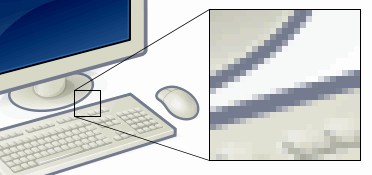
In digital imaging, a pixel (abbreviated px), pel,[1] or picture element[2] is the smallest addressable element in a raster image, or the smallest addressable element in a dot matrix display device. In most digital display devices, pixels are the smallest element that can be manipulated through software.
Each pixel is a sample of an original image; more samples typically provide more accurate representations of the original. The intensity of each pixel is variable. In color imaging systems, a color is typically represented by three or four component intensities such as red, green, and blue, or cyan, magenta, yellow, and black.
In some contexts (such as descriptions of camera sensors), pixel refers to a single scalar element of a multi-component representation (called a photosite in the camera sensor context, although sensel 'sensor element' is sometimes used),[3] while in yet other contexts (like MRI) it may refer to a set of component intensities for a spatial position.
Software on early consumer computers was necessarily rendered at a low resolution, with large pixels visible to the naked eye; graphics made under these limitations may be called pixel art, especially in reference to video games. Modern computers and displays, however, can easily render orders of magnitude more pixels than was previously possible, necessitating the use of large measurements like the megapixel (one million pixels).
Etymology
[edit]
The word pixel is a combination of pix (from "pictures", shortened to "pics") and el (for "element"); similar formations with 'el' include the words voxel[4] 'volume pixel', and texel 'texture pixel'.[4] The word pix appeared in Variety magazine headlines in 1932, as an abbreviation for the word pictures, in reference to movies.[5] By 1938, "pix" was being used in reference to still pictures by photojournalists.[6]
The word "pixel" was first published in 1965 by Frederic C. Billingsley of JPL, to describe the picture elements of scanned images from space probes to the Moon and Mars.[7] Billingsley had learned the word from Keith E. McFarland, at the Link Division of General Precision in Palo Alto, who in turn said he did not know where it originated. McFarland said simply it was "in use at the time" (c. 1963).[6]
The concept of a "picture element" dates to the earliest days of television, for example as "Bildpunkt" (the German word for pixel, literally 'picture point') in the 1888 German patent of Paul Nipkow. According to various etymologies, the earliest publication of the term picture element itself was in Wireless World magazine in 1927,[8] though it had been used earlier in various U.S. patents filed as early as 1911.[9]
Some authors explain pixel as picture cell, as early as 1972.[10] In graphics and in image and video processing, pel is often used instead of pixel.[11] For example, IBM used it in their Technical Reference for the original PC.
Pixilation, spelled with a second i, is an unrelated filmmaking technique that dates to the beginnings of cinema, in which live actors are posed frame by frame and photographed to create stop-motion animation. An archaic British word meaning "possession by spirits (pixies)", the term has been used to describe the animation process since the early 1950s; various animators, including Norman McLaren and Grant Munro, are credited with popularizing it.[12]
Technical
[edit]
A pixel is generally thought of as the smallest single component of a digital image. However, the definition is highly context-sensitive. For example, there can be "printed pixels" in a page, or pixels carried by electronic signals, or represented by digital values, or pixels on a display device, or pixels in a digital camera (photosensor elements). This list is not exhaustive and, depending on context, synonyms include pel, sample, byte, bit, dot, and spot. Pixels can be used as a unit of measure such as: 2400 pixels per inch, 640 pixels per line, or spaced 10 pixels apart.

The measures "dots per inch" (dpi) and "pixels per inch" (ppi) are sometimes used interchangeably, but have distinct meanings, especially for printer devices, where dpi is a measure of the printer's density of dot (e.g. ink droplet) placement.[13] For example, a high-quality photographic image may be printed with 600 ppi on a 1200 dpi inkjet printer.[14] Even higher dpi numbers, such as the 4800 dpi quoted by printer manufacturers since 2002, do not mean much in terms of achievable resolution.[15]
The more pixels used to represent an image, the closer the result can resemble the original. The number of pixels in an image is sometimes called the resolution, though resolution has a more specific definition. Pixel counts can be expressed as a single number, as in a "three-megapixel" digital camera, which has a nominal three million pixels, or as a pair of numbers, as in a "640 by 480 display", which has 640 pixels from side to side and 480 from top to bottom (as in a VGA display) and therefore has a total number of 640 × 480 = 307,200 pixels, or 0.3 megapixels.
The pixels, or color samples, that form a digitized image (such as a JPEG file used on a web page) may or may not be in one-to-one correspondence with screen pixels, depending on how a computer displays an image. In computing, an image composed of pixels is known as a bitmapped image or a raster image. The word raster originates from television scanning patterns, and has been widely used to describe similar halftone printing and storage techniques.
Sampling patterns
[edit]For convenience, pixels are normally arranged in a regular two-dimensional grid. By using this arrangement, many common operations can be implemented by uniformly applying the same operation to each pixel independently. Other arrangements of pixels are possible, with some sampling patterns even changing the shape (or kernel) of each pixel across the image. For this reason, care must be taken when acquiring an image on one device and displaying it on another, or when converting image data from one pixel format to another.
For example:

- LCD screens typically use a staggered grid, where the red, green, and blue components are sampled at slightly different locations. Subpixel rendering is a technology which takes advantage of these differences to improve the rendering of text on LCD screens.
- The vast majority of color digital cameras use a Bayer filter, resulting in a regular grid of pixels where the color of each pixel depends on its position on the grid.
- A clipmap uses a hierarchical sampling pattern, where the size of the support of each pixel depends on its location within the hierarchy.
- Warped grids are used when the underlying geometry is non-planar, such as images of the earth from space.[16]
- The use of non-uniform grids is an active research area, attempting to bypass the traditional Nyquist limit.[17]
- Pixels on computer monitors are normally "square" (that is, have equal horizontal and vertical sampling pitch); pixels in other systems are often "rectangular" (that is, have unequal horizontal and vertical sampling pitch – oblong in shape), as are digital video formats with diverse aspect ratios, such as the anamorphic widescreen formats of the Rec. 601 digital video standard.
Resolution of computer monitors
[edit]Computer monitors (and TV sets) generally have a fixed native resolution. What it is depends on the monitor, and size. See below for historical exceptions.
Computers can use pixels to display an image, often an abstract image that represents a GUI. The resolution of this image is called the display resolution and is determined by the video card of the computer. Flat-panel monitors (and TV sets), e.g. OLED or LCD monitors, or E-ink, also use pixels to display an image, and have a native resolution, and it should (ideally) be matched to the video card resolution. Each pixel is made up of triads, with the number of these triads determining the native resolution.
On older, historically available, CRT monitors the resolution was possibly adjustable (still lower than what modern monitor achieve), while on some such monitors (or TV sets) the beam sweep rate was fixed, resulting in a fixed native resolution. Most CRT monitors do not have a fixed beam sweep rate, meaning they do not have a native resolution at all – instead they have a set of resolutions that are equally well supported. To produce the sharpest images possible on a flat-panel, e.g. OLED or LCD, the user must ensure the display resolution of the computer matches the native resolution of the monitor.
Resolution of telescopes
[edit]The pixel scale used in astronomy is the angular distance between two objects on the sky that fall one pixel apart on the detector (CCD or infrared chip). The scale s measured in radians is the ratio of the pixel spacing p and focal length f of the preceding optics, s = p / f. (The focal length is the product of the focal ratio by the diameter of the associated lens or mirror.)
Because s is usually expressed in units of arcseconds per pixel, because 1 radian equals (180/π) × 3600 ≈ 206,265 arcseconds, and because focal lengths are often given in millimeters and pixel sizes in micrometers which yields another factor of 1,000, the formula is often quoted as s = 206 p / f.
Bits per pixel
[edit]The number of distinct colors that can be represented by a pixel depends on the number of bits per pixel (bpp). A 1 bpp image uses 1 bit for each pixel, so each pixel can be either on or off. Each additional bit doubles the number of colors available, so a 2 bpp image can have 4 colors, and a 3 bpp image can have 8 colors:
- 1 bpp, 21 = 2 colors (monochrome)
- 2 bpp, 22 = 4 colors
- 3 bpp, 23 = 8 colors
- 4 bpp, 24 = 16 colors
- 8 bpp, 28 = 256 colors
- 16 bpp, 216 = 65,536 colors ("Highcolor" )
- 24 bpp, 224 = 16,777,216 colors ("Truecolor")
For color depths of 15 or more bits per pixel, the depth is normally the sum of the bits allocated to each of the red, green, and blue components. Highcolor, usually meaning 16 bpp, normally has five bits for red and blue each, and six bits for green, as the human eye is more sensitive to errors in green than in the other two primary colors. For applications involving transparency, the 16 bits may be divided into five bits each of red, green, and blue, with one bit left for transparency. A 24-bit depth allows 8 bits per component. On some systems, 32-bit depth is available: this means that each 24-bit pixel has an extra 8 bits to describe its opacity (for purposes of combining with another image).
Subpixels
[edit]
Many display and image-acquisition systems are not capable of displaying or sensing the different color channels at the same site. Therefore, the pixel grid is divided into single-color regions that contribute to the displayed or sensed color when viewed at a distance. In some displays, such as LCD, LED, and plasma displays, these single-color regions are separately addressable elements, which have come to be known as subpixels, mostly RGB colors.[18] For example, LCDs typically divide each pixel vertically into three subpixels. When the square pixel is divided into three subpixels, each subpixel is necessarily rectangular. In display industry terminology, subpixels are often referred to as pixels, as they are the basic addressable elements in a viewpoint of hardware, and hence pixel circuits rather than subpixel circuits is used.

Most digital camera image sensors use single-color sensor regions, for example using the Bayer filter pattern, and in the camera industry these are known as pixels just like in the display industry, not subpixels.
For systems with subpixels, two different approaches can be taken:
- The subpixels can be ignored, with full-color pixels being treated as the smallest addressable imaging element; or
- The subpixels can be included in rendering calculations, which requires more analysis and processing time, but can produce apparently superior images in some cases.
This latter approach, referred to as subpixel rendering, uses knowledge of pixel geometry to manipulate the three colored subpixels separately, producing an increase in the apparent resolution of color displays. While CRT displays use red-green-blue-masked phosphor areas, dictated by a mesh grid called the shadow mask, it would require a difficult calibration step to be aligned with the displayed pixel raster, and so CRTs do not use subpixel rendering.
The concept of subpixels is related to samples.
Logical pixel
[edit]In graphic, web design, and user interfaces, a "pixel" may refer to a fixed length rather than a true pixel on the screen to accommodate different pixel densities. A typical definition, such as in CSS, is that a "physical" pixel is 1⁄96 inch (0.26 mm). Doing so makes sure a given element will display as the same size no matter what screen resolution views it.[19]
There may, however, be some further adjustments between a "physical" pixel and an on-screen logical pixel. As screens are viewed at difference distances (consider a phone, a computer display, and a TV), the desired length (a "reference pixel") is scaled relative to a reference viewing distance (28 inches (71 cm) in CSS). In addition, as true screen pixel densities are rarely multiples of 96 dpi, some rounding is often applied so that a logical pixel is an integer amount of actual pixels. Doing so avoids render artifacts. The final "pixel" obtained after these two steps becomes the "anchor" to which all other absolute measurements (e.g. the "centimeter") are based on.[20]
Worked example, with a 30-inch (76 cm) 2160p TV placed 56 inches (140 cm) away from the viewer:
- Calculate the scaled pixel size as 1⁄96 in × (56/28) = 1⁄48 inch (0.53 mm).
- Calculate the DPI of the TV as 2160 / (30 in / √9^2 + 16^2 × 16) ≈ 82.61 dpi.
- Calculate the real-pixel count per logical-pixel as 1⁄48 in × 82.61 dpi ≈ 1.721 pixels.
A browser will then choose to use the 1.721× pixel size, or round to a 2× ratio.
Megapixel
[edit]

A megapixel (MP) is a million pixels; the term is used not only for the number of pixels in an image but also to express the number of image sensor elements of digital cameras or the number of display elements of digital displays. For example, a camera that makes a 2048 × 1536 pixel image (3,145,728 finished image pixels) typically uses a few extra rows and columns of sensor elements and is commonly said to have "3.2 megapixels" or "3.4 megapixels", depending on whether the number reported is the "effective" or the "total" pixel count.[21]
The number of pixels is sometimes quoted as the "resolution" of a photo. This measure of resolution can be calculated by multiplying the width and height of a sensor in pixels.
Digital cameras use photosensitive electronics, either charge-coupled device (CCD) or complementary metal–oxide–semiconductor (CMOS) image sensors, consisting of a large number of single sensor elements, each of which records a measured intensity level. In most digital cameras, the sensor array is covered with a patterned color filter mosaic having red, green, and blue regions in the Bayer filter arrangement so that each sensor element can record the intensity of a single primary color of light. The camera interpolates the color information of neighboring sensor elements, through a process called demosaicing, to create the final image. These sensor elements are often called "pixels", even though they only record one channel (only red or green or blue) of the final color image. Thus, two of the three color channels for each sensor must be interpolated and a so-called N-megapixel camera that produces an N-megapixel image provides only one-third of the information that an image of the same size could get from a scanner. Thus, certain color contrasts may look fuzzier than others, depending on the allocation of the primary colors (green has twice as many elements as red or blue in the Bayer arrangement).
DxO Labs invented the Perceptual MegaPixel (P-MPix) to measure the sharpness that a camera produces when paired to a particular lens – as opposed to the MP a manufacturer states for a camera product, which is based only on the camera's sensor. P-MPix claims to be a more accurate and relevant value for photographers to consider when weighing up camera sharpness.[22] As of mid-2013, the Sigma 35 mm f/1.4 DG HSM lens mounted on a Nikon D800 has the highest measured P-MPix. However, with a value of 23 MP, it still wipes off[clarification needed] more than one-third of the D800's 36.3 MP sensor.[23] In August 2019, Xiaomi released the Redmi Note 8 Pro as the world's first smartphone with 64 MP camera.[24] On December 12, 2019, Samsung released Samsung A71 that also has a 64 MP camera.[25] In late 2019, Xiaomi announced the first camera phone with 108 MP 1/1.33-inch across sensor. The sensor is larger than most of bridge camera with 1/2.3-inch across sensor.[26]
One new method to add megapixels has been introduced in a Micro Four Thirds System camera, which only uses a 16 MP sensor but can produce a 64 MP RAW (40 MP JPEG) image by making two exposures, shifting the sensor by a half pixel between them. Using a tripod to take level multi-shots within an instance, the multiple 16 MP images are then combined into a 64 MP image.[27]
See also
[edit]- Computer display standard
- Dexel
- Gigapixel image
- Image resolution
- Intrapixel and Interpixel processing
- LCD crosstalk
- PenTile matrix family
- Pixel advertising
- Pixel art
- Pixel art scaling algorithms
- Pixel aspect ratio
- Pixelation
- Pixelization
- Point (typography)
- Glossary of video terms
- Voxel
- Vector graphics
References
[edit]- ^ Foley, J. D.; Van Dam, A. (1982). Fundamentals of Interactive Computer Graphics. Reading, MA: Addison-Wesley. ISBN 0201144689.
- ^ Rudolf F. Graf (1999). Modern Dictionary of Electronics. Oxford: Newnes. p. 569. ISBN 0-7506-4331-5.
- ^ Michael Goesele (2004). New Acquisition Techniques for Real Objects and Light Sources in Computer Graphics. Books on Demand. ISBN 3-8334-1489-8. Archived from the original on 2018-01-22.
- ^ a b James D. Foley; Andries van Dam; John F. Hughes; Steven K. Fainer (1990). "Spatial-partitioning representations; Surface detail". Computer Graphics: Principles and Practice. The Systems Programming Series. Addison-Wesley. ISBN 0-201-12110-7.
These cells are often called voxels (volume elements), in analogy to pixels.
- ^ "Online Etymology Dictionary". Archived from the original on 2010-12-30.
- ^ a b Lyon, Richard F. (2006). A brief history of 'pixel' (PDF). IS&T/SPIE Symposium on Electronic Imaging. Archived (PDF) from the original on 2009-02-19.
- ^ Fred C. Billingsley, "Processing Ranger and Mariner Photography," in Computerized Imaging Techniques, Proceedings of SPIE, Vol. 0010, pp. XV-1–19, Jan. 1967 (Aug. 1965, San Francisco).
- ^ Safire, William (2 April 1995). "Modem, I'm Odem". On Language. The New York Times. Archived from the original on 9 July 2017. Retrieved 21 December 2017.
- ^ US 1175313, Alf Sinding-Larsen, "Transmission of pictures of moving objects", published 1916-03-14
- ^ Robert L. Lillestrand (1972). "Techniques for Change Detection". IEEE Trans. Comput. C-21 (7).
- ^ Lewis, Peter H. (12 February 1989). "Compaq Sharpens Its Video Option". The Executive Computer. The New York Times. Archived from the original on 20 December 2017. Retrieved 21 December 2017.
- ^ Tom Gasek (17 January 2013). Frame by Frame Stop Motion: NonTraditional Approaches to Stop Motion Animation. Taylor & Francis. p. 2. ISBN 978-1-136-12933-9. Archived from the original on 22 January 2018.
- ^ Derek Doeffinger (2005). The Magic of Digital Printing. Lark Books. p. 24. ISBN 1-57990-689-3.
printer dots-per-inch pixels-per-inch.
- ^ "Experiments with Pixels Per Inch (PPI) on Printed Image Sharpness". ClarkVision.com. July 3, 2005. Archived from the original on December 22, 2008.
- ^ Harald Johnson (2002). Mastering Digital Printing (1st ed.). Thomson Course Technology. p. 40. ISBN 978-1-929685-65-3.
- ^ "Image registration of blurred satellite images". staff.utia.cas.cz. 28 February 2001. Archived from the original on 20 June 2008. Retrieved 2008-05-09.
- ^ Saryazdi, Saeı̈d; Haese-Coat, Véronique; Ronsin, Joseph (2000). "Image representation by a new optimal non-uniform morphological sampling". Pattern Recognition. 33 (6): 961–977. Bibcode:2000PatRe..33..961S. doi:10.1016/S0031-3203(99)00158-2.
- ^ "Subpixel in Science". dictionary.com. Archived from the original on 5 July 2015. Retrieved 4 July 2015.
- ^ "CSS: em, px, pt, cm, in..." w3.org. 8 November 2017. Archived from the original on 6 November 2017. Retrieved 21 December 2017.
- ^ "CSS Values and Units Module Level 3". www.w3.org.
- ^ "Now a megapixel is really a megapixel". Archived from the original on 2013-07-01.
- ^ "Looking for new photo gear? DxOMark's Perceptual Megapixel can help you!". DxOMark. 17 December 2012. Archived from the original on 8 May 2017.
- ^ "Camera Lens Ratings by DxOMark". DxOMark. Archived from the original on 2013-05-26.
- ^ Anton Shilov (August 31, 2019). "World's First Smartphone with a 64 MP Camera: Xiaomi's Redmi Note 8 Pro". Archived from the original on August 31, 2019.
- ^ "Samsung Galaxy A51 and Galaxy A71 announced: Infinity-O displays and L-shaped quad cameras". December 12, 2019.
- ^ Robert Triggs (January 16, 2020). "Xiaomi Mi Note 10 camera review: The first 108MP phone camera". Retrieved February 20, 2020.
- ^ Damien Demolder (February 14, 2015). "Soon, 40MP without the tripod: A conversation with Setsuya Kataoka from Olympus". Archived from the original on March 11, 2015. Retrieved March 8, 2015.
External links
[edit]- A Pixel Is Not A Little Square: Microsoft Memo by computer graphics pioneer Alvy Ray Smith.
- "Pixels and Me", March 23, 2005 lecture by Richard F. Lyon at the Computer History Museum
- Square and non-Square Pixels: Technical info on pixel aspect ratios of modern video standards (480i, 576i, 1080i, 720p), plus software implications.
Pixel
View on GrokipediaFundamentals
Definition
A pixel, short for picture element, is the smallest addressable element in a raster image or display, representing a single sampled value of light intensity or color.[3] In digital imaging, it serves as the fundamental unit of information, capturing discrete variations in visual data to reconstruct scenes.[4] Mathematically, a pixel is defined as a point within a two-dimensional grid, identified by integer coordinates , where and range from 0 to the image width and height minus one, respectively.[5] Each pixel holds a color value, typically encoded in the RGB model as a triplet of intensities for red, green, and blue channels, often represented as 8-bit integers per channel ranging from 0 to 255.[6] This grid structure enables the storage and manipulation of images as arrays of numerical data.[7] Pixels can be categorized into physical pixels, which are the tangible dots on a display device that emit or reflect light, and image pixels, which are abstract units in digital files representing sampled data without a fixed physical size.[8] The concept of the pixel originated in the process of analog-to-digital conversion for images, where continuous visual signals are sampled and quantized into discrete values to form a digital representation.[9]Etymology
The term "pixel," a contraction of "picture element," was coined in 1965 by Frederic C. Billingsley, an engineer at NASA's Jet Propulsion Laboratory (JPL), to describe the smallest discrete units in digitized images.[10] Billingsley introduced the word in two technical papers presented at SPIE conferences that year: "Digital Video Processing at JPL" (SPIE Vol. 3, April 1965) and "Processing Ranger and Mariner Photography" (SPIE Vol. 10, August 1965).[10] These early usages appeared in the context of image processing for NASA's space exploration programs, where analog television signals from probes like Ranger and Mariner were converted to digital formats using JPL's Video Film Converter system. The term facilitated discussions of scanning and quantizing photographic data from lunar and planetary missions, marking its debut in formal scientific literature.[11] An alternative abbreviation, "pel" (also short for "picture element"), was introduced by William F. Schreiber at MIT and first published in his 1967 paper in Proceedings of the IEEE, and was preferred by some researchers at Bell Labs and in early video coding work, creating a brief terminological distinction in the 1960s and 1970s.[10] By the late 1970s, "pixel" began to dominate computing literature, appearing in seminal textbooks such as Digital Image Processing by Gonzalez and Wintz (1977) and Digital Image Processing by Pratt (1978).[10] The term's cultural impact grew in the 1980s as digital imaging entered broader technical standards and consumer technology. It was incorporated into IEEE glossaries and proceedings on computer hardware and graphics, solidifying its role in formalized definitions for raster displays and image analysis.[12] With the rise of personal computers, such as the Apple Macintosh in 1984, "pixel" permeated everyday language, evolving from a niche engineering shorthand to a ubiquitous descriptor for digital visuals in media and interfaces.[10]Technical Aspects
Sampling Patterns
In digital imaging, pixels represent discrete samples of a continuous analog signal, such as light intensity captured from a scene, transforming the infinite variability of the real world into a finite grid of values.[13] This sampling process is governed by the Nyquist-Shannon sampling theorem, which specifies the minimum rate required to accurately reconstruct a signal without distortion. Formulated by Claude Shannon in 1949, the theorem states that for a bandlimited signal with highest frequency component , the sampling frequency must satisfy: This ensures no information loss, as sampling below this threshold introduces aliasing, where high-frequency components masquerade as lower ones.[13] Common sampling patterns organize these discrete points into structured grids to approximate the continuous scene efficiently. The rectangular (or Cartesian) grid is the most prevalent in digital imaging, arranging pixels in orthogonal rows and columns for straightforward hardware implementation and processing. Hexagonal sampling, an alternative pattern, positions pixels at the vertices of a honeycomb lattice, offering advantages like denser packing and more isotropic coverage, which reduces directional biases in image representation. Pioneered in theoretical work by Robert M. Mersereau in 1979,[14] hexagonal grids can capture spatial frequencies more uniformly than rectangular ones at equivalent densities, though they require specialized algorithms for interpolation and storage. To mitigate aliasing when the Nyquist criterion cannot be fully met—such as in resource-constrained systems—anti-aliasing techniques enhance effective sampling. Supersampling, a widely adopted method, involves rendering the scene at a higher resolution than the final output, taking multiple samples per pixel and averaging them to smooth transitions. This approach, integral to high-quality computer graphics since the 1970s, approximates sub-pixel detail and reduces jagged edges by increasing the sample density before downsampling to the target grid. Undersampling, violating the Nyquist limit, produces prominent artifacts that degrade image fidelity. Jaggies, or stairstep edges, appear on diagonal lines due to insufficient samples along those orientations, common in low-resolution renders of geometric shapes. Moiré patterns emerge from interference between the scene's repetitive high-frequency details and the sampling grid, creating false wavy or dotted overlays; in photography, this is evident when capturing fine fabrics like window screens or printed halftones, where the sensor's periodic array interacts with the subject's periodicity to generate illusory colors and curves. In practice, sampling occurs within image sensors that convert incident light into pixel values. Charge-coupled device (CCD) sensors, invented in 1970 by Willard Boyle and George E. Smith, generate electron charge packets proportional to light exposure in each photosite, then serially transfer and convert these charges to voltages representing pixel intensities. Complementary metal-oxide-semiconductor (CMOS) sensors, advanced by Eric Fossum in the 1990s, integrate photodiodes and amplifiers at each pixel, enabling parallel readout where light directly produces voltage signals sampled as discrete pixel data, improving speed and reducing power consumption over CCDs. Following spatial sampling, these analog pixel values undergo quantization to digital levels, influencing color depth as covered in bits per pixel discussions.Resolution
In digital imaging and display technologies, resolution refers to the total number of pixels or the density of pixels within a given area, determining the sharpness and detail of an image. For instance, a Full HD display has a resolution of 1920×1080 pixels, yielding approximately 2.07 million pixels in total. This metric is fundamental to grid-based representations, where higher resolutions enable finer perceptual quality but demand greater computational resources. For monitors and screens, resolution is often quantified using pixels per inch (PPI), which measures pixel density along the diagonal to account for aspect ratios. The PPI is calculated as , providing a standardized way to compare display clarity across devices. Viewing distance significantly influences perceived resolution; at typical distances (e.g., 50-70 cm for desktops), resolutions below 100 PPI may appear pixelated, while higher densities like those in 4K monitors (around 163 PPI for 27-inch screens) enhance detail without aliasing, aligning with human visual acuity limits of about 1 arcminute. In telescopes and optical imaging systems, resolution translates to angular resolution expressed in pixels, constrained by physical diffraction limits rather than just sensor size. The Rayleigh criterion defines the minimum resolvable angle as radians, where is the wavelength of light and is the aperture diameter; this angular limit is then mapped onto pixel arrays in charge-coupled device (CCD) sensors to determine effective resolution. For example, Hubble Space Telescope observations achieve pixel-scale resolutions of about 0.05 arcseconds per pixel in high-resolution modes, balancing diffraction with sampling to avoid undersampling. Imaging devices like digital cameras distinguish between sensor resolution—typically measured in megapixels (e.g., a 20-megapixel sensor with 5472×3648 pixels)—and output resolution, which may differ due to processing. Cropping reduces effective resolution by subsetting the pixel grid, potentially halving detail in zoomed images, while interpolation algorithms upscale lower-resolution sensors to match output formats, though this introduces artifacts rather than true detail enhancement.| Resolution Standard | Dimensions (pixels) | Total Pixels (millions) |
|---|---|---|
| VGA | 640 × 480 | 0.31 |
| Full HD | 1920 × 1080 | 2.07 |
| 4K UHD | 3840 × 2160 | 8.29 |
Bits per Pixel
Bits per pixel (BPP), also known as color depth or bit depth, refers to the number of bits used to represent the color or intensity of a single pixel in a digital image or display.[15] This value determines the range of possible colors or grayscale tones that can be encoded per pixel; for instance, 1 BPP supports only two colors (monochrome, black and white), while 24 BPP enables true color representation with over 16 million distinct colors.[16] In color models like RGB, BPP is typically the sum of bits allocated to each channel, such as 8 bits per channel for red, green, and blue, yielding 24 BPP total.[15] The total bit count for an image is calculated as the product of its width in pixels, height in pixels, and BPP, providing the raw data size before compression.[17] For example, a 1920 × 1080 image at 24 BPP requires 1920 × 1080 × 24 bits, or approximately 49.8 megabits uncompressed.[18] This allocation directly influences storage requirements and processing demands in digital imaging systems.[19] Higher BPP enhances image quality by providing smoother gradients and reducing visible artifacts like color banding, where transitions between tones appear as distinct steps rather than continuous shades. However, it increases file sizes and computational overhead; for instance, 10-bit HDR formats (30 BPP in RGB) mitigate banding in high-dynamic-range content compared to standard 8-bit (24 BPP) but demand more memory and bandwidth.[20] These trade-offs are critical in applications like video streaming and professional photography, where balancing fidelity and efficiency is essential. The evolution of BPP in computer graphics began in the 1970s with 1-bit monochrome displays on early raster systems, such as the Xerox Alto (1973), limited by hardware constraints to simple binary representations.[21] By the 1980s, advancements in memory allowed 4- to 8-bit color depths, supporting 16 to 256 colors on personal computers like the IBM PC.[21] Modern graphics routinely employ 32 BPP or higher, incorporating 24 bits for color plus an 8-bit alpha channel for transparency, with extensions to 10- or 12-bit per channel for HDR in displays and rendering pipelines. In systems constrained by low BPP, techniques like dithering are applied to simulate higher effective depth by distributing quantization errors across neighboring pixels, creating the illusion of intermediate tones through patterned noise.[22] For example, error-diffusion dithering converts an 8 BPP image to 1 BPP while preserving perceptual detail, commonly used in printing and early digital displays to enhance visual quality without additional bits.[23]Subpixels
In display technologies, a pixel is composed of multiple subpixels, which are the smallest individually addressable light-emitting or light-modulating elements responsible for producing color. These subpixels typically consist of red (R), green (G), and blue (B) components that combine additively to form the full range of visible colors within each pixel.[24] In liquid crystal displays (LCDs), the standard arrangement is an RGB stripe, where the three subpixels are aligned horizontally in a repeating pattern across the screen, allowing for precise color reproduction through color filters over a backlight.[24] Organic light-emitting diode (OLED) displays also employ RGB subpixels but often use alternative layouts to optimize manufacturing and performance; for instance, the PenTile arrangement, common in active-matrix OLEDs (AMOLEDs), features an RGBG matrix with two subpixels per pixel—twice as many green subpixels as red or blue—to leverage the human eye's greater sensitivity to green light, thereby extending device lifespan and reducing production costs compared to the three-subpixel RGB stripe.[25] The concept of subpixels evolved from the phosphor triads in cathode ray tube (CRT) displays, where electron beams excited red, green, and blue phosphors to emit light, providing the foundational three-color model for color imaging.[26] In LCDs, introduced in the 1970s with twisted-nematic modes, subpixels are switched via thin-film transistors (TFTs) to control liquid crystal orientation and modulate backlight through RGB color filters, enabling flat-panel scalability.[26] Modern AMOLED displays advanced this further in the late 1990s by using self-emissive organic layers for each subpixel, eliminating the need for backlights and allowing flexible, high-contrast designs, though blue subpixels remain prone to faster degradation.[26] Subpixel antialiasing techniques, such as Microsoft's ClearType introduced in the early 2000s, exploit the horizontal RGB stripe structure in LCDs by rendering text at the subpixel level—treating the three components as independent for positioning—effectively tripling horizontal resolution for edges and improving readability by aligning with human visual perception, where the eye blends subpixel colors without resolving their separation.[27] Subpixel density directly influences a display's effective resolution, as the total count of subpixels exceeds the pixel grid; for example, a standard RGB arrangement has three subpixels per pixel, so a 1080p display (1920 × 1080 pixels, or approximately 2.07 million pixels) contains about 6.22 million subpixels, enhancing perceived sharpness beyond the nominal pixel count.[28] This subpixel multiplicity subtly boosts resolution perception, while each subpixel supports independent bit depth for color gradation. However, non-stripe arrangements like PenTile or triangular RGB in high-density OLEDs (e.g., over 100 PPI) can introduce color fringing artifacts, where colored edges appear around text or fine lines due to uneven subpixel sampling—such as magenta or green halos in QD-OLED triad layouts—though higher densities and software mitigations like adjusted rendering algorithms reduce visibility.[29]Logical Pixel
A logical pixel, also known as a device-independent pixel, serves as an abstracted unit in software and operating systems that remains consistent across devices regardless of their physical hardware characteristics. This abstraction allows developers to design user interfaces without needing to account for varying screen densities, where one logical pixel corresponds to a scaled number of physical pixels based on the device's dots per inch (DPI) settings.[30][31] In high-DPI or Retina displays, scaling mechanisms map logical pixels to multiple physical pixels to maintain visual clarity and proportionality; for instance, Apple's Retina displays employ a scale factor of 2.0 or 3.0, meaning one logical point equates to four or nine physical pixels, respectively, as seen in iOS devices where the logical resolution remains fixed while physical resolution doubles or triples. Similarly, web design utilizes CSS pixels, defined by the W3C as density-independent units approximating 1/96th of an inch, which browsers render by multiplying by the device's pixel ratio—such as providing @2x images for screens with a 2x device pixel ratio.[32][30] Operating systems implement logical pixels through dedicated units like points in iOS and density-independent pixels (dp) in Android, where dp values are converted to physical pixels via the formula px = dp × (dpi / 160), ensuring UI elements appear uniformly sized on screens of different densities. This approach favors vector graphics, which scale infinitely without loss of quality, over raster images that require multiple density-specific variants to avoid pixelation; for example, Android provides drawable resources categorized by density buckets (e.g., mdpi, xhdpi) to handle raster assets efficiently. In Windows, DPI awareness in APIs such as GDI+ enables applications to query and scale to the system's DPI, supporting per-monitor adjustments for multi-display setups.[32][31][33] The primary advantages of logical pixels include delivering a consistent user experience across diverse hardware, simplifying cross-device development, and enhancing accessibility by allowing uniform touch targets and text sizing. However, challenges arise in legacy software designed for low-DPI environments, which may appear distorted or require manual DPI-aware updates to prevent bitmap blurring or improper scaling when rendered on modern high-DPI screens.[31][34][33] Standards for logical pixels are outlined in W3C specifications for CSS, emphasizing the px unit's role in resolution-independent layouts, while platform-specific guidelines from Apple, Google, and Microsoft promote DPI-aware programming to bridge logical and physical representations effectively.[30]Measurements and Units
Pixel Density
Pixel density quantifies the concentration of pixels within a given area of a display or print medium, directly influencing perceived sharpness and image clarity. For digital displays, it is primarily measured in pixels per inch (PPI), calculated as the number of horizontal pixels divided by the physical width in inches (with a similar metric for vertical PPI); the overall PPI often uses the diagonal formula for comprehensive assessment: . In contrast, for printing, dots per inch (DPI) measures the number of ink or toner dots per inch, typically ranging from 150 to 300 DPI for high-quality output to ensure fine detail without visible dot patterns. Higher densities enhance visual acuity by reducing the visibility of individual pixels or dots, approximating continuous imagery. To illustrate, the iPhone X's 5.8-inch OLED display with a resolution of 1125 × 2436 pixels yields 458 PPI, providing sharp visuals where pixels are imperceptible at normal viewing distances. This density surpasses the approximate human eye resolution limit of ~300 PPI at 12 inches, beyond which additional pixels offer diminishing returns in perceived sharpness for typical use. Pixel density arises from the interplay between total pixel count and physical dimensions: for instance, increasing resolution on a fixed-size screen boosts PPI, while enlarging the screen for the same resolution lowers it, potentially softening the image unless compensated. In applications like virtual reality (VR), densities exceeding 500 PPI are employed to minimize the screen-door effect and deliver immersive, near-retinal clarity, as seen in prototypes targeting 1000 PPI or more. Historically, early Macintosh computers from 1984 used 72 PPI screens, aligning with basic bitmap graphics of the era; by the 2020s, microLED prototypes have pushed boundaries to over 1000 PPI, enabling compact, high-fidelity displays for AR/VR. However, elevated densities trade off against practicality: they heighten power draw per inch, potentially reducing battery life in smartphones compared to lower-PPI counterparts, and escalate manufacturing costs through intricate fabrication of smaller subpixel elements.Megapixel
A megapixel (MP) is a unit of measurement representing one million (1,000,000) pixels in digital imaging contexts.[35] This metric quantifies the total number of pixels in an image sensor or captured image, commonly used in camera specifications to denote resolution capacity.[36] In marketing, it is frequently abbreviated as "MP," as seen in smartphone cameras advertised with ratings like 12 MP, which typically correspond to sensors producing images around 4,000 by 3,000 pixels.[37] While megapixel count indicates potential detail and cropping flexibility, image quality depends more on factors such as sensor size, noise levels, and dynamic range, particularly in low-light conditions.[38] Larger sensors capture more light per pixel, reducing noise and improving dynamic range—the ability to render both bright highlights and dark shadows without loss of detail—beyond what higher megapixels alone provide.[39] For instance, a smaller sensor with high megapixel density may introduce more noise in dim environments compared to a larger sensor with fewer megapixels but better light sensitivity.[40] The evolution of megapixel counts in imaging devices reflects technological advancements, starting from 0.3 MP in early 2000s mobile phones like the Sanyo models to over 200 MP in 2020s sensors, such as the 200 MP sensor in the Samsung Galaxy S25 Ultra (2025).[41][42] This progression has been driven by demands for higher resolution in compact devices, though crop factors in smaller sensors (e.g., APS-C or smartphone formats) effectively reduce the field of view, requiring higher megapixels to achieve equivalent detail to full-frame equivalents.[43] To illustrate practical implications, the following table compares approximate maximum print sizes at 300 dots per inch (DPI)—a standard for high-quality photo prints—for common megapixel counts, assuming a 3:2 aspect ratio:| Megapixels | Approximate Dimensions (pixels) | Max Print Size at 300 DPI (inches) |
|---|---|---|
| 3 MP | 2,048 × 1,536 | 6.8 × 5.1 |
| 6 MP | 3,000 × 2,000 | 10 × 6.7 |
| 12 MP | 4,000 × 3,000 | 13.3 × 10 |
| 24 MP | 6,000 × 4,000 | 20 × 13.3 |
| 48 MP | 8,000 × 6,000 | 26.7 × 20 |