Hubbry Logo
Data and information visualizationData and information visualizationMain
Open search
Data and information visualization
Community hub
Data and information visualization
logo
8 pages, 0 posts
0 subscribers
Be the first to start a discussion here.
Data and information visualization
from Wikipedia
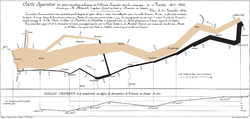
Professor Edward Tufte described Charles Joseph Minard's 1869 graphic of the French invasion of Russia as potentially "the best statistical graphic ever drawn", noting it captures 6 variables in 2 dimensions.[1]

Data and information visualization (data viz/vis or info viz/vis) is the practice of designing and creating graphic or visual representations of[2] quantitative and qualitative data and information with the help of static, dynamic or interactive visual items. These visualizations are intended to help a target audience visually explore and discover, quickly understand, interpret and gain important insights into otherwise difficult-to-identify structures, relationships, correlations, local and global patterns, trends, variations, constancy, clusters, outliers and unusual groupings within data.[3][4][5] When intended for the public to convey a concise version of information in an engaging manner,[3] it is typically called infographics.

Data visualization is concerned with presenting sets of primarily quantitative raw data in a schematic form, using imagery. The visual formats used in data visualization include charts and graphs, geospatial maps, figures, correlation matrices, percentage gauges, etc..

Information visualization deals with multiple, large-scale and complicated datasets which contain quantitative data, as well as qualitative, and primarily abstract information, and its goal is to add value to raw data, improve the viewers' comprehension, reinforce their cognition and help derive insights and make decisions as they navigate and interact with the graphical display. Visual tools used include maps for location based data; hierarchical[6] organisations of data; displays that prioritise relationships such as Sankey diagrams; flowcharts, timelines.

Emerging technologies like virtual, augmented and mixed reality have the potential to make information visualization more immersive, intuitive, interactive and easily manipulable and thus enhance the user's visual perception and cognition.[7] In data and information visualization, the goal is to graphically present and explore abstract, non-physical and non-spatial data collected from databases, information systems, file systems, documents, business data, which is different from scientific visualization, where the goal is to render realistic images based on physical and spatial scientific data to confirm or reject hypotheses.[8]

Effective data visualization is well-sourced, appropriately contextualized, and presented in a simple, uncluttered manner. The underlying data is accurate and up-to-date to ensure insights are reliable. Graphical items are well-chosen and aesthetically appealing, with shapes, colors and other visual elements used deliberately in a meaningful and non-distracting manner. The visuals are accompanied by supporting texts. Verbal and graphical components complement each other to ensure clear, quick and memorable understanding. Effective information visualization is aware of the needs and expertise level of the target audience.[9][2] Effective visualization can be used for conveying specialized, complex, big data-driven ideas to a non-technical audience in a visually appealing, engaging and accessible manner, and domain experts and executives for making decisions, monitoring performance, generating ideas and stimulating research.[9][3]

Data scientists, analysts and data mining specialists use data visualization to check data quality, find errors, unusual gaps, missing values, clean data, explore the structures and features of data, and assess outputs of data-driven models.[3] Data and information visualization can be part of data storytelling, where they are paired with a narrative structure, to contextualize the analyzed data and communicate insights gained from analyzing it to convince the audience into making a decision or taking action.[2][10] This can be contrasted with statistical graphics, where complex data are communicated graphically among researchers and analysts to help them perform exploratory data analysis or convey results of such analyses, where visual appeal, capturing attention to a certain issue and storytelling are less important.[11]

Data and information visualization is interdisciplinary, it incorporates principles found in descriptive statistics,[12] visual communication, graphic design, cognitive science and, interactive computer graphics and human-computer interaction.[13] Since effective visualization requires design skills, statistical skills and computing skills, it is both an art and a science.[14] Visual analytics combines statistical data analysis, data and information visualization, and human analytical reasoning through interactive visual interfaces to help users reach conclusions, gain actionable insights and make informed decisions which are otherwise difficult for computers to do. Research into how people read and misread types of visualizations helps to determine what types and features of visualizations are most understandable and effective.[15][16] Unintentionally poor or intentionally misleading and deceptive visualizations can function as powerful tools which disseminate misinformation, manipulate public perception and divert public opinion.[17] Thus data visualization literacy has become an important component of data and information literacy in the information age akin to the roles played by textual, mathematical and visual literacy in the past.[18]

Overview

[edit]
Data visualization is one of the steps in analyzing data and presenting it to users.
Partial map of the Internet early 2005 represented as a graph; each line represents two IP addresses, and some delay between those two nodes.

The field of data and information visualization has emerged "from research in human–computer interaction, computer science, graphics, visual design, psychology, photography and business methods. It is increasingly applied as a critical component in scientific research, digital libraries, data mining, financial data analysis, market studies, manufacturing production control, and drug discovery".[19]

Data and information visualization presumes that "visual representations and interaction techniques take advantage of the human eye's broad bandwidth pathway into the mind to allow users to see, explore, and understand large amounts of information at once. Information visualization focused on the creation of approaches for conveying abstract information in intuitive ways."[20]

Data analysis is an indispensable part of all applied research and problem solving in industry. The most fundamental data analysis approaches are visualization (histograms, scatter plots, surface plots, tree maps, parallel coordinate plots, etc.), statistics (hypothesis test, regression, PCA, etc.), data mining (association mining, etc.), and machine learning methods (clustering, classification, decision trees, etc.). Among these approaches, information visualization, or visual data analysis, is the most reliant on the cognitive skills of human analysts, and allows the discovery of unstructured actionable insights that are limited only by human imagination and creativity. The analyst does not have to learn any sophisticated methods to be able to interpret the visualizations of the data. Information visualization is also a hypothesis generation scheme, which can be, and is typically followed by more analytical or formal analysis, such as statistical hypothesis testing.

To communicate information clearly and efficiently, data visualization uses statistical graphics, plots, information graphics and other tools. Numerical data may be encoded using dots, lines, or bars, to visually communicate a quantitative message.[21] Effective visualization helps users analyze and reason about data and evidence.[22] It makes complex data more accessible, understandable, and usable, but can also be reductive.[23] Users may have particular analytical tasks, such as making comparisons or understanding causality, and the design principle of the graphic (i.e., showing comparisons or showing causality) follows the task. Tables are generally used where users will look up a specific measurement, while charts of various types are used to show patterns or relationships in the data for one or more variables.

Data visualization refers to the techniques used to communicate data or information by encoding it as visual objects (e.g., points, lines, or bars) contained in graphics. The goal is to communicate information clearly and efficiently to users. It is one of the steps in data analysis or data science. According to Vitaly Friedman (2008) the "main goal of data visualization is to communicate information clearly and effectively through graphical means. It doesn't mean that data visualization needs to look boring to be functional or extremely sophisticated to look beautiful. To convey ideas effectively, both aesthetic form and functionality need to go hand in hand, providing insights into a rather sparse and complex data set by communicating its key aspects in a more intuitive way. Yet designers often fail to achieve a balance between form and function, creating gorgeous data visualizations which fail to serve their main purpose — to communicate information".[24]

Indeed, Fernanda Viegas and Martin M. Wattenberg suggested that an ideal visualization should not only communicate clearly, but stimulate viewer engagement and attention.[25]

Data visualization is closely related to information graphics, information visualization, scientific visualization, exploratory data analysis and statistical graphics. In the new millennium, data visualization has become an active area of research, teaching and development. According to Post et al. (2002), it has united scientific and information visualization.[26]

In the commercial environment data visualization is often referred to as dashboards. Infographics are another very common form of data visualization.

Principles

[edit]

Characteristics of effective graphical displays

[edit]

The greatest value of a picture is when it forces us to notice what we never expected to see.

Edward Tufte has explained that users of information displays are executing particular analytical tasks such as making comparisons. The design principle of the information graphic should support the analytical task.[28] As William Cleveland and Robert McGill show, different graphical elements accomplish this more or less effectively. For example, dot plots and bar charts outperform pie charts.[29]

In his 1983 book The Visual Display of Quantitative Information,[30] Edward Tufte defines 'graphical displays' and principles for effective graphical display in the following passage: "Excellence in statistical graphics consists of complex ideas communicated with clarity, precision, and efficiency. Graphical displays should:

  • show the data
  • induce the viewer to think about the substance rather than about methodology, graphic design, the technology of graphic production, or something else
  • avoid distorting what the data has to say
  • present many numbers in a small space
  • make large data sets coherent
  • encourage the eye to compare different pieces of data
  • reveal the data at several levels of detail, from a broad overview to the fine structure
  • serve a reasonably clear purpose: description, exploration, tabulation, or decoration
  • be closely integrated with the statistical and verbal descriptions of a data set.

Graphics reveal data. Indeed, graphics can be more precise and revealing than conventional statistical computations."[31]

For example, the Minard diagram shows the losses suffered by Napoleon's army in the 1812–1813 period. Six variables are plotted: the size of the army, its location on a two-dimensional surface (x and y), time, the direction of movement, and temperature. The line width illustrates a comparison (size of the army at points in time), while the temperature axis suggests a cause of the change in army size. This multivariate display on a two-dimensional surface tells a story that can be grasped immediately while identifying the source data to build credibility. Tufte wrote in 1983 that: "It may well be the best statistical graphic ever drawn."[31]

Not applying these principles may result in misleading graphs, distorting the message, or supporting an erroneous conclusion. According to Tufte, chartjunk refers to the extraneous interior decoration of the graphic that does not enhance the message or gratuitous three-dimensional or perspective effects. Needlessly separating the explanatory key from the image itself, requiring the eye to travel back and forth from the image to the key, is a form of "administrative debris." The ratio of "data to ink" should be maximized, erasing non-data ink where feasible.[31]

The Congressional Budget Office summarized several best practices for graphical displays in a June 2014 presentation. These included: a) Knowing your audience; b) Designing graphics that can stand alone outside the report's context; and c) Designing graphics that communicate the key messages in the report.[32]

Useful criteria for a data or information visualization include:[33]

  1. It is based on (non-visual) data - that is, a data/info viz is not image processing and collage;
  2. It creates an image - specifically that the image plays the primary role in communicating meaning and is not an illustration accompanying the data in text form; and
  3. The result is readable.

Readability means that it is possible for a viewer to understand the underlying data, such as by making comparisons between proportionally sized visual elements to compare their respective data values; or using a legend to decode a map, like identifying coloured regions on a climate map to read temperature at that location. For greatest efficiency and simplicity of design and user experience, this readability is enhanced through the use of bijective mapping in that design of the image elements - where the mapping of representational element to data variable is unique.[34]

Kosara (2007)[33] also identifies the need for a visualisation to be "recognisable as a visualisation and not appear to be something else". He also states that recognisability and readability may not always be required in all types of visualisation e.g. "informative art" (which would still meet all three above criteria but might not look like a visualisation) or "artistic visualisation" (which similarly is still based on non-visual data to create an image, but may not be readable or recognisable).

Quantitative messages

[edit]
The same dataset plotted in three charts: Top panel is a bar chart depicting the flow of occurrences over time (resembles the Sankey diagram in the New York Times original[35]). Middle panel is a bubble chart that separately quantifies discrete outcomes. Bottom panel is an exploded pie chart showing relative shares of categories, and shares within categories.

Author Stephen Few described eight types of quantitative messages that users may attempt to understand or communicate from a set of data and the associated graphs used to help communicate the message:

  1. Time-series: A single variable is captured over a period of time, such as the unemployment rate or temperature measures over a 10-year period. A line chart may be used to demonstrate the trend over time.
  2. Ranking: Categorical subdivisions are ranked in ascending or descending order, such as a ranking of sales performance (the measure) by sales persons (the category, with each sales person a categorical subdivision) during a single period. A bar chart may be used to show the comparison across the sales persons.
  3. Part-to-whole: Categorical subdivisions are measured as a ratio to the whole (i.e., a percentage out of 100%). A pie chart or bar chart can show the comparison of ratios, such as the market share represented by competitors in a market.
  4. Deviation: Categorical subdivisions are compared against a reference, such as a comparison of actual vs. budget expenses for several departments of a business for a given time period. A bar chart can show comparison of the actual versus the reference amount.
  5. Frequency distribution: Shows the number of observations of a particular variable for given interval, such as the number of years in which the stock market return is between intervals such as 0–10%, 11–20%, etc. A histogram, a type of bar chart, may be used for this analysis. A boxplot helps visualize key statistics about the distribution, such as median, quartiles, outliers, etc.
  6. Correlation: Comparison between observations represented by two variables (X,Y) to determine if they tend to move in the same or opposite directions. For example, plotting unemployment (X) and inflation (Y) for a sample of months. A scatter plot is typically used for this message.
  7. Nominal comparison: Comparing categorical subdivisions in no particular order, such as the sales volume by product code. A bar chart may be used for this comparison.
  8. Geographic or geospatial: Comparison of a variable across a map or layout, such as the unemployment rate by state or the number of persons on the various floors of a building. A cartogram is a typical graphic used.[21][36]

Analysts reviewing a set of data may consider whether some or all of the messages and graphic types above are applicable to their task and audience. The process of trial and error to identify meaningful relationships and messages in the data is part of exploratory data analysis.

Visual perception and data visualization

[edit]
Example of data visualization (website monitoring for MusicBrainz wirh Grafana).

A human can distinguish differences in line length, shape, orientation, distances, and color (hue) readily without significant processing effort; these are referred to as "pre-attentive attributes". For example, it may require significant time and effort ("attentive processing") to identify the number of times the digit "5" appears in a series of numbers; but if that digit is different in size, orientation, or color, instances of the digit can be noted quickly through pre-attentive processing.[37]

Compelling graphics take advantage of pre-attentive processing and attributes and the relative strength of these attributes. For example, since humans can more easily process differences in line length than surface area, it may be more effective to use a bar chart (which takes advantage of line length to show comparison) rather than pie charts (which use surface area to show comparison).[37]

Human perception/cognition and data visualization

[edit]

Almost all data visualizations are created for human consumption. Knowledge of human perception and cognition is necessary when designing intuitive visualizations.[38] Cognition refers to processes in human beings like perception, attention, learning, memory, thought, concept formation, reading, and problem solving.[39] Human visual processing is efficient in detecting changes and making comparisons between quantities, sizes, shapes and variations in lightness. When properties of symbolic data are mapped to visual properties, humans can browse through large amounts of data efficiently. It is estimated that 2/3 of the brain's neurons can be involved in visual processing. Proper visualization provides a different approach to show potential connections, relationships, etc. which are not as obvious in non-visualized quantitative data. Visualization can become a means of data exploration.

Studies have shown individuals used on average 19% less cognitive resources, and 4.5% better able to recall details when comparing data visualization with text.[40]

History

[edit]

There is no comprehensive history of data visualization. There are no accounts that span the entire development of visual thinking and visual representation of data, and which collate the contributions of disparate disciplines.[41] Michael Friendly and Daniel Denis of York University are engaged in a project that attempts to provide a comprehensive history of visualization. Data visualization is not a modern development. Since prehistory, stellar data, or information such as location of stars were visualized on the walls of caves (such as those found in Lascaux Cave in Southern France) since the Pleistocene era.[42] Physical artefacts such as Mesopotamian clay tokens (5500 BC), Inca quipus (2600 BC) and Marshall Islands stick charts (n.d.) can also be considered as visualizing quantitative information.[43][44]

The first documented data visualization can be tracked back to 1160 B.C. with the Turin Papyrus Map which accurately illustrates the distribution of geological resources and provides information about quarrying of those resources.[45] Such maps can be categorized as thematic cartography, which is a type of data visualization that presents and communicates specific data and information through a geographical illustration designed to show a particular theme connected with a specific geographic area. Earliest documented forms of data visualization were various thematic maps from different cultures and ideograms and hieroglyphs that provided and allowed interpretation of information illustrated. For example, Linear B tablets of Mycenae provided a visualization of information regarding Late Bronze Age era trades in the Mediterranean. The idea of coordinates was used by ancient Egyptian surveyors in laying out towns, earthly and heavenly positions were located by something akin to latitude and longitude at least by 200 BC, and the map projection of a spherical Earth into latitude and longitude by Claudius Ptolemy [c. 85c. 165] in Alexandria would serve as reference standards until the 14th century.[45]

Planetary movements
Playfair TimeSeries, 1786
Selected milestones and inventions
Product Space Localization, intended to show the Economic Complexity of a given economy
Tree map of Benin exports (2009) by product category, The Observatory of Economic Complexity

The invention of paper and parchment allowed further development of visualizations. One graph from the 10th or possibly 11th century is an illustration of planetary movements, used in an appendix of a textbook in monastery schools.[46] The graph apparently was meant to represent a plot of the inclinations of the planetary orbits as a function of the time. For this purpose, the zone of the zodiac was represented on a plane with a horizontal line divided into thirty parts as the time or longitudinal axis. The vertical axis designates the width of the zodiac. The horizontal scale appears to have been chosen for each planet individually for the periods cannot be reconciled. The accompanying text refers only to the amplitudes. The curves are apparently not related in time.

By the 16th century, techniques and instruments for precise observation and measurement of physical quantities, and geographic and celestial position were well-developed (for example, a "wall quadrant" constructed by Tycho Brahe [1546–1601], covering an entire wall in his observatory). Particularly important were the development of triangulation and other methods to determine mapping locations accurately.[41] Very early, the measure of time led scholars to develop innovative way of visualizing the data (e.g. Lorenz Codomann in 1596, Johannes Temporarius in 1596[47]).

Mathematicians René Descartes and Pierre de Fermat developed analytic geometry and two-dimensional coordinate system which heavily influenced the practical methods of displaying and calculating values. Fermat and Blaise Pascal's work on statistics and probability theory laid the groundwork for what we now conceptualize as data.[41] These developments helped William Playfair, who saw potential for graphical communication of quantitative data, to generate and develop graphical methods of statistics.[38] In 1786, Playfair published the first presentation graphics.

In the second half of the 20th century, Jacques Bertin used quantitative graphs to represent information "intuitively, clearly, accurately, and efficiently".[38] John Tukey and Edward Tufte pushed the bounds of data visualization; Tukey with his new statistical approach of exploratory data analysis and Tufte with his book "The Visual Display of Quantitative Information" paved the way for refining data visualization techniques for more than statisticians. With the progression of technology came the progression of data visualization; starting with hand-drawn visualizations and evolving into more technical applications – including interactive designs leading to software visualization.[48]

The modern study of visualization started with computer graphics, which "has from its beginning been used to study scientific problems. However, in its early days the lack of graphics power often limited its usefulness. The recent emphasis on visualization started in 1987 with the special issue of Computer Graphics on Visualization in Scientific Computing. Since then there have been several conferences and workshops, co-sponsored by the IEEE Computer Society and ACM SIGGRAPH".[49] They have been devoted to the general topics of data visualization, information visualization and scientific visualization, and more specific areas such as volume visualization.

Programs like SAS, SOFA, R, Minitab, Cornerstone and more allow for data visualization in the field of statistics. Other data visualization applications, more focused and unique to individuals, programming languages such as D3, Python (through matplotlib, seaborn) and JavaScript and Java(through JavaFX) help to make the visualization of quantitative data a possibility. Private schools have also developed programs to meet the demand for learning data visualization and associated programming libraries, including free programs like The Data Incubator or paid programs like General Assembly.[50]

Beginning with the symposium "Data to Discovery" in 2013, ArtCenter College of Design, Caltech and JPL in Pasadena have run an annual program on interactive data visualization.[51] The program asks: How can interactive data visualization help scientists and engineers explore their data more effectively? How can computing, design, and design thinking help maximize research results? What methodologies are most effective for leveraging knowledge from these fields? By encoding relational information with appropriate visual and interactive characteristics to help interrogate, and ultimately gain new insight into data, the program develops new interdisciplinary approaches to complex science problems, combining design thinking and the latest methods from computing, user-centered design, interaction design and 3D graphics.

Terminology

[edit]

Data visualization involves specific terminology, some of which is derived from statistics. For example, author Stephen Few defines two types of data, which are used in combination to support a meaningful analysis or visualization:

  • Categorical: Represent groups of objects with a particular characteristic. Categorical variables can either be nominal or ordinal. Nominal variables for example gender have no order between them and are thus nominal. Ordinal variables are categories with an order, for sample recording the age group someone falls into.[52]
  • Quantitative: Represent measurements, such as the height of a person or the temperature of an environment. Quantitative variables can either be continuous or discrete. Continuous variables capture the idea that measurements can always be made more precisely. While discrete variables have only a finite number of possibilities, such as a count of some outcomes or an age measured in whole years.[52]

The distinction between quantitative and categorical variables is important because the two types require different methods of visualization.

Two primary types of information displays are tables and graphs.

  • A table contains quantitative data organized into rows and columns with categorical labels. It is primarily used to look up specific values. In the example above, the table might have categorical column labels representing the name (a qualitative variable) and age (a quantitative variable), with each row of data representing one person (the sampled experimental unit or category subdivision).
  • A graph is primarily used to show relationships among data and portrays values encoded as visual objects (e.g., lines, bars, or points). Numerical values are displayed within an area delineated by one or more axes. These axes provide scales (quantitative and categorical) used to label and assign values to the visual objects. Many graphs are also referred to as charts.[53]

Eppler and Lengler have developed the "Periodic Table of Visualization Methods," an interactive chart displaying various data visualization methods. It includes six types of data visualization methods: data, information, concept, strategy, metaphor and compound.[54] In "Visualization Analysis and Design" Tamara Munzner writes "Computer-based visualization systems provide visual representations of datasets designed to help people carry out tasks more effectively." Munzner argues that visualization "is suitable when there is a need to augment human capabilities rather than replace people with computational decision-making methods."[55]

Techniques

[edit]
Name Visual dimensions Description / Example usages
Bar chart
  • length/count
  • category
  • color
  • Presents categorical data with rectangular bars with heights or lengths proportional to the values that they represent. The bars can be plotted vertically or horizontally.
  • A bar graph shows comparisons among discrete categories. One axis of the chart shows the specific categories being compared, and the other axis represents a measured value.
  • Some bar graphs present bars clustered in groups of more than one, showing the values of more than one measured variable. These clustered groups can be differentiated using color.
  • For example; comparison of values, such as sales performance for several persons or businesses in a single time period.

Variable-width ("variwide") bar chart

  • category (size/count/extent in first dimension)
  • size/count/extent in second dimension
  • size/count/extent as area of bar
  • color
  • Includes most features of basic bar chart, above
  • Areas of non-uniform-width bars represent quantities with areas A that are respective products of related pairs of
· vertical-axis quantities (A/X) and
· horizontal-axis quantities (X).
  • Arithmetically:
(A/X)*X=A for each bar
  • Instances: Mosaic plots (also known as Marimekko, or Mekko, charts)

Orthogonal (orthogonal composite) bar chart

  • numerical value of first variable (extent in first dimension; superimposed horizontal bars)
  • numerical value of second variable (extent in second dimension; like conventional vertical bar chart)
  • category for first and second variables (e.g., color-coded)
  • Includes most features of basic bar chart, above
  • Pairs of numeric variables, usually color-coded, rendered by category
  • Variables need not be directly related in the way they are in "variwide" charts

Histogram
  • bin limits
  • count/length
  • color
  • An approximate representation of the distribution of numerical data. Divide the entire range of values into a series of intervals and then count how many values fall into each interval this is called binning. The bins are usually specified as consecutive, non-overlapping intervals of a variable. The bins (intervals) must be adjacent, and are often (but not required to be) of equal size.
  • For example, determining frequency of annual stock market percentage returns within particular ranges (bins) such as 0–10%, 11–20%, etc. The height of the bar represents the number of observations (years) with a return % in the range represented by the respective bin.

Scatter plot (dot plot)
  • x position
  • y position
  • symbol/glyph
  • color
  • size
  • Uses Cartesian coordinates to display values for typically two variables for a set of data.
  • Points can be coded via color, shape and/or size to display additional variables.
  • Each point on the plot has an associated x and y term that determines its location on the cartesian plane.
  • Scatter plots are often used to highlight the correlation between variables (x and y).
  • Also called "dot plots"

Scatter plot (3D)
  • position x
  • position y
  • position z
  • color
  • symbol
  • size
  • Similar to the 2-dimensional scatter plot above, the 3-dimensional scatter plot visualizes the relationship between typically 3 variables from a set of data.
  • Again point can be coded via color, shape and/or size to display additional variables
Network
  • Finding clusters in the network (e.g. grouping Facebook friends into different clusters).
  • Discovering bridges (information brokers or boundary spanners) between clusters in the network
  • Determining the most influential nodes in the network (e.g. A company wants to target a small group of people on Twitter for a marketing campaign).
  • Finding outlier actors who do not fit into any cluster or are in the periphery of a network.
Pie chart
  • color
  • Represents one categorical variable which is divided into slices to illustrate numerical proportion. In a pie chart, the arc length of each slice (and consequently its central angle and area), is proportional to the quantity it represents.
  • For example, as shown in the graph to the right, the proportion of English native speakers worldwide
Line chart
  • x position
  • y position
  • symbol/glyph
  • color
  • size
  • Represents information as a series of data points called 'markers' connected by straight line segments.
  • Similar to a scatter plot except that the measurement points are ordered (typically by their x-axis value) and joined with straight line segments.
  • Often used to visualize a trend in data over intervals of time – a time series – thus the line is often drawn chronologically.
Semi-log or log-log (non-linear) charts
  • x position
  • y position
  • symbol/glyph
  • color
  • connections
  • Represents data as lines or series of points spanning large ranges on one or both axes
  • One or both axes are represented using a non-linear logarithmic scale
Streamgraph (type of area chart)
  • width
  • color
  • time (flow)
  • A type of stacked area chart that is displaced around a central axis, resulting in a flowing shape.
  • Unlike a traditional stacked area chart in which the layers are stacked on top of an axis, in a streamgraph the layers are positioned to minimize their "wiggle".
  • Streamgraphs display data with only positive values, and are not able to represent both negative and positive values.
  • Example: the visual shows music listened to by a user over time
Treemap
  • size
  • color
  • Is a method for displaying hierarchical data using nested figures, usually rectangles.
  • For example, disk space by location / file type
Gantt chart
  • color
  • time (flow)
Heat map
  • color
  • categorical variable
  • Represents the magnitude of a phenomenon as color in two dimensions.
  • There are two categories of heat maps:
    • cluster heat map: where magnitudes are laid out into a matrix of fixed cell size whose rows and columns are categorical data. For example, the graph to the right.
    • spatial heat map: where no matrix of fixed cell size for example a heat-map. For example, a heat map showing population densities displayed on a geographical map
Stripe graphic
  • x position
  • color
  • A sequence of colored stripes visually portrays trend of a data series.
  • Portrays a single variable—prototypically temperature over time to portray global warming
  • Deliberately minimalist—with no technical indicia—to communicate intuitively with non-scientists[56]
  • Can be "stacked" to represent plural series (example)
Animated spiral graphic
  • radial distance (dependent variable)
  • rotating angle (cycling through months)
  • color (passing years)
  • Portrays a single dependent variable—prototypically temperature over time to portray global warming
  • Dependent variable is progressively plotted along a continuous "spiral" determined as a function of (a) constantly rotating angle (twelve months per revolution) and (b) evolving color (color changes over passing years)[57]
Box and Whisker Plot
  • x axis
  • y axis
  • A method for graphically depicting groups of numerical data through their quartiles.
  • Box plots may also have lines extending from the boxes (whiskers) indicating variability outside the upper and lower quartiles.
  • Outliers may be plotted as individual points.
  • The two boxes graphed on top of each other represent the middle 50% of the data, with the line separating the two boxes identifying the median data value and the top and bottom edges of the boxes represent the 75th and 25th percentile data points respectively.
  • Box plots are non-parametric: they display variation in samples of a statistical population without making any assumptions of the underlying statistical distribution, thus are useful for getting an initial understanding of a data set. For example, comparing the distribution of ages between a group of people (e.g., male and females).
Flowchart
  • Represents a workflow, process or a step-by-step approach to solving a task.
  • The flowchart shows the steps as boxes of various kinds, and their order by connecting the boxes with arrows.
  • For example, outlying the actions to undertake if a lamp is not working, as shown in the diagram to the right.
Radar chart
  • attributes
  • value assigned to attributes
  • Displays multivariate data in the form of a two-dimensional chart of three or more quantitative variables represented on axes starting from the same point.
  • The relative position and angle of the axes is typically uninformative, but various heuristics, such as algorithms that plot data as the maximal total area, can be applied to sort the variables (axes) into relative positions that reveal distinct correlations, trade-offs, and a multitude of other comparative measures.
  • For example, comparing attributes/skills (e.g., communication, analytical, IT skills) learnt across different university degrees (e.g., mathematics, economics, psychology)
Venn diagram
  • all possible logical relations between a finite collection of different sets.
  • Shows all possible logical relations between a finite collection of different sets.
  • These diagrams depict elements as points in the plane, and sets as regions inside closed curves.
  • A Venn diagram consists of multiple overlapping closed curves, usually circles, each representing a set.
  • The points inside a curve labelled S represent elements of the set S, while points outside the boundary represent elements not in the set S. This lends itself to intuitive visualizations; for example, the set of all elements that are members of both sets S and T, denoted ST and read "the intersection of S and T", is represented visually by the area of overlap of the regions S and T. In Venn diagrams, the curves are overlapped in every possible way, showing all possible relations between the sets.

Iconography of correlations
  • No axis
  • Solid line
  • dotted line
  • color
  • Exploratory data analysis.
  • Replace a correlation matrix by a diagram where the "remarkable" correlations are represented by a solid line (positive correlation), or a dotted line (negative correlation).
  • Points can be coded via color.

Other techniques

[edit]

Interactivity

[edit]

Interactive data visualization enables direct actions on a graphical plot to change elements and link between multiple plots.[58]

Interactive data visualization has been a pursuit of statisticians since the late 1960s. Examples of the developments can be found on the American Statistical Association video lending library.[59]

Common interactions include:

  • Brushing: works by using the mouse to control a paintbrush, directly changing the color or glyph of elements of a plot. The paintbrush is sometimes a pointer and sometimes works by drawing an outline of sorts around points; the outline is sometimes irregularly shaped, like a lasso. Brushing is most commonly used when multiple plots are visible and some linking mechanism exists between the plots. There are several different conceptual models for brushing and a number of common linking mechanisms. Brushing scatterplots can be a transient operation in which points in the active plot only retain their new characteristics. At the same time, they are enclosed or intersected by the brush, or it can be a persistent operation, so that points retain their new appearance after the brush has been moved away. Transient brushing is usually chosen for linked brushing, as we have just described.
  • Painting: Persistent brushing is useful when we want to group the points into clusters and then proceed to use other operations, such as the tour, to compare the groups. It is becoming common terminology to call the persistent operation painting,
  • Identification: which could also be called labeling or label brushing, is another plot manipulation that can be linked. Bringing the cursor near a point or edge in a scatterplot, or a bar in a barchart, causes a label to appear that identifies the plot element. It is widely available in many interactive graphics, and is sometimes called mouseover.
  • Scaling: maps the data onto the window, and changes in the area of the. mapping function help us learn different things from the same plot. Scaling is commonly used to zoom in on crowded regions of a scatterplot, and it can also be used to change the aspect ratio of a plot, to reveal different features of the data.
  • Linking: connects elements selected in one plot with elements in another plot. The simplest kind of linking, one-to-one, where both plots show different projections of the same data, and a point in one plot corresponds to exactly one point in the other. When using area plots, brushing any part of an area has the same effect as brushing it all and is equivalent to selecting all cases in the corresponding category. Even when some plot elements represent more than one case, the underlying linking rule still links one case in one plot to the same case in other plots. Linking can also be by categorical variable, such as by a subject id, so that all data values corresponding to that subject are highlighted, in all the visible plots.

Other perspectives

[edit]

There are different approaches on the scope of data visualization. One common focus is on information presentation, such as Friedman (2008). Friendly (2008) presumes two main parts of data visualization: statistical graphics, and thematic cartography.[60] In this line the "Data Visualization: Modern Approaches" (2007) article gives an overview of seven subjects of data visualization:[61]

All these subjects are closely related to graphic design and information representation.

From a computer science perspective, Frits Post in 2002 categorized the field into sub-fields:[26][62]

Within The Harvard Business Review, Scott Berinato developed a framework to approach data visualisation.[63] To start thinking visually, users must consider two questions; 1) What you have and 2) what you're doing. The first step is identifying what data you want visualised. It is data-driven like profit over the past ten years or a conceptual idea like how a specific organisation is structured. Once this question is answered one can then focus on whether they are trying to communicate information (declarative visualisation) or trying to figure something out (exploratory visualisation). Scott Berinato combines these questions to give four types of visual communication that each have their own goals.[63]

These four types of visual communication are as follows;

  • idea illustration (conceptual & declarative).[63]
    • Used to teach, explain and/or simply concepts. For example, organisation charts and decision trees.
  • idea generation (conceptual & exploratory).[63]
    • Used to discover, innovate and solve problems. For example, a whiteboard after a brainstorming session.
  • visual discovery (data-driven & exploratory).[63]
    • Used to spot trends and make sense of data. This type of visual is more common with large and complex data where the dataset is somewhat unknown and the task is open-ended.
  • everyday data-visualisation (data-driven & declarative).[63]
    • The most common and simple type of visualisation used for affirming and setting context. For example, a line graph of GDP over time.

Applications

[edit]

Data and information visualization insights are being applied in areas such as:[19]

Organization

[edit]

Notable academic and industry laboratories in the field are:

Conferences in this field, ranked by significance in data visualization research,[65] are:

  • IEEE Visualization: An annual international conference on scientific visualization, information visualization, and visual analytics. Conference is held in October.
  • ACM SIGGRAPH: An annual international conference on computer graphics, convened by the ACM SIGGRAPH organization. Conference dates vary.
  • Conference on Human Factors in Computing Systems (CHI): An annual international conference on human–computer interaction, hosted by ACM SIGCHI. Conference is usually held in April or May.
  • Eurographics: An annual Europe-wide computer graphics conference, held by the European Association for Computer Graphics. Conference is usually held in April or May.

For further examples, see: Category:Computer graphics organizations

Data presentation architecture

[edit]
A data visualization from social media

Data presentation architecture (DPA) is a skill-set that seeks to identify, locate, manipulate, format and present data in such a way as to optimally communicate meaning and knowledge. Historically, data presentation architecture is attributed to Kelly Lautt:[a] "Data Presentation Architecture (DPA) is a rarely applied skill set critical for the success and value of Business Intelligence. Data presentation architecture weds the science of numbers, data and statistics in discovering valuable information from data and making it usable, relevant and actionable with the arts of data visualization, communications, organizational psychology and change management in order to provide business intelligence solutions with the data scope, delivery timing, format and visualizations that will most effectively support and drive operational, tactical and strategic behaviour toward understood business (or organizational) goals. DPA is neither an IT nor a business skill set but exists as a separate field of expertise. Often confused with data visualization, data presentation architecture is a much broader skill set that includes determining what data on what schedule and in what exact format is to be presented, not just the best way to present data that has already been chosen. Data visualization skills are one element of DPA."

Objectives

[edit]

DPA has two main objectives:

  • To use data to provide knowledge in the most efficient manner possible (minimize noise, complexity, and unnecessary data or detail given each audience's needs and roles)
  • To use data to provide knowledge in the most effective manner possible (provide relevant, timely and complete data to each audience member in a clear and understandable manner that conveys important meaning, is actionable and can affect understanding, behavior and decisions)

Scope

[edit]

With the above objectives in mind, the actual work of data presentation architecture consists of:

  • Creating effective delivery mechanisms for each audience member depending on their role, tasks, locations and access to technology
  • Defining important meaning (relevant knowledge) that is needed by each audience member in each context
  • Determining the required periodicity of data updates (the currency of the data)
  • Determining the right timing for data presentation (when and how often the user needs to see the data)
  • Finding the right data (subject area, historical reach, breadth, level of detail, etc.)
  • Utilizing appropriate analysis, grouping, visualization, and other presentation formats
[edit]

DPA work shares commonalities with several other fields, including:

  • Business analysis in determining business goals, collecting requirements, mapping processes.
  • Business process improvement in that its goal is to improve and streamline actions and decisions in furtherance of business goals
  • Data visualization in that it uses well-established theories of visualization to add or highlight meaning or importance in data presentation.
  • Digital humanities explores more nuanced ways of visualising complex data.
  • Information architecture, but information architecture's focus is on unstructured data and therefore excludes both analysis (in the statistical/data sense) and direct transformation of the actual content (data, for DPA) into new entities and combinations.
  • HCI and interaction design, since many of the principles in how to design interactive data visualisation have been developed cross-disciplinary with HCI.
  • Visual journalism and data-driven journalism or data journalism: Visual journalism is concerned with all types of graphic facilitation of the telling of news stories, and data-driven and data journalism are not necessarily told with data visualisation. Nevertheless, the field of journalism is at the forefront in developing new data visualisations to communicate data.
  • Graphic design, conveying information through styling, typography, position, and other aesthetic concerns.

See also

[edit]

Notes

[edit]

References

[edit]

Further reading

[edit]
[edit]
Revisions and contributorsEdit on WikipediaRead on Wikipedia
from Grokipedia
Data and information visualization encompasses the graphical representation of quantitative data and abstract information to facilitate human perception, interpretation, and decision-making. It transforms complex datasets into visual forms such as charts, graphs, maps, and interactive interfaces, enabling users to identify patterns, trends, and anomalies that would be difficult to discern from tabular or textual data alone. This discipline bridges statistics, design, and cognitive science, distinguishing data visualization—which focuses on structured, numerical representations like scatter plots and histograms—for analytical purposes, from information visualization, which handles non-numerical, multidimensional data such as networks or hierarchies through techniques like tree maps and node-link diagrams. The historical roots of data and information visualization trace back to prehistoric cave paintings and ancient maps, such as the 3,000-year-old Papyrus of Turin depicting Nile River mine locations, which served early informational purposes. Modern developments emerged in the 17th century with Michael Florent van Langren's 1644 line graph of longitude measurements, marking the first use of graphical plotting for data comparison. The 18th and 19th centuries saw foundational innovations by William Playfair, who invented the line graph, bar chart, and pie chart in 1786 and 1801 to illustrate economic data, and Charles Joseph Minard, whose 1869 flow map of Napoleon's Russian campaign integrated six variables into a single, narrative-driven visualization. The advent of computers in the mid-20th century revolutionized the field, enabling dynamic and interactive tools, with seminal works like John Tukey's 1977 exploratory data analysis promoting graphical methods for statistical inference. The importance of data and information visualization lies in its ability to enhance data exploration, communication, and insight generation across disciplines, from scientific research to business intelligence. It supports tasks such as detecting outliers, revealing clusters and correlations, and aiding data cleaning by making structural irregularities visually apparent, thereby accelerating analysis and reducing cognitive load. In an era of big data, effective visualizations prevent misinterpretation by adhering to principles of clarity, accuracy, and minimalism, as emphasized in guidelines for scientific communication that prioritize perceptual accuracy over aesthetic embellishment. Moreover, interactive visualizations empower users to query datasets dynamically, fostering deeper understanding and informed decision-making in fields like healthcare, finance, and public policy.

Introduction

Definition and Scope

Data and information visualization refers to the process of transforming abstract data into visual forms, such as charts, graphs, and maps, to facilitate understanding, decision-making, and communication of insights. This discipline leverages graphical representations to reveal patterns, trends, and relationships that might be obscured in raw data formats, enabling users to perceive and interpret information more intuitively than through numerical or textual means alone. A key distinction exists between data visualization, which focuses on representing raw or quantitative data to uncover inherent patterns like distributions and correlations, and information visualization, which emphasizes processed or abstract data integrated with contextual elements to support exploratory analysis and knowledge discovery. Data visualization typically deals with numerical datasets, such as statistical metrics, and is recognized as a technical skill involving the creation of visual representations to turn data into actionable insights using tools like Tableau. While information visualization extends to non-numerical or qualitative data, including hierarchies, networks, and textual information, often incorporating user interaction to enhance cognition. The scope of data and information visualization encompasses both quantitative and qualitative data types, spanning applications from scientific research to business intelligence, but excludes purely non-visual representations like standalone tables or lists that do not employ graphical elements. It prioritizes methods that exploit human visual perception to augment analytical processes, such as identifying outliers or clusters in datasets. Over time, the field has evolved from simple statistical plots in the 18th century, pioneered by figures like William Playfair with bar charts and line graphs for economic data, to contemporary techniques handling big data volumes in the 2020s, including real-time streaming visualizations and multidimensional representations for complex, high-velocity information flows. For instance, scatter plots are commonly used in data visualization to illustrate correlations between two variables, such as the relationship between temperature and ice cream sales, whereas network diagrams in information visualization depict relational structures, like social connections in a graph of interconnected nodes and edges.

Historical Context

The roots of data and information visualization extend to ancient civilizations, where visual methods were employed to represent quantitative and spatial data. In ancient Egypt, around 1150 BCE, the Papyrus Map of Turin depicted mining sites, transportation routes, and geographic features in a manner that qualifies as an early form of thematic mapping, illustrating resource distribution for practical planning. In the 2nd century CE, the Alexandrian scholar Claudius Ptolemy furthered this tradition in his treatise Geography, using latitude and longitude coordinates to create projected world maps that systematically visualized known geographic data, influencing cartographic practices for centuries. The 19th century brought foundational innovations in statistical graphics, transforming abstract numbers into intuitive visuals. Scottish economist William Playfair pioneered modern techniques, introducing line graphs and bar charts in his 1786 Commercial and Political Atlas to depict economic trends like trade balances and commodity prices over time. He later invented the pie chart in 1801's Statistical Breviary, using circular sectors to proportionally represent demographic and fiscal data, such as population distributions across European nations, thereby making comparative analysis more accessible to policymakers and the public. In the 20th century, visualization shifted toward exploratory and principled design paradigms. Statistician John Tukey formalized exploratory data analysis in his 1977 book, promoting graphical techniques like stem-and-leaf plots and box plots to iteratively probe datasets for patterns, anomalies, and relationships, emphasizing visualization as a core tool for scientific discovery. Edward Tufte's 1983 The Visual Display of Quantitative Information critiqued misleading charts—such as those exaggerating trends through distorted scales—and advocated for "small multiples" and high data-ink ratios to ensure honest, efficient communication of quantitative evidence. The digital era began in the 1960s with breakthroughs in interactive graphics. Ivan Sutherland's 1963 Sketchpad, developed at MIT, introduced real-time manipulation of geometric shapes via a light pen on a cathode-ray tube display, enabling users to draw, copy, and constrain elements dynamically, which pioneered the human-computer interaction essential for future data exploration tools. By the 1990s, Xerox PARC researchers advanced dynamic visualization through the Information Visualizer system (1991), which combined perspectives, overviews, and focus+context views in a 3D workspace to facilitate browsing and querying of hierarchical and relational data structures. The 21st century democratized visualization via open-source and commercial software. Tableau, launched in 2003 by Stanford researchers Chris Stolte, Pat Hanrahan, and Christian Chabot, offered drag-and-drop interfaces for building interactive dashboards from large datasets, enabling non-experts to perform ad-hoc analyses and uncover insights in business intelligence. In 2011, Mike Bostock's D3.js library emerged as a JavaScript framework for binding data to web documents, supporting scalable, custom animations and transitions that powered diverse online visualizations, from network graphs to geographic projections. Recent developments in the 2020s integrate AI and immersive technologies, addressing big data challenges while raising historical ethical issues. AI-assisted tools automate visualization generation, such as using generative models to suggest optimal charts for real-time analytics from streaming data, enhancing efficiency in domains like finance and healthcare. Virtual reality applications, incorporating Oculus headsets since 2016, allow 3D immersion in datasets—such as molecular structures or urban planning simulations—fostering deeper spatial comprehension beyond traditional screens. Historically, concerns over misrepresentation have persisted, as seen in 19th-century economic charts that skewed public perceptions or 20th-century infographics omitting context, prompting ongoing calls for transparency to prevent distortion of facts in visual narratives.

Core Principles

Design Principles for Clarity

Design principles for clarity in data and information visualization emphasize creating graphics that accurately convey quantitative information without distortion or unnecessary complexity, ensuring viewers can interpret data intuitively and reliably. These principles guide designers to prioritize the data itself over decorative elements, leveraging human perceptual strengths while maintaining representational integrity. Seminal works by Edward Tufte and William S. Cleveland and Robert McGill have established foundational rules that balance precision with accessibility, influencing modern practices in statistical graphics and beyond. A core tenet is Tufte's principle of maximizing the data-ink ratio, which advocates using the proportion of ink (or pixels) dedicated to representing actual data as high as possible, while minimizing non-data ink such as excessive grid lines or borders. This approach erases superfluous elements to enhance clarity and focus attention on the quantitative message. Complementing this is Tufte's avoidance of chartjunk—unnecessary decorations like moiré patterns, heavy grid lines, or ornamental flourishes that distract from the data and reduce cognitive load. By eliminating chartjunk, visualizations become more efficient and less prone to misinterpretation. Cleveland and McGill's hierarchy of graphical elements ranks perceptual tasks by accuracy in judging quantities, providing a framework for selecting visual encodings that align with human vision capabilities. The hierarchy orders elements from most to least accurate: position along a common scale (e.g., aligned dots or bars), followed by length (e.g., bar heights), angle (e.g., pie slices), area (e.g., circle sizes), volume (e.g., 3D bars), and color saturation (e.g., intensity shades). Experimental results from their studies showed that position and length judgments had the lowest error rates (around 3-8%), while color saturation was least precise (up to 20% error), underscoring the need to use higher-ranked elements for precise comparisons. Graphs, such as bar charts, scatterplots, and line graphs, serve as fundamental tools in data visualization, enabling the effective representation and interpretation of quantitative data through these perceptual elements. Ensuring quantitative integrity requires representations where visual elements are proportional to the data values, avoiding distortions such as truncated axes or non-zero baselines that exaggerate differences. Tufte's principles of graphical integrity further stipulate clear labeling, consistent scales across comparisons, and explanations integrated into the graphic to prevent ambiguity or deception. A key aspect of these principles is the avoidance of bias, which can arise from misleading scales, selective data presentation, or inappropriate visual encodings that distort true relationships in the data; such biases can lead to exclusionary or inequitable interpretations, particularly when data affects marginalized groups. By addressing potential biases through transparent methodology, diverse data sourcing, and inclusive design, visualizations promote accurate interpretation and support reliable decision-making. For effective comparisons, small multiples—grids of similar small graphics varying by one data dimension—facilitate pattern detection and relational understanding without overwhelming the viewer. Balancing aesthetics with function involves principles of simplicity, proportion, and alignment to guide viewer attention without compromising accuracy. Simplicity reduces cognitive effort by limiting visual elements to essentials, while proportion ensures relative sizes reflect data magnitudes, and alignment creates orderly flow that aids scanning. This harmony prevents aesthetic overload, maintaining focus on informational goals. A historical example of proper axis scaling and integrity is Florence Nightingale's coxcomb charts from 1858, which illustrated mortality causes in the British Army during the Crimean War. These polar area diagrams used wedge areas proportional to death counts from preventable diseases, wounds, and other causes, comparing periods before and after sanitary reforms to demonstrate a 90% reduction in zymotic deaths—persuasively advocating for hygiene improvements without distortion. To address inclusivity, modern principles incorporate accessibility standards for color blindness, as outlined in WCAG 2.1's Success Criterion 1.4.1, which prohibits using color alone to convey information in visualizations. Instead, combine colors with patterns, textures, or labels to ensure distinguishability, making graphics usable for the estimated 8% of men and 0.5% of women with color vision deficiencies.

Perceptual Foundations

Human visual perception plays a foundational role in the effectiveness of data and information visualizations, as it determines how graphical elements are interpreted and patterns are detected. The principles of perception guide designers in encoding data to align with innate cognitive processes, ensuring that visualizations facilitate accurate and efficient comprehension rather than misleading the viewer. These foundations draw from psychology and neuroscience, emphasizing how the brain organizes sensory input into meaningful structures. Gestalt principles describe how the human visual system groups and organizes elements into coherent wholes, influencing the layout and structure of visualizations. The principle of proximity posits that elements close together are perceived as related, aiding in clustering data points for pattern recognition in scatterplots or heatmaps. Similarity suggests that items sharing attributes like shape or color are grouped, which can highlight categories in bar charts without explicit labels. Closure implies that incomplete figures are mentally completed into familiar shapes, useful for suggesting continuity in line graphs despite minor data gaps. Continuity encourages perceiving aligned elements as connected paths, supporting the flow of trends in time-series visualizations. These principles, originally formulated in the early 20th century, have been adapted to visualization design to reduce ambiguity and enhance perceptual unity. Visual encoding leverages distinct processing stages in perception to communicate data effectively. Pre-attentive processing occurs rapidly and unconsciously, allowing detection of basic features such as color, size, orientation, or position within 200-500 milliseconds, enabling quick identification of outliers or trends without focused effort. For instance, varying point sizes in a bubble chart can pre-attentively signal magnitude differences, while hue variations highlight categories. In contrast, attentive processing involves deliberate scrutiny for complex judgments, such as estimating precise ratios in superimposed lines, which is slower and more error-prone. Empirical studies rank encoding effectiveness, showing position along a common scale as most accurate, followed by length, angle, and area, with color and volume least precise for quantitative tasks. This distinction informs choices in graphical design to prioritize pre-attentive cues for initial insights and attentive elements for detailed analysis. Cognitive load theory explains how visualizations can overwhelm or optimize working memory, which holds limited information—typically 4-7 chunks—before decay. The theory categorizes load into intrinsic (inherent task complexity), extraneous (poor design artifacts), and germane (effort toward schema building). Effective visualizations minimize extraneous load by layering information, such as providing an overview first followed by zoomable details on demand, aligning with the limited capacity of visual working memory. This approach prevents overload, as seen in progressive disclosure techniques where high-level summaries precede granular data, allowing users to build understanding incrementally without cognitive fatigue. Applications in visualization design emphasize simplicity and relevance to support germane load for deeper insights. Perceptual biases, particularly in magnitude estimation, must inform scale and encoding decisions to avoid distortion. Weber's law states that the just-noticeable difference in stimulus intensity is proportional to the stimulus magnitude itself, expressed as ΔII=k\frac{\Delta I}{I} = k where ΔI\Delta I is the smallest detectable change, II is the initial intensity, and kk is a constant (typically 0.02-0.05 for visual tasks). In visualizations, this implies that relative judgments are more accurate than absolute ones; for example, percentage changes are easier to discern on linear scales for small values but require logarithmic scales for wide ranges to maintain perceptual uniformity. Misapplication, such as equal spacing in pie charts, exaggerates differences at low magnitudes, leading to systematic errors in correlation estimation or trend interpretation. Designers thus select scales that respect these limits to ensure faithful data representation. Color theory in visualization draws from opponent-process models, which describe perception via antagonistic channels: red-green, blue-yellow, and luminance (black-white). This framework explains why complementary hues like red and green oppose each other, preventing simultaneous perception of opposites and guiding hue selection to maximize discriminability. Poor choices, such as adjacent high-saturation reds and greens, induce illusions like simultaneous contrast, where a gray appears tinted by surrounding colors, distorting data values in colormaps. Instead, sequential or diverging palettes aligned with opponent axes—e.g., blue-to-yellow for ordered data—enhance pre-attentive differentiation while accommodating color vision deficiencies. These principles ensure color supports rather than hinders accurate encoding.

Visualization Techniques

Static Techniques

Static techniques encompass non-interactive visual representations of data, fixed on a medium such as paper or screen, designed to convey patterns, trends, and relationships without user manipulation. These methods rely on established graphical elements like position, length, area, and color to encode information effectively, drawing from principles of graphical perception that prioritize accurate decoding by viewers. Pioneered in works like Jacques Bertin's Semiology of Graphics (1983), static visualizations emphasize clarity and efficiency for univariate, bivariate, multivariate, and spatial data types. For univariate data, histograms partition continuous variables into bins to display frequency distributions, revealing shape, central tendency, and spread. Introduced in Karl Pearson's foundational statistical work (1895), histograms facilitate quick assessment of data skewness and modality. Pie charts, conversely, represent categorical parts-of-a-whole using angular sectors, but their effectiveness is limited by human perceptual inaccuracies in comparing angles, particularly for more than five categories, as demonstrated in experiments ranking angle judgments below position and length encodings. Bivariate techniques address relationships between two variables. Scatter plots position data points by their values on perpendicular axes, ideal for detecting correlations, clusters, or outliers, with perceptual studies confirming superior accuracy in judging positions along common scales. Line graphs connect ordered points to illustrate trends over time or sequences, excelling in showing continuity and change, though they assume ordinal data to avoid misleading inferences. Multivariate static methods handle three or more dimensions. Heatmaps encode matrix values through color intensity in a grid, useful for revealing patterns in correlation matrices or genomic data, building on Bertin's matrix-based reordering principles for enhanced readability. Parallel coordinates plot each observation as a polygonal line across parallel axes representing variables, enabling identification of clusters and interactions in high-dimensional spaces, as formalized by Alfred Inselberg in 1985 for geometric visualization. Spatial techniques integrate geographic context. Choropleth maps shade administrative regions by aggregated values, such as population density, to highlight areal patterns, though they risk the ecological fallacy from zonal aggregation. Cartograms deform geographic areas proportional to a variable, like election results, preserving topology while emphasizing magnitude, as advanced by Michael Gastner and Mark Newman's diffusion-based algorithm for continuous distortion. Selection criteria for static techniques emphasize matching the method to data characteristics and perceptual tasks. For instance, position-based encodings like scatter plots outperform area or angle judgments for comparisons, per ranked hierarchies of graphical perception. Avoid pie charts for numerous categories due to discrimination errors in angle comparisons. Box plots summarize univariate distributions via quartiles, median, and whiskers for outliers, offering robust summaries without binning assumptions, as developed by John Tukey in exploratory data analysis. Radar charts, or spider plots, display multivariate cyclical data on radial axes, suitable for seasonal patterns like monthly sales, though they can clutter with many variables. Recent applications in data journalism highlight small multiples, arrays of similar static charts varying one element, to compare distributions across subgroups efficiently, popularized by Edward Tufte for micro/macro readings without interactivity.

Dynamic and Interactive Techniques

Dynamic and interactive techniques in data visualization extend beyond static representations by incorporating movement, user controls, and real-time responses to facilitate deeper exploration of complex datasets. These methods leverage animations for temporal storytelling and interactivity for on-demand manipulation, enabling users to uncover patterns, test hypotheses, and navigate multidimensional data structures. Seminal advancements, such as morphing transitions in animated bubble charts, have demonstrated how motion can reveal trends over time, as exemplified by Hans Rosling's 2006 TED presentation using Gapminder software to animate global health and economic indicators, debunking misconceptions about development disparities. Animations, particularly morphing transitions, allow smooth evolution of visual elements to depict changes, such as data flows across time or categories. In Gapminder's implementation, animated bubbles resize and reposition to illustrate shifts in metrics like life expectancy and income from 1800 to the present, making abstract temporal data intuitive and engaging. However, animations pose challenges like change blindness, where rapid transitions can obscure subtle variations, leading users to miss key updates; studies show this effect is pronounced in information visualizations in comparative tasks. To mitigate this, designers often incorporate pauses or user-triggered playback, balancing narrative flow with perceptual clarity. Interactivity enhances exploration through techniques like zooming, filtering, and brushing with linked views. Zooming enables hierarchical navigation, allowing users to magnify details within a broader context, while filtering dynamically subsets data based on criteria, such as selecting ranges in scatterplots. Brushing involves selecting elements in one view that highlight corresponding items across multiple linked visualizations, supporting multivariate analysis; this technique, formalized in early works on focusing and linking, facilitates hypothesis testing by revealing correlations invisible in isolated views. For instance, in exploratory data analysis, brushing a cluster in a scatterplot matrix can synchronize highlights in parallel coordinates, aiding pattern discovery in high-dimensional datasets. Modern tools and frameworks have democratized these techniques. Observable, launched in 2018 by Mike Bostock, provides a reactive JavaScript environment for building interconnected visualizations, where cells update dynamically in response to user inputs or data changes, ideal for web-based interactive notebooks. Similarly, Microsoft Power BI, released in 2011, offers dashboard tools with built-in zooming, filtering, and brushing for business intelligence, enabling non-experts to create touch-responsive reports that integrate real-time queries. Benefits include empowered hypothesis testing, as users iteratively refine views to validate assumptions, though challenges like cognitive overload from excessive options require careful interface design. Specific examples illustrate practical applications. Interactive treemaps, introduced by Ben Shneiderman in 1992, use nested rectangles to represent hierarchies, with drill-down functionality allowing users to zoom into subcategories for detailed inspection, such as file system navigation or market share analysis. Force-directed graphs, based on Peter Eades' 1984 algorithm, simulate physical forces to layout networks interactively, where users can drag nodes to explore connectivity in social or biological graphs, revealing clusters through real-time rearrangements. In the 2020s, emerging integrations extend interactivity to new modalities: voice-activated visualizations for geospatial data queries since 2020 allow spoken commands to filter and highlight maps, while touch-based mobile interfaces support gesture-driven panning and pinching on smartphones, optimizing for portable exploration.

Human-Centered Aspects

Cognitive and Perceptual Processes

Cognitive and perceptual processes in data visualization involve the interplay between low-level sensory perception and higher-level cognitive interpretation, enabling users to construct meaning from visual representations. Users engage in pattern recognition and schema formation to interpret visualizations, such as identifying correlations in scatterplots where denser clusters indicate stronger relationships between variables. This process relies on mental models—internal representations that users build to simulate and reason about the data structure and interactions within the visualization. For instance, when viewing a scatterplot, a user might form a mental model of variable dependencies, allowing them to predict outcomes or detect outliers by mentally simulating data transformations. Dual-coding theory posits that information is processed through interconnected verbal and visual channels, enhancing comprehension and retention when visualizations pair graphical elements with textual explanations. In data visualization, this theory explains why combining charts with descriptive labels improves memory for trends, as the visual imagery reinforces verbal descriptions, creating dual pathways for encoding information. Allan Paivio's foundational work emphasizes that such dual processing reduces cognitive load and supports deeper understanding, particularly in educational contexts where learners integrate visual patterns with narrative context. Attention mechanisms play a critical role in navigating complex visualizations, where selective attention filters cluttered displays to focus on salient features. In dense charts, users rely on bottom-up saliency—driven by contrast and color—to guide eye movements toward key data points, while top-down attention directs focus based on task goals, such as anomaly detection. Saliency maps, computational models simulating human attention, highlight how poor design in cluttered interfaces can overwhelm selective processes, leading to overlooked insights. The learning curve in interpreting visualizations reveals stark differences between novices and experts, with experts detecting anomalies more quickly due to refined mental models and pattern familiarity. Novices often struggle with basic trend identification, requiring more time to encode relationships, whereas experts leverage chunking to process multiple data series holistically. Studies show that along the novice-expert continuum, interpretation accuracy improves with exposure. Errors in visualization interpretation arise from cognitive biases and encoding failures, such as confirmation bias, where users selectively attend to data supporting preconceptions, leading to misread trends in bar charts. Poor encoding occurs when visualizations mismatch perceptual cues, causing users to overestimate proportions in pie charts due to area misjudgment. These sources of error can propagate in decision-making. Considerations for neurodiversity highlight variations in visual processing, particularly for individuals on the autism spectrum, who may exhibit enhanced detail-oriented perception but challenges with holistic pattern integration in complex visualizations. Research from 2021 indicates that autistic adults show superior performance in detail detection tasks but slower global coherence formation. Recent developments emphasize inclusive designs for broader neurodiversity, such as simplified layouts and color contrasts for conditions like dyslexia and ADHD in analytics reports. This underscores the need for inclusive designs, such as modular breakdowns of data displays, to accommodate diverse cognitive styles and reduce processing overload.

Evaluation of Effectiveness

Evaluating the effectiveness of data and information visualizations involves a combination of quantitative and qualitative methods to measure quality, usability, and impact on user understanding. Key metrics include accuracy, assessed through task completion rates in controlled experiments where participants perform specific analytical tasks; efficiency, measured by time to insight or task completion duration; and satisfaction, often quantified using the System Usability Scale (SUS), a standardized questionnaire yielding scores from 0 to 100, with averages above 68 indicating acceptable usability. These metrics provide objective benchmarks for how well visualizations support decision-making and data interpretation. A particular focus in accuracy assessments is on users' ability to distinguish between correlation and causation, a common pitfall where visual representations of associations may lead to erroneous causal inferences. User studies play a central role in validation, employing techniques such as eye-tracking to analyze attention patterns and gaze behavior, revealing how users scan and process visual elements like charts or graphs. A/B testing compares design variants by exposing user groups to different visualization versions and measuring performance differences in metrics like accuracy or engagement. For exploratory visualizations, quantitative evaluation often relies on insight-based metrics, such as the number and quality of discoveries users report during open-ended sessions, as pioneered in methodologies that catalog user-generated insights against predefined criteria. Qualitative approaches complement these by involving expert reviews, where specialists apply adapted heuristics to identify usability issues. Jakob Nielsen's 10 usability principles, modified for visualization contexts—such as ensuring visibility of data status and flexibility in visual encodings—guide these assessments, enabling rapid detection of design flaws without end-user involvement. Benchmarks like Edward Tufte's data density, defined as the number of data elements per unit area of the graphic (ideally maximized while maintaining clarity), and lie factor, calculated as the ratio of the displayed effect size to the actual data effect size (with values between 0.95 and 1.05 indicating minimal distortion), offer intrinsic measures of graphical integrity. Recent advancements incorporate AI-driven evaluation, such as automated insight detection models that use machine learning to identify patterns and generate explanations from visualizations, reducing reliance on manual user studies. For instance, multi-agent large language model frameworks can process datasets to produce dashboards with detected insights, evaluated for accuracy against human benchmarks in 2025 studies. Systematic reviews of visualization research highlight that while lab-based evaluations dominate, field studies and longitudinal assessments remain underrepresented, underscoring ongoing challenges in scaling these methods.

Advanced Frameworks

Data Presentation Architectures

Data presentation architectures provide structured frameworks for organizing and layering visualizations to manage complexity in data exploration and analysis. These architectures emphasize systematic organization to support user tasks, from broad overviews to detailed inspections, ensuring that information is presented coherently across single charts, multiple views, or comprehensive dashboards. By integrating principles of navigation, coordination, and scalability, they enable effective handling of diverse data types and scales, drawing on established models to guide design and implementation. A foundational element of these architectures is Shneiderman's visual information-seeking mantra, which advocates for an iterative process of "overview first, zoom and filter, details on demand." Introduced in 1996, this approach structures data presentation to begin with high-level summaries that allow users to identify patterns, followed by interactive zooming and filtering to narrow focus, and finally on-demand access to granular details. This layered progression has influenced numerous visualization systems, promoting user-centered exploration by aligning presentation with cognitive workflows. Information architecture within data presentation involves designing navigational structures to organize content logically. Hierarchical structures arrange data in tree-like layers, where broader categories branch into specifics, facilitating sequential discovery in ordered datasets. In contrast, networked structures represent interconnections via graphs or links, suitable for relational or non-linear data, allowing users to traverse associations freely. Faceted navigation complements these by enabling multi-dimensional filtering, where users select attributes independently to refine views without rigid paths, enhancing flexibility in complex information spaces. Multiview coordination enhances these architectures by linking multiple visualizations, allowing simultaneous updates across views to reveal relationships. A key mechanism is linked brushing, where selections in one chart—such as highlighting points in a scatterplot—propagate to corresponding elements in others, like a parallel coordinates plot, enabling cross-validation of insights. This coordination, formalized in user interfaces like Snap-Together Visualization, supports dynamic exploration by maintaining relational consistency without overwhelming the user. Scalability in data presentation architectures addresses the challenges of big data's volume, velocity, and variety through techniques like level-of-detail (LOD) management. LOD approaches render simplified representations at coarse scales for overviews, progressively revealing finer details upon interaction, thus handling millions of data points without performance degradation. These methods ensure architectures remain responsive, adapting presentation layers to data scale while preserving analytical utility. Standards for data presentation architectures prioritize objectives such as coherence, which ensures unified visual and semantic alignment across elements, and consistency, which standardizes interactions and styling to reduce cognitive load. These apply across scopes, from individual visualizations to integrated dashboards, where multiple components must harmonize for effective storytelling. Recent advancements include cloud-based architectures, exemplified by AWS QuickSight since its 2016 launch and its evolution to Amazon Quick Suite in 2025, which integrates scalable presentation layers with serverless computing and AI agents for collaborative, real-time dashboards.

Integration with Emerging Technologies

The integration of artificial intelligence (AI) and machine learning (ML) with data visualization has enabled automated generation of visualizations from natural language queries, democratizing access for non-experts. For instance, the NL4DV toolkit processes tabular datasets and natural language inputs to output structured analytic specifications, including data attributes, tasks, and visualization encodings, facilitating rapid chart creation in environments like Jupyter notebooks. Similarly, IBM Watson Analytics, introduced in the mid-2010s and discontinued in 2019, automated visualization discovery by interpreting natural language queries to generate and rank charts based on data relationships, reducing manual design effort. More recent advancements leverage generative AI, such as ChatGPT, to assist in data analysis and visualization design; studies show it effectively guides users with limited technical skills in selecting appropriate chart types and interpreting results, though outputs require validation for accuracy. In streaming contexts, AI/ML enhances anomaly detection by analyzing real-time data flows; for example, Google Cloud's streaming analytics uses ML models to identify deviations in log data, visualizing alerts for immediate response. Amazon's Managed Service for Apache Flink integrates online learning algorithms to detect anomalies in time-series streams, enabling dynamic visualizations that update as new data arrives. Virtual reality (VR) and augmented reality (AR) extend visualization into immersive 3D environments, allowing users to interact with complex datasets spatially. Since 2018, Unity-based tools have supported stereoscopic 3D rendering of biomolecular structures and dynamics, enabling researchers to navigate molecular interactions in a virtual space for enhanced intuition and collaboration. These platforms overlay virtual data representations onto real-world contexts in AR, facilitating applications like architectural data exploration, where users manipulate 3D models intuitively. For big data handling, streaming visualization integrates with tools like Apache Kafka to process high-velocity data in real time. Kafka serves as a distributed event streaming platform, enabling pipelines that ingest and route data to visualization engines; for example, Confluent's Stream Lineage tool maps Kafka topics and consumer groups, providing interactive diagrams of data flows for monitoring and debugging. Imply's Druid integration with Kafka supports sub-second queries on streaming data, powering real-time dashboards that visualize metrics from millions of events per second without batch processing delays. Ethical considerations in these integrations focus on bias detection within AI-driven visualization pipelines, where skewed training data can propagate unfair representations. Techniques include auditing datasets for demographic imbalances and applying fairness metrics during model training to ensure visualizations do not reinforce stereotypes, as seen in medical imaging AI where pipeline biases affect diagnostic equity. Tools like BiasBuzz combine visual cues with haptic feedback to highlight potential biases in chart designs, aiding designers in mitigating perceptual distortions. Emerging trends point toward multimodal enhancements, including generative AI for custom visualizations—such as ChatGPT plugins and extensions that generate tailored charts from descriptive prompts—and prototypes incorporating haptic feedback for tactile data interaction. Haptic interfaces, like those using robot arms in VR portals, provide force feedback during data selection, improving precision in immersive scatterplot navigation. Brain-computer interfaces (BCIs) are in early prototyping stages for visualization control; noninvasive systems advanced in 2024 using novel neural signal recording techniques enable potential thought-driven manipulation of virtual data objects, though still requiring further development to aid users with motor impairments in exploring complex datasets. These developments, while promising, require rigorous validation to address accessibility and reliability challenges.

Applications and Extensions

Domain-Specific Uses

In scientific research, data visualization plays a pivotal role in interpreting complex simulations, such as molecular dynamics in biology. The Visual Molecular Dynamics (VMD) software, developed in 1995, enables researchers to display, animate, and analyze large biomolecular systems, including proteins and nucleic acids, facilitating insights into structural changes over time. Similarly, in climate modeling, high-resolution maps like the Köppen-Geiger classification visualize global climate zones and their projections from 1901 to 2099, aiding in the assessment of environmental shifts based on temperature and precipitation data. In business contexts, visualization tools support decision-making through key performance indicator (KPI) dashboards in finance, which aggregate metrics like revenue trends and operating margins to provide real-time overviews of financial health. For supply chain management, network graphs map supplier-to-consumer flows, highlighting bottlenecks and optimizing logistics by representing nodes as entities and edges as material movements. Journalistic applications leverage interactive visualizations to engage audiences with real-time data. The New York Times' 2020 U.S. presidential election map allowed users to explore county-level voting patterns, demographic breakdowns, and turnout rates, enhancing public understanding of electoral dynamics. In healthcare, visualizations track patient journeys and public health trends. Timeline-based representations of patient data, such as the Health Timeline tool, organize electronic health records chronologically to reveal patterns in diagnoses, treatments, and outcomes, supporting clinical reviews. The Johns Hopkins COVID-19 Dashboard, launched in January 2020, provided global maps and time-series charts of cases, deaths, and recoveries, informing policy responses during the pandemic until its discontinuation in March 2023. Educational uses employ animated simulations to demystify statistical concepts. Interactive platforms like Seeing Theory use dynamic visualizations of probability distributions and regression to illustrate variability and inference, improving student comprehension through step-by-step animations. Domain-specific applications raise unique ethical challenges, particularly privacy in health visualizations, where de-identification techniques must balance data utility with patient confidentiality to prevent re-identification risks in shared datasets. Recent 2020s examples include social media sentiment visualizations during global events, such as temporal maps of Twitter reactions to the COVID-19 pandemic, which tracked shifts in public emotions across languages and regions to gauge societal impacts. Data and information visualization intersects with several related disciplines, each contributing unique perspectives and methods. Infographics emphasize design and narrative storytelling, integrating data visualizations with illustrations and text to communicate complex ideas accessibly to broad audiences. Scientific visualization focuses on rendering large-scale, multidimensional datasets, often through 3D simulations to model physical phenomena like fluid dynamics or astronomical structures. Information design prioritizes user experience by structuring data hierarchically and intuitively, ensuring clarity and engagement in interfaces such as dashboards or reports. These connections extend to interdisciplinary fields that enhance visualization's rigor and applicability. Human-computer interaction (HCI) informs usability by applying principles of perception and interaction design to make visualizations intuitive and error-resistant. Statistics ensures validity by guiding the selection of appropriate graphical representations that accurately depict distributions, correlations, and uncertainties without distortion. Artificial intelligence (AI) automates visualization processes, such as generating tailored charts or detecting patterns in datasets, thereby scaling analysis for non-experts. Looking ahead, future directions in data and information visualization emphasize ethical and sustainable practices amid technological evolution. Ethical AI visualization, particularly explainable AI visuals, aims to demystify opaque models by rendering decision pathways transparently, fostering trust in applications like predictive analytics. Sustainable computing integrates low-energy rendering techniques for environmental data visualization, aligning with goals to minimize the carbon footprint of data centers while depicting climate metrics. Key challenges include ensuring accessibility for diverse global users and combating misinformation in widely shared visuals. Accessibility requires adherence to standards like alt text for screen readers and color-contrast guidelines to accommodate disabilities affecting over 1 billion people worldwide. Misinformation arises from manipulative tactics such as axis truncation or selective data omission, which can amplify false narratives in viral contexts; interactive formats have shown promise in improving recall and verification. As of 2025, emerging technologies continue to evolve, with quantum computing showing potential to handle ultra-complex datasets for advanced simulations, though real-time visualization remains developmental. Similarly, metaverse platforms are exploring immersive visualizations for collaborative data exploration in fields like urban planning. In 2025, key advancements include AI-powered automated visualization tools and real-time interactive dashboards, enhancing accessibility and insight generation. Addressing gaps in current practices, ethical visualization for climate change draws on global standards, such as UNESCO's 2017 Declaration of Ethical Principles in relation to Climate Change, to promote transparent data depiction in policy tools like the UN Climate Change's 2025 Climate Policy Impact Assessment General Equilibrium Model (CPIA-GEM) interface. These efforts underscore the need for equitable, bias-free visuals to support international climate action.

References

Add your contribution
Related Hubs
User Avatar
No comments yet.