


Community hub
Recent from talks
Contribute something
Nothing was collected or created yet.
Windows API
View on Wikipedia
| Windows API | |
|---|---|
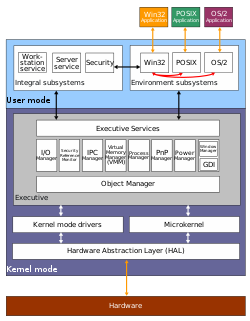
 The Win32 subsystem shown next to the POSIX and OS/2 subsystem in the architecture of Windows NT (later Win64 is also available.) | |
| Developer | Microsoft |
| Initial release | November 20, 1985 |
| Operating system | Microsoft Windows, OS/2 |
| Predecessor | DOS API |
| Type | API |
| License | Proprietary |
| Website | learn |
The Windows API, informally WinAPI, is the foundational application programming interface (API) that allows a computer program to access the features of the Microsoft Windows operating system in which the program is running. Programs typically access this API using system libraries, which are shared libraries.
Each major version of the Windows API has a distinct name that identifies a compatibility aspect of that version. For example, Win32 is the major version of Windows API that runs on 32-bit systems. The name, Windows API, collectively refers to all versions of this capability of Windows.
Microsoft provides developer support via a software development kit, Microsoft Windows SDK, which includes documentation and tools for building software based on the Windows API.
Services
[edit] | This section needs to be updated. The reason given is: The categories are out of date, as are the references for it; see, for example, https://learn.microsoft.com/en-us/windows/win32/apiindex/windows-api-list.. (May 2023) |
This section lists notable services provided by the Windows API.[1]
Base Services
[edit]Base services include features such as the file system, devices, processes, threads, and error handling. These functions reside in kernel.exe, krnl286.exe or krnl386.exe files on 16-bit Windows, and kernel32.dll and KernelBase.dll on 32 and 64 bit Windows. These files reside in the folder \Windows\System32 on all versions of Windows.[2]
Advanced Services
[edit]Advanced services include features beyond the kernel like the Windows registry, shutdown/restart the system (or abort), start/stop/create a Windows service, manage user accounts. These functions reside in advapi32.dll and advapires32.dll on 32-bit Windows.
Graphics Device Interface
[edit]The Graphics Device Interface (GDI) component provides features to output graphics content to monitors, printers, and other output devices. It resides in gdi.exe on 16-bit Windows, and gdi32.dll on 32-bit Windows in user-mode. Kernel-mode GDI support is provided by win32k.sys which communicates directly with the graphics driver.[3][4]
User Interface
[edit]The User Interface component provides features to create and manage screen windows and most basic controls, such as buttons and scrollbars, receive mouse and keyboard input, and other functions associated with the graphical user interface (GUI) part of Windows. This functional unit resides in user.exe on 16-bit Windows, and user32.dll on 32-bit Windows. Since Windows XP versions, the basic controls reside in comctl32.dll, together with the common controls (Common Control Library).[5]
Common Dialog Box Library
[edit]The Common Dialog Box Library provides standard dialog boxes to open and save files, choose color and font, etc. The library resides in a file called commdlg.dll on 16-bit Windows, and comdlg32.dll on 32-bit Windows. It is grouped under the User Interface category of the API.[6]
Common Control Library
[edit]The Common Control Library provides access to advanced user interface controls, including things like status bars, progress bars, toolbars and tabs. The library resides in a DLL file called commctrl.dll on 16-bit Windows, and comctl32.dll on 32-bit Windows. It is grouped under the User Interface category of the API.[7]
Windows Shell
[edit]The Windows Shell component provides access to the operating system shell. The component resides in shell.dll on 16-bit Windows, and shell32.dll on 32-bit Windows. The Shell Lightweight Utility Functions are in shlwapi.dll. It is grouped under the User Interface category of the API.[8][9]
Network Services
[edit]Network Services provide access to the various networking abilities of the operating system. Its subcomponents include NetBIOS, Winsock, NetDDE, remote procedure call (RPC) and many more. This component resides in netapi32.dll on 32-bit Windows.[10]
Web
[edit]The Internet Explorer (IE) web browser exposes APIs and as such could be considered part of the Windows API. IE has been included with the operating system since Windows 95 OSR2 and has provided web-related services to applications since Windows 98.[11]
Program interaction
[edit]The Windows API is a C language-based API.[12] Functions and data structures are consumable via C syntax by including windows.h, but the API can be consumed via any programming language that can inter-operate with the API data structures and calling conventions for function calls and callbacks.
Of note, the implementation of API functions has been developed in several languages other than C.[a]
Despite the fact that C is not an object-oriented programming (OOP) language, the Windows API is somewhat object-oriented due to its use of handles. Various other technologies from Microsoft and others make this object-oriented aspect more apparent by using an OOP language such as C++ — see Microsoft Foundation Class Library (MFC), Visual Component Library (VCL), GDI+. Of note, Windows 8 provides the Windows API and the WinRT API, which is implemented in C++[13] and is object-oriented by design.[13]
Windows.pas is a Delphi unit that exposes the features of Windows API – the Pascal equivalent of windows.h.[14]
Related technologies
[edit]Many Microsoft technologies use the Windows API -- as most software running on Windows does. As middle-ware between Windows API and an application, the following technologies provide some access to Windows API. Some technologies are described as wrapping Windows API, but this is debatable since they don't provide or expose all of the capabilities of Windows API.
- Microsoft Foundation Class Library (MFC) exposes some of Windows API functionality in C++ classes, and thus allows a more object-oriented way to interact with the API
- Active Template Library (ATL) is a C++ template library that provides some Windows API access
- Windows Template Library (WTL) was developed as an extension to ATL, and intended as a smaller alternative to MFC
- Most application frameworks for Windows provide some access to Windows API; including .NET runtime and Java virtual machine and any other programming languages targeting Windows
- Various technologies for communicating between components and applications – starting with Dynamic Data Exchange (DDE), which was superseded by Object Linking and Embedding (OLE) and later by the Component Object Model (COM), Automation Objects, ActiveX controls, and the .NET Framework
Although almost all Windows programs use the Windows API, on the Windows NT line of operating systems, programs that start early in the Windows startup process use the Native API instead.[15]
History
[edit]The Windows API has always exposed a large part of the underlying structure of the Windows systems to programmers. This had the advantage of giving them much flexibility and power over their applications, but also creates great responsibility in how applications handle various low-level, sometimes tedious, operations that are associated with a graphical user interface.
For example, a beginning C programmer will often write the simple "hello world" as their first assignment. The working part of the program is only a single printf line within the main subroutine. The overhead for linking to the standard I/O library is also only one line:

#include <stdio.h>

int main(void) {
    printf("Hello, World!\n");
}
Charles Petzold, who wrote several books about programming for the Windows API, said: "The original hello world program in the Windows 1.0 SDK was a bit of a scandal. HELLO.C was about 150 lines long, and the HELLO.RC resource script had another 20 or so more lines. (...) Veteran programmers often curled up in horror or laughter when encountering the Windows hello-world program."[16] Petzold explains that while it was the first Windows sample programs developers were introduced to, it was quite "fancy" and more complex than needed. Tired of people ridiculing the length of the sample, he eventually reduced it to a simple MessageBox call.[17]
Over the years, various changes and additions were made to Windows systems, and the Windows API changed and grew to reflect this.[18] The Windows API for Windows 1.0 supported fewer than 450 function calls, whereas modern versions of the Windows API support thousands. However, in general, the interface remained fairly consistent, and an old Windows 1.0 application will still look familiar to a programmer who is used to the modern Windows API.[19]
Microsoft has made an effort to maintain backward compatibility. To achieve this, when developing new versions of Windows, Microsoft sometimes implemented workarounds[20] to allow compatibility with third-party software that used the prior version in an undocumented or even inadvisable way. Raymond Chen, a Microsoft developer who works on the Windows API, has said: "I could probably write for months solely about bad things apps do and what we had to do to get them to work again (often in spite of themselves). Which is why I get particularly furious when people accuse Microsoft of maliciously breaking applications during OS upgrades. If any application failed to run on Windows 95, I took it as a personal failure."[21]
One of the largest changes to the Windows API was the transition from Win16 (shipped in Windows 3.1 and older) to Win32 (Windows NT and Windows 95 and up). While Win32 was originally introduced with Windows NT 3.1 and Win32s allowed use of a Win32 subset before Windows 95, it was not until Windows 95 that widespread porting of applications to Win32 began. To ease the transition, in Windows 95, for developers outside and inside Microsoft, a complex scheme of API thunks was used that could allow 32-bit code to call into 16-bit code (for most of Win16 APIs) and vice versa. Flat thunks allowed 32-bit code to call into 16-bit libraries, and the scheme was used extensively inside Windows 95's libraries to avoid porting the whole OS to Win32 in one batch. In Windows NT, the OS was pure 32-bit, except parts for compatibility with 16-bit applications, and only generic thunks were available to thunk from Win16 to Win32, as for Windows 95. The Platform SDK shipped with a compiler that could produce the code needed for these thunks. Versions of 64-bit Windows are also able to run 32-bit applications via WoW64. The SysWOW64 folder located in the Windows folder on the OS drive contains several tools to support 32-bit applications.[22]
Major versions
[edit]Each version of Microsoft Windows contains a version of Windows API, and almost every new version of Microsoft Windows has introduced additions and changes to the Windows API.[23]
The name, Windows API, refers to essentially the same capability in each version of Windows, but there is another name for this capability that is based on major architectural aspects of the Windows version that contains it. When there was only one version, it was simply called Windows API. Then, when the first major update was made, Microsoft gave it the name Win32 and gave the first version the name Win16. The term Windows API refers to both versions and all subsequently developed major versions.[24]
- Win16 is in the 16-bit versions of Windows. The functions reside mainly in core files of the OS: kernel.exe (or krnl286.exe or krnl386.exe), user.exe and gdi.exe. Despite the file extension of exe, such a file is accessed as a DLL.
- Win32 is in the 32-bit versions of Windows (NT, 95, and later). The functions are implemented in system DLL files including kernel32.dll, user32.dll, and gdi32.dll. Win32 was introduced with Windows NT. In Windows 95, it was initially referred to as Win32c, with c meaning compatibility. This term was later abandoned by Microsoft in favor of Win32.
- Win32s is an extension for the Windows 3.1x family of Microsoft Windows that implemented a subset of the Win32 API for these systems. The "s" stands for "subset".
- Win64 is the version in the 64-bit platforms of the Windows architecture (as of 2021[update], x86-64 and AArch64).[b][25][26] Both 32-bit and 64-bit versions of an application can be compiled from one codebase, although some older API functions have been deprecated, and some of the API functions that were deprecated in Win32 were removed. All memory pointers are 64-bit by default (the LLP64 model), so porting Win32-compatible source code includes updating for 64-bit pointer arithmetic.[27]
- WinCE is the version in the Windows CE operating system.
Other implementations
[edit]
The Wine project provides a Win32 API compatibility layer for Unix-like platforms, between Linux kernel API and programs written for the Windows API. ReactOS goes a step further and aims to implement the full Windows operating system, working closely with the Wine project to promote code re-use and compatibility. DosWin32 and HX DOS Extender are other projects which emulate the Windows API to allow executing simple Windows programs from a DOS command line. Odin is a project to emulate Win32 on OS/2, superseding the original Win-OS/2 emulation which was based on Microsoft code. Other minor implementations include the MEWEL and Zinc libraries which were intended to implement a subset of the Win16 API on DOS (see List of platform-independent GUI libraries).
Windows Interface Source Environment (WISE) was a licensing program from Microsoft which allowed developers to recompile and run Windows-based applications on Unix and Macintosh platforms. WISE SDKs were based on an emulator of the Windows API that could run on those platforms.[28]
Efforts toward standardization included Sun's Public Windows Interface (PWI) for Win16 (see also: Sun Windows Application Binary Interface (Wabi)), Willows Software's Application Programming Interface for Windows (APIW) for Win16 and Win32 (see also: Willows TWIN), and ECMA-234, which attempted to standardize the Windows API bindingly.
Compiler support
[edit]To develop software that uses the Windows API, a compiler must be able to use the Microsoft-specific DLLs listed above (COM-objects are outside Win32 and assume a certain vtable layout). The compiler must either handle the header files that expose the interior API function names, or supply such files.
For the language C++, Zortech (later Symantec, then Digital Mars), Watcom and Borland have all produced well-known commercial compilers that have been used often with Win16, Win32s, and Win32. Some of them supplied memory extenders, allowing Win32 programs to run on Win16 with Microsoft's redistributable Win32s DLL. The Zortech compiler was probably one of the first stable and usable C++ compilers for Windows programming, before Microsoft had a C++ compiler.
For certain classes of applications, the compiler system should also be able to handle interface description language (IDL) files. Collectively, these prerequisites (compilers, tools, libraries, and headers) are known as the Microsoft Platform SDK. For a time, the Microsoft Visual Studio and Borland's integrated development system were the only integrated development environments (IDEs) that could provide this (although, the SDK is downloadable for free separately from the entire IDE suite, from Microsoft Windows SDK for Windows 7 and .NET Framework 4).
As of 2016[update], the MinGW and Cygwin projects also provide such an environment based on the GNU Compiler Collection (GCC), using a stand-alone header file set, to make linking against the Win32-specific DLLs simple. LCC-Win32 is a C compiler maintained by Jacob Navia, freeware for non-commercial use. Pelles C is a freeware C compiler maintained by Pelle Orinius. Free Pascal is a free software Object Pascal compiler that supports the Windows API. The MASM32 package is a mature project providing support for the Windows API under Microsoft Macro Assembler (MASM) by using custom made or converted headers and libraries from the Platform SDK. Flat assembler FASM allows building Windows programs without using an external linker, even when running on Linux.
Windows specific compiler support is also needed for Structured Exception Handling (SEH). This system serves two purposes: it provides a substrate on which language-specific exception handling can be implemented, and it is how the kernel notifies applications of exceptional conditions such as dereferencing an invalid pointer or stack overflow. The Microsoft/Borland C++ compilers had the ability to use this system as soon as it was introduced in Windows 95 and NT, however the actual implementation was undocumented and had to be reverse engineered for the Wine project and free compilers. SEH is based on pushing exception handler frames onto the stack, then adding them to a linked list stored in thread-local storage (the first field of the thread environment block). When an exception is thrown, the kernel and base libraries unwind the stack running handlers and filters as they are encountered. Eventually, every exception unhandled by the application will be dealt with by the default backstop handler, which pops up the Windows common crash dialog.
Other languages
[edit]Microsoft has plans to update the Windows API for modern C++ usage with their win32metadata project.[29] Microsoft has also created bindings for other languages, including C# and Rust for calling the Win32 API.[30]
See also
[edit]- Windows.h
- Windows Libraries for OS/2
- Interix – Unix subsystem for Windows NT operating systems
- Linux kernel API – Linux kernel APIs and ABIs
- Microsoft Windows library files – List of main shared-libraries of Microsoft Windows
- Windows legacy audio components – Obsolete Microsoft Windows audio APIs
- C++/WinRT – Software library
- C POSIX library
- C standard library
- C++ standard library
Notes
[edit]- ^ Both Pascal and x86 assembly were heavily used in earlier versions, before C became dominant. A reminiscence of this is that the API functions still use the Pascal calling convention to restore the stack from pushed parameters after a call (although they expect parameters pushed from right to left, as most C compilers do, by default).
- ^ Nomenclature of released 64-bit versions includes Windows XP Professional x64 Edition and x64 Editions of Windows Server 2003, Windows Vista and Windows Server 2008 on the x86-64 (AMD64) platform, and Windows 2000 Server Limited Edition, Windows XP 64-bit Edition, Windows Advanced Server 2003 for Itanium and Windows 2008 Advanced Server for Itanium on the IA-64 platform.
References
[edit]- ^ "Windows API Index". March 15, 2023.
- ^ Microsoft Developer Network (July 2005). Base Services. Retrieved August 28, 2005.
- ^ Microsoft Developer Network (July 2005). Graphics Device Interface. Retrieved August 28, 2005.
- ^ "G". Microsoft Developer Network. Retrieved January 28, 2009.
- ^ Microsoft Developer Network (July 2005). User Interface. Retrieved August 28, 2005.
- ^ Microsoft Developer Network (2005). Common Dialog Box Library. Retrieved September 22, 2005.
- ^ Microsoft Developer Network (July 2005). Common Control Library. Retrieved August 28, 2005.
- ^ Microsoft Developer Network (July 2005). Windows Shell. Retrieved August 28, 2005.
- ^ Microsoft Developer Network (2005). Shell Programmer's Guide. Retrieved August 28, 2005.
- ^ Microsoft Developer Network (July 2005). Network Services. Retrieved August 28, 2005.
- ^ Microsoft Developer Network (January 2006); Programming and reusing the browser Retrieved January 22, 2006.
- ^ "Walkthrough: Create a traditional Windows Desktop application (C++)". Microsoft Docs. February 23, 2022.
- ^ a b Mayberry, Michael (2012). WinRT Revealed. New York City: Apress. p. 3. ISBN 978-1-4302-4585-8.
- ^ Texeira, Steve and Xavier Pacheco (2002). Borland Delphi 6 Developer's Guide. Sams. p. 253. ISBN 0672321157.
- ^ Russinovich, Mark (November 2006). "Inside Native Applications". Microsoft Docs. Retrieved April 12, 2022.
- ^ Charles Petzold (December 2001). Programming Microsoft Windows with C#. Microsoft Press. Beyond the Console, page 47.
- ^ Petzold, Charles. "The Infamous Windows "Hello World" Program". www.charlespetzold.com. Retrieved June 30, 2024.
- ^ Detailed analysis of changes in the Windows API from XP to 10. Retrieved September 08, 2016.
- ^ Charles Petzold (November 11, 1998). Programming Windows, Fifth Edition. Microsoft Press. APIs and Memory Models, page 9.
- ^ Smith, Graham (October 8, 2022). "Windows 95 had special code just to fix a bug in the original SimCity". Rock, Paper, Shotgun.
- ^ Raymond Chen (October 15, 2003). What about BOZOSLIVEHERE and TABTHETEXTOUTFORWIMPS? Retrieved June 29, 2022.
- ^ Hoffman, Chris (February 16, 2018). "What's the Difference Between the "System32" and "SysWOW64" Folders in Windows?". How-To Geek. Retrieved April 11, 2023.
- ^ The Iseran Project (1996–2001). History of the Windows API. Retrieved October 7, 2005.
- ^ Microsoft Developer Network (July 2005). Overview of the Windows API. Retrieved August 28, 2005.
- ^ "Windows XP Professional x64 Edition home page". Microsoft. Archived from the original on January 11, 2006.
- ^ "Microsoft 64-bit Computing Overview". Microsoft. Archived from the original on January 12, 2009.
- ^ "MSDN: Getting Ready for 64-bit Windows". Microsoft. August 19, 2020.
- ^ WISE Archived 2008-03-30 at the Wayback Machine
- ^ "Making Win32 APIs More Accessible to More Languages". blogs.windows.com. January 21, 2021.
- ^ "win32metadata". Retrieved September 4, 2025.
External links
[edit]- MSDN Windows API index
- Windows API Microsoft Code Samples
- ECMA-234 – ECMA standard for a subset of the Windows API
- Advanced Win32 API newsgroup
- French Win32 API newsgroup


Windows API
View on GrokipediaFundamentals
Definition and Scope
The Windows API serves as the foundational programming interface for interacting with the Microsoft Windows operating system, comprising a comprehensive collection of functions, interfaces, and protocols primarily exported by dynamic-link libraries (DLLs) such as kernel32.dll, user32.dll, and gdi32.dll. These DLLs encapsulate core system functionalities: kernel32.dll provides low-level operating system services including memory management and process handling; user32.dll manages user interface elements like messages and windows; and gdi32.dll handles graphics device interface operations for rendering and display. This structure enables developers to access Windows capabilities through standardized entry points, ensuring portability across compatible Windows versions while leveraging hardware and system resources efficiently.[3][6] The scope of the Windows API spans from low-level kernel-mode interactions, such as process creation and thread synchronization via functions like CreateProcess in kernel32.dll, to high-level user-mode features, including window management with CreateWindow in user32.dll. This broad range supports operations critical to system stability and user experience, allowing applications to interface directly with the operating system's kernel, file systems, and hardware abstractions without requiring proprietary extensions. The API's design emphasizes modularity, with functions grouped into logical sets that abstract underlying complexities, facilitating both performance-critical tasks and intuitive application development.[2][4] While the classic Win32 API represents the core C-style procedural interface for traditional desktop applications, the broader Windows API extends to include object-oriented paradigms like the Component Object Model (COM), which enables reusable binary components through interfaces such as IUnknown, and the Windows Runtime (WinRT), a metadata-driven API for building universal apps with language projections in C++, C#, and JavaScript. This distinction allows the Windows API to evolve beyond 32-bit legacy constraints, incorporating modern standards for security, asynchronous programming, and cross-platform compatibility in newer Windows environments. COM and WinRT build upon Win32 foundations but introduce projection layers to abstract implementation details, promoting interoperability across diverse development ecosystems.[1] Primary use cases for the Windows API include developing native desktop applications that require direct system access, such as productivity software utilizing user interface primitives; creating system utilities for tasks like file manipulation and registry access via kernel functions; and facilitating user-mode interactions with kernel-mode drivers through APIs like those in advapi32.dll for security and device management. These applications leverage the API's stability to ensure seamless integration with Windows features, from legacy Win32-based tools to contemporary hybrid solutions incorporating COM or WinRT components.[7][5]Architectural Overview
The Windows API operates within a hybrid architecture that delineates user mode and kernel mode to ensure system stability and security. User-mode components, where applications and higher-level services execute, are isolated from the kernel mode, which handles core operating system functions such as hardware abstraction, process management, and memory allocation. This separation prevents user-mode faults from crashing the entire system, with transitions between modes enforced through protected system calls. At the heart of this design is the Windows NT kernel (ntoskrnl.exe), which provides the foundational executive services and object manager, while the Win32 subsystem serves as the primary user-mode API layer, translating application requests into native kernel operations.[8][9] The modular design of the Windows API relies heavily on dynamic-link libraries (DLLs) to organize functionality and promote reusability. Central to this is ntdll.dll, which acts as the system service dispatcher in user mode, exporting the Native API functions (prefixed with Nt or Zw) that directly interface with the kernel via system service dispatch tables. Subsystem DLLs, such as kernel32.dll, build upon ntdll.dll to implement the Win32 API's base services, including process and thread management, file I/O, and synchronization primitives; these DLLs forward low-level requests to ntdll.dll for kernel invocation while providing a higher-level, abstracted interface for developers. This layered DLL approach allows for versioned API sets and facilitates updates without disrupting dependent applications.[10][11] Inter-component communication in the Windows API spans both local and remote scenarios, primarily through Local Procedure Call (LPC) and Remote Procedure Call (RPC) mechanisms. LPC enables efficient, secure message passing between user-mode processes and the kernel or other subsystems on the same machine, using port objects managed by the kernel's LPC facility to handle asynchronous requests and responses without direct memory access. For distributed interactions, RPC extends this model across network boundaries, allowing client applications to invoke procedures on remote servers as if they were local calls, with the RPC runtime handling marshaling, authentication, and transport via protocols like TCP/IP. These mechanisms underpin subsystem interactions, such as the Win32 subsystem communicating with the kernel.[12][13] The Windows API encompasses multiple layers that support interoperability and extensibility, with Win32 forming the foundational layer for native C/C++ development, exposing functions through headers like windows.h. Above Win32 sits the Component Object Model (COM), a binary standard for object-oriented components that enables language-agnostic reuse and is integral to advanced services like ActiveX and OLE; COM objects often delegate to Win32 primitives for implementation. Further abstraction is provided through .NET interop, where managed code in the .NET Framework or .NET Core uses Platform Invoke (P/Invoke) to call Win32 and COM APIs, bridging unmanaged native code with managed environments while respecting the underlying user-kernel boundaries. These layers depend hierarchically: .NET relies on COM and Win32 for system access, COM on Win32 for core operations, and all ultimately on the NT kernel via ntdll.dll.[14][11]Core Services
Base Services
Base services in the Windows API encompass the essential low-level functions for process and thread management, memory allocation, file input/output operations, and console/environment handling, forming the foundation upon which applications interact with the operating system's core resources. These services are primarily exposed through the kernel32.dll dynamic-link library, enabling developers to build robust, efficient programs without direct kernel access.[2] By providing handle-based abstractions, these APIs ensure secure and portable resource management across Windows versions.[15] Process and thread management APIs allow applications to create, query, and control execution units within the system. The CreateProcess function initiates a new process and its primary thread, executing the specified module in the security context of the calling process while allowing customization of startup information, such as the working directory and environment block.[16] For introspection, GetCurrentProcessId retrieves the unique identifier of the current process, a DWORD value used for inter-process communication or logging.[17] Thread creation is handled by CreateThread, which allocates a new thread in the calling process's virtual address space, specifying the thread procedure, parameters, stack size, and creation flags to control scheduling and security attributes.[18] These functions support multiprogramming by enabling concurrent execution, where threads share the process's address space and resources but maintain independent execution contexts.[19] Memory allocation services provide mechanisms for dynamic memory management at both heap and virtual address levels. HeapAlloc allocates a block of memory from a specified heap—typically obtained via HeapCreate or GetProcessHeap—ensuring the memory is non-movable and at least the requested size in bytes, with optional zero-initialization via the HEAP_ZERO_MEMORY flag.[20] For larger-scale or page-aligned allocations, VirtualAlloc reserves, commits, or modifies regions in the process's virtual address space, operating at page granularity (typically 4 KB) and supporting protection constants like PAGE_READWRITE, which grants both read and write access to the committed pages.[21][22] These APIs differ in granularity: heap allocations suit frequent small blocks, while virtual allocations optimize for performance in scenarios like buffer management or executable code loading.[23] File I/O operations rely on handle-based APIs for creating, reading, and writing to files or devices, supporting both synchronous and asynchronous modes. CreateFile opens an existing file or creates a new one, returning a HANDLE for subsequent operations and specifying access rights (e.g., GENERIC_READ, GENERIC_WRITE), sharing modes, creation disposition, and attributes like FILE_ATTRIBUTE_NORMAL.[24] Data transfer uses ReadFile to retrieve bytes from the file into a buffer at the current file pointer position, and WriteFile to output bytes from a buffer, both functions blocking until completion in synchronous mode or returning immediately in asynchronous mode when the FILE_FLAG_OVERLAPPED flag is set during file creation.[25][26] Asynchronous I/O, also known as overlapped I/O, employs an OVERLAPPED structure to track operation progress and completion, allowing non-blocking file access essential for high-throughput applications like servers.[27] Console and environment services facilitate interaction with standard I/O streams and process-specific configurations. GetStdHandle retrieves pseudohandles to the standard devices—STD_INPUT_HANDLE for input, STD_OUTPUT_HANDLE for output, and STD_ERROR_HANDLE for error streams—enabling console applications to redirect or manipulate these streams programmatically.[28] Environment management is provided by SetEnvironmentVariable, which sets or modifies a named variable in the current process's environment block, affecting subsequent calls to GetEnvironmentVariable and child processes unless explicitly blocked.[29] These services are crucial for command-line tools and scripts, allowing dynamic configuration without altering system-wide settings.[30]Advanced Services
Advanced services in the Windows API extend base functionality by providing specialized mechanisms for concurrency control, persistent data management, resource optimization, and regional adaptations, enabling developers to build robust, multithreaded applications that interact efficiently with system states. These services are essential for scenarios requiring coordinated thread execution, configuration persistence across sessions, performance tuning under varying power conditions, and accurate handling of time-based operations in diverse locales. Synchronization objects form a cornerstone of multithreading support, allowing threads to coordinate access to shared resources and signal completion of operations. Mutexes, created using the CreateMutex function, enforce mutual exclusion by granting ownership to only one thread at a time, preventing race conditions in critical sections.[31] Threads acquire mutex ownership via WaitForSingleObject, which blocks until the object is available or a specified timeout expires, returning a handle for release with ReleaseMutex.[32] Semaphores, initialized through CreateSemaphore, extend this by permitting a configurable number of simultaneous threads—defined by an initial and maximum count—to access resources, ideal for managing bounded pools like connection limits. Events, generated by CreateEvent, facilitate inter-thread communication; manual-reset events maintain a signaled state until explicitly reset, while auto-reset events signal only one waiting thread, supporting patterns like producer-consumer synchronization.[33] The registry API offers a structured approach to persistent configuration storage, treating the registry as a tree-like database for key-value pairs that survive process termination. RegOpenKeyEx opens an existing or creates a new subkey under a parent handle—such as HKEY_LOCAL_MACHINE—with specified access rights, yielding a handle for read/write operations while supporting recursive navigation. Once opened, RegQueryValueEx retrieves the data type (e.g., REG_SZ for strings, REG_DWORD for integers) and value contents for a named entry, populating buffers with the raw data and size, which is crucial for loading application settings or hardware configurations at startup.[34] Corresponding functions like RegSetValueEx and RegCloseKey complete the cycle, ensuring secure, atomic updates with error handling via return codes. Power and performance services enable optimization of thread scheduling and awareness of hardware constraints, particularly in battery-powered or resource-limited environments. SetThreadPriority modifies a thread's base priority relative to its process class, using values from THREAD_PRIORITY_IDLE (-15) to THREAD_PRIORITY_TIME_CRITICAL (15), or special flags like THREAD_MODE_BACKGROUND_BEGIN to deprioritize non-foreground tasks and conserve CPU cycles.[35] This influences the scheduler's time-slice allocation, though priorities above 11 require debug privileges to avoid system instability. GetSystemPowerStatus queries the overall power state, filling a SYSTEM_POWER_STATUS structure with details like AC/DC mode, battery charge percentage (0-100 or 255 for unknown), low-battery flags, and charging status, allowing applications to throttle operations or warn users proactively.[36][37] Time and localization services manage date-time retrieval and zone adjustments, with built-in support for regional variations evolving alongside Unicode integration for global compatibility. GetLocalTime fetches the current date and time in the system's locale, converting UTC via the time zone bias and populating a SYSTEMTIME structure with components like year, month, day-of-week, hour, minute, second, and millisecond.[38] SetTimeZoneInformation updates the active time zone by specifying bias minutes from UTC, names for standard and daylight periods, and SYSTEMTIME transition rules, requiring the SE_TIME_ZONE_NAME privilege for security.[39] Unicode support emerged natively in Windows NT 3.1 (1993) through wide-character ("W") API variants using UCS-2 encoding (a subset of UTF-16), contrasting with ANSI ("A") code-page handling, while Windows 95/98/Me relied on the Microsoft Layer for Unicode (MSLU), introduced in 2001 as a thunking layer to map Unicode calls to ANSI equivalents for those systems.[40][41] This progression ensures functions like GetLocalTime and SetTimeZoneInformation properly render localized strings and formats, such as date separators or AM/PM indicators, across languages without data loss.[40]User Interface Services
Graphics Device Interface
The Graphics Device Interface (GDI) is a core component of the Windows API that provides device-independent 2D graphics and formatted text rendering capabilities for applications targeting displays and printers.[42] It abstracts hardware details through device drivers, allowing developers to draw shapes, lines, text, and images without direct interaction with specific output devices. Introduced in early Windows versions, GDI remains integral to legacy and compatibility-focused applications, supporting raster and vector operations via a unified programming model.[42] Central to GDI operations are device contexts (DCs), which serve as logical drawing surfaces representing physical or memory-based output targets. A device context is identified by a handle of typeHDC and encapsulates attributes such as graphic objects (pens, brushes, fonts) and rendering modes. Applications obtain an HDC for a window's client area using the GetDC function, which retrieves a common or class-specific DC depending on the window's style, enabling drawing within that surface.[43] Once drawing is complete, ReleaseDC must be called to free the DC and return resources to the system, preventing handle leaks and ensuring efficient resource management.[44] DCs support various types, including memory DCs for off-screen rendering and printer DCs for output spooling, facilitating consistent graphics across diverse hardware.[43]
GDI's drawing primitives enable basic 2D vector graphics through functions that operate on the current DC, utilizing selected graphic objects for styling. For lines, LineTo draws from the current pen position to a specified endpoint (excluding the endpoint itself), with the pen defining attributes like color, width, and style (solid, dashed); the current position is updated or set via MoveToEx. Shapes like rectangles are rendered using Rectangle, which draws the outline with the current pen and fills the interior with the selected brush, where brushes specify fill patterns, colors, or gradients (e.g., solid, hatched). Text output is handled by TextOut, which renders a character string at a given location using the currently selected font, text color, and background; fonts are managed via creation functions like CreateFont and selection into the DC with SelectObject, supporting TrueType and raster fonts for scalable typography.[45] These primitives prioritize simplicity and portability, forming the foundation for user interface elements and printed output.
GDI supports raster graphics through bitmap handling and vector storage via metafiles, allowing efficient image manipulation and playback. CreateCompatibleBitmap generates a device-compatible bitmap matching the format of the associated DC, suitable for off-screen drawing or blitting to the screen; this enables memory-based rendering before transfer to visible surfaces using functions like BitBlt. For vector graphics portability, enhanced metafiles (EMFs) record sequences of GDI calls as scalable records, which can be replayed with PlayEnhMetaFile to redraw the content on any compatible DC, preserving fidelity across resolutions and devices.
Despite its robustness, GDI exhibits limitations in modern scenarios, particularly due to its software-based rendering on the CPU, which lacks hardware acceleration and struggles with high-resolution displays, complex animations, or large-scale graphics, leading to performance bottlenecks.[46] As a result, Microsoft recommends Direct2D for new 2D graphics development in Windows, as it leverages GPU acceleration via Direct3D for improved efficiency and subpixel antialiasing, while maintaining compatibility with GDI through interop layers; GDI continues to be supported for backward compatibility but is increasingly supplemented or replaced in performance-critical applications.[47]
User Interface Primitives
The Windows API provides fundamental primitives for creating and managing windows, forming the basis of event-driven user interfaces in desktop applications. Window creation begins with registering a window class using theRegisterClassEx function, which defines shared attributes such as the window procedure, class styles, background brush, and instance handle via a WNDCLASSEX structure.[48] This registration associates a unique class name with these properties, enabling multiple windows to share behavior without redundant definitions; local classes are process-specific, while global classes use the CS_GLOBALCLASS style for broader availability.[48] Once registered, the CreateWindowEx function (with CreateWindow as a macro alias) instantiates an overlapped, pop-up, or child window by specifying the class name, window title, styles, position, size, parent handle, menu, instance, and creation parameters.[49] The function returns a handle (HWND) to the new window upon success, triggering messages like WM_NCCREATE and WM_CREATE for initialization.[49]
Window styles, defined as bitwise flags in the dwStyle parameter of CreateWindowEx, dictate the window's appearance and behavior, such as borders, scrollbars, and resizability.[50] For instance, the WS_OVERLAPPEDWINDOW style combines WS_OVERLAPPED | WS_CAPTION | WS_SYSMENU | WS_THICKFRAME | WS_MINIMIZEBOX | WS_MAXIMIZEBOX to create a standard resizable window with a title bar, system menu, thick frame, and minimize/maximize buttons, equivalent to WS_TILEDWINDOW.[50] Extended styles via dwExStyle further customize aspects like layering or composition, but core styles remain modifiable post-creation using functions like SetWindowLong.[50] These styles ensure windows integrate seamlessly with the desktop environment, supporting default positioning via CW_USEDEFAULT for overlapped windows.[49]
After creation, window management involves functions like ShowWindow to control visibility and state, activating and displaying the window based on commands such as SW_SHOWNORMAL for the default restored size or SW_SHOWMAXIMIZED for full-screen presentation.[51] The function takes the window handle and show command as parameters, returning nonzero if the window was previously visible; on the initial call from WinMain, it respects the nCmdShow parameter unless overridden by STARTUPINFO.[51] This primitive enables dynamic lifecycle control, such as minimizing or restoring windows without recreating them.[51]
Event-driven programming relies on the message loop, a core primitive that retrieves, translates, and dispatches messages from the thread's queue to window procedures. The loop typically uses GetMessage to fetch the next message into a MSG structure, blocking until one arrives or WM_QUIT terminates it (returning 0).[52] If a message is retrieved successfully, TranslateMessage converts virtual-key codes to character messages for keyboard input, posting them back to the queue.[52] Finally, DispatchMessage routes the message to the target window's procedure for processing, enabling responsive handling of events like user interactions.[52] A basic implementation appears as:
while (GetMessage(&msg, NULL, 0, 0) > 0) {
    TranslateMessage(&msg);
    DispatchMessage(&msg);
}
while (GetMessage(&msg, NULL, 0, 0) > 0) {
    TranslateMessage(&msg);
    DispatchMessage(&msg);
}
GetAsyncKeyState queries the state of a virtual key (e.g., VK_ESCAPE), returning a short value where the most significant bit indicates if the key is down and the least significant bit signals a transition since the last call, though the latter is unreliable in multitasking environments.[53] Mouse position can be manipulated via SetCursorPos, which relocates the cursor to specified screen coordinates (in pixels), succeeding only if within any ClipCursor-defined bounds and requiring WINSTA_WRITEATTRIBUTES access on the input desktop.[54] Clipboard operations start with OpenClipboard, which locks the system clipboard to the calling thread or specified window, preventing modifications by others until CloseClipboard is called, and returns nonzero on success.[55] These functions provide low-level control for custom input processing in windows.
Menu and accelerator support enables navigation primitives through CreateMenu and LoadMenu. The CreateMenu function allocates an empty menu object, returning a handle (HMENU) that can be populated with items using AppendMenu or InsertMenuItem and attached to a window via SetMenu.[56] Resources are automatically freed when the menu is assigned to a window, but DestroyMenu is required otherwise.[56] For resource-based menus, LoadMenu retrieves a predefined menu template from the application's executable by name or ID, loading it into memory and returning the handle for immediate use or assignment.[57] Accelerators, defined in resource files, map keyboard shortcuts to menu commands, integrating seamlessly with the message loop for efficient user interaction.[57]
Common Controls and Dialogs
The common controls library in the Windows API provides a set of reusable user interface components for building graphical applications, such as buttons, progress bars, and more complex widgets like tree views and list views, all hosted within standard windows. To initialize these controls, applications call theInitCommonControlsEx function, which loads the Comctl32.dll dynamic-link library and registers the necessary window classes using an INITCOMMONCONTROLSEX structure that specifies the desired control classes via flags like ICC_STANDARD_CLASSES.[58] This ensures the controls are available before creating their windows with CreateWindow or CreateWindowEx, specifying class names such as WC_TREEVIEW for tree views or WC_LISTVIEW for list views.[59]
Tree-view controls (WC_TREEVIEW) display hierarchical data in an expandable tree structure, allowing users to navigate parent-child relationships, such as file directories or organizational charts.[60] Developers insert items using the TVM_INSERTITEM message with a TVINSERTSTRUCT that includes a TVITEM structure to define attributes like text, images from an image list, and state (e.g., selected or expanded).[61] The TVITEM structure supports retrieval and modification of item properties via TVM_GETITEM and TVM_SETITEM messages, enabling dynamic updates like expanding nodes on user interaction through notifications such as TVN_ITEMEXPANDING.[61] List-view controls (WC_LISTVIEW), on the other hand, present collections of items in views like icon, small icon, list, report, or large icon, ideal for displaying tabular data such as file lists in Explorer.[62] Items are added via LVM_INSERTITEM with an LVITEM structure specifying subitems, columns, and icons, while features like virtual mode (LVS_OWNERDATA) allow handling large datasets without loading all items into memory.[63]
Dialog boxes facilitate user input through predefined or custom forms, typically defined via resource templates in the application's executable that specify controls, layout, and initial values.[64] The DialogBox function creates a modal dialog, which blocks interaction with the parent window until dismissed (e.g., via OK or Cancel), processing messages in a dialog procedure (DLGPROC) that handles events like WM_COMMAND. In contrast, CreateDialog produces a modeless dialog that allows interaction with other windows, returning immediately with a handle for sending messages directly. Standard file open and save dialogs, such as those invoked by GetOpenFileName, exemplify resource-based templates integrated with common controls for functionality like thumbnail previews.[65]
Property sheets extend dialog functionality into multi-page interfaces for configuring complex settings, such as system properties panels.[66] Each page is created with CreatePropertySheetPage, populating a PROPSHEETPAGE structure with a dialog template, procedure, and title, then added to a sheet via PropertySheet which manages navigation tabs or wizards.[67] Wizards, a sequential variant, use similar pages but with PSH_WIZARD flags for forward/back navigation without tabs, guiding users through steps like installation processes.[68]
The common controls evolved significantly with version 6 of Comctl32.dll, introduced in Windows XP, which integrates support for visual styles and themes to align with the operating system's appearance, such as Luna or Aero schemes.[69] To enable this, applications include a manifest specifying dependency on Comctl32 version 6 or use InitCommonControlsEx with appropriate flags, allowing controls to render with themed elements like gradients and rounded corners via the User Experience (UX) theme API.[70] This version enhances accessibility and consistency but requires explicit activation, as earlier versions default to classic appearance.[71]
Shell Integration
The Windows Shell APIs enable applications to integrate seamlessly with the desktop environment, File Explorer, and system notification areas, allowing for enhanced user interactions such as navigating shell namespaces, managing taskbar icons, launching files through Explorer, and supporting drag-and-drop operations. These APIs are part of the broader shell namespace, which abstracts the file system and virtual folders into a unified structure accessible via COM interfaces. By leveraging these, developers can extend Explorer's functionality without directly manipulating underlying file I/O, focusing instead on shell-specific behaviors like context menus and item properties.[72] Shell namespaces form the foundation of this integration, providing a hierarchical view of system resources that includes both physical files and virtual elements like the Recycle Bin or network locations. The IShellFolder interface is central to this, enabling applications to enumerate, display, and operate on folder contents within the shell's namespace. For instance, it supports methods like EnumObjects for listing items and GetUIObjectOf for retrieving UI handlers, such as context menus or icons, for specific shell items. To begin navigation, applications typically call SHGetDesktopFolder, which returns an IShellFolder pointer to the desktop—the root of the shell namespace—allowing traversal to subfolders via BindToObject. This setup facilitates file system navigation in a shell-aware manner, treating folders as objects with display names and attributes.[73][74][72] Taskbar and notification integration allows applications to place persistent icons in the system tray and trigger user notifications, enhancing visibility for background processes. The Shell_NotifyIcon function handles adding, modifying, or removing icons from the notification area, using a NOTIFYICONDATAA structure to specify details like the icon handle, tooltip text, and callback messages for user interactions such as clicks. For notifications, it supports balloon tips and modern toast-like displays when the NIF_INFO flag is set, ensuring compatibility with the evolving notification area. In Windows 11, these APIs remain consistent, though the centered taskbar layout repositions icons visually without altering core functionality. Applications can also query icon positions using Shell_NotifyIconGetRect for precise overlay or animation handling.[75][76][77] Explorer extensions via shell APIs enable launching and manipulating files in a user-friendly context, mimicking native Explorer behaviors. ShellExecute performs operations on files or URLs by specifying a verb like "open" or "print," delegating to the associated application or shell handler, which simplifies tasks like opening documents without hardcoding paths to executables. For more control, ShellExecuteEx provides extended parameters, including process monitoring via a SHELLEXECUTEINFO structure. Drag-and-drop operations integrate through IDataObject, a COM interface that encapsulates transferable data formats, such as CF_HDROP for file lists, during DoDragDrop loops. Shell extensions can implement IDataObject to support dropping shell items onto custom views, enabling scenarios like rearranging desktop icons or transferring files between applications and Explorer.[78][79][80] Recent enhancements in shell integration reflect evolving desktop paradigms, particularly with virtual desktops introduced in Windows 10 and refined in Windows 11. The IVirtualDesktopManager interface allows programmatic management of virtual desktops, such as moving windows between them using MoveWindowToDesktop or querying active desktops via GetWindowDesktopId. This API supports multi-desktop workflows by associating windows with specific desktops, improving isolation and organization without disrupting taskbar or notification flows. In Windows 11, the centered taskbar complements these by providing a streamlined UI for switching desktops via Task View, though no new APIs specifically target the centering; existing shell notifications adapt to the layout automatically. These features ensure applications remain responsive across desktop environments.[81][82]Network and System Services
Network Communications
The Windows API provides a suite of functions and libraries for handling network communications, enabling applications to establish connections, transmit data, and manage network resources at the socket and protocol levels. Central to this is the Windows Sockets API (Winsock), which offers a standardized interface for TCP/IP and UDP-based networking, supporting both client and server operations across local and wide-area networks.[83] Winsock version 2.x, introduced in Windows 95 and enhanced in subsequent versions, extends these capabilities with support for multiple protocols, asynchronous operations, and protocol-independent name resolution, allowing developers to build robust, cross-platform compatible network applications.[83] To initialize a Winsock session, applications call WSAStartup, which negotiates the Winsock version (typically 2.2) and loads the necessary DLL (ws2_32.dll), returning a WSAData structure with version details and provider information.[84] Once initialized, the socket function creates a socket descriptor for communication, specifying the address family (e.g., AF_INET for IPv4), type (SOCK_STREAM for TCP or SOCK_DGRAM for UDP), and protocol (IPPROTO_TCP or IPPROTO_UDP).[85] For server-side operations, bind associates the socket with a local address and port, while clients use connect to establish a connection to a remote endpoint using a sockaddr structure.[84] These functions form the foundation for data transmission via send and recv (or their asynchronous counterparts like WSASend and WSARecv), with error handling through WSAGetLastError.[84] Winsock 2.x features, such as overlapped I/O for non-blocking operations and the select or WSAWaitForMultipleEvents for multiplexing, enhance scalability in multi-client scenarios.[83] Complementing Winsock, the IP Helper API (Iphlpapi.dll) facilitates enumeration and management of network interfaces and addresses. The GetAdaptersInfo function retrieves a linked list of IP_ADAPTER_INFO structures, detailing adapter names, IP addresses, gateway addresses, and DHCP status for all network interfaces on the system.[86] This is particularly useful for applications needing to detect connectivity changes or configure routes dynamically, though Microsoft recommends GetAdaptersAddresses for newer Windows versions due to its support for IPv6 and extended data.[87] By querying adapter indices and mask values from these structures, developers can implement network diagnostics or adapter-specific routing without relying on external tools.[87] For distributed computing, the Windows Remote Procedure Call (RPC) API enables seamless invocation of procedures across network boundaries as if they were local calls. The RpcBindingCreate function (or its ANSI variant RpcBindingCreateA) generates a binding handle from a string representation of the endpoint, protocol sequence (e.g., ncacn_ip_tcp for TCP/IP), and server details, establishing a connection to the RPC server.[88] This handle is then used with RpcCall or interface-specific stubs for marshaling arguments and executing remote methods, supporting authentication via security callbacks and asynchronous patterns through *RpcAsync ** functions.[89] RPC integrates with the Microsoft Interface Definition Language (MIDL) for generating client and server code, making it ideal for enterprise applications requiring inter-process communication over LANs or the internet.[89] IPv6 support is natively embedded in Winsock 2.x and later, allowing applications to use the same API for both IPv4 and IPv6 without major code changes by specifying AF_INET6 in socket creation.[90] Functions like getaddrinfo replace legacy gethostbyname for dual-stack resolution, returning addrinfo structures that handle IPv6 literals (e.g., [2001:db8::1]) and scoped addresses, while WSAConnectByName simplifies hostname-based connections over IPv6.[91] This ensures forward compatibility, with Winsock automatically selecting the appropriate protocol stack based on the address family and system configuration.[90] Integration with the Windows Firewall is achieved through the NetFwTypeLib COM library (hnetcfg.dll), which exposes interfaces for querying and modifying rules programmatically. The INetFwPolicy interface, obtained via CoCreateInstance with CLSID_NetFwPolicy2, provides access to current profiles (domain, private, public) and their INetFwRules collections.[92] Applications can add rules using INetFwRule objects, specifying ports, protocols (TCP/UDP), and directions to authorize traffic for sockets created via Winsock, ensuring compliance with security policies without manual user intervention.[93] This API, available since Windows XP SP2, supports elevation prompts via UAC for administrative changes and integrates with group policy for enterprise deployments.[93]Web and HTTP Handling
The Windows API provides several abstractions for handling web and HTTP operations, primarily through high-level interfaces that simplify internet protocol interactions for desktop applications. These APIs enable developers to perform tasks such as sending HTTP requests, parsing URLs, and managing connections without directly handling low-level network transports. Key components include the WinINet API for client-side HTTP operations, COM-based URL monikers for resource identification and binding, and the WinHTTP API for more advanced, server-oriented scenarios.[94][95][96] The WinINet API, introduced in Windows 95, offers a straightforward interface for applications to access HTTP and FTP resources, making it suitable for simple, interactive client applications that integrate with Internet Explorer's behaviors like caching and cookies. To initiate an HTTP session, developers callInternetOpen to create a handle, specifying the access type (direct, proxy, or parent) and optional agent string. Subsequent operations involve InternetConnect to establish a server connection, followed by HttpOpenRequest to prepare an HTTP request with details like the verb (e.g., GET or POST), object path, and version. The request is then sent using HttpSendRequest, which transmits headers and data to the server and retrieves the response, supporting features like secure connections via HTTPS. WinINet automatically handles protocol details, including HTTP/1.1 compliance and HTTP/2 support since Windows 10 version 1709, but it includes UI-dependent elements like credential prompts, limiting its use in services.[94][97]
For URL handling in a COM-centric approach, Windows employs URL monikers, which are objects implementing the IMoniker interface to represent and bind to network resources like web pages. Creation of a URL moniker is typically performed using the CreateURLMoniker function from urlmon.dll, which takes an optional base moniker context and a URL string to produce an IMoniker object.[96] This enables asynchronous binding via IMoniker::BindToObject, which resolves the URL and retrieves data streams, often used in compound documents or OLE scenarios for embedding web content.[98] The related IUri interface, also from urlmon.dll and available since Windows XP SP2, provides finer-grained parsing; it is instantiated via CreateUri or CoCreateInstance with CLSID_IUri, offering methods such as GetScheme to extract the protocol, GetHost for the domain, and GetPath for the resource path, ensuring canonicalization and validation per RFC 3986. These COM-based tools facilitate robust URL manipulation in legacy Win32 applications requiring integration with broader object models.[99])
WinHTTP, available since Internet Explorer 5 and enhanced in subsequent Windows versions, serves as a more programmatic alternative to WinINet, optimized for server-side and non-interactive applications with stronger support for authentication and scalability. Initialization begins with WinHttpOpen to establish a session handle, configurable for features like secure protocols (SSL/TLS 1.0+). Connections are made via WinHttpConnect to a server, then WinHttpOpenRequest prepares the HTTP request similar to WinINet but with additional flags for verbs and headers. Sending occurs through WinHttpSendRequest, followed by WinHttpReceiveResponse to process the reply, enabling advanced capabilities like proxy authentication (NTLM, Digest, Negotiate) and automatic redirects. Unlike WinINet, WinHTTP lacks built-in UI or caching, making it ideal for services, and it supports HTTP/2 by default since Windows 10 version 1709, with IPv6 and WebSocket extensions added in Windows 8.[95][100][101]
While these APIs remain supported for Win32 desktop applications, Microsoft recommends transitioning to the Windows Runtime (WinRT) Windows.Web.Http namespace, particularly HttpClient, for Universal Windows Platform (UWP) apps to leverage modern asynchronous patterns and sandboxed networking. This shift emphasizes HttpClient for sending requests via methods like GetAsync or PostAsync, providing better integration with app isolation and future-proofing against legacy dependencies.[95]
System Management Services
The System Management Services in the Windows API provide developers with interfaces to perform administrative tasks essential for maintaining and monitoring system health, such as controlling background services, logging events for auditing, and retrieving performance metrics. These services enable applications to interact with the Service Control Manager (SCM), the Event Log subsystem, and the Windows Management Instrumentation (WMI) framework, facilitating tasks like service installation, error reporting, and query-based system introspection. Unlike lower-level base services, these APIs focus on system-wide administrative operations, often requiring elevated privileges for secure execution.[102][103][104] Service control APIs allow programs to manage Windows services, which are long-running executable applications that support core system functions without a user interface. The OpenSCManager function establishes a connection to the SCM on a local or remote computer, returning a handle to the specified database (typically SERVICES_ACTIVE) with access rights like SC_MANAGER_CONNECT for querying services or SC_MANAGER_CREATE_SERVICE for modifications.[105] Once connected, the CreateService function creates a new service object in the SCM database, specifying details such as the service binary path, display name, startup type (e.g., SERVICE_AUTO_START), and dependencies on other services.[106] For example, an installation program might use these APIs to register a custom service, ensuring it starts automatically on boot; the function requires a valid SCM handle and appropriate security descriptors to prevent unauthorized access.[107] Related functions like OpenService and StartService extend this control by opening existing services for configuration or initiating their execution, forming a complete lifecycle management suite.[108] These APIs, part of the winsvc.h header, integrate with the Windows security model to enforce access rights, such as SERVICE_START for initiating services.[109] Event logging services support system auditing by enabling applications and services to record operational events, errors, and informational messages in structured logs viewable via the Event Viewer. The RegisterEventSource function retrieves a handle to an event source within a specified log file (e.g., Application or System), requiring the source name to be registered in the registry under HKLM\SYSTEM\CurrentControlSet\Services\EventLog for validation.[110] With this handle, the ReportEvent function writes an event entry to the log, including parameters like event type (e.g., EVENTLOG_ERROR_TYPE), category, ID, and insertion strings or binary data for detailed descriptions.[111] For instance, a service encountering a failure might call ReportEvent to log the incident with user-defined strings, aiding in post-mortem analysis; the function appends entries asynchronously to minimize performance impact.[112] These APIs, declared in winbase.h, support remote logging by specifying a server name, and require DeregisterEventSource to release handles properly, ensuring thread-safe operations in multi-process environments.[113] Designed primarily for Windows 2000 and later, they provide a standardized mechanism for auditing without direct file I/O.[103] Performance counters offer a mechanism to monitor system and application metrics, with basic integration often involving registry queries for counter definitions and WMI for advanced retrieval. The RegQueryValueEx function from the registry API reads performance counter data stored under keys like HKLM\SOFTWARE[Microsoft](/page/Microsoft)\Windows NT\CurrentVersion\Perflib, retrieving values such as counter names, indices, and help texts to build localized monitoring tools. This approach provides foundational access to counter metadata, enabling developers to enumerate available counters (e.g., processor utilization or memory usage) without specialized libraries, though it requires careful handling of registry hives for 32-bit versus 64-bit views. For broader integration, WMI exposes performance data through classes like Win32_PerfRawData_PerfOS_System, where queries can fetch real-time values like total processes or context switches. The higher-level Performance Data Helper (PDH) API, such as PdhOpenQuery and PdhCollectQueryData, builds on these foundations for easier consumption, but WMI's query model allows flexible, SQL-like filtering for system-wide monitoring.[114][115] These counters, introduced in early Windows NT versions, abstract hardware-specific metrics into a unified interface, supporting tools like PerfMon for visualization.[116] Windows Management Instrumentation (WMI) serves as a cornerstone for query-based system management, providing a standardized, object-oriented model to access and manipulate system data across local and remote machines. The IWbemServices interface, obtained via CoCreateInstance from the CLSID_WbemLocator, acts as the primary entry point for WMI operations, supporting methods like ExecQuery for executing WQL (WMI Query Language) statements to retrieve instances of classes such as Win32_Service or Win32_Process.[117] For example, a management application might use IWbemServices::ExecQuery with "SELECT * FROM Win32_OperatingSystem" to gather details like OS version and build number, returning an enumerator (IEnumWbemClassObject) for iterating results asynchronously via IWbemServices::GetObjectAsync.[118] This interface also enables instance creation or modification through PutInstance and supports namespace navigation with OpenNamespace, allowing scoped queries in hierarchical structures like root\cimv2.[119] Defined in wbemcli.h and part of the WMI COM API, IWbemServices integrates with DCOM for remote access, requiring authentication and impersonation levels for security; it addresses gaps in traditional API coverage by unifying access to hardware, software, and configuration data in a scriptable, extensible format compliant with CIM standards.[120][104] Since its introduction in Windows 2000, WMI has evolved to support modern scenarios like performance monitoring and policy enforcement, with providers extending its capabilities for custom classes.[121]Programmatic Usage
Calling Mechanisms
The Windows API employs the__stdcall calling convention for the majority of its functions on 32-bit platforms, which dictates how parameters are passed and the stack is managed during invocation.[122] In this convention, arguments are pushed onto the stack from right to left, ensuring efficient access for variable-argument functions if needed.[122] The called function (callee) is responsible for cleaning up the stack by popping its own arguments after execution, which simplifies caller code but requires fixed argument counts to avoid mismatches.[122] On 64-bit Windows platforms, the API uses the Microsoft x64 calling convention, a register-based fast-call mechanism where the first four integer or pointer parameters are passed in registers RCX, RDX, R8, and R9; the first four floating-point parameters in XMM0–XMM3; and additional parameters are pushed onto the stack from right to left by the caller, who also manages stack cleanup.[123] This convention supports efficient performance on x64 and ARM64 architectures without the need for callee stack adjustment. In C and C++ programming for 32-bit targets, developers specify this convention using the __stdcall keyword in function declarations, such as int __stdcall MyFunction(int param1, int param2);, and macros like WINAPI or APIENTRY often alias it for API prototypes.[122][124] For 64-bit compilations, the x64 calling convention is used by default, and keywords like __stdcall are ignored or mapped to it.
Invocation of Windows API functions occurs via either static or dynamic linking, each offering distinct trade-offs in performance and flexibility. Static linking resolves function addresses at compile time by incorporating import libraries (.lib files) into the executable, ensuring immediate availability but requiring the target DLL to be present at load time or risking application failure.[125] In contrast, dynamic linking defers resolution to runtime: LoadLibrary (or LoadLibraryEx) loads the DLL into the process address space and returns a module handle, while GetProcAddress retrieves the address of a specific exported function using its name or ordinal.[125][126][127] This approach eliminates the need for import libraries, enables conditional loading based on availability, and supports error handling, such as calling FreeLibrary to unload the module when done.[125]
To support internationalization, Windows API functions often provide parallel ANSI and Unicode variants, identifiable by suffixes in their names. The "A" suffix denotes the ANSI version, which uses single-byte Windows code page characters for compatibility with legacy systems.[40] The "W" suffix indicates the Unicode version, employing wide characters in UTF-16 encoding as the default for modern Windows platforms to handle global text natively.[40] For instance, CreateWindowA processes ANSI strings, whereas CreateWindowW accepts UTF-16 strings; generic prototypes without suffixes (e.g., CreateWindow) resolve to "W" variants when Unicode is enabled via project settings or macros like UNICODE.[40] Developers are encouraged to use Unicode variants for new applications to avoid code page limitations.[40]
On 64-bit Windows editions, the WOW64 (Windows-on-Windows 64-bit) subsystem extends API calling compatibility for 32-bit applications without requiring recompilation.[128] WOW64 emulates the x86 environment, translating 32-bit API calls to their 64-bit counterparts where necessary and managing separate address spaces to prevent direct DLL cross-loading between bitnesses.[128] This ensures seamless execution of legacy 32-bit code on x64 or ARM64 systems, including support for console, GUI, and service applications, though it imposes limitations like restricted 16-bit app support due to handle size constraints.[128] Developers can detect WOW64 operation using functions like IsWow64Process to adjust behavior if needed.[128]
Data Structures and Types
The Windows API employs a variety of fundamental data types and structures to facilitate interaction with system resources, windows, processes, and messages, ensuring portability across different architectures and character encodings. These types are defined in header files such as WinDef.h, WinNT.h, and BaseTsd.h, and are integral to the API's design for low-level programming in C and C++. They abstract underlying hardware and OS specifics, allowing developers to reference objects without direct memory management in many cases.[124] Key handle types include HANDLE, which is a generic pointer to an object such as a file, process, or device, defined astypedef PVOID HANDLE and sized to match the platform's pointer width (32 bits on 32-bit systems, 64 bits on 64-bit systems).[124] HWND, a handle to a window, is defined as typedef HANDLE HWND and used to identify and manipulate graphical user interface elements.[124] Similarly, HINSTANCE represents a module's base address in memory, defined as typedef HANDLE HINSTANCE, and serves as a handle to an executable or DLL instance; it is equivalent to HMODULE in modern Windows implementations.[124] For integer values, DWORD is a 32-bit unsigned integer ranging from 0 to 4,294,967,295, defined as typedef unsigned long DWORD, commonly used for flags, parameters, and return values across API functions.[124]
Pointer types for strings, such as LPCTSTR, provide a const pointer to a null-terminated string, conditionally defined as LPCWSTR (wide-character) if UNICODE is enabled or LPCSTR (ANSI) otherwise, promoting code compatibility between character sets.[124] The TCHAR macro underpins this portability, mapping to CHAR (8-bit) for ANSI builds or WCHAR (16-bit Unicode) when UNICODE is defined, enabling developers to write string-handling code that compiles for both environments without modification.[129] For Component Object Model (COM) interactions, BSTR (Basic String) is a length-prefixed, Unicode string type allocated via OLE Automation functions like SysAllocString, ensuring safe memory management in cross-language scenarios; it includes a 4-byte length prefix followed by null-terminated OLECHAR data.[130]
Common structures encapsulate related data for efficiency. The RECT structure defines a rectangle's bounds using four LONG members—left, top, right, and bottom—representing client-area coordinates in pixels, essential for window positioning and clipping operations.[131] The POINT structure specifies a 2D coordinate pair with LONG x and y members, used for cursor positions, mouse events, and graphical primitives.[132] For message processing, the MSG structure holds details of a queued message, including HWND hwnd (target window), UINT message (identifier), WPARAM wParam and LPARAM lParam (parameters), DWORD time (timestamp), and POINT pt (cursor position), facilitating event-driven programming in window procedures.[133] Process creation relies on the STARTUPINFO structure (and its ANSI variant STARTUPINFOA), which includes members like DWORD cb (size), LPSTR lpDesktop (desktop assignment), DWORD dwFlags (options such as window visibility), and handles for standard input/output/error, allowing customization of a new process's initial environment.[134]
Version-specific adaptations address architectural changes, notably in pointer-sized types like SIZE_T, defined as typedef ULONG_PTR SIZE_T to represent the maximum addressable memory (32 bits on 32-bit Windows, 64 bits on 64-bit Windows since Windows XP).[124] This evolution ensures scalability for memory allocation and array sizing in 64-bit applications, where exceeding 4 GB of address space is common, while maintaining backward compatibility through conditional compilation. These types and structures form the foundational building blocks for API calls, as detailed in related sections on invocation mechanisms.[124]
Error Handling and Debugging
The Windows API employs a combination of return codes, error values, and exception mechanisms to manage failures and unexpected conditions during program execution. Win32 functions typically indicate errors through return values, often zero or NULL for failure, with detailed error information stored in thread-local storage accessible via specific APIs. This approach allows developers to query and interpret errors programmatically, ensuring robust application behavior across diverse system states. Structured exception handling (SEH) complements these by providing a framework for intercepting and recovering from both hardware faults and software-generated exceptions, enhancing reliability in multithreaded environments.[135] Win32 error codes form the primary mechanism for reporting API failures, represented as 32-bit unsigned integers (DWORD) in the range 0 to 65,535, with values from 0 to 499 commonly used for system errors. The GetLastError function retrieves the most recent error code set by a failed Win32 API call on the calling thread, preserving per-thread isolation to avoid interference in multithreaded applications. To obtain a human-readable description, developers use FormatMessage, which formats the error code into a message string using system message tables, supporting flags like FORMAT_MESSAGE_FROM_SYSTEM for automatic buffer allocation and localization. For example, after a failed CreateFile call, an application might invoke GetLastError to get code 2 (ERROR_FILE_NOT_FOUND) and FormatMessage to retrieve "The system cannot find the file specified."[136][137][138] Error codes in the Windows API also encompass HRESULT (a 32-bit value used in COM and many modern APIs) and NTSTATUS (a 32-bit code from the NT kernel layer). The HRESULT_FROM_WIN32 macro converts a Win32 error code to an HRESULT by combining the facility code (FACILITY_WIN32 = 0x7) with the error value in the pattern 0x80070000 + error, setting the severity bit for failure indication; for instance, Win32 error 5 (ERROR_ACCESS_DENIED) becomes HRESULT 0x80070005. Similarly, the RtlNtStatusToDosError function maps NTSTATUS values (e.g., STATUS_ACCESS_DENIED = 0xC0000022) to equivalent Win32 error codes like 5, facilitating interoperability between kernel-mode and user-mode components. These conversions ensure consistent error propagation across API layers without loss of semantic meaning.[139][140] Structured exception handling (SEH) provides a low-level mechanism to catch and process exceptions, extending beyond simple error codes to handle asynchronous events like access violations or arithmetic overflows. Developers enclose potentially risky code in a __try block, followed by an __except block that executes if an exception matches the filter expression, allowing decisions to continue execution, terminate, or propagate the exception. The RaiseException function explicitly generates a software exception by specifying an exception code, flags, and parameters, enabling custom error signaling within SEH; for example, it can raise EXCEPTION_ACCESS_VIOLATION (0xC0000005) to trigger handler evaluation. SEH operates at the machine level, supporting vectored handlers for global interception and ensuring cleanup via __finally blocks, which is crucial for resource management in Windows applications.[135][141] Debugging APIs facilitate runtime inspection and logging without halting execution. The OutputDebugString function outputs a null-terminated string to any attached debugger, generating an OUTPUT_DEBUG_STRING_EVENT for display in tools like DebugView, ideal for conditional logging during development. DebugBreak triggers a breakpoint exception (EXCEPTION_BREAKPOINT = 0x80000003), pausing the process and notifying the debugger for immediate inspection. Complementing these, IsDebuggerPresent queries whether a user-mode debugger is attached to the process, returning a nonzero value if true, allowing applications to adjust behavior such as suppressing debug output in release builds. These functions integrate seamlessly with the Windows debugging subsystem, supporting just-in-time debugging scenarios.[142][143][144] For advanced debugging, Windows provides tool integration through symbol files and tracing facilities. Program database (PDB) files store symbol information, mapping machine code addresses to source lines, function names, and variables; WinDbg, a versatile kernel and user-mode debugger, loads these PDBs to resolve symbols during crash dump analysis or live sessions, enabling precise stack traces and variable inspection in Windows API applications. Event Tracing for Windows (ETW) offers high-performance, kernel-integrated tracing, where providers register events via APIs like EventWrite, and consumers enable sessions with StartTrace for real-time or logged capture; this is particularly useful for performance debugging and diagnosing API interactions without instrumentation overhead. ETW supports both user-mode and kernel-mode events, with tools like Windows Performance Analyzer processing traces for bottlenecks in API calls.[145][146][147]Extensions and Related Technologies
Multimedia and Graphics Extensions
The Windows API includes several extensions that enhance multimedia and graphics capabilities beyond the core functionality, enabling developers to handle advanced audio, video, and rendering tasks with hardware acceleration. These extensions, primarily part of the DirectX suite and related frameworks, provide low-level access to GPU resources for high-performance applications such as games, video players, and image processors. Introduced progressively since the late 1990s, they address limitations in legacy APIs by supporting modern hardware features like shader programming and efficient media pipelines. DirectX serves as a foundational extension for graphics and multimedia, offering APIs for 3D rendering and audio processing. The IDirect3DDevice interface, a key component in earlier DirectX versions, allows applications to create and manage rendering devices for 3D graphics, facilitating operations like vertex processing and texture mapping on the GPU. This interface enables direct control over rendering pipelines, improving performance for real-time 3D applications compared to software-based rendering. For audio, DirectSound provides a mixing API that handles multiple sound streams with low-latency buffering, supporting 3D spatial audio and hardware-accelerated effects through interfaces like IDirectSoundBuffer. Although deprecated in favor of newer audio APIs, DirectSound remains available for legacy compatibility in Windows applications.) Media Foundation represents a modern extension for handling digital media, introduced in Windows Vista as a successor to DirectShow for more efficient video and audio processing. The IMFMediaSession interface manages playback sessions, coordinating topology building, state transitions, and event handling for protected and unprotected content, which simplifies streaming and decoding workflows. This framework supports hardware-accelerated decoding via DXVA integration and is recommended for new media applications due to its improved scalability over DirectShow.[148][149] The Windows Imaging Component (WIC) extends the API for image handling, providing a codec framework for encoding, decoding, and manipulating various formats without vendor-specific dependencies. The IWICBitmapDecoder interface enables applications to query and extract frames from image files, supporting metadata access and pixel format conversion for formats like JPEG, PNG, and BMP. WIC integrates with other graphics APIs, allowing seamless image loading into rendering pipelines.[150] Direct2D builds on these extensions by offering hardware-accelerated 2D graphics, introduced in Windows 7 to complement GDI with GPU support for vector graphics, bitmaps, and text rendering. It uses Direct3D for acceleration, providing interfaces like ID2D1Device for factory creation and resource management, which enable high-quality anti-aliased drawing at interactive frame rates. This integration allows developers to layer 2D content over 3D scenes efficiently.[151]Security and Cryptography APIs
The Windows API provides a suite of functions and libraries for implementing security and cryptography features, enabling developers to perform encryption, authentication, access control, and hardware-secured operations within applications. These APIs are essential for protecting data integrity, confidentiality, and user identities in Win32-based software, supporting both legacy and modern cryptographic standards. Key components include the Cryptography API (CryptoAPI) for traditional operations and its successor, Cryptography API: Next Generation (CNG), which offers enhanced flexibility and extensibility for key management and algorithm implementation.[152][153] CryptoAPI, introduced in early Windows versions, facilitates symmetric and asymmetric cryptography through functions like CryptAcquireContext, which obtains a handle to a cryptographic service provider (CSP) and key container for subsequent operations. For encryption, CryptEncrypt processes data using algorithms such as AES for symmetric encryption or RSA for asymmetric key exchange, allowing developers to secure communications and stored data by specifying parameters like key handles and buffer sizes. Although CryptoAPI remains available for backward compatibility, Microsoft recommends transitioning to CNG, available since Windows Vista, which separates algorithm providers from key storage for better modularity and support for newer standards.[154][155][152] CNG extends cryptographic capabilities with primitives for hashing, signing, and key derivation, emphasizing isolation of cryptographic operations from storage to enhance security. For hardware integration, NCryptOpenStorageProvider loads a key storage provider, such as the TPM-based provider, enabling persistent key storage in Trusted Platform Modules (TPMs) for secure boot and attestation processes. In Windows 11, TPM 2.0 integration via CNG supports features like BitLocker key protection and Windows Hello authentication, where hardware-bound keys prevent extraction and ensure tamper-resistant operations, aligning with 2025 security enhancements for endpoint protection against firmware attacks.[156][157][158] Access control in the Windows API relies on token-based mechanisms to manage user privileges and rights. The AdjustTokenPrivileges function enables or disables existing privileges in an access token without adding new ones, allowing applications to elevate capabilities like backup operations or shutdown rights for the current process or impersonated user. Complementing this, GetTokenInformation retrieves details about a token, such as privilege assignments or group memberships, via classes like TokenPrivileges, aiding in auditing and conditional access decisions. These functions are integral to implementing least-privilege principles in Win32 applications.[159][160][161] For claims-based authentication and federation, Windows Identity Foundation (WIF), integrated into the .NET Framework since version 4.5, provides tools to handle security tokens and identity delegation in scenarios involving OAuth and WS-Federation protocols. WIF enables applications to process claims from identity providers, supporting token issuance and validation for single sign-on across trusted realms, though modern implementations often leverage the Microsoft Authentication Library (MSAL) for acquiring OAuth tokens via methods like AcquireTokenAsync in integrated environments. This framework ensures secure identity propagation in enterprise applications built on Windows platforms.[162][163]Modern Windows APIs (WinRT and Beyond)
The Windows Runtime (WinRT) introduced a component-oriented programming model that emphasizes metadata-driven discovery, asynchronous operations, and cross-language compatibility, serving as the foundation for modern Windows application development.[164] Central to WinRT is the IInspectable interface, from which all WinRT interfaces derive, extending IUnknown to provide runtime introspection via methods such as GetRuntimeClassName for type identification and GetTrustLevel for contract versioning, enabling dynamic querying and activation without prior knowledge of types.[164] This structure supports language projections that abstract underlying COM-based mechanics; for instance, C++/WinRT delivers a header-only C++17 library for direct WinRT consumption, while C#/WinRT generates .NET interop assemblies that map WinRT types to familiar C# classes, handling reference counting and interface queries transparently.[165][166] Building on WinRT, the Universal Windows Platform (UWP) APIs enable the creation of distributed, touch-first applications through a restricted execution environment that promotes security and resource efficiency.[167] The Windows.UI.Xaml namespace facilitates declarative UI development using XAML, a markup language for defining hierarchical elements like controls, layouts, and data bindings, which compile to efficient runtime representations for cross-device rendering.[168][169] UWP's app lifecycle management governs execution states—including NotRunning (pre-launch or post-termination), Running (foreground or background), Suspended (paused with preserved memory), and Terminated (system-closed for resources)—via key events such as OnLaunched for initial activation and state restoration, Suspending for asynchronous state persistence using deferrals, and Resuming for UI refresh, ensuring seamless user experiences across suspension and reactivation.[167] The Windows App SDK further modernizes desktop development by providing a unified toolkit for Win32 applications, allowing traditional codebases to adopt packaged deployment via MSIX while integrating contemporary features without full UWP migration.[170] It bridges legacy Win32 APIs with WinRT components through consistent access to services like WinUI 3 for native, Fluent Design-compliant interfaces, MRT Core for resource localization, and advanced windowing, all deployable in both packaged (Store-distributed, sandboxed) and unpackaged modes to maintain compatibility across Windows 10 (version 1809+) and Windows 11.[170] As of 2025, enhancements to AI and machine learning APIs, particularly Windows ML, have expanded on-device inference support by leveraging ONNX Runtime for hardware-accelerated execution of models on CPUs, GPUs, and neural processing units, enabling low-latency, privacy-preserving scenarios like real-time image analysis without cloud dependency. Windows ML became generally available in September 2025, enabling production deployment of on-device machine learning models.[171] Integrated into the Windows App SDK, these APIs now include the Microsoft.Windows.AI.MachineLearning namespace for streamlined model loading and evaluation, superseding earlier implementations and aligning with Windows AI Foundry's local AI features for Windows 11 PCs.[172][173][174][175]Historical Development
Origins and Early Evolution
The Windows API originated from the application programming interfaces provided by MS-DOS, where programs accessed operating system services primarily through software interrupts, such as INT 21h, which acted as the central dispatcher for functions like file input/output, memory allocation, and process execution. This interrupt-driven approach, implemented in the MS-DOS kernel (COMMAND.COM and IO.SYS/MSDOS.SYS), emphasized simplicity and direct hardware access on x86 processors, influencing the Windows API's early design by establishing a model of modular, callable system services that could be extended for more complex environments.[176] With the release of Windows 1.0 in November 1985, Microsoft introduced the foundational components of what would evolve into the modern Windows API, focusing on graphical user interface (GUI) capabilities while maintaining compatibility with MS-DOS. The system comprised three core modules: KERNEL for low-level services including memory management, task switching, and file I/O; USER for window management, message handling, and user input; and GDI for graphics device interface functions such as drawing primitives and font rendering. These 16-bit components ran cooperatively atop MS-DOS without protected memory, relying on conventions rather than hardware-enforced separation to prevent crashes, and directly built upon DOS interrupt calls for underlying operations. USER and GDI would later form the basis for user32.dll and gdi32.dll in 32-bit Windows implementations.[177] The transition to more advanced multitasking in Windows 3.0 (1990) and Windows 3.1 (1992) expanded the 16-bit API with improved memory management via the GlobalAlloc functions and enhanced multitasking through the Windows kernel's cooperative model, still layered over MS-DOS. To bridge toward 32-bit computing amid growing demand for protected-mode applications, Microsoft released Win32s in 1993 as a runtime extension for Windows 3.1, providing a subset of the emerging Win32 API that enabled select 32-bit executables to run in a protected 32-bit address space while thunking unsupported calls (e.g., advanced networking or threading) to the underlying 16-bit system. Win32s supported key Win32 features like flat memory addressing and the core user32 and gdi32 interfaces but omitted full kernel services, serving as a transitional layer that accelerated developer adoption of 32-bit code without requiring a full OS upgrade. The release of Windows 95 in August 1995 marked a major milestone, introducing the full Win32 API to the consumer market on a MS-DOS-based operating system. It provided preemptive multitasking for 32-bit applications, long filename support, and the first version of the shell (Explorer) via APIs in shell32.dll, significantly boosting Win32 adoption among developers and users. Windows 98 (1998) and Windows Me (2000) further refined these APIs with USB support and media enhancements, though retaining the hybrid 16/32-bit architecture. In parallel, the inception of Windows NT 3.1 in July 1993 marked a pivotal evolution on the enterprise side, introducing a secure, portable 32-bit API implementation decoupled from MS-DOS dependencies under the leadership of engineer Dave Cutler, who drew from his prior work on Digital Equipment Corporation's VMS operating system. The NT kernel adopted a microkernel-inspired architecture with hardware-enforced protection rings (ring 0 for kernel, ring 3 for user-mode APIs), enabling the full Win32 API—including comprehensive user32 for windowing, gdi32 for graphics, and kernel32 for process/thread management—to operate in isolated address spaces for enhanced stability and security. This design prioritized portability across CPU architectures (initially x86, MIPS, Alpha, and PowerPC) and incorporated C2-level security features like access control lists, establishing the Win32 API as a robust, enterprise-ready interface that would underpin subsequent Windows versions.[178] Windows 2000, released in February 2000 as NT 5.0, unified the consumer and enterprise branches by stabilizing the Win32 API across both lines, introducing features like Active Directory for network management via new security and directory service APIs, improved plug-and-play support, and enhanced stability, paving the way for broader API consistency.Key Milestones and Changes
The Windows API saw pivotal advancements starting with Windows XP in 2001, which integrated the .NET Framework 1.0 and its Common Language Runtime (CLR) for managed code development, enabling safer and more efficient applications through just-in-time compilation and garbage collection.[179] This integration allowed developers to leverage CLR-hosted APIs for cross-language interoperability while maintaining compatibility with native Win32 code. Additionally, Windows XP introduced version 6 of the Common Controls library (Comctl32.dll v6), supporting themed user interfaces with visual styles that applied Luna theme aesthetics to buttons, menus, and other elements, requiring an application manifest to opt in for these enhancements.[69] These changes marked a shift toward richer, customizable UIs without altering core Win32 structures. Windows Vista, released in 2007, emphasized security and composition with the debut of User Account Control (UAC) and the Desktop Window Manager (DWM) API. UAC fundamentally altered privilege management by prompting for elevation on administrative tasks, filtering the access token for standard users to mitigate malware risks while preserving backward compatibility through manifest declarations.[180] The DWM API revolutionized desktop rendering by offloading window composition to hardware-accelerated surfaces, enabling Aero visual effects such as translucent glass frames, live thumbnails, and Flip3D transitions for a more fluid, layered experience.[181] Developers could interact with DWM via functions like DwmEnableComposition to toggle effects, influencing API calls for window management and graphics. In 2012, Windows 8 introduced the Windows Runtime (WinRT) API, a metadata-driven platform designed for Metro-style (later UWP) applications optimized for touch interactions on diverse devices. WinRT abstracted underlying Win32 components into a projection model supporting languages like C++, C#, and JavaScript, with built-in asynchronous patterns via IAsyncInfo interfaces to handle touch gestures, sensors, and contracts for sharing and search.[182] This layered API extended the Windows ecosystem beyond traditional desktop apps, enforcing sandboxing and lifecycle management for immersive experiences while allowing interop with classic Win32 via COM activation. Windows 10, launched in 2015, and its successor Windows 11 evolved the API toward adaptive, motion-rich interfaces with the Fluent Design System, incorporating depth via acrylic materials, parallax effects, and reveal highlights through updated XAML and WinUI controls.[183] APIs like those in WinUI 3 enabled connected animations and variable timing (e.g., 167ms for gentle eases) to create responsive UIs across form factors. In Windows 11, Snap Layouts API enhancements allowed programmatic support for multitasking zones, invoked via Win+Z or mouse hover, with minimum width constraints (500 epx) to ensure compatibility on varied screens.[184] By 2025, Windows 11's Copilot+ integrations expanded the API with on-device AI capabilities powered by Neural Processing Units (NPUs), introducing Windows AI APIs for local inference without cloud dependency. Key additions include the Phi Silica small language model for text generation and summarization, alongside imaging APIs for object erasure and super-resolution, accessible through WinRT projections in apps targeting Copilot+ PCs.[185] These APIs prioritize privacy via edge processing, with samples demonstrating integration for features like real-time conversation tone adjustment, building on prior evolutions for intelligent, hardware-accelerated experiences.Versions and Implementations
Major Version History
The Windows API employs preprocessor macros such as _WIN32_WINNT and WINVER to specify the target operating system version, enabling conditional compilation of APIs based on availability across Windows releases. These macros define the minimum supported Windows version, influencing which functions, constants, and structures are exposed in header files like sdkddkver.h. For instance, setting _WIN32_WINNT to 0x0500 targets Windows 2000, while 0x0A00 encompasses Windows 10 and later, including Windows 11.[186] The following table outlines key _WIN32_WINNT values for major Windows versions:| Windows Version | _WIN32_WINNT Value | NTDDI Value (Example) |
|---|---|---|
| Windows NT 4.0 | 0x0400 | N/A |
| Windows 2000 | 0x0500 | 0x05000000 |
| Windows XP | 0x0501 | 0x05010000 |
| Windows Server 2003 | 0x0502 | 0x05020000 |
| Windows Vista/Server 2008 | 0x0600 | 0x06000000 |
| Windows 7 | 0x0601 | 0x06010000 |
| Windows 8 | 0x0602 | 0x06020000 |
| Windows 8.1 | 0x0603 | 0x06030000 |
| Windows 10/11 | 0x0A00 | 0x0A000000 |
Compatibility and Portability
The Windows API maintains compatibility across evolving versions of the operating system through a combination of compile-time directives, runtime emulation, and abstraction mechanisms, ensuring that applications can target specific features while remaining functional on supported platforms. These strategies address challenges in binary compatibility, hardware architecture transitions, and the integration of legacy code with modern environments, allowing developers to build portable applications within the Microsoft ecosystem.[2] Version targeting is achieved via preprocessor macros such as_WIN32_WINNT, which developers define to specify the minimum Windows version for conditional compilation. For instance, setting #define _WIN32_WINNT 0x0A00 enables code paths for Windows 10 and later, while excluding APIs unavailable in older versions like Windows 7 (0x0601). This macro, along with WINVER, is typically set in headers like targetver.h before including Windows SDK files, allowing the compiler to resolve declarations and avoid errors from unsupported functions. By aligning with SDK version constants in sdkddkver.h, such as NTDDI_WIN10, developers ensure forward-compatible builds that adapt to the target OS without runtime failures.[186][193]
Emulation layers further enhance portability by bridging architectural differences and app models. The WOW64 subsystem emulates a 32-bit x86 environment on 64-bit Windows (x64 and ARM64), intercepting system calls from 32-bit processes via thunks in wow64.dll and redirecting them to the native 64-bit kernel. This allows legacy 32-bit Win32 applications to run seamlessly alongside 64-bit ones, with isolated address spaces and environment variables (e.g., PROCESSOR_ARCHITECTURE=x86 for 32-bit views) to prevent conflicts in file paths or registry access. Similarly, the Desktop Bridge (now integrated into MSIX packaging) enables Win32 applications to be containerized and run within the Universal Windows Platform (UWP) on Windows 10 and later, providing access to modern APIs like notifications and app services while preserving existing code. Developers package Win32 binaries into a UWP app using tools like the Desktop App Converter, ensuring compatibility with Store distribution and cross-device deployment without full rewrites.[128][194][195]
API sets provide a virtualization layer for forward compatibility, using schema-defined contracts like api-ms-win-core-* to abstract underlying DLL implementations. These virtualized modules, such as api-ms-win-core-processenvironment-l1-2-0.dll, act as lightweight forwarders resolved by the OS loader at runtime, redirecting calls to the appropriate host binaries (e.g., kernel32.dll) based on the device's configuration. Introduced in Windows 10, this mechanism supports device portability across PCs, servers, and embedded systems by decoupling application binaries from specific OS versions, enabling older apps to leverage new features without recompilation. Direct forwarding offers efficient one-step resolution, while reverse forwarding maps legacy DLL requests to API sets, maintaining backward compatibility.[196]
Portability challenges arise from deprecated functions, such as GetVersionEx, which was altered in Windows 8.1 to return version 6.2 (Windows 8) unless the app manifest explicitly targets 8.1 or later, potentially causing version-check failures in legacy code. To mitigate this, Microsoft recommends Version Helper APIs in VersionHelpers.h, like IsWindows8Point1OrGreater(), which accurately detect the running OS without manifest dependencies. For broader legacy support, application compatibility shims—small interceptors created via the Compatibility Administrator tool—modify API behaviors at runtime, emulating older Windows environments for specific apps (e.g., adjusting heap management or version reporting). These shims, applied per executable, transform calls to align with new OS semantics, ensuring that unmaintained software runs without crashes on modern hardware.[197][198][199]
Third-Party and Cross-Platform Implementations
Third-party implementations of the Windows API enable compatibility with Windows software on non-Microsoft platforms, often through reimplementation, translation layers, or virtualization techniques. These efforts address the challenge of running Windows applications and drivers on alternative operating systems or development environments, fostering open-source alternatives and cross-platform development without relying on official Microsoft binaries.[200][201] The Wine project is an open-source compatibility layer designed to run Windows applications on POSIX-compliant operating systems such as Linux, macOS, and BSD. It translates Windows API calls into equivalent POSIX calls, supporting a wide range of Win32 APIs through ongoing development. As of 2025, Wine 10.0 and subsequent releases, including Wine 10.18, have introduced enhancements like Vulkan-based OpenGL mapping, improved WinRT exception handling, and better support for 16-bit applications and COM components, enabling execution of many Windows programs without emulation overhead.[200][202][203] ReactOS is an open-source operating system that reimplements the Windows NT kernel and associated APIs to achieve binary compatibility with Windows software and drivers. This allows unmodified Windows applications from earlier eras, such as those targeting Windows Server 2003, to run natively on ReactOS hardware. In 2025, the release of version 0.4.15 brought significant kernel improvements, including better Plug and Play support, memory management, and initial explorations into Windows Display Driver Model (WDDM) compatibility for modern graphics, advancing its goal of serving as a trustworthy open-source alternative.[201][204] Cygwin and MinGW provide bridges for Unix-like development on Windows by mapping POSIX interfaces to Windows API calls, facilitating the porting and building of software across environments. Cygwin offers a comprehensive POSIX compatibility layer via the cygwin1.dll library, which intercepts POSIX system calls and redirects them to native Win32 equivalents, enabling a Unix-like shell and tools on Windows for tasks like file handling and process management. MinGW, particularly the MinGW-w64 variant, complements this by supplying GCC-based toolchains with Windows API headers, allowing developers to compile native Windows executables using POSIX-style build systems without a full emulation layer, thus supporting hybrid workflows.[205][206] Commercial solutions like VMware ThinApp address compatibility gaps through application virtualization, packaging Windows applications into portable executables that isolate API dependencies from the host OS. This enables deployment across different Windows versions or thin-client infrastructures, mitigating issues in legacy software migration and cross-device portability, such as to virtual desktops or endpoint management systems.[207][208]Language and Compiler Support
The Windows API is natively supported in C and C++ through thewindows.h header file, which declares functions, structures, and constants essential for interacting with the operating system. Microsoft Visual C++ (MSVC), the official compiler from Microsoft, provides seamless integration with this header, enabling developers to build traditional Win32 applications directly. For example, including #include <windows.h> allows access to core functions like CreateWindow for GUI creation. This setup has been the standard since the API's inception, ensuring high performance and direct system access without intermediaries.[209]
For developers preferring open-source tools, MinGW-w64 offers compatibility with the GNU Compiler Collection (GCC) by supplying Windows-specific headers and libraries that mirror the Win32 API. This allows cross-compilation of C/C++ code targeting Windows from non-Microsoft environments, supporting both 32-bit and 64-bit architectures while maintaining binary compatibility with MSVC outputs. MinGW-w64 is particularly useful for projects requiring GCC's optimizations or integration with Unix-like build systems on Windows.[210]
In managed environments, C# leverages Platform Invoke (P/Invoke) for interoperability with the Windows API from .NET applications. By using the [DllImport] attribute, developers can declare and call unmanaged DLL functions, such as those in kernel32.dll, directly from managed code, with .NET handling marshaling of data types like strings and pointers. This mechanism is documented extensively for ensuring type safety and error handling during interop. Similarly, Java applications access the API via Java Native Access (JNA), a library that maps native functions to Java interfaces without requiring custom JNI wrappers, simplifying calls to libraries like user32.dll for window management.[211][212]
Scripting support includes VBScript and JScript, executed through the Windows Script Host (WSH) via the wscript.exe host, which exposes Windows API objects like WScript.Shell for tasks such as file operations and process launching. However, VBScript has been deprecated since May 2023, with its DLLs scheduled for removal in future Windows releases, prompting migration to alternatives. PowerShell, built on .NET, extends this by providing hundreds of cmdlets that internally wrap Windows API calls using P/Invoke; for instance, the Get-Process cmdlet invokes functions from psapi.dll like EnumProcesses to enumerate running processes, offering a high-level, scriptable interface to low-level system details.[213][214][215]
As of 2025, Rust has emerged as a modern option with the windows crate from Microsoft, which generates safe, idiomatic bindings to the entire Windows API using metadata-driven code generation. This crate supports calling past, present, and future APIs with memory safety guarantees, addressing gaps in non-C++ coverage by enabling Rust developers to build secure Windows applications and even drivers. Updates in 2025 have focused on enhancing driver support and integration with the Windows SDK, reflecting Rust's growing adoption for systems programming on Windows.[216][217]